 Perplexity
Back to Blog angular
1. Updating
2. Building the Lightweight
2.1 Restoring Auth State in the Constructor (
2.2 Lazy-Loading
2.3 Preventing Duplicate Modals & Resetting
2.4 Conditional CTA Rendering in
 devchallenge
 devchallenge
 career
 ai
 discuss
 ai
Securing an Angular Firebase AI App with Email/Password Authentication (Part 3: Lightweight Home Screen, Lazy CDK Dialog, and Header Navigation)
Connie Leung November 4, 2026
0 views
We now have AuthService for authentication and SignInModalComponent for users to enter their email...
We now have AuthService for authentication and SignInModalComponent for users to enter their email and password, and we need a lightweight home screen (HomeComponent) to connect them. When a user is unauthenticated, clicking the Sign In button on the home screen opens the CDK Sign-In modal. The user then enters their email and password to complete authentication and navigate to the /dashboard route.
In addition, HeaderComponent no longer displays only static text. It now renders a Home icon link on the left edge and a conditional Sign-Out button on the right edge.
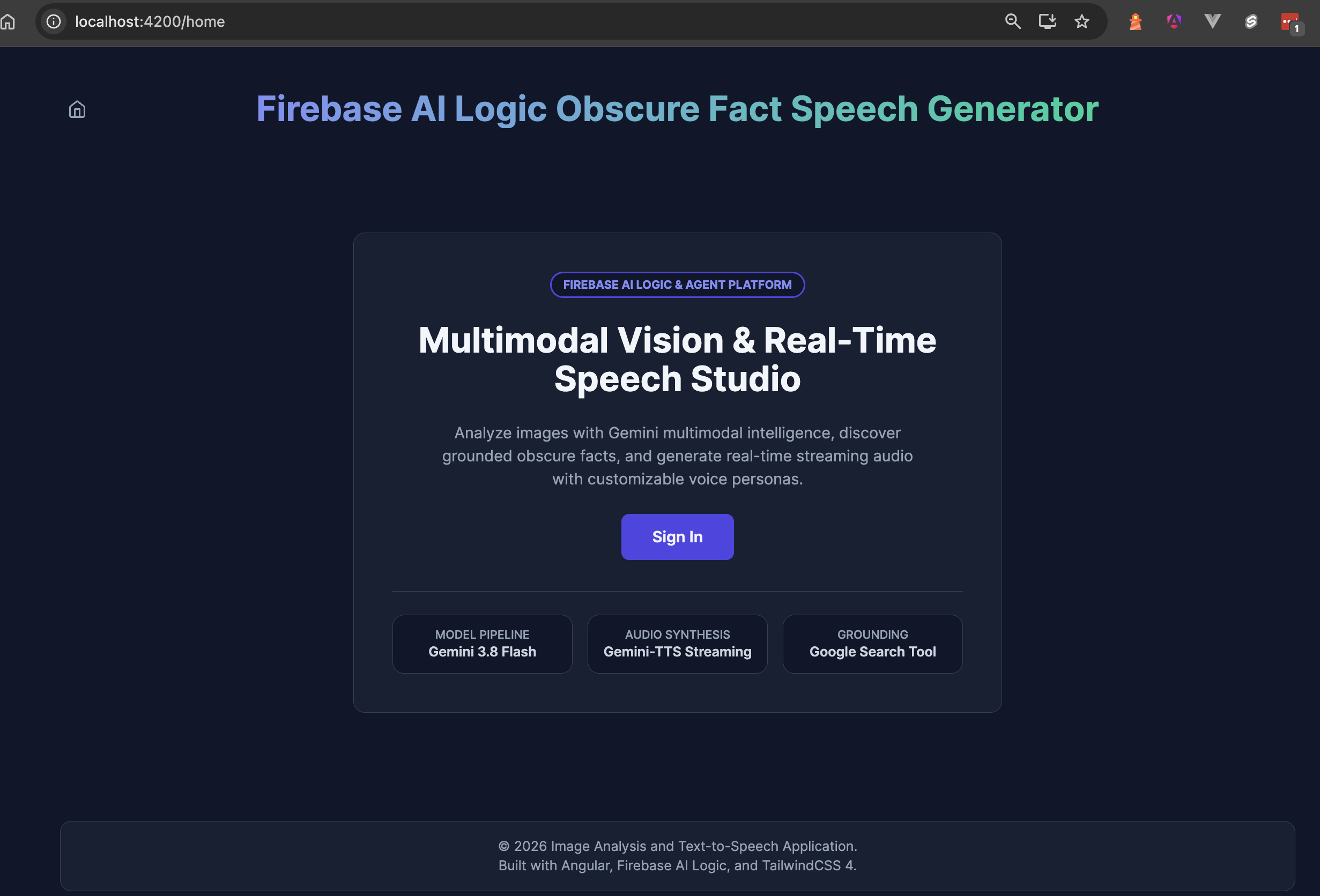 Caption: The unauthenticated Home screen displaying the left-aligned Home icon in the header, the "Sign In" button in the hero card, and the feature metadata cards.
Architecture & Mental Model
HomeComponent and HeaderComponent share the AuthService.isAuthenticated computed signal to coordinate the UI across three states:
- Unauthenticated
/home:HeaderComponentdisplays only the left-aligned Home icon link (/home), andHomeComponentrenders the Sign In button. - Lazy-loaded CDK Dialog (
openSignInModal()): Clicking Sign In dynamically importsSignInModalComponentandDialog(@angular/cdk/dialog) withPromise.all(), keeping the CDK dialog and Signal Forms out of the initialmain.jsbundle. - Authenticated
/dashboardand/home: Once signed in,HeaderComponentreveals the right-aligned Sign-Out button. When an authenticated user returns to/home,HomeComponentchecksisAuthenticated()and displays the Launch Studio link (/dashboard) instead of the Sign In button.
flowchart LR
    subgraph Header["HeaderComponent (app-header)"]
        HOME_ICON["HomeIconComponent ([routerLink]='/home')"]
        AUTH_HDR{"isAuthenticated()?"}
        SIGNOUT_BTN["SignOutIconComponent (onSignOut -> /home)"]
        AUTH_HDR -- "true" --> SIGNOUT_BTN
    end

    subgraph Home["HomeComponent (/home)"]
        RESTORE["constructor: ensureAuth().catch(...)"]
        AUTH_HOME{"isAuthenticated()?"}
        SIGNIN_BTN["Button: Sign In (openSignInModal)"]
        LAUNCH_LINK["Link: Launch Studio ([routerLink]='/dashboard')"]
        RESTORE --> AUTH_HOME
        AUTH_HOME -- "false" --> SIGNIN_BTN
        AUTH_HOME -- "true" --> LAUNCH_LINK
    end

    subgraph LazyModal["Deferred Modal Chunk"]
        IMPORT["Promise.all([import(SignInModalComponent), import('@angular/cdk/dialog')])"]
        INJECT["runInInjectionContext(#injector, () => inject(Dialog).open(...))"]
        IMPORT --> INJECT
    end

    SIGNIN_BTN --> IMPORT
    INJECT -- "Auth Success" --> AUTH_HOME
    INJECT -- "Auth Success" --> AUTH_HDR
1. Updating HeaderComponent with Home Navigation and Conditional Sign-Out
In HeaderComponent, we add home navigation and a conditional Sign-Out button:
- Component imports: Imports
HomeIconComponent,RouterLink, andSignOutIconComponentin theimportsarray. - Home link: Displays
<app-home-icon />inside an<a>tag with[routerLink]="homeLink"(APP_LINKS.HOME, or/home) to navigate to the home screen on click. - Sign-Out button: Shows the
<app-sign-out-icon />button only whenisAuthenticated()istrue; clicking it callsonSignOut()to sign out, updateisAuthenticated(), and return to/home.
// src/app/shared/ui/layout/header/header.component.ts
@Component({
  selector: 'app-header',
  imports: [HomeIconComponent, RouterLink, SignOutIconComponent],
})
export class HeaderComponent {
  readonly homeLink = APP_LINKS.HOME;
  readonly #authService = inject(AuthService);
  readonly #router = inject(Router);
  readonly isAuthenticated = this.#authService.isAuthenticated;

  async onSignOut(): Promise<void> {
    await this.#authService.signOut();
    await this.#router.navigate([APP_LINKS.HOME]);
  }
}
<!-- src/app/shared/ui/layout/header/header.component.html -->
<header>
  <a [routerLink]="homeLink" aria-label="Go to Home Screen">
    <app-home-icon />
  </a>
  <h1>Firebase AI Logic Obscure Fact Speech Generator</h1>
  @if (isAuthenticated()) {
    <button type="button" (click)="onSignOut()" aria-label="Sign out">
      <app-sign-out-icon />
    </button>
  }
</header>
2. Building the Lightweight HomeComponent & Lazy-Loading the CDK Dialog
2.1 Restoring Auth State in the Constructor (ensureAuth().catch(...))
We need to ensure that the Firebase Auth Emulator and Firebase Auth are properly initialized when HomeComponent is constructed. However, a constructor() cannot be async, so we must execute this.#authService.ensureAuth() with a Promise chain instead of async/await.
The .catch() block logs and silently swallows any error without rethrowing it. Because this background task does not require the user's attention, showing an error message here would only cause confusion and unwanted panic.
// src/app/features/home/home.component.ts (Part 1: Fields & Constructor)
@Component({
  selector: 'app-home',
  imports: [RouterLink, ArrowRightIconComponent],
})
export class HomeComponent {
  readonly dashboard = APP_LINKS.DASHBOARD;
  readonly #authService = inject(AuthService);
  readonly isAuthenticated = this.#authService.isAuthenticated;
  readonly #injector = inject(Injector);
  #dialogRef: DialogRef<unknown, SignInModalComponent> | null = null;
  #isOpeningModal = false;

  constructor() {
    this.#authService.ensureAuth().catch((error) => console.error('Failed to restore auth session:', error));
  }
2.2 Lazy-Loading @angular/cdk/dialog & Solving the NG0203 Injection Context Error with runInInjectionContext
When opening the Sign-In modal in openSignInModal(), we keep the initial bundle small while preserving Angular's injection context:
- Keeping
main.jslightweight: BecauseHomeComponentis eagerly loaded into themain.jsbundle, any static import increases its raw size and transfer time. - Lazy-loading
@angular/cdk/dialogand theNG0203error: We optimize the bundle by dynamically importingSignInModalComponentand@angular/cdk/dialoginopenSignInModal(). However, callinginject(Dialog)afterawait Promise.all(...)throws anNG0203error because it runs outside a valid injection context. - Restoring the injection context: We solve this by running the dialog logic inside the callback of
runInInjectionContextusingHomeComponent'sInjector(this.#injector). - Why
runInInjectionContextover a higher-order function: UsingrunInInjectionContextlets us assignthis.#dialogRef = dialogRefdirectly inside an arrow function, which is cleaner than passing.bind(this)to a higher-order function.
2.3 Preventing Duplicate Modals & Resetting this.#dialogRef on Close (dialogRef.closed.subscribe)
In openSignInModal(), we prevent duplicate Sign-In modals and clean up the dialog reference on close:
- Guarding against duplicate modals:
#isOpeningModaland#dialogRefprevent opening multiple Sign-In modals; when either is truthy, a modal is already opening or open, so the method exits early. - Lazy-loading and opening the modal: Otherwise, we dynamically import
SignInModalComponentand@angular/cdk/dialogwithPromise.all(), injectDialogto open the modal, and store its reference inthis.#dialogRef. - Resetting
#dialogRefon close: Subscribing todialogRef.closedresetsthis.#dialogReftonullwhen the modal closes, allowing the dialog to be reopened later.
// src/app/features/home/home.component.ts (Part 2: openSignInModal)
  async openSignInModal(): Promise<void> {
    if (this.#isOpeningModal || this.#dialogRef) {
      return;
    }

    this.#isOpeningModal = true;
    try {
      const [{ SignInModalComponent }, { Dialog }] = await Promise.all([
        import('@/shared/ui/sign-in-modal/sign-in-modal.component'),
        import('@angular/cdk/dialog'),
      ]);
      runInInjectionContext(this.#injector, () => {
        const dialog = inject(Dialog);
        const dialogRef = dialog.open(SignInModalComponent, {
          backdropClass: ['bg-surface-card'],
        });

        this.#dialogRef = dialogRef;
        dialogRef.closed.subscribe(() => (this.#dialogRef = null));
      });
    } finally {
      this.#isOpeningModal = false;
    }
  }
}
2.4 Conditional CTA Rendering in home.component.html
In home.component.html, the isAuthenticated() computed signal determines which button to display—including when a user navigates back to /home by typing /home in the address bar or clicking the Home icon in HeaderComponent:
- When
isAuthenticated()istrue: The Home screen renders a Launch Studio link ([routerLink]="dashboard") that routes directly to/dashboard. - When
isAuthenticated()isfalse: The Home screen renders a Sign In button ((click)="openSignInModal()") that opens the CDK Sign-In modal.
<!-- src/app/features/home/home.component.html (CTA excerpt) -->
@if (isAuthenticated()) {
  <a [routerLink]="dashboard">
    <span>Launch Studio</span>
    <app-arrow-right-icon />
  </a>
} @else {
  <button type="button" (click)="openSignInModal()">
    <span>Sign In</span>
  </button>
}
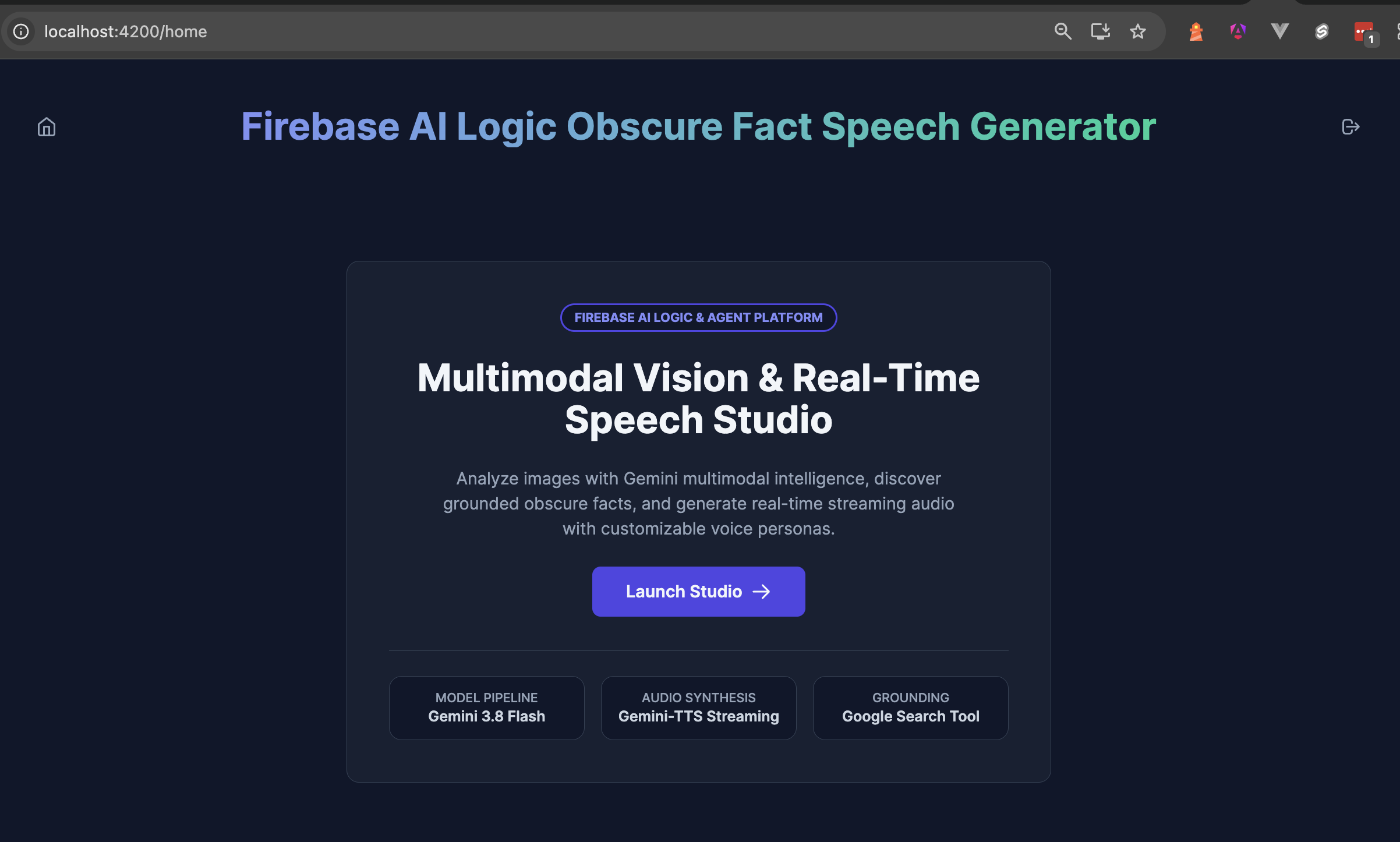 Caption: The authenticated Home screen displaying the Home icon on the left and Sign-Out icon on the right of the header, and the "Launch Studio" button in the hero card.
Takeaways
In Part 3, we completed our authentication flow by connecting HomeComponent, SignInModalComponent, and HeaderComponent:
- Conditional Actions in
HomeComponent: We built a lightweightHomeComponentthat conditionally renders the Sign In and Launch Studio buttons based on theisAuthenticated()signal. WhenisAuthenticated()isfalse, it displays the Sign In button; whentrue, it displays Launch Studio. - Lazy CDK Sign-In Modal Flow: Clicking Sign In opens the CDK
SignInModalComponentwhere users enter their email and password. When the credentials are valid, the modal navigates the user to the/dashboardroute; otherwise, it displays an authentication error message. - Resolving
NG0203withrunInInjectionContext: InjectingDialogafterawait Promise.all(...)inopenSignInModal()triggers Angular'sNG0203error because the async continuation runs outside an injection context. We resolve this by executing the dialog logic inside the callback ofrunInInjectionContextusingHomeComponent'sInjector. - Header Navigation and Sign-Out:
HeaderComponentadds home navigation and sign-out functionality. It always displays the Home icon to navigate back to the/homescreen when clicked, while the conditional Sign-Out icon allows authenticated users to sign out from Firebase Auth and reset theisAuthenticated()signal tofalse.
Resources
Comments
More Blog
View alldevchallengeAn Update on the Hacktoberfest Open-Source AI Challenge: Ghost in the Machine Winners
Hey all, we have a quick update for everyone who participated in the Hacktoberfest Open-Source AI...
J
Jem 1
devchallengeCongrats to October's MLH x DEV Writing Challenge Winner!
October's MLH x DEV Writing Challenge is a wrap! This is our way of celebrating MLH hackers who take...
J
JemcareerWant to make DEV your full-time job? We're hiring a Community Manager!
Hey friends 👋 Back in June, we posted about a Community Program Manager role. Thank you to everyone...
J
Jess Lee 1
aiContaining the Autonomous Mind: Sub-Second Zero-Trust Execution with GKE Agent Sandbox
Why standard Kubernetes pods fail when AI agents start writing code and how to build a sub-second,...
S
Saurabh MishradiscussWho is building solutions with documents?
Digital transformation, anyone?
A
Amara Graham 1
aiPrompt Pad: Show Your AI How to Respond with Few-Shot Examples
Want AI to answer in a specific way? Don't just tell it. Show it. In this episode of Prompt Pad,...
M
MLH TeamReady-made automations for this
Workflows from the Neura Market marketplace related to this Perplexity resource
- Automate Multi-Factor Authentication with Voice and Email Verificationn8n · $14.99 · Related topic
- Automate Authentication IP Monitoring and Email Alerts with SaaS Alerts and SMTP2Gon8n · $9.99 · Related topic
- Customer Authentication for Chat Support with OpenAI and Redis Session Managementn8n · $14.99 · Related topic
- Build Production-Ready User Authentication with Airtable and JWTn8n · $14.99 · Related topic