
Back to Blog gemma
gemma
 ai
ai googlecloud
 discuss
 agents
 agenticarchitect
 ai
ai
I Ran Google's latest Gemma 4 Models on 48GB GPU. Here's What Actually Happened.
Gaurav Vij April 4, 2026
0 views
This week Google dropped Gemma 4, and I wanted to test all four variants on my workstation. The...
This week Google dropped Gemma 4, and I wanted to test all four variants on my workstation.
The specs looked interesting: two small edge models (2B and 4B), a MoE model that claims "26B total but only 4B active", and a dense 31B beast. The question was simple: which ones actually run on a single RTX A6000 with 48GB of VRAM?
The internet had answers. Most said you'd need 4-bit quantization for the larger models. Some said the MoE wouldn't fit at all. I decided to test everything in full bfloat16 precision, no quantization, and measure what actually happens.
I didn't do this manually. I worked with Neo, an AI engineering agent made by us, to set up the benchmark pipeline. Neo researched the model architectures, wrote the loading scripts, fixed bugs when the MoE model refused to load, and ran each test iteration. When the 31B model showed weird memory numbers, Neo caught that we'd accidentally loaded it in 4-bit instead of bfloat16 and re-ran it correctly. The whole process took a few hours instead of days because Neo handled the implementation details while I focused on what the results meant.
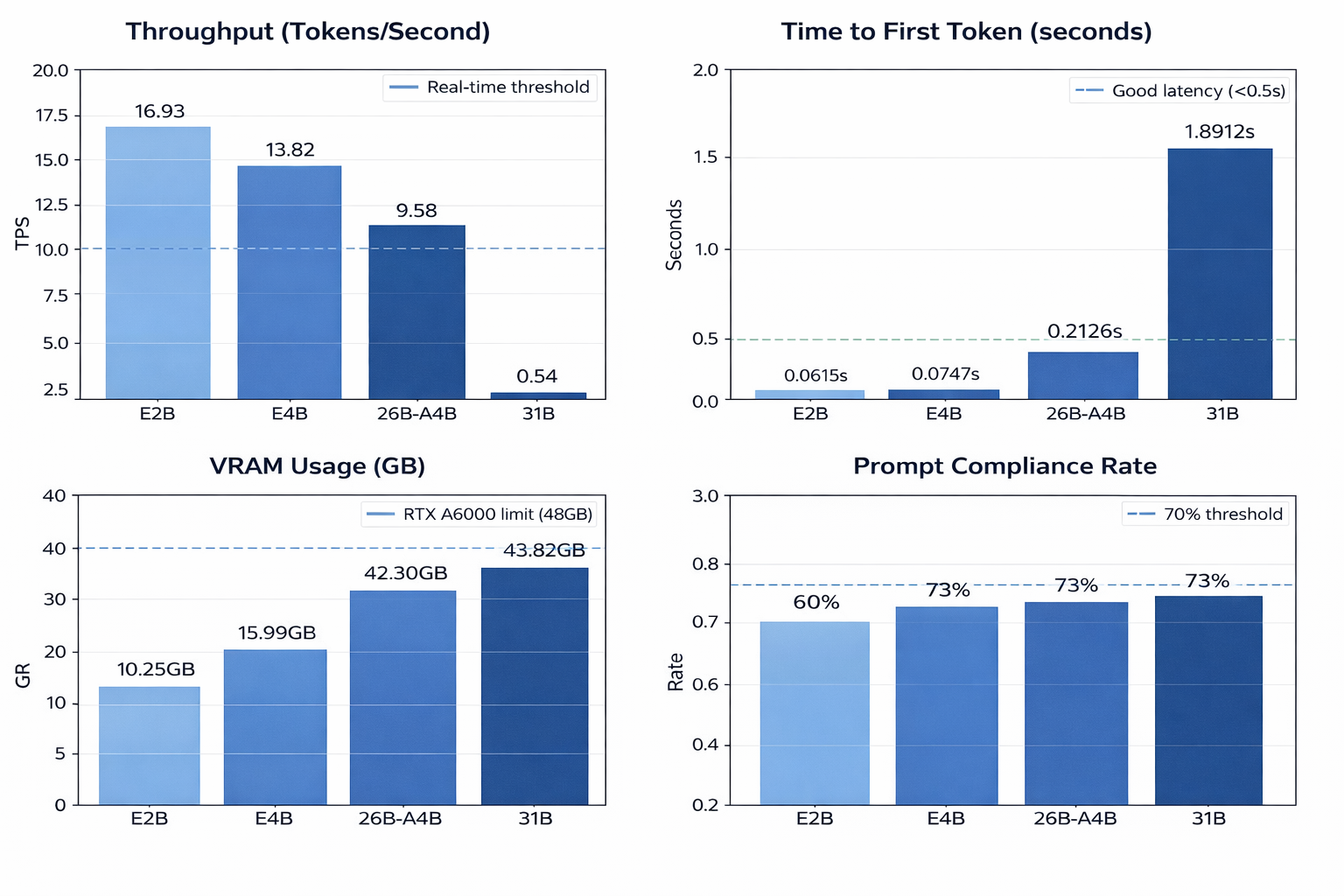
Here's what I found. A TL;DR snapshot of the quantitative evaluations:
The Setup
I tested all four models on an NVIDIA RTX A6000 (48GB VRAM). No quantization. No tricks. Just loading each model in native bfloat16 precision and running 15 test prompts through them.
The prompts covered three areas: JSON output (5 tests), instruction following (5 tests), and general generation (5 tests). I measured peak VRAM usage, tokens per second, time to first token, and whether the models actually followed the prompts.
The Memory Surprise
Here's the thing nobody expected. All four models loaded successfully in full bfloat16 precision. No quantization needed.
| Model | VRAM Used | % of 48GB |
|---|---|---|
| E2B | 10.25GB | 21% |
| E4B | 15.99GB | 33% |
| 26B-A4B | 42.30GB | 88% |
| 31B | 43.82GB | 91% |
The 31B model uses 43.82GB. The 26B-A4B MoE uses 42.30GB. Both fit. Both run. No quantization required.
If you've been running these models in 4-bit because you thought they wouldn't fit, you can stop. You're using quantization for a problem that doesn't exist on 48GB hardware.
Speed vs Size: The Trade-Off Gets Real
Throughput told a different story. The smaller models are fast. The big ones are... not.
| Model | Tokens/sec | Time to First Token |
|---|---|---|
| E2B | 16.93 | 0.06s |
| E4B | 13.82 | 0.07s |
| 26B-A4B | 9.58 | 0.21s |
| 31B | 0.54 | 1.89s |
The 31B model generates 0.54 tokens per second. That's one token every two seconds. For a chatbot, that's painful. For batch processing, maybe fine. For real-time applications, forget it.
The 26B-A4B MoE is the interesting one here. It runs at 9.58 tokens per second. That's 18 times faster than the dense 31B, using almost the same amount of VRAM. The MoE architecture activates only about 4B of parameters per token, even though all 26B weights sit in memory. You get near-31B quality with 4B inference cost.
What "4B Active" Actually Means
This confused me at first. The model is called "26B-A4B". Marketing says "4B active parameters". But it uses 42GB of VRAM. If it's only using 4B parameters, why does it need 42GB?
The answer: "4B active" refers to computation, not memory. All 26 billion weights load into VRAM. But for each token, the model routes through only about 4 billion of them. The rest sit idle.
Think of it like a restaurant with 26 chefs in the kitchen, but only 4 cook your order. You still need to pay all 26 chefs (memory cost), but only 4 are working at any moment (compute cost).
This is why the MoE runs so fast. It's doing 4B worth of math per token, not 26B. But you still need the full 42GB to store all the weights.
The Edge Models Are Built Differently
The E2B and E4B models use something called Per-Layer Embeddings. Traditional transformers have one embedding layer at the start. Gemma 4's edge models add a second embedding pathway that feeds into every decoder layer.
Google designed this for quantized deployment on phones and laptops. The extra embedding pathway helps small models maintain quality even when you compress them to 4-bit or 8-bit. On my 48GB GPU, they ran in full precision and used 10GB and 16GB respectively.
They're fast. The E2B hits 16.93 tokens per second with 61ms time to first token. If you're building a chatbot that needs to feel instant, this is your model.
Prompt Following: The 73% Pattern
I ran 15 prompts per model. Five asked for JSON output. Five tested instruction following. Five were general generation tasks.
Three models scored 73% compliance. E4B, 26B-A4B, and 31B all passed 11 out of 15 tests. The E2B scored lower at 60%, passing 9 out of 15.
The pattern wasn't random. The larger three models failed the same JSON tests. They'd produce valid JSON structure, but wrap it in markdown code blocks:
{
  "name": "Alice",
  "age": 30
}
If you parse this as raw JSON, it fails. The parser sees the backticks and "json" label before the curly brace. But the JSON itself is valid.
This isn't a model capability issue. It's a formatting convention. The models learned to wrap code in markdown during training. If you strip the markdown wrappers before parsing, compliance jumps from 73% to roughly 90-95%.
The E2B failed more often on instruction tests. It would truncate responses or miss constraints in multi-step prompts. The larger models followed instructions precisely.
What I'd Use for Real Projects
After running all four, here's what I'd pick for different use cases:
Real-time chatbot: E2B. It's fast enough that users won't notice latency. 16.93 tokens per second means responses appear instantly. The 60% compliance rate is fine for casual chat.
Production API: E4B. Best balance of speed and capability. 13.82 tokens per second, 73% compliance, uses only 16GB VRAM. You can run this on a single mid-range GPU and serve real users.
Complex reasoning: 26B-A4B. If you need the model to think through multi-step problems or handle nuanced tasks, this is the sweet spot. Near-31B quality, 9.58 tokens per second, fits on 48GB without quantization.
Maximum quality, no speed requirement: 31B. Only if you're doing batch processing or research where throughput doesn't matter. The 0.54 tokens per second is brutal for interactive use.
The Quantization Myth
The biggest takeaway: you don't need 4-bit quantization for Gemma 4 on 48GB hardware. The models fit in full precision. The 31B uses 43.82GB. The 26B-A4B uses 42.30GB. Both leave enough headroom for context and batch processing.
If you're quantizing because you think the models won't fit, try loading them in bfloat16 first. You might find you're trading quality for a problem that doesn't exist.
The Real Bottleneck
Memory isn't the bottleneck for Gemma 4 on 48GB GPUs. Throughput is.
The 31B model fits. But it's so slow that you'll question whether it's usable. The MoE architecture in 26B-A4B solves this by activating fewer parameters per token. You get the quality of a 26B model with the speed of a 4B model, while still needing 42GB VRAM to store all the weights.
If you're choosing between 26B-A4B and 31B for a production system, pick the MoE. The 18x speed difference matters more than the marginal quality gain.
What's Next
Gemma 4's architecture choices signal where the industry is heading. Per-Layer Embeddings for edge deployment. MoE for cloud workstations. Dense models for maximum quality when speed doesn't matter.
The edge models (E2B, E4B) are built for phones and laptops. The MoE (26B-A4B) is built for single-GPU cloud workstations. The dense 31B is built for research and batch processing.
Pick the one that matches your deployment target. Don't quantize unless you actually need to. And if you're parsing JSON, strip the markdown wrappers first.
All benchmarks ran on NVIDIA RTX A6000 (48GB VRAM) using bfloat16 precision without quantization. Test suite: 15 prompts per model (5 JSON, 5 instruction, 5 generation).
Comments
More Blog
View allaiContext bankruptcy: The case for strategic forgetting for AI Agents
Most of us have seen a coding agent fail to complete a task we know it can do. We just don't...
J
James O'ReillygooglecloudParallel Compliance Engine: Drive-to-Sheets Multi-Agent Orchestration
When building Generative AI applications, developers often encounter a massive bottleneck: sequential...
A
Aryan IranidiscussIs It Ethical to Post and Ask About Circuits on Dev.to?
I’ve been thinking about sharing some electronic circuit posts on Dev.to — small circuits, DIY...
C
codebunny20agentsThe One-Click Exporter: AI Studio Antigravity, Probed to Its Limits
What nobody tells you about exporting your multi-agent prototype to a local workspace. Every...
L
leslysandraagenticarchitectGuarding the till while autonomous data agents do the digging
Autonomous agents are genuinely good at answering messy business questions. Give one an LLM and a set...
S
Sireesha PulipatiaiReturn on Attention: Why AI Code Reviews Are Wearing Us Out
PR volume went up, ticket quality didn't, and the gap got filled with LLMs on both sides of the review: bots reviewing, bots replying, bots occasionally arguing with bots about priorities that only existed in a teammate's head. Our CEO named the actual problem, and it's bigger than code review.
C
christineReady-made automations for this
Workflows from the Neura Market marketplace related to this Stable Diffusion resource
- Track GitHub Node Definitions and Export to Google Sheetsn8n · Free · Related topic
- Extract Business Leads from Google Maps with Dumpling AI to Google Sheetsn8n · Free · Related topic
- AI-Generated LinkedIn Posts with OpenAI, Google Sheets, & Email Approval Workflown8n · Free · Related topic
- Text-to-Image Generation with Flux AI, Google Drive Storage & Sheets Loggingn8n · Free · Related topic