
Back to Blog rag
rag ai
ai googlecloud
 discuss
 agents
 agenticarchitect
 ai
ai
Migrating vector embeddings in production without downtime
Remigiusz Samborski April 13, 2026
0 views
In the fast-moving world of AI, models evolve rapidly. What was state-of-the-art six months ago is...
In the fast-moving world of AI, models evolve rapidly. What was state-of-the-art six months ago is now being surpassed by newer models. For a RAG system, this presents a significant challenge: vector embeddings are tied to the specific model that generated them.
If you want to upgrade your model, you can’t just start using the new one. Existing vectors in your database are incompatible with queries from the new model. A "naive" migration-shutting down the site, re-embedding everything, and restarting-means hours of potential downtime.
In this post, I'll show you how to execute a zero-downtime migration strategy using dual-column schemas and background processing.
If you haven't read the previous post, I recommend starting there to understand the basics of building a RAG pipeline with BigQuery, Cloud Run Jobs, Vertex AI, and AlloyDB for PostgreSQL.
In this post we will start off with a running system built in the previous post, and I will show you how to:
- Implement the Shadow Deployment pattern with dual-column schemas
- Execute background backfilling using Cloud Run Jobs
- Safely switch application logic without impacting search functionality
- Ensure data consistency and handle migration failures
Before we dive into the code, let's briefly discuss the concept of shadow deployment and how it supports the RAG application migration process.
Shadow deployment with dual columns
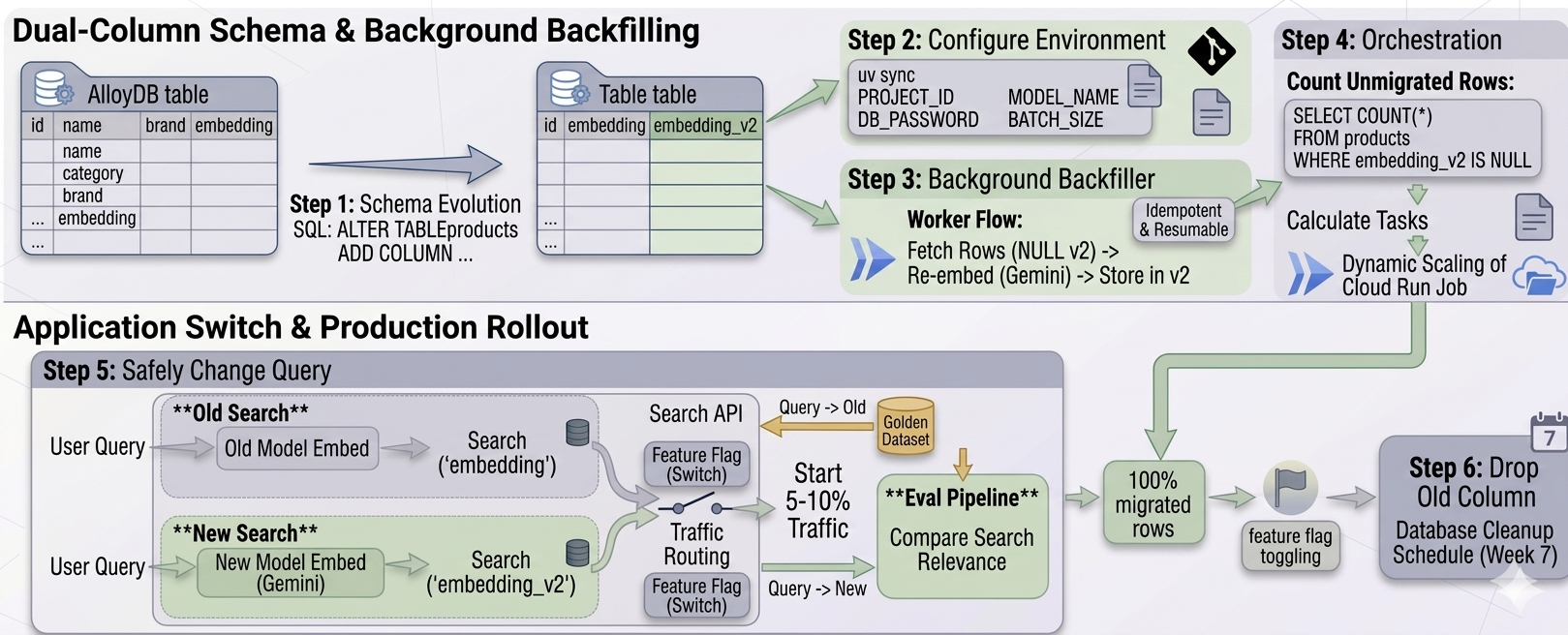
A robust way to migrate embeddings is to use a Shadow Deployment pattern. Instead of replacing the existing vectors, you store the new vectors alongside them in a separate column. The migration process boils down to following major steps:
- Add a new column: We update our AlloyDB table to include
embedding_v2. - Backfill in the background: We run a migration job to populate
embedding_v2for all existing rows. - Switch: Once every row has a new vector, we update the application code to use the new model and the new column.
This strategy ensures that your live search functionality, which still uses the original embedding column, remains fully operational during the entire migration process.
Implementation
Let's walk through the migration process step-by-step. All the code for this migration is available in the 03-migration folder of the RAG Migration Repository.
Step 1: Schema evolution
First, we prepare the database. Using a simple SQL query, we add the new vector column. Because we are targeting an existing database, we connect via the AlloyDB Auth Proxy and use psql to execute the query.
# Ensure your AlloyDB Auth proxy is running in another terminal window by running
# ./alloydb-auth-proxy projects/<PROJECT_ID>/locations/<LOCATION>/clusters/<CLUSTER>/instances/<INSTANCE> --port <PORT> --auto-iam-authn --public-ip

# Navigate to the migration directory
cd 03-migration

# Apply the schema change
psql -h 127.0.0.1 -p <PORT> -U postgres -d <DATABASE_NAME> -f 001_add_embedding_v2.sql
The content of 001_add_embedding_v2.sql is straightforward:
ALTER TABLE products ADD COLUMN IF NOT EXISTS embedding_v2 VECTOR(768);
Since AlloyDB handles schema changes gracefully, this operation is near-instantaneous and doesn’t lock the table for reads. Your live API is completely unaffected.
Note: In production you may want to run this query via your CI/CD pipeline.
Step 2: Configure the migration environment
We reuse the parallelization framework we built in the previous post, but this time we configure the environment for the new model. The project uses uv for dependency management:
# Sync local dependencies (run it in 03-migration folder)
uv sync

# Set required environment variables
export GOOGLE_CLOUD_PROJECT="YOUR_PROJECT_ID"
export DB_PASSWORD="YOUR_ALLOYDB_PASSWORD"
export GEMINI_EMBEDDING_MODEL="gemini-embedding-001"
export GEMINI_EMBEDDING_DIMENSION=768
export BATCH_SIZE=1000
Step 3: Background backfilling worker
The migration worker (03-migration/main.py) specifically targets rows where the new column is still empty. This makes the migration process idempotent and resumable - if a task fails, you can just run it again.
# snippet from 03-migration/main.py
# Fetch products where embedding_v2 is null, respecting offset
fetch_stmt = text("""
    SELECT id, name, category, brand FROM products
    WHERE embedding_v2 IS NULL
    ORDER BY id
    LIMIT :batch_size OFFSET :offset
""")
We deploy this worker as a Cloud Run Job. A convenient deploy script is provided in the repository which builds the Docker image and configures the job on GCP.
./infra/scripts/deploy_migration.sh
Step 4: Orchestrating the migration
Instead of manually calculating the number of tasks to run, we use a Python orchestrator (03-migration/orchestrator.py) to query the database, calculate the remaining work, and dynamically scale the Cloud Run Job.
The orchestrator counts the number of unmigrated rows:
# snippet from orchestrator.py logic
count_stmt = text("SELECT COUNT(*) FROM products WHERE embedding_v2 IS NULL")
unmigrated_count = session.execute(count_stmt).scalar()
total_tasks = math.ceil(unmigrated_count / batch_size)
Then, it triggers the Cloud Run Job via the Google Cloud SDK, passing the exact number of tasks required:
# Run the orchestrator to kick off the migration
uv run orchestrator.py
The job runs in the background, consuming rows and generating new embeddings without competing for critical resources with our live search API.
Step 5: Safely changing the query
Once the orchestrator reports that 100% of rows have embedding_v2 populated, we are ready for the switch. This happens entirely at the application layer (02-ui).
The search API code is updated to:
- Use the
gemini-embedding-001model to embed the user's search query. - Query the
embedding_v2column in AlloyDB instead ofembedding.
Congratulations 🎉 You have successfully migrated your entire vector database with zero downtime!
Production best practices: evals and feature flags
While a direct code swap works for a simple demonstration, in a real-world production environment, you should avoid an abrupt 100% cutover. Instead, you should leverage the fact that both vector representations exist simultaneously in your database to roll out safely:
- Evaluation pipeline: Before exposing the new model to customers, build an eval pipeline. Take a golden dataset of your most common or critical search queries and run them against both the old (
embedding) and new (embedding_v2) columns. Compare the relevance of the retrieved results to ensure the new model actually improves the search experience. - Feature flags for traffic routing: Wrap the application-layer switch in a feature flag. Start by routing a small percentage of your traffic (e.g., 5% or 10%) to the new
embedding_v2logic. Monitor your application metrics, click-through rates, and error logs.
Because the migration happened in the background, this dual-state makes it trivial to run A/B tests or instantly rollback by toggling the feature flag if the new model introduces unexpected regressions. Once you're fully ramped up to 100% and verified the new performance, the old embedding column can be safely dropped in a future database cleanup.
See it in action
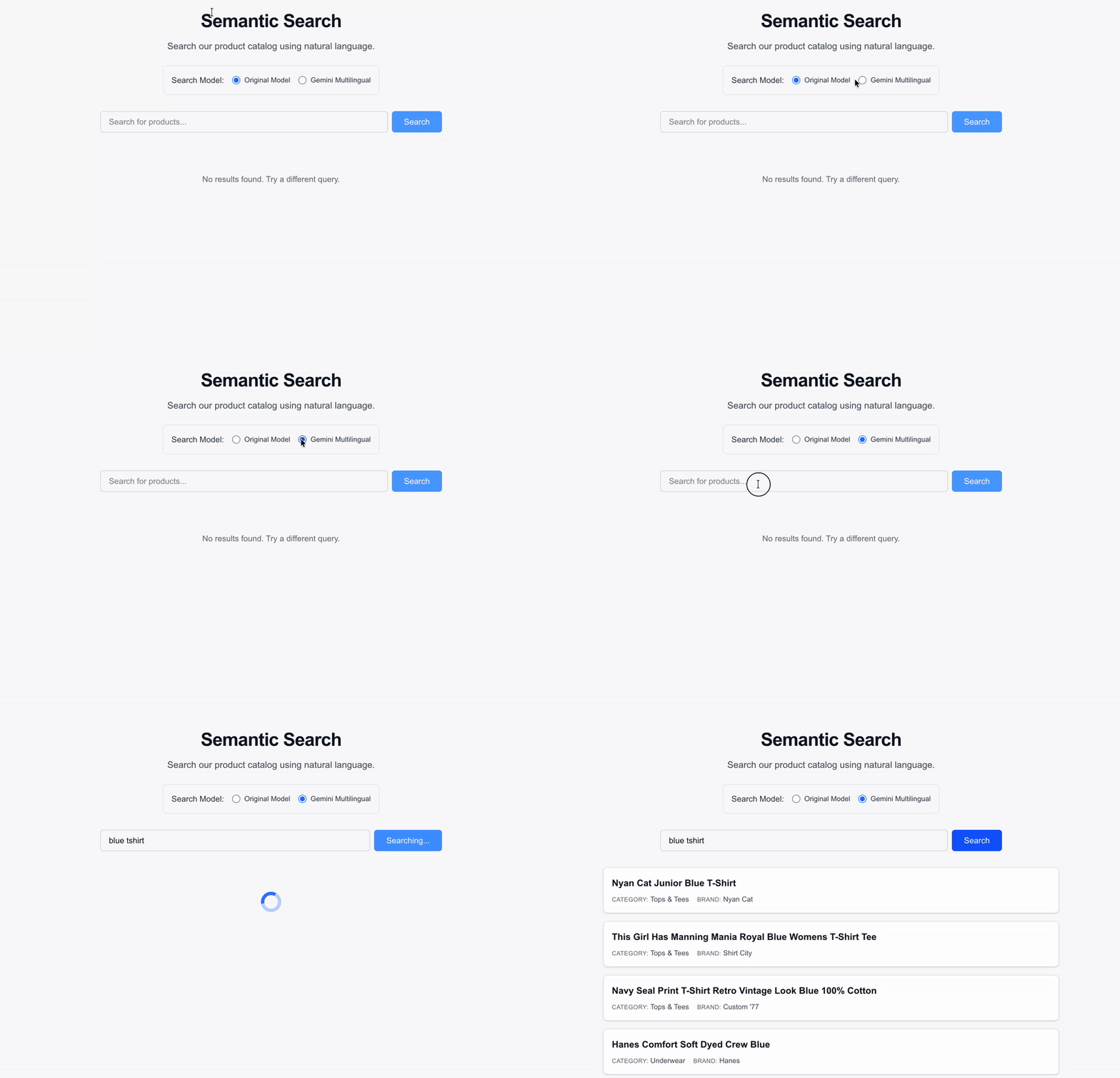
The semantic search UI seamlessly returns results using the new gemini-embedding-001 model without any disruption to the user experience.
Summary
AI infrastructure is about more than just the initial build; it’s about designing for evolution. By using shadow deployments, you ensure your RAG system can always stay at the cutting edge of model performance without sacrificing availability.
Ready to take it further?
- Check out the full source code on GitHub.
- Learn more about Cloud Run Jobs.
- Learn more about AlloyDB and pgvector.
- Learn more about Embeddings APIs on VertexAI.
In my next post, we’ll look at the Developer Experience - how I used Gemini CLI and the Conductor extension to build and manage this entire multi-phase project.
Thanks for reading
If you found this article helpful, please consider adding 50 claps to this post by pressing and holding the clap button 👏 This will help others find it. You can also share it with your friends on socials.
I'm always eager to share my learnings or chat with fellow developers and AI enthusiasts, so feel free to follow me on LinkedIn, X or Bluesky.
Comments
More Blog
View allaiContext bankruptcy: The case for strategic forgetting for AI Agents
Most of us have seen a coding agent fail to complete a task we know it can do. We just don't...
J
James O'ReillygooglecloudParallel Compliance Engine: Drive-to-Sheets Multi-Agent Orchestration
When building Generative AI applications, developers often encounter a massive bottleneck: sequential...
A
Aryan IranidiscussIs It Ethical to Post and Ask About Circuits on Dev.to?
I’ve been thinking about sharing some electronic circuit posts on Dev.to — small circuits, DIY...
C
codebunny20agentsThe One-Click Exporter: AI Studio Antigravity, Probed to Its Limits
What nobody tells you about exporting your multi-agent prototype to a local workspace. Every...
L
leslysandraagenticarchitectGuarding the till while autonomous data agents do the digging
Autonomous agents are genuinely good at answering messy business questions. Give one an LLM and a set...
S
Sireesha PulipatiaiReturn on Attention: Why AI Code Reviews Are Wearing Us Out
PR volume went up, ticket quality didn't, and the gap got filled with LLMs on both sides of the review: bots reviewing, bots replying, bots occasionally arguing with bots about priorities that only existed in a teammate's head. Our CEO named the actual problem, and it's bigger than code review.
C
christineReady-made automations for this
Workflows from the Neura Market marketplace related to this Stable Diffusion resource
- Postgres Automation for Gmail to Vector Embeddingsn8n · $9.99 · Related topic
- Production KPI Dashboard Workflow for Enhanced Manufacturing Insightsn8n · $16.91 · Related topic
- Solar Output Forecaster: Predicting Solar Energy Productionn8n · $4.61 · Related topic
- Transform Google Drive Docs to Vector Embeddingsn8n · $22.99 · Related topic