
Back to Blog gemini
 ai
ai googlecloud
 discuss
 agents
 agenticarchitect
 ai
ai
How I used Gemini CLI to orchestrate a complex RAG migration
Remigiusz Samborski April 13, 2026
0 views
Building a complex, multi-phase cloud project like a RAG migration is as much about orchestration as...
Building a complex, multi-phase cloud project like a RAG migration is as much about orchestration as it is about code. You have to manage infrastructure (Terraform), backend services (Python), frontend UI (Next.js), data pipelines (BigQuery/AlloyDB), and documentation - all while maintaining a consistent technical strategy.
Standard IDE completions are great for snippets, but they lack the system-level context needed for this kind of engineering. To build this reference architecture, I didn't just use an AI to write code. I used an AI to orchestrate the entire project.
In this final post (see previous part 1 and part 2), I'll share a behind-the-scenes look at using Gemini CLI with the Conductor extension to orchestrate this migration.
In this post, you will learn:
- How to leverage terminal-first AI assistants for system-level engineering
- How to implement spec-driven development with the Conductor extension
- How to use AI-driven Test-Driven Development (TDD) for reliable code generation
- How to collaborate with AI agents using the "Human-in-the-Loop" model
Before we dive into the workflow, let's briefly discuss why orchestration is the next logical step for AI-assisted development.
The Developer Experience
Let's walk through my development process step-by-step. The entire specification, plan, and implementation logic is available in the conductor directory of the rag-migration repository.
Spec-driven development with Conductor
Central to my workflow, is the Conductor extension. It's built on the principle of spec-driven development. Instead of jumping straight into code, we define the "source of truth" in Markdown files.
- Product Definition (
product.md): What are we building? - Tech Stack (
tech-stack.md): What tools are we using? - Tracks Registry (
tracks.md): What are the major milestones? - Implementation Plans (
plan.mdfor each of the tracks): What are the step-by-step tasks? - Workflow (
workflow.md): How are we building the solution?
By having these documents in the codebase, the AI agent (Gemini CLI) always has the high-level context it needs to make smart decisions. It's also a good practice to share those with your team so everyone (including AI agents) is on the same page about the project's direction.
Conductor initialization
The first step for the project initialization is to create product definition and tech stack files. This is handled by running:
/conductor:setup
Gemini CLI will ask you a series of questions to help you define your project, including:
- What is the name of your product?
- Who are the primary users?
- What is the tech stack you are using?
- What are the major features you want to implement?
- What is the workflow you want to use?
It will then create the initial project structure in the conductor directory, including the product.md and tech-stack.md files.
The lifecycle of a track
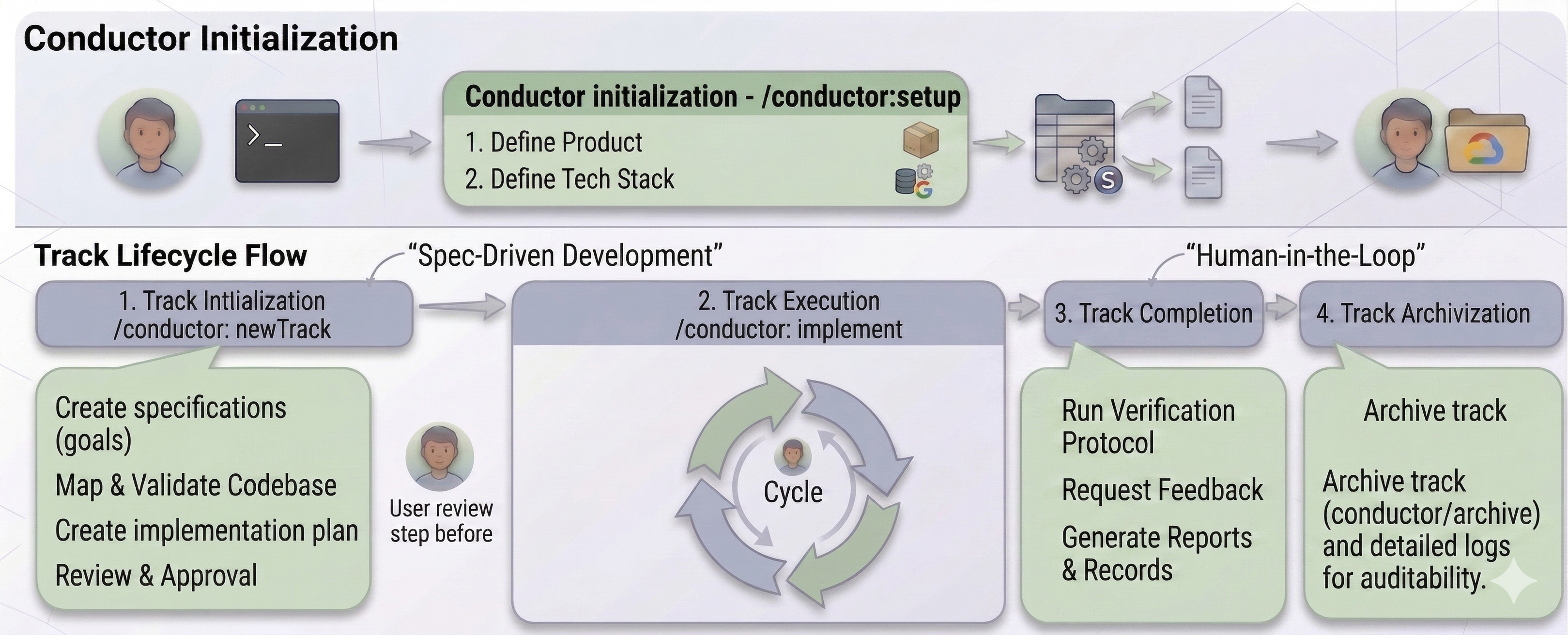
Each major feature in this project was implemented as a "Track". A typical track lifecycle consists of:
- Track Initialization (
/conductor:newTrack):- The agent creates a
spec.mdfile that describes the goals of the track - The agent maps the existing codebase and validates assumptions
- The agent creates a
plan.mdfile that describes the steps needed to achieve the goals
- The agent creates a
- Track Execution (
/conductor:implement):- The agent iterates through tasks using a Plan -> Act -> Validate cycle
- Track Completion:
- The agent verifies the changes made during the track
- The agent ask for user feedback on the implementation
- Track Archivization:
- Once a track is completed, Gemini CLI archives the track in the
conductor/archivedirectory
- Once a track is completed, Gemini CLI archives the track in the
For example, when I started the initial embeddings track, I initialized it with:
/conductor:newTrack
Gemini CLI researches the codebase, asks clarifying questions and creates a spec.md and plan.md files. Only after I review and approve them, the actual implementation starts.
Terraform for Infrastructure as Code
My product.md file instructs Gemini CLI to write Terraform code for all the resources created during the project. This works really well as all the resources are consistently managed by source code and it's easy to spin up a new environment when needed.
You can see all the Terraform files and infrastructure scripts used in the first track in the infra directory.
Moreover, in the course of the project creation I instructed Gemini CLI to always run terraform plan before terraform apply. Keeping this information in the workflow.md file ensures that such an approach is applied to all tracks.
TDD with an AI agent
One of the most powerful aspects of this workflow is AI-driven Test-Driven Development (TDD). I didn't just ask the agent to "write the code". It followed a strict protocol:
- Write Failing Tests: The agent defines the expected behavior in a new test file
- Red Phase: It runs the tests and confirms they fail
- Green Phase: It writes the minimum code needed to pass the tests
- Refactor: It refactors the implementation code and the test code to improve clarity, remove duplication, and enhance performance without changing the external behavior.
- Verify Coverage: It verifies that the test coverage meets the project requirements (target: >80% coverage for new code).
- Commit Code Changes: The agent commits code changes related to the task.
This ensures that the AI-generated code isn't just "syntactically correct" but functionally verified against my requirements. This workflow is described in the workflow.md file.
Checkpoints and quality gates
At the end of every phase, Gemini CLI runs a "Checkpoint" protocol. This includes:
- Automated Verification: Running the full test suite.
- Manual Verification: Providing the user with step-by-step instructions to verify the changes.
- Auditable Records: Attaching a verification report to the git commit using
git notesand updateplan.mdwith the new commit hash.
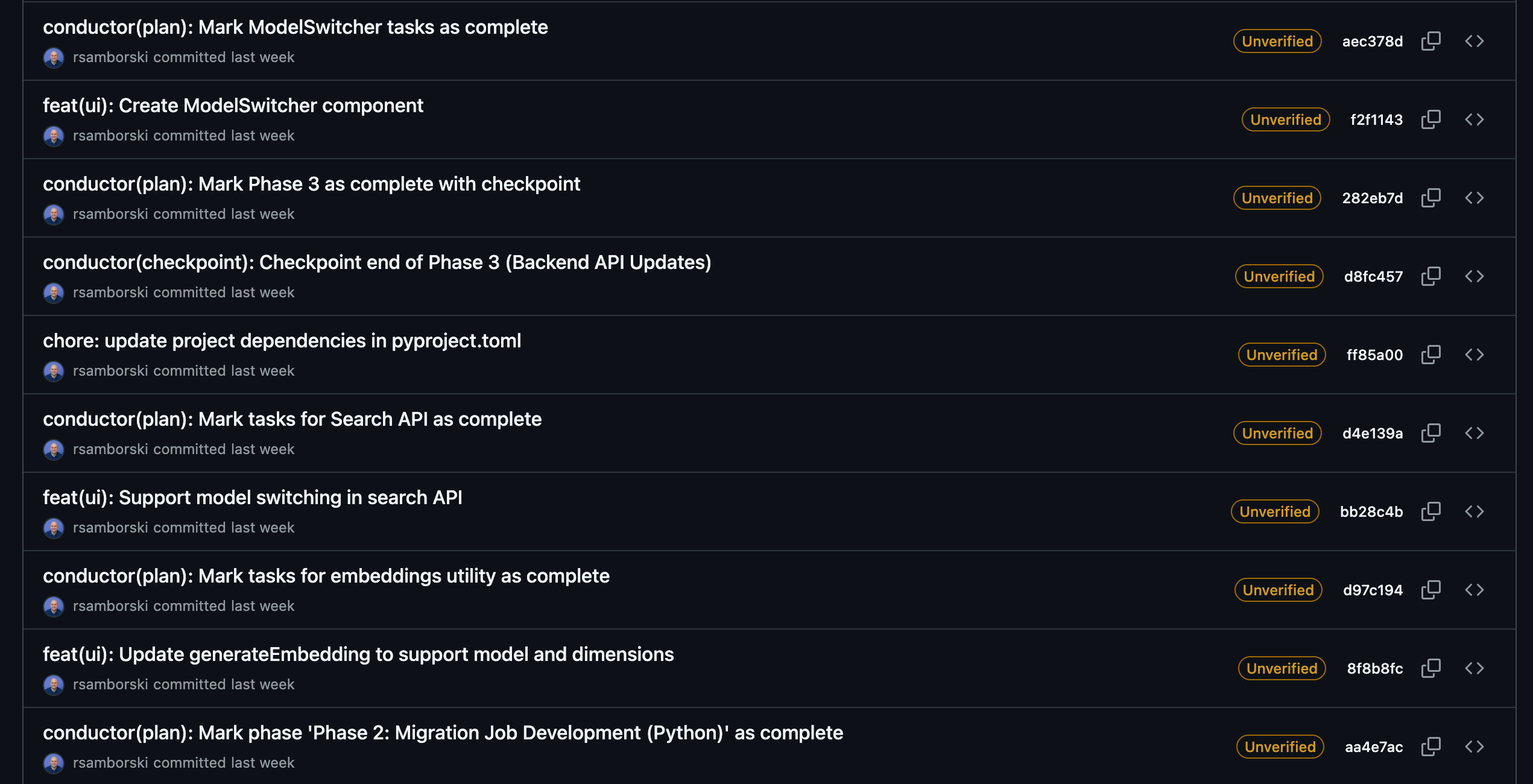
Conductor commits demonstrating the checkpoint protocol.
Effective Human-in-the-Loop
To achieve an effective AI agent-human development synergy I heavily depended on following solutions:
- Gemini CLI in a sandbox with Yolo mode enabled - see my past article for more about it.
- Custom sandbox notifier script that runs in another terminal.
This approach provided safe guardrails and allowed me to jump into work on other projects while the AI was working on this one. I was always able to jump back quickly thanks to timely notifications. Moreover the checkpointing mechanism of Conductor allowed me to always have a possibility to revert unnecessary changes or to restart from a known working state.
I also used Antigravity to polish the generated code and the documentation. It was particularly helpful for minor tweaks or refactoring of the code that was generated by Gemini CLI.
Token usage
Throughout the project I used several models (Gemini 3 Pro, Gemini 3 Flash and Gemini 2.5 Flash Lite). The total token consumption was:
- Input tokens: ~19M
- Cached input tokens: ~66M
- Output tokens: ~400k
Notice the high number of cached input tokens, which significantly impacts the spend. The total Vertex AI token cost was around $30. Not bad for several days of AI assisted work.
See the pricing page for more details and please mind that your mileage may vary.
Summary
Software engineering is evolving from writing code to orchestrating agentic workflows. By using tools like Gemini CLI and frameworks like Conductor, you can scale your impact as an architect while ensuring consistent, high-quality implementation.
Ready to build your own AI-assisted development projects?
- Check out Gemini CLI
- Explore the Conductor extension
- Try Antigravity
- Check out the full RAG Migration repository
Thanks for reading
If you found this article helpful, please consider adding 50 claps to this post by pressing and holding the clap button 👏 This will help others find it. You can also share it with your friends on socials.
I'm always eager to share my learnings or chat with fellow developers and AI enthusiasts, so feel free to follow me on LinkedIn, X or Bluesky.
Comments
More Blog
View allaiContext bankruptcy: The case for strategic forgetting for AI Agents
Most of us have seen a coding agent fail to complete a task we know it can do. We just don't...
J
James O'ReillygooglecloudParallel Compliance Engine: Drive-to-Sheets Multi-Agent Orchestration
When building Generative AI applications, developers often encounter a massive bottleneck: sequential...
A
Aryan IranidiscussIs It Ethical to Post and Ask About Circuits on Dev.to?
I’ve been thinking about sharing some electronic circuit posts on Dev.to — small circuits, DIY...
C
codebunny20agentsThe One-Click Exporter: AI Studio Antigravity, Probed to Its Limits
What nobody tells you about exporting your multi-agent prototype to a local workspace. Every...
L
leslysandraagenticarchitectGuarding the till while autonomous data agents do the digging
Autonomous agents are genuinely good at answering messy business questions. Give one an LLM and a set...
S
Sireesha PulipatiaiReturn on Attention: Why AI Code Reviews Are Wearing Us Out
PR volume went up, ticket quality didn't, and the gap got filled with LLMs on both sides of the review: bots reviewing, bots replying, bots occasionally arguing with bots about priorities that only existed in a teammate's head. Our CEO named the actual problem, and it's bigger than code review.
C
christineReady-made automations for this
Workflows from the Neura Market marketplace related to this Stable Diffusion resource
- AI-Driven Handbook Generator with Multi-Agent Orchestrationn8n · $24.99 · Related topic
- Generate Collaborative Handbooks with GPT-4o: Multi-Agent Orchestration and Human Reviewn8n · $18.54 · Related topic
- Pyragogy AI-Driven Handbook Generator with Multi-Agent Orchestrationn8n · $27.99 · Related topic
- AI Sales Department: CSO-Orchestrated Multi-Agent Teamn8n · $29.99 · Related topic