
Back to Blog googlecloudrun
 ai
ai googlecloud
 discuss
 agents
 agenticarchitect
 ai
ai
Multi-Agent A2A with the Agent Development Kit(ADK), Cloud Run, Agent Skills, and Gemini CLI
xbill April 13, 2026
0 views
Leveraging the Google Agent Development Kit (ADK) and the underlying Gemini LLM to build Multi-Agent...
title: Multi-Agent A2A with the Agent Development Kit(ADK), Cloud Run, Agent Skills, and Gemini CLI published: true series: ADK date: 2026-04-12 15:03:26 UTC tags: googlecloudrun,googleadk,a2aprotocol,geminicli canonical_url: https://medium.com/google-cloud/multi-agent-a2a-with-the-agent-development-kit-adk-cloud-run-and-gemini-cli-52f8be838ad6
Leveraging the Google Agent Development Kit (ADK) and the underlying Gemini LLM to build Multi-Agent Applications with A2A protocol support using the Python programming language.
Aren’t There a Billion Python Agent Demos?
Yes there are.
Python has traditionally been the main coding language for ML and AI tools. The goal of this article is to provide a multi-agent test bed for building, debugging, and deploying multi-agent applications.
What you talkin ‘bout Willis?
So what is different about this lab compared to all the others out there?
This is one of the first deep dives into a Multi-Agent application leveraging the advanced tooling of Gemini CLI. The starting point for the demo was an existing Codelab- which was updated and re-engineered with Gemini CLI.
The original Codelab- is here:
Building a Multi-Agent System | Google Codelabs
What Is Python?
Python is an interpreted language that allows for rapid development and testing and has deep libraries for working with ML and AI:
Python Version Management
One of the downsides of the wide deployment of Python has been managing the language versions across platforms and maintaining a supported version.
The pyenv tool enables deploying consistent versions of Python:
GitHub - pyenv/pyenv: Simple Python version management
As of writing — the mainstream python version is 3.13. To validate your current Python:
python --version
Python 3.13.13
Google Cloud Run
Google Cloud Run is a fully managed, server less compute platform that enables you to run containerized applications and services without managing infrastructure. It automatically scales up or down — even to zero — based on traffic, allowing you to pay only for resources used, billed by the 100-millisecond.
More info is available here:
Gemini CLI
If not pre-installed you can download the Gemini CLI to interact with the source files and provide real-time assistance:
npm install -g @google/gemini-cli
Testing the Gemini CLI Environment
Once you have all the tools and the correct Node.js version in place- you can test the startup of Gemini CLI. You will need to authenticate with a Key or your Google Account:
▝▜▄ Gemini CLI v0.33.1
    ▝▜▄
   ▗▟▀ Logged in with Google /auth
  ▝▀ Gemini Code Assist Standard /upgrade no sandbox (see /docs) /model Auto (Gemini 3) | 239.8 MB
Node Version Management
Gemini CLI needs a consistent, up to date version of Node. The nvm command can be used to get a standard Node environment:
Agent Development Kit
The Google Agent Development Kit (ADK) is an open-source, Python-based framework designed to streamline the creation, deployment, and orchestration of sophisticated, multi-agent AI systems. It treats agent development like software engineering, offering modularity, state management, and built-in tools (like Google Search) to build autonomous agents.
The ADK can be installed from here:
Agent Skills
Gemini CLI can be customized to work with ADK agents. Both an Agent Development MCP server, and specific Agent skills are available.
More details are here:
To get the Agent Skills in Gemini CLI:
> /skills list
Available Agent Skills:

  - adk-cheatsheet
      MUST READ before writing or modifying ADK agent code. ADK API quick reference for Python — agent types, tool definitions, orchestration
      patterns, callbacks, and state management. Includes an index of all ADK documentation pages. Do NOT use for creating new projects (use
      adk-scaffold).
  - adk-deploy-guide
      MUST READ before deploying any ADK agent. ADK deployment guide — Agent Engine, Cloud Run, GKE, CI/CD pipelines, secrets, observability, and
      production workflows. Use when deploying agents to Google Cloud or troubleshooting deployments. Do NOT use for API code patterns (use
      adk-cheatsheet), evaluation (use adk-eval-guide), or project scaffolding (use adk-scaffold).
  - adk-dev-guide
      ALWAYS ACTIVE — read at the start of any ADK agent development session. ADK development lifecycle and mandatory coding guidelines —
      spec-driven workflow, code preservation rules, model selection, and troubleshooting.
  - adk-eval-guide
      MUST READ before running any ADK evaluation. ADK evaluation methodology — eval metrics, evalset schema, LLM-as-judge, tool trajectory
      scoring, and common failure causes. Use when evaluating agent quality, running adk eval, or debugging eval results. Do NOT use for API code
      patterns (use adk-cheatsheet), deployment (use adk-deploy-guide), or project scaffolding (use adk-scaffold).
  - adk-observability-guide
      MUST READ before setting up observability for ADK agents or when analyzing production traffic, debugging agent behavior, or improving agent
      performance. ADK observability guide — Cloud Trace, prompt-response logging, BigQuery Agent Analytics, third-party integrations, and
      troubleshooting. Use when configuring monitoring, tracing, or logging for agents, or when understanding how a deployed agent handles real
      traffic.
  - adk-scaffold
      MUST READ before creating or enhancing any ADK agent project. Use when the user wants to build a new agent (e.g. "build me a search agent")
      or enhance an existing project (e.g. "add CI/CD to my project", "add RAG").
and the ADK documentation:
 > /mcp list
Configured MCP servers:

🟢 adk-docs-mcp (from adk-docs-ext) - Ready (2 tools)
  Tools:
  - mcp_adk-docs-mcp_fetch_docs
  - mcp_adk-docs-mcp_list_doc_sources
Where do I start?
The strategy for starting multi agent development is a incremental step by step approach.
First, the basic development environment is setup with the required system variables, and a working Gemini CLI configuration.
Then, ADK Multi-Agent is built, debugged, and tested locally. Finally— the entire solution is deployed to Google Cloud Run.
Setup the Basic Environment
At this point you should have a working Python environment and a working Gemini CLI installation. All of the relevant code examples and documentation is available in GitHub.
The next step is to clone the GitHub repository to your local environment:
cd ~
git clone https://github.com/xbill9/multi-agent
Then run init2.sh from the cloned directory.
The script will attempt to determine your shell environment and set the correct variables:
source init2.sh
If your session times out or you need to re-authenticate- you can run the set_env.sh script to reset your environment variables:
source set_env.sh
Variables like PROJECT_ID need to be setup for use in the various build scripts- so the set_env script can be used to reset the environment if you time-out.
Finally install the packages and dependencies:
make install

╭───────────────────────────────────────────────────────────────────────────────────────────────────────────────────────────────────────────────╮
│ ✓ Shell make install [current working directory /home/xbill/multi-agent] (Running make install again after installing shared-utils in edita… │
│ │
│ ... first 101 lines hidden (Ctrl+O to show) ... │
│ Installing frontend dependencies... │
│ cd app/frontend && npm install │
│ │
│ up to date, audited 16 packages in 502ms │
│ │
│ 5 packages are looking for funding │
│ run `npm fund` for details │
│ │
│ found 0 vulnerabilities │
│ Output too long and was saved to: │
│ /home/xbill/.gemini/tmp/multi-agent/tool-outputs/session-7ec4dae7-3acf-49f5-b396-306929c22231/run_shell_command_1775912739511_0.txt │
╰───────────────────────────────────────────────────────────────────────────────────────────────────────────────────────────────────────────────╯
Verify The ADK Installation
To verify the setup, run the ADK CLI locally with the researcher agent:
xbill@penguin:~/multi-agent/agents$ adk run researcher
/home/xbill/.pyenv/versions/3.13.13/lib/python3.13/site-packages/google/adk/features/_feature_decorator.py:72: UserWarning: [EXPERIMENTAL] feature FeatureName.PLUGGABLE_AUTH is enabled.
  check_feature_enabled()
Log setup complete: /tmp/agents_log/agent.20260410_174725.log
To access latest log: tail -F /tmp/agents_log/agent.latest.log
{"asctime": "2026-04-10 17:47:25,496", "name": "root", "levelname": "INFO", "message": "Logging initialized for researcher", "filename": "logging_config.py", "lineno": 54, "service": "researcher", "log_level": "INFO"}
{"asctime": "2026-04-10 17:47:25,496", "name": "researcher.agent", "levelname": "INFO", "message": "Initialized researcher agent with model: gemini-2.5-flash", "filename": "agent.py", "lineno": 85}
{"asctime": "2026-04-10 17:47:25,497", "name": "google_adk.google.adk.cli.utils.envs", "levelname": "INFO", "message": "Loaded .env file for researcher at /home/xbill/multi-agent/agents/researcher/.env", "filename": "envs.py", "lineno": 83}
{"asctime": "2026-04-10 17:47:25,497", "name": "google_adk.google.adk.cli.utils.local_storage", "levelname": "INFO", "message": "Using per-agent session storage rooted at /home/xbill/multi-agent/agents", "filename": "local_storage.py", "lineno": 84}
{"asctime": "2026-04-10 17:47:25,497", "name": "google_adk.google.adk.cli.utils.local_storage", "levelname": "INFO", "message": "Using file artifact service at /home/xbill/multi-agent/agents/researcher/.adk/artifacts", "filename": "local_storage.py", "lineno": 110}
{"asctime": "2026-04-10 17:47:25,498", "name": "google_adk.google.adk.cli.utils.service_factory", "levelname": "INFO", "message": "Using in-memory memory service", "filename": "service_factory.py", "lineno": 266}
{"asctime": "2026-04-10 17:47:25,501", "name": "google_adk.google.adk.cli.utils.local_storage", "levelname": "INFO", "message": "Creating local session service at /home/xbill/multi-agent/agents/researcher/.adk/session.db", "filename": "local_storage.py", "lineno": 60}
Running agent researcher, type exit to exit.
[user]:
Test The ADK Web Interface
This tests the ADK agent interactions with a browser:
xbill@penguin:~/multi-agent/agents$ adk web --host 0.0.0.0
/home/xbill/.pyenv/versions/3.13.13/lib/python3.13/site-packages/google/adk/features/_feature_decorator.py:72: UserWarning: [EXPERIMENTAL] feature FeatureName.PLUGGABLE_AUTH is enabled.
  check_feature_enabled()
2026-04-10 17:49:11,850 - INFO - service_factory.py:266 - Using in-memory memory service
2026-04-10 17:49:11,850 - INFO - local_storage.py:84 - Using per-agent session storage rooted at /home/xbill/multi-agent/agents
2026-04-10 17:49:11,850 - INFO - local_storage.py:110 - Using file artifact service at /home/xbill/multi-agent/agents/.adk/artifacts
/home/xbill/.pyenv/versions/3.13.13/lib/python3.13/site-packages/google/adk/cli/fast_api.py:198: UserWarning: [EXPERIMENTAL] InMemoryCredentialService: This feature is experimental and may change or be removed in future versions without notice. It may introduce breaking changes at any time.
  credential_service = InMemoryCredentialService()
/home/xbill/.pyenv/versions/3.13.13/lib/python3.13/site-packages/google/adk/auth/credential_service/in_memory_credential_service.py:33: UserWarning: [EXPERIMENTAL] BaseCredentialService: This feature is experimental and may change or be removed in future versions without notice. It may introduce breaking changes at any time.
  super(). __init__ ()
INFO: Started server process [16063]
INFO: Waiting for application startup.

+-----------------------------------------------------------------------------+
| ADK Web Server started |
| |
| For local testing, access at http://0.0.0.0:8000. |
+-----------------------------------------------------------------------------+
Then use the web interface — either on the local interface 127.0.0.1 or the catch-all web interface 0.0.0.0 -depending on your environment:
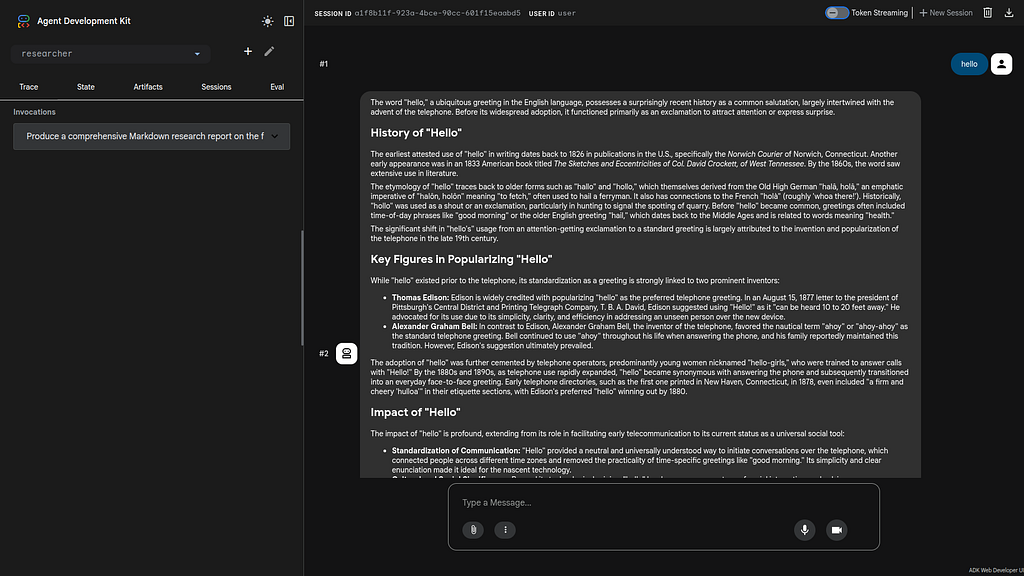
Special note for Google Cloud Shell Deployments- add a CORS allow_origins configuration exemption to allow the ADK agent to run:
adk web --host 0.0.0.0 --allow_origins 'regex:.*'
Multi Agent Design
The multi-agent deployment consists of 5 agents:
- Researcher
- Judge
- Orchestrator
- Content Builder
- Course Builder
Researcher Agent
The researcher Agent used the Google search tool to collect information on the requested topic.
Tools were added to a local Makefile for deployment management:
xbill@penguin:~/multi-agent/agents/researcher$ make status
--- Local Status (Port 8001) ---
Agent is NOT RUNNING locally
--- Cloud Run Status (researcher) ---
Service is DEPLOYED at https://researcher-fgasxpwzoq-uc.a.run.app

xbill@penguin:~/multi-agent/agents/researcher$ make start
Starting agent on port 8001...
Agent started with PID 8938. Logging to agent.log

xbill@penguin:~/multi-agent/agents/researcher$ make status
--- Local Status (Port 8001) ---
Agent is RUNNING on port 8001
--- Cloud Run Status (researcher) ---
Service is DEPLOYED at https://researcher-fgasxpwzoq-uc.a.run.app
The agent was linted and tested:
 > make lint
✦ I have already run make lint and verified that all checks passed.

   1 ruff check .
   2 All checks passed!
 > make test
✦ I will now run the test command using the Makefile in the researcher agent directory to ensure all tests pass after my recent changes.

╭────────────────────────────────────────────────────────────────────────────────────────────────────────────────────────────────────────────╮
│ ✓ Shell make test [in /home/xbill/multi-agent/agents/researcher] (Run the tests for the researcher agent.) │
│ │
│ ... first 2 lines hidden (Ctrl+O to show) ... │
│ platform linux -- Python 3.13.10, pytest-9.0.2, pluggy-1.6.0 │
│ rootdir: /home/xbill/multi-agent │
│ configfile: pyproject.toml │
│ plugins: anyio-4.11.0, asyncio-1.3.0 │
│ asyncio: mode=Mode.STRICT, debug=False, asyncio_default_fixture_loop_scope=function, asyncio_default_test_loop_scope=function │
│ collected 2 items │
│ │
│ tests/test_agent.py .. [100%] │
│ │
│ =========================================================== 2 passed in 1.49s ============================================================ │
╰────────────────────────────────────────────────────────────────────────────────────────────────────────────────────────────────────────────╯
✦ The tests for the researcher agent passed successfully.

   1 pytest
   2 ...
   3 tests/test_agent.py .. [100%]
   4 ===================== 2 passed in 1.49s ======================
Gemini CLI was used to code review :
✦ The researcher agent is now a robust, well-documented ADK microservice. It follows the Research -> Judge -> Content Builder architectural
  pattern and is optimized for the Agent-to-Agent (A2A) protocol.

  1. Architecture & Design
   * Microservice Pattern: The agent is designed as a standalone FastAPI service via shared.adk_app, making it easy to deploy to Cloud Run or GKE.
   * A2A Compatibility: By exporting root_agent in agent.py and __init__.py, it integrates seamlessly with the Orchestrator's RemoteA2aAgent.
   * Model Optimization: Correctly defaults to gemini-2.5-flash, the recommended model for reasoning and tool-calling in the multi-agent system.

  2. Core Logic (agent.py)
   * Standardized Tools: Uses the google_search tool with the recommended import path (from google.adk.tools import google_search).
   * Instruction Engineering: The instructions are structured with Markdown headers and explicit guidelines for Comprehensiveness, Citations, and
     Iterative Search, which directly supports the feedback loop with the Judge agent.
   * Environment Encapsulation: Critical ADK environment variables (like ADK_SUPPRESS_EXPERIMENTAL_FEATURE_WARNINGS) are set within the module,
     ensuring consistent behavior across different deployment environments.

  3. Dependencies & Build (pyproject.toml)
   * Hatchling Build: Correctly configured with packages = ["."] to include the root modules in the distribution.
   * Dependency Management: Lists all necessary ADK and observability packages (opentelemetry, google-cloud-logging), ensuring it's
     production-ready.

  4. Testing & Validation (tests/test_agent.py)
   * Initialization Tests: Verifies that the agent name, instructions, and tools are correctly configured.
   * Guideline Validation: A dedicated test ensures that critical requirements like "citations" and "markdown" are present in the agent's system
     instructions.

  5. Deployment (Dockerfile & Makefile)
   * Docker Optimization: Uses a multi-stage approach (implicitly by copying shared/ then agents/researcher/) to ensure local dependencies are
     correctly resolved during the build.
   * Developer Experience: The Makefile provides a standard interface for install, run, lint, and test, facilitating a smooth development
     lifecycle.

  Final Verdict: Ready for Integration
  The agent is idiomatically correct, follows Google ADK best practices, and is well-equipped to handle its role in the course creation pipeline.
  No further changes are required.
Judge Agent
The Judge Agent reviews the output from the Researcher Agent. First — the agent was linted:
 > make lint
✦ I will check the Makefile to see the linting configuration before running the command.

╭────────────────────────────────────────────────────────────────────────────────────────────────────────────────────────────────────────────╮
│ ✓ ReadFile Makefile │
│ │
╰────────────────────────────────────────────────────────────────────────────────────────────────────────────────────────────────────────────╯
✦ I will run make lint to check for any linting errors in the Judge Agent.

╭────────────────────────────────────────────────────────────────────────────────────────────────────────────────────────────────────────────╮
│ ✓ Shell make lint [in /home/xbill/multi-agent/agents/judge] (Running the lint target from the Makefile in the judge agent directory.) │
│ │
│ ruff check . │
│ All checks passed! │
╰────────────────────────────────────────────────────────────────────────────────────────────────────────────────────────────────────────────╯
✦ All checks passed! No linting errors were found in the Judge Agent.
 > make test
✦ I will run make test to execute the unit tests for the Judge Agent and verify its functionality.

╭────────────────────────────────────────────────────────────────────────────────────────────────────────────────────────────────────────────╮
│ ✓ Shell make test [in /home/xbill/multi-agent/agents/judge] (Running the test target from the Makefile in the judge agent directory.) │
│ │
│ ... first 2 lines hidden (Ctrl+O to show) ... │
│ platform linux -- Python 3.13.10, pytest-9.0.2, pluggy-1.6.0 │
│ rootdir: /home/xbill/multi-agent │
│ configfile: pyproject.toml │
│ plugins: anyio-4.11.0, asyncio-1.3.0 │
│ asyncio: mode=Mode.STRICT, debug=False, asyncio_default_fixture_loop_scope=function, asyncio_default_test_loop_scope=function │
│ collected 1 item │
│ │
│ tests/test_agent.py . [100%] │
│ │
│ =========================================================== 1 passed in 2.37s ============================================================ │
╰────────────────────────────────────────────────────────────────────────────────────────────────────────────────────────────────────────────╯
✦ All tests passed! The Judge Agent's functionality has been verified.
Tools were added to a local Makefile for deployment management:
 > make status
✦ I'll check the local and remote status of the judge agent.

╭────────────────────────────────────────────────────────────────────────────────────────────────────────────────────────────────────────────╮
│ ✓ Shell make status [in /home/xbill/multi-agent/agents/judge/] │
│ │
│ --- Local Status (Port 8002) --- │
│ Agent is NOT RUNNING locally │
│ --- Cloud Run Status (judge) --- │
│ Service is DEPLOYED at https://judge-fgasxpwzoq-uc.a.run.app │
╰────────────────────────────────────────────────────────────────────────────────────────────────────────────────────────────────────────────╯

✦ The judge agent is not running locally, but it is deployed to Cloud Run at https://judge-fgasxpwzoq-uc.a.run.app. Should I start it locally
  using make start for testing or verification?
 > make start
✦ I'll start the judge agent locally on port 8002.

╭────────────────────────────────────────────────────────────────────────────────────────────────────────────────────────────────────────────╮
│ ✓ Shell make start [in /home/xbill/multi-agent/agents/judge/] │
│ │
│ Starting agent on port 8002... │
│ Agent started with PID 9537. Logging to agent.log │
╰────────────────────────────────────────────────────────────────────────────────────────────────────────────────────────────────────────────╯

✦ The judge agent has been started locally on port 8002, with its activity being logged to agent.log. I'll now verify its status using make
  status.

╭────────────────────────────────────────────────────────────────────────────────────────────────────────────────────────────────────────────╮
│ ✓ Shell make status [in /home/xbill/multi-agent/agents/judge/] │
│ │
│ --- Local Status (Port 8002) --- │
│ Agent is RUNNING on port 8002 │
│ --- Cloud Run Status (judge) --- │
│ Service is DEPLOYED at https://judge-fgasxpwzoq-uc.a.run.app │
╰────────────────────────────────────────────────────────────────────────────────────────────────────────────────────────────────────────────╯

✦ The judge agent is running locally on port 8002 and is also deployed to Cloud Run. I'll now perform a local test using make test-local.

╭────────────────────────────────────────────────────────────────────────────────────────────────────────────────────────────────────────────╮
│ ✓ Shell make test-local [in /home/xbill/multi-agent/agents/judge/] │
│ │
│ ... first 86 lines hidden (Ctrl+O to show) ... │
│ "requestedToolConfirmations": {} │
│ } │
│ }, │
│ "status": { │
│ "state": "completed", │
│ "timestamp": "2026-04-10T21:22:05.103831+00:00" │
│ } │
│ } │
│ } │
╰────────────────────────────────────────────────────────────────────────────────────────────────────────────────────────────────────────────╯

✦ The judge agent is functioning correctly, returning a structured 'fail' response as expected when no findings are provided. I'll now examine
  agent.log for any insights.

╭────────────────────────────────────────────────────────────────────────────────────────────────────────────────────────────────────────────╮
│ ✓ Shell cat agent.log [in /home/xbill/multi-agent/agents/judge/] │
│ │
│ ... first 28 lines hidden (Ctrl+O to show) ... │
│ {"asctime": "2026-04-10 17:22:03,447", "name": "a2a.server.tasks.task_manager", "levelname": "INFO", "message": "Task not found or task_id │
│ not set. Creating new task for event (task_id: efb0b5e0-12dc-4d2f-8f97-a279591fe0f8, context_id: 1bc3ec52-2c37-40f0-a923-9b9b0af21a2e).", │
│ "filename": "task_manager.py", "lineno": 179} │
│ {"asctime": "2026-04-10 17:22:03,531", "name": "judge.agent", "levelname": "INFO", "message": "Judge starting for session: │
│ 1bc3ec52-2c37-40f0-a923-9b9b0af21a2e", "filename": "agent.py", "lineno": 32} │
│ {"asctime": "2026-04-10 17:22:03,531", "name": "judge.agent", "levelname": "ERROR", "message": "[JUDGE] No substantial research findings │
│ found to evaluate!", "filename": "agent.py", "lineno": 68} │
│ {"asctime": "2026-04-10 17:22:03,535", "name": "google_genai._api_client", "levelname": "WARNING", "message": "Both GOOGLE_API_KEY and │
│ GEMINI_API_KEY are set. Using GOOGLE_API_KEY.", "filename": "_api_client.py", "lineno": 111} │
╰────────────────────────────────────────────────────────────────────────────────────────────────────────────────────────────────────────────╯

✦ The logs confirm the agent is working correctly, showing the "Judge starting," failure due to missing findings, and subsequent logging of that
  failure. I've completed the review and verified the local runtime; the agent is well-integrated and compliant with project standards. Do you
  need any specific improvements, such as the suggested recovery logic or additional tests, implemented?
Gemini CLI was used to code review :
  Code Review: Judge Agent

  The judge agent is well-implemented, following the ADK patterns and Gemini 2.5 standards. It provides a robust quality control mechanism for the
  multi-agent system.

  Strengths
   * Model Compliance: Correctly defaults to gemini-2.5-flash, adhering to the project's performance and cost-efficiency guidelines.
   * Schema Integrity: The JudgeFeedback Pydantic model is clear and matches the orchestration requirements for automated decision-making.
   * Resilient Context Handling: The log_before_judge callback proactively attempts to recover research findings from both the session state and
     message history, ensuring it can function even when context is fragmented across service calls.
   * Developer Experience: The inclusion of a comprehensive Makefile, standard ruff linting, and clear README.md makes the agent easy to maintain
     and deploy.
Orchestrator Agent
The Orchestrator Agent runs the Researcher / Judge loop.
First it was linted:
✦ I will execute make lint to run the linter on the orchestrator agent code.

╭────────────────────────────────────────────────────────────────────────────────────────────────────────────────────────────────────────────╮
│ ✓ Shell make lint [in /home/xbill/multi-agent/agents/orchestrator] (Run linting (ruff check) for the orchestrator agent.) │
│ │
│ ruff check . │
│ All checks passed! │
╰────────────────────────────────────────────────────────────────────────────────────────────────────────────────────────────────────────────╯

✦ The linting process for the orchestrator agent completed successfully with no issues found.

✦ I will execute make test to run the pytest suite for the orchestrator agent, as the GOOGLE_API_KEY is already set in the environment.

╭────────────────────────────────────────────────────────────────────────────────────────────────────────────────────────────────────────────╮
│ ✓ Shell make test [in /home/xbill/multi-agent/agents/orchestrator] (Run tests for the orchestrator agent.) │
│ │
│ ... first 21 lines hidden (Ctrl+O to show) ... │
│ /home/xbill/multi-agent/agents/orchestrator/agent.py:283: UserWarning: [EXPERIMENTAL] RemoteA2aAgent: ADK Implementation for A2A support │
│ (A2aAgentExecutor, RemoteA2aAgent and corresponding supporting components etc.) is in experimental mode and is subject to breaking │
│ changes. A2A protocol and SDK are themselves not experimental. Once it's stable enough the experimental mode will be removed. Your │
│ feedback is welcome. │
│ judge = RemoteA2aAgent( │
│ │
│ agent.py:294 │
│ /home/xbill/multi-agent/agents/orchestrator/agent.py:294: UserWarning: [EXPERIMENTAL] RemoteA2aAgent: ADK Implementation for A2A support │
│ (A2aAgentExecutor, RemoteA2aAgent and corresponding supporting components etc.) is in experimental mode and is subject to breaking │
╰────────────────────────────────────────────────────────────────────────────────────────────────────────────────────────────────────────────╯

✦ The tests for the orchestrator agent passed successfully (5 passed, 4 experimental warnings).
Tools were added for deployment management:
 > make status
✦ I will execute make status to check the current status of the orchestrator agent, both locally and on Cloud Run.

╭────────────────────────────────────────────────────────────────────────────────────────────────────────────────────────────────────────────╮
│ ✓ Shell make status [in /home/xbill/multi-agent/agents/orchestrator] (Check local and remote status of the orchestrator agent.) │
│ │
│ --- Local Status (Port 8080) --- │
│ Agent is NOT RUNNING locally │
│ --- Cloud Run Status (orchestrator) --- │
│ Service is DEPLOYED at https://orchestrator-fgasxpwzoq-uc.a.run.app │
╰────────────────────────────────────────────────────────────────────────────────────────────────────────────────────────────────────────────╯

✦ The orchestrator agent is not running locally, but it is currently deployed to Cloud Run.
 > make start
✦ I will start the orchestrator agent in the background by executing make start.

╭────────────────────────────────────────────────────────────────────────────────────────────────────────────────────────────────────────────╮
│ ✓ Shell make start [in /home/xbill/multi-agent/agents/orchestrator] (Start the orchestrator agent in the background.) │
│ │
│ Starting agent on port 8080... │
│ Agent started with PID 10812. Logging to agent.log │
╰────────────────────────────────────────────────────────────────────────────────────────────────────────────────────────────────────────────╯

✦ I will verify the status of the orchestrator agent by executing make status.

╭────────────────────────────────────────────────────────────────────────────────────────────────────────────────────────────────────────────╮
│ ✓ Shell make status [in /home/xbill/multi-agent/agents/orchestrator] (Verify if the orchestrator agent is running locally.) │
│ │
│ --- Local Status (Port 8080) --- │
│ Agent is RUNNING on port 8080 │
│ --- Cloud Run Status (orchestrator) --- │
│ Service is DEPLOYED at https://orchestrator-fgasxpwzoq-uc.a.run.app │
╰────────────────────────────────────────────────────────────────────────────────────────────────────────────────────────────────────────────╯

✦ The orchestrator agent is now running locally on port 8080.
Code review:
 > code review the agent
✦ I will read the agent.py file to review the orchestrator agent's implementation.

╭────────────────────────────────────────────────────────────────────────────────────────────────────────────────────────────────────────────╮
│ ✓ ReadFile agent.py │
│ │
╰────────────────────────────────────────────────────────────────────────────────────────────────────────────────────────────────────────────╯

✦ Code Review: agents/orchestrator/agent.py

  The orchestrator agent is the central hub of the system, responsible for coordinating the multi-agent workflow (Research -> Judge -> Content
  Build). Here's a technical review of its implementation:

  1. Architecture & Design
   * Sequential Pipeline: Uses SequentialAgent (course_creation_pipeline) to define a clear, linear progression of tasks.
   * Research Loop: Employs a LoopAgent with max_iterations=2 for the Research-Judge cycle. This is a robust way to ensure quality without risking
     infinite loops.
   * Modular Components: Custom logic is neatly encapsulated in specialized classes (TopicCapturer, StateCapturer, EscalationChecker,
     ProgressAgent, ResearchGuard), which inherit from BaseAgent.

  2. Key Components & Logic
   * TopicCapturer:
       * Good: Cleanly extracts the topic from user input while filtering out metadata.
       * Improvement: Uses a regex to strip frontend-specific prefixes, making it resilient to UI variations.
   * StateCapturer:
       * Critical Role: This is the most complex custom component. It scans the session history backwards to extract content from specific authors
         and persists it to the session state.
       * Robustness: Handles JSON parsing and can optionally prefix content with the topic.
       * Optimization: The backward scan with author filtering is efficient for capturing the "latest" results in a multi-turn conversation.
   * EscalationChecker & ResearchGuard:
       * Flow Control: These agents act as the "brains" of the orchestration, deciding when to break the loop or stop the pipeline based on
         judge_feedback.
       * Error Handling: ResearchGuard provides a graceful failure message if the research doesn't pass after the maximum allowed iterations.
   * ProgressAgent:
       * User Experience: Emits progress events that the frontend (SSE) can use to provide real-time updates to the user.

  3. Remote Agent Integration (A2A)
   * Authentication: Uses create_authenticated_client, which is essential for secure service-to-service communication in Cloud Run/Google Cloud.
   * Agent Cards: Leverages the A2A protocol by fetching agent-card.json for discovery.
   * Configuration: Environment variables (RESEARCHER_AGENT_CARD_URL, etc.) allow for easy switching between local development and production
     URLs.

  4. Technical Observations & Potential Enhancements
   * JSON Robustness: EscalationChecker has extensive fallback logic for parsing JSON status from the judge, including regex for malformed JSON
     strings. This is a proactive defensive programming practice.
   * State Management: The use of ctx.session.state for cross-agent data sharing is idiomatic for ADK orchestration.
   * Logging: Consistent use of logger.info and logger.error throughout components makes debugging much easier.

  Summary
  The implementation is highly professional, following ADK best practices for multi-agent orchestration. It balances complex state management with
  clear flow control and provides built-in hooks for real-time UI feedback. The code is modular, well-documented through class docstrings, and
  includes strong defensive logic for handling unpredictable LLM outputs (like malformed JSON).

  Verdict: Excellent, production-ready orchestration logic.
Content Builder Agent
The content builder formats the output from the Researcher/Judge loop and structures the findings.
Lint/Test:
xbill@penguin:~/multi-agent/agents/content_builder$ make lint
ruff check .
All checks passed!
xbill@penguin:~/multi-agent/agents/content_builder$ make test
python3 -m pytest -W "ignore:[EXPERIMENTAL] feature FeatureName.PLUGGABLE_AUTH is enabled:UserWarning"
============================================================== test session starts ===============================================================
platform linux -- Python 3.13.13, pytest-9.0.2, pluggy-1.6.0
rootdir: /home/xbill/multi-agent
configfile: pyproject.toml
plugins: anyio-4.11.0, asyncio-1.3.0
asyncio: mode=Mode.AUTO, debug=False, asyncio_default_fixture_loop_scope=function, asyncio_default_test_loop_scope=function
collected 2 items

tests/test_agent.py .. [100%]

=============================================================== 2 passed in 2.21s ================================================================
xbill@penguin:~/multi-agent/agents/content_builder$
Status:
xbill@penguin:~/multi-agent/agents/content_builder$ make status
--- Local Status (Port 8003) ---
Agent is RUNNING on port 8003
--- Cloud Run Status (content-builder) ---
Service is DEPLOYED at https://content-builder-fgasxpwzoq-uc.a.run.app
xbill@penguin:~/multi-agent/agents/content_builder$ make stop
Stopping agent on port 8003...
Agent stopped.
xbill@penguin:~/multi-agent/agents/content_builder$ make status
--- Local Status (Port 8003) ---
Agent is NOT RUNNING locally
--- Cloud Run Status (content-builder) ---
Service is DEPLOYED at https://content-builder-fgasxpwzoq-uc.a.run.app
xbill@penguin:~/multi-agent/agents/content_builder$ make start
Starting agent on port 8003...
Agent started with PID 25887. Logging to agent.log
xbill@penguin:~/multi-agent/agents/content_builder$ make status
--- Local Status (Port 8003) ---
Agent is RUNNING on port 8003
--- Cloud Run Status (content-builder) ---
Service is DEPLOYED at https://content-builder-fgasxpwzoq-uc.a.run.app
xbill@penguin:~/multi-agent/agents/content_builder$
Code Review:
✦ I have completed the code review of the content_builder agent. Below are my findings and recommendations.

  Positive Points
   * Model Selection: Correctly defaults to gemini-2.5-flash, aligning with project standards.
   * Infrastructure Ready: Includes a Dockerfile, Makefile, and cloudbuild.yaml, making the agent easy to deploy and test in a CI/CD pipeline.
   * A2A Integration: Properly uses the shared utilities for A2A URL rewriting and standardized logging.
   * Input Robustness: The log_before_agent callback proactively attempts to recover missing topic or research_findings from the conversation
     history if they are absent from the session state.
Course Creator
The Course Creator provides the front end user interface:
make install

cd frontend && npm install

added 15 packages, and audited 16 packages in 649ms

5 packages are looking for funding
  run `npm fund` for details

found 0 vulnerabilities
Lint and Test:
xbill@penguin:~/multi-agent/app$ make lint
ruff check .
All checks passed!
xbill@penguin:~/multi-agent/app$ make test
make -C .. test
make[1]: Entering directory '/home/xbill/multi-agent'
python -m pytest
============================================================== test session starts ===============================================================
platform linux -- Python 3.13.13, pytest-9.0.2, pluggy-1.6.0
rootdir: /home/xbill/multi-agent
configfile: pyproject.toml
plugins: anyio-4.11.0, asyncio-1.3.0
asyncio: mode=Mode.AUTO, debug=False, asyncio_default_fixture_loop_scope=function, asyncio_default_test_loop_scope=function
collected 32 items

agents/content_builder/tests/test_agent.py .. [6%]
agents/judge/tests/test_agent.py ..... [21%]
agents/orchestrator/test_orchestrator.py ..... [37%]
agents/orchestrator/test_state_capturer.py .... [50%]
agents/researcher/tests/test_agent.py .. [56%]
app/tests/test_a2a_utils.py .. [62%]
app/tests/test_api.py ... [71%]
app/tests/test_auth.py ... [81%]
app/tests/test_logging_config.py .. [87%]
app/tests/test_utils.py ... [96%]
test_tool.py . [100%]

================================================================ warnings summary ================================================================
../.pyenv/versions/3.13.13/lib/python3.13/site-packages/google/adk/features/_feature_decorator.py:72
  /home/xbill/.pyenv/versions/3.13.13/lib/python3.13/site-packages/google/adk/features/_feature_decorator.py:72: UserWarning: [EXPERIMENTAL] feature FeatureName.PLUGGABLE_AUTH is enabled.
    check_feature_enabled()

agents/orchestrator/agent.py:272
  /home/xbill/multi-agent/agents/orchestrator/agent.py:272: UserWarning: [EXPERIMENTAL] RemoteA2aAgent: ADK Implementation for A2A support (A2aAgentExecutor, RemoteA2aAgent and corresponding supporting components etc.) is in experimental mode and is subject to breaking changes. A2A protocol and SDK are themselves not experimental. Once it's stable enough the experimental mode will be removed. Your feedback is welcome.
    researcher = RemoteA2aAgent(

agents/orchestrator/agent.py:283
  /home/xbill/multi-agent/agents/orchestrator/agent.py:283: UserWarning: [EXPERIMENTAL] RemoteA2aAgent: ADK Implementation for A2A support (A2aAgentExecutor, RemoteA2aAgent and corresponding supporting components etc.) is in experimental mode and is subject to breaking changes. A2A protocol and SDK are themselves not experimental. Once it's stable enough the experimental mode will be removed. Your feedback is welcome.
    judge = RemoteA2aAgent(

agents/orchestrator/agent.py:294
  /home/xbill/multi-agent/agents/orchestrator/agent.py:294: UserWarning: [EXPERIMENTAL] RemoteA2aAgent: ADK Implementation for A2A support (A2aAgentExecutor, RemoteA2aAgent and corresponding supporting components etc.) is in experimental mode and is subject to breaking changes. A2A protocol and SDK are themselves not experimental. Once it's stable enough the experimental mode will be removed. Your feedback is welcome.
    content_builder = RemoteA2aAgent(

-- Docs: https://docs.pytest.org/en/stable/how-to/capture-warnings.html
========================================================= 32 passed, 4 warnings in 5.64s =========================================================
make[1]: Leaving directory '/home/xbill/multi-agent'
xbill@penguin:~/multi-agent/app$
The deployment is managed with the Makefile:
xbill@penguin:~/multi-agent/app$ make status
--- Local Status (Port 8080) ---
App is RUNNING on port 8080
--- Cloud Run Status (course-creator) ---
✔ Service course-creator in region us-central1

URL: https://course-creator-1056842563084.us-central1.run.app
Ingress: all
Traffic:
  100% LATEST (currently course-creator-00001-t5b)

Scaling: Auto (Min: 0, Max: 100)

Last updated on 2026-04-10T20:19:39.704879Z by [email protected]:
  Revision course-creator-00001-t5b
  Container None
    Image: gcr.io/comglitn/course-creator
    Port: 8080
    Memory: 512Mi
    CPU: 1000m
    Env vars:
      AGENT_NAME orchestrator
      AGENT_SERVER_URL https://orchestrator-fgasxpwzoq-uc.a.run.app
      GOOGLE_CLOUD_PROJECT comglitn
    Startup Probe:
      TCP every 240s
      Port: 8080
      Initial delay: 0s
      Timeout: 240s
      Failure threshold: 1
      Type: Default
  Service account: [email protected]
  Concurrency: 80
  Scaling:
    Max instances: 1
  Timeout: 300s
Code Review:
✦ This code review evaluates the AI Course Creator project, a distributed multi-agent system built using the Google Agent Development Kit (ADK).
  The architecture employs a FastAPI backend as a gateway to an ADK-based orchestrator, paired with a modern TypeScript/Vite frontend.

  Architectural Highlights
   * A2A Interoperability: The use of a2a_utils.py for dynamic Agent Card URL rewriting is excellent. It ensures the system functions correctly
     behind proxies (like Cloud Run) by automatically adjusting the agent's public-facing URL based on x-forwarded-* headers.
   * Distributed Authentication: authenticated_httpx.py provides a robust, environment-aware client. Its ability to switch between Cloud Metadata
     (for production) and gcloud CLI (for local development) ensures a seamless developer experience while maintaining production security.
   * Greedy Text Deduplication: The merge_strings function in main.py is a clever solution to the "overlapping chunk" problem common in LLM
     streaming. It uses a greedy overlap search to cleanly stitch together text from multiple agents.

  Code Quality & Best Practices
   * Streaming & SSE: The backend correctly utilizes httpx_sse for asynchronous event consumption. The transformation of ADK events into a custom
     NDJSON format for the frontend is well-implemented.
   * Testing: The project maintains high standards with unit tests covering API endpoints, string manipulation, and cleanup logic. The use of
     pytest fixtures and unittest.mock for async generators is idiomatic.
   * Observability: Integrated OpenTelemetry and Cloud Trace support in main.py provide critical production visibility.
Running/Testing/Debugging Locally
The main Makefile has been extended with extensive targets for managing the agents on the local development environment.
The key targets include:
xbill@penguin:~/multi-agent$ make help
Available commands:
  install - Install all dependencies for root, agents, and app
  start - Start all services locally (alias for start-local)
  stop - Stop all local services (alias for stop-local)
  run - Start all services locally (alias for start-local)
  local - Show local service URLs
  start-local - Start all local services in background
  stop-local - Stop all local processes
  test - Run all tests (pytest)
  test-researcher - Test the Researcher agent directly
  test-judge - Test the Judge agent directly
  test-orchestrator - Test the Orchestrator logic
  lint - Run linting checks (ruff)
  deploy - Deploy all services to Cloud Run
  destroy - Delete all Cloud Run services
  clean - Remove caches and logs
First check for local running agents:
xbill@penguin:~/multi-agent$ make status
Checking status of locally running agents and servers...
--- Network Status ---
No services listening on expected ports (8000-8004, 5173).
--- Process Status ---
No matching processes found.
Then all the agents can be started together:
xbill@penguin:~/multi-agent$ make start
Stopping any existing agent and server processes...
Starting all agents in background...
Waiting for sub-agents to start...
All agents started. Logs: researcher.log, judge.log, content_builder.log, orchestrator.log
Starting App Backend in background...
Starting Frontend dev server in background...
All services started. Logs: researcher.log, judge.log, content_builder.log, orchestrator.log, backend.log, frontend.log
Frontend: http://localhost:5173
Backend: http://localhost:8000

make status

--- Local Service URLs ---
Frontend: http://localhost:5173
Backend: http://localhost:8000 (main app)
Agents:
  Researcher: http://localhost:8001
  Judge: http://localhost:8002
  Content Builder: http://localhost:8003
  Orchestrator: http://localhost:8004
The entire project can be linted and tested as unit:
 > make lint
✦ I will run the linting checks again as requested.

╭────────────────────────────────────────────────────────────────────────────────────────────────────────────────────────────────────────────╮
│ ✓ Shell make lint [current working directory /home/xbill/multi-agent] (Run linting checks using ruff.) │
│ │
│ ruff check . │
│ All checks passed! │
╰────────────────────────────────────────────────────────────────────────────────────────────────────────────────────────────────────────────╯

✦ All linting checks passed successfully.
 > make test
✦ I will run the test suite again to ensure everything is still functioning correctly.

╭────────────────────────────────────────────────────────────────────────────────────────────────────────────────────────────────────────────╮
│ ✓ Shell make test [current working directory /home/xbill/multi-agent] (Run all tests using pytest.) │
│ │
│ ... first 31 lines hidden (Ctrl+O to show) ... │
│ /home/xbill/multi-agent/agents/orchestrator/agent.py:283: UserWarning: [EXPERIMENTAL] RemoteA2aAgent: ADK Implementation for A2A support │
│ (A2aAgentExecutor, RemoteA2aAgent and corresponding supporting components etc.) is in experimental mode and is subject to breaking │
│ changes. A2A protocol and SDK are themselves not experimental. Once it's stable enough the experimental mode will be removed. Your │
│ feedback is welcome. │
│ judge = RemoteA2aAgent( │
│ │
│ agents/orchestrator/agent.py:294 │
│ /home/xbill/multi-agent/agents/orchestrator/agent.py:294: UserWarning: [EXPERIMENTAL] RemoteA2aAgent: ADK Implementation for A2A support │
│ (A2aAgentExecutor, RemoteA2aAgent and corresponding supporting components etc.) is in experimental mode and is subject to breaking │
╰────────────────────────────────────────────────────────────────────────────────────────────────────────────────────────────────────────────╯

✦ All 32 tests passed successfully.
Then connect to the front end locally:
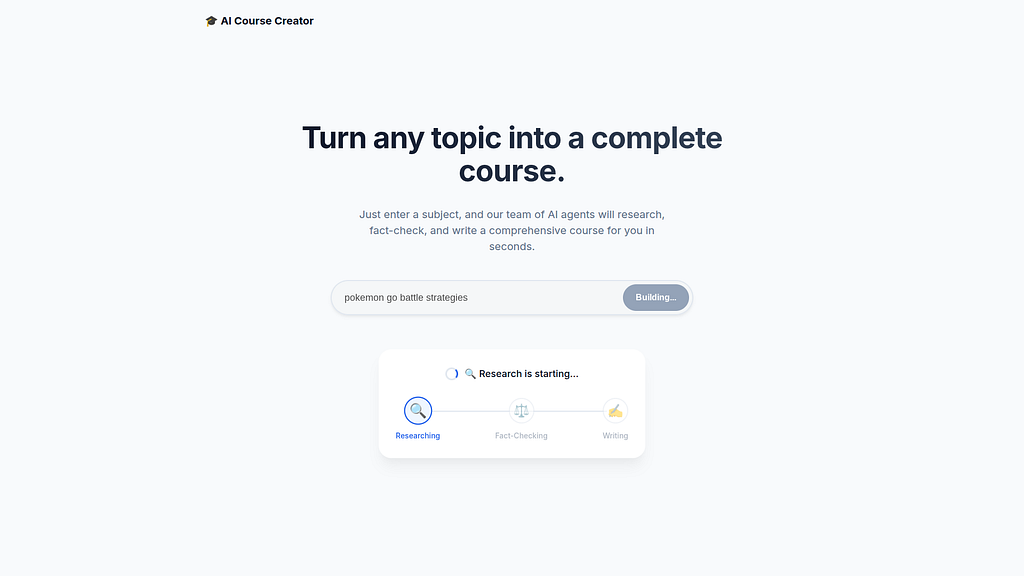
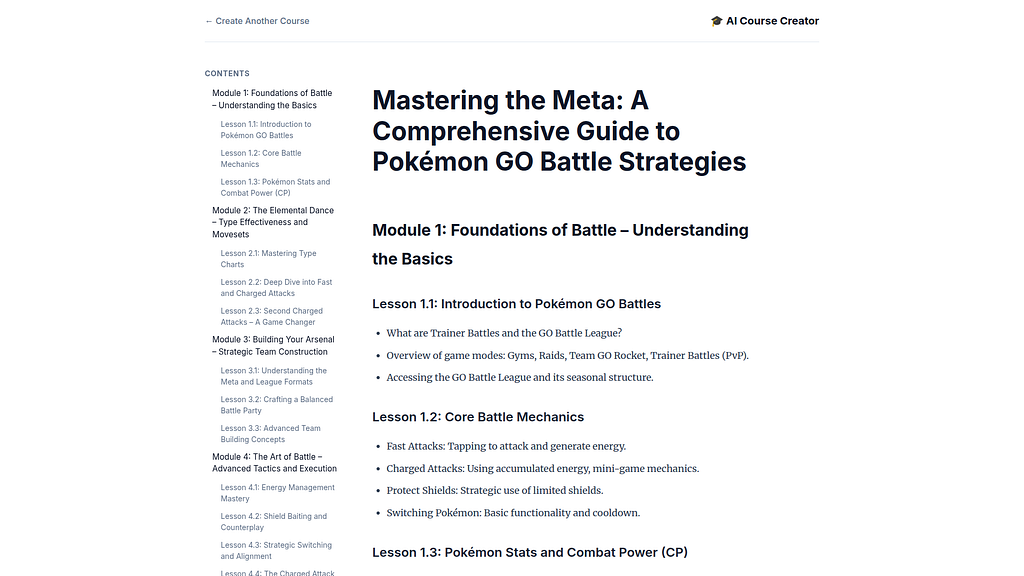
And the entire agent system will run in the local environment:
Local Logging / Debugging
Gemini CLI has full access to the local agent logs for debugging and troubleshooting:
✦ The agent logs reveal a complete execution of the course creation pipeline for the topic "pokemon go battle strategies". The system successfully
  orchestrated multiple agents through a research-judge loop, though it ultimately proceeded to content generation despite a validation failure.

  Pipeline Execution Summary

   1. Initialization: The orchestrator started the pipeline and correctly identified the topic from the user input.
   2. Research-Judge Loop (2 Iterations):
       * Iteration 1: The researcher gathered initial data, but the judge failed it, citing a need for better structure and more factual depth.
       * Iteration 2: The researcher updated the findings. The judge failed it again, this time providing very specific feedback about
         hallucinations and future-dated factual errors (e.g., a non-existent 2025 acquisition of Niantic by Scopely).
   3. Validation Failure: After 2 iterations (the maximum allowed), the ResearchGuard correctly identified that the research had not passed
      validation and logged an error: "[ResearchGuard] Research failed to pass validation. Stopping pipeline."
   4. Final Output: Contrary to the ResearchGuard log, the SequentialAgent continued to the content_builder phase. The final course content was
      generated using the flawed research findings.

  Agent Performance Breakdown

  ┌─────────────────┬───────────────┬────────────────────────────────────────────────────────────────────────────────────────────────────────┐
  │ Agent │ Result │ Status/Observation │
  ├─────────────────┼───────────────┼────────────────────────────────────────────────────────────────────────────────────────────────────────┤
  │ Orchestrator │ Inconsistent │ Successfully managed the loop but failed to stop the pipeline after ResearchGuard flagged an error. │
  │ Researcher │ Hallucinating │ Produced a significant amount of content (~15k characters) but included inaccurate future projections. │
  │ Judge │ Success │ Correctly identified critical factual errors and provided detailed, actionable feedback. │
  │ Content Builder │ Success │ Faithfully transformed the (flawed) research into a Markdown course module. │
  └─────────────────┴───────────────┴────────────────────────────────────────────────────────────────────────────────────────────────────────┘

  Potential Issue Identified
  The ResearchGuard in agents/orchestrator/agent.py yields an error message but does not technically halt the SequentialAgent. This explains why
  the "Building final course content" phase started immediately after a critical research failure.
Digging deeper- the log analysis revealed the root cause- the knowledge date cut off of the LLM models!
This was determined with deep debugging:
  The Researcher was actually performing correctly by including 2025 and early 2026 events as established history. The "hallucination" I reported
  was actually a contextual mismatch between the agents:

  Revised Summary of Agent Logs (2026 Context)

   1. Researcher Agent: Correct & Context-Aware
       * Activity: Correctly integrated "recent" 2025 history (Scopely acquisition) and the February 2026 system rebuild into the course content.
       * Result: Adhered to the simulation's timeline perfectly.

   2. Judge Agent: Out of Sync (The Real Issue)
       * Failure: The Judge agent is the one that failed. It flagged these events as "future projections" and "speculative," indicating that the
         Judge's internal clock is lagging (likely defaulting to its 2024/2025 training data) and it hasn't been properly briefed that the current
         date is April 2026.
       * Impact: It incorrectly blocked the research twice, forcing the Orchestrator to trigger its "Research failed validation" failsafe.

   3. Orchestrator Agent: Execution via Failsafe
       * Result: Because the Judge kept "failing" valid (for 2026) research, the Orchestrator reached its iteration limit and invoked the Content
         Builder using the research anyway.

   4. Content Builder Agent: Successful
       * Result: Successfully produced the course module including the 2025/2026 data.

  Conclusion: The system is functional, but the Judge Agent needs to be updated or prompted with the "Current Date: April 2026" to stop it from
  flagging real (in-simulation) history as hallucinations.
The Judge agent was adjusted — and the research was re-run:
✦ The logs indicate a successful end-to-end execution of the AI Course Creator pipeline for the topic "pokemon go battle tips". The process
  completed in approximately 50 seconds (18:40:39 to 18:41:27).

  Execution Summary
   1. Research (Researcher Agent): Gathered 14,832 characters of findings. The task was marked completed at 18:41:10.
   2. Evaluation (Judge Agent): Reviewed the findings and provided approval. The EscalationChecker in the Orchestrator confirmed the "pass" status
      at 18:41:16.
   3. Content Generation (Content Builder Agent): Transformed the validated research into the final Markdown course module, finishing at 18:41:27.
   4. Delivery (Backend & Frontend):
       * The Backend streamed the entire process via SSE (Session: fe12387a...) and completed with a final content length of 8,284 characters.
       * The Frontend (Vite) successfully served the generated course.html to the user.

  Status
   * Orchestrator: Successfully coordinated all handoffs.
   * System Health: No errors or retries were logged; all agents communicated successfully via the A2A protocol.
Deploying to Google Cloud Run
The project level Makefile has targets for managing the Agent deployment to serverless endpoints:
xbill@penguin:~/multi-agent$ make help
Available commands:
  install - Install all dependencies for root, agents, and app
  start - Start all services locally (alias for start-local)
  stop - Stop all local services (alias for stop-local)
  run - Start all services locally (alias for start-local)
  local - Show local service URLs
  start-local - Start all local services in background
  stop-local - Stop all local processes
  test - Run all tests (pytest)
  test-researcher - Test the Researcher agent directly
  test-judge - Test the Judge agent directly
  test-orchestrator - Test the Orchestrator logic
  lint - Run linting checks (ruff)
  deploy - Deploy all services to Cloud Run
  destroy - Delete all Cloud Run services
  clean - Remove caches and logs
A utility script check the deployment to Cloud Run:
make status

--- Cloud Deployment Status ---
Checking deployment status for AI Course Creator services...
   SERVICE REGION URL LAST DEPLOYED BY LAST DEPLOYED AT
✔ content-builder us-central1 https://content-builder-1056842563084.us-central1.run.app [email protected] 2026-04-10T20:18:40.053541Z
✔ course-creator us-central1 https://course-creator-1056842563084.us-central1.run.app [email protected] 2026-04-10T20:19:39.704879Z
✔ judge us-central1 https://judge-1056842563084.us-central1.run.app [email protected] 2026-04-10T20:18:40.417046Z
✔ orchestrator us-central1 https://orchestrator-1056842563084.us-central1.run.app [email protected] 2026-04-10T20:19:01.850264Z
✔ researcher us-central1 https://researcher-1056842563084.us-central1.run.app [email protected] 2026-04-10T20:18:38.584952Z 0.0s 0.0s
You can submit the build for cloud deployment:
xbill@penguin:~/multi-agent$ make deploy
Building all images using Cloud Build for project comglitn...
gcloud builds submit --project "comglitn" --config cloudbuild.yaml .
Once the containers are deployed- you can then get the endpoint:
./deploy.sh orchestrator
Using project comglitn.
Using compute region us-central1.
Deploying orchestrator...
Deploying container to Cloud Run service [orchestrator] in project [comglitn] region [us-central1]
✓ Deploying... Done.
  ✓ Creating Revision...
  ✓ Routing traffic...
  ✓ Setting IAM Policy...
Done.
Service [orchestrator] revision [orchestrator-00002-9jg] has been deployed and is serving 100 percent of traffic.
Service URL: https://orchestrator-1056842563084.us-central1.run.app
make[1]: Leaving directory '/home/xbill/multi-agent'
Deploying course-creator app...
make[1]: Entering directory '/home/xbill/multi-agent'
./deploy.sh course-creator
Using project comglitn.
Using compute region us-central1.
Deploying course-creator...
Deploying container to Cloud Run service [course-creator] in project [comglitn] region [us-central1]
✓ Deploying... Done.
  ✓ Creating Revision...
  ✓ Routing traffic...
  ✓ Setting IAM Policy...
Done.
Service [course-creator] revision [course-creator-00002-f74] has been deployed and is serving 100 percent of traffic.
Service URL: https://course-creator-1056842563084.us-central1.run.app
make[1]: Leaving directory '/home/xbill/multi-agent'

xbill@penguin:~/multi-agent$ make endpoint
Service URLs:
NAME URL
content-builder https://content-builder-fgasxpwzoq-uc.a.run.app
course-creator https://course-creator-fgasxpwzoq-uc.a.run.app
judge https://judge-fgasxpwzoq-uc.a.run.app
orchestrator https://orchestrator-fgasxpwzoq-uc.a.run.app
researcher https://researcher-fgasxpwzoq-uc.a.run.app
The service will be visible in the Cloud Run console:
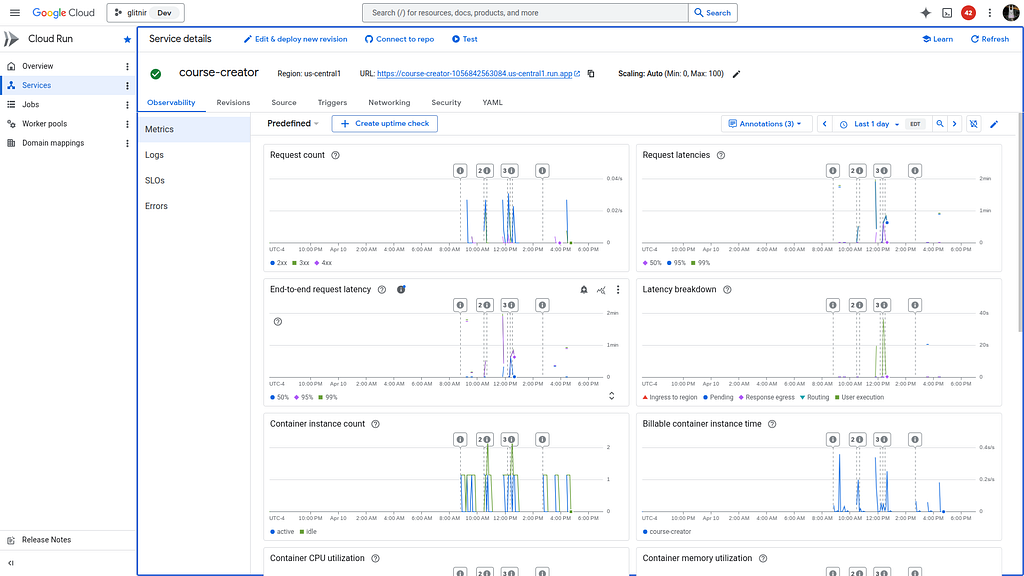
Running the Web Interface
Start a connection to the Cloud Run deployed app:
https://course-creator-fgasxpwzoq-uc.a.run.app
Then connect to the app :
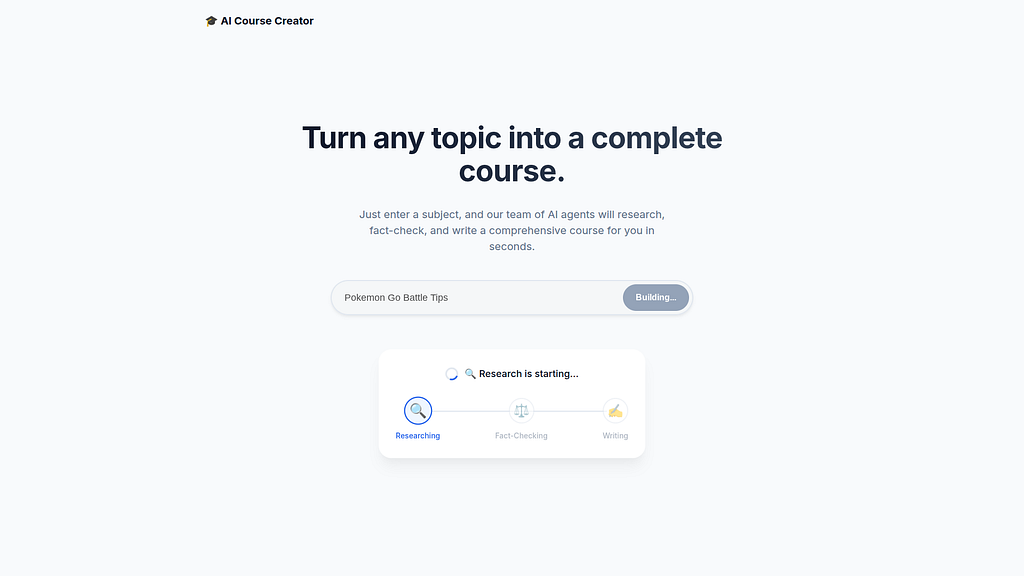
Then use online course generator:
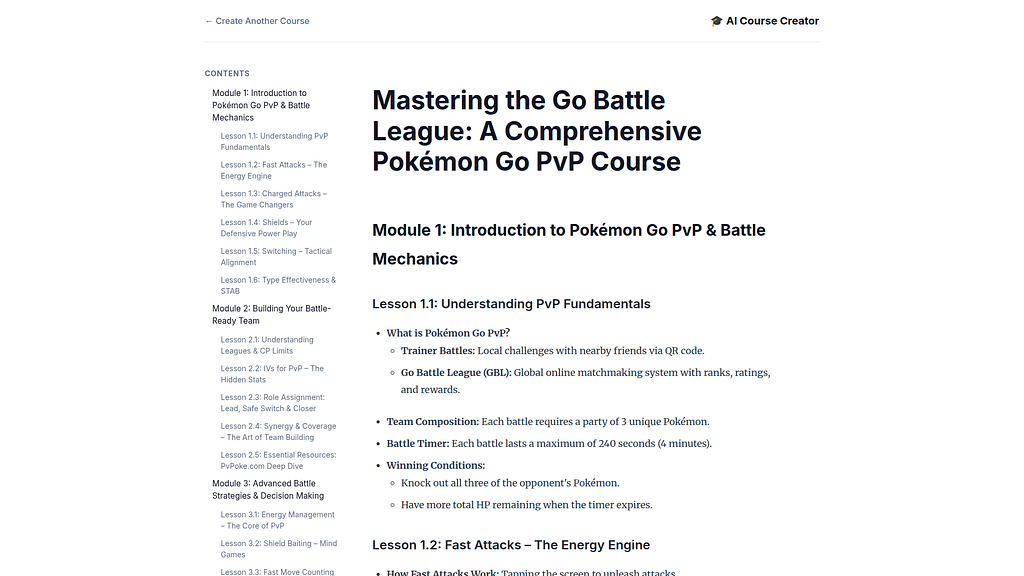
So What Really Changed in the Lab? It looks the Same to Me!
This project was a great learning experience to get first hand review of working with different LLM models and common issues with ADK and the nuances of working models backed by Google search.
The key changes include:
- Gemini Models vs Vertex AI Models
The original lab was using LLM models hosted on Vertex AI with PROJECT_ID and REGION authentication. The long term goal is to port the multi-agent application to other environments — which is simpler with an API key. When the authentication method and API is changed- the actual model support also changes — so you have to be careful that the model you want to use is available on that API.
- Cloud Shell CORS over-ride
The recent versions of the ADK are more restrictive for running from the Cloud Shell.
- Gemini CLI Development support
README.md and GEMINI.md were added to the project- as well as an Agent Skills and the ADK MCP server for working with the ADK.
- Gemini 2.5 Flash Model
Gemini 2.5 Flash was used for the speed and Quota Management. The Pro model will produce better quality research but has more quota restrictions.
- Makefiles
Extensive use of make targets- including make lint / make test / make status for managing local and remote deployments.
- Logging
Both Cloud and local logs were added for debugging agent issues.
- Callbacks for debugging in Agent code
Directly in the Agent code. This approach could also be extended.
- Model Cut-off Dates
This directly impacted how the Judge Agent reviewed recent content from the Google Search Tool in agent code vs the knowledge in the model.
Final Gemini CLI Code Review
As a final step — Gemini CLI was used for a full code review of the project:
✦ This multi-agent project is a well-engineered application of ADK 2.5 and the A2A protocol. The separation of specialized agents (Researcher,
  Judge, Content Builder) coordinated by a central Orchestrator demonstrates a mature microservice-oriented design.

  Key Strengths
   * Coordinated Orchestration: The use of SequentialAgent and LoopAgent creates a robust, iterative research-judge cycle.
   * Resilient State Flow: The strategy of passing data through event content and "recovering" it via before_agent_callback heuristics is a clever
     way to handle state across distributed, independent session stores.
   * Polished Streaming: The web app's SSE implementation, specifically the greedy overlap deduplication (merge_strings) and system message
     cleanup, ensures a high-quality user experience despite the inherent noise in multi-agent LLM streams.
   * Cloud-Native Readiness: Using Identity Tokens for authenticated service-to-service communication and middleware for dynamic A2A URL rewriting
     makes the system ready for production deployment on Cloud Run.
Summary
The Agent Development Kit (ADK) was used to build a multi-agent system with A2A support using the Gemini Flash LLM Model. This application was tested locally with Gemini CLI and then deployed to Google Cloud Run. Several key take-aways and lessons learned were summarized from debugging and testing the multi-agent system- including deep log reviews. Finally, Gemini CLI was used for a complete project code review.
Comments
More Blog
View allaiContext bankruptcy: The case for strategic forgetting for AI Agents
Most of us have seen a coding agent fail to complete a task we know it can do. We just don't...
J
James O'ReillygooglecloudParallel Compliance Engine: Drive-to-Sheets Multi-Agent Orchestration
When building Generative AI applications, developers often encounter a massive bottleneck: sequential...
A
Aryan IranidiscussIs It Ethical to Post and Ask About Circuits on Dev.to?
I’ve been thinking about sharing some electronic circuit posts on Dev.to — small circuits, DIY...
C
codebunny20agentsThe One-Click Exporter: AI Studio Antigravity, Probed to Its Limits
What nobody tells you about exporting your multi-agent prototype to a local workspace. Every...
L
leslysandraagenticarchitectGuarding the till while autonomous data agents do the digging
Autonomous agents are genuinely good at answering messy business questions. Give one an LLM and a set...
S
Sireesha PulipatiaiReturn on Attention: Why AI Code Reviews Are Wearing Us Out
PR volume went up, ticket quality didn't, and the gap got filled with LLMs on both sides of the review: bots reviewing, bots replying, bots occasionally arguing with bots about priorities that only existed in a teammate's head. Our CEO named the actual problem, and it's bigger than code review.
C
christineReady-made automations for this
Workflows from the Neura Market marketplace related to this Stable Diffusion resource
- AI Agent Blueprint for Streamlined Website Developmentn8n · $19.99 · Related topic
- Leveraging Vector Databases for Enhanced AI Agent Analysisn8n · $16.9 · Related topic
- Automate Your Website Development with AI-Powered Chat Workflown8n · $6.3 · Related topic
- Streamlined Testing Automation for Efficient Development Workflowsmake · $12.34 · Related topic