
Back to Blog agents
 ai
ai googlecloud
 discuss
 agents
 agenticarchitect
 ai
ai
Web scraping for AI agents: How to give your agents web access
Asaolu Elijah 🧙♂️ April 13, 2026
0 views
AI agents are only as useful as the information they can act on. A reasoning model with a January...
AI agents are only as useful as the information they can act on. A reasoning model with a January knowledge cutoff can't tell you today's pricing, yesterday's news, or what your competitor just changed on their homepage. Giving your agent a way to reach out and pull fresh data from the web is how you fix that.
Web scraping is how you do that. This guide walks through how it works, what breaks, and how to wire it cleanly into an AI agent workflow.
Why agents need live web access
Most LLMs are trained once and frozen. They know a lot, but that knowledge has an expiry date. This creates a fundamental problem for agents doing anything time-sensitive:
- A research agent summarizing a competitor's product page will surface stale pricing.
- A lead generation agent building contact lists from directories misses companies founded last month.
- A news monitoring agent trained on data from six months ago isn't monitoring anything.
- A price tracking agent with no live feed is just guessing.
Equipping your agent with a tool call that fetches current HTML, parses it intelligently, and returns structured data is how you solve this.
What scraping looks like in an agent loop
In practice, scraping fits into an agent's tool-use loop the same way a database query or API call does. The agent decides it needs information from a URL, calls the scraping tool, gets back structured data, and continues reasoning.
Agent needs: "What's the current price of product X?"
  → calls scrapeUrl(url, prompt)
  → gets back: { "name": "Product X", "price": 49.99, "currency": "USD" }
  → continues: "The price is $49.99, which is $5 lower than last week..."
This workflow is also represented in the diagram below:
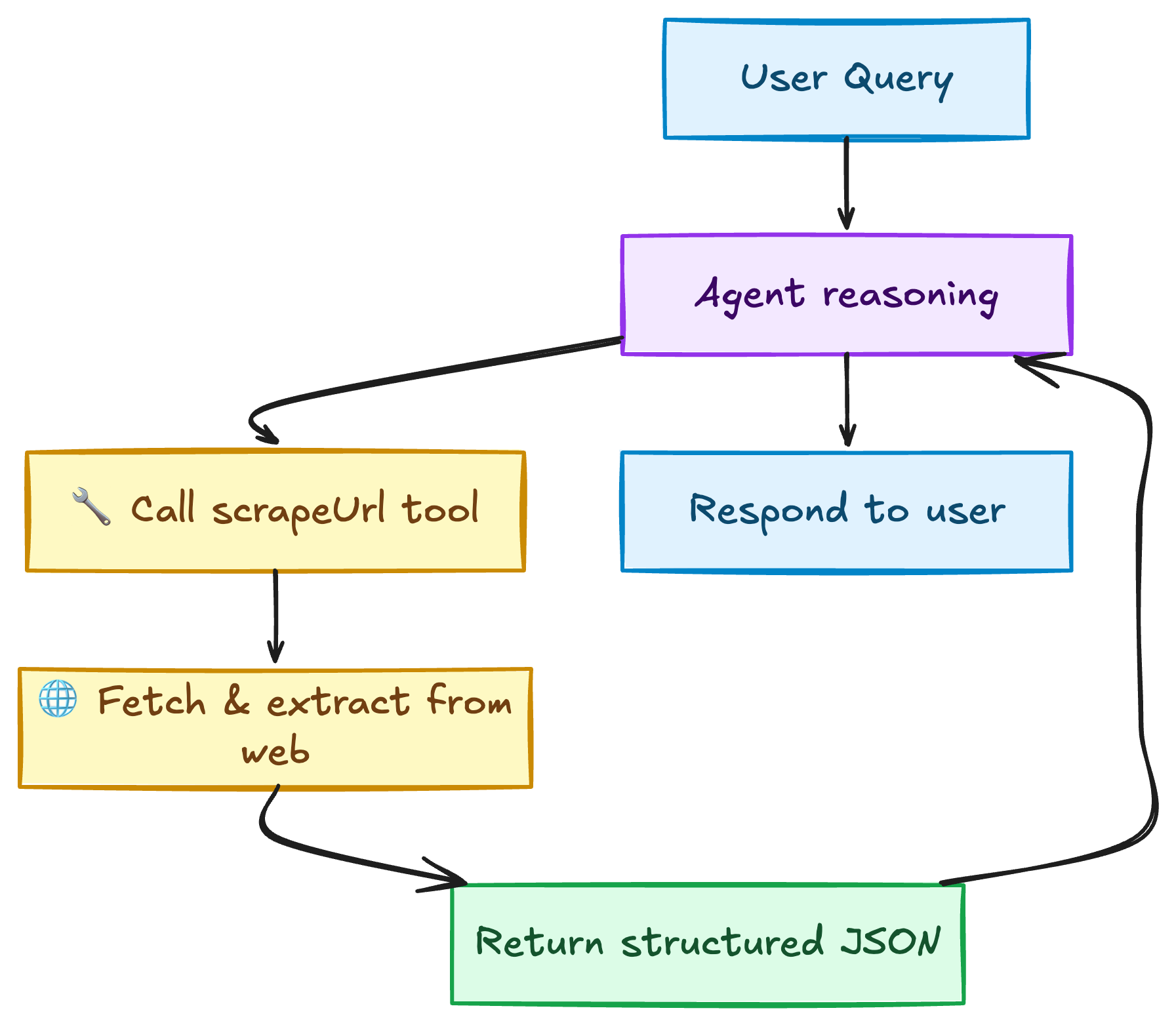
The key design question is: what does scrapeUrl actually do under the hood?
Different scraping approaches
There are a few ways to implement web access for an agent. They sit on a spectrum of complexity vs. reliability.
Raw HTTP + HTML parsing
The simplest approach: fetch the URL with fetch, parse the HTML with a library like Cheerio, extract what you need with selectors.
import * as cheerio from "cheerio";

async function scrape(url) {
  const res = await fetch(url, { headers: { "User-Agent": "Mozilla/5.0" } });
  const html = await res.text();
  const $ = cheerio.load(html);
  return $("body").text();
}
The problem: Most modern websites don't return meaningful HTML on the first HTTP request. They're JavaScript-rendered. The above returns a shell. The content loads after JS executes. You'll also get blocked quickly with no proxy rotation.
Headless browsers
Tools like Playwright and Puppeteer launch a real browser, wait for JS to execute, then let you extract content. More reliable for modern sites.
import { chromium } from "playwright";

const browser = await chromium.launch();
const page = await browser.newPage();
await page.goto(url);
await page.waitForLoadState("networkidle");
const content = await page.content();
await browser.close();
The problem: This is expensive to run at scale. Infrastructure, browser pools, proxy management, and CAPTCHA handling all become your problem. And sophisticated anti-bot systems will still block you based on browser fingerprinting.
Scraping APIs
The third option: delegate all of that to a purpose-built API. You send a URL and a description of what you want. The API handles browser automation, proxy rotation, CAPTCHA solving, and returns clean structured data.
For agents, this is almost always the right call. You get a simple async interface, reliable results, and you're not managing headless browser infrastructure.
The real challenges (and why they matter for agents)
Before picking an approach, understand what actually breaks in production:
-
Anti-bot detection: IP rate limiting, CAPTCHA challenges, browser fingerprinting. If your agent scrapes the same site repeatedly, naive implementations get blocked fast.
-
JavaScript-rendered content: Most product pages, social feeds, and dashboards render content after the initial HTML loads. Raw HTTP fetches get empty shells.
-
Unstructured output: Raw HTML or even extracted text isn't what your agent wants. Agents reason better over
{"price": 49.99}than over a wall of text that contains the price somewhere. -
Async workflows: Scraping takes time (seconds, not milliseconds). Your agent can't block waiting for a result. You need job submission, polling, and async result handling baked in.
-
Scale: If your agent processes 100 leads at a time, you need batch processing. Running 100 sequential scrape calls is slow and fragile.
What agent-ready scraping looks like
Here's what the ideal scraping tool looks like from an agent's perspective:
- Natural language prompts: The agent describes what it wants, not how to get it.
"Extract the job title, company, and salary range"rather than a CSS selector. - Structured JSON output: Returns a typed object matching a schema the agent defines. No parsing, no regex, no string manipulation.
- Async with polling: Submit a job, get a job ID, poll for results. Non-blocking.
- Proxy and anti-bot handling built in: The agent doesn't care about IP rotation. That's infrastructure.
- Batch support: Submit 50 URLs at once, get 50 results back.
Let's build this.
Practical Implementation
The following examples use Spidra, an API built specifically for this pattern: browser automation, proxy rotation, CAPTCHA solving, and AI-powered extraction in one endpoint. The concepts translate to any scraping API with similar capabilities.
Setup
Get an API key from app.spidra.io → Settings → API Keys.
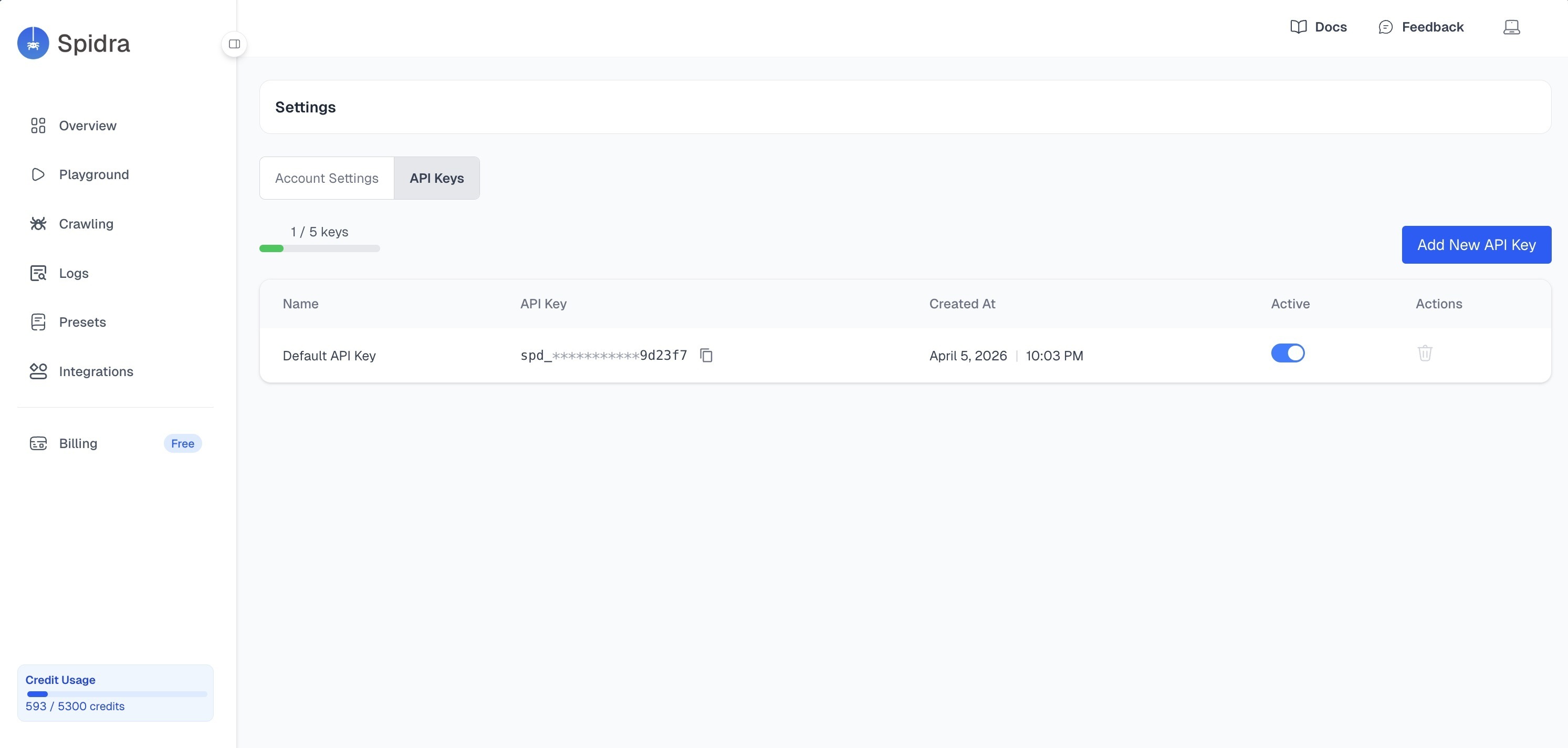
Base URL: https://api.spidra.io/api
Auth: x-api-key header on every request.
Example 1: Simple scrape tool for an agent
The pattern is always the same: submit a job, get a jobId, poll until complete.
const API_KEY = "your-api-key";
const BASE_URL = "https://api.spidra.io/api";
const HEADERS = { "x-api-key": API_KEY, "Content-Type": "application/json" };

async function scrape(url, prompt, schema, options = {}) {
  const payload = {
    urls: [{ url }],
    prompt,
    output: "json",
    useProxy: true,
    ...(schema && { schema }),
    ...options,
  };

  const res = await fetch(`${BASE_URL}/scrape`, {
    method: "POST",
    headers: HEADERS,
    body: JSON.stringify(payload),
  });
  const { jobId } = await res.json();

  while (true) {
    const status = await fetch(`${BASE_URL}/scrape/${jobId}`, {
      headers: HEADERS,
    }).then((r) => r.json());

    if (status.status === "completed") return status.result.content;
    if (status.status === "failed") throw new Error(status.error);

    await new Promise((r) => setTimeout(r, 3000));
  }
}
Now your agent has a clean tool call:
const result = await scrape(
  "https://news.ycombinator.com",
  "List the top 5 stories with title, points, and comment count",
  {
    type: "object",
    required: ["stories"],
    properties: {
      stories: {
        type: "array",
        items: {
          type: "object",
          required: ["title", "points", "comments"],
          properties: {
            title: { type: "string" },
            points: { type: "number" },
            comments: { type: "number" },
            url: { type: ["string", "null"] },
          },
        },
      },
    },
  }
);

// result.stories → [{ title, points, comments, url }, ...]
The agent gets back a typed list it can iterate, filter, and reason over. No parsing.
Example 2: Structured output with JSON schema
The schema field is the most important feature for agent use. Instead of getting unpredictable text, you define the exact shape of the response and the API enforces it.
Here's a job listing extractor:
const result = await scrape(
  "https://jobs.example.com/senior-engineer",
  "Extract all details about this job listing.",
  {
    type: "object",
    required: ["title", "company", "remote"],
    properties: {
      title: { type: "string" },
      company: { type: "string" },
      location: { type: ["string", "null"] },
      remote: { type: ["boolean", "null"] },
      salary_min: { type: ["number", "null"] },
      salary_max: { type: ["number", "null"] },
      employment_type: {
        type: ["string", "null"],
        enum: ["full_time", "part_time", "contract", null],
      },
      skills: {
        type: "array",
        items: { type: "string" },
      },
    },
  }
);

// Guaranteed shape: fields in `required` always present, nullable where marked
// {
//   title: "Senior Engineer",
//   company: "Acme Corp",
//   location: "Austin, TX",
//   remote: true,
//   salary_min: 140000,
//   salary_max: 180000,
//   employment_type: "full_time",
//   skills: ["TypeScript", "React", "AWS"]
// }
Two rules worth knowing:
- Fields in
requiredalways appear, asnullif the data isn't found. - Optional fields are omitted entirely if unavailable.
- Mark anything that might be missing as
["type", "null"]to avoid surprises.
Example 3: Crawling an entire site
Sometimes your agent doesn't know which pages to scrape. It needs to discover them. The crawl endpoint handles this: give it a base URL, tell it which pages to find, and what to extract from each.
async function crawlSite(baseUrl, crawlInstruction, extractInstruction, maxPages = 20) {
  const res = await fetch(`${BASE_URL}/crawl`, {
    method: "POST",
    headers: HEADERS,
    body: JSON.stringify({
      baseUrl,
      crawlInstruction,
      transformInstruction: extractInstruction,
      maxPages,
      useProxy: true,
    }),
  });
  const { jobId } = await res.json();

  while (true) {
    const data = await fetch(`${BASE_URL}/crawl/${jobId}`, {
      headers: HEADERS,
    }).then((r) => r.json());

    if (data.status === "completed") return data.result;
    if (data.status === "failed") throw new Error("Crawl failed");

    console.log(data.progress?.message ?? "crawling...");
    await new Promise((r) => setTimeout(r, 5000));
  }
}

// Example: crawl a competitor's blog for content strategy research
const posts = await crawlSite(
  "https://competitor.com/blog",
  "Find all blog post pages published in the last 6 months",
  "Extract the title, author, publish date, and a one-sentence summary",
  30
);

// posts → [{ url, title, data: { title, author, publish_date, summary } }, ...]
Example 4: Geo-targeted scraping
Some sites show different content based on the visitor's country: prices in local currency, region-specific inventory, geo-restricted offers. Use proxyCountry to scrape from a specific location.
// Scrape a German Amazon page with a German IP
const result = await scrape(
  "https://www.amazon.de/gp/bestsellers/electronics",
  "List the top 10 bestselling electronics with name and price in EUR",
  {
    type: "object",
    required: ["products"],
    properties: {
      products: {
        type: "array",
        items: {
          type: "object",
          properties: {
            name: { type: "string" },
            price_eur: { type: ["number", "null"] },
            rank: { type: "number" },
          },
        },
      },
    },
  },
  { proxyCountry: "de" }
);

// Spidra supports 50+ country codes: us, gb, de, fr, jp, au, ca, br, in, ...
// Use "eu" for rotating EU proxies, "global" for worldwide rotation
Example 5: Authenticated scraping
For pages behind a login: dashboards, account pages, paywalled content. Pass session cookies directly.
// Export cookies from your browser DevTools (Application → Cookies)
// or grab them with document.cookie from the console

const result = await scrape(
  "https://app.example.com/dashboard/reports",
  "Extract monthly revenue, active users, and conversion rate for the last 3 months",
  {
    type: "object",
    required: ["months"],
    properties: {
      months: {
        type: "array",
        items: {
          type: "object",
          properties: {
            month: { type: "string" },
            revenue: { type: "number" },
            active_users: { type: "number" },
            conversion_rate: { type: "number" },
          },
        },
      },
    },
  },
  { cookies: "session=abc123; auth_token=xyz789; csrf=def456" }
);
Wiring it into an agent (full example)
Here's a minimal but complete research agent using the Vercel AI SDK with scrapeUrl as a tool. The SDK handles the agentic loop: the model decides when to call the tool, the tool fetches live data, and the model reasons over the result.
import { generateText, tool } from "ai";
import { anthropic } from "@ai-sdk/anthropic";
import { z } from "zod";

const result = await generateText({
  model: anthropic("claude-opus-4-6"),
  maxSteps: 5,
  tools: {
    scrapeUrl: tool({
      description:
        "Fetch and extract structured data from a URL. Use this when you need current information from a website.",
      parameters: z.object({
        url: z.string().describe("The URL to scrape"),
        prompt: z
          .string()
          .describe("What to extract from the page, in plain English"),
      }),
      execute: async ({ url, prompt }) => {
        const data = await scrape(url, prompt);
        return JSON.stringify(data);
      },
    }),
  },
  prompt:
    "What are the top 3 trending repositories on GitHub today, and what do they do?",
});

console.log(result.text);
maxSteps lets the model make multiple tool calls in sequence if it needs to follow links, cross-reference sources, or refine its query. The scraping layer handles everything else. The model just decides what to fetch and what to ask for.
Practical agent use cases
To make this concrete, here are a few agent patterns that become viable with web access:
-
Competitive intelligence agent: Crawls competitor sites weekly, diffs pricing and feature changes, surfaces meaningful deltas to a Slack channel.
-
Lead enrichment agent: Given a list of company names, scrapes their websites, LinkedIn pages, and job boards to build structured profiles: company size, tech stack, recent hires, open roles.
-
Research agent: Given a topic, searches the web, scrapes the top results, synthesizes findings into a structured report with citations.
-
Price monitoring agent: Tracks SKUs across multiple retailers, alerts when prices drop below a threshold or when a product goes out of stock.
-
News digest agent: Crawls a configured list of sources each morning, extracts headlines and summaries, sends a curated briefing tailored to the user's interests.
Each of these follows the same fundamental pattern: the agent knows what it wants, the scraping layer fetches and structures the data, and the agent reasons over clean output rather than raw HTML.
Wrapping up
Web access expands the category of problems an AI agent can tackle. A scraping tool lets it monitor competitor pages, research live topics, track prices, and respond to things happening right now. Without it, your agent is limited to reasoning over whatever it already knows.
The implementation is straightforward: a submit-and-poll pattern, a JSON schema for the output shape, and a proxy-enabled API to handle the infrastructure. The agent doesn't need to know how any of that works. It just needs a reliable tool call that returns structured data. That's the interface worth building toward.
Thanks for reading!
Comments
More Blog
View allaiContext bankruptcy: The case for strategic forgetting for AI Agents
Most of us have seen a coding agent fail to complete a task we know it can do. We just don't...
J
James O'ReillygooglecloudParallel Compliance Engine: Drive-to-Sheets Multi-Agent Orchestration
When building Generative AI applications, developers often encounter a massive bottleneck: sequential...
A
Aryan IranidiscussIs It Ethical to Post and Ask About Circuits on Dev.to?
I’ve been thinking about sharing some electronic circuit posts on Dev.to — small circuits, DIY...
C
codebunny20agentsThe One-Click Exporter: AI Studio Antigravity, Probed to Its Limits
What nobody tells you about exporting your multi-agent prototype to a local workspace. Every...
L
leslysandraagenticarchitectGuarding the till while autonomous data agents do the digging
Autonomous agents are genuinely good at answering messy business questions. Give one an LLM and a set...
S
Sireesha PulipatiaiReturn on Attention: Why AI Code Reviews Are Wearing Us Out
PR volume went up, ticket quality didn't, and the gap got filled with LLMs on both sides of the review: bots reviewing, bots replying, bots occasionally arguing with bots about priorities that only existed in a teammate's head. Our CEO named the actual problem, and it's bigger than code review.
C
christineReady-made automations for this
Workflows from the Neura Market marketplace related to this Stable Diffusion resource
- Build AI Agents with Think-Plan-Act Architecture Using Llama-4 Reasoningn8n · Free · Related topic
- Build Advanced AI Agents with Multi-Step Reasoning Using GPT-4n8n · Free · Related topic
- Develop AI Agents with Custom Reasoning Using GraphRAG and Ontologiesn8n · Free · Related topic
- Bypass Cloudflare Turnstile for Web Scraping with 2captchan8n · Free · Related topic