
Back to Blog python
 ai
ai googlecloud
 discuss
 agents
 agenticarchitect
 ai
ai
FastAPI Async+Pytest, Event Loop Trap
Neeraj Kansal April 14, 2026
0 views
Async FastAPI tests fail with different loop errors due to connection pool behavior. Here is what actually works.
title: FastAPI Async+Pytest, Event Loop Trap published: true description: Async FastAPI tests fail with different loop errors due to connection pool behavior. Here is what actually works. tags: python, fastapi, pytest, asyncio cover_image: https://dev-to-uploads.s3.amazonaws.com/uploads/articles/a25a1ydqvbup1speivmo.png
cover_image: https://direct_url_to_image.jpg
Use a ratio of 100:42 for best results.
published_at: 2026-04-14 14:16 +0000
If you’ve ever written async tests with FastAPI and SQLAlchemy, chances are you’ve seen this error:
RuntimeError: Task attached to a different loop
I have spent many hours figuring this out here are my findings hoping someone else will not.
Setup
Ok, here is the setup.
I have a FastAPI application with SQLAlchemy for ORM and Alembic for migrations. For tests I wanted to use pytest. Since DB and other operations are async, I had to write async tests.
Here is the example repo I set up for this blog: FastAPI + Async Pytest
I have written tests in the past using pytest fixtures, so I know about fixture scopes and what should go in session scope and what should go in function scope.
In a typical sync setup you have:
- DB engine: session scoped, created once and reused to take advantage of connection pooling
- DB Session: function scoped, created per test, takes a connection from the pool
- Client: This is a imoprtant fixture in API testing this is the object that will be used to call and even initilize the app that will respond to that call.
What breaks in async
When you try to run with same config you end up with couple of diffrent errors like
- “got Future <Future pending cb=[…]> attached to a different loop” or
- “Error while inserting record: … cannot perform operation another operation is in progress”
Both happen when you are sharing or mixing up fixture and test loop scope.
**What are loop scope? **Each async program runs on an event loop. The loop schedules and executes async tasks.
In pytest (pytest-asyncio), loop scope decides:
- when the loop is created &
- when it is destroyed
By default,
By default, everything runs with function loop scope. That means each async def runs in a separate event loop.
Which is great but with one problem, you cannot share objects between loop so heavy operations that you generally put in “session” scope you will need to initilize everytime.
First attempt
So you will think, “I will keep DB engine in session scope, and let tests run in function loops” atleast that is what i thought. Something like this,
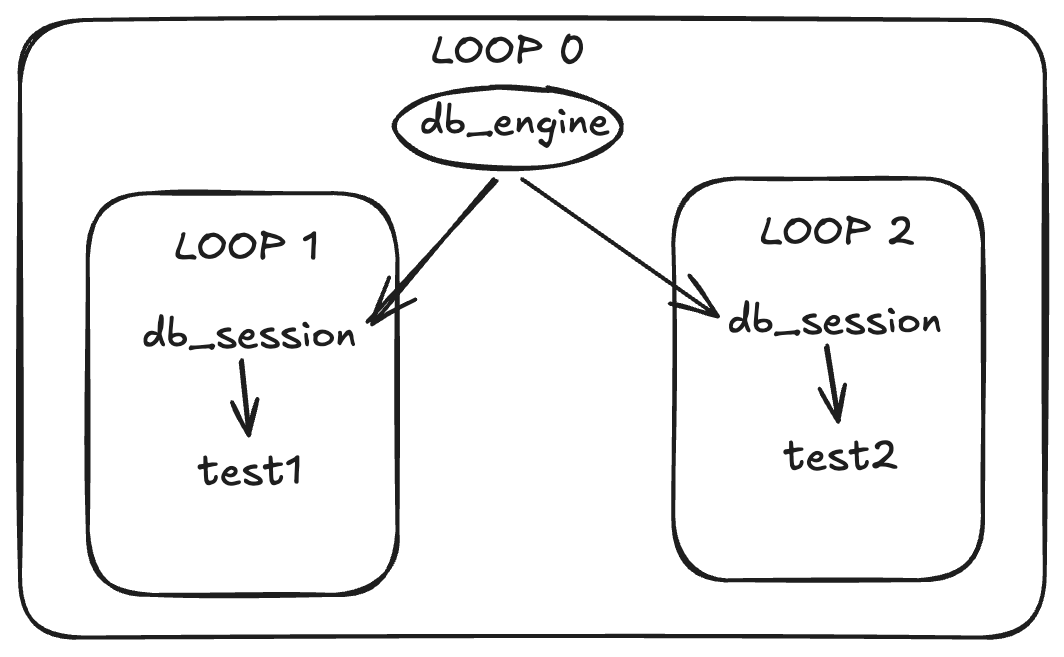
That is great thinking but then you will end up with a error like this“got Future <Future pending cb=[…]> attached to a different loop”.
Example:
@pytest_asyncio.fixture(scope="session", loop_scope="session")
async def db_engine():
    print(id(asyncio.get_running_loop()))    # 1111
    yield ...
@pytest.fixture
async def db_session(db_engine):
    print(id(asyncio.get_running_loop()))    # 2222
    db_engine.connect...
    yield ...
async def test_example(db_session):
    print(id(asyncio.get_running_loop()))    # 2222
Second attempt
You will realise loop objects cannt be shared , but what about global objects that shoud work right?
engine: AsyncEngine = create_async_engine(str(DATABASE_URL))
@pytest.fixture
async def db_session():
    print(id(asyncio.get_running_loop()))    # 2222
    engine.connect...
    yield ...
async def test_example(db_session):
    print(id(asyncio.get_running_loop()))    # 2222
No, same error.
Here is the important part:
The engine itself is not loop bound, but the connection pool gets bound to the first loop where it is used.
So:
- Test 1 initializes pool in loop A
- Test 2 runs in loop B
- Same pool is reused and it fails
Third attempt
Now you might try full isolation, making db_engine fixture a function loop scope so it looks somethign like this.
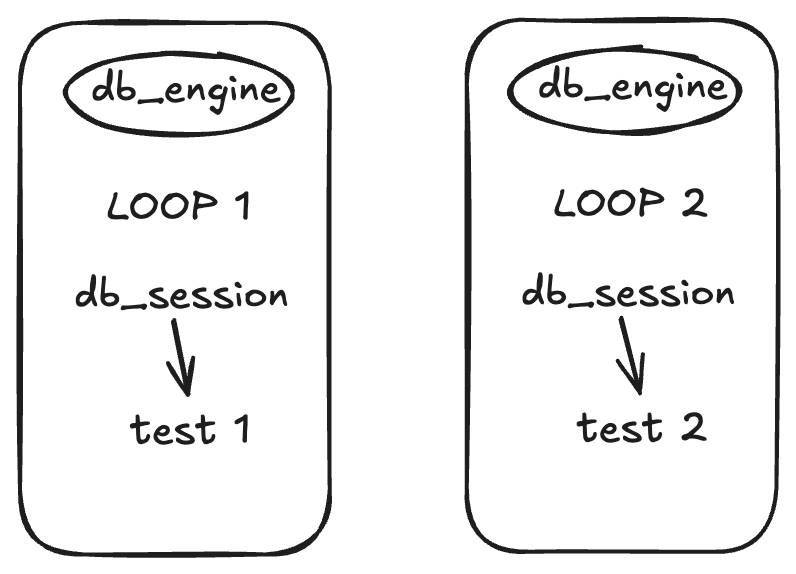
This is a great solution and might even work but
- Engine creation is expensive
- Connection pools are not reused
- Tests become slower
- High DB load if you have many tests
Final approach
So, you go to the extreme opposite side. Why not use One loop for everything?
That’s your best option, given the limitations. Even a FastAPI server runs a single loop to handle various async coroutines.
Example:
@pytest_asyncio.fixture(scope="session", loop_scope="session")
async def db_engine():
    print(id(asyncio.get_running_loop()))    # 1111
    yield ...
@pytest_asyncio.fixture(scope="function", loop_scope="session")
async def db_session(db_engine):
    print(id(asyncio.get_running_loop()))    # 1111
    db_engine.connect...
    yield ...
@pytest_asyncio.fixture(scope="function", loop_scope="session")
async def test_example(db_session):
    print(id(asyncio.get_running_loop()))    # 1111
Now everything runs in the same loop. This works and is more efficient than function loop scope.
New problem
Now there is another issue.
Data created in one test leaks into another test.
When you have multiple test functions and they create/update/delete resources on DB. The data created in one test will leak into another test because we are not cleaning up DB tables.
Common fix
You will write a fixture that will run before every test function something like this.
@pytest_asyncio.fixture(scope="function", loop_scope="session", autouse=True)
def migration(db_engine):
    async with db_engine.begin() as conn:
        await conn.run_sync(Base.metadata.create_all)

    yield "on head"

    async with db_engine.begin() as conn:
        await conn.run_sync(Base.metadata.drop_all)
This will work fine, but,
It is slow. Creating and dropping tables for every test is expensive.
Better fix: transactions
Instead, use transactions, rollback and savepoint.
Here’s the idea:
- open a DB connection & start a transaction
- run the test
- rollback everything at the end
- if commit is called inside test don’t commit the outer transaction use savepoint.
Example:
@pytest_asyncio.fixture(scope="function", loop_scope="session")
async def db_session():
    """
    Create a transactional test database session.
    Ref:
    https://docs.sqlalchemy.org/en/latest/orm/session_transaction.html
    """
    connection = await engine.connect()
    transaction = await connection.begin()
    async_session = AsyncSession(
        bind=connection,
        expire_on_commit=False,
        join_transaction_mode="create_savepoint",
    )
    try:
        yield async_session
    finally:
        await async_session.rollback()
        await async_session.close()
        await transaction.rollback()
        await connection.close()
When you do:
connection = await engine.connect()
transaction = await connection.begin()
You are starting a real database transaction. Now anything that happens using this connection is part of that transaction. If you rollback this transaction:
await transaction.rollback()
Everything done inside it is undone.
Where savepoints come in In SQLAlchemy async sessions, we usually do this:
In SQLAlchemy async sessions, we usually do this:
async_session = AsyncSession(
 bind=connection,
 expire_on_commit=False,
 join_transaction_mode=”create_savepoint”,
)
That join_transaction_mode=”create_savepoint” is important.
It tells SQLAlchemy: “If something inside the session tries to start or commit a transaction, don’t commit the outer transaction. Just create a savepoint.”
So DB stays clean without recreating tables.
Cleaner config
Instead of adding loop_scope="session" everywhere better way to setup this is using “pytest.ini”
[pytest]
asyncio_mode = auto
asyncio_default_test_loop_scope = session
asyncio_default_fixture_loop_scope = session
This makes all tests and fixtures run in the same loop.
Final takeaway
Once you understand this:
The connection pool is tied to the event loop where it is first used
Everything becomes clear.
You have two choices:
- Use one loop and share the pool
- Use multiple loops but do not share the pool
Trying to mix both will fail.
Comments
More Blog
View allaiContext bankruptcy: The case for strategic forgetting for AI Agents
Most of us have seen a coding agent fail to complete a task we know it can do. We just don't...
J
James O'ReillygooglecloudParallel Compliance Engine: Drive-to-Sheets Multi-Agent Orchestration
When building Generative AI applications, developers often encounter a massive bottleneck: sequential...
A
Aryan IranidiscussIs It Ethical to Post and Ask About Circuits on Dev.to?
I’ve been thinking about sharing some electronic circuit posts on Dev.to — small circuits, DIY...
C
codebunny20agentsThe One-Click Exporter: AI Studio Antigravity, Probed to Its Limits
What nobody tells you about exporting your multi-agent prototype to a local workspace. Every...
L
leslysandraagenticarchitectGuarding the till while autonomous data agents do the digging
Autonomous agents are genuinely good at answering messy business questions. Give one an LLM and a set...
S
Sireesha PulipatiaiReturn on Attention: Why AI Code Reviews Are Wearing Us Out
PR volume went up, ticket quality didn't, and the gap got filled with LLMs on both sides of the review: bots reviewing, bots replying, bots occasionally arguing with bots about priorities that only existed in a teammate's head. Our CEO named the actual problem, and it's bigger than code review.
C
christineReady-made automations for this
Workflows from the Neura Market marketplace related to this Stable Diffusion resource
- Automated LinkedIn Connection Requests with Personalized Messagesmake · $18.75 · Related topic
- Joining Different Datasets with n8n Workflown8n · $14.99 · Related topic
- Generate Prospect Research & Connection Strategy Reports with Claude AIn8n · $24.99 · Related topic
- Automate LinkedIn Connection Requests with Airtopn8n · $14.99 · Related topic