
Back to Blog playwright
 ai
ai googlecloud
 discuss
 agents
 agenticarchitect
 ai
ai
Playwright in Pictures: Fully Parallel Mode
Vitaliy Potapov April 15, 2026
0 views
Playwright in Pictures is a series of articles where I use playwright-timeline-reporter to visualize...
<small>Playwright in Pictures is a series of articles where I use playwright-timeline-reporter to visualize different Playwright concepts with simple timeline charts. Here's the first article in the series.</small>
Playwright’s fullyParallel mode is often treated as a simple performance switch. In practice, it changes how the runner schedules work, which leads to different execution shapes for the same test suite.
In this post I’ll show a visual comparison of different modes and highlight when fully parallel is slower.
Example Setup
I use a minimal suite:
spec1.test.ts→ 1 testspec2.test.ts→ 5 testsworkers = 2
This setup is enough to expose how scheduling works.
Non-Fully Parallel
By default, Playwright assigns entire files to workers. Once a worker picks a file, it runs all tests in that file in order.
Running the example suite:
npx playwright test --workers 2
produces the following timeline:
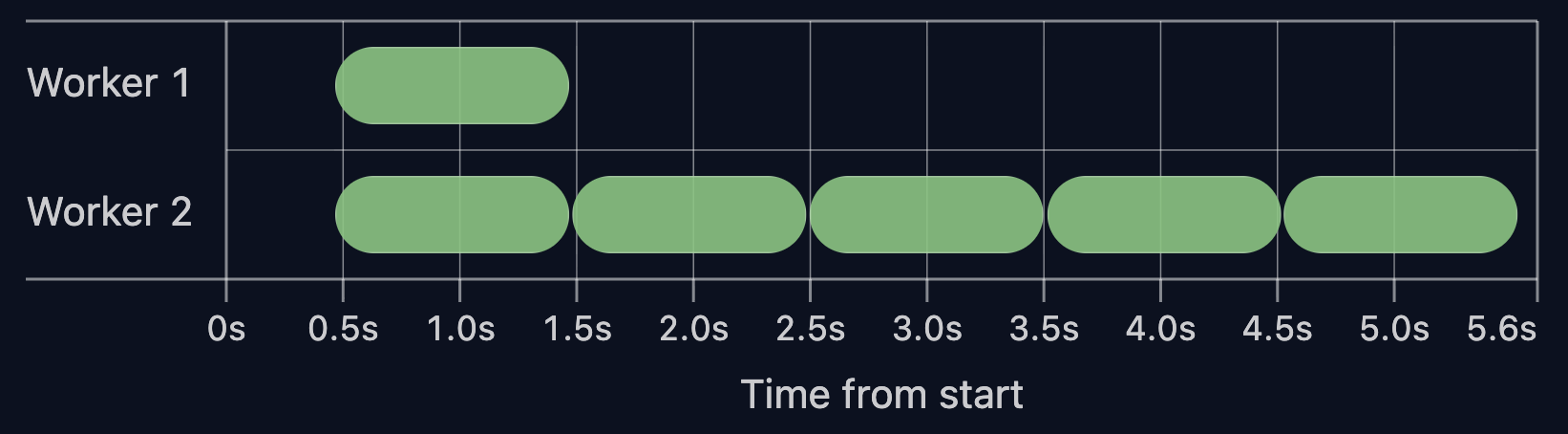
In this setup, Worker 1 runs the single test from spec1, while Worker 2 executes all 5 tests from spec2.
Tests inside a file cannot move to another worker. Even if one worker is idle, it cannot pick up remaining tests from other running files.
In practice, the total run time is defined by the longest file, not by the total amount of work.
Fully Parallel
With --fully-parallel enabled, Playwright schedules individual tests instead of files. File boundaries stop mattering. Workers take the next available test.
Running the example suite with --fully-parallel:
npx playwright test --workers 2 --fully-parallel
The timeline:
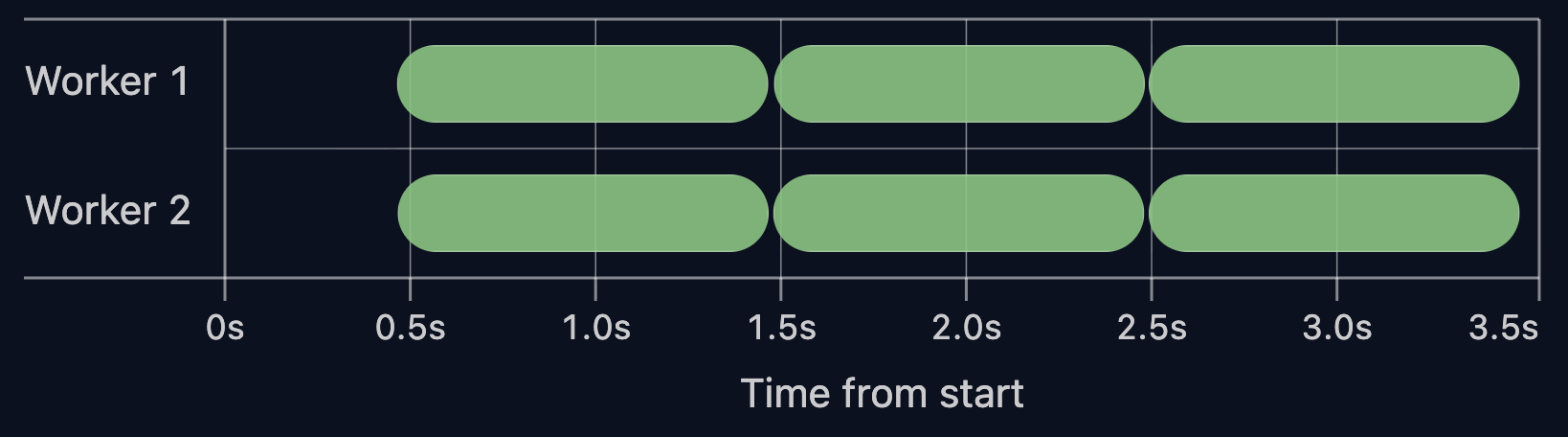
With the same setup, the 5 tests from spec2 are split across both workers, keeping the timeline balanced.
The total run time drops from 5.6s to 3.5s.
This shifts the execution model. It now follows individual tests instead of the longest file.
Is Fully Parallel Always Faster? No.
Fully parallel mode may be slower if tests rely on heavy worker hooks or worker fixtures.
To illustrate this, I added a heavy beforeAll hook to spec2:
test.beforeAll(async () => {
  await expensiveSetup()
});
Running the tests without fully parallel:
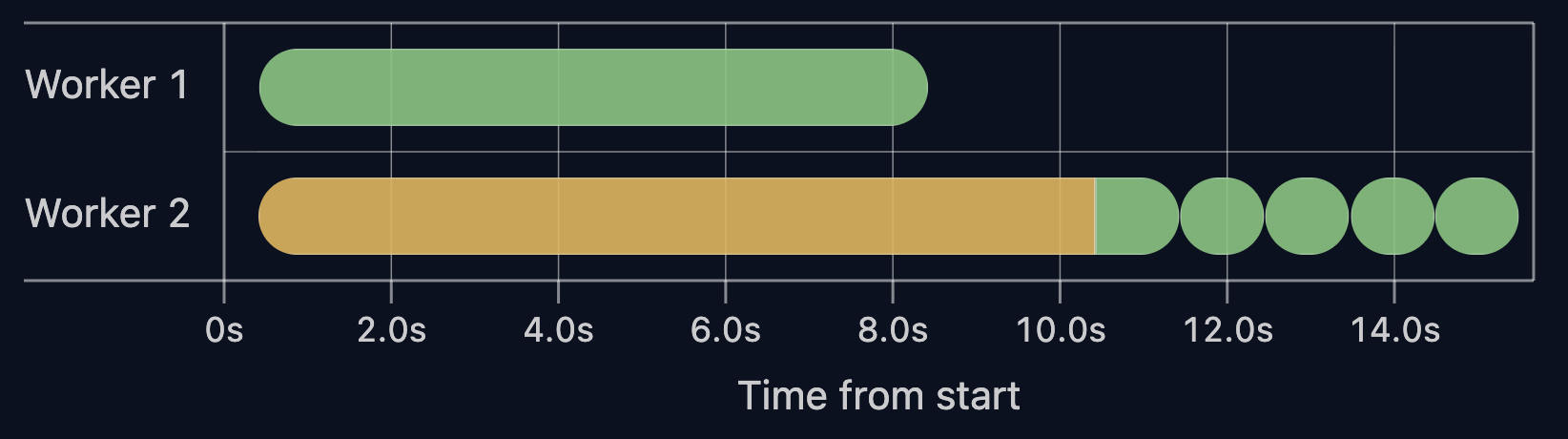
The beforeAll setup cost (yellow bar) is paid once in Worker 2 and reused across all tests in that file.
Now run the same suite with --fully-parallel:
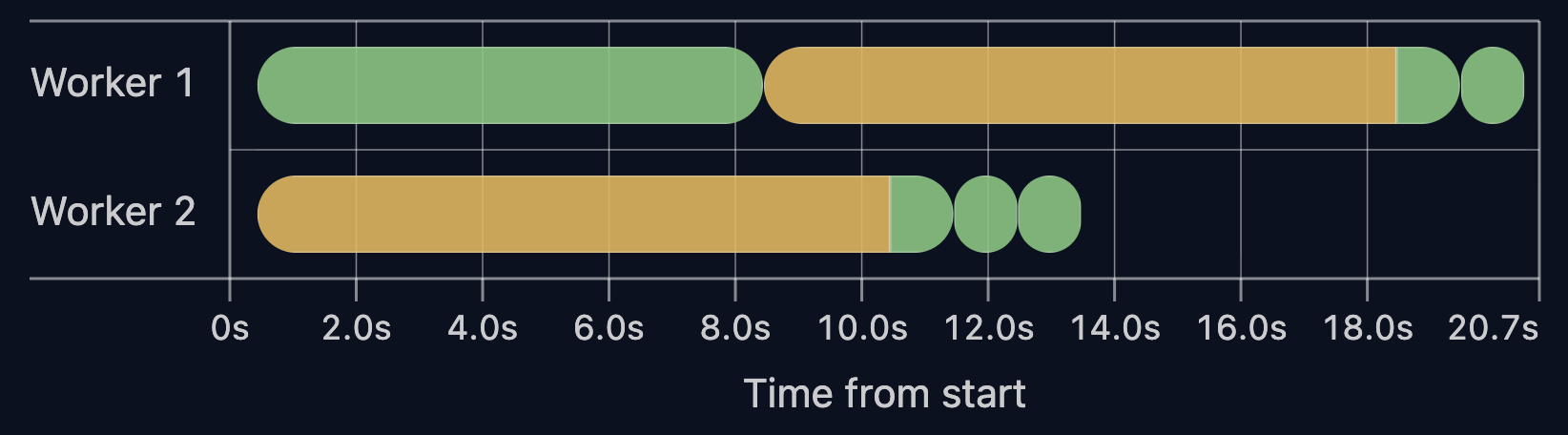
Here, beforeAll runs twice, once per worker. As the number of workers grows, the setup is repeated more times.
Total run time increases from 15s to 20s after enabling fully parallel mode.
When setup dominates test time, --fully-parallel makes the run slower.
Key Takeaways
- By default, Playwright runs tests per file: files are split across workers, tests inside a file run sequentially.
- With fully parallel mode, tests are split across workers and run independently.
- Fully parallel mode can slow tests down. Check your test distribution and setup before enabling it.
Thanks for reading ❤️
👉 Next in the series: Playwright in Pictures: Why Workers Restart?
Comments
More Blog
View allaiContext bankruptcy: The case for strategic forgetting for AI Agents
Most of us have seen a coding agent fail to complete a task we know it can do. We just don't...
J
James O'ReillygooglecloudParallel Compliance Engine: Drive-to-Sheets Multi-Agent Orchestration
When building Generative AI applications, developers often encounter a massive bottleneck: sequential...
A
Aryan IranidiscussIs It Ethical to Post and Ask About Circuits on Dev.to?
I’ve been thinking about sharing some electronic circuit posts on Dev.to — small circuits, DIY...
C
codebunny20agentsThe One-Click Exporter: AI Studio Antigravity, Probed to Its Limits
What nobody tells you about exporting your multi-agent prototype to a local workspace. Every...
L
leslysandraagenticarchitectGuarding the till while autonomous data agents do the digging
Autonomous agents are genuinely good at answering messy business questions. Give one an LLM and a set...
S
Sireesha PulipatiaiReturn on Attention: Why AI Code Reviews Are Wearing Us Out
PR volume went up, ticket quality didn't, and the gap got filled with LLMs on both sides of the review: bots reviewing, bots replying, bots occasionally arguing with bots about priorities that only existed in a teammate's head. Our CEO named the actual problem, and it's bigger than code review.
C
christineReady-made automations for this
Workflows from the Neura Market marketplace related to this Stable Diffusion resource
- Visualize SQL Agent Queries with OpenAI and Quickchart.io Integrationn8n · $6.11 · Related topic
- Visualize SQL Agent Queries with OpenAI and QuickChart.ion8n · $4.99 · Related topic
- Extract Market Cap from Yahoo Finance & Visualize in Telegramn8n · $24.99 · Related topic
- Visualize SQL Agent Queries with OpenAI & Quickchart.ion8n · $24.99 · Related topic