
Back to Blog api
api ai
ai googlecloud
 discuss
 agents
 agenticarchitect
 ai
ai
Display and test openapi.yaml file
Gabriel Weidmann April 16, 2026
0 views
From a partner company I got a openapi.yaml file to evaluate their api for our use cases. Mostly I...
From a partner company I got a openapi.yaml file to evaluate their api for our use cases. Mostly I know those files from working with ASP.NET Core Apis + Swagger UI, but this time it was just a standalone file.
I got the file and an api key for the sandbox.
Did not work: Use via ASP.NET Core swagger
The first thing I was trying was to use the already known swagger ui as it's the same format.
So:
- Setting up a new ASP.NET Core Api project in Visual Studio
- Including the latest
Swashbuckle.AspNetCorenuget - Putting the
openapi.yamlfile in thewwwrootfolder - Setting up the Program.cs
var builder = WebApplication.CreateBuilder(args);
var app = builder.Build();

app.UseHttpsRedirection();

// Allow to serve the unknown-by-default file type .yaml
var provider = new FileExtensionContentTypeProvider();
provider.Mappings[".yaml"] = "application/yaml";

app.UseStaticFiles(new StaticFileOptions
{
    ContentTypeProvider = provider,
});

app.UseSwaggerUI(c =>
{
    c.SwaggerEndpoint("/openapi.yaml", "Imported API");
    c.RoutePrefix = "swagger";
});

app.Run();
- Accessing the api via https://localhost:7298/swagger
This worked almost, but then CORS came around :-(
Access to fetch at 'https://sandbox.***.com/api/...' from origin 'https://localhost:7298' has been blocked by CORS policy: Response to preflight request doesn't pass access control check: No 'Access-Control-Allow-Origin' header is present on the requested resource.
The problem seems to be the browser, so let's look for a non-browser-solution.
Did work: Import in Postman
Then I noticed that Postman got the functionality to import openapi spec files:
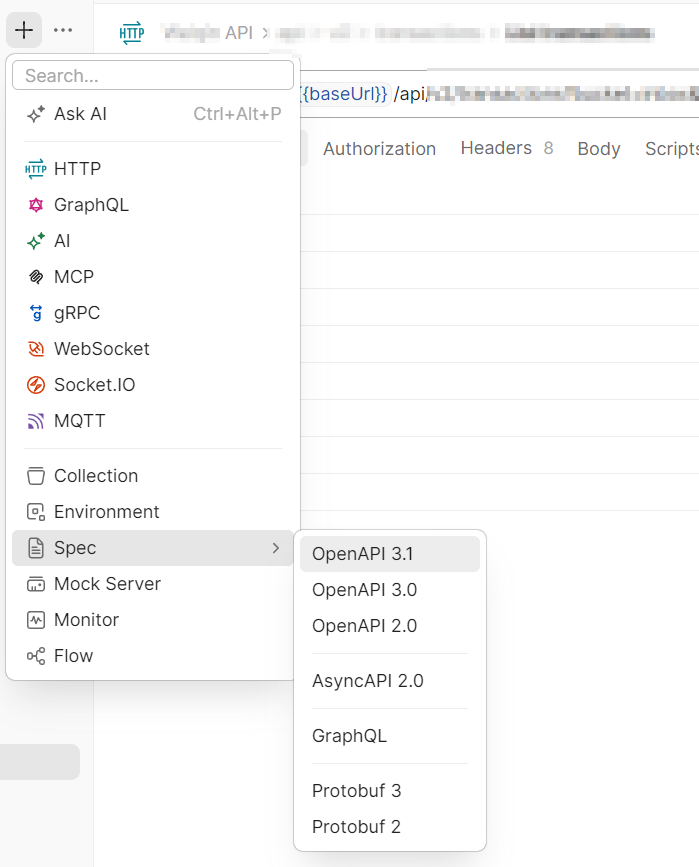
From here it's possible to simulate the api requests just as good (or better?) as in swagger UI.
Comments
More Blog
View allaiContext bankruptcy: The case for strategic forgetting for AI Agents
Most of us have seen a coding agent fail to complete a task we know it can do. We just don't...
J
James O'ReillygooglecloudParallel Compliance Engine: Drive-to-Sheets Multi-Agent Orchestration
When building Generative AI applications, developers often encounter a massive bottleneck: sequential...
A
Aryan IranidiscussIs It Ethical to Post and Ask About Circuits on Dev.to?
I’ve been thinking about sharing some electronic circuit posts on Dev.to — small circuits, DIY...
C
codebunny20agentsThe One-Click Exporter: AI Studio Antigravity, Probed to Its Limits
What nobody tells you about exporting your multi-agent prototype to a local workspace. Every...
L
leslysandraagenticarchitectGuarding the till while autonomous data agents do the digging
Autonomous agents are genuinely good at answering messy business questions. Give one an LLM and a set...
S
Sireesha PulipatiaiReturn on Attention: Why AI Code Reviews Are Wearing Us Out
PR volume went up, ticket quality didn't, and the gap got filled with LLMs on both sides of the review: bots reviewing, bots replying, bots occasionally arguing with bots about priorities that only existed in a teammate's head. Our CEO named the actual problem, and it's bigger than code review.
C
christineReady-made automations for this
Workflows from the Neura Market marketplace related to this Stable Diffusion resource
- Display Project Data on a Smashing Dashboardn8n · $12.99 · Related topic
- AI Blog Generator: GPT-4o Outline, Evaluate & Sheets Publishn8n · $24.99 · Related topic
- Evaluate Hybrid Search for Legal QA with Qdrant & BM25/mxbain8n · $24.99 · Related topic
- Evaluate AI Agent Tool Usage Accuracy with Evaluation Nodesn8n · $24.99 · Related topic