
Back to Blog gemma
gemma
 ai
ai googlecloud
 discuss
 agents
 agenticarchitect
 ai
ai
Fine-Tuning Gemma 4 with Cloud Run Jobs: Serverless GPUs (NVIDIA RTX 6000 Pro) for pet breed classification 🐈🐕
Shir Meir Lador April 24, 2026
0 views
Google has just announced the release of Gemma 4! This new generation of open models brings...
Google has just announced the release of Gemma 4! This new generation of open models brings significant advancements, particularly in reasoning capabilities and architectural efficiency.
Bridging Reasoning and Precision with Gemma 4
In my previous blog, I demonstrated how to fine-tune Gemma 3 27B on Cloud Run Jobs using NVIDIA RTX PRO 6000 Blackwell Edition GPUs for pet breed classification. With the release of Gemma 4, I couldn't wait to update my pipeline and see how the new model performs.
In this follow-up post, I'll explain what makes Gemma 4 different, the benefits it brings, and exactly what file modifications and workarounds are needed to successfully fine-tune it using PEFT (LoRA) on Cloud Run. We'll cover everything from memory requirements and dynamic label masking to prompt structures for reasoning models. Whether you read the previous post or are new to this pipeline, this guide will provide a complete, working solution for Gemma 4.
If you'd rather dive straight into the code and explore it at your own pace, you can clone the repository here.
What's New in Gemma 4?
Gemma 4 introduces groundbreaking improvements over Gemma 3, making it Google's most intelligent open model family to date:
- Apache 2.0 License: Gemma 4 is released under a commercially permissive Apache 2.0 license, providing full developer flexibility.
- Highly Competitive Benchmarks: The 31B model ranks as the #3 open model on the Arena AI text leaderboard, while the 26B MoE model ranks #6, outcompeting models 20x their size!
- Advanced Reasoning & Agents: Purpose-built for multi-step planning and deep logic. It features native support for function-calling, structured JSON output, and native system instructions.
- Multimodal & Long Context: Natively processes images, video, and even audio (in edge models). It supports up to a 256K context window for larger models.
- Versatile Architectures: Includes a 26B Mixture of Experts (MoE) model that only activates 3.8B parameters during inference for fast response times.
Because of these changes, simply dropping Gemma 4 into a Gemma 3 fine-tuning script won't work out of the box. Here is a breakdown of what needed to change in the codebase to make it work.
GPU Memory and Parameter Capacity
With the availability of NVIDIA RTX PRO 6000 GPUs on Cloud Run, we now have access to 96GB of VRAM. This is a game-changer for hosting and fine-tuning large models.
According to the formula discussed in my blog post on Decoding high-bandwidth memory: Total HBM ≈ (Model Size) + (Optimizer States) + (Gradients) + (Activations)
When using LoRA (Low-Rank Adaptation), we freeze the base model weights and only train a small subset of parameters. This means the memory-hungry gradients and optimizer states are negligible for the base model. For Gemma 4 31B loaded in 16-bit precision (bfloat16), the base model size is roughly 31 billion parameters × 2 bytes/parameter ≈ 62 GB. While this 62GB model fits comfortably within the 96GB of VRAM available on the RTX 6000 Pro, we can do even better!
By applying 4-bit quantization (QLoRA) via the bitsandbytes library, we dramatically shrink this base memory footprint to roughly 18–20GB. This leaves an enormous amount of VRAM overhead exclusively dedicated to the high-memory activations required by multi-modal processing and long-context training batches, unlocking unparalleled serverless efficiency!
Key Code Changes for Gemma 4 Migration
If you are updating your own script or starting fresh, these are the critical adjustments made to the pipeline:
1. Multimodal Input Ordering & Integrated Instructions
While Gemma 4 supports interleaved inputs and a native system role, we recommend providing the image data before the text as a stable convention and merging instructions into the user prompt for this pipeline. We found this 'single-turn' structure more effective for maintaining instruction-following precision and simplifying our custom masking logic.
In the code below, the {"type": "image"} entry acts as a placeholder that signals the processor to inject special image tokens into the chat template. The actual image tensors are then passed separately during the data collation step to ensure the multimodal architecture is adapted correctly.
full_user_content = f"{prompt}\n\nIdentify the breed of the animal in this image."
messages = [
  {
    "role": "user",
    "content": [
      {"type": "image"},  # Image must come first!
      {"type": "text", "text": full_user_content},
    ],
  },
  {
    "role": "assistant",
    "content": [{"type": "text", "text": example["caption"]}]
  }
]
2. Loading the Correct Multimodal Architecture
Gemma 4 natively processes images, video, and even audio (in the E2B and E4B models), which changes how the model must be loaded. To correctly handle these diverse inputs, we explicitly use the AutoModelForMultimodalLM class. While AutoModelForImageTextToText remains a valid option for purely image-based tasks, the multimodal class is the more precise choice for the Gemma 4 architecture, ensuring it is ready to handle video and audio data natively.
from transformers import AutoModelForMultimodalLM
model = AutoModelForMultimodalLM.from_pretrained(model_id, **model_kwargs)
3. Label Masking for Multimodal Data
In Gemma 3, we could hardcode specific token IDs to find where the assistant's response started to mask the prompt. For Gemma 4, we initially tried tokenizing the text prompt separately to find its length, but hit a major snag.
Gemma 4 is highly efficient with media: each image gets a dynamic number of soft tokens exactly fitted to its content. While these image soft tokens are highly stable and pre-computable (their count does not change whether the image is alone or accompanied by text), standard tokenizers can still introduce slight boundary quirks when concatenating text and control tokens after these media tokens. If you tokenize the prompt in isolation, the length might be slightly off compared to the fully assembled chat template, tanking the model's accuracy.
To achieve the highest precision, we implemented a bulletproof backward-search collator. Instead of trying to calculate the prompt length, we search the full _input_ids_ array for the exact tokens of our breed name label. Once found, we step backwards to locate the <|turn> control token that marks the start of the assistant's response, and mask everything before it. This mathematically guarantees the model is trained exactly on the required template structure and the label, without any masking misalignment.
4. Bypassing Custom Layers & Unlocking the Vision Tower
This was the most critical breakthrough! The official Hugging Face implementation for Gemma 4 uses a custom neural network wrapper called Gemma4ClippableLinear for its projection layers. This custom class wraps a standard nn.Linear layer but adds specific logic to clip minimum and maximum activations (input_min, output_max, etc.) to stabilize training.
When we tried to apply standard LoRA by targeting specific layer names like q_proj or v_proj, we hit two major issues:
- Activation Clipping Bypass: Standard PEFT/LoRA doesn't natively recognize
Gemma4ClippableLinear. If forced to attach to the inner.linearweights, it bypasses the parent wrapper entirely. Without that crucial activation clipping during the forward pass, the model's activations become unstable, and the training loss explodes. - Frozen Vision Tower: Even if we fixed the text backbone, standard text-focused LoRA configurations often miss the vision tower's projection layers, leaving the model's "eyes" frozen during training.
The solution is to use the macro target_modules="all-linear". This tells the PEFT library to recursively scan the entire model tree. It safely identifies and wraps nested linear layers without breaking the outer Gemma4ClippableLinear clipping logic. Crucially, it also ensures that every linear layer across both the language model and the vision tower is adapted to your data, without sacrificing architectural stability.
5. Results
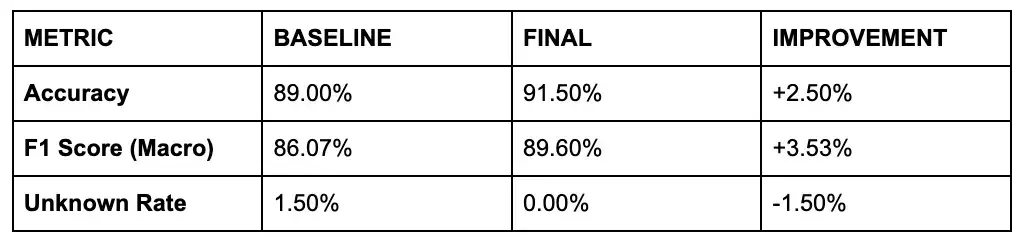
By combining the multimodal architecture, bulletproof masking, and full-tower LoRA, we achieved a nice improvement in the model accuracy.
Note that Gemma 4 baseline performance (89% accuracy) was significantly higher than Gemma 3 Baseline performance (67% accuracy) so in this case the accuracy improvement is more modest, but still significant.
Intermediate Results (700 Samples, ~50 minutes Run)
Even with a small subset of 700 training images, we saw a nice boost over the baseline in less than one hour:
Final Results (Full Dataset, ~4.25 Hours Run)
Running the full Oxford-IIIT Pet dataset (~4,000 training images and 3,669 evaluation images) yielded our peak performance (STOA for this dataset is 94% accuracy):

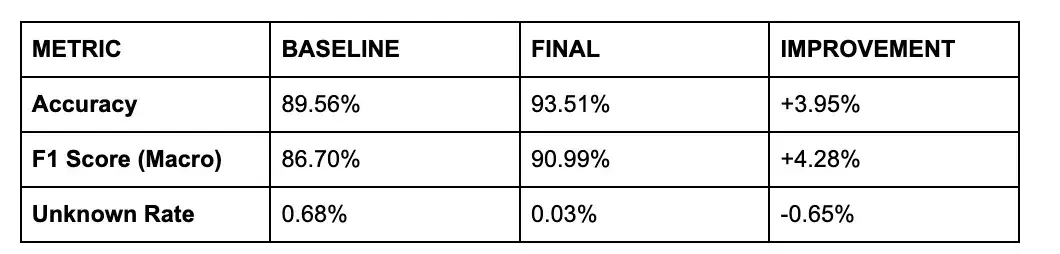
In this run, we utilized a more aggressive LoRA configuration than typical text-only runs: a Rank 64 / Alpha 64 setup with a 5e-5 learning rate. This gave the model enough "surface area" to refine its visual features for the specific nuances of the pet dataset.
6. Managing VRAM with QLoRA & Gradient Checkpointing
While 96GB of VRAM on the RTX 6000 Pro is massive, training a 31B parameter model with LoRA still pushes the boundaries of a single GPU. To ensure absolute stability and prevent Out-Of-Memory (OOM) errors during the backward pass, our script implements a two-pronged optimization strategy:
- QLoRA (4-bit Quantization): Utilizing
BitsAndBytesConfig(load_in_4bit=True, bnb_4bit_quant_type="nf4")to drastically reduce the model's footprint when loaded on CUDA. - Gradient Checkpointing: Specifically enabled for the 31B model, this trades a slight increase in compute time for a significant reduction in VRAM usage by recalculating activations instead of storing them all in memory.
The Complete Fine-Tuning Workflow on Cloud Run
Before you begin the fine-tuning process, ensure you have the following software and environment configurations in place.
Prerequisites
- Google Cloud Project with billing enabled and APIs active (Cloud Run, Artifact Registry, Cloud Build, Secret Manager).
- NVIDIA RTX PRO 6000 availability in your region (e.g.,
europe-west4). - Hugging Face Token: A valid token with access to the Gemma 4 model weights.
Step 0: Set Environment Variables
Set the following environment variables to align with the steps below:
export PROJECT_ID=[YOUR_PROJECT_ID]
export REGION=europe-west4
export HF_TOKEN=[YOUR_HF_TOKEN]
export SERVICE_ACCOUNT="finetune-gemma-job-sa"
export BUCKET_NAME=$PROJECT_ID-gemma4-finetuning-eu
export AR_REPO=gemma4-finetuning-repo
export SECRET_ID=HF_TOKEN
export IMAGE_NAME=gemma4-finetune
export JOB_NAME=gemma4-finetuning-job
Step 1: Get the Code
Whether you're running locally or on the cloud, you'll need the code. Clone the repository and navigate to the project directory:
git clone https://github.com/GoogleCloudPlatform/devrel-demos
cd devrel-demos/ai-ml/finetune_gemma/
Step 2: Test Locally Before Cloud Deployment
Before spinning up massive GPUs in the cloud, it is always a best practice to verify your pipeline locally using a smaller model variant (like the 2B IT model) on a subset of the data.
To run a local CPU test, first activate your virtual environment:
source .venv/bin/activate
Then, execute the script with a very small dataset to ensure the pipeline completes successfully:
python3 finetune_and_evaluate.py \
  --model-id google/gemma-4-e2b-it \
  --device cpu \
  --train-size 20 \
  --eval-size 20 \
  --gradient-accumulation-steps 4 \
  --num-epochs 1
Once you verify that the training pipeline completes successfully, you are ready to scale up to Cloud Run!
Step 3: Stage the Model in GCS
To save startup time and avoid repetitive downloads from the internet during training, stage the model weights (e.g., google/gemma-4-31b-it) in a GCS bucket located in the same region as your Cloud Run job. We provide a utility script within the repository to perform this transfer directly:
# Navigate to the utility directory
cd hf-to-gcs
# Execute the transfer script
python3 hf_to_gcs.py \
  --model-id google/gemma-4-31b-it \
  --bucket $BUCKET_NAME \
  --hf-token $HF_TOKEN
This script ensures that the weights are stored in your project's bucket, enabling high-speed access via volume mounts when the Cloud Run job executes.
Step 4: Build the Container
Use Cloud Build to package your script and dependencies into a container image compatible with CUDA 12.8:
gcloud builds submit --tag $REGION-docker.pkg.dev/$PROJECT_ID/$AR_REPO/$IMAGE_NAME:latest .
[!TIP] You can track the real-time progress of your build in the Cloud Build console.
Step 5: Create and Execute the Cloud Run Job
Create the job with GPU support and volume mounts for the GCS bucket holding the model:
gcloud beta run jobs create gemma4-finetuning-job \
  --region $REGION \
  --image gcr.io/$PROJECT_ID/gemma4-finetune \
  --gpu 1 \
  --gpu-type nvidia-rtx-pro-6000 \
  --cpu 30.0 \
  --memory 120Gi \
  --labels dev-tutorial=finetune-gemma \
  --add-volume name=model-volume,type=cloud-storage,bucket=$BUCKET_NAME \
  --add-volume-mount volume=model-volume,mount-path=/mnt/gcs \
  --args="--model-id","/mnt/gcs/google/gemma-4-31b-it/","--output-dir","/mnt/gcs/gemma4-finetuned","--train-size","700","--eval-size","200","--merge"
Then execute it:
gcloud beta run jobs execute gemma4-finetuning-job --region $REGION --async
Conclusion
Migrating to Gemma 4 requires handling its new architecture and response formats, but the effort pays off with its superior reasoning and adherence to instructions. By leveraging Cloud Run Jobs and Serverless Blackwell GPUs, you can train these massive models efficiently without managing servers.
To get started with inference, explore this codelab: Run inference of Gemma 4 model on Cloud Run with RTX 6000 Pro GPU with vLLM.
To learn more about production serving, refer to the Cloud Run Gemma 4 documentation.
Happy fine-tuning! 🎉
Special thanks to Ryan Mullins, Juyeong Ji and Gus Martins from the Gemma 4 team for the helpful review and feedback on this blog.
Comments
More Blog
View allaiContext bankruptcy: The case for strategic forgetting for AI Agents
Most of us have seen a coding agent fail to complete a task we know it can do. We just don't...
J
James O'ReillygooglecloudParallel Compliance Engine: Drive-to-Sheets Multi-Agent Orchestration
When building Generative AI applications, developers often encounter a massive bottleneck: sequential...
A
Aryan IranidiscussIs It Ethical to Post and Ask About Circuits on Dev.to?
I’ve been thinking about sharing some electronic circuit posts on Dev.to — small circuits, DIY...
C
codebunny20agentsThe One-Click Exporter: AI Studio Antigravity, Probed to Its Limits
What nobody tells you about exporting your multi-agent prototype to a local workspace. Every...
L
leslysandraagenticarchitectGuarding the till while autonomous data agents do the digging
Autonomous agents are genuinely good at answering messy business questions. Give one an LLM and a set...
S
Sireesha PulipatiaiReturn on Attention: Why AI Code Reviews Are Wearing Us Out
PR volume went up, ticket quality didn't, and the gap got filled with LLMs on both sides of the review: bots reviewing, bots replying, bots occasionally arguing with bots about priorities that only existed in a teammate's head. Our CEO named the actual problem, and it's bigger than code review.
C
christineReady-made automations for this
Workflows from the Neura Market marketplace related to this Stable Diffusion resource
- AI Smart Supplier Matcher - Automated Sourcing & Contract Generation Workflown8n · $100 · Related topic
- Text-to-Image Generation with Flux AI, Google Drive Storage & Sheets Loggingn8n · Free · Related topic
- Business Lead Generation with Apify Web Scraping and Google Sheets Storagen8n · Free · Related topic
- Automate Property Link Shortening & QR Code Generation with Google Sheets and Bitlyn8n · Free · Related topic