
Back to Blog angular
 ai
ai googlecloud
 discuss
 agents
 agenticarchitect
 ai
ai
Building MCP Apps with Angular
Dale Nguyen April 25, 2026
0 views
If you've been building MCP servers, you know the drill: your tool returns JSON, the host renders it...
If you've been building MCP servers, you know the drill: your tool returns JSON, the host renders it as text, and the user squints at a timestamp string. MCP Apps change that — they let your server ship an interactive UI that the host renders in an iframe, right inside the conversation.
MCP Apps are built on the Model Context Protocol — an open standard. They're not tied to Claude or any specific AI provider. Any host that implements the MCP Apps specification (Claude Desktop, custom chat clients, or other AI assistants that adopt MCP) can render your UI. You build it once, and it works everywhere MCP is supported.
This post walks through building MCP Apps with Angular. We'll start with a single tool, add a second tool with its own UI, and then show how to share code between them without bloating either bundle.
How MCP Apps Work (Quick Recap)
View (Angular App) <--PostMessageTransport--> Host (AppBridge) <--MCP Client--> MCP Server
- Server registers tools and resources. Each tool can point to a resource URI containing the UI.
- Host (the chat client) fetches that resource and renders it in a sandboxed iframe.
- View is your Angular app running inside that iframe. It uses the
Appclass from@modelcontextprotocol/ext-appsto communicate with the host.
The key insight: your UI is bundled into a single self-contained HTML file using Vite and vite-plugin-singlefile. The host doesn't need to know it's Angular — it just loads HTML.
Project Structure
basic-server-angular/
├── mcp-app.html              # HTML entry point for UI #1
├── greeting-app.html         # HTML entry point for UI #2
├── src/
│   ├── main.ts               # Angular bootstrap for UI #1
│   ├── app.component.ts      # Get Time component
│   ├── greeting-main.ts      # Angular bootstrap for UI #2
│   ├── greeting.component.ts # Greeting component
│   ├── shared/
│   │   └── mcp-app-setup.ts  # Shared App + theming setup
│   └── global.css            # Host-aware CSS variables
├── server.ts                 # MCP server (registers tools + resources)
├── main.ts                   # Server entry point (HTTP + stdio)
└── vite.config.ts            # Builds each HTML into a single file
Step 1: The Server
Every MCP App starts on the server side. You register a tool (what the LLM calls) and a resource (the HTML that gets rendered). They're linked by a resource URI.
// server.ts
import { McpServer } from "@modelcontextprotocol/sdk/server/mcp.js";
import type { CallToolResult, ReadResourceResult } from "@modelcontextprotocol/sdk/types.js";
import fs from "node:fs/promises";
import path from "node:path";
import {
  registerAppTool,
  registerAppResource,
  RESOURCE_MIME_TYPE,
} from "@modelcontextprotocol/ext-apps/server";

const DIST_DIR = import.meta.filename.endsWith(".ts")
  ? path.join(import.meta.dirname, "dist")
  : import.meta.dirname;

export function createServer(): McpServer {
  const server = new McpServer({
    name: "Basic MCP App Server (Angular)",
    version: "1.0.0",
  });

  const resourceUri = "ui://get-time/mcp-app.html";

  // Register the tool — this is what the LLM calls
  registerAppTool(server, "get-time", {
    title: "Get Time",
    description: "Returns the current server time as an ISO 8601 string.",
    inputSchema: {},
    _meta: { ui: { resourceUri } }, // Links this tool to its UI
  }, async (): Promise<CallToolResult> => {
    const time = new Date().toISOString();
    return { content: [{ type: "text", text: time }] };
  });

  // Register the resource — the bundled HTML for this tool's UI
  registerAppResource(server, resourceUri, resourceUri, {
    mimeType: RESOURCE_MIME_TYPE,
  }, async (): Promise<ReadResourceResult> => {
    const html = await fs.readFile(
      path.join(DIST_DIR, "mcp-app.html"),
      "utf-8",
    );
    return {
      contents: [{ uri: resourceUri, mimeType: RESOURCE_MIME_TYPE, text: html }],
    };
  });

  return server;
}
The _meta.ui.resourceUri is the glue. When the host calls this tool, it reads that field to know which resource to fetch and render.
Step 2: The HTML Entry Point
Each UI needs an HTML file at the project root. This is the Vite entry point that gets bundled into a single self-contained file.
<!-- mcp-app.html -->
<!DOCTYPE html>
<html lang="en">
<head>
  <meta charset="UTF-8">
  <meta name="viewport" content="width=device-width, initial-scale=1.0">
  <meta name="color-scheme" content="light dark">
  <title>Get Time App</title>
  <link rel="stylesheet" href="/src/global.css">
</head>
<body>
  <app-root></app-root>
  <script type="module" src="/src/main.ts"></script>
</body>
</html>
Step 3: The Angular App
The bootstrap is minimal — Angular 19+ with zoneless change detection:
// src/main.ts
import "@angular/compiler";
import { bootstrapApplication } from "@angular/platform-browser";
import { provideZonelessChangeDetection } from "@angular/core";
import { AppComponent } from "./app.component";
import "./global.css";

bootstrapApplication(AppComponent, {
  providers: [provideZonelessChangeDetection()],
}).catch((err) => console.error(err));
Now the component itself. The App class from @modelcontextprotocol/ext-apps is the bridge between your Angular code and the host:
// src/app.component.ts
import { Component, type OnInit, signal } from "@angular/core";
import {
  App,
  applyDocumentTheme,
  applyHostStyleVariables,
  applyHostFonts,
  type McpUiHostContext,
} from "@modelcontextprotocol/ext-apps";
import type { CallToolResult } from "@modelcontextprotocol/sdk/types.js";

function extractText(result: CallToolResult): string {
  return result.content?.find((c) => c.type === "text")!.text;
}

@Component({
  selector: "app-root",
  template: `
    <main
      [style.padding-top.px]="hostContext()?.safeAreaInsets?.top"
      [style.padding-right.px]="hostContext()?.safeAreaInsets?.right"
      [style.padding-bottom.px]="hostContext()?.safeAreaInsets?.bottom"
      [style.padding-left.px]="hostContext()?.safeAreaInsets?.left"
    >
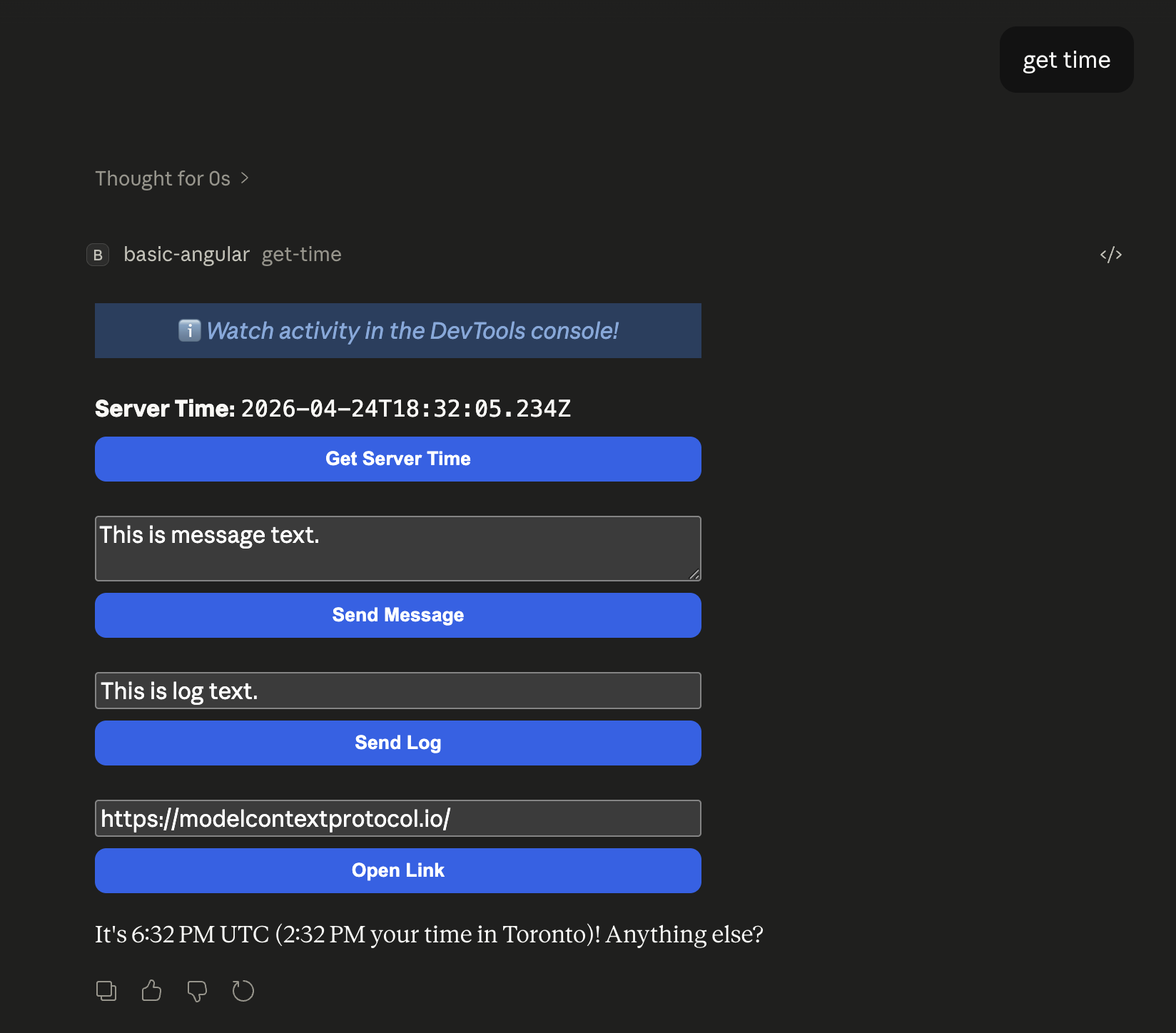
      <p><strong>Server Time:</strong> <code>{{ serverTime() }}</code></p>
      <button (click)="handleGetTime()">Get Server Time</button>
    </main>
  `,
})
export class AppComponent implements OnInit {
  private app: App | null = null;
  hostContext = signal<McpUiHostContext | undefined>(undefined);
  serverTime = signal("Loading...");

  async ngOnInit() {
    const instance = new App({ name: "Get Time App", version: "1.0.0" });

    instance.ontoolresult = (result) => {
      this.serverTime.set(extractText(result));
    };

    instance.onhostcontextchanged = (params) => {
      const ctx = { ...this.hostContext(), ...params };
      this.hostContext.set(ctx);
      if (ctx.theme) applyDocumentTheme(ctx.theme);
      if (ctx.styles?.variables) applyHostStyleVariables(ctx.styles.variables);
      if (ctx.styles?.css?.fonts) applyHostFonts(ctx.styles.css.fonts);
    };

    await instance.connect();
    this.app = instance;

    const ctx = instance.getHostContext();
    this.hostContext.set(ctx);
    if (ctx?.theme) applyDocumentTheme(ctx.theme);
    if (ctx?.styles?.variables) applyHostStyleVariables(ctx.styles.variables);
    if (ctx?.styles?.css?.fonts) applyHostFonts(ctx.styles.css.fonts);
  }

  async handleGetTime() {
    if (!this.app) return;
    try {
      const result = await this.app.callServerTool({
        name: "get-time",
        arguments: {},
      });
      this.serverTime.set(extractText(result));
    } catch {
      this.serverTime.set("[ERROR]");
    }
  }
}
A few things to note:
Appclass — this is the SDK's main entry point. You create one, wire up callbacks, and callconnect(). That's it.ontoolresult— fires when the host sends a tool result. This is how data flows from the server to your UI.callServerTool()— lets the UI call tools on the server. The host proxies this through the MCP client.onhostcontextchanged— the host pushes theme and style updates. The helper functions (applyDocumentTheme, etc.) apply them as CSS variables ondocument, so your component styles just work.safeAreaInsets— the host tells you how much padding to leave for its chrome. Use it on your root container.
Step 4: Adding a Second UI
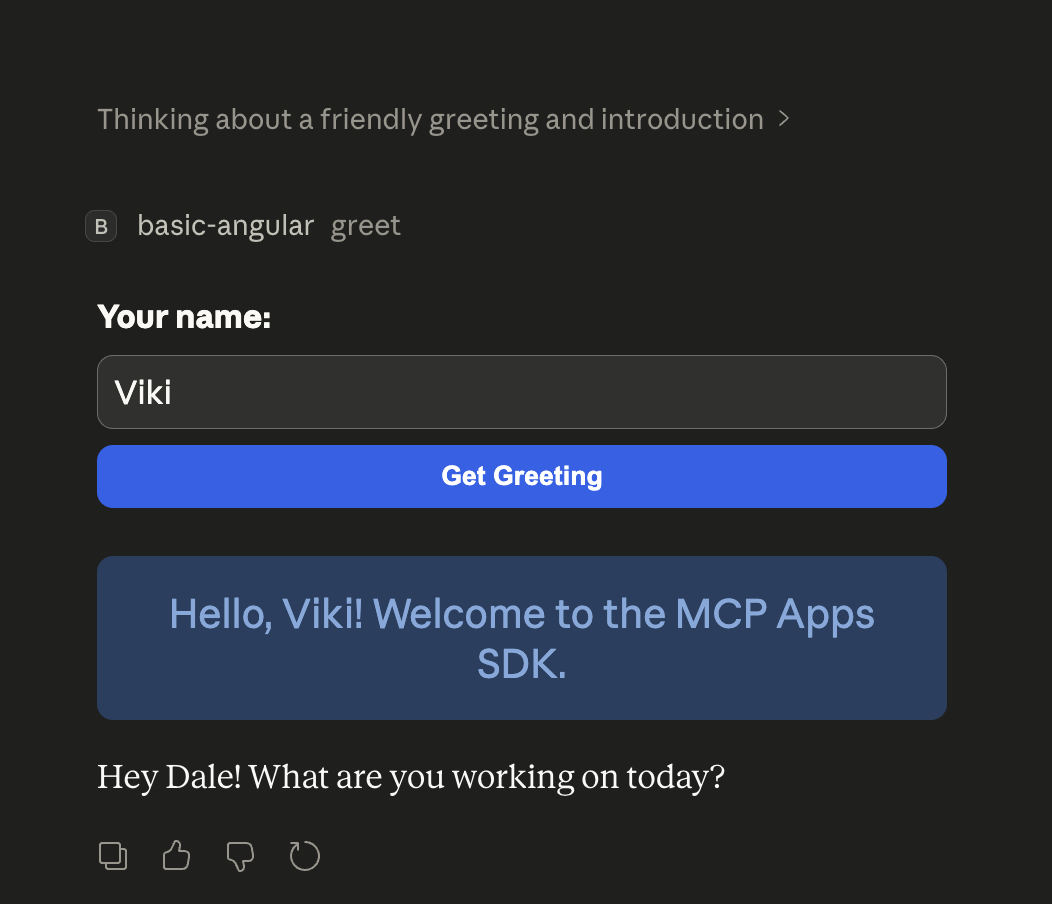
Here's where it gets interesting. Say you want a "Greet" tool with its own UI. Each tool gets its own HTML entry point, its own Angular app, and its own resource registration.
Server: Register Both Tools
// server.ts — inside createServer()

// Tool #1: Get Time
const timeResourceUri = "ui://get-time/mcp-app.html";
registerAppTool(server, "get-time", {
  title: "Get Time",
  description: "Returns the current server time.",
  inputSchema: {},
  _meta: { ui: { resourceUri: timeResourceUri } },
}, async (): Promise<CallToolResult> => {
  return { content: [{ type: "text", text: new Date().toISOString() }] };
});
registerAppResource(server, timeResourceUri, timeResourceUri, {
  mimeType: RESOURCE_MIME_TYPE,
}, async (): Promise<ReadResourceResult> => {
  const html = await fs.readFile(path.join(DIST_DIR, "mcp-app.html"), "utf-8");
  return { contents: [{ uri: timeResourceUri, mimeType: RESOURCE_MIME_TYPE, text: html }] };
});

// Tool #2: Greet
const greetResourceUri = "ui://greet/greeting-app.html";
registerAppTool(server, "greet", {
  title: "Greet",
  description: "Returns a personalised greeting.",
  inputSchema: {
    name: z.string().optional().default("World").describe("Name to greet"),
  },
  _meta: { ui: { resourceUri: greetResourceUri } },
}, async ({ name }: { name?: string }): Promise<CallToolResult> => {
  const greeting = `Hello, ${name || "World"}! Welcome to the MCP Apps SDK.`;
  return { content: [{ type: "text", text: greeting }] };
});
registerAppResource(server, greetResourceUri, greetResourceUri, {
  mimeType: RESOURCE_MIME_TYPE,
}, async (): Promise<ReadResourceResult> => {
  const html = await fs.readFile(path.join(DIST_DIR, "greeting-app.html"), "utf-8");
  return { contents: [{ uri: greetResourceUri, mimeType: RESOURCE_MIME_TYPE, text: html }] };
});
Greeting Component
// src/greeting.component.ts
import { Component, type OnInit, signal } from "@angular/core";
import { FormsModule } from "@angular/forms";
import {
  App,
  applyDocumentTheme,
  applyHostStyleVariables,
  applyHostFonts,
  type McpUiHostContext,
} from "@modelcontextprotocol/ext-apps";
import type { CallToolResult } from "@modelcontextprotocol/sdk/types.js";

@Component({
  selector: "greeting-root",
  imports: [FormsModule],
  template: `
    <main
      [style.padding-top.px]="hostContext()?.safeAreaInsets?.top"
      [style.padding-right.px]="hostContext()?.safeAreaInsets?.right"
      [style.padding-bottom.px]="hostContext()?.safeAreaInsets?.bottom"
      [style.padding-left.px]="hostContext()?.safeAreaInsets?.left"
    >
      <div>
        <label><strong>Your name:</strong></label>
        <input type="text" [(ngModel)]="nameText" placeholder="Enter your name">
        <button (click)="handleGreet()">Get Greeting</button>
      </div>
      @if (greeting()) {
        <div class="greeting-display">{{ greeting() }}</div>
      }
    </main>
  `,
})
export class GreetingComponent implements OnInit {
  private app: App | null = null;
  hostContext = signal<McpUiHostContext | undefined>(undefined);
  greeting = signal("");
  nameText = "";

  async ngOnInit() {
    const instance = new App({ name: "Greeting App", version: "1.0.0" });
    instance.ontoolresult = (result) => {
      this.greeting.set(result.content?.find((c) => c.type === "text")!.text);
    };
    instance.onhostcontextchanged = (params) => {
      const ctx = { ...this.hostContext(), ...params };
      this.hostContext.set(ctx);
      if (ctx.theme) applyDocumentTheme(ctx.theme);
      if (ctx.styles?.variables) applyHostStyleVariables(ctx.styles.variables);
      if (ctx.styles?.css?.fonts) applyHostFonts(ctx.styles.css.fonts);
    };
    await instance.connect();
    this.app = instance;
    const ctx = instance.getHostContext();
    this.hostContext.set(ctx);
    if (ctx?.theme) applyDocumentTheme(ctx.theme);
    if (ctx?.styles?.variables) applyHostStyleVariables(ctx.styles.variables);
    if (ctx?.styles?.css?.fonts) applyHostFonts(ctx.styles.css.fonts);
  }

  async handleGreet() {
    if (!this.app) return;
    try {
      const name = this.nameText.trim() || "World";
      const result = await this.app.callServerTool({ name: "greet", arguments: { name } });
      this.greeting.set(result.content?.find((c) => c.type === "text")!.text);
    } catch {
      this.greeting.set("[ERROR]");
    }
  }
}
Step 5: Sharing Code Between UIs
You probably noticed that both components have identical App setup and theming boilerplate. That's a great candidate for extraction — and since each HTML is a separate Vite entry point, Vite's tree-shaking ensures each bundle only includes what it actually imports.
// src/shared/mcp-app-setup.ts
import {
  App,
  applyDocumentTheme,
  applyHostStyleVariables,
  applyHostFonts,
  type McpUiHostContext,
} from "@modelcontextprotocol/ext-apps";
import type { WritableSignal } from "@angular/core";
import type { CallToolResult } from "@modelcontextprotocol/sdk/types.js";

export function extractText(result: CallToolResult): string {
  return result.content?.find((c) => c.type === "text")!.text;
}

function applyContext(ctx: McpUiHostContext): void {
  if (ctx.theme) applyDocumentTheme(ctx.theme);
  if (ctx.styles?.variables) applyHostStyleVariables(ctx.styles.variables);
  if (ctx.styles?.css?.fonts) applyHostFonts(ctx.styles.css.fonts);
}

export async function createMcpApp(
  name: string,
  hostContext: WritableSignal<McpUiHostContext | undefined>,
  onToolResult?: (result: CallToolResult) => void,
): Promise<App> {
  const app = new App({ name, version: "1.0.0" });
  if (onToolResult) app.ontoolresult = onToolResult;
  app.onhostcontextchanged = (params) => {
    const ctx = { ...hostContext(), ...params } as McpUiHostContext;
    hostContext.set(ctx);
    applyContext(ctx);
  };
  await app.connect();
  const ctx = app.getHostContext();
  hostContext.set(ctx);
  if (ctx) applyContext(ctx);
  return app;
}
Both components import createMcpApp and extractText from the shared module. Since they're in separate Vite builds, tree-shaking still applies — each bundle only pulls in what it calls.
Step 6: The Build
// vite.config.ts
import { defineConfig } from "vite";
import { viteSingleFile } from "vite-plugin-singlefile";

const INPUT = process.env.INPUT;
if (!INPUT) throw new Error("INPUT environment variable is not set");

export default defineConfig({
  plugins: [viteSingleFile()],
  build: {
    rollupOptions: { input: INPUT },
    outDir: "dist",
    emptyOutDir: false, // Key: don't wipe previous builds
  },
});
{
  "scripts": {
    "build": "tsc --noEmit && cross-env INPUT=mcp-app.html vite build && cross-env INPUT=greeting-app.html vite build && tsc -p tsconfig.server.json && bun build server.ts --outdir dist --target node"
  }
}
Each HTML file produces a fully self-contained output (all JS, CSS, and Angular runtime inlined). The two bundles are completely independent.
Theming: Looking Native in Any Host
:root {
  color-scheme: light dark;
  --color-text-primary: light-dark(#1f2937, #f3f4f6);
  --color-background-primary: light-dark(#ffffff, #1a1a1a);
  --color-accent: #2563eb;
  --border-radius-md: 6px;
  --spacing-unit: var(--font-text-md-size);
}
When the host sends style updates via onhostcontextchanged, the helper functions overwrite these variables on the document root. Your Angular component styles reference the variables (var(--color-accent), var(--spacing-md)), so they adapt automatically — no theme prop drilling needed.
Recap
- Server: register a tool + resource pair per UI, linked by a resource URI
- HTML: one entry point per UI, each bootstrapping its own Angular app
- Component: create an
Appinstance, wire up callbacks, callconnect() - Shared code: extract common setup into a shared module — Vite tree-shakes per entry point
- Build: run Vite once per HTML file into the same
dist/directory - Theming: use host CSS variables with fallbacks, apply updates via
onhostcontextchanged
The full source is available in the ext-apps examples.
Comments
More Blog
View allaiContext bankruptcy: The case for strategic forgetting for AI Agents
Most of us have seen a coding agent fail to complete a task we know it can do. We just don't...
J
James O'ReillygooglecloudParallel Compliance Engine: Drive-to-Sheets Multi-Agent Orchestration
When building Generative AI applications, developers often encounter a massive bottleneck: sequential...
A
Aryan IranidiscussIs It Ethical to Post and Ask About Circuits on Dev.to?
I’ve been thinking about sharing some electronic circuit posts on Dev.to — small circuits, DIY...
C
codebunny20agentsThe One-Click Exporter: AI Studio Antigravity, Probed to Its Limits
What nobody tells you about exporting your multi-agent prototype to a local workspace. Every...
L
leslysandraagenticarchitectGuarding the till while autonomous data agents do the digging
Autonomous agents are genuinely good at answering messy business questions. Give one an LLM and a set...
S
Sireesha PulipatiaiReturn on Attention: Why AI Code Reviews Are Wearing Us Out
PR volume went up, ticket quality didn't, and the gap got filled with LLMs on both sides of the review: bots reviewing, bots replying, bots occasionally arguing with bots about priorities that only existed in a teammate's head. Our CEO named the actual problem, and it's bigger than code review.
C
christineReady-made automations for this
Workflows from the Neura Market marketplace related to this Stable Diffusion resource
- Automate Your Website Building with N8N: Unsubscribe Workflowmake · $6.62 · Related topic
- Automate Google Sheets Triggered List Building Workflown8n · $9.53 · Related topic
- AI Agent for Q&A with RAG & Search Engine MCP Serversn8n · $22.99 · Related topic
- Building Your First WhatsApp AI Sales Chatbotn8n · $19.99 · Related topic