
Back to Blog computerscience
 ai
ai googlecloud
 discuss
 agents
 agenticarchitect
 ai
ai
When Information Hits a Wall: Barriers in Cellular Automata
John Samuel April 26, 2026
0 views
TL;DR: Add one frozen cell to a cellular automaton and watch the entire pattern reshape itself. This...
TL;DR: Add one frozen cell to a cellular automaton and watch the entire pattern reshape itself. This post explores what happens when you introduce a single barrier into elementary CAs — and why it matters for both theory and real-world modeling.
What happens when a single cell in a cellular automaton refuses to change?
In elementary cellular automata (ECAs), every cell updates each generation based on its neighbors and a deterministic rule. Patterns emerge, spread, and evolve across the grid in beautiful, often chaotic ways. But introduce one frozen cell — one immutable point that never updates — and the entire system transforms.
This simple constraint acts like matter in an otherwise purely computational space, blocking information flow and reshaping how patterns propagate.
🧱 The Barrier Concept
A barrier is remarkably simple to define: mark one cell as frozen.
While every other cell continues updating according to the automaton's rule, this single cell remains locked in its initial state. It doesn't compute. It doesn't respond to neighbors. It just sits there, unchanging.
The automaton must work around this obstacle. Information flowing through the grid can't pass through the barrier — it reflects, splits, or terminates at this boundary.
Think of it like dropping a rock into a stream: the water doesn't stop, but its flow pattern is permanently altered.
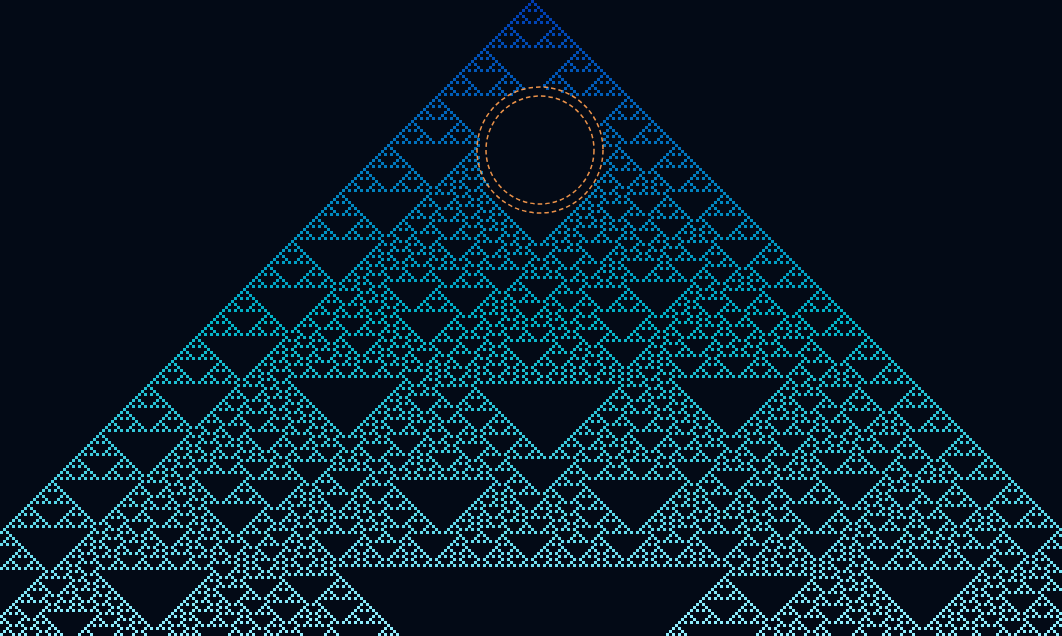
Rule 195
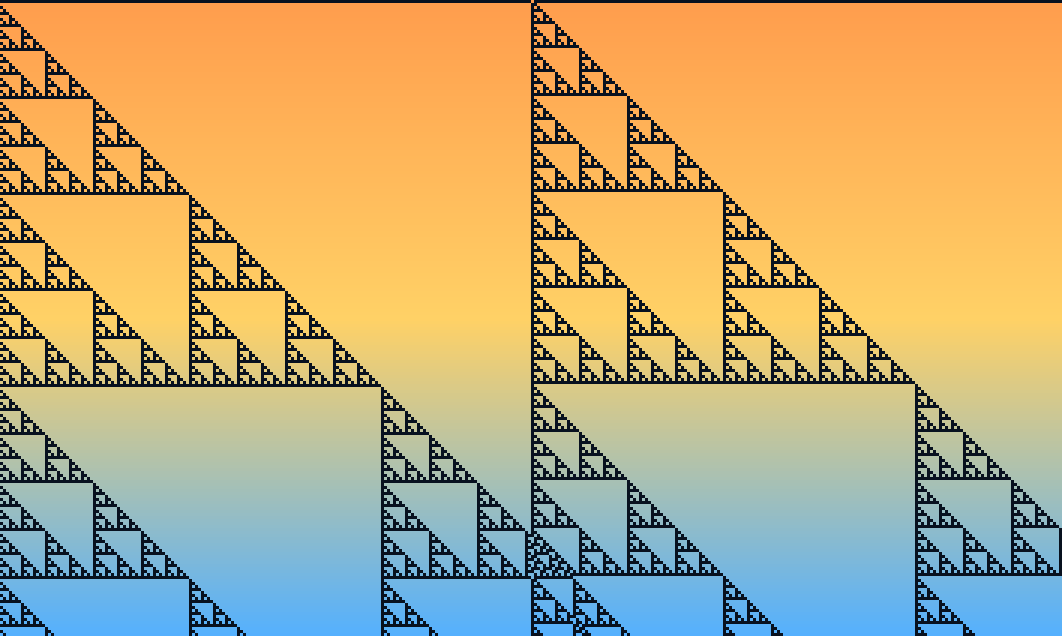
Rule 195 with one cell barrier
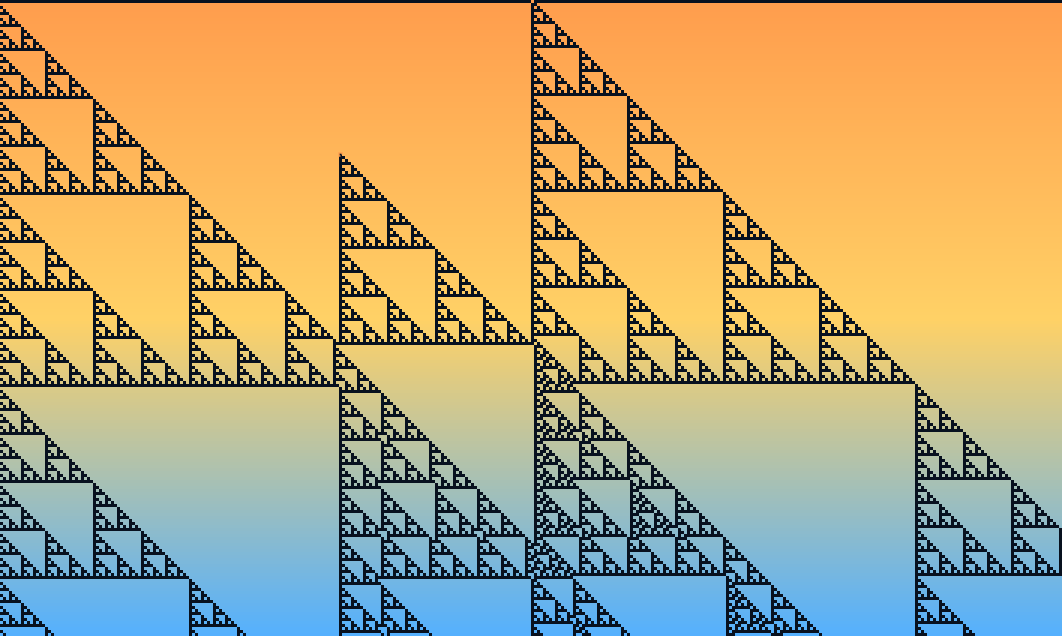
🔬 Visualizing the Impact: Three Rules, One Barrier
Rule 30 — Chaos Interrupted
Rule 30 is famous for its chaotic, random-looking output — so much so that Wolfram used it as a pseudorandom number generator. Place a barrier anywhere in a Rule 30 grid, and you see dramatic sensitivity: patterns on either side of the frozen cell diverge completely, as if two independent automata are running simultaneously.
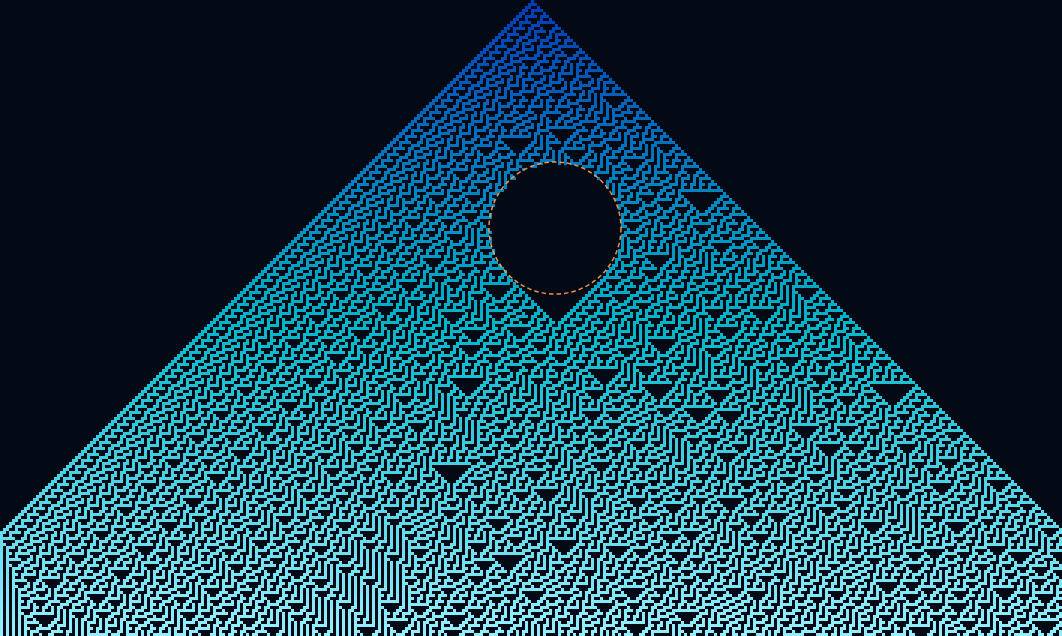
Rule 110 — Computation Blocked
Rule 110 is remarkable: it's been proven Turing-complete, capable of universal computation. A barrier doesn't just disrupt its pattern — it interrupts the computation itself. Signals that would have propagated and interacted across the grid are halted or reflected, cutting off potential glider collisions and information pathways.
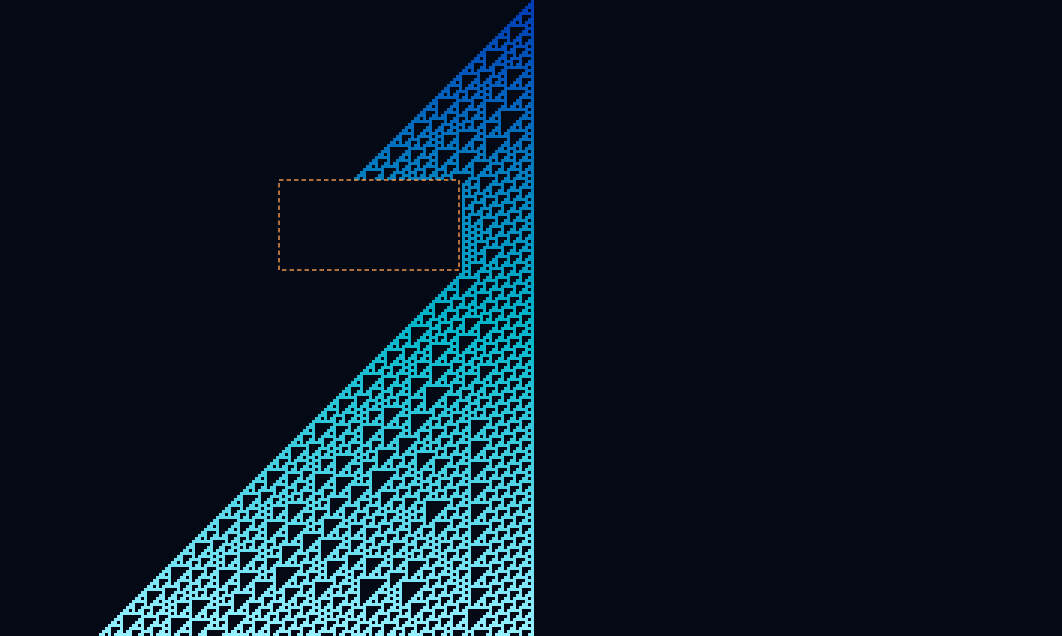
Rule 90 — Symmetry Preserved (Then Broken)
Rule 90 produces beautiful, perfectly symmetric Sierpiński triangle-like patterns under normal conditions. Add a barrier on the central axis, and the symmetry is maintained. Shift it off-center, however, and you get asymmetric reflections — a clean demonstration of how positional context shapes global behavior.
🧪 A Minimal Experiment You Can Run
Here's the core idea in code:
# Elementary CA with a single frozen barrier
RULE = 30
SIZE = 101
BARRIER_POS = SIZE // 3  # Offset from center

grid = [0] * SIZE
grid[SIZE // 2] = 1  # Single active cell at start

def step(row, rule, barrier):
    new_row = []
    for i in range(len(row)):
        if i == barrier:
            new_row.append(row[i])  # Frozen — never updates
        else:
            left   = row[i - 1] if i > 0 else 0
            center = row[i]
            right  = row[i + 1] if i < len(row) - 1 else 0
            index  = (left << 2) | (center << 1) | right
            new_row.append((rule >> index) & 1)
    return new_row

for _ in range(50):
    grid = step(grid, RULE, BARRIER_POS)
The key insight: one if statement is all it takes to turn a computational cell into a physical obstacle.
Try changing BARRIER_POS or swapping RULE to 90 or 110 — the behavioral differences are striking.
💡 Why One Barrier Matters
The single-barrier setup is a case of minimal experimental design. By introducing exactly one constraint, you isolate its effects cleanly — no noise from multiple obstacles or extended walls. Every change in behavior traces directly back to that one frozen cell.
This reveals something profound: cellular automata, despite being abstract computational systems, respond to spatial constraints in ways that feel physical. The barrier doesn't change the rule or the initial conditions — it just occupies space. Yet this spatial occupation transforms global dynamics.
From a research perspective, barriers bridge pure computation and physical simulation:
- 🔷 Crystal defects in material science — impurities that scatter phonons and electrons
- 🌊 Obstacles in fluid flow — the same logic underpins lattice-Boltzmann simulations
- ⚛️ Scattering particles in quantum systems — potential wells and barriers that reflect wave functions
Cellular automata give us a clean, discrete sandbox to study the same phenomenon at minimal cost.
🚀 Try It Interactively
In a universe of pure information, a barrier becomes matter. And matter, it turns out, changes everything.
👉 Explore barriers interactively at CellCosmos
Switch between Rule 30, 90, and 110. Drag the barrier to different positions. Watch how one frozen cell reshapes the entire computation around it.
What rule or barrier position surprised you the most? Drop a comment — I'd love to compare notes!
Comments
More Blog
View allaiContext bankruptcy: The case for strategic forgetting for AI Agents
Most of us have seen a coding agent fail to complete a task we know it can do. We just don't...
J
James O'ReillygooglecloudParallel Compliance Engine: Drive-to-Sheets Multi-Agent Orchestration
When building Generative AI applications, developers often encounter a massive bottleneck: sequential...
A
Aryan IranidiscussIs It Ethical to Post and Ask About Circuits on Dev.to?
I’ve been thinking about sharing some electronic circuit posts on Dev.to — small circuits, DIY...
C
codebunny20agentsThe One-Click Exporter: AI Studio Antigravity, Probed to Its Limits
What nobody tells you about exporting your multi-agent prototype to a local workspace. Every...
L
leslysandraagenticarchitectGuarding the till while autonomous data agents do the digging
Autonomous agents are genuinely good at answering messy business questions. Give one an LLM and a set...
S
Sireesha PulipatiaiReturn on Attention: Why AI Code Reviews Are Wearing Us Out
PR volume went up, ticket quality didn't, and the gap got filled with LLMs on both sides of the review: bots reviewing, bots replying, bots occasionally arguing with bots about priorities that only existed in a teammate's head. Our CEO named the actual problem, and it's bigger than code review.
C
christineReady-made automations for this
Workflows from the Neura Market marketplace related to this Stable Diffusion resource
- Notion Knowledge Base AI Assistant for Enhanced Information Managementn8n · $19.99 · Related topic
- Get GitHub Contributors' Information in Slackn8n · $15.99 · Related topic
- Automated Logo Information Extraction Workflown8n · $15.95 · Related topic
- Automated Spotify Track Information Processorn8n · $14.99 · Related topic