
Back to Blog tpu
tpu
 ai
ai googlecloud
 discuss
 agents
 agenticarchitect
 ai
ai
ML acceleration guide: TPUs vs GPUs
Glen Yu April 28, 2026
0 views
There’s a lot of hype around GPUs and NVIDIA, but how much do you know about TPUs? Article...
There’s a lot of hype around GPUs and NVIDIA, but how much do you know about TPUs?
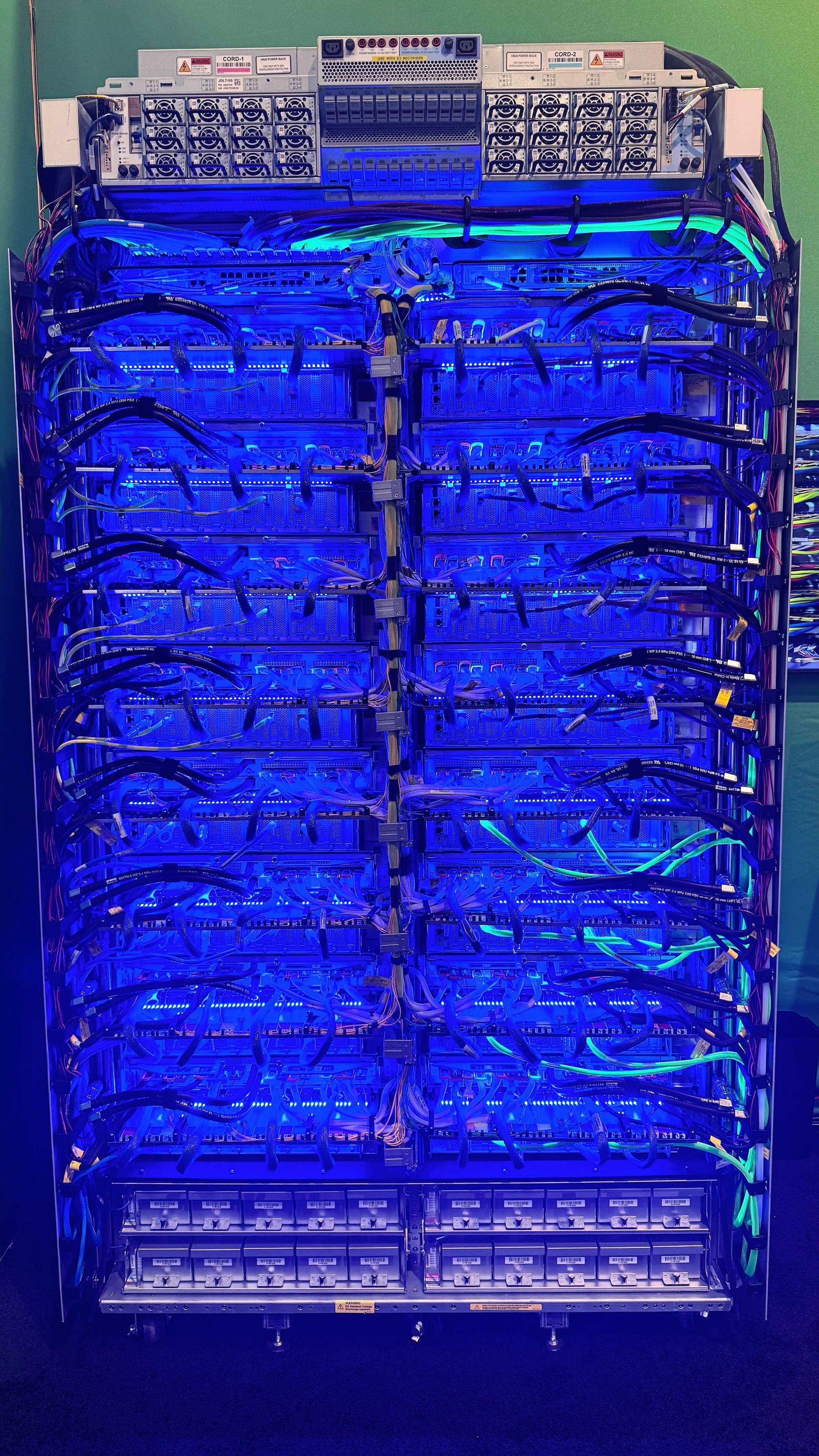
Article includes code examples you can find near the end
Rise of GPUs
Graphics Processing Units have been around for quite some time and their job is to render 2D and 3D graphics in to millions of pixels, calculating their colour, texture, lighting, in parallel to send to your monitor. For a 60Hz monitor that means producing rendered frames 60 times every second.
Rendering graphics is one thing, but developing code for handling GPUs was a little more difficult. That is, until NVIDIA launched CUDA (Compute Unified Device Architecture) in 2006, which allowed scientific researchers and developers who work in fields that require massive parallel math to take advantage of a GPU’s capabilities. With the rise of machine learning in the early 2010’s, it was discovered that the massive parallel math was exactly what ML engineers needed to train deep neural networks. Since then, the focus of CUDA has been shifting more towards optimizing for machine learning and AI workloads.
Because GPUs were commercially available and relatively inexpensive at the time, the barrier to entry was low. An ML engineer could train models on their NVIDIA graphics card during the day and jump into a game of League of Legends at night on the same hardware.
Honourable mention
AMD’s GPUs with Radeon Open Compute (ROCm) in an open-source software stack designed to compete in the AI ecosystem. Though it’s not as popular as CUDA, this gap is closing with Meta recently signing a deal to expand its existing partnership with AMD.
Tensor Processing Unit
In the early 2010s, Google projected that the growing demands of its AI workloads, particularly the rapid adoption of deep learning across products like Search and Photos, would require doubling its data center computing capacity roughly every year and a half. Rather than scale generic hardware indefinitely, Google sought a more efficient solution purpose-built for neural network computation, and thus the Tensor Processing Unit (TPU) was born. The TPU is a custom application-specific integrated circuit (ASIC) designed by Google specifically to accelerate AI workloads, deployed internally starting in 2015. By specializing the hardware for the dense matrix operations at the heart of neural networks, TPUs achieve dramatically better performance per watt than general-purpose CPUs or GPUs, reducing both energy consumption and cooling demands at data center scale.
Google has a tradition of making tools it uses internally available to the broader world, and TPUs are another example of this. The existence of TPUs was first publicly announced at Google I/O in 2016. In 2018, Cloud TPU v2 became available for external users through Google Cloud, marking the first time developers outside Google could harness the same accelerators powering Google’s own AI systems. TPUs also come in two performance flavours: efficiency and performance to meet different market needs.
NOTE: As of the 8th generation of TPUs announced during Google Next 2026, efficiency and performance TPUs will be renamed inference and training respectively in favour of a more descriptive, workload-based naming convention.
Architecture layout
From an architectural standpoint, GPUs can be thought of as being individual computers with accelerators (picture your home gaming PC). If you want to connect them into a cluster, it would be over network, but no matter how fast the network is, it still has to cross node boundaries, and bandwidth drops as a result.
TPUs are designed from the ground up to be interconnected at a massive scale with a physical layout that involves thousands of TPU chips in a torus topology which gives every chip 6 neighbours (two per axis, one on each side). Recognize that interconnect bandwidth would be the main bottleneck at this scale, Google designed their own proprietary Inter-Chip Interconnect (ICI) network which provides uniform, high-bandwidth, low-latency connections between all the chips in a slice regardless of physical location. With torus topology, there is no concept of crossing a node boundary. When you request TPUs, you do not get the entire TPU cluster or pod. Rather, you get only a small subset or slice. To make this possible, Google developed Optical Circuit Switch (OCS) to be able to rewire physical connections on the fly (entirely in software), allowing the same hardware to serve different workload shapes without any physical reconfiguration.
NOTE: Efficiency TPU versions use a 2D torus topology, while Performance TPUs leverage a 3D torus architecture to give you maximum performance with minimum latency.
Precision and range
A floating-point number consists of three parts:
- Sign: Positive or negative (represented by the first bit)
- Exponent: Determines the range of the number
- Mantissa: Significant digits of a floating-point number, which determines the accuracy
Traditionally, the standard for high-performance computing was FP32. When AI researchers moved to FP16 to save memory, they lost more than just accuracy: they also lost range. FP32 uses 8 bits for the exponent, while FP16 uses only 5. The 3-bit difference in the exponent bits amount to an almost 10³⁴ difference in range (FP32 has a range of 3.4 x 10³⁸, while FP16 only has a range of 6.5 x 10⁴). In deep learning, where gradients can be incredibly tiny, FP16 often suffers from underflow (meaning numbers are being rounded to 0 because it is too small for FP16’s range to represent), requiring a technical workaround called “loss scaling” to keep the math stable.
Google Brain (now part of Google DeepMind) solved this invented Brain Floating Point (bfloat16), which simply shifted 3 bits from the mantissa to exponents:
| Format | Total Bits | Exponent Bits | Mantissa Bits |
|---|---|---|---|
| FP32 | 32 | 8 | 23 |
| FP16 | 16 | 5 | 10 |
| bfloat16 | 16 | 8 | 7 |
By sacrificing precision for range, bfloat offers the same massive range as FP32, but with the reduced memory and bandwidth of FP16. A huge reason for why this works is that deep learning models are surprisingly noise-tolerant and having more training stability is for more important than having a few extra decimal places of precision. Today, bfloat16 is the de facto standard for training modern LLMs on NVIDIA’s GPUs and Google’s TPUs.
Why XLA matters
Standard Python execution typically takes an eager approach. This means it executes each step as it is being encountered. This is great for debugging because you can insert print statements to inspect variables at any point.
XLA (Accelerated Linear Algebra), on the other hand, is a domain-specific JIT compiler. Instead of executing steps one by one, it analyzes the entire execution graph to optimize and fuse operations before they run. This lazy approach creates an initial warm-up delay, but once the training starts, it is significantly faster than standard methods. The tradeoff is transparency: your step-by-step Python code becomes an optimized “black box”, making traditional debugging strategies more difficult. This is why TPUs are powerhouses for massive enterprise training, while GPUs remain the flexible choice for quick experimentation.
NOTE: Though XLA was built for TPUs, it’s also made its way into the NVIIA GPU ecosystem via tools such as JAX and torch.compile since PyTorch 2.0.
TorchTPU
Google is engineering a TorchTPU stack that will provide native PyTorch support. This would allow you to run models in TPUs as they are with full support for native PyTorch features. TorchTPU is currently in preview, and once it becomes GA, you can be sure I’ll be diving deeper into it!
Code example
I’m including a couple of Jupyter notebooks that I ran via Antigravity + Colab plugin for you to try yourself:
As you will see from the results below, TPU is indeed faster. However, my example isn’t large enough or complex enough to really showcase the true speeds that TPU can bring.
NOTE: I have a Colab Pro account which affords me access to additional GPUs and TPUs. The Colab free tier only includes NVIDIA T4 and TPU v5e-1
Interpreting training results
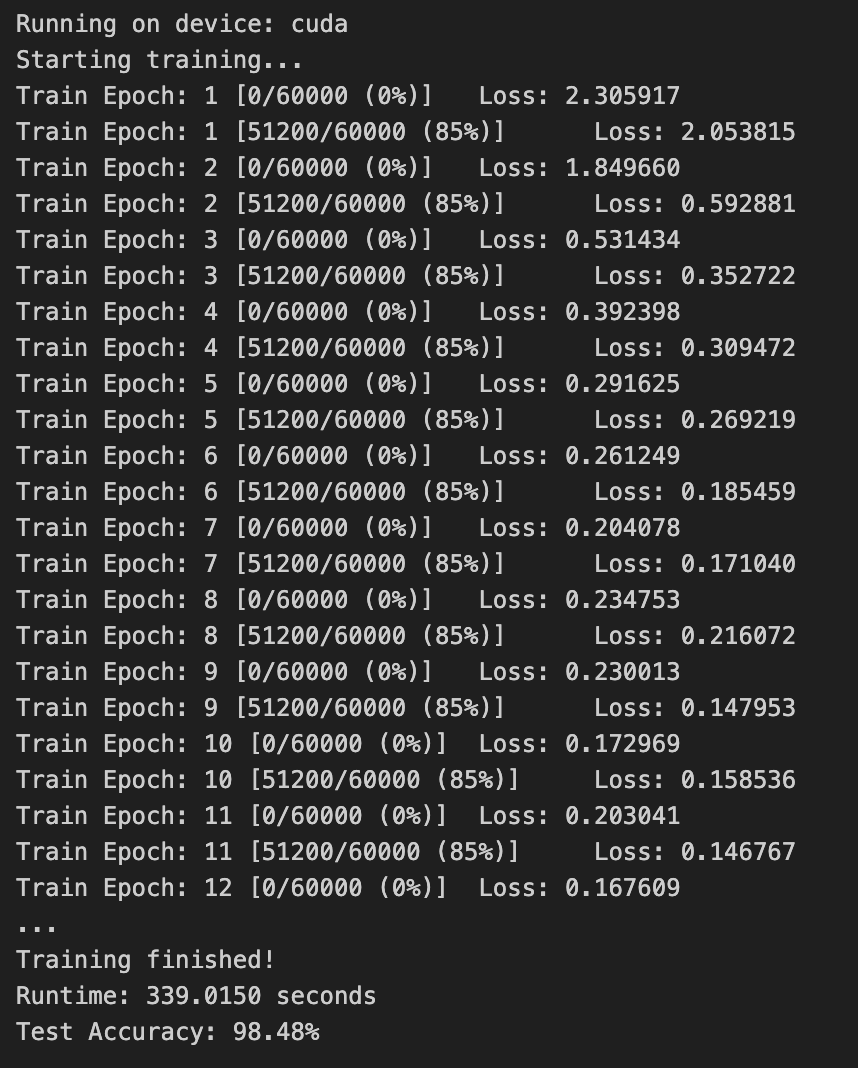
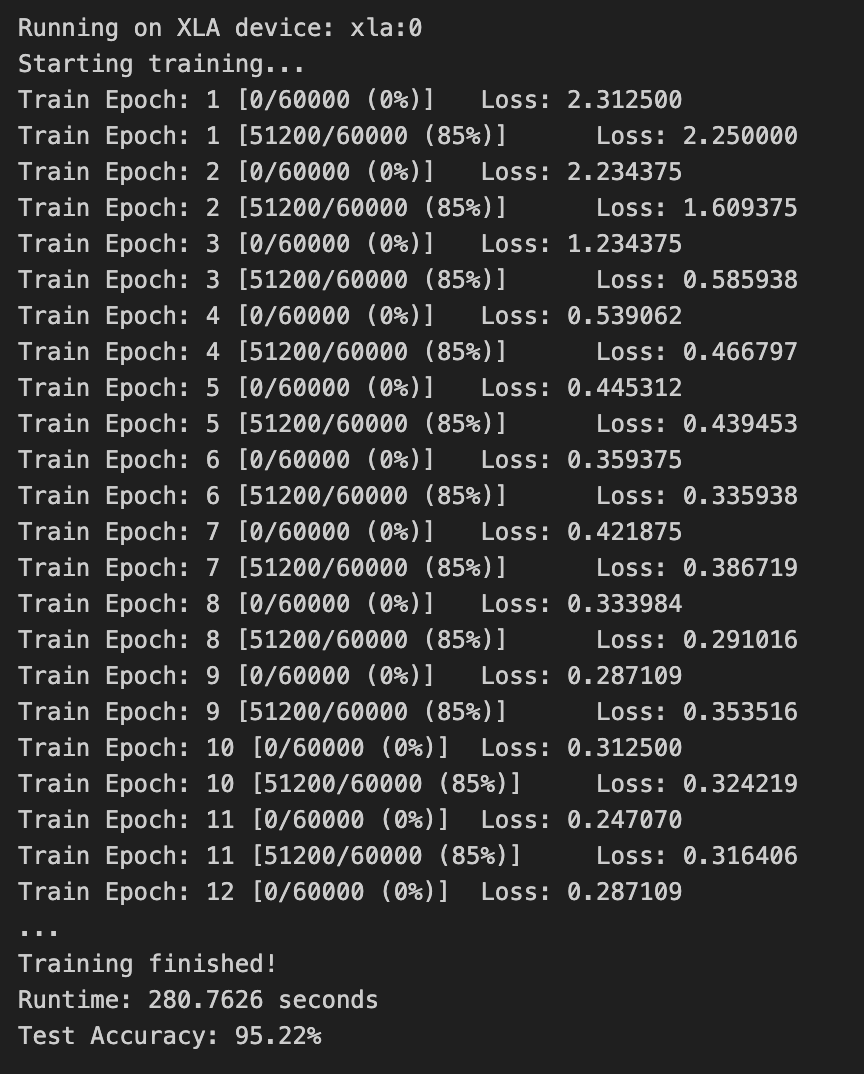
These are some benchmark trainings (epochs: 50, batch size: 512) in which I used a NVIDIA T4 GPU with (default) FP32 vs Google TPU v5e-1 (single chip TPU) with bfloat16. As expected, TPUs were faster but with lower precision:
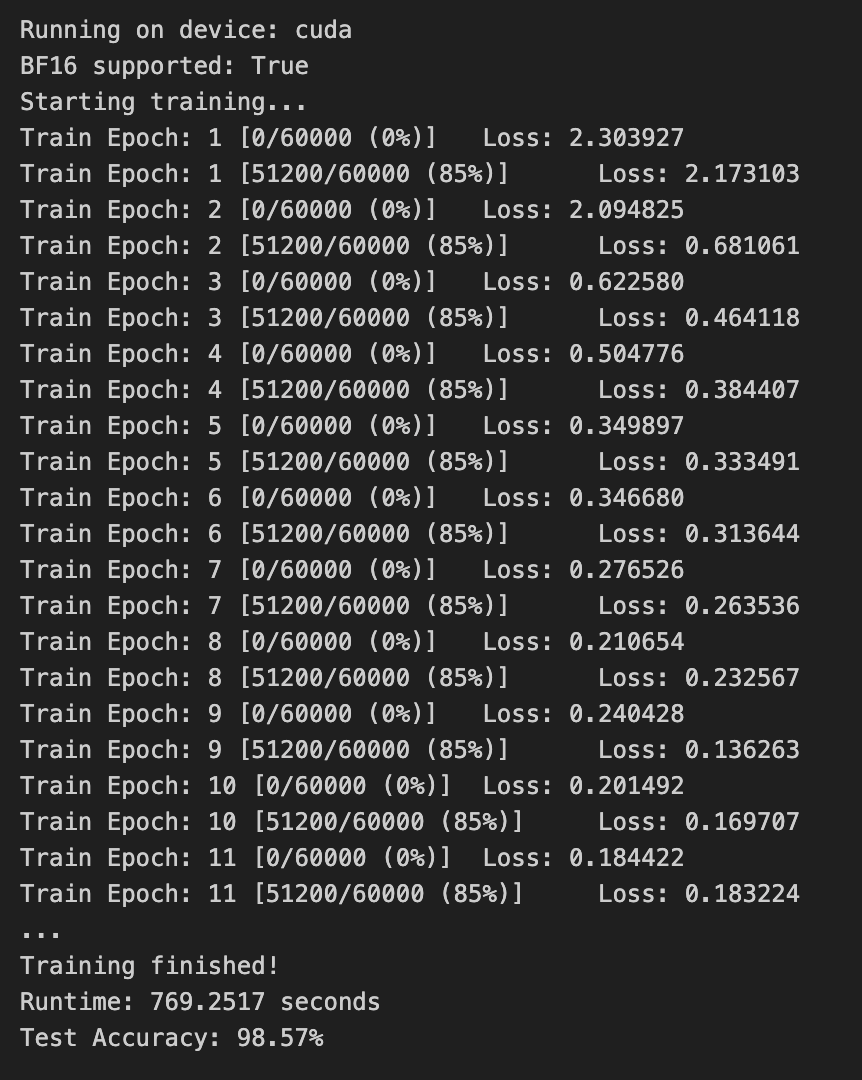
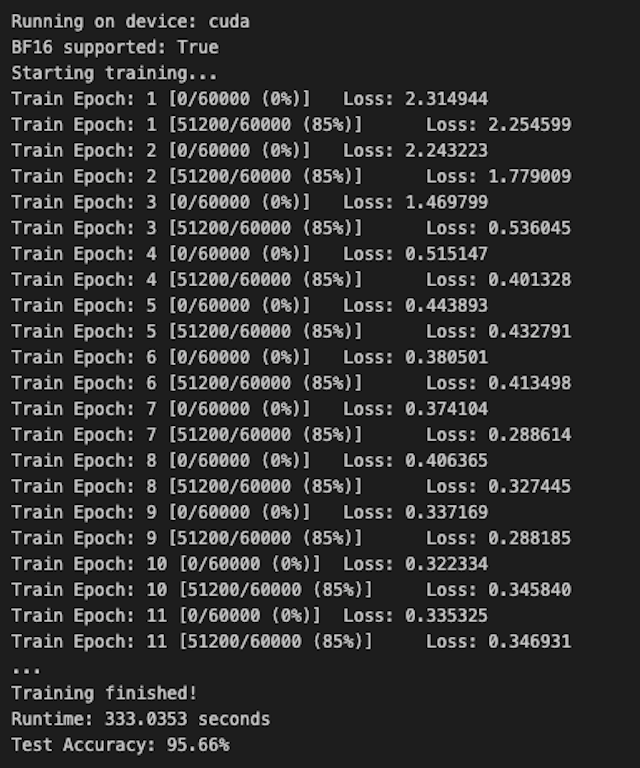
I then trained the same model using the T4 GPU using bfloat16 but noticed a massive performance drop. This was due to the T4 being an older generation GPU that did not support bfloat16 natively and had to emulate which added a lot of overhead. Switching to a newer L4 GPU, I was able to see the (tiny) performance gain along with the reduced precision:
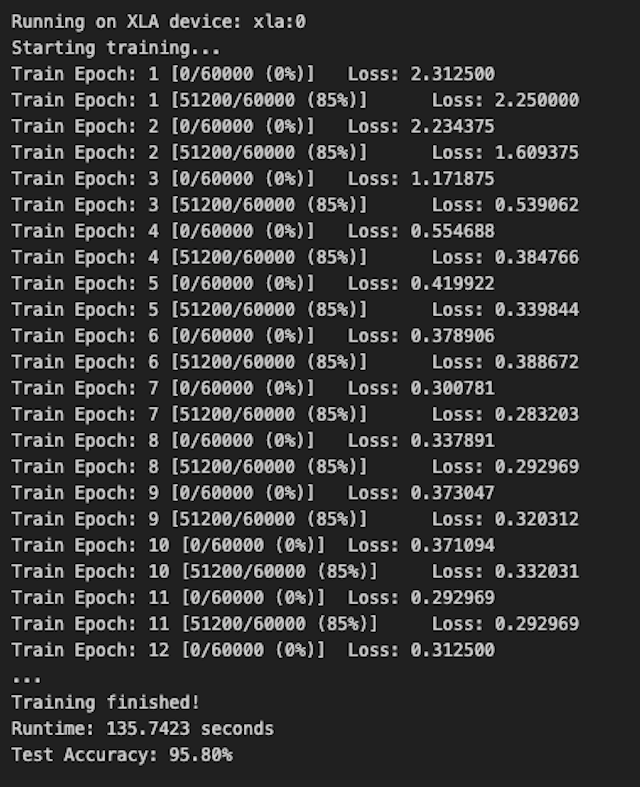
Finally, I thought I’d see how the training would perform on a newer TPU v6e-1 and I was blown away by the improvement:
Conclusion
Comparing GPUs and TPUs isn’t exactly apples-to-apples. They represent fundamentally different philosophies in architecture, memory management, and execution.
In the modern enterprise, it isn’t usually a matter of choosing one over the other, but rather using each where it shines. For rapid iteration and smaller workloads, the flexibility of GPUs is unmatched. However, once a project hits a certain scale, the domain-specific architecture of the TPU becomes the clear winner in efficiency and throughput.
TPUs are as fast as they are because they are a specialized one-trick pony, but to truly harness that power requires a deeper understanding of the stack. The biggest challenge isn’t often the compute itself, but rather: “How do I feed data to the TPUs fast enough and efficiently enough so that it doesn’t become the bottleneck?” and ensuring your input pipeline is fast enough so that the hardware doesn’t sit idle.
In future posts, I'll dive deeper into these advanced concepts to show how you can optimizing data pipelines to get the most out of your TPUs.
BONUS: Google’s 8th-generation TPUs announced at Google Next
{% embed https://www.youtube.com/watch?v=3Qw_CZkiQQg %}
Comments
More Blog
View allaiContext bankruptcy: The case for strategic forgetting for AI Agents
Most of us have seen a coding agent fail to complete a task we know it can do. We just don't...
J
James O'ReillygooglecloudParallel Compliance Engine: Drive-to-Sheets Multi-Agent Orchestration
When building Generative AI applications, developers often encounter a massive bottleneck: sequential...
A
Aryan IranidiscussIs It Ethical to Post and Ask About Circuits on Dev.to?
I’ve been thinking about sharing some electronic circuit posts on Dev.to — small circuits, DIY...
C
codebunny20agentsThe One-Click Exporter: AI Studio Antigravity, Probed to Its Limits
What nobody tells you about exporting your multi-agent prototype to a local workspace. Every...
L
leslysandraagenticarchitectGuarding the till while autonomous data agents do the digging
Autonomous agents are genuinely good at answering messy business questions. Give one an LLM and a set...
S
Sireesha PulipatiaiReturn on Attention: Why AI Code Reviews Are Wearing Us Out
PR volume went up, ticket quality didn't, and the gap got filled with LLMs on both sides of the review: bots reviewing, bots replying, bots occasionally arguing with bots about priorities that only existed in a teammate's head. Our CEO named the actual problem, and it's bigger than code review.
C
christineReady-made automations for this
Workflows from the Neura Market marketplace related to this Stable Diffusion resource
- Auto-translate Blog Articles with Google Translate and Airtable Storagen8n · Free · Related topic
- WordPress Content Assistant: Article Recommendations & Q&A with Mistral AIn8n · Free · Related topic
- Command-based Telegram Bot for Article Summarization & Image Prompts with OpenAIn8n · Free · Related topic
- TechCrunch AI Article Scraper & Classifier with GPT-4.1-nano to Sheets & Telegramn8n · Free · Related topic