
Back to Blog multiagentsystems
 ai
ai googlecloud
 discuss
 agents
 agenticarchitect
 ai
ai
Multi-Agent A2A with the Agent Development Kit(ADK), Azure Functions, and Gemini CLI
xbill May 3, 2026
0 views
Leveraging the Google Agent Development Kit (ADK) and the underlying Gemini LLM to build Multi-Agent...
title: Multi-Agent A2A with the Agent Development Kit(ADK), Azure Functions, and Gemini CLI published: true series: Azure date: 2026-05-03 02:02:47 UTC tags: multiagentsystems,geminicli,googleadk,a2aprotocol canonical_url: https://xbill999.medium.com/multi-agent-a2a-with-the-agent-development-kit-adk-azure-functions-and-gemini-cli-da1d5e0612a7
Leveraging the Google Agent Development Kit (ADK) and the underlying Gemini LLM to build Multi-Agent Applications with A2A protocol support using the Python programming language.
Aren’t There a Billion Python ADK Demos?
Yes there are.
Python has traditionally been the main coding language for ML and AI tools. The goal of this article is to provide a multi-agent test bed for building, debugging, and deploying multi-agent applications.
What you talkin ‘bout Willis?
So what is different about this lab compared to all the others out there?
This is one of the first deep dives into a Multi-Agent application leveraging the advanced tooling of Gemini CLI. The starting point for the demo was an existing Codelab- which was updated and re-engineered with Gemini CLI.
The original Codelab- is here:
Building a Multi-Agent System | Google Codelabs
What Is Python?
Python is an interpreted language that allows for rapid development and testing and has deep libraries for working with ML and AI:
Python Version Management
One of the downsides of the wide deployment of Python has been managing the language versions across platforms and maintaining a supported version.
The pyenv tool enables deploying consistent versions of Python:
GitHub - pyenv/pyenv: Simple Python version management
As of writing — the mainstream python version is 3.13. To validate your current Python:
python --version
Python 3.13.13
Azure Functions
Azure Functions is a serverless, event-driven compute service that allows developers to run code on-demand without managing infrastructure. It supports multiple languages (C#, Python, JavaScript, Java, PowerShell) and scales automatically, charging only when code executes. Key use cases include building APIs, processing data, and running scheduled tasks. [1, 2, 3, 4, 5]
Key Aspects of Azure Functions
- Serverless Architecture: You focus on code, while Azure handles infrastructure, patching, and scaling.
- Event-Driven Triggers: Functions are triggered by events such as HTTP requests, timers, or data changes in Azure Storage/Cosmos DB.
- Bindings: Connect to other services (e.g., queues, databases) with minimal code.
- Durable Functions: Enable stateful, long-running workflows with features like chaining, fan-out, and checkpoints.
More details are available here:
https://azure.microsoft.com/en-us/products/functions
Why would I want Gemini CLI with Azure? Isn’t that a Google Thing?
Yes- Gemini CLI leverages the Google Cloud console and Gemini models but it is also open source and platform agnostic. Many applications are already cross-cloud so this enables familiar tools to be run natively on Microsoft Azure.
Azure Functions Configuration
To configure your Azure Service with the base system tools- this article provides a reference:
MCP Development with Gemini CLI, Python, and Azure Functions
Gemini CLI
If not pre-installed you can download the Gemini CLI to interact with the source files and provide real-time assistance:
npm install -g @google/gemini-cli
Testing the Gemini CLI Environment
Once you have all the tools and the correct Node.js version in place- you can test the startup of Gemini CLI. You will need to authenticate with a Key or your Google Account:
▝▜▄ Gemini CLI v0.33.1
    ▝▜▄
   ▗▟▀ Logged in with Google /auth
  ▝▀ Gemini Code Assist Standard /upgrade no sandbox (see /docs) /model Auto (Gemini 3) | 239.8 MB
Node Version Management
Gemini CLI needs a consistent, up to date version of Node. The nvm command can be used to get a standard Node environment:
Agent Development Kit
The Google Agent Development Kit (ADK) is an open-source, Python-based framework designed to streamline the creation, deployment, and orchestration of sophisticated, multi-agent AI systems. It treats agent development like software engineering, offering modularity, state management, and built-in tools (like Google Search) to build autonomous agents.
The ADK can be installed from here:
Agent Skills
Gemini CLI can be customized to work with ADK agents. Both an Agent Development MCP server, and specific Agent skills are available.
More details are here:
To get the Agent Skills in Gemini CLI:
> /skills list
Available Agent Skills:

- adk-cheatsheet
      MUST READ before writing or modifying ADK agent code. ADK API quick reference for Python — agent types, tool definitions, orchestration
      patterns, callbacks, and state management. Includes an index of all ADK documentation pages. Do NOT use for creating new projects (use
      adk-scaffold).
  - adk-deploy-guide
      MUST READ before deploying any ADK agent. ADK deployment guide — Agent Engine, Cloud Run, GKE, CI/CD pipelines, secrets, observability, and
      production workflows. Use when deploying agents to Google Cloud or troubleshooting deployments. Do NOT use for API code patterns (use
      adk-cheatsheet), evaluation (use adk-eval-guide), or project scaffolding (use adk-scaffold).
  - adk-dev-guide
      ALWAYS ACTIVE — read at the start of any ADK agent development session. ADK development lifecycle and mandatory coding guidelines —
      spec-driven workflow, code preservation rules, model selection, and troubleshooting.
  - adk-eval-guide
      MUST READ before running any ADK evaluation. ADK evaluation methodology — eval metrics, evalset schema, LLM-as-judge, tool trajectory
      scoring, and common failure causes. Use when evaluating agent quality, running adk eval, or debugging eval results. Do NOT use for API code
      patterns (use adk-cheatsheet), deployment (use adk-deploy-guide), or project scaffolding (use adk-scaffold).
  - adk-observability-guide
      MUST READ before setting up observability for ADK agents or when analyzing production traffic, debugging agent behavior, or improving agent
      performance. ADK observability guide — Cloud Trace, prompt-response logging, BigQuery Agent Analytics, third-party integrations, and
      troubleshooting. Use when configuring monitoring, tracing, or logging for agents, or when understanding how a deployed agent handles real
      traffic.
  - adk-scaffold
      MUST READ before creating or enhancing any ADK agent project. Use when the user wants to build a new agent (e.g. "build me a search agent")
      or enhance an existing project (e.g. "add CI/CD to my project", "add RAG").
and the ADK documentation:
> /mcp list
Configured MCP servers:

🟢 adk-docs-mcp (from adk-docs-ext) - Ready (2 tools)
  Tools:
  - mcp_adk-docs-mcp_fetch_docs
  - mcp_adk-docs-mcp_list_doc_sources
Where do I start?
The strategy for starting multi agent development is a incremental step by step approach.
First, the basic development environment is setup with the required system variables, and a working Gemini CLI configuration.
Then, ADK Multi-Agent is built, debugged, and tested locally. Finally — the entire solution is deployed to Azure Functions .
Setup the Basic Environment
At this point you should have a working Python environment and a working Gemini CLI installation. All of the relevant code examples and documentation is available in GitHub.
The next step is to clone the GitHub repository to your local environment:
cd ~
git clone https://github.com/xbill9/gemini-cli-azure
cd mulit-functions
Then run init2.sh from the cloned directory.
The script will attempt to determine your shell environment and set the correct variables:
source init2.sh
If your session times out or you need to re-authenticate- you can run the set_env.sh script to reset your environment variables:
source set_env.sh
Variables like PROJECT_ID need to be setup for use in the various build scripts- so the set_env script can be used to reset the environment if you time-out.
Finally install the packages and dependencies:
cd multi-functions
make install
Verify The ADK Installation
To verify the setup, run the ADK CLI locally with the researcher agent:
xbill@penguin:~/gemini-cli-azure/multi-functions/agents$ adk run researcher
/home/xbill/.pyenv/versions/3.13.13/lib/python3.13/site-packages/authlib/_joserfc_helpers.py:8: AuthlibDeprecationWarning: authlib.jose module is deprecated, please use joserfc instead.
It will be compatible before version 2.0.0.
  from authlib.jose import ECKey
/home/xbill/.pyenv/versions/3.13.13/lib/python3.13/site-packages/google/adk/features/_feature_decorator.py:72: UserWarning: [EXPERIMENTAL] feature FeatureName.PLUGGABLE_AUTH is enabled.
  check_feature_enabled()
Log setup complete: /tmp/agents_log/agent.20260502_210037.log
To access latest log: tail -F /tmp/agents_log/agent.latest.log
{"asctime": "2026-05-02 21:00:37,163", "name": "root", "levelname": "INFO", "message": "Logging initialized for researcher", "filename": "logging_config.py", "lineno": 54, "service": "researcher", "log_level": "INFO"}
{"asctime": "2026-05-02 21:00:37,165", "name": "researcher.agent", "levelname": "INFO", "message": "Initialized researcher agent with model: gemini-2.5-flash", "filename": "agent.py", "lineno": 85}
{"asctime": "2026-05-02 21:00:37,167", "name": "google_adk.google.adk.cli.utils.envs", "levelname": "INFO", "message": "Loaded .env file for researcher at /home/xbill/gemini-cli-azure/multi-functions/.env", "filename": "envs.py", "lineno": 83}
{"asctime": "2026-05-02 21:00:37,168", "name": "google_adk.google.adk.cli.utils.local_storage", "levelname": "INFO", "message": "Using per-agent session storage rooted at /home/xbill/gemini-cli-azure/multi-functions/agents", "filename": "local_storage.py", "lineno": 84}
{"asctime": "2026-05-02 21:00:37,169", "name": "google_adk.google.adk.cli.utils.local_storage", "levelname": "INFO", "message": "Using file artifact service at /home/xbill/gemini-cli-azure/multi-functions/agents/researcher/.adk/artifacts", "filename": "local_storage.py", "lineno": 110}
{"asctime": "2026-05-02 21:00:37,170", "name": "google_adk.google.adk.cli.utils.service_factory", "levelname": "INFO", "message": "Using in-memory memory service", "filename": "service_factory.py", "lineno": 266}
{"asctime": "2026-05-02 21:00:37,193", "name": "google_adk.google.adk.cli.utils.local_storage", "levelname": "INFO", "message": "Creating local session service at /home/xbill/gemini-cli-azure/multi-functions/agents/researcher/.adk/session.db", "filename": "local_storage.py", "lineno": 60}
Running agent researcher, type exit to exit.
[user]:
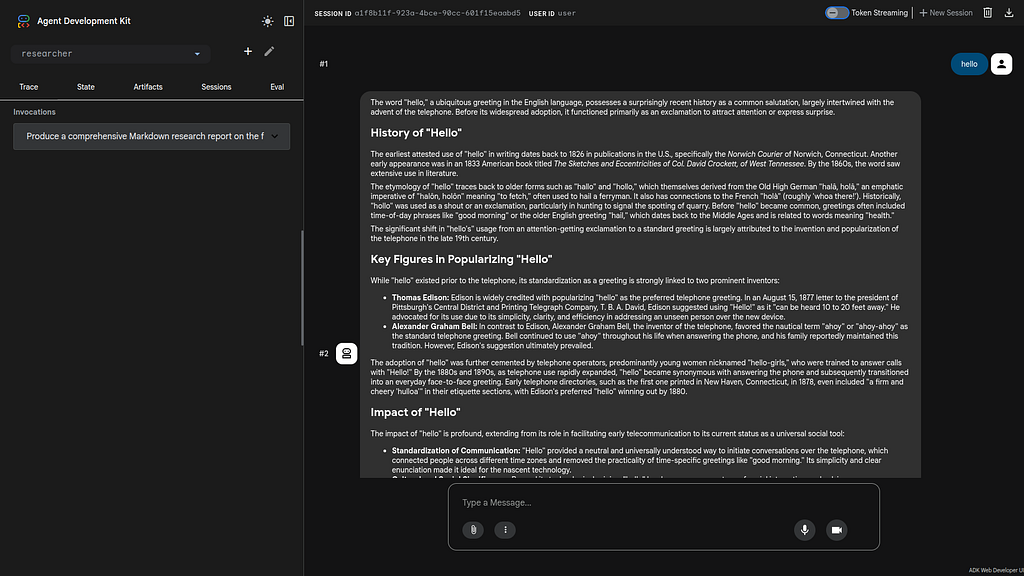
Test The ADK Web Interface
This tests the ADK agent interactions with a browser:
/home/xbill/.pyenv/versions/3.13.13/lib/python3.13/site-packages/google/adk/auth/credential_service/in_memory_credential_service.py:33: UserWarning: [EXPERIMENTAL] BaseCredentialService: This feature is experimental and may change or be removed in future versions without notice. It may introduce breaking changes at any time.
  super(). __init__ ()
INFO: Started server process [8827]
INFO: Waiting for application startup.

+-----------------------------------------------------------------------------+
| ADK Web Server started |
| |
| For local testing, access at http://0.0.0.0:8000. |
+-----------------------------------------------------------------------------+
Then use the web interface — either on the local interface 127.0.0.1 or the catch-all web interface 0.0.0.0 -depending on your environment:
Special note for Google Cloud Shell Deployments- add a CORS allow_origins configuration exemption to allow the ADK agent to run:
adk web --host 0.0.0.0 --allow_origins 'regex:.*'
Multi Agent Design
The multi-agent deployment consists of 5 agents:
- Researcher
- Judge
- Orchestrator
- Content Builder
- Course Builder
An overview of the multi-agent system can be found here:
Multi-Agent A2A with the Agent Development Kit(ADK), Cloud Run, Agent Skills, and Gemini CLI
Running/Testing/Debugging Locally
The main Makefile has been extended with extensive targets for managing the agents on the local development environment.
The key targets include:
xbill@penguin:~/gemini-cli-azure/multi-functions$ make help

✦ The available make commands are:

  ┌────────────────────┬────────────────────────────────────────────────────┐
  │ Command │ Description │
  ├────────────────────┼────────────────────────────────────────────────────┤
  │ install │ Install all dependencies for root, agents, and app │
  │ start, run │ Start all services locally │
  │ stop │ Stop all local services │
  │ status │ Show status of local services and Azure Functions │
  │ local │ Show local service URLs │
  │ test │ Run all tests (pytest) │
  │ e2e-test │ Run E2E test against local environment │
  │ e2e-test-functions │ Run E2E test against Azure Functions endpoint │
  │ deploy │ Deploy all-in-one container to Azure Functions │
  │ destroy │ Delete Azure Functions resources │
  │ endpoint │ Show Azure Functions endpoint │
  │ lint │ Run linting checks (ruff) │
  │ clean │ Remove caches and logs │
  └────────────────────┴────────────────────────────────────────────────────┘
First check for local running agents:
xbill@penguin:~/gemini-cli-azure/multi-functions$ make status
Checking status of locally running agents and servers...
--- Network Status ---
No services listening on expected ports (8000-8004, 5173).
--- Process Status ---
No matching processes found.
Then all the agents can be started together:
xbill@penguin:~/gemini-cli-azure/multi-functions$ make start
Stopping any existing agent and server processes...
Starting all agents in background...
Waiting for sub-agents to start...
All agents started. Logs: researcher.log, judge.log, content_builder.log, orchestrator.log
Starting App Backend in background...
Starting Frontend dev server in background...
All services started. Logs: researcher.log, judge.log, content_builder.log, orchestrator.log, backend.log, frontend.log
Frontend: http://localhost:5173
Backend: http://localhost:8000
xbill@penguin:~/gemini-cli-azure/multi-functions$

make status
Checking status of locally running agents and servers...
--- Network Status ---
tcp 0 0 0.0.0.0:5173 0.0.0.0:* LISTEN 10245/node
tcp 0 0 0.0.0.0:8001 0.0.0.0:* LISTEN 9690/python3
tcp 0 0 0.0.0.0:8000 0.0.0.0:* LISTEN 10031/python3
tcp 0 0 0.0.0.0:8003 0.0.0.0:* LISTEN 9696/python3
tcp 0 0 0.0.0.0:8002 0.0.0.0:* LISTEN 9695/python3
tcp 0 0 0.0.0.0:8004 0.0.0.0:* LISTEN 10019/python3
--- Process Status ---
xbill 9687 0.0 0.0 2584 1628 pts/1 S 21:03 0:00 /bin/sh -c /bin/bash -c "source .env 2>/dev/null || true; \ /home/xbill/.pyenv/shims/python3 -m shared.adk_app --host 0.0.0.0 --port 8001 --a2a agents/researcher"
The entire project can be linted and tested as unit:
xbill@penguin:~/gemini-cli-azure/multi-functions$ make lint
ruff check .
All checks passed!

> make test
✦ The test suite ran successfully. All 30 tests passed with 5 experimental feature warnings.
And end to end tested:
make e2e-test
│ E2E Test Completed successfully! │
╰───────────────────────────────────────────────────────────────────────────────────────────────────────────────────╯

✦ The end-to-end test ran successfully. The orchestrator coordinated with the researcher, judge, and content builder
  agents to generate a full Markdown course about the history of the internet, and streamed the result back over the API
  endpoint.
Then connect to the local front end:
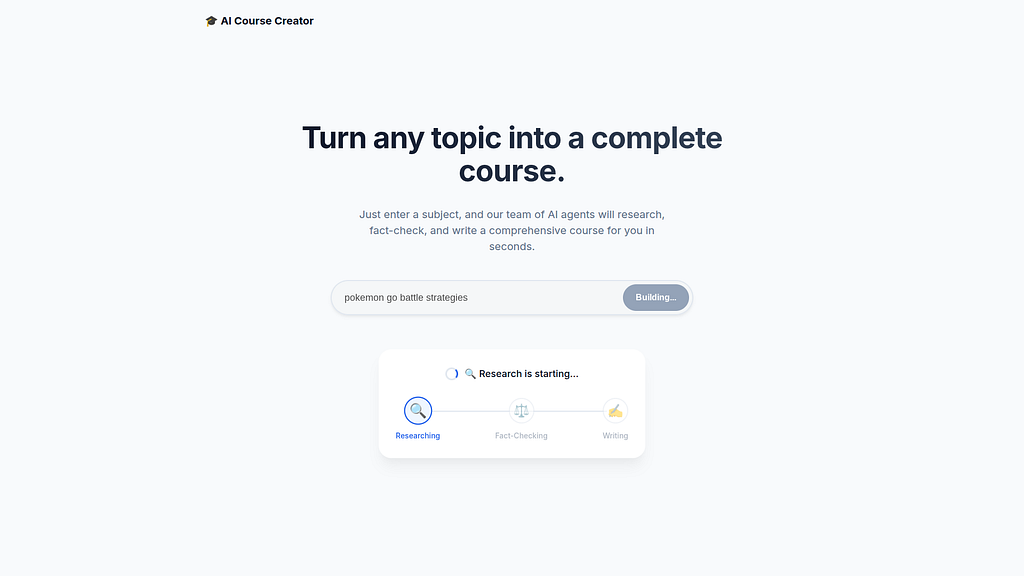
And the entire agent system will run in the local environment:
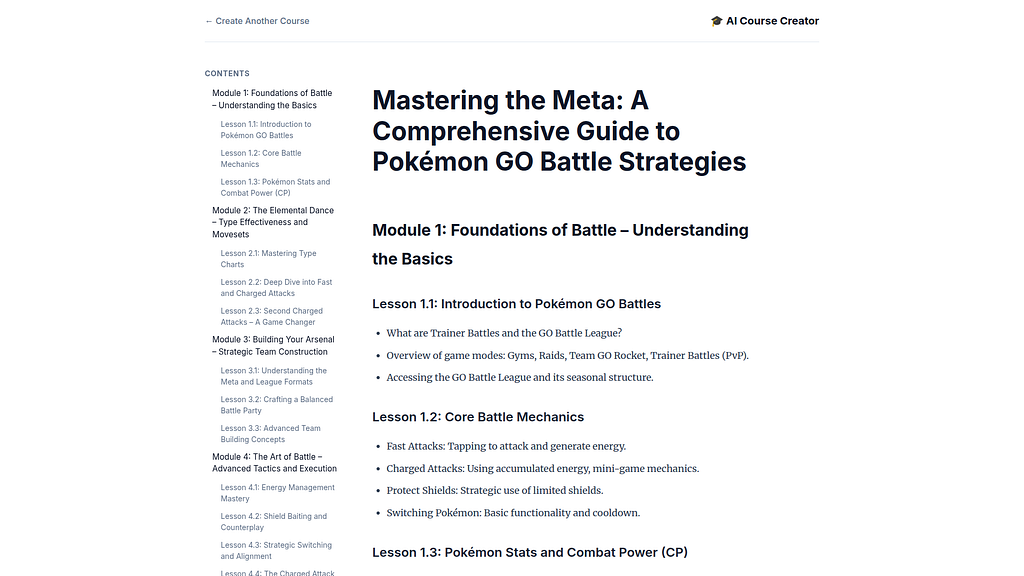
Local Logging / Debugging
Gemini CLI has full access to the local agent logs for debugging and troubleshooting:
✦ I've analyzed the logs from your e2e run. All agents (researcher, judge, content_builder, orchestrator) and both frontend and backend services
  started successfully. The course creation pipeline ran as expected: the orchestrator initiated the "history of the internet" course, the researcher
  gathered information, the judge approved it, and the content builder generated the course content.
Deploying to Azure Functions
The project level Makefile has targets for managing the Agent deployment to serverless endpoints:
xbill@penguin:~/gemini-cli-azure/multi-aci$ az login
A web browser has been opened at https://login.microsoftonline.com/organizations/oauth2/v2.0/authorize. Please continue the login in the web browser. If no web browser is available or if the web browser fails to open, use device code flow with `az login --use-device-code`.
A utility script check the deployment to Azure ACI:
✦ I ran make status (as make status-functions isn't a defined target in the Makefile, but make status achieves the same
  goal).

  Here is the status of your Azure Functions deployment:

  Azure Functions Status:
   * Name: adk-penguin-func
   * Location: West US 2
   * State: Running
   * ResourceGroup: adk-rg-functions
   * DefaultHostName: adk-penguin-func.azurewebsites.net
   * AppServicePlan: adk-plan-penguin

  The function app is currently up and running. If you want to get the direct URL to the endpoint, you can use make
  endpoint.
You can then deploy the services:
make deploy

Full Log Output: │
│ ./single-container/deploy.sh │
│ === Azure Functions All-in-One Deployment === │
│ Resource Group: adk-rg-functions │
│ ACR Name: adkacrpenguinx4ocqm │
│ Storage Name: adkstoragepenguinx4ocqm │
│ Function Name: adk-penguin-func │
│ ============================= │
Once the containers are deployed- you can then get the endpoint:
> make status

Remote Environment (Azure):
   - Function App adk-penguin-func is Running in the adk-rg-functions resource group.
   - The default hostname is adk-penguin-func.azurewebsites.net.
And check the endpoint:
> make endpoint

✦ The deployed Azure Function App endpoint is:
  https://adk-penguin-func.azurewebsites.net
Test End to End in A
The entire agent system is tested on the remote Azure endpoint:
 The end-to-end test against the Azure Function App completed successfully!

  The system correctly executed the following steps:
   1. Orchestrator Selection: The updated AGENT_NAME=orchestrator setting ensured the full pipeline was invoked.
   2. Research Phase: The Researcher agent gathered comprehensive information on the history of the internet, including
      early concepts like packet switching and ARPANET.
   3. Judge Phase: The Judge agent evaluated the research findings for quality and completeness.
   4. Content Builder Phase: The Content Builder agent transformed the validated research into a well-structured,
      multi-module Markdown course.

  The final course, titled "The History and Impact of the Internet", is now available and verified on the cloud
  environment.
Running the Web Interface
Start a connection to the Cloud Run deployed app:
https://adk-penguin-func.azurewebsites.net
Then connect to the app :
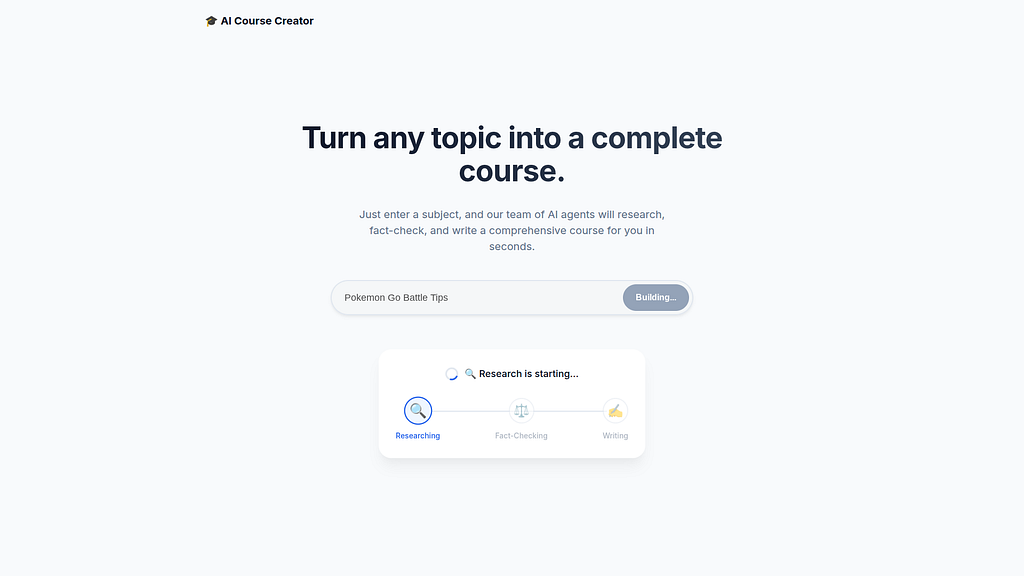
Then use online course generator:

Final Gemini CLI Code Review
As a final step — Gemini CLI was used for a full code review of the project:
Overall Code Review Summary

After reviewing the app and agents directories, I can say this is an exceptionally well-engineered multi-agent system.

High-Level Architecture:
  The architecture is sophisticated and effective. The use of a main orchestrator to manage a pipeline of specialized agents (researcher, judge,
  content_builder) is a strong and scalable pattern. The inclusion of a research-and-refine loop with the judge agent is a standout feature that
  significantly enhances the quality of the final output.

Key Strengths:
   1. Expert ADK Usage: The project demonstrates a deep understanding of the Google ADK, using advanced features like SequentialAgent, LoopAgent,
      RemoteA2aAgent, structured Pydantic outputs, and agent callbacks to their full potential.
   2. Excellent Prompt Engineering: The instruction prompts for all agents are clear, specific, and well-crafted. This is the foundation of the
      system's success.
   3. Robust State Management: The custom StateCapturer agent is a brilliant, reusable utility that cleanly handles the flow of information between
      agents.
   4. Production-Ready Features: The system includes production-grade features like environment-aware authentication for service-to-service calls,
      robust error handling, and detailed logging.
Summary
The Agent Development Kit (ADK) was used to build a multi-agent system with A2A support using the Gemini Flash LLM Model. This application was tested locally with Gemini CLI and then deployed to Azure Functions. Several key take-aways and lessons learned were summarized from debugging and testing the multi-agent system- including deep log reviews. Finally, Gemini CLI was used for a complete project code review.
Comments
More Blog
View allaiContext bankruptcy: The case for strategic forgetting for AI Agents
Most of us have seen a coding agent fail to complete a task we know it can do. We just don't...
J
James O'ReillygooglecloudParallel Compliance Engine: Drive-to-Sheets Multi-Agent Orchestration
When building Generative AI applications, developers often encounter a massive bottleneck: sequential...
A
Aryan IranidiscussIs It Ethical to Post and Ask About Circuits on Dev.to?
I’ve been thinking about sharing some electronic circuit posts on Dev.to — small circuits, DIY...
C
codebunny20agentsThe One-Click Exporter: AI Studio Antigravity, Probed to Its Limits
What nobody tells you about exporting your multi-agent prototype to a local workspace. Every...
L
leslysandraagenticarchitectGuarding the till while autonomous data agents do the digging
Autonomous agents are genuinely good at answering messy business questions. Give one an LLM and a set...
S
Sireesha PulipatiaiReturn on Attention: Why AI Code Reviews Are Wearing Us Out
PR volume went up, ticket quality didn't, and the gap got filled with LLMs on both sides of the review: bots reviewing, bots replying, bots occasionally arguing with bots about priorities that only existed in a teammate's head. Our CEO named the actual problem, and it's bigger than code review.
C
christineReady-made automations for this
Workflows from the Neura Market marketplace related to this Stable Diffusion resource
- Build MCP Server with Google Calendar & Custom Functionsn8n · $19.99 · Related topic
- AI Agent Blueprint for Streamlined Website Developmentn8n · $19.99 · Related topic
- Leveraging Vector Databases for Enhanced AI Agent Analysisn8n · $16.9 · Related topic
- Automate RSS Feed Creation with Datetime Functions and Webhooksn8n · $10.35 · Related topic