
Back to Blog rust
rust
 ai
ai googlecloud
 discuss
 agents
 agenticarchitect
 ai
ai
Building a Cross Language MCP Server with Rust, Python ADK, and Gemini CLI
xbill May 5, 2026
0 views
Leveraging the Google Agent Development Kit (ADK) and the underlying Gemini LLM to build ADK Agent...
title: Building a Cross Language MCP Server with Rust, Python ADK, and Gemini CLI published: true series: Rust date: 2026-05-04 16:23:44 UTC tags: rust,mcpserver,googleadk,multilanguageagent canonical_url: https://medium.com/rustaceans/building-a-cross-language-mcp-server-with-rust-python-adk-and-gemini-cli-09caf0f03376
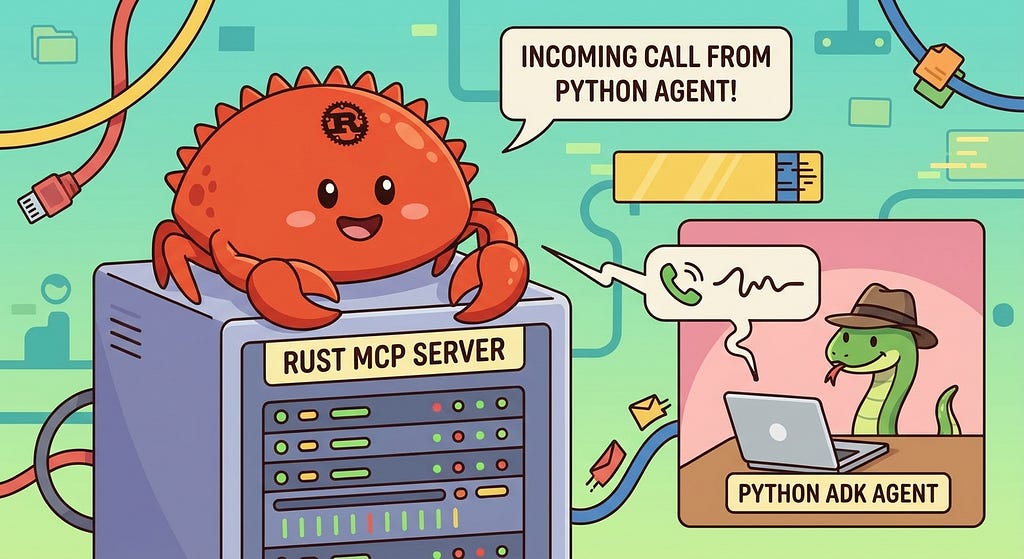
Leveraging the Google Agent Development Kit (ADK) and the underlying Gemini LLM to build ADK Agent Applications using the Python programming language. The ADK Agent application was configured to seamlessly connect to a Rust based MCP server.
Aren’t There a Trillion Python Agent Demos?
Yes there are.
Python has traditionally been the main coding language for ML and AI tools. The goal of this article is to provide a test bed for building, debugging, and deploying cross language applications.
So is this the real Slim Shady?
So what is different about this lab compared to all the others out there?
This is one of the first deep dives into a Cross Language agent with MCP leveraging the advanced tooling of Gemini CLI.
Python Version Management
One of the downsides of the wide deployment of Python has been managing the language versions across platforms and maintaining a supported version.
The pyenv tool enables deploying consistent versions of Python:
GitHub - pyenv/pyenv: Simple Python version management
As of writing — the mainstream python version is 3.13. To validate your current Python:
python --version
Python 3.13.13
What is Rust?
Rust is a high performance, memory safe, compiled language:
Rust provides memory safe operations beyond C/C++ and also can provide exceptional performance gains as it is compiled directly to native binaries.
Rust Setup
Instructions to install Rust are available here:
For a Linux like environment the command looks like this:
curl — proto ‘=https’ — tlsv1.2 -sSf https://sh.rustup.rs | sh
Rust also depends on a working C compiler and OpenSSL setup. For a Debian 12 system — install the basic tools for development:
sudo apt install build-essential
sudo apt install libssl-dev
sudo apt install pkg-config
sudo apt-get install libudev-dev
sudo apt install make
sudo apt install git
Gemini CLI
If not pre-installed you can download the Gemini CLI to interact with the source files and provide real-time assistance:
npm install -g @google/gemini-cli
Testing the Gemini CLI Environment
Once you have all the tools and the correct Node.js version in place- you can test the startup of Gemini CLI. You will need to authenticate with a Key or your Google Account:
▝▜▄ Gemini CLI v0.33.1
    ▝▜▄
   ▗▟▀ Logged in with Google /auth
  ▝▀ Gemini Code Assist Standard /upgrade no sandbox (see /docs) /model Auto (Gemini 3) | 239.8 MB
Node Version Management
Gemini CLI needs a consistent, up to date version of Node. The nvm command can be used to get a standard Node environment:
Agent Development Kit
The Google Agent Development Kit (ADK) is an open-source, Python-based framework designed to streamline the creation, deployment, and orchestration of sophisticated, multi-agent AI systems. It treats agent development like software engineering, offering modularity, state management, and built-in tools (like Google Search) to build autonomous agents.
The ADK can be installed from here:
Agent Skills
Gemini CLI can be customized to work with ADK agents. Both an Agent Development MCP server, and specific Agent skills are available.
More details are here:
To get the Agent Skills in Gemini CLI:
> /skills list
and the ADK documentation:
> /mcp list
Configured MCP servers:
🟢 adk-docs-mcp (from adk-docs-ext) - Ready (2 tools)
  Tools:
  - mcp_adk-docs-mcp_fetch_docs
  - mcp_adk-docs-mcp_list_doc_sources
Where do I start?
The strategy for starting multi agent development is a incremental step by step approach.
First, the basic development environment is setup with the required system variables, and a working Gemini CLI configuration.
Then, and ADK agent is built, debugged, and tested locally.
Setup the Basic Environment
At this point you should have a working Python environment and a working Gemini CLI installation. All of the relevant code examples and documentation is available in GitHub.
The next step is to clone the GitHub repository to your local environment:
cd ~
git clone https://github.com/xbill9/mcp-cloudrun-rust
Then run init.sh from the cloned directory.
The script will attempt to determine your shell environment and set the correct variables:
source init.sh
If your session times out or you need to re-authenticate- you can run the set_env.sh script to reset your environment variables:
source set_env.sh
Variables like PROJECT_ID need to be setup for use in the various build scripts- so the set_env script can be used to reset the environment if you time-out.
Finally install the packages and dependencies:
make install
Build The Rust MCP Server
Some background information on building and configuring a Rust MCP server is here:
Building a Secure HTTP Transport MCP Server with Rust, and Gemini CLI
The mcp-cloudrun-rust subdirectory has the complete Rust MCP server in one subdirectory.
Minimal System Information Tool Build
The first step is to build the basic tool directly with Rust. This allows the tool to be debugged and tested locally before adding the MCP layer.
First build the tool locally:
xbill@penguin:~/mcp-adk-rust/mcp-cloudrun-rust$ make
Building the Rust project...
   Compiling mcp-https-rust v0.1.0 (/home/xbill/mcp-adk-rust/mcp-cloudrun-rust)
    Finished `dev` profile [unoptimized + debuginfo] target(s) in 7.35s
xbill@penguin:~/mcp-adk-rust/mcp-cloudrun-rust$
then lint check the code:
xbill@penguin:~/mcp-adk-rust/mcp-cloudrun-rust$ make lint
Linting code...
   Compiling cmake v0.1.58
    Checking tokio v1.52.2
   Compiling aws-lc-sys v0.40.0
    Checking tokio-util v0.7.18
    Checking tower v0.5.3
    Checking tokio-stream v0.1.18
    Checking h2 v0.4.13
    Checking tower-http v0.6.8
    Checking hyper v1.9.0
    Checking hyper-util v0.1.20
    Checking axum v0.8.9
   Compiling aws-lc-rs v1.16.3
   Compiling rustls v0.23.40
    Checking rustls-webpki v0.103.13
    Checking tokio-rustls v0.26.4
    Checking rustls-platform-verifier v0.7.0
    Checking hyper-rustls v0.27.9
    Checking reqwest v0.13.3
    Checking rmcp v1.6.0
    Checking mcp-https-rust v0.1.0 (/home/xbill/mcp-adk-rust/mcp-cloudrun-rust)
    Finished `dev` profile [unoptimized + debuginfo] target(s) in 18.94s
xbill@penguin:~/mcp-adk-rust/mcp-cloudrun-rust$
and run local tests:
xbill@penguin:~/mcp-adk-rust/mcp-cloudrun-rust$ make test
Running tests...
    Finished `test` profile [unoptimized + debuginfo] target(s) in 0.16s
     Running unittests src/main.rs (target/debug/deps/mcp_https_rust-46fde43b0deb8d54)

running 1 test
test tests::test_greeting ... ok

test result: ok. 1 passed; 0 failed; 0 ignored; 0 measured; 0 filtered out; finished in 0.00s

xbill@penguin:~/mcp-adk-rust/mcp-cloudrun-rust$
The last step is to build the production version:
xbill@penguin:~/mcp-adk-rust/mcp-cloudrun-rust$ make release
Building Release...
    Finished `release` profile [optimized] target(s) in 0.13s
xbill@penguin:~/mcp-adk-rust/mcp-cloudrun-rust$
The MCP server can be started locally:
xbill@penguin:~/mcp-adk-rust/mcp-cloudrun-rust$ make start
Building Release...
    Finished `release` profile [optimized] target(s) in 0.14s
Starting the MCP server...
Server started with PID 1569
Then Gemini CLI is used as a MCP client:
xbill@penguin:~/mcp-adk-rust/mcp-cloudrun-rust$ gemini

 ▝▜▄ Gemini CLI v0.40.1
   ▝▜▄
  ▗▟▀ Signed in with Google /auth
 ▝▀ Plan: Gemini Code Assist Standard /upgrade


 > /mcp list

Configured MCP servers:

🟢 mcp-https-rust - Ready (1 tool)
  Tools:
  - mcp_mcp-https-rust_greeting
The MCP tool can then be tested:
 > greeting Hello Ferris!

╭────────────────────────────────────────────────────────────────────────────────────────────────────────────────────────────────────────────╮
│ ✓ greeting (mcp-https-rust MCP Server) {"message":"Hello Ferris!"} │
│ │
│ Hello World MCP! Hello Ferris! │
╰────────────────────────────────────────────────────────────────────────────────────────────────────────────────────────────────────────────╯

✦ Hello World MCP! Hello Ferris!
Verify The ADK Installation
First- verify the ADK is installed:
xbill@penguin:~/mcp-adk-rust$ adk --version
adk, version 1.32.0
xbill@penguin:~/mcp-adk-rust$
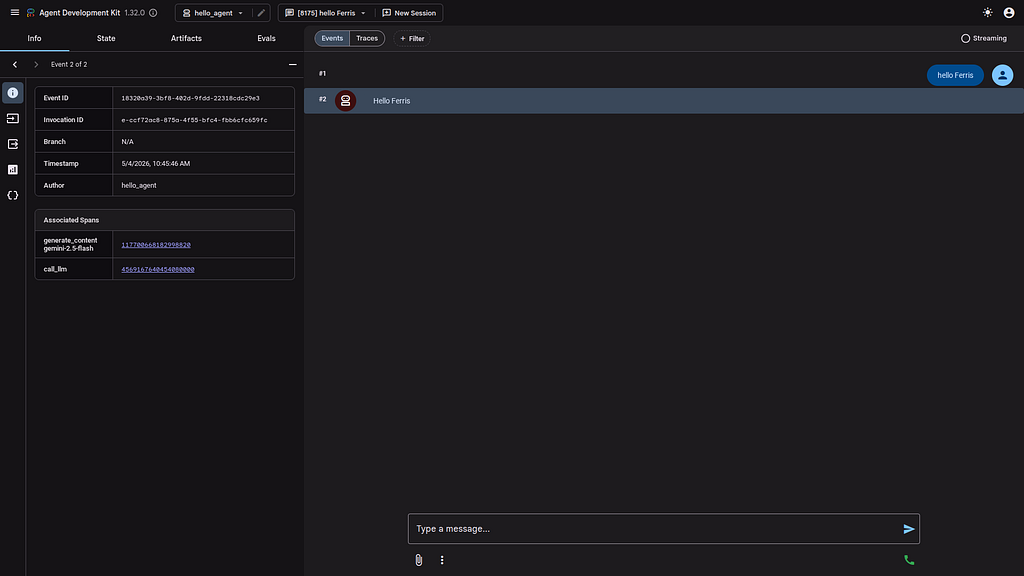
To check the ADK setup, run the ADK CLI locally with the hello Agent. This is a basic Hello World style agent. No external tools or MCP calls are used in the Agent code- which allows the ADK installation to be checked:
xbill@penguin:~/mcp-adk-rust$ adk run hello_agent
Log setup complete: /tmp/agents_log/agent.20260504_104424.log
To access latest log: tail -F /tmp/agents_log/agent.latest.log
/home/xbill/.local/lib/python3.13/site-packages/google/adk/cli/cli.py:204: UserWarning: [EXPERIMENTAL] InMemoryCredentialService: This feature is experimental and may change or be removed in future versions without notice. It may introduce breaking changes at any time.
  credential_service = InMemoryCredentialService()
/home/xbill/.local/lib/python3.13/site-packages/google/adk/auth/credential_service/in_memory_credential_service.py:33: UserWarning: [EXPERIMENTAL] BaseCredentialService: This feature is experimental and may change or be removed in future versions without notice. It may introduce breaking changes at any time.
  super(). __init__ ()
Running agent hello_agent, type exit to exit.
[user]: hello ferris
[hello_agent]: Hello ferris
[user]:
Test The ADK Web Interface
This step tests the ADK agent interactions with a browser:
xbill@penguin:~/mcp-adk-rust$ adk web --host 0.0.0.0
2026-05-04 10:45:27,500 - INFO - service_factory.py:266 - Using in-memory memory service
2026-05-04 10:45:27,501 - INFO - local_storage.py:84 - Using per-agent session storage rooted at /home/xbill/mcp-adk-rust
2026-05-04 10:45:27,501 - INFO - local_storage.py:110 - Using file artifact service at /home/xbill/mcp-adk-rust/.adk/artifacts
/home/xbill/.local/lib/python3.13/site-packages/google/adk/cli/fast_api.py:204: UserWarning: [EXPERIMENTAL] InMemoryCredentialService: This feature is experimental and may change or be removed in future versions without notice. It may introduce breaking changes at any time.
  credential_service = InMemoryCredentialService()
/home/xbill/.local/lib/python3.13/site-packages/google/adk/auth/credential_service/in_memory_credential_service.py:33: UserWarning: [EXPERIMENTAL] BaseCredentialService: This feature is experimental and may change or be removed in future versions without notice. It may introduce breaking changes at any time.
  super(). __init__ ()
INFO: Started server process [13965]
INFO: Waiting for application startup.

+-----------------------------------------------------------------------------+
| ADK Web Server started |
| |
| For local testing, access at http://0.0.0.0:8000. |
+-----------------------------------------------------------------------------+
Then use the web interface — either on the local interface 127.0.0.1 or the catch-all web interface 0.0.0.0 -depending on your environment:
Special note for Google Cloud Shell Deployments- add a CORS allow_origins configuration exemption to allow the ADK agent to run:
adk web --host 0.0.0.0 --allow_origins 'regex:.*'
Test the Python Agent with the Rust MCP Server
Once the Rust MCP server and the Hello World ADK agent have been tested independently- a new ADK agent is built that calls the Rust MCP tool directly from the Agent Code.
The key piece that enables this is the MCP configuration in Python:
from google.adk.tools.mcp_tool import McpToolset
from google.adk.tools.mcp_tool.mcp_session_manager import StreamableHTTPConnectionParams

# Load environment variables from .env
load_dotenv()

# The MCP server is expected to be running at this URL.
# In a real scenario, this would be the Cloud Run URL.
MCP_SERVER_URL = os.getenv("MCP_SERVER_URL", "http://localhost:8080/mcp")
First- the ADK CLI is used to test the ADK agent calling the Rust MCP server:
xbill@penguin:~/mcp-adk-rust$ adk run basic_agent
Log setup complete: /tmp/agents_log/agent.20260504_105226.log
To access latest log: tail -F /tmp/agents_log/agent.latest.log
/home/xbill/.local/lib/python3.13/site-packages/google/adk/features/_feature_decorator.py:72: UserWarning: [EXPERIMENTAL] feature FeatureName.PLUGGABLE_AUTH is enabled.
  check_feature_enabled()
/home/xbill/.local/lib/python3.13/site-packages/google/adk/cli/cli.py:204: UserWarning: [EXPERIMENTAL] InMemoryCredentialService: This feature is experimental and may change or be removed in future versions without notice. It may introduce breaking changes at any time.
  credential_service = InMemoryCredentialService()
/home/xbill/.local/lib/python3.13/site-packages/google/adk/auth/credential_service/in_memory_credential_service.py:33: UserWarning: [EXPERIMENTAL] BaseCredentialService: This feature is experimental and may change or be removed in future versions without notice. It may introduce breaking changes at any time.
  super(). __init__ ()
Running agent basic_mcp_agent, type exit to exit.
[user]: hello Ferris
/home/xbill/.local/lib/python3.13/site-packages/google/adk/features/_feature_decorator.py:72: UserWarning: [EXPERIMENTAL] feature FeatureName.BASE_AUTHENTICATED_TOOL is enabled.
  check_feature_enabled()
[basic_mcp_agent]: Hello World MCP! hello Ferris
[user]:
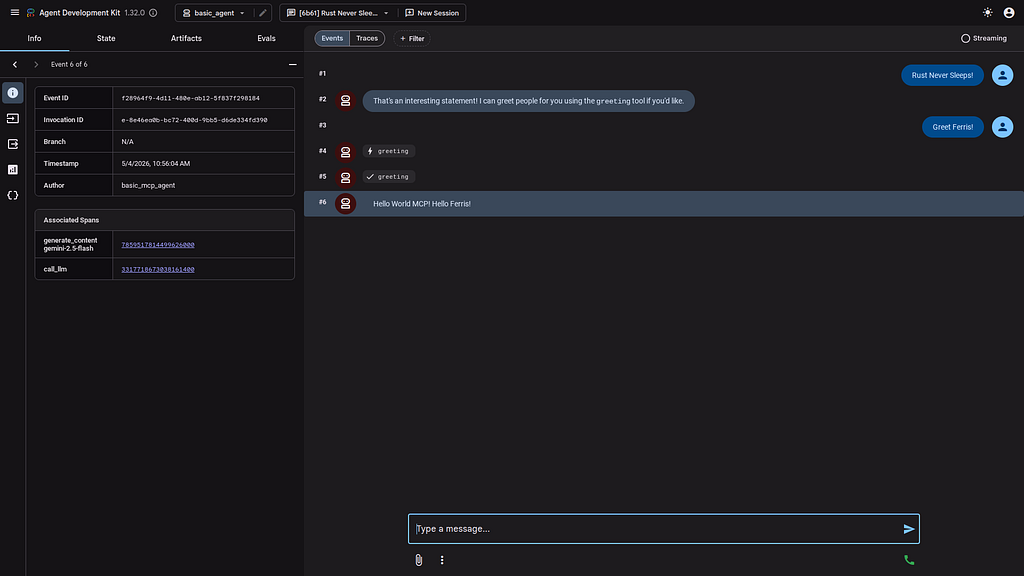
Then use the Web interface to cross-check the agent:
So What Just Happened?
The basic_agent Python ADK agent performed a MCP tool call against the locally running rust MCP server. Because the MCP server in Rust provides standard MCP tools- the Python ADK agent transparently calls the Rust backend MCP code. The actual implementation language of the MCP code does not matter to the Python Agent- as long as standard MCP services are exposed.
Code Review with Gemini CLI
Gemini CLI was used to review the project:
xbill@penguin:~/mcp-adk-rust$ gemini

 ▝▜▄ Gemini CLI v0.40.1
   ▝▜▄
  ▗▟▀ Signed in with Google /auth
 ▝▀ Plan: Gemini Code Assist Standard /upgrade


 > code review the project

  Code Review: Project Overview:
  Performing a high-level code review of the project to assess its structure, compliance with standards, and identify potential issues.

  ✓ ReadFolder . → Found 11 item(s). (3 ignored)
  ✓ ReadFile mcp-cloudrun-rust/Cargo.toml
  ✓ ReadFile mcp-cloudrun-rust/src/main.rs
  ✓ ReadFile basic_agent/agent.py
  ✓ ReadFile basic_agent/requirements.txt
  Code Review: Agent Analysis & Workspace Config:
  Conducting a deeper review of the Python agents and project configuration to identify discrepancies or missing components.

  ✓ ReadFolder hello_agent → Found 4 item(s). (1 ignored)
  ✓ ReadFile hello_agent/agent.py
  ✓ ReadFile Makefile
  ✓ ReadFile init.sh
  ✓ ReadFile set_env.sh
  Code Review: Dependency & Logic Verification:
  Analyzing project requirements and dependencies to identify inconsistencies or missing packages.

  ✓ ReadFolder . → Found 11 item(s). (3 ignored)
  ✓ ReadFile mcp-cloudrun-rust/Makefile
  Code Review: Summary & Recommendations:
  Conducting a thorough code review of the project to identify areas for improvement and ensure adherence to best practices.
The Rust MCP server implementation was checked:
✦ I have completed a deep-dive code review of the Rust MCP server. My findings are summarized below:

  1. Code Quality & Linting (src/main.rs)
   * Clippy Status: I ran make clippy, and it returned no warnings or errors. This indicates that the code is already following common Rust idioms
     and best practices for the 2024 edition.
   * Logging: The earlier fix for the EnvFilter was correct and is now properly scoped to mcp_https_rust.
   * Tool Parameters: The use of Parameters<GetMsgRequest> is correct for the rmcp framework. The fields in GetMsgRequest have appropriate
     schemars annotations for JSON schema generation.

  2. Framework & API Alignment (rmcp v1.6.0)
   * Streaming HTTP: The server correctly uses StreamableHttpService and LocalSessionManager. This is the recommended setup for high-concurrency
     environments like Google Cloud Run.
   * Tool Macros: The usage of #[tool_router] and #[tool] is consistent with the rmcp macro system, which handles the complex boilerplate of tool
     registration and JSON-RPC dispatch.
   * Graceful Shutdown: The signal handling for SIGINT and SIGTERM is robust and follows the pattern required for managed platforms to avoid
     abrupt session termination.

  3. Documentation Review (README.md)
   * The README.md is accurate and provides clear instructions for building, running, and deploying the service.
   * The mentions of axum and rmcp versions are consistent with Cargo.toml.

  4. ADK Integration
   * The ADK documentation highlights that while Python is the primary language for ADK, MCP serves as the bridge for cross-language toolsets.
     Your Rust implementation acts as a high-performance tool provider that can be seamlessly consumed by an ADK LlmAgent using an McpToolset.

  Final Verdict
  The server is production-ready. It is a lean, well-architected implementation that leverages the strongest features of the Rust ecosystem (Axum,
  Tokio, Tracing) and the MCP protocol. No further changes are required.
Summary
A complete HTTP transport MCP server was built using Rust. Then, the Agent Development Kit (ADK) was used to build a minimal Python agent using the Gemini Flash LLM Model. Next, a Python ADK agent was built that directly called the Rust MCP server. This application was tested locally with Gemini CLI. Finally, Gemini CLI was used for a complete project code review.
Future enhancements include using Google Cloud Run to deploy the various system components.
Comments
More Blog
View allaiContext bankruptcy: The case for strategic forgetting for AI Agents
Most of us have seen a coding agent fail to complete a task we know it can do. We just don't...
J
James O'ReillygooglecloudParallel Compliance Engine: Drive-to-Sheets Multi-Agent Orchestration
When building Generative AI applications, developers often encounter a massive bottleneck: sequential...
A
Aryan IranidiscussIs It Ethical to Post and Ask About Circuits on Dev.to?
I’ve been thinking about sharing some electronic circuit posts on Dev.to — small circuits, DIY...
C
codebunny20agentsThe One-Click Exporter: AI Studio Antigravity, Probed to Its Limits
What nobody tells you about exporting your multi-agent prototype to a local workspace. Every...
L
leslysandraagenticarchitectGuarding the till while autonomous data agents do the digging
Autonomous agents are genuinely good at answering messy business questions. Give one an LLM and a set...
S
Sireesha PulipatiaiReturn on Attention: Why AI Code Reviews Are Wearing Us Out
PR volume went up, ticket quality didn't, and the gap got filled with LLMs on both sides of the review: bots reviewing, bots replying, bots occasionally arguing with bots about priorities that only existed in a teammate's head. Our CEO named the actual problem, and it's bigger than code review.
C
christineReady-made automations for this
Workflows from the Neura Market marketplace related to this Stable Diffusion resource
- AI Agent Blueprint for Streamlined Website Developmentn8n · $19.99 · Related topic
- Leveraging Vector Databases for Enhanced AI Agent Analysisn8n · $16.9 · Related topic
- Automate Your Website Development with AI-Powered Chat Workflown8n · $6.3 · Related topic
- Streamlined Testing Automation for Efficient Development Workflowsmake · $12.34 · Related topic