
Back to Blog python
 ai
ai googlecloud
 discuss
 agents
 agenticarchitect
 ai
ai
What Reddit Can Teach Us About Women’s Watch Preferences (Python + NLP Project)
elizabeththomas7 May 8, 2026
0 views
Most “what watch should I buy?” discussions online skew heavily male. A friend wanted to launch a...
Most “what watch should I buy?” discussions online skew heavily male. A friend wanted to launch a women’s watch, so I helped with a small data analysis.
In this post I’ll walk through a small but complete Python pipeline I built:
- Scrape relevant posts and comments from Reddit with no API keys
- Filter out irrelevant posts (e.g. men asking for themselves)
- Run NLP analysis: sentiment, brands, features, prices, keywords, clustering, topic modeling
- Generate visualizations and CSVs you can explore further
Everything here is powered by standard Python libraries: requests, pandas, nltk, scikit‑learn, and wordcloud.
1. Collecting Reddit data without API keys
We didn’t use the official Reddit API; instead we hit the public JSON endpoints directly using requests.
At the top of reddit_json_scraper.py we define search URLs across multiple subreddits:
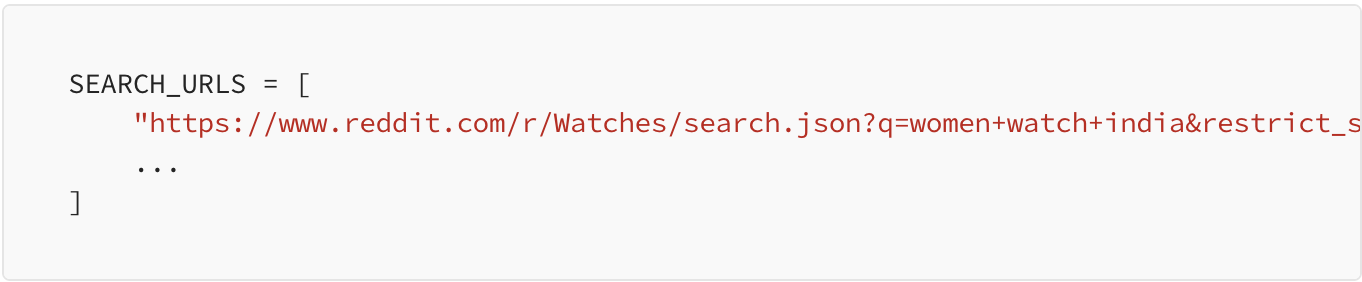
Each URL returns a JSON blob; we wrap that in a helper:
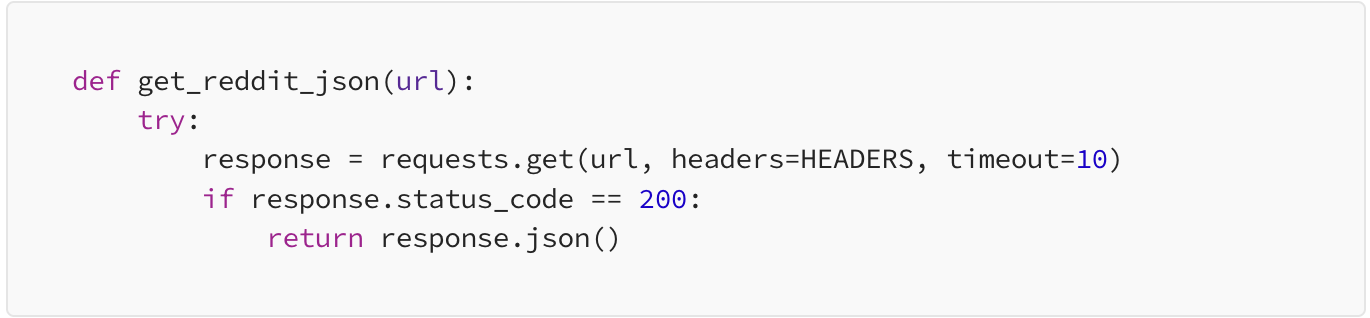
Reddit’s listing JSON has a fairly nested structure, so we created extract_post_data to normalize it into a flat dictionary with the fields we actually care about (ID, subreddit, title, body, score, comment count, timestamps, etc.):
def extract_post_data(post_json):
    """
    Extract relevant information from a Reddit post JSON
    """
    try:
        data = post_json['data']

        return {
            'post_id': data.get('id', ''),
            'subreddit': data.get('subreddit', ''),
            'title': data.get('title', ''),
            'text': data.get('selftext', ''),
            'author': data.get('author', ''),
            'score': data.get('score', 0),
            'upvote_ratio': data.get('upvote_ratio', 0),
            'num_comments': data.get('num_comments', 0),
            'created_utc': data.get('created_utc', 0),
            'created_date': datetime.fromtimestamp(data.get('created_utc', 0)).strftime('%Y-%m-%d %H:%M:%S'),
            'url': f"https://reddit.com{data.get('permalink', '')}",
            'post_url': data.get('url', ''),
            'is_video': data.get('is_video', False),
            'over_18': data.get('over_18', False)
        }
The main collection loop simply iterates through all search URLs, fetches JSON, and appends normalized posts into a list:
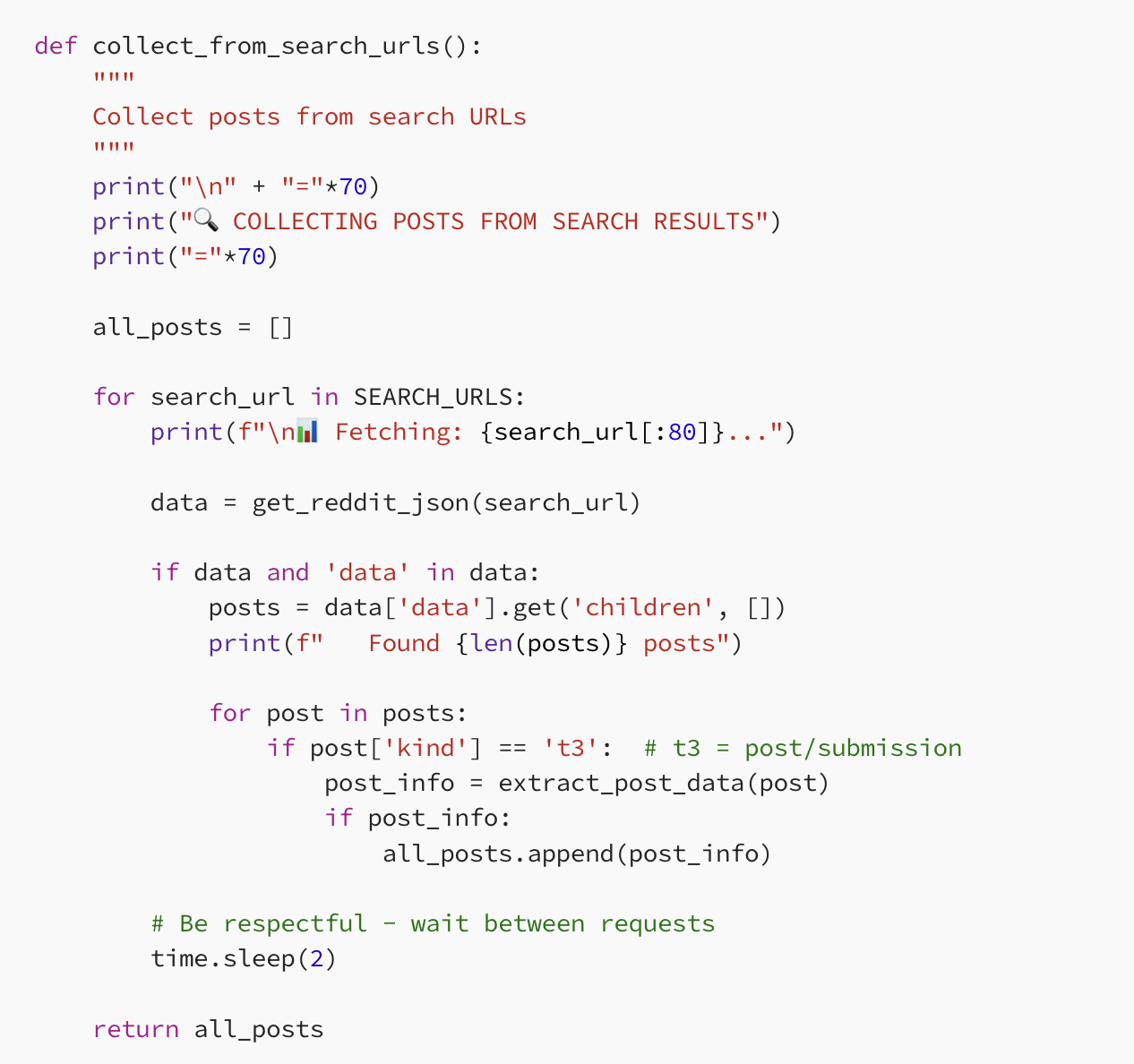
We also fetch comments for the most “interesting” posts, sorted by engagement (score + num_comments), by hitting each post’s .json endpoint and walking the comment tree.
At the end of main() we save everything to CSV and run a quick text summary (brand and keyword counts, simple price stats).
2. Filtering: keeping posts that are really about women’s watches
Search results are noisy. Some posts mention “women” but are actually men asking for themselves.
filter_posts.py applies a simple but effective regex filter.We flag posts that contain phrases like “as a man” or “for men”:
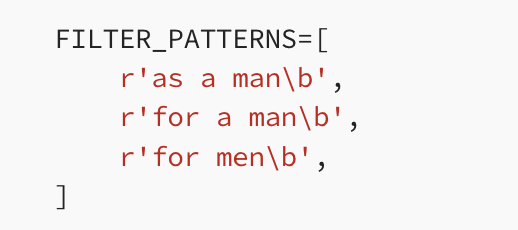
…but we keep posts that clearly talk about buying for a woman, e.g. “gift for my wife”:
NON_FILTER_PATTERNS=r"(for|gift|buying|getting|choosing|help).*(mum|mom|mother|wife|girlfriend|partner|daughter|sister|woman|female|her|she)"
filter_check combines title and text, applies these patterns, and filtered_posts_csv writes a cleaned filtered_posts.csv. This becomes the starting point for our analysis.
3. Analyzing the conversations with WatchDataAnalyzer
The main analysis lives in watch_analyzer.py as a single class:
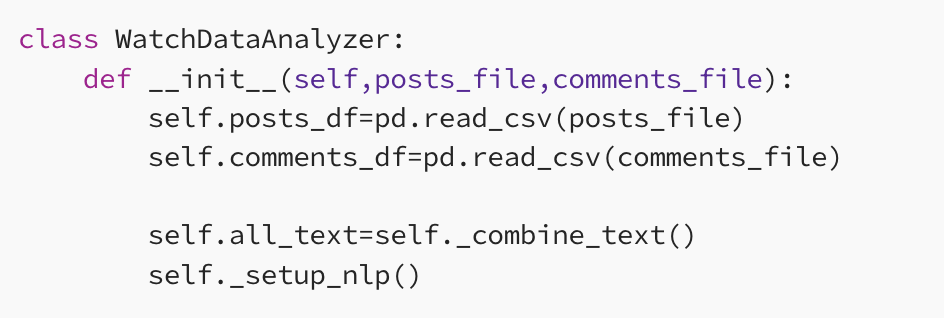
- Load the filtered posts and comments
- Combine titles, bodies, and comment text into all_text
- Set up NLTK and VADER sentiment
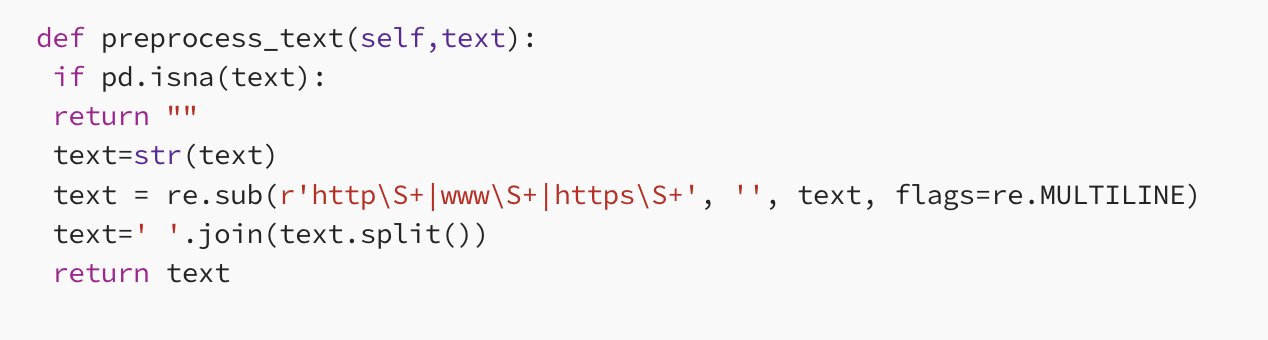
3.1. Light text cleaning
We remove URLs and normalize whitespace, then build a combined_text column per post:
3.2. Sentiment on posts and comments
Using VADER, we compute a compound score and label each post/comment as positive, neutral, or negative:
self.posts_df['sentiment_scores']=self.posts_df['combined_text'].apply(lambda x: self.sia.polarity_scores(x))
self.posts_df['sentiment_compound']=self.posts_df['sentiment_scores'].apply(lambda x: x['compound'])
self.posts_df['sentiment_label']=self.posts_df['sentiment_compound'].apply(
    lambda x: 'positive' if x>0.05 else ('negative' if x<-0.05 else 'neutral')
)
We do the same for comments and then plot the distribution, saving sentiment_dist.png.
3.3. Brands, price ranges, and features
We look at three practical angles:
- Brand mentions — a curated list from Titan and Seiko to Rolex and Omega, counted across all text.
def extract_brands(self):
    # Common watch brands
    brands = [
        'casio', 'seiko', 'citizen', 'timex', 'fossil', 'orient', 'tissot',
        'michael kors', 'daniel wellington', 'mvmt', 'skagen', 'swatch',
        'rolex', 'omega', 'cartier', 'tag heuer', 'breitling', 'patek philippe',
        'audemars piguet', 'vacheron constantin', 'baume mercier', 'longines',
        'hamilton', 'bulova', 'invicta', 'bering', 'titan', 'fastrack',
        'sonata', 'maxima', 'hmt', 'raymond weil', 'zenith', 'iwc'
    ]
    brand_mentions={}
    # ...
- Price — regexes to capture Indian price patterns with ₹/rs/inr or “rupees”, then bucketed into budget/mid‑range/premium/luxury ranges.
def extract_prices(self):
    # Patterns for price extraction
    patterns = [
        r'(?:₹|rs\.?|inr)\s*(\d+(?:,\d{3})*(?:\.\d+)?)',
        r'(\d+(?:,\d{3})*(?:\.\d+)?)\s*(?:₹|rs\.?|inr)',
        r'(\d+(?:,\d{3})*(?:\.\d+)?)\s*(?:rupees|rupee)',
    ]

    all_prices=[]

    for text in self.all_text:
        for pattern in patterns:
            matches=re.findall(pattern,str(text),re.IGNORECASE)
            for match in matches:
                price_str=match.replace(',','').replace('.','')
                all_prices.append(int(price_str))

    ranges = {
            'Budget (<₹5,000)': sum(1 for p in all_prices if p < 5000),
            'Mid-range (₹5,000-₹20,000)': sum(1 for p in all_prices if 5000 <= p < 20000),
            'Premium (₹20,000-₹1,00,000)': sum(1 for p in all_prices if 20000 <= p < 100000),
            'Luxury (>₹1,00,000)': sum(1 for p in all_prices if p >= 100000)
        }
- Features — categories like size, material, movement, style, strap, and “features” (water resistance, sapphire, chronograph, etc.), each with their own keyword list.
This gives a quick picture of which brands dominate, what price bands people discuss, and which attributes come up most.
3.4. Keywords, clusters, and topics
Using scikit‑learn:
TF‑IDF keywords — we build a TfidfVectorizer over combined_text
and save the top terms to keywords_tfidf.csv.
def extract_keywords(self):
    self.preprocess_all_text()

    vectorizer=TfidfVectorizer(
        max_features=80,
        stop_words='english',
        min_df=2
    )

    texts=self.posts_df['combined_text'].fillna('').tolist()
    X=vectorizer.fit_transform(texts)

    feature_names=vectorizer.get_feature_names_out()

    scores = X.mean(axis=0).A1

    # Create keyword dataframe
    keywords_df = pd.DataFrame({
        'keyword': feature_names,
        'tfidf_score': scores
    }).sort_values('tfidf_score', ascending=False)
- Clustering — we cluster posts into 5 groups using K‑Means over TF‑IDF vectors, then inspect top words per cluster.
def cluster_posts(self, n_clusters=5):
    """
    Cluster posts based on text similarity
    """
    # ...
    vectorizer = TfidfVectorizer(
        max_features=50,
        stop_words='english',
        min_df=2
    )

    texts = self.posts_df['combined_text'].fillna('').tolist()
    X = vectorizer.fit_transform(texts)

    # K-means clustering
    kmeans = KMeans(n_clusters=n_clusters, random_state=42, n_init=10)
    clusters = kmeans.fit_predict(X)

    self.posts_df['cluster'] = clusters
- Topic modeling — we run LDA/NMF over the same vectors to discover high‑level themes (“budget gifts”, “small wrists and office wear”, “sporty/outdoor”, etc.).
def topic_modeling(self, n_topics=5, method='lda'):
    """
    Perform topic modeling using LDA or NMF
    """
    # ...
    vectorizer = TfidfVectorizer(
        max_features=100,
        stop_words='english',
        ngram_range=(1, 2),
        min_df=2,
        max_df=0.95
    )
    # ...
    if method.lower() == 'lda':
        model = LatentDirichletAllocation(n_components=n_topics, random_state=42)
    else:  # NMF
        model = NMF(n_components=n_topics, random_state=42)
    # ...
    for idx, topic in enumerate(model.components_):
        top_words = [feature_names[i] for i in topic.argsort()[-10:][::-1]]
        print(f"\n   Topic {idx + 1}: {', '.join(top_words)}")
4. Putting it all together
The generate_report() method runs the full pipeline:
- Preprocess text
- Run sentiment, brand/feature/price extraction
- Compute keywords, clusters, and topics
- Generate a word cloud and sentiment plot
- Save everything to CSVs you can open in Excel or a notebook
def generate_report(self):

    # 1. Pre- processing the text
    self.preprocess_all_text()

    # 2. Analyze sentiment
    sentiment_df=self.analyze_sentiment()

    # 3. Brands mentions
    brands=self.extract_brands()

    # 4. Features
    features = self.extract_features()

    # 5. Prices
    prices = self.extract_prices()

    # 6. Keywords
    keywords_df = self.extract_keywords()

    # 7. Clustering
    clusters = self.cluster_posts(n_clusters=5)

    # 8. Topic Modeling
    print("\n🔍 Running topic modeling (this may take a moment)...")
    topic_model, vectorizer = self.topic_modeling(n_topics=5, method='lda')

    # 9. Visualizations
    print("\n🎨 Creating visualizations...")
    self.create_wordcloud('wordcloud.png')
    self.plot_sentiment_distribution('sentiment_dist.png')

    # Save results ...
It’s a compact example of how to go from raw Reddit JSON to structured insights about a very specific question: what are people really saying when they talk about women’s watches ?
Comments
More Blog
View allaiContext bankruptcy: The case for strategic forgetting for AI Agents
Most of us have seen a coding agent fail to complete a task we know it can do. We just don't...
J
James O'ReillygooglecloudParallel Compliance Engine: Drive-to-Sheets Multi-Agent Orchestration
When building Generative AI applications, developers often encounter a massive bottleneck: sequential...
A
Aryan IranidiscussIs It Ethical to Post and Ask About Circuits on Dev.to?
I’ve been thinking about sharing some electronic circuit posts on Dev.to — small circuits, DIY...
C
codebunny20agentsThe One-Click Exporter: AI Studio Antigravity, Probed to Its Limits
What nobody tells you about exporting your multi-agent prototype to a local workspace. Every...
L
leslysandraagenticarchitectGuarding the till while autonomous data agents do the digging
Autonomous agents are genuinely good at answering messy business questions. Give one an LLM and a set...
S
Sireesha PulipatiaiReturn on Attention: Why AI Code Reviews Are Wearing Us Out
PR volume went up, ticket quality didn't, and the gap got filled with LLMs on both sides of the review: bots reviewing, bots replying, bots occasionally arguing with bots about priorities that only existed in a teammate's head. Our CEO named the actual problem, and it's bigger than code review.
C
christineReady-made automations for this
Workflows from the Neura Market marketplace related to this Stable Diffusion resource
- AI-Powered Project Management Assistant with Airtable and Firefliesn8n · $19.99 · Related topic
- Automate Project and Time Entry Creation in Clockifyn8n · $19.74 · Related topic
- Efficient Calendar Slot Retrieval for Project Managementmake · $19.24 · Related topic
- Automate Project Tracking with Copper Trigger Workflown8n · $18.69 · Related topic