
Back to Blog android
 ai
ai googlecloud
 discuss
 agents
 agenticarchitect
 ai
ai
Building a custom launcher for ChromeOS
Thomas Künneth May 14, 2026
0 views
In this article, I will share some of my experience of enhancing Be nice to be a launcher on...
In this article, I will share some of my experience of enhancing Be nice to be a launcher on ChromeOS. Now, why would I want to do that anyway? I use my ChromeOS detachable more like an Android tablet than a traditional laptop; therefore, I find myself deeply missing the Android goodness that Google's desktop OS tends to strip away. Chief among these missing features is support for app widgets. Be nice has app widget support, so it would be great to run my app on ChromeOS. On a standard Android phone or tablet you can simply swap the home app in settings.
fun changeDefaultHomeApp() {
  val intent = Intent(Settings.ACTION_HOME_SETTINGS).apply {
    addFlags(Intent.FLAG_ACTIVITY_NEW_TASK)
  }
  if (context.packageManager.resolveActivity(
      intent,
      PackageManager.MATCH_DEFAULT_ONLY
    ) != null
  ) {
    context.startActivity(intent)
  }
}
Unfortunately, ChromeOS forces you to use its native environment.
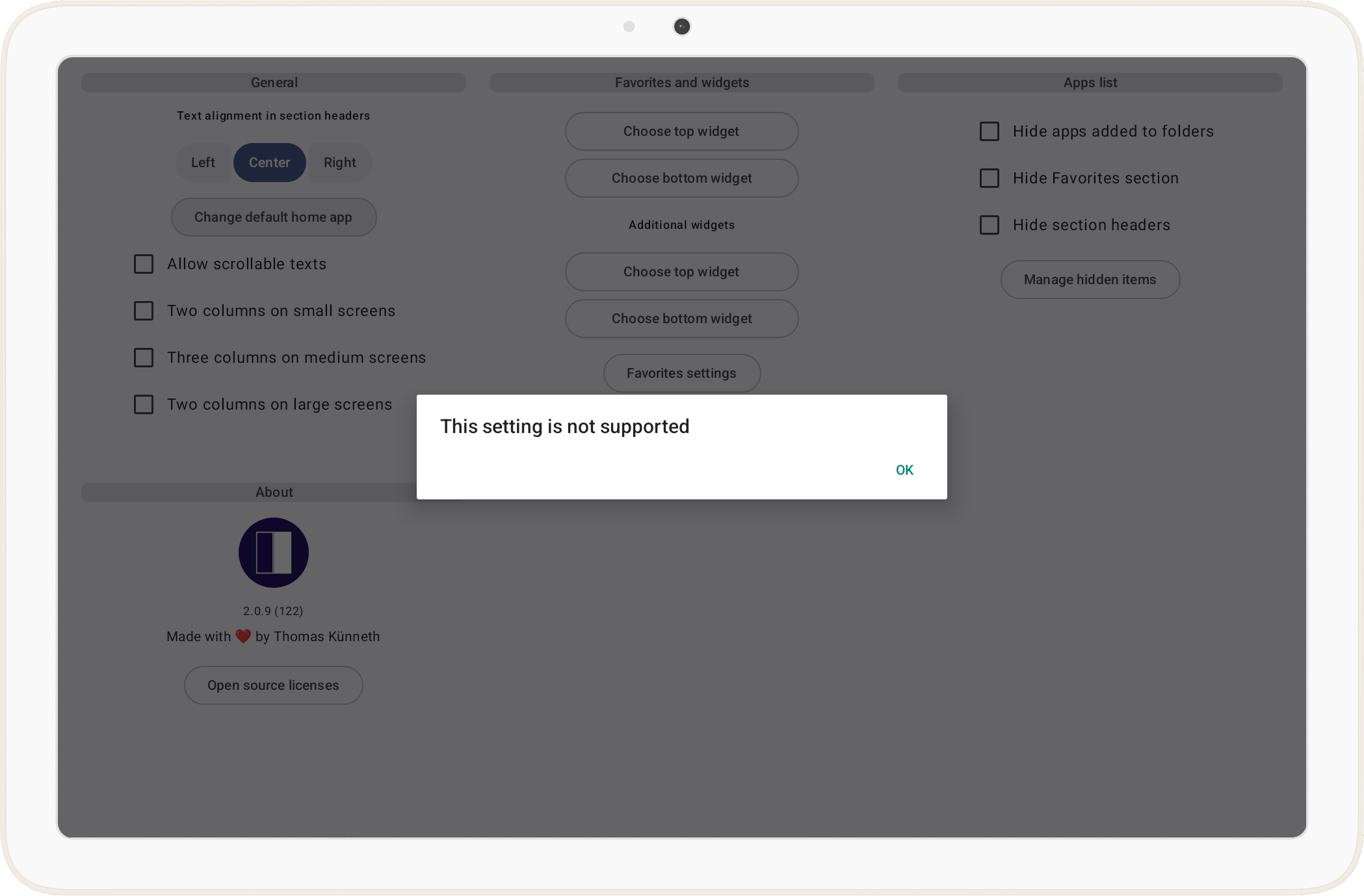
Consequently, the launcher will be treated just like any other Android app. What does this imply? While we can easily launch other apps, core launcher features like returning to the home screen via the system gesture or home button, acting as the dedicated home activity that fills the display with the normal Android home wallpaper visible behind transparent UI, and integration with the system-level overview or task switcher are not available. Instead, the launcher stays contained within its own window, meaning a swipe up or a press of the Everything Button will still take you back to the native ChromeOS shelf rather than your custom interface.
And there is another nasty issue. Before Be nice became a genuine launcher, its main goal was to run two apps side by side, utilizing the split-screen capabilities that are present in Android since 7.0 (Nougat). On ChromeOS, this behavior is consistently buggy. Specifically, when the launcher attempts to start another activity in the adjacent window for a side-by-side view, the originating app (Be nice itself) fails to redraw correctly and simply becomes a black, unresponsive rectangle. I have created an issue tracker item for this, as the black screen glitch makes automated multitasking nearly impossible on ChromeOS. The issue is, at the time of writing this article, marked as Assigned, though there has been no significant movement toward a fix. It is disheartening to see such a fundamental multitasking feature remain broken while Google continues to market these devices as serious productivity tools.
Let's return to Be nice. When the app is the default launcher, tapping an item in its Apps list launches the desired app just like any launcher would; however, when Be nice is not the default home app, it intentionally opens the tapped app in split-screen. While the default home app behavior is what we want on ChromeOS, on that platform we just can't become the launcher. To cater for this, I changed Be nice to do this:
private fun detectIsHomeApp(): Boolean {
  if (isRunningOnChromeOs()) {
    return true
  }
  if (Build.VERSION.SDK_INT >= Build.VERSION_CODES.Q) {
    val roleManager =
      context.getSystemService(RoleManager::class.java)
    return roleManager?.isRoleHeld(RoleManager.ROLE_HOME) == true
  } else {
    val intent = Intent(Intent.ACTION_MAIN).apply {
      addCategory(Intent.CATEGORY_HOME)
    }
    val resolveInfo =
      context.packageManager.resolveActivity(
        intent,
        PackageManager.MATCH_DEFAULT_ONLY
      )
    return resolveInfo?.activityInfo?.packageName == context.packageName
  }
}
But what does isRunningOnChromeOs() do?
fun isRunningOnChromeOs(): Boolean {
  val pm = context.packageManager
  return pm.hasSystemFeature(SYSTEM_FEATURE_TYPE_CHROMEBOOK) ||
    pm.hasSystemFeature(SYSTEM_FEATURE_ARC) ||
    pm.hasSystemFeature(SYSTEM_FEATURE_ARC_DEVICE_MANAGEMENT)
}
Because ChromeOS will not let Be nice hold the real home role, RoleManager would always report that we are not the default launcher. The early return true in detectIsHomeApp() is therefore a deliberate in‑app policy switch: on ChromeOS we pretend we are the home app so the rest of the codebase can follow the same paths it uses when Be nice truly is the launcher on phones and tablets, without claiming any privilege the OS refuses to grant.
isRunningOnChromeOs() exists because a single PackageManager feature is not reliable across ARC/ARCVM builds: android.hardware.type.chromebook was absent on my device, so relying on it alone left detection false and the old UX in place. org.chromium.arc (and the related org.chromium.arc.device_management flag) matches what Android’s own docs and compatibility tooling use for the ChromeOS Android runtime; we still OR in the chromebook feature string when the system exposes it. Together, that trio is a pragmatic runtime probe; not a perfect definition of ChromeOS everywhere, but a stable way to branch behavior where the platform already diverges from stock Android.
About wallpapers
On phones and tablets, Be nice is written like a classic launcher: the app theme turns on android:windowShowWallpaper and uses a transparent window background, and the main shell keeps the Material Scaffold surface transparent so the Android home wallpaper can show through wherever the UI does not paint an opaque layer. I do not sample the wallpaper with WallpaperManager and draw it myself; instead, I rely on the system to composite the wallpaper behind the window, which is simple and matches how many launchers behave.
<style name="Theme.BeNice" parent="Theme.AppCompat.DayNight.NoActionBar">
  <item name="android:windowShowWallpaper">true</item>
  <item name="android:windowBackground">@android:color/transparent</item>
</style>
The Compose tree leans into that model as well. For example, when Be nice believes it is acting as the default home app and the pager actually has transitions between widget-style home pages and other pages, the horizontal pager applies a fade on those transitions so the swipe does not feel like hard cuts over a solid sheet; visually that only works if there is something worth looking at behind the transparent regions.
val wallpaperFadeEdgeIndices = remember(pages) {
  computeWallpaperFadeEdgeIndices(pages)
}
val useHomeWallpaperPagerFade = state.isHomeApp && wallpaperFadeEdgeIndices.isNotEmpty()
ChromeOS breaks the mental model. The wallpaper you care about on a Chromebook is usually the ChromeOS desktop behind all windows, while Be nice runs inside the Android (ARC) window. windowShowWallpaper still asks the Android side to show its wallpaper layer, but that layer is often weak, empty, or simply not the same thing as the ChromeOS background you identify as my wallpaper. Transparent UI that looks intentional on a Pixel can read as muddy, flat, or accidental in a resizable Android window.
Scaffold(
  containerColor = if (defaultAppsManager.isRunningOnChromeOs()) {
    MaterialTheme.colorScheme.background
  } else {
    ComposeColor.Transparent
  },
  // ...
Even after switching the main Scaffold to an opaque background on ChromeOS, the pager’s cross-fade still runs only when the app considers itself the home app and the page list includes at least one transition between a widget-style home page and a non-widget page (the same situation useHomeWallpaperPagerFade encodes), so the animation eases between pages over the opaque shell, not over the live wallpaper, without pretending ARC gives you a phone-quality backdrop.
So the pragmatic fix is boring but honest: on ChromeOS, stop pretending the ARC wallpaper layer is a beautiful backdrop. In the main activity I branch Scaffold’s containerColor: opaque theme background on ChromeOS, transparent on everything else. That trades the phone-launcher aesthetic on ChromeOS for a predictable in-window surface, which matches how the platform actually presents Android apps.
Wrap-up
A pragmatic fix is also a boring one: a solid theme background is honest about ARC, but it is not necessarily nice. In a follow-up, I may explore what it would take to get an actually pleasant backdrop on ChromeOS, without lying to myself that windowShowWallpaper is doing the same job it does on a phone, whether that means sampling and drawing wallpaper myself, using a curated gradient or image asset, or finding a host-supported way to align with ChromeOS personalization. If you have solved this cleanly in a launcher-style app on ARC, I would love pointers.
Beyond wallpaper, the other open question is how to replace the system gestures you do not get on ChromeOS (home, recents, and that snap back to launcher feeling), without fighting the shell. I have started experimenting with notifications as a lightweight, always-reachable affordance: not as a fake home button, but as a predictable escape hatch back into Be nice when the OS route is wrong for how I actually use the device. I do not have a polished pattern yet. If you have tried notification-driven navigation (or a better substitute) for ARC-hosted almost launchers, kindly share what worked in the comments.
Comments
More Blog
View allaiContext bankruptcy: The case for strategic forgetting for AI Agents
Most of us have seen a coding agent fail to complete a task we know it can do. We just don't...
J
James O'ReillygooglecloudParallel Compliance Engine: Drive-to-Sheets Multi-Agent Orchestration
When building Generative AI applications, developers often encounter a massive bottleneck: sequential...
A
Aryan IranidiscussIs It Ethical to Post and Ask About Circuits on Dev.to?
I’ve been thinking about sharing some electronic circuit posts on Dev.to — small circuits, DIY...
C
codebunny20agentsThe One-Click Exporter: AI Studio Antigravity, Probed to Its Limits
What nobody tells you about exporting your multi-agent prototype to a local workspace. Every...
L
leslysandraagenticarchitectGuarding the till while autonomous data agents do the digging
Autonomous agents are genuinely good at answering messy business questions. Give one an LLM and a set...
S
Sireesha PulipatiaiReturn on Attention: Why AI Code Reviews Are Wearing Us Out
PR volume went up, ticket quality didn't, and the gap got filled with LLMs on both sides of the review: bots reviewing, bots replying, bots occasionally arguing with bots about priorities that only existed in a teammate's head. Our CEO named the actual problem, and it's bigger than code review.
C
christineReady-made automations for this
Workflows from the Neura Market marketplace related to this Stable Diffusion resource
- Automate Your E-commerce Chat Experience with RAG Agentn8n · $19.99 · Related topic
- Dynamic Music Playlist Mood Tagger for Enhanced Listening Experiencen8n · $19.79 · Related topic
- AI-Powered WooCommerce Support Agent for Enhanced Customer Experiencen8n · $18.97 · Related topic
- In-Game Event Reminder Workflow for Enhanced Gaming Experiencen8n · $17.27 · Related topic