
Back to Blog mcpserver
 ai
ai googlecloud
 discuss
 agents
 agenticarchitect
 ai
ai
Local MCP Development with Python and Antigravity CLI
xbill May 21, 2026
0 views
This article re-visits and updates an existing deployment originally built with Gemini CLI and...
title: Local MCP Development with Python and Antigravity CLI published: true series: agy date: 2026-05-21 15:35:20 UTC tags: mcpserver,python,antigravitycli,antigravity canonical_url: https://xbill999.medium.com/local-mcp-development-with-python-and-antigravity-cli-1be148c0728a
This article re-visits and updates an existing deployment originally built with Gemini CLI and re-tools the setup to leverage the new Antigravity CLI to build Model Context Protocol (MCP) AI applications in Python with a local development environment.

Is this Deja Vu?
There is no spoon.
This article updates an earlier deployment built out with Gemini CLI and re-tools the entire setup for Antigravity CLI.
The original article is here:
Local MCP Development with Python and Gemini CLI
Aren’t There a Quadrillion Python MCP Demos?
Yes there are.
Python has traditionally been the main coding language for ML and AI tools. The goal of this article is to provide a minimal viable basic working MCP stdio server that can be run locally without any unneeded extra code or extensions.
Antigravity CLI
Antigravity CLI is the follow-on successor to Gemini CLI- the terminal driven, agent assisted coding tool.
Full details on installing Antigravity CLI are here:
Getting Started with Antigravity CLI
Testing the Antigravity CLI Environment
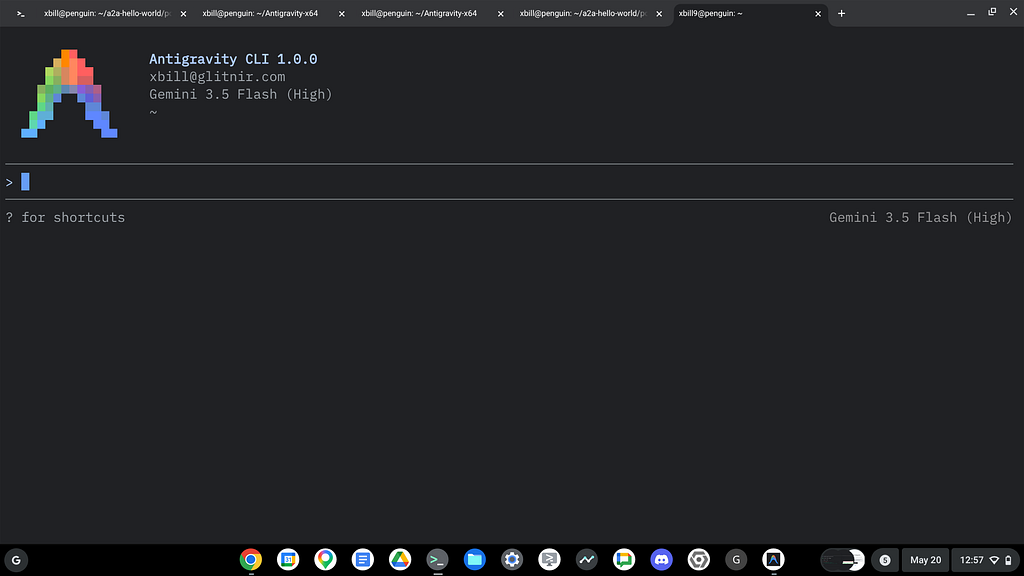
Once you have all the tools in place- you can test the startup of Antigravity CLI.
You will need to authenticate with a Google Cloud Project or your Google Account:
agy
This will start the interface:
Python MCP Documentation
The official GitHub Repo provides samples and documentation for getting started:
The most common MCP Python deployment path uses the FASTMCP library:
Where do I start?
The strategy for starting MCP development is a incremental step by step approach.
First, the basic development environment is setup with the required system variables, and a working Antigravity CLI configuration.
Then, a minimal Hello World Style Python MCP Server is built with stdio transport. This server is validated with Antigravity CLI in the local environment.
This setup validates the connection from Antigravity CLI to the local process via MCP. The MCP client (Antigravity CLI) and the Python MCP server both run in the same local environment.
Next- the basic MCP server is extended with Antigravity CLI to add several new tools in standard Python code.
Setup the Basic Environment
At this point you should have a working Python interpreter and a working Antigravity CLI installation. The next step is to clone the GitHub samples repository with support scripts:
cd ~
git clone https://github.com/xbill9/gemini-cli-codeassist
Then run init.sh from the cloned directory.
The script will attempt to determine your shell environment and set the correct variables:
cd gemini-cli-codeassist
source init.sh
If your session times out or you need to re-authenticate- you can run the set_env.sh script to reset your environment variables:
cd gemini-cli-codeassist
source set_env.sh
Variables like PROJECT_ID need to be setup for use in the various build scripts- so the set_env script can be used to reset the environment if you time-out.
Hello World with STDIO Transport
One of the key features that the standard MCP libraries provide is abstracting various transport methods.
The high level MCP tool implementation is the same no matter what low level transport channel/method that the MCP Client uses to connect to a MCP Server.
The simplest transport that the SDK supports is the stdio (stdio/stdout) transport — which connects a locally running process. Both the MCP client and MCP Server must be running in the same environment.
The connection over stdio will look similar to this:
if __name__ == " __main__":
    # Explicitly use stdio transport
    mcp.run(transport="stdio")
Running the Python Code
First- switch the directory with the Python MCP sample code:
cd ~/gemini-cli-codeassist/mcp-stdio-python-agy
Run the release version on the local system:
cd ~/gemini-cli-codeassist/mcp-stdio-python-agy
make release
You can validate the final result by checking the messages:
Requirement already satisfied: cryptography>=3.4.0 in /home/xbill/.local/lib/python3.13/site-packages (from pyjwt[crypto]>=2.10.1->mcp->-r requirements.txt (line 1)) (48.0.0)
Requirement already satisfied: cffi>=2.0.0 in /home/xbill/.local/lib/python3.13/site-packages (from cryptography>=3.4.0->pyjwt[crypto]>=2.10.1->mcp->-r requirements.txt (line 1)) (2.0.0)
Requirement already satisfied: pycparser in /home/xbill/.local/lib/python3.13/site-packages (from cffi>=2.0.0->cryptography>=3.4.0->pyjwt[crypto]>=2.10.1->mcp->-r requirements.txt (line 1)) (3.0)
Requirement already satisfied: click>=7.0 in /home/xbill/.pyenv/versions/3.13.13/lib/python3.13/site-packages (from uvicorn>=0.31.1->mcp->-r requirements.txt (line 1)) (8.1.8)
xbill@penguin:~/gemini-cli-codeassist/mcp-stdio-python-agy$
Antigravity CLI settings.json
Settings.json is where MCP servers are setup in Gemini CLI. Antigravity CLI moves the MCP configuration to a seperate file: mcp_config.json.
xbill@penguin:~/gemini-cli-codeassist/mcp-stdio-python-agy$ cd .agents
xbill@penguin:~/gemini-cli-codeassist/mcp-stdio-python-agy/.agents$ d
total 4
-rw-r--r-- 1 xbill xbill 184 May 21 10:03 mcp_config.json
drwxr-xr-x 1 xbill xbill 30 May 21 10:03 .
drwxr-xr-x 1 xbill xbill 242 May 21 10:03 ..
This file contains the configuration for connecting to external tools and services:
{
  "mcpServers": {
    "hello-stdio-python": {
      "command": "python",
      "args": [
        "/home/xbill/gemini-cli-codeassist/mcp-stdio-python-agy/main.py"
      ]
    }
  }
}
Validation with Antigravity CLI
Finally- agy CLI is restarted and the MCP connection over stdio to the Python Code is validated, The full session will start:
> /mcp list
────────────────────────────────────────────────────────────────────────────────────────────────────
MCP Servers

Plugins (~/.gemini/antigravity-cli/plugins)
> ✓ hello-stdio-python Tools: greet
And you can then connect to the MCP Server over stdio:
> greet Two Snakes!

● ListDir(/home/xbill/.gemini/antigravity-cli/mcp/hello-stdio-python)
● Read(/home/xbill/.gemini/antigrav...ello-stdio-python/greet.json)
● hello-stdio-python/greet(Calling greet tool via MCP) (ctrl+o to expand)

  Hello! I've invoked the greet tool from the hello-stdio-python server with the parameter
  "Two Snakes!" , and it responded with:

  │ Two Snakes!
Extending the Python MCP Server with Antigravity CLI
Now that the basic MCP functionality has been tested and verified with Antigravity CLI- the Python server code can be extended with new MCP tools:
> with @main.py add 2 new MCP tools - one that returns the current system time and the other
  returns the current system info like OS,
    memory, etc

● ListDir(/home/xbill/gemini-cli-codeassist/mcp-stdio-python-agy)
● Read(/home/xbill/gemini-cli-codea...mcp-stdio-python-agy/main.py)
● Read(/home/xbill/gemini-cli-codea...-python-agy/requirements.txt) (ctrl+o to expand)
▸ Thought for 2s, 977 tokens
  Clarifying Instructions

● Read(/home/xbill/gemini-cli-codea...cp-stdio-python-agy/Makefile)
● Read(/home/xbill/gemini-cli-codea...dio-python-agy/test_greet.py)
● Read(/home/xbill/gemini-cli-codea...o-python-agy/test_logging.py) (ctrl+o to expand)

▸ Thought for 2s, 1.4k tokens
  Considering Time Return Formats
● ListPermissions(You have read and write access to the following workspace(s)...) (ctrl+o to
expand)

▸ Thought for 1s, 1.5k tokens
  Proposing the Execution

● Edit(/home/xbill/gemini-cli-codea...mcp-stdio-python-agy/main.py) (ctrl+o to expand)

▸ Thought for 2s, 589 tokens
  Initiating Unit Tests

● Edit(/home/xbill/gemini-cli-codea...dio-python-agy/test_greet.py)
● Bash(make test) (ctrl+o to expand)
Restart Antigravity CLI and check for the new MCP tools:
MCP Servers

Plugins (~/.gemini/antigravity-cli/plugins)
> ✓ hello-stdio-python Tools: greet, get_system_time, get_system_info
Get the current time:
> get_system_time

● hello-stdio-python/get_system_time(Executing get_system_time via MCP) (ctrl+o to expand)

  I have successfully invoked the get_system_time tool from the local MCP server, and it
  returned the following current system times:

    Local Time: 2026-05-21T10:15:38.715899 (2026-05-21 10:15:38)
    UTC Time: 2026-05-21T15:15:38.715912+00:00
And system Info:
> get_system_info

● hello-stdio-python/get_system_info(Executing get_system_info via MCP) (ctrl+o to expand)

  I have successfully invoked the get_system_info tool from the local MCP server. Here is the
  current system information retrieved:

    Operating System: Linux
    Release/Kernel: 6.6.99-09128-g14e87a8a9b71
    Version: #1 SMP PREEMPT_DYNAMIC Fri, 6 Feb 2026 20:45:19 -0800
    Architecture: x86_64
    CPU Cores: 12
    Memory Info: Total: 6530980 kB, Free: 332012 kB, Available: 1558252 kB
    Python Version: 3.13.13
The information from the MCP tool execution comes back into the current context. You can use the information returned from the tools along with the underlying Gemini Models:
> can i play Cyberpunk 2077 on this machine

● WebSearch(Cyberpunk 2077 minimum system requirements) (ctrl+o to expand)

▸ Thought for 2s, 494 tokens
  Assessing Game Requirements
  Based on the system information retrieved, no, you cannot play Cyberpunk 2077 on this machine
  in its current state.

  Here is a detailed breakdown of why, comparing your system specs to the game's official minimum
  requirements (after Update 2.0):

  ### 1. RAM (Critical Bottleneck) ❌

  • Minimum Requirement: 12 GB RAM
  • Your Machine: ~6.2 GB RAM ( Total: 6530980 kB )
  • Verdict: This is a severe bottleneck. With only 6.2 GB of RAM, the game will either fail to
  launch, crash constantly, or suffer from unplayable stuttering as your system runs out of
  memory.

  ### 2. Operating System ⚠️

  • Minimum Requirement: 64-bit Windows 10/11
  • Your Machine: Linux (Kernel 6.6)
  • Verdict: While Cyberpunk 2077 does not have a native Linux version, this is actually not a
  dealbreaker. The game has a "Platinum" rating on ProtonDB, meaning it runs beautifully on Linux
  via Steam Proton (compatibility layer). However, the hardware limits below still apply.

  ### 3. CPU Cores

  • Minimum Requirement: Intel Core i7-6700 (4 cores) or AMD Ryzen 5 1600 (6 cores)
  • Your Machine: 12 Cores
  • Verdict: Excellent. Your CPU core count is more than capable of handling the game.

  ### 4. Graphics Card & Storage (Unknown) ❓

  • Minimum Requirement: Dedicated GPU with at least 6 GB of VRAM (e.g., GeForce GTX 1060 6GB /
  Radeon RX 580) and 70 GB SSD (an SSD is strictly required).
  • Our system info tools do not expose your GPU model or storage type, but you would need to
  meet these specifications as well.
  ──────
  ### Conclusion

  Even though your CPU is powerful and Linux compatibility is excellent via Proton, the 6.2 GB
  RAM limit will prevent you from playing the game. You would need to upgrade the system's RAM to
  at least 12 GB (ideally 16 GB) and ensure you have a gaming-grade dedicated graphics card.
But you can still play Doom!
> can I play Classic Doom on this machine?

● WebSearch(classic doom 1993 system requirements) (ctrl+o to expand)

  Absolutely, 100% yes! In fact, your machine could easily run thousands of instances of Classic
  Doom (1993) at the exact same time.

  Here is how your current system compares to the original 1993 requirements:

   Component │ Classic Doom (│ Your Machine │ How Much Better Is It?
  ───────────────┼───────────────┼────────────────────┼──────────────────────────────────────────
   Operating Syst│ MS-DOS 5.0 │ Linux (Kernel 6.6) │ Native Linux source ports (like Chocolate
   Processor (CPU│ Intel 386DX (3│ 12 CPU Cores (Multi│ Thousands of times faster with massive mu
   Memory (RAM) │ 4 MB (Megabyte│ 6,530 MB (6.2 GB) │ Over 1,600 times more RAM than required!
   Storage │ 12 MB │ Gigabytes available│ Plenty of space to store every mod ever c

  ### How to play it on your Linux machine right now:

  Because Doom's engine code was open-sourced in 1997, Linux has excellent native support through
  modern "source ports" which run the game flawlessly with widescreen and high-resolution support.

  You can install a lightweight classic source port like Chocolate Doom directly via your package
  manager:

    # On Debian/Ubuntu-based systems
    sudo apt install chocolate-doom

  Then, you just need a game file (like the free shareware DOOM1.WAD or a retail DOOM.WAD
  from Steam/GOG) to start slaying demons!
One Last Code Review
Lets see how good of a Python coder I am -
> code review this Python MCP project

● Read(/home/xbill/gemini-cli-codea...p-stdio-python-agy/README.md)
● Bash(git status)
● Bash(find . -maxdepth 2) (ctrl+o to expand)

▸ Thought for 4s, 732 tokens
  Investigating File Absence
  Here is a comprehensive code review of the Python MCP (Model Context Protocol) project.

  Overall, the project is exceptionally well-structured, lightweight, and employs industry best
  practices for MCP stdio-based servers.
  ──────
   📊 Project-Wide Code Review

  ## 1. Architectural Highlights & Best Practices

  ### A. Protocol Stream Safety (Logging to Stderr)

  • The Design: MCP servers communicating via the stdio transport use stdout exclusively for
  JSON-RPC protocol messages. Any standard print statements or unstructured logs written to
  stdout will corrupt the protocol stream and cause client-side connection failures.
  • The Implementation: In main.py, the root logger is configured to send all logs to sys.
  stderr using the structured JsonFormatter from pythonjsonlogger .
  • Verdict: Excellent. This guarantees that all logs are safe, structured (JSON format), and
  completely isolated from the MCP communication channel.

  ### B. Developer Experience (DX)

  • The Makefile provides full life-cycle automation for installation, manual execution,
  testing, linting ( flake8 ), formatting ( black ), and type checking ( mypy ).
  • The codebase maintains 100% strict compliance with PEP8/flake8 (79-character line limits) and
  passes static type checks under mypy without any warning or exception suppression.
  ──────
  ## 2. File-by-File Detailed Review

  ### 📁 main.py

  • Initialization: FastMCP simplifies server setup beautifully:
    mcp = FastMCP("hello-world-server")

  • Exposing Tools: The @mcp.tool() decorator is perfectly utilized. Docstrings are parsed
  automatically by FastMCP and transmitted to MCP clients as the official description of the
  tool:
    @mcp.tool()
    def get_system_time() -> str:
        """
        Get the current system time in ISO-8601 format and human-readable format.
        """

  • Modern Python Features: The get_system_time tool avoids the deprecated utcnow() method,
  utilizing standard timezone-aware UTC retrieval:
    now_utc = datetime.now(timezone.utc)

  • Platform Portability: get_system_info gracefully detects whether it's running on Linux
  (reading /proc/meminfo directly) and falls back to POSIX sysconf APIs if running on
  macOS/BSD/other UNIX variants, ensuring maximum reliability.
  ──────
  ### 📁 test_logging.py and test_greet.py

  • Logging Verification: test_logging.py employs a custom caplog_stream Pytest fixture that
  intercepts root logging handlers to assert that debug, info, and error outputs generate valid
  JSON strings with correct levels. This is highly robust!
  • Input Robustness: test_greet.py thoroughly verifies greet behavior on empty strings and
  special characters ( !@#$%^&*() ).
  • New Tools Coverage: The new system tools are fully covered, verifying output structures and
  ensuring the expected system/time labels are present.
  ──────
  ## 3. Areas for Improvement & Recommendations

  While the project is in a production-ready state, addressing the following points will make the
  project even more robust:

  ### Recommendation 1: Update README Virtual Environment Instructions

  • File: README.md
  • Issue: The README still suggests setting up a local .venv under # Installation . However,
  as documented in your GEMINI.md, direct virtual environment setups can conflict with the
  way MCP client launchers handle stdio Python subprocesses.
  • Fix: Add a note in README.md warning developers that if the server is executed via an MCP
  client (such as Claude Desktop), they must ensure their client configuration points explicitly
  to the python executable inside that virtual environment (e.g., /path/to/project/.
  venv/bin/python ), rather than just a global python command.

  ### Recommendation 2: Avoid Swallowing Key Failures in get_system_info

  • File: main.py
  • Issue: In get_system_info , the else block (POSIX fallback) catches all exceptions using a
  bare except Exception: pass . If os.sysconf fails or is missing, mem_details remains
  "Memory information not available." without any traceback or warning captured in the logs.
  • Fix: Log the exception details at DEBUG or WARNING level so that issues on unsupported
  systems can be diagnosed:
    except Exception as e:
        logger.debug(f"Failed to query POSIX sysconf memory: {str(e)}")

  ### Recommendation 3: Explicitly Set Pytest Rootdir

  • File: Makefile
  • Issue: Running pytest without a dedicated pytest.ini config file means it defaults to
  scanning the current working directory recursively, which might include .venv files or parent
  folders if executed from outside.
  • Fix: Create a minimal pytest.ini file in the root of the project to lock down test
  detection parameters:
    [pytest]
    testpaths = .
    python_files = test_*.py

  ──────
  ### Final Verdict

  Score: 9.8 / 10
  The project is extremely clean, PEP8 compliant, well-tested, and demonstrates an outstanding
  understanding of the Model Context Protocol's stdio transport constraints.
Summary
The strategy for using Python for MCP development with Antigravity CLI was validated with an incremental step by step approach.
A minimal stdio transport MCP Server was started from Python source code and validated with Antigravity CLI running as a MCP client in the same local environment.
Antigravity CLI was then used to extend the sample Python code with several MCP tools and use these tools inside the context for the underlying LLM.
This approach can be extended to more complex deployments using other MCP transports and Cloud based options.
Comments
More Blog
View allaiContext bankruptcy: The case for strategic forgetting for AI Agents
Most of us have seen a coding agent fail to complete a task we know it can do. We just don't...
J
James O'ReillygooglecloudParallel Compliance Engine: Drive-to-Sheets Multi-Agent Orchestration
When building Generative AI applications, developers often encounter a massive bottleneck: sequential...
A
Aryan IranidiscussIs It Ethical to Post and Ask About Circuits on Dev.to?
I’ve been thinking about sharing some electronic circuit posts on Dev.to — small circuits, DIY...
C
codebunny20agentsThe One-Click Exporter: AI Studio Antigravity, Probed to Its Limits
What nobody tells you about exporting your multi-agent prototype to a local workspace. Every...
L
leslysandraagenticarchitectGuarding the till while autonomous data agents do the digging
Autonomous agents are genuinely good at answering messy business questions. Give one an LLM and a set...
S
Sireesha PulipatiaiReturn on Attention: Why AI Code Reviews Are Wearing Us Out
PR volume went up, ticket quality didn't, and the gap got filled with LLMs on both sides of the review: bots reviewing, bots replying, bots occasionally arguing with bots about priorities that only existed in a teammate's head. Our CEO named the actual problem, and it's bigger than code review.
C
christineReady-made automations for this
Workflows from the Neura Market marketplace related to this Stable Diffusion resource
- Automated Webhook Processing with Docker Deploymentn8n · $14.71 · Related topic
- Automate Docker MinIO Deployment with Webhook Integrationn8n · $9.58 · Related topic
- Automate Your Website Development with AI-Powered Chat Workflown8n · $6.3 · Related topic
- Automate Docker Deployment with Webhook Integrationn8n · $5.37 · Related topic