
Back to Blog azure
azure
 ai
ai googlecloud
 discuss
 agents
 agenticarchitect
 ai
ai
Create and configure virtual networks
Rahimah Sulayman May 25, 2026
0 views
Introduction Imagine migrating a critical enterprise web application to the cloud, only to...
Introduction
Imagine migrating a critical enterprise web application to the cloud, only to face network bottlenecks, unsegmented traffic, or exposure to the public internet. Designing a resilient, production-ready cloud environment always begins at the foundational layer: secure, scalable networking.
In this article, I demonstrate how to architect a modern cloud infrastructure blueprint using a Hub-and-Spoke topology in Microsoft Azure. This structural design isolates workloads, enforces security boundaries, and minimizes latency.
As a cloud professional, my focus isn't just on clicking buttons in the portal,it is on delivering architectural patterns that protect data, optimize costs, and align with the Azure Well-Architected Framework.
Scenario Your organization is migrating a web-based application to Azure. Your first task is to put in place the virtual networks and subnets. You also need to securely peer the virtual networks. You identify these requirements.
- Two virtual networks are required, app-vnet and hub-vnet. This simulates a hub and spoke network architecture.
- The app-vnet will host the application. This virtual network requires two subnets. The frontend subnet will host the web servers. The backend subnet will host the database servers.
- The hub-vnet only requires a subnet for the firewall.
- The two virtual networks must be able to communicate with each other securely and privately through virtual network peering.
- Both virtual networks should be in the same region.
Skilling tasks
- Create a virtual network.
- Create a subnet.
- Configure vnet peering.
Note: To complete this lab you will need an Azure subscription with Contributor RBAC role assigned. In this lab, when you are asked to create a resource, for any properties that are not specified, use the default value.
Create hub and spoke virtual networks and subnets
An Azure virtual network enables many types of Azure resources to securely communicate with each other, the internet, and on-premises networks. All Azure resources in a virtual network are deployed into subnets within the virtual network.
1.Sign in to the Azure portal - https://portal.azure.com.
2.Search for and select Virtual Networks.
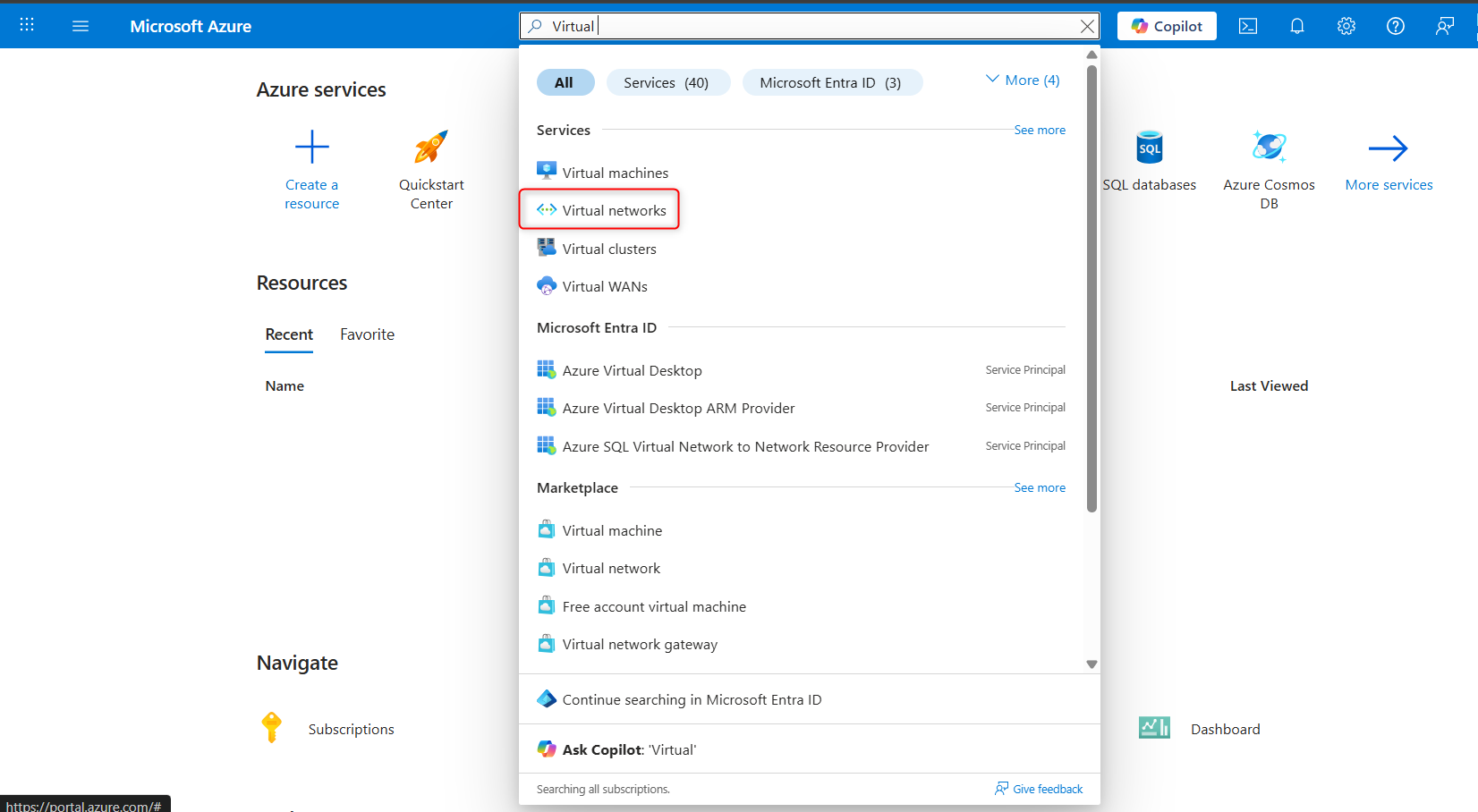
3.Select + Create and complete the configuration of the app-vnet.
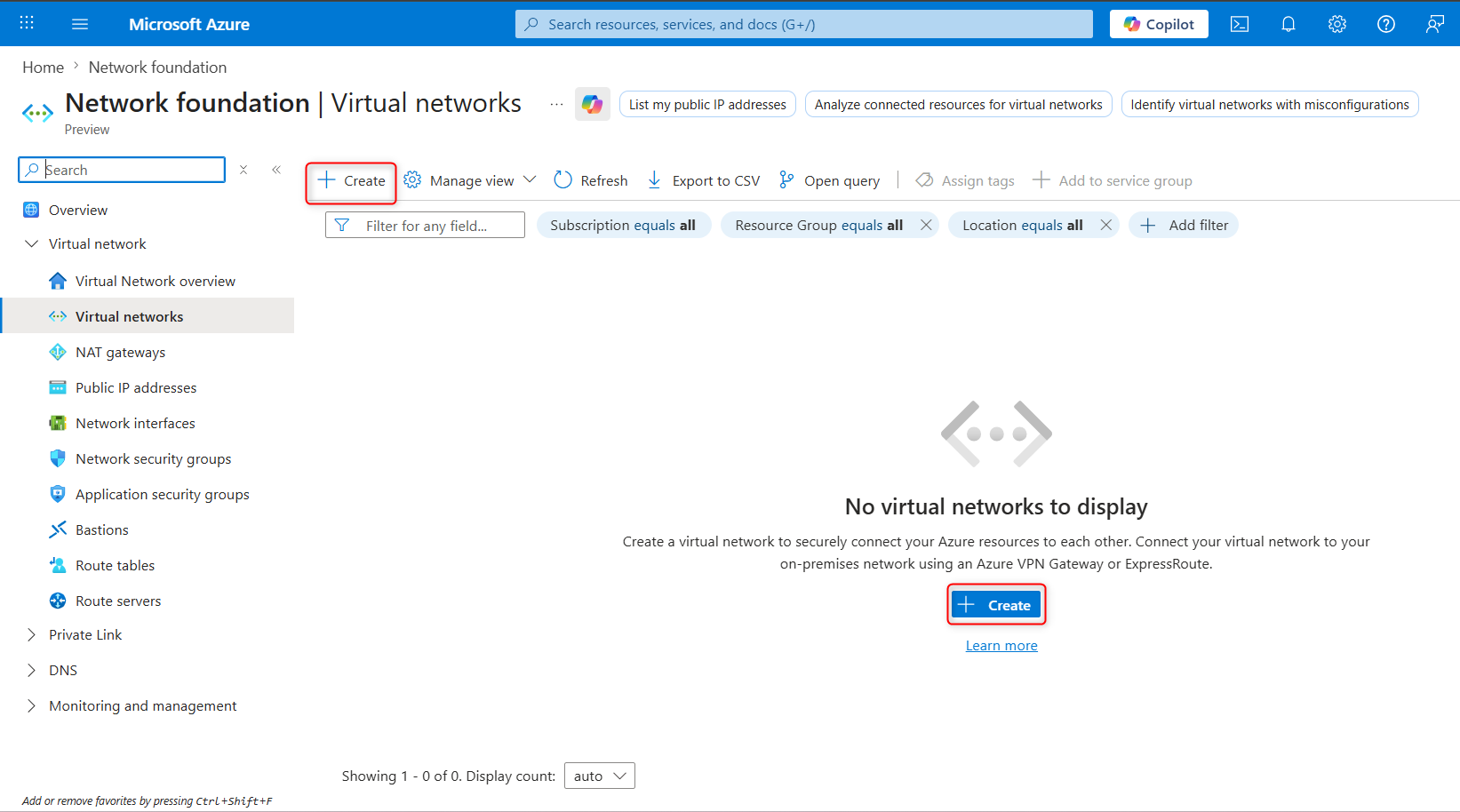
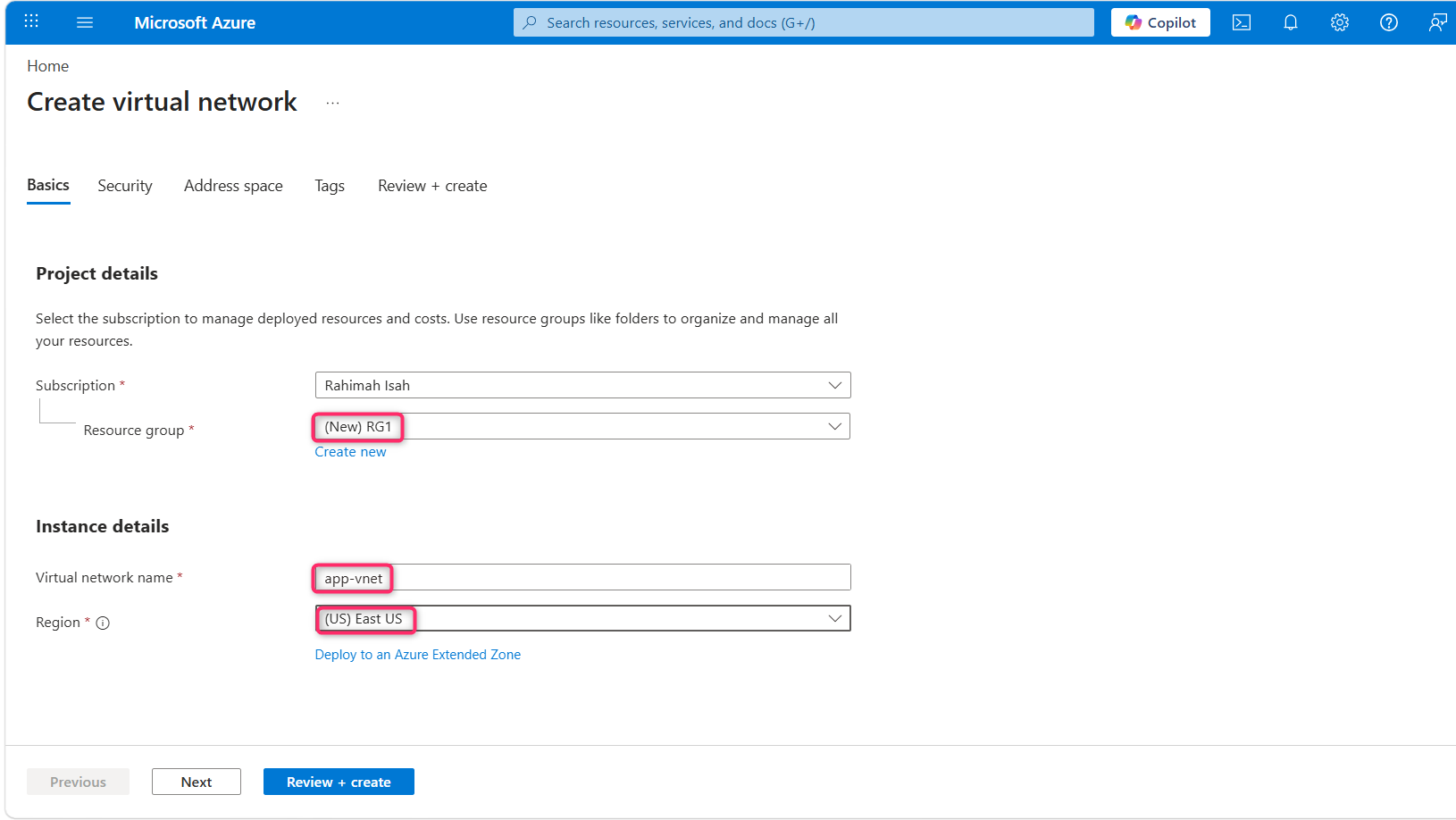
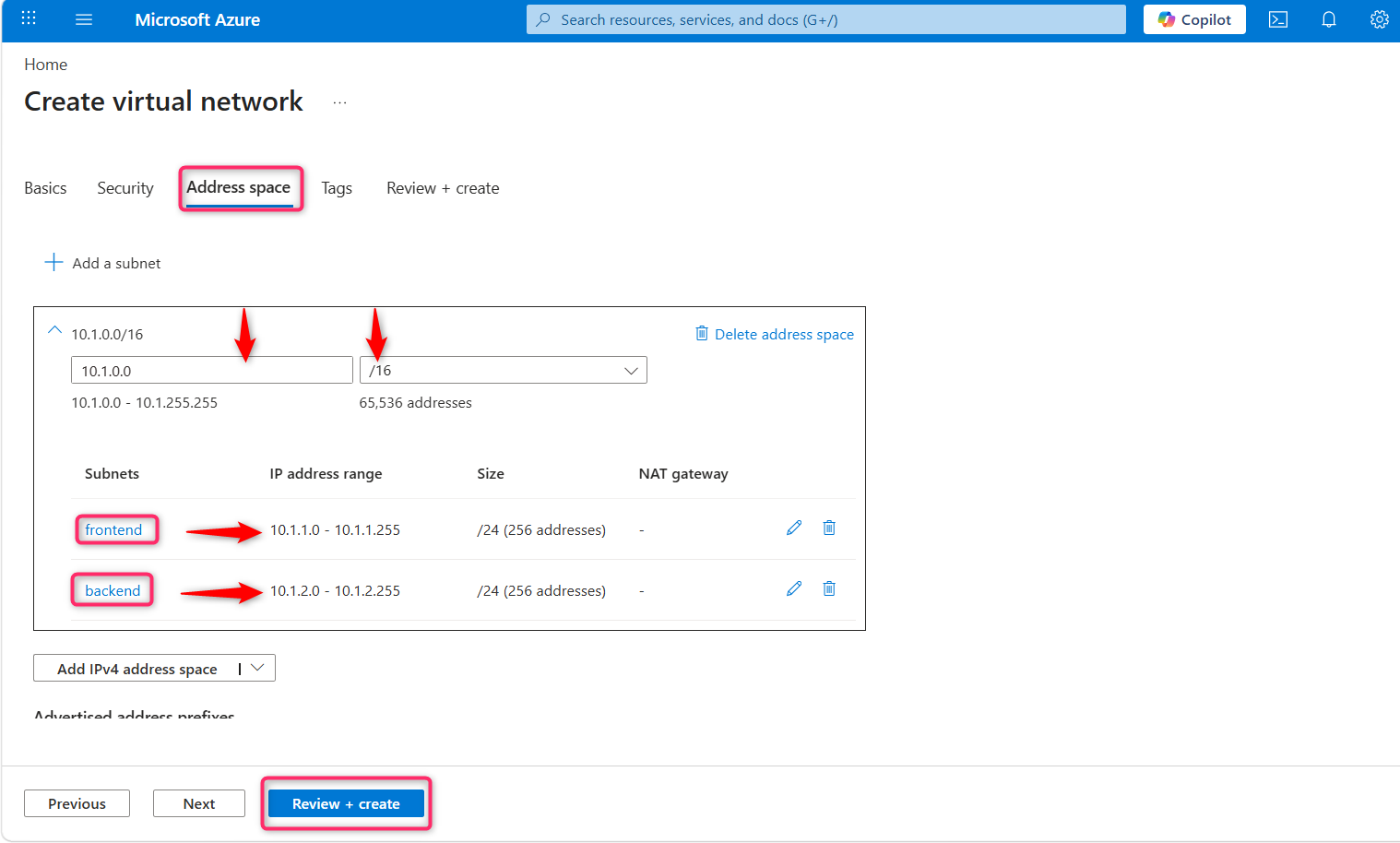
This virtual network requires two subnets, frontend and backend.
| Property | Value |
|---|---|
| Resource group | RG1 |
| Virtual network name | app-vnet |
| Region | East US |
| IPv4 address space | 10.1.0.0/16 |
| Subnet name | frontend |
| Subnet address range | 10.1.0.0/24 |
| Subnet name | backend |
| Subnet address range | 10.1.1.0/24 |
Note:Leave all other settings as their defaults.
When finished select Review + create and then Create.
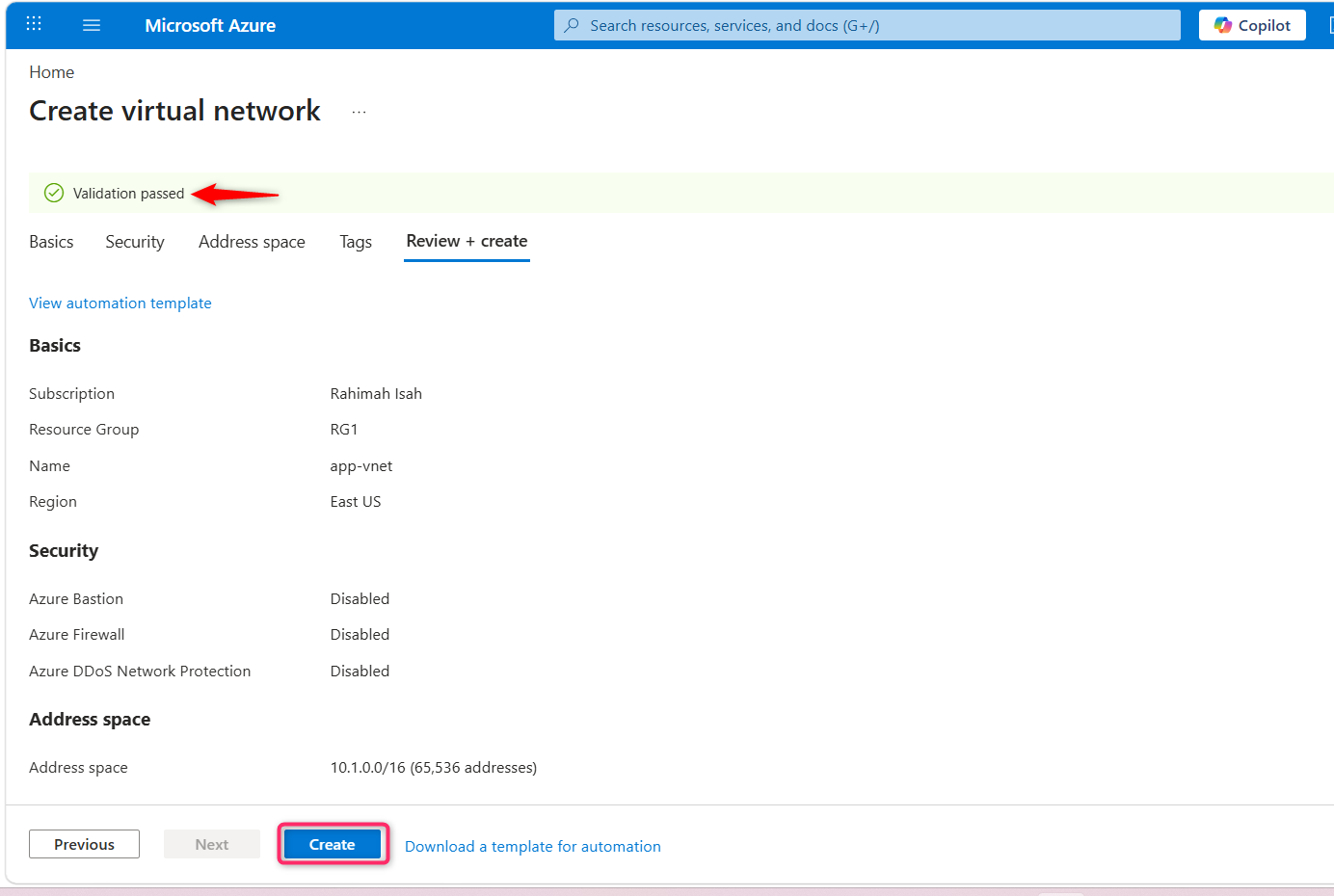
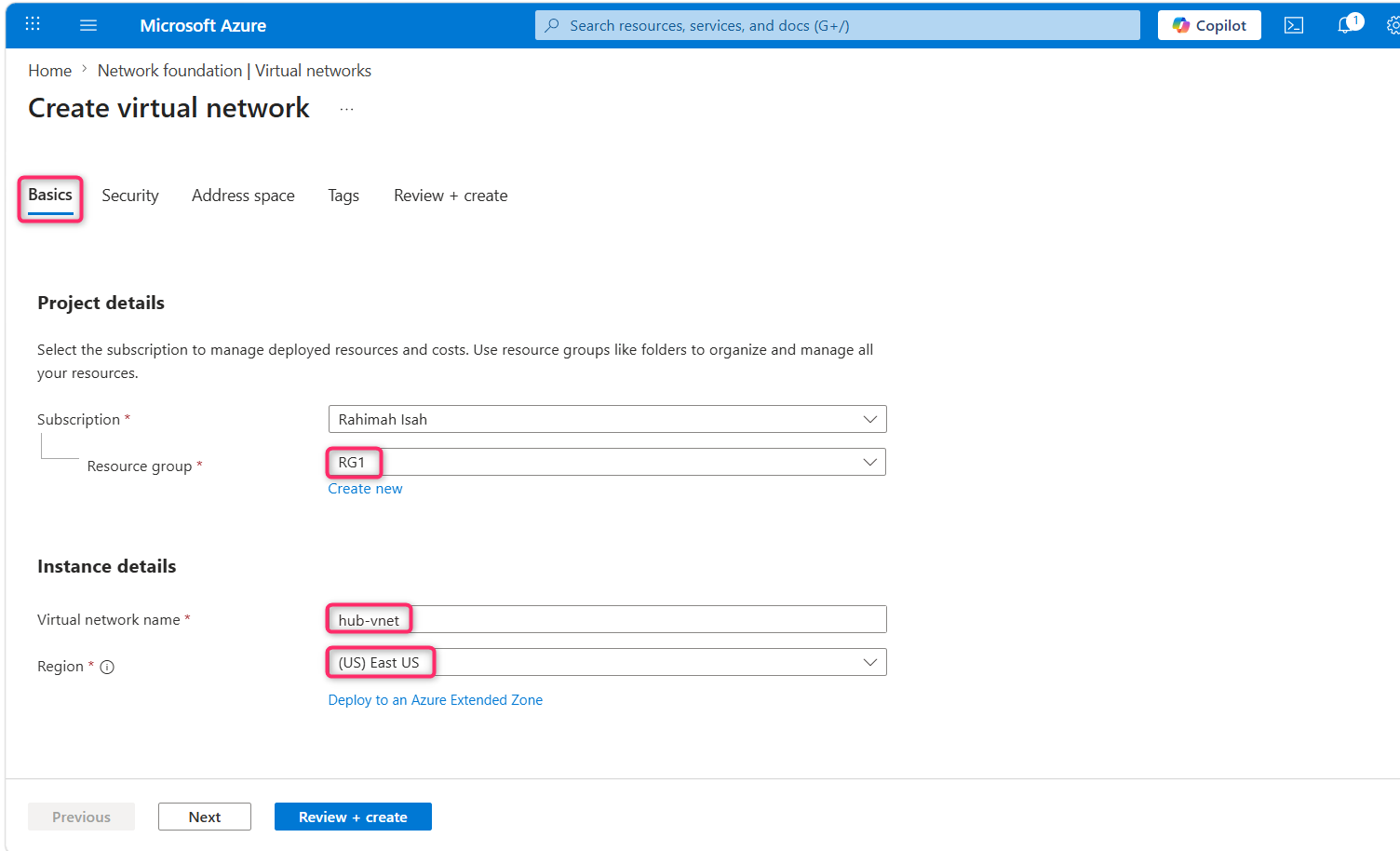
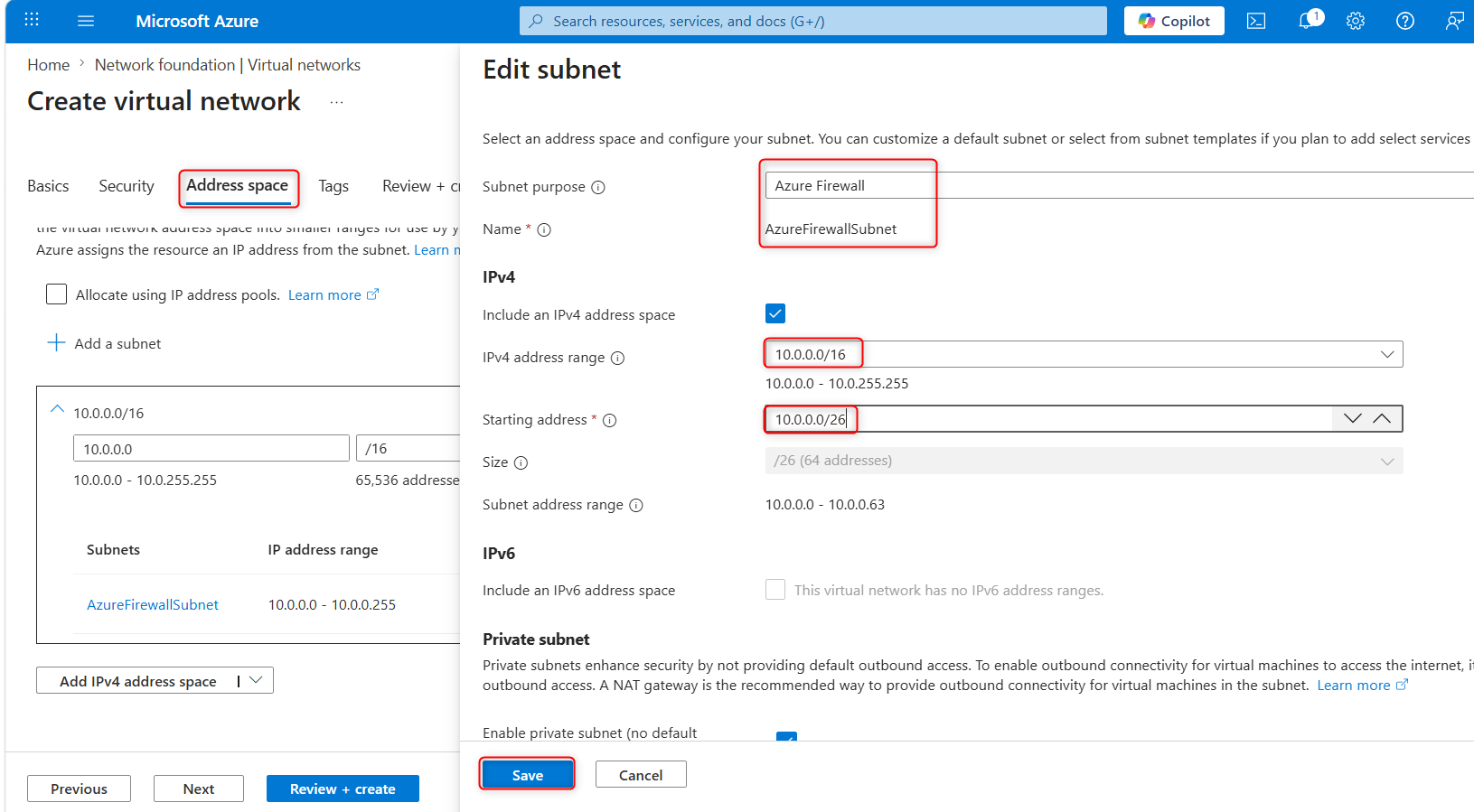
4.Create the Hub-vnet virtual network configuration. This virtual network has the firewall subnet.
| Property | Value |
|---|---|
| Resource group | RG1 |
| Name | hub-vnet |
| Region | East US |
| IPv4 address space | 10.0.0.0/16 |
| Subnet name | AzureFirewallSubnet |
| Subnet address range | 10.0.0.0/26 |
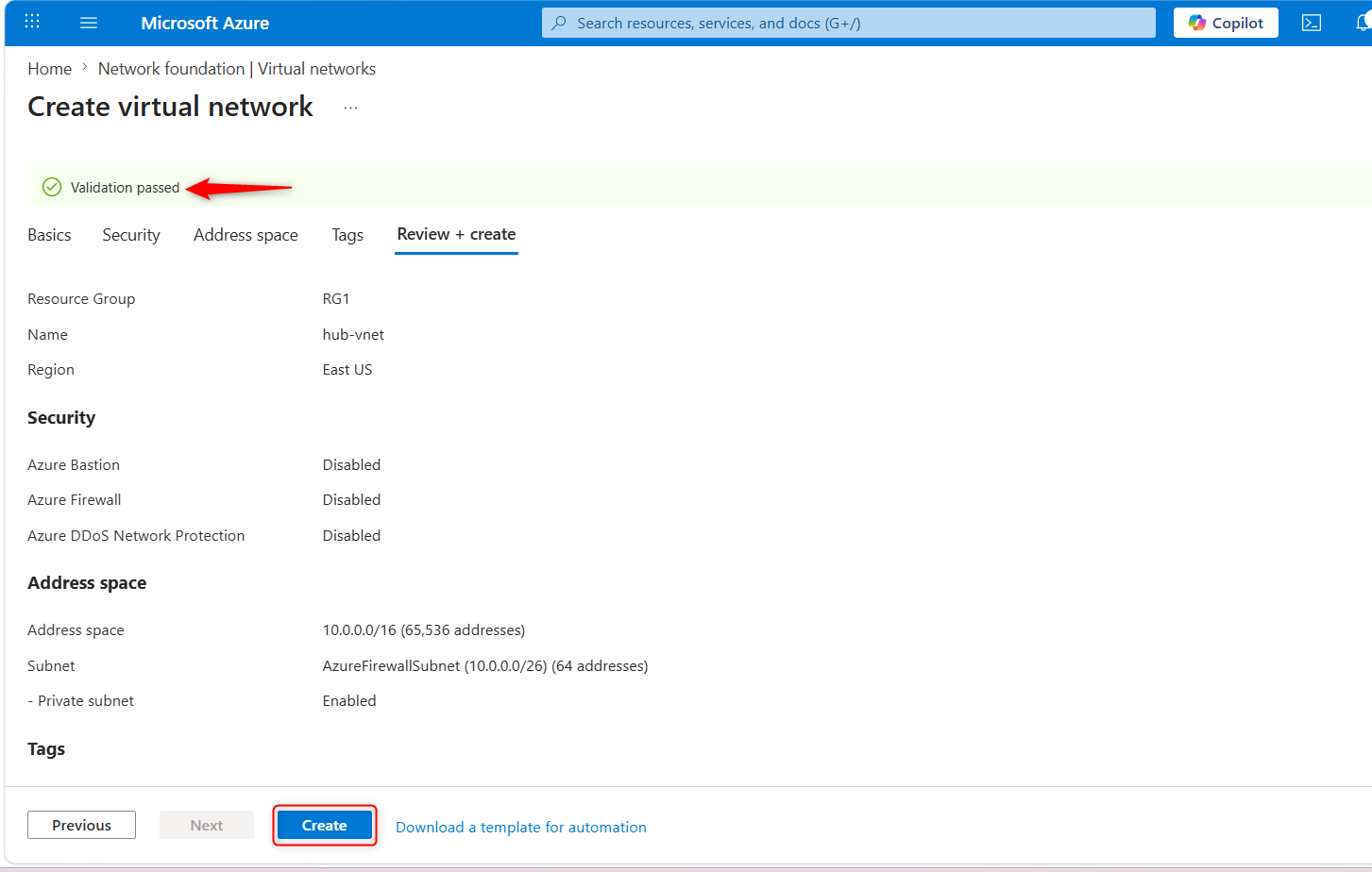
5.Once the deployments are complete, search for and select your ‘virtual networks`.
6.Verify your virtual networks and subnets were deployed.
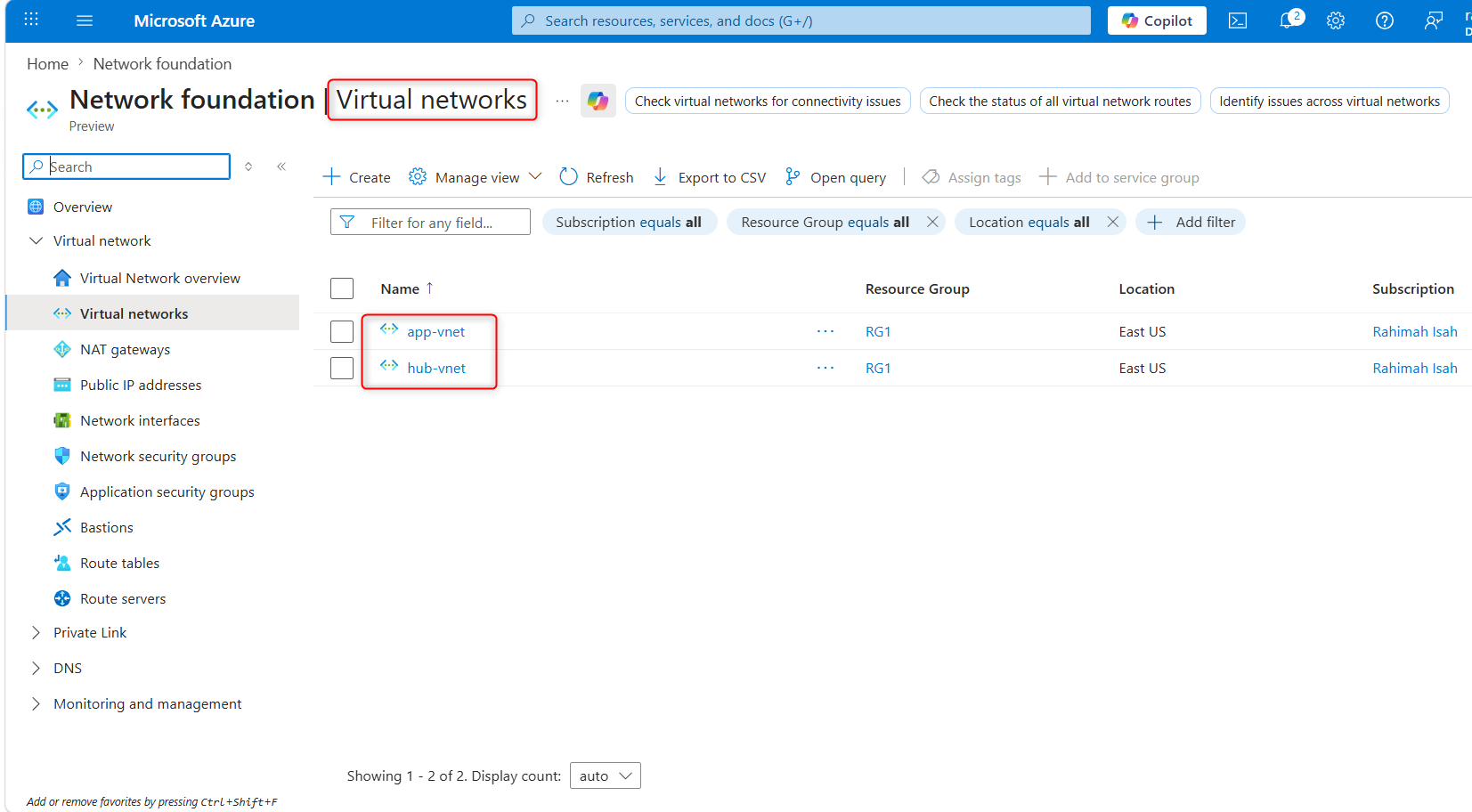
Configure a peer relationship between the virtual networks
Virtual network peering enables you to seamlessly connect two or more Virtual Networks in Azure.
1.Search for and select the app-vnet virtual network.
2.In the Settings blade, select Peerings.
3.+ Add a peering between the two virtual networks.
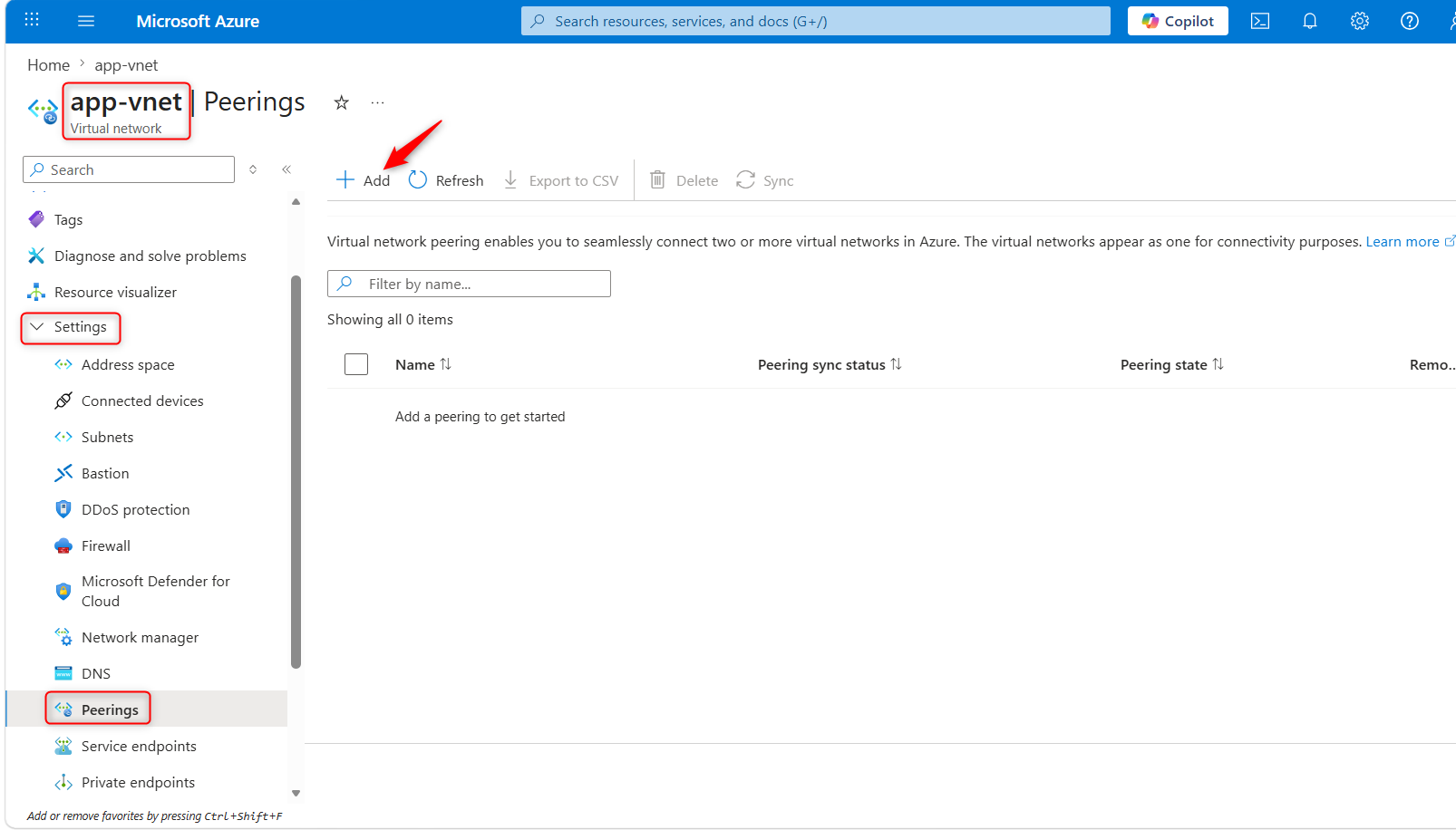
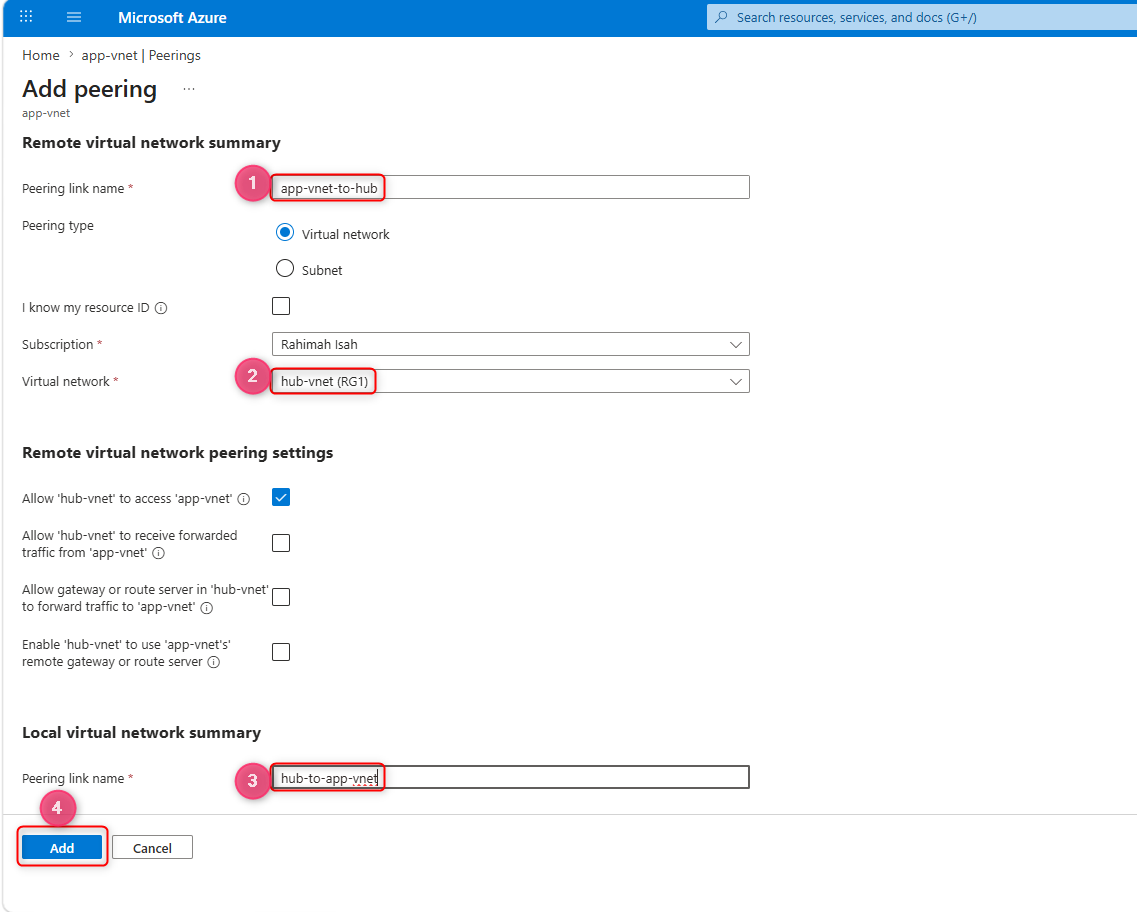
| Property | Value |
|---|---|
| Remote peering link name | app-vnet-to-hub |
| Virtual network | hub-vnet |
| Local virtual network peering link name | hub-to-app-vnet |
Note: Leave all other settings as their defaults. Select “Add” to create the virtual network peering.
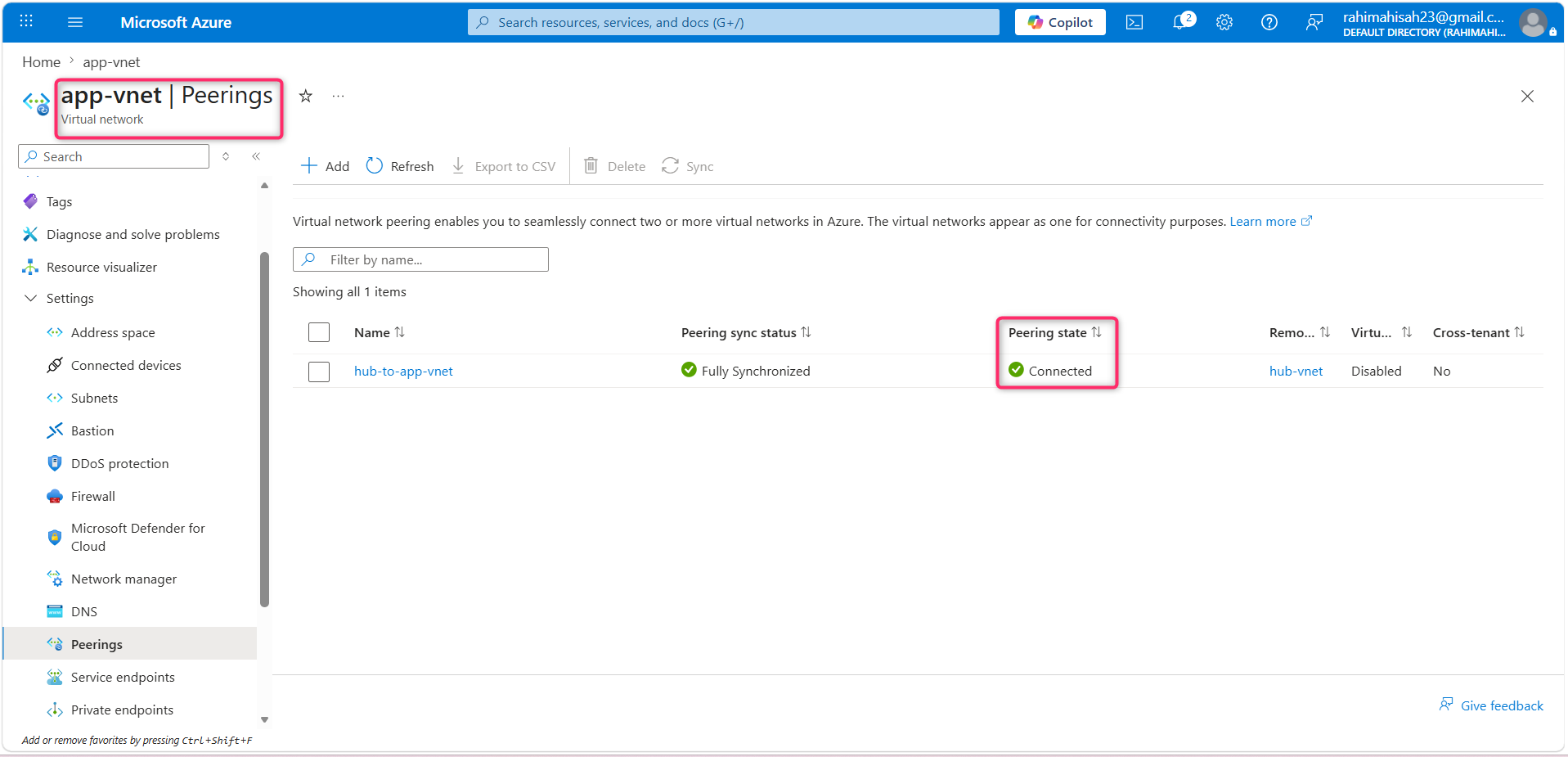
4.Once the deployment completes, verify the Peering status is Connected.
Key takeaways
Here are the main takeaways:
- Azure virtual networks (VNets) provide a secure and isolated network environment for your cloud resources. You can create multiple virtual networks per region per subscription.
- When designing virtual networks make sure the VNet address space (CIDR block) doesn’t overlap with your organization’s other network ranges.
- A subnet is a range of IP addresses in the VNet. You can segment VNets into different size subnets, creating as many subnets as you require for organization and security within the subscription limit. Each subnet must have a unique address range.
- Certain Azure services, such as Azure Firewall, require their own subnet.
- Virtual network peering enables you to seamlessly connect two Azure virtual networks. The virtual networks appear as one for connectivity purposes.
Summary
This project isn't just about spinning up resources, it is a demonstration of secure, production-grade cloud architecture. By implementing this Hub-and-Spoke topology, I have successfully:
1.Enforced Strict Network Isolation: Segmented the application layer into dedicated frontend and backend subnets to implement a defense-in-depth security model.
2.Designed for Enterprise Scale: Established a central hub-vnet to allow seamless, future integration of centralized security appliances like Azure Firewall.
3.Optimized Performance & Security: Leveraged VNet Peering to ensure high-bandwidth, low-latency communication that remains entirely off the public internet.
I designed this infrastructure with a Zero-Trust mindset, ensuring that every deployment is scalable, compliant, and structurally aligned with enterprise security standards.
Comments
More Blog
View allaiContext bankruptcy: The case for strategic forgetting for AI Agents
Most of us have seen a coding agent fail to complete a task we know it can do. We just don't...
J
James O'ReillygooglecloudParallel Compliance Engine: Drive-to-Sheets Multi-Agent Orchestration
When building Generative AI applications, developers often encounter a massive bottleneck: sequential...
A
Aryan IranidiscussIs It Ethical to Post and Ask About Circuits on Dev.to?
I’ve been thinking about sharing some electronic circuit posts on Dev.to — small circuits, DIY...
C
codebunny20agentsThe One-Click Exporter: AI Studio Antigravity, Probed to Its Limits
What nobody tells you about exporting your multi-agent prototype to a local workspace. Every...
L
leslysandraagenticarchitectGuarding the till while autonomous data agents do the digging
Autonomous agents are genuinely good at answering messy business questions. Give one an LLM and a set...
S
Sireesha PulipatiaiReturn on Attention: Why AI Code Reviews Are Wearing Us Out
PR volume went up, ticket quality didn't, and the gap got filled with LLMs on both sides of the review: bots reviewing, bots replying, bots occasionally arguing with bots about priorities that only existed in a teammate's head. Our CEO named the actual problem, and it's bigger than code review.
C
christineReady-made automations for this
Workflows from the Neura Market marketplace related to this Stable Diffusion resource