
Back to Blog llm
llm
 ai
ai googlecloud
 discuss
 agents
 agenticarchitect
 ai
ai
An LLM API call, in 4 GIFs
Jasmin Virdi May 26, 2026
0 views
This is the first post of series Building TinyAgent where we are going to build a small agent from...
This is the first post of series Building TinyAgent where we are going to build a small agent from scratch in Node.js with no frameworks just the API calls.
But before we write an agent, we need to understand what actually happens when you call an LLM. If you've only ever used a SDK, you've probably never seen the raw request and understand how it works. Six lines of code, an API key, and it just works but you have no idea what happened when request was dispatched and response was printed on the screen.
1. The request
Here is the sample API call with each and every section explained in detail.

A few things worth noticing in the API call.
The API is stateless: Every new API call does not remember previous call context. If you want a chatbot that "remembers" earlier messages, you hold the messages array and resend the whole thing every time.
max_tokens is a hard stop, not a target. If you hit the target the response stops mid sentence.
The API call pattern is universal. Different URL, Authorization: Bearer instead of x-api-key, the system prompt lives inside messages rather than at the top level. But it's the same POST, the same JSON, the same {model, messages, max_tokens}. Once you understand the shape, switching providers is just a find-and-replace.
2. The response
The API answers with a JSON blob. There are ~10 fields in it, but only four actually matter:

The one which is mostly skipped is: stop_reason.
It tells you why the model stopped, and in real systems and there could be possible reasons behind it:
end_turn      → finished naturally, you're done
max_tokens    → hit your ceiling, response is truncated
tool_use      → model wants to call a tool (next post!)
stop_sequence → matched one of your stop strings
If you only check the text and ignore stop_reason, you will ship a bug at some point. The response looks fine right up until it doesn't.
The other field worth burning in: usage. It shows you how many tokens went in and came out. You want this number in your logs from day one not after you get a surprise bill. 🤯
3. Tokens
I keep saying "24 input tokens." Here's what that means:
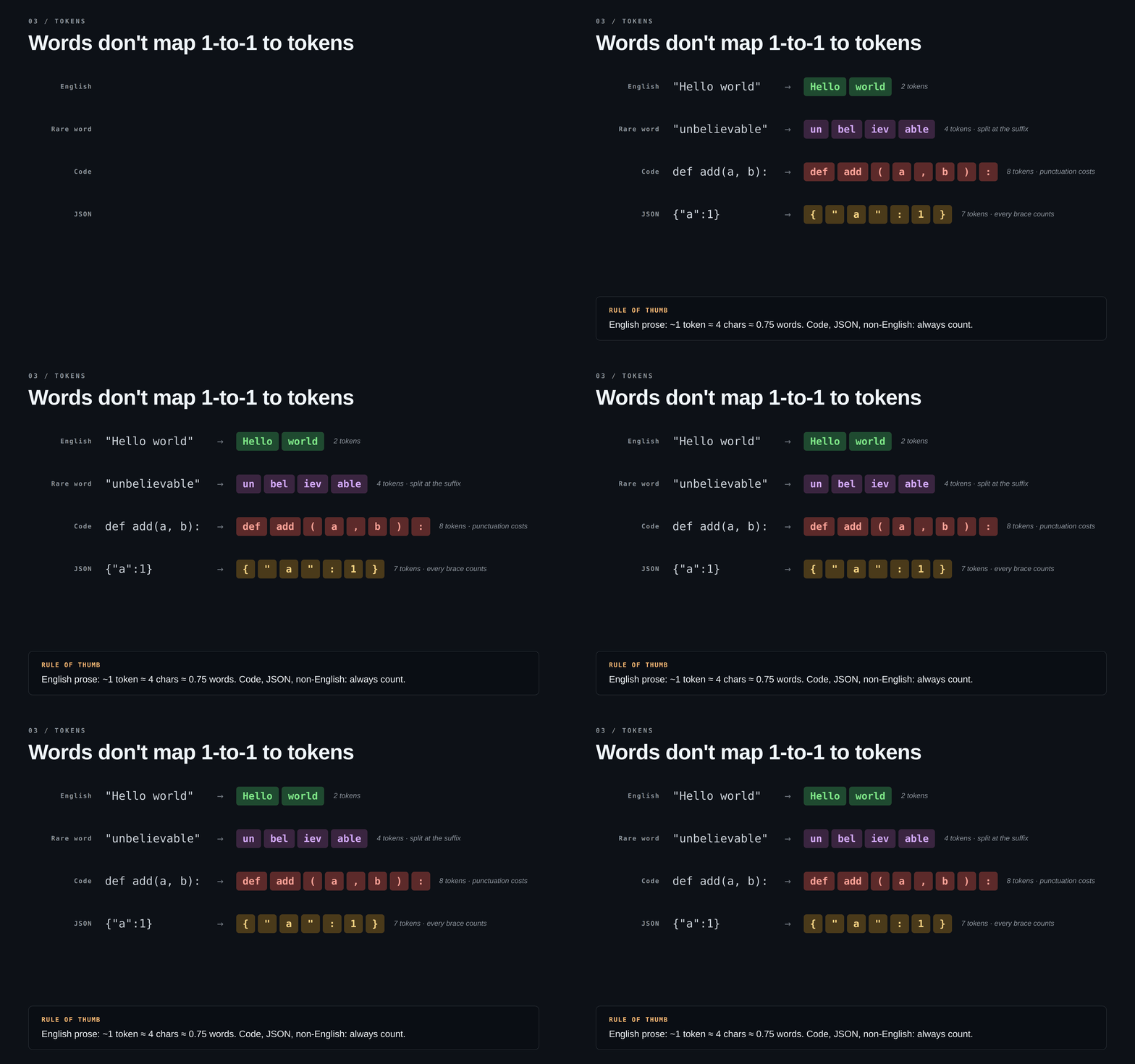
Things that surprise people and is worth noting:
Words don't equal tokens. "Unbelievable" is one word but four tokens. The tokenizer splits on common substrings, not spaces.
Code costs more than it looks def add(a, b): is 8 tokens. Every bracket and comma is its own token.
JSON is expensive. {"a":1} is 7 tokens. If your tool schemas are bloated, they're quietly eating into your budget on every single request.
Non-English costs more Japanese, Hindi, Arabic tend to run 2–4× the token count of the same content in English. If you're building for a global audience, this changes your cost math a lot.
Rule of thumb for English prose: ~1 token ≈ 4 characters ≈ 0.75 words. For everything else, run it through the tokenizer yourself before assuming.
4. The bill
Two meters run on every call. They are priced differently
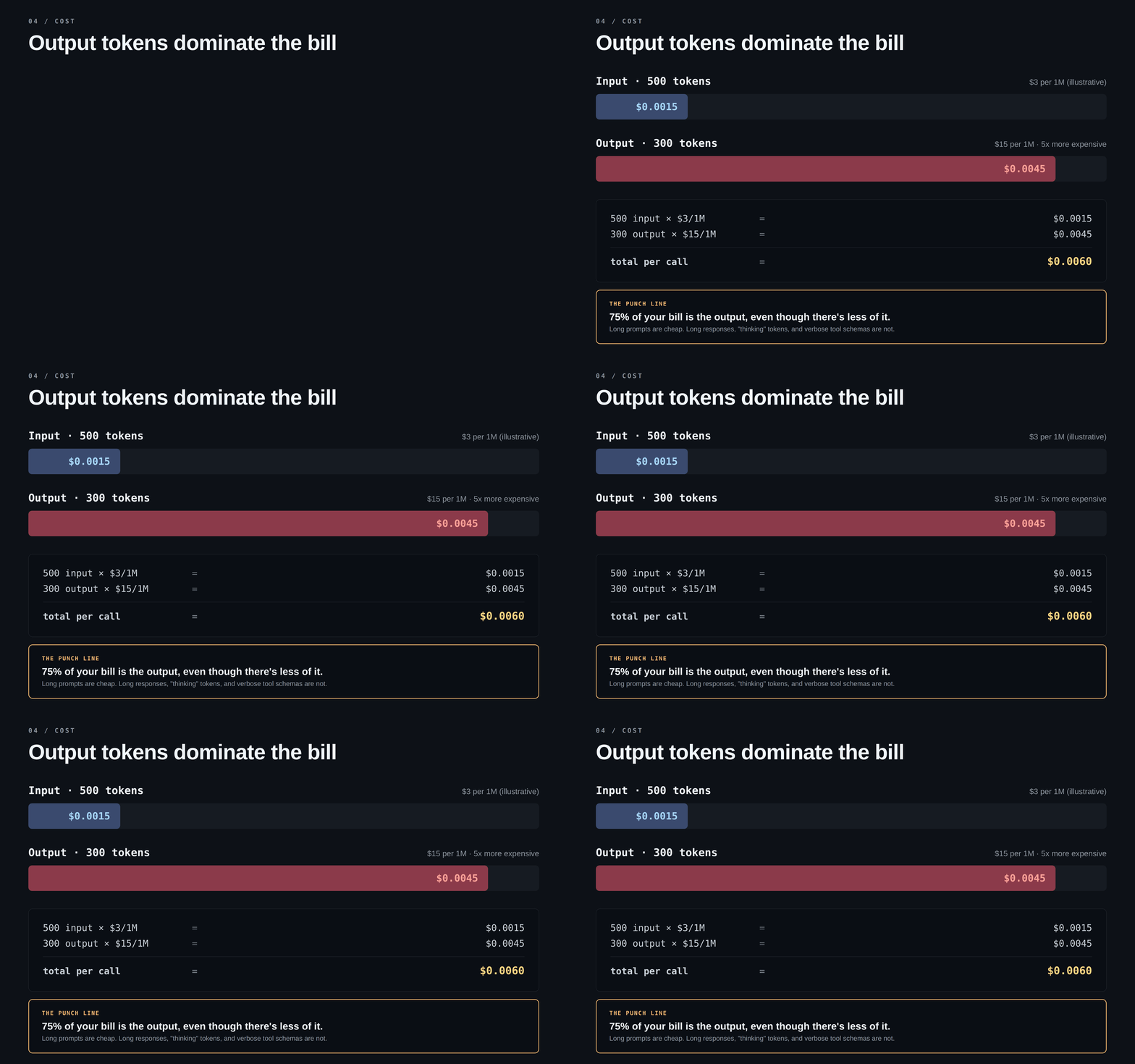
Output tokens cost roughly 3–5× more than input tokens. That's the one number to internalize about LLM pricing.
cost = (input_tokens  / 1,000,000) × input_price
     + (output_tokens / 1,000,000) × output_price
Three things that follow from the asymmetry:
- Long prompts are cheap. Long responses are expensive. Stuffing 50 KB of context into a system prompt is fine. Asking for 50 KB of output is roughly 5× more expensive.
- "Thinking" tokens count as output. Reasoning models bill their internal thought at the output rate, even though you don't see it.
- Tool schemas eat input on every call. They get resent with every request, just like the system prompt.
At $0.006 per call, 100k calls a day is $600/month from one small feature. Add usage logging now, not when you get the alert. 🚨
5. The whole thing in 20 lines
Here is the complete code of the API call we have discussed above: {% embed https://github.com/Jasmin2895/TinyAgent %}
No dependencies and no install setup it is just Node file with API key.
Three things to try before the next post
-
Run it and watch the numbers Make ten calls, change the prompt length, see how usage moves. You'll build a real instinct for cost faster this way than reading any doc.
-
Set
max_tokens: 20and ask for something long. Watch it cut off. Check stop_reason. This is a bug you'll hit in production eventually better to meet it on purpose right now -
Build a multi-turn chat by hand. Keep a messages array, push each user message and each model reply onto it, and resend the whole thing every turn. Once you do this, you'll immediately understand why long conversations get expensive you're paying for the full history on every call.
What's next
In the upcoming post series we will expand the ability of the TinyAgent to actually handle lot of things than just responding.
Happy Coding! 👩💻
Comments
More Blog
View allaiContext bankruptcy: The case for strategic forgetting for AI Agents
Most of us have seen a coding agent fail to complete a task we know it can do. We just don't...
J
James O'ReillygooglecloudParallel Compliance Engine: Drive-to-Sheets Multi-Agent Orchestration
When building Generative AI applications, developers often encounter a massive bottleneck: sequential...
A
Aryan IranidiscussIs It Ethical to Post and Ask About Circuits on Dev.to?
I’ve been thinking about sharing some electronic circuit posts on Dev.to — small circuits, DIY...
C
codebunny20agentsThe One-Click Exporter: AI Studio Antigravity, Probed to Its Limits
What nobody tells you about exporting your multi-agent prototype to a local workspace. Every...
L
leslysandraagenticarchitectGuarding the till while autonomous data agents do the digging
Autonomous agents are genuinely good at answering messy business questions. Give one an LLM and a set...
S
Sireesha PulipatiaiReturn on Attention: Why AI Code Reviews Are Wearing Us Out
PR volume went up, ticket quality didn't, and the gap got filled with LLMs on both sides of the review: bots reviewing, bots replying, bots occasionally arguing with bots about priorities that only existed in a teammate's head. Our CEO named the actual problem, and it's bigger than code review.
C
christineReady-made automations for this
Workflows from the Neura Market marketplace related to this Stable Diffusion resource
- Automate Google Sheets Triggered List Building Workflown8n · $9.53 · Related topic
- Automate Your Website Building with N8N: Unsubscribe Workflowmake · $6.62 · Related topic
- Building Your First WhatsApp AI Sales Chatbotn8n · $19.99 · Related topic
- Create Portrait Series from Single Images with Flux AI & Replicaten8n · $14.99 · Related topic