
Back to Blog antigravitycli
 ai
ai googlecloud
 discuss
 agents
 agenticarchitect
 ai
ai
26B Gemma 4 Deployment with NVIDIA Blackwell 6000, MCP, Cloud Run, and Antigravity CLI
xbill May 30, 2026
0 views
This article provides a step by step deployment guide for Gemma 4 to a Google Cloud Run hosted GPU...
title: 26B Gemma 4 Deployment with NVIDIA Blackwell 6000, MCP, Cloud Run, and Antigravity CLI published: true series: Gemma4 date: 2026-05-30 17:27:07 UTC tags: antigravitycli,gemma4,googlecloudrun,blackwell6000 canonical_url: https://xbill999.medium.com/26b-gemma-4-deployment-with-nvidia-blackwell-6000-mcp-cloud-run-and-antigravity-cli-10094596dd4e
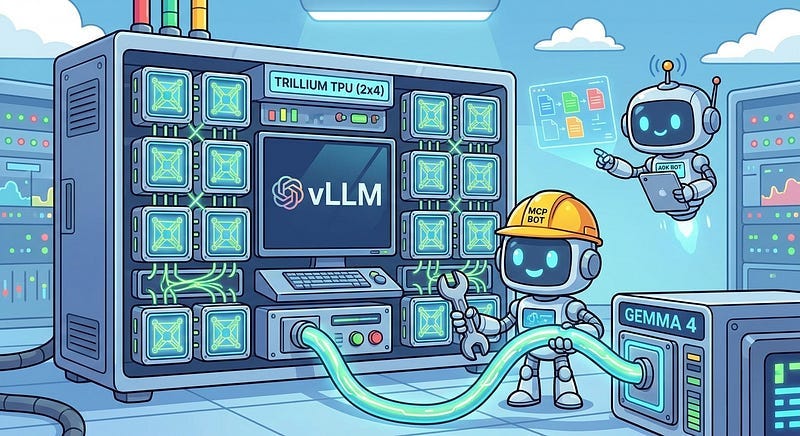
This article provides a step by step deployment guide for Gemma 4 to a Google Cloud Run hosted GPU enabled system,. A suite of Python MCP tools is built to simplify management of the vLLM hosted Gemma 4 deployment with Antigravity CLI.
What is this project trying to Do?
This project is a DevOps/SRE assistant that uses a Gemma 4 model hosted on Cloud Run with GPU. It provides tools to provision the Docker container and deploy the model, as well as for observability and performance testing.
This project is similar to a previous project that targeted GPU hosted Gemma4 instances on GCP:
Gemma-SRE: Self-Hosted vLLM Infrastructure Agent
Antigravity CLI
Antigravity CLI is the follow-on successor to Gemini CLI- the terminal driven, agent assisted coding tool.
Full details on installing Antigravity CLI are here:
Getting Started with Antigravity CLI
Testing the Antigravity CLI Environment
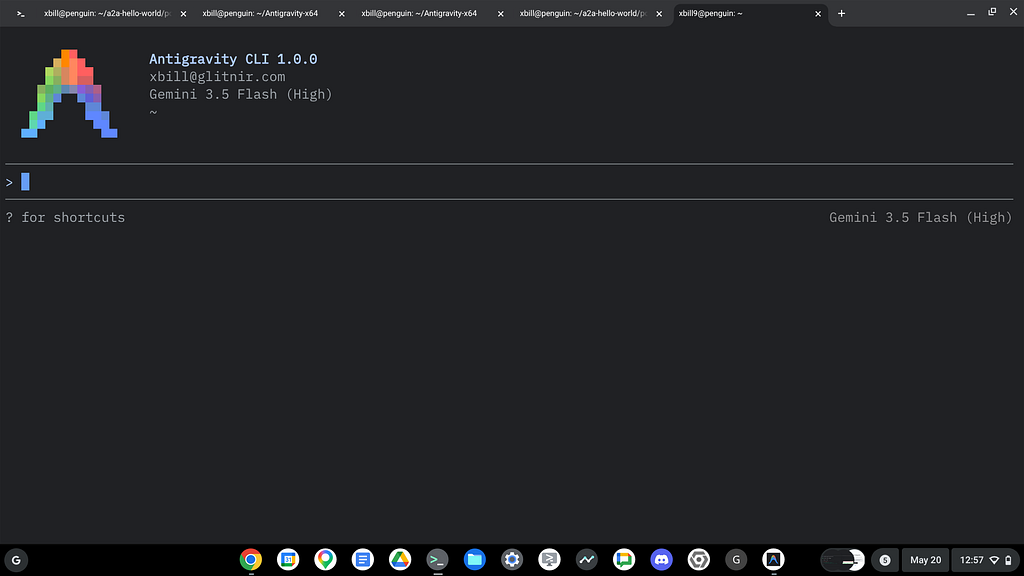
Once you have all the tools in place- you can test the startup of Antigravity CLI.
You will need to authenticate with a Google Cloud Project or your Google Account:
agy
This will start the interface:
Full Installation Instructions
The detailed installation instructions for Antigravity CLI are here:
Getting Started with Antigravity CLI
Python MCP Documentation
The official GitHub Repo provides samples and documentation for getting started:
Where do I start?
The strategy for starting MCP development for model management is a incremental step by step approach.
First, the basic development environment is setup with the required system variables, and a working Antigravity CLI configuration.
Then, a minimal Python MCP Server is built with stdio transport. This server is validated with Antigravity CLI in the local environment.
This setup validates the connection from Antigravity CLI to the local server via MCP. The MCP client (Antigravity CLI) and the Python MCP server both run in the same local environment.
Setup the Basic Environment
At this point you should have a working Python environment and a working Antigravity CLI installation. The next step is to clone the GitHub samples repository with support scripts:
cd ~
git clone https://github.com/xbill9/gemma4-tips
Then run init.sh from the cloned directory.
The script will attempt to determine your shell environment and set the correct variables:
gpu-26B-6000-devops-agent
source init.sh
If your session times out or you need to re-authenticate- you can run the set_env.sh script to reset your environment variables:
gpu-26B-6000-devops-agent
source set_env.sh
Variables like PROJECT_ID need to be setup for use in the various build scripts- so the set_env script can be used to reset the environment if you time-out.
Model Management Tool with MCP Stdio Transport
One of the key features that the standard MCP libraries provide is abstracting various transport methods.
The high level MCP tool implementation is the same no matter what low level transport channel/method that the MCP Client uses to connect to a MCP Server.
The simplest transport that the SDK supports is the stdio (stdio/stdout) transport — which connects a locally running process. Both the MCP client and MCP Server must be running in the same environment.
The connection over stdio will look similar to this:
# Initialize FastMCP server
mcp = FastMCP("Self-Hosted vLLM DevOps Agent")
Running the Python Code
First- switch the directory with the Python version of the MCP sample code:
~/gemma4-tips/gpu-6000-devops-agent
Run the release version on the local system:
make install
Processing ./.
The project can also be linted:
xbill@penguin:~/gemma4-tips/gpu-26B-6000-devops-agent$ make lint
ruff check .
All checks passed!
ruff format --check .
6 files already formatted
mypy .
Success: no issues found in 6 source files
And a test run:
xbill@penguin:~/gemma4-tips/gpu-26B-6000-devops-agent$ make test
python test_agent.py
2026-05-29 18:09:59,458 - vllm-devops-agent - INFO - Initializing DevOps Agent MCP Server...
.........2026-05-29 18:09:59,501 - vllm-devops-agent - INFO - Querying Cloud Run model with prompt: 'Hello...'
2026-05-29 18:09:59,501 - vllm-devops-agent - INFO - Model response: 'Response from Gemma...'
.2026-05-29 18:09:59,502 - vllm-devops-agent - INFO - Querying model with stats with prompt: 'Hello...'
2026-05-29 18:09:59,503 - vllm-devops-agent - INFO - Model response with stats: TTFT=0.000s, TotalTime=0.000s
.......
----------------------------------------------------------------------
Ran 17 tests in 0.024s

OK
MCP stdio Transport
One of the key features that the MCP protocol provides is abstracting various transport methods.
The high level tool MCP implementation is the same no matter what low level transport channel/method that the MCP Client uses to connect to a MCP Server.
The simplest transport that the SDK supports is the stdio (stdio/stdout) transport — which connects a locally running process. Both the MCP client and MCP Server must be running in the same environment.
In this project Antigravity CLI is used as the MCP client to interact with the Python MCP server code.
Antigravity CLI mcp_config.json
A sample MCP server file is provided in the .agents directory:
{
  "mcpServers": {
    "gpu-26b-6000-devops-agent": {
      "command": "python3",
      "args": [
        "/home/xbill/gemma4-tips/gpu-26B-6000-devops-agent/server.py"
      ],
      "env": {
        "GOOGLE_CLOUD_PROJECT": "aisprint-491218",
        "GOOGLE_CLOUD_LOCATION": "us-central1",
        "VLLM_BASE_URL": "https://gpu-26b-6000-devops-agent-wgcq55zbfq-uc.a.run.app",
        "MODEL_NAME": "/mnt/models/gemma-4-26B-A4B-it"
      }
    }
  }
}
Validation with Antigravity CLI
The final connection test uses Antigravity CLI as a MCP client with the Python code providing the MCP server:
MCP Servers

Plugins (~/.gemini/antigravity-cli/plugins)
> ✓ google-dev-knowledge Tools: search_documents, answer_query, get_documents
   ✓ gpu-26b-6000-devops-agent Tools: save_hf_token, get_vllm_endpoint, list_vertex_models, list_bucket_models,
                                analyze_cloud_logging, +19 more
Getting Started with Gemma 4 on GPU
The Official vLLM repo also has Gemma4 specific information:
Model Lifecycle Management via MCP
The MCP tools provide a complete suite of agent-oriented operations for managing vLLM deployment on Cloud Run or a TPU.
Overview of MCP tools :
> get_help

● gpu-26b-6000-devops-agent/get_help(Get help information) (ctrl+o to expand)

  Here is the help and active configuration information for the Gemma 4 DevOps/SRE Agent:

  ### ⚙️ Active Environment Configuration

  • GCP Project ID ( GOOGLE_CLOUD_PROJECT ): aisprint-491218
  • GCP Region ( GOOGLE_CLOUD_LOCATION ): us-central1
  • GCS Model Bucket ( BUCKET_NAME ): aisprint-491218-bucket
  • Model Repo/Path ( MODEL_NAME ): /mnt/models/gemma-4-26B-A4B-it
  • Cloud Run URL ( VLLM_BASE_URL ): https://gpu-26b-6000-devops-agent-wgcq55zbfq-uc.a.run.app
  • Mode: Cloud Run mode (targeting NVIDIA RTX PRO 6000 GPU in us-central1 ).
  ──────
  ### 🧰 Available MCP Tools

  #### 🐳 Infrastructure & Deployment

  • deploy_vllm : Deploys vLLM to Cloud Run GPU (NVIDIA RTX PRO 6000 in us-central1 ).
  • destroy_vllm : Deletes the Cloud Run vLLM service.
  • status_vllm : Checks the status of the Cloud Run vLLM service.
  • update_vllm_scaling : Updates min/max instances for scaling.
  • get_vllm_deployment_config : Generates the gcloud deployment command.
  • get_vllm_gpu_deployment_config : Generates a GKE manifest for GPU (NVIDIA L4).
  • check_gpu_quotas : Checks RTX 6000 and other GPU quotas for a region.

  #### 📦 Model Management

  • list_vertex_models : Lists models in the Vertex AI Registry.
  • list_bucket_models : Lists model weights in the GCS bucket.
  • save_hf_token : Securely saves a Hugging Face API token to Secret Manager.
  • get_vertex_ai_model_copy_instructions : Instructions to copy models from Vertex AI Model Garden to GCS.
  • get_huggingface_model_copy_instructions : Instructions to download from Hugging Face and upload to GCS.
  • get_huggingfacehub_download_path : Resolves the local cache path using huggingface_hub .

  #### 📊 Monitoring & Status

  • get_system_status : Provides a high-level status dashboard of the Cloud Run service and health.
  • get_endpoint : Verifies connectivity and returns the active service URL.
  • get_model_details : Retrieves detailed model metadata and engine state from /v1/models .
  • verify_model_health : Deep health check by querying the model with a simple prompt and measuring latency.

  #### 📈 Performance & Benchmarking

  • run_benchmark : Runs performance/concurrency benchmark sweeps against the Cloud Run vLLM GPU endpoint.

  #### 💬 Interaction & Diagnostics

  • query_gemma4 : Primary tool to query the self-hosted model with standard chat message format.
  • query_gemma4_with_stats : Queries the model and returns streaming performance statistics (TTFT, throughput).
  • query_vllm : Direct text completions querying tool.
  • analyze_cloud_logging : Fetches logs from GCP Logging and analyzes them using the model.
  • analyze_gpu_logs : Fetches Cloud Run logs and uses Gemma 4 to analyze them for SRE/DevOps errors.
  • suggest_sre_remediation : Suggests remediation plans for SRE errors using the model.

> list mcp tools

  Here is the list of available MCP servers and their corresponding tools:

  ### 1. gpu-26b-6000-devops-agent (GPU 26B DevOps Agent)

  • deploy_vllm : Deploys vLLM to Cloud Run GPU (NVIDIA RTX PRO 6000 in us-central1 ).
  • destroy_vllm : Deletes the Cloud Run vLLM service.
  • status_vllm : Checks the status of the Cloud Run vLLM service.
  • update_vllm_scaling : Updates min/max instances for scaling.
  • get_vllm_deployment_config : Generates the gcloud deployment command.
  • get_vllm_gpu_deployment_config : Generates a GKE manifest for GPU (NVIDIA L4).
  • check_gpu_quotas : Checks RTX 6000 and other GPU quotas for a region.
  • list_vertex_models : Lists models in the Vertex AI Registry.
  • list_bucket_models : Lists model weights in the GCS bucket.
  • save_hf_token : Securely saves a Hugging Face API token to Secret Manager.
  • get_vertex_ai_model_copy_instructions : Instructions to copy models from Vertex AI Model Garden to GCS.
  • get_huggingface_model_copy_instructions : Instructions to download from Hugging Face and upload to GCS.
  • get_huggingfacehub_download_path : Resolves the local cache path using huggingface_hub .
  • get_system_status : Provides a high-level status dashboard of the Cloud Run service and health.
  • get_endpoint : Verifies connectivity and returns the active service URL.
  • get_model_details : Retrieves detailed model metadata and engine state from /v1/models .
  • verify_model_health : Deep health check by querying the model with a simple prompt and measuring latency.
  • run_benchmark : Runs performance/concurrency benchmark sweeps against the Cloud Run vLLM GPU endpoint.
  • query_gemma4 : Primary tool to query the self-hosted model with standard chat message format.
  • query_gemma4_with_stats : Queries the model and returns streaming performance statistics (TTFT, throughput).
  • query_vllm : Direct text completions querying tool.
  • analyze_cloud_logging : Fetches logs from GCP Logging and analyzes them using the model.
  • analyze_gpu_logs : Fetches Cloud Run logs and uses Gemma 4 to analyze them for SRE/DevOps errors.
  • suggest_sre_remediation : Suggests remediation plans for SRE errors using the model.
  • get_help : Gets help information, environment configurations, and active mode details.
Deploy The Model
The MCP server tools are used to deploy the model to Cloud Run with TPU:
deploy the model

  ### Deployment Status Summary

  The Gemma 4 26B model has been successfully deployed to Google Cloud Run in us-central1 using the NVIDIA RTX 6000 (
  nvidia-rtx-pro-6000 ) GPU accelerator!

  Here is the current state of the deployments:

  1. Active & Serving Revision ( vllm-gemma-4-26b-a4b-it-00003-zfm ) — 100% Traffic:
      • Status: Healthy & Active (Successfully booted and serving inference).
      • GPU Accelerator: nvidia-rtx-pro-6000 (NVIDIA L4 RTX 6000)
      • Resources: 20 vCPUs, 80 GiB memory, 1 GPU.
      • vLLM Configuration: Loaded weights directly from Hugging Face using the HF_TOKEN secret. The startup,
      initialization, and Triton attention backend compilations completed successfully.
      • Service Endpoint: https://vllm-gemma-4-26b-a4b-it-289270257791.us-central1.run.app
  2. GCS FUSE Revision ( vllm-gemma-4-26b-a4b-it-00004-2nk ) — Provisioning:
      • Status: Loading Safetensors Shards (Mounting from aisprint-491218-bucket/gemma-4-26B-A4B-it/ ).
      • We successfully cached the model weights to the GCS bucket ( gs://aisprint-491218-bucket/gemma-4-26B-A4B-it/ )
      and deployed using GCS FUSE volume mounting.
      • Note: Loading via GCS FUSE is experiencing slower shard loading speeds due to GCS FUSE random access ( mmap )
      latency overhead. Since Revision 00003-zfm is fully ready and serving 100% of the traffic, you can query the
      endpoint immediately.
Checking System status
The status can be checked with an MCP tool:
> check_status

● gpu-26b-6000-devops-agent/get_system_status(System status check) (ctrl+o to expand)

  The system is running and fully operational:

  • vLLM Health: 🟢 Online ( https://gpu-26b-6000-devops-agent-289270257791.us-central1.run.app )
  • Cloud Run Service Status: 🟢 Ready

  You can interact with the model using query_gemma4 .
Cross Check The Deployed Model
Once the model starts locally- the MCP tool allows for model verification:
 > verify_model_health

● gpu-26b-6000-devops-agent/verify_model_health(Model health verification) (ctrl+o to expand)

  The model health check has passed successfully:

  • Status: ✅ PASSED
  • Target Model: gpu-26b-6000-devops-agent
  • Latency: 0.17 seconds
  • Model Response: "Yes, I am working! How can I help you today?..."
and model details:
> get_model_details

● gpu-26b-6000-devops-agent/get_model_details(Model details retrieval) (ctrl+o to expand)

  Here are the details for the currently active model:

  ### 🧩 Model Details

  • Endpoint: https://gpu-26b-6000-devops-agent-289270257791.us-central1.run.app
  • Health Status ( /health ): Healthy ✅

  #### Model Information ( /v1/models )

    [
      {
        "id": "gpu-26b-6000-devops-agent",
        "object": "model",
        "owned_by": "vllm"
      }
    ]
and the endpoint:
> get_endpoint

● gpu-26b-6000-devops-agent/get_endpoint(Endpoint retrieval) (ctrl+o to expand)

  The Cloud Run vLLM endpoint is:

  🟢 https://gpu-26b-6000-devops-agent-289270257791.us-central1.run.app
and status:
> get_system_details

● gpu-26b-6000-devops-agent/get_help(Agent help query) (ctrl+o to expand)

  Here are the active configuration and system details:

  ### ⚙️ System Configuration

  • Active Mode: Cloud Run (NVIDIA RTX PRO 6000 GPU) in region us-central1
  • GCP Project ID ( GOOGLE_CLOUD_PROJECT ): aisprint-491218
  • GCP Region ( GOOGLE_CLOUD_LOCATION ): us-central1
  • GCS Bucket Name ( BUCKET_NAME ): aisprint-491218-bucket
  • Model Path ( MODEL_NAME ): /mnt/models/gemma-4-26B-A4B-it
  • vLLM Endpoint URL ( VLLM_BASE_URL ): https://gpu-26b-6000-devops-agent-289270257791.us-central1.run.app

  ### 📊 Deployment Status

  • vLLM Health: 🟢 Online
  • Cloud Run Service Status: 🟢 Ready
Check the Cloud Run deployment status:
> show the cloud run docker status

● ListDir(/home/xbill/gemma4-tips/gpu-26B-6000-devops-agent)
● Bash(gcloud run services describe gpu-26b-6000-devops-agent --region us-central1 --format="yaml") (ctrl+o to expand)

  Here is the detailed status and configuration of the Docker container running on Cloud Run:

  ### 🐳 Docker & Container Configuration

  • Docker Image: vllm/vllm-openai:latest
  • Target Port: 8080 (HTTP)
  • Service Account: [email protected]

  #### ⚙️ Resources & Limits

  • CPU Limit: 20 CPUs
  • Memory Limit: 80Gi
  • GPU Limit: 1 (NVIDIA RTX PRO 6000 via nvidia-rtx-pro-6000 node selector)
  • Container Concurrency: 16
  • Timeout: 3600 seconds (1 hour)

  #### 📦 Volume Mounts

  • Driver: gcsfuse.run.googleapis.com (GCS FUSE)
  • Bucket: aisprint-491218-bucket
  • Mount Path: /mnt/models (mounted read-only)

  #### 🚀 Execution Command

    bash -c "vllm serve /mnt/models/gemma-4-26B-A4B-it \
      --served-model-name gpu-26b-6000-devops-agent \
      --enable-log-requests \
      --enable-chunked-prefill \
      --enable-prefix-caching \
      --generation-config auto \
      --enable-auto-tool-choice \
      --tool-call-parser gemma4 \
      --reasoning-parser gemma4 \
      --dtype bfloat16 \
      --quantization fp8 \
      --kv-cache-dtype fp8 \
      --max-num-seqs 8 \
      --gpu-memory-utilization 0.95 \
      --tensor-parallel-size 1 \
      --load-format runai_streamer \
      --port 8080 \
      --host 0.0.0.0 \
      --max-model-len 32767"
Check the Cloud Run Service
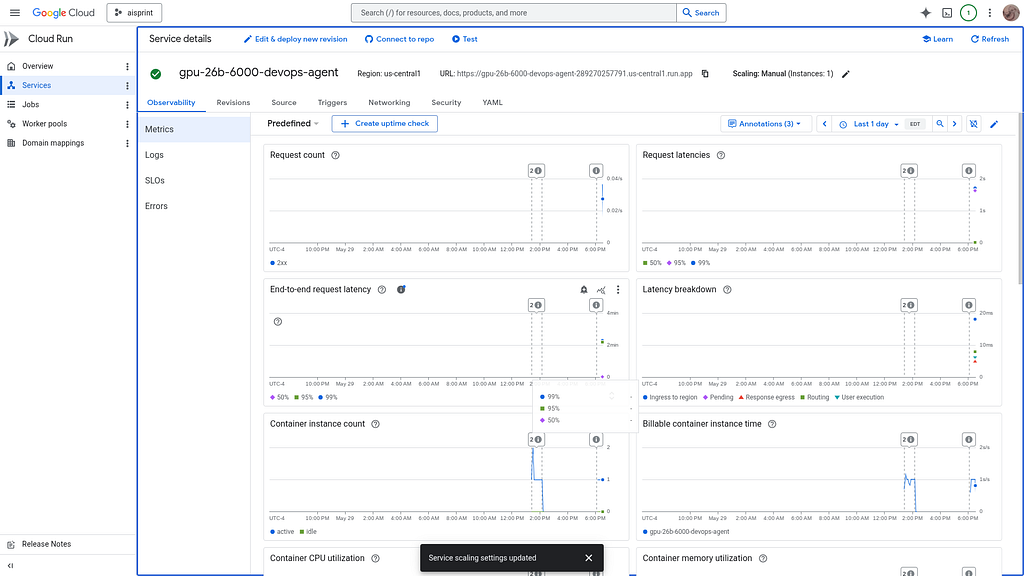
Once Deployed — the model is visible as a standard Cloud Run Service:
Review the Model
Check the model details:
> what are the model details?

> what are the model details?

● gpu-26b-6000-devops-agent/get_model_details(Model details retrieval) (ctrl+o to expand)

  The model details are as follows:

  • Serving Endpoint: https://gpu-26b-6000-devops-agent-289270257791.us-central1.run.app
  • Model ID (served name): gpu-26b-6000-devops-agent
  • Owner: vllm
  • Engine Health Status: Healthy ✅
  • Served Model Source Path: /mnt/models/gemma-4-26B-A4B-it (loaded from the bucket aisprint-491218-bucket via GCS
  FUSE).
Once everything is online — you can send queries to the Model:
> query_gemma4_with_stats what is gemma?
● gpu-26b-6000-devops-agent/query_gemma4_with_stats(Query model with stats) (ctrl+o to expand)

  Here are the performance stats and the model's explanation of Gemma:

  ### 📊 Performance Stats

  • Model: gpu-26b-6000-devops-agent
  • Time to First Token (TTFT): 0.123s
  • Total Generation Time: 4.329s
  • Throughput: 169.07 tokens/s
  • Total Tokens (approx.): 711
  ──────
  ### 💬 Model Response

  Gemma is a family of lightweight, state-of-the-art open models developed by Google DeepMind.

  If you are familiar with Google’s Gemini (their massive, closed-source AI), you can think of Gemma as the "smaller,
  open sibling." While Gemini is built to power massive consumer applications, Gemma is built for developers,
  researchers, and enthusiasts to run on their own hardware.

  Here is a breakdown of what makes Gemma significant:

  #### 1. "Open Weights" vs. "Open Source"

  It is technically more accurate to call Gemma an open weights model rather than fully "open source."

  • What this means: Google has released the "brain" (the weights/parameters) of the model. This allows you to download
  it, run it on your own laptop or private server, and fine-tune it for specific tasks (like medical coding or creative
  writing).
  • The Difference: You can use it freely, but you don't necessarily have access to the raw training data or the exact
  proprietary training code used by Google.

  #### 2. Built from Gemini Technology

  Gemma was built using the same research, technology, and infrastructure used to create the Gemini models. This means
  that even though Gemma is much smaller, it inherits much of the "reasoning" capability, mathematical ability, and
  linguistic nuance found in Google's most powerful AI.

  #### 3. Key Characteristics

  • Lightweight and Efficient: Unlike massive models that require a room full of servers, Gemma is designed to be small
  enough to run on a high-end consumer laptop or a single GPU.
  • Variety of Sizes: Gemma is released in different sizes (measured in "parameters," such as 2B, 7B, 9B, or 27B).
      • A 2B (2 billion) model is tiny and can run on a phone or a basic laptop.
      • A 27B (27 billion) model is much more intelligent but requires more powerful hardware.
  • Multimodal Capabilities: Newer versions (like PaliGemma) are designed to understand both text and images.

  #### 4. Why does Gemma exist? (The Purpose)

  Google released Gemma to support the global developer community. By providing Gemma, they are:

  • Empowering Developers: Allowing people to build specialized AI apps without paying massive API fees to Google or
  OpenAI.
  • Research: Enabling scientists to study how LLMs (Large Language Models) work, which is harder to do with "closed"
  models like GPT-4.
  • Customization: Allowing a company to take Gemma and "teach" it their specific private data without that data ever
  leaving their secure servers.

  #### Summary Table

   Feature | Gemini | Gemma
  -------------------------------|----------------------------------------|--------------------------------------------
   Access | Closed (via API/App) | Open (Downloadable weights)
   Size | Massive (Trillions of parameters) | Small to Medium (Billions)
   Hardware | Google's Supercomputers | Laptops, Desktops, Private Clouds
   Best For | General purpose, high-complexity tasks | Specific tasks, local privacy, development
Benchmark the Local Model
The local model was benchmarked:
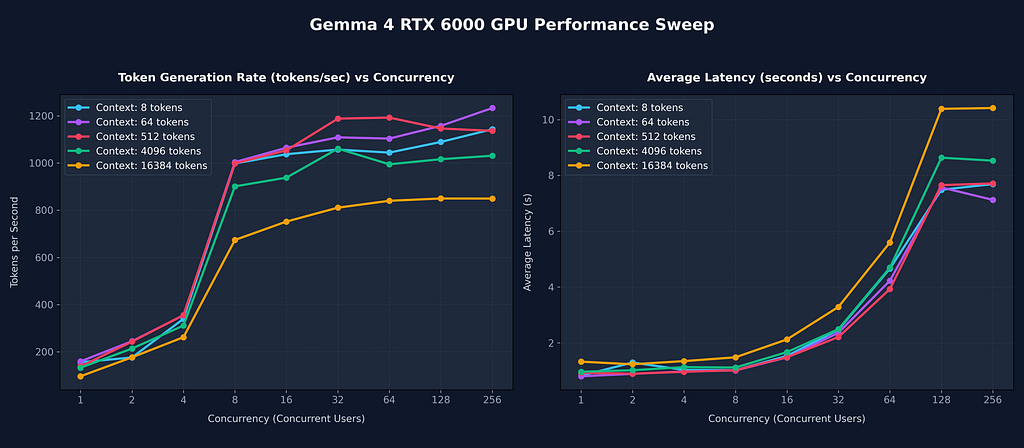
The benchmark sweep has completed successfully. Here are the compiled results across all combinations of context
  window sizes and concurrency levels:

I have completed the benchmark sweep and generated a full performance report.

The benchmark tested 1 to 256 concurrent users across context windows ranging from 8 to 16,384 tokens on the vLLM
  Cloud Run instance (NVIDIA RTX 6000 GPU).

### 📈 Benchmark Results Summary

• Continuous Batching Scaling: The RTX 6000 GPU handles high concurrency remarkably well. For a standard 512-token
  context, aggregate throughput scaled from 138.52 tokens/s (1 user) to 1,136.26 tokens/s (256 concurrent users).
  • Large Context Performance (16,384 tokens): Even under maximum context sizes (16k tokens) and extreme concurrency
  (256 users), the model achieved an aggregate throughput of 849.39 tokens/s with a 100% success rate.
  • Low Latency: Average latency stays under 2.2 seconds for up to 16 concurrent users across all context lengths.
The analysis is reviewed:
  Here is a hardware-focused Deep Dive comparing the NVIDIA RTX 6000 (96GB/48GB VRAM) and NVIDIA L4 (24GB VRAM) for
  serving Gemma 4 models.
  ──────
  ### 📊 GPU Performance Comparison Chart

  🖼 Image: NVIDIA RTX 6000 vs NVIDIA L4 Performance Comparison → /home/xbill/.gemini/antigravity-cli/brain/2d9e479f-
  08d1-
  4cb8-826d-f51e949ae228/gpu_comparison_chart.png
  ──────
  ### 🔍 Architectural Comparison: RTX 6000 vs. NVIDIA L4

   Specification | NVIDIA RTX 6000 | NVIDIA L4
  --------------------------------------|-------------------------------------|----------------------------------------
   VRAM | 96 GB (or 48 GB) GDDR6 ECC | 24 GB GDDR6
   Memory Bandwidth | 960 GB/s | 300 GB/s
   FP32 Compute | 91.1 TFLOPS | 30 TFLOPS
   Tensor Cores | 568 (Gen 4) | 242 (Gen 4)
   Power Consumption | 300W | 72W
   Best Target Model | Gemma 4 26B / 31B (Large models) | Gemma 4 E4B / 9B (Medium/small models)
  ──────
  ### 💡 Key Takeaways from the Deep Dive

  #### 1. Memory Bandwidth Bottlenecks

  • Large Language Models (LLMs) are highly memory bandwidth-bound during the token-generation phase (decoding). Every
  single token generation cycle requires reloading the entire model's weights from high-speed memory into the
  processing cores.
  • The RTX 6000 (960 GB/s) has 3.2x higher memory bandwidth than the NVIDIA L4 (300 GB/s). This means it can fetch
  weights and process individual sequence updates 3 times faster, directly resulting in the extremely high tokens-per-
  second outputs observed in the benchmark.

  #### 2. VRAM Capacity & Batch Size Limits

  • The NVIDIA L4 has only 24 GB of VRAM. To serve a model like Gemma 4 26B, you are forced to use heavy quantization
  (such as FP4 or INT4), which degrades model accuracy.
  • Even with quantization, the L4 will have very little remaining VRAM for the KV cache, capping maximum concurrency
  (often failing or queueing heavily above 8–16 concurrent users).
  • The RTX 6000 (96 GB) allows loading the model with full fidelity (BF16) or using FP8 quantization to leave up to 70
  GB of VRAM dedicated entirely to the KV Cache. This allows for massive concurrent execution up to 256 users at a 16k
  context window with 100% success rate.

  #### 3. Core Compute and Throughput Scaling

  • With 568 Gen-4 Tensor Cores, the RTX 6000 provides massive parallel matrix multiplication capabilities. Under heavy
  concurrency, the GPU can continuous-batch hundreds of sequences together, keeping the Tensor cores highly saturated
  and hitting peak throughput numbers above 1,100 tokens/second.
This is visualized:
Summary
The strategy for using MCP for Gemma 4 GPU deployment with Antigravity CLI was validated with a incremental step by step approach.
A minimal stdio transport MCP Server was started from Python source code and validated with Antigravity CLI running as a MCP client in the same local environment. This Python server provided all of the management tools to deploy and troubleshoot Cloud Run Model deployments.
Comments
More Blog
View allaiContext bankruptcy: The case for strategic forgetting for AI Agents
Most of us have seen a coding agent fail to complete a task we know it can do. We just don't...
J
James O'ReillygooglecloudParallel Compliance Engine: Drive-to-Sheets Multi-Agent Orchestration
When building Generative AI applications, developers often encounter a massive bottleneck: sequential...
A
Aryan IranidiscussIs It Ethical to Post and Ask About Circuits on Dev.to?
I’ve been thinking about sharing some electronic circuit posts on Dev.to — small circuits, DIY...
C
codebunny20agentsThe One-Click Exporter: AI Studio Antigravity, Probed to Its Limits
What nobody tells you about exporting your multi-agent prototype to a local workspace. Every...
L
leslysandraagenticarchitectGuarding the till while autonomous data agents do the digging
Autonomous agents are genuinely good at answering messy business questions. Give one an LLM and a set...
S
Sireesha PulipatiaiReturn on Attention: Why AI Code Reviews Are Wearing Us Out
PR volume went up, ticket quality didn't, and the gap got filled with LLMs on both sides of the review: bots reviewing, bots replying, bots occasionally arguing with bots about priorities that only existed in a teammate's head. Our CEO named the actual problem, and it's bigger than code review.
C
christineReady-made automations for this
Workflows from the Neura Market marketplace related to this Stable Diffusion resource
- Automated Webhook Processing with Docker Deploymentn8n · $14.71 · Related topic
- Automate Docker MinIO Deployment with Webhook Integrationn8n · $9.58 · Related topic
- Automate Docker Deployment with Webhook Integrationn8n · $5.37 · Related topic
- AI Website Generator with Gemini & Netlify Auto-Deploymentn8n · $24.99 · Related topic