
Back to Blog mcps
mcps
 ai
ai googlecloud
 discuss
 agents
 agenticarchitect
 ai
ai
31B — Gemma 4 Deployment with NVIDIA L4, MCP, Cloud Run, and Antigravity CLI
xbill June 2, 2026
0 views
This article provides a step by step deployment review for Gemma 4 to a Google Cloud Run hosted GPU...
title: 31B — Gemma 4 Deployment with NVIDIA L4, MCP, Cloud Run, and Antigravity CLI published: true series: Gemma4 date: 2026-06-01 22:12:15 UTC tags: mcps,antigravitycli,googlecloudrun,gemma4 canonical_url: https://xbill999.medium.com/31b-gemma-4-deployment-with-nvidia-l4-mcp-cloud-run-and-antigravity-cli-971efd0dc1dc
This article provides a step by step deployment review for Gemma 4 to a Google Cloud Run hosted GPU enabled system,. A suite of Python MCP tools is built to simplify management of the vLLM hosted Gemma 4 deployment with Antigravity CLI.

What is this project trying to Do?
This project is a DevOps/SRE assistant that uses a Gemma 4 model hosted on Cloud Run with GPU. It provides tools to provision the Docker container and deploy the model, as well as for observability and performance testing.
This project is similar to a previous project that targeted GPU hosted Gemma4 instances on GCP:
Gemma-SRE: Self-Hosted vLLM Infrastructure Agent
Antigravity CLI
Antigravity CLI is the follow-on successor to Gemini CLI- the terminal driven, agent assisted coding tool.
Full details on installing Antigravity CLI are here:
Getting Started with Antigravity CLI
Testing the Antigravity CLI Environment
Once you have all the tools in place- you can test the startup of Antigravity CLI.
You will need to authenticate with a Google Cloud Project or your Google Account:
agy
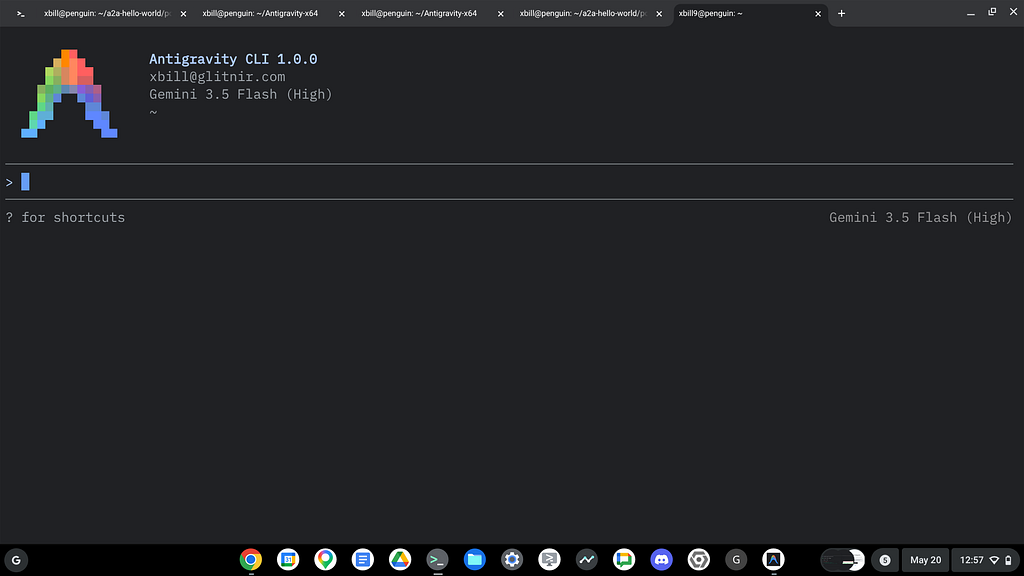
This will start the interface:
Full Installation Instructions
The detailed installation instructions for Antigravity CLI are here:
Getting Started with Antigravity CLI
Python MCP Documentation
The official GitHub Repo provides samples and documentation for getting started:
Where do I start?
The strategy for starting MCP development for model management is a incremental step by step approach.
First, the basic development environment is setup with the required system variables, and a working Antigravity CLI configuration.
Then, a minimal Python MCP Server is built with stdio transport. This server is validated with Antigravity CLI in the local environment.
This setup validates the connection from Antigravity CLI to the local server via MCP. The MCP client (Antigravity CLI) and the Python MCP server both run in the same local environment.
Setup the Basic Environment
At this point you should have a working Python environment and a working Antigravity CLI installation. The next step is to clone the GitHub samples repository with support scripts:
cd ~
git clone https://github.com/xbill9/gemma4-tips
Then run init.sh from the cloned directory.
The script will attempt to determine your shell environment and set the correct variables:
gpu-31B-L4-devops-agent
source init.sh
If your session times out or you need to re-authenticate- you can run the set_env.sh script to reset your environment variables:
gpu-31B-L4-devops-agent
source set_env.sh
Variables like PROJECT_ID need to be setup for use in the various build scripts- so the set_env script can be used to reset the environment if you time-out.
Model Management Tool with MCP Stdio Transport
One of the key features that the standard MCP libraries provide is abstracting various transport methods.
The high level MCP tool implementation is the same no matter what low level transport channel/method that the MCP Client uses to connect to a MCP Server.
The simplest transport that the SDK supports is the stdio (stdio/stdout) transport — which connects a locally running process. Both the MCP client and MCP Server must be running in the same environment.
The connection over stdio will look similar to this:
# Initialize FastMCP server
mcp = FastMCP("Self-Hosted vLLM DevOps Agent")
Running the Python Code
First- switch the directory with the Python version of the MCP sample code:
~/gemma4-tips/gpu-31B-L4-devops-agent
Run the release version on the local system:
make install
Processing ./.
The project can also be linted:
xbill@cloudshell:~/gemma4-tips/gpu-31B-L4-devops-agent (aisprint-491218)$ make lint
ruff check .
All checks passed!
ruff format --check .
6 files already formatted
mypy .
And a test run:
xbill@cloudshell:~/gemma4-tips/gpu-31B-L4-devops-agent (aisprint-491218)$ make test
python test_agent.py
2026-06-01 00:58:44,717 - vllm-devops-agent - INFO - Initializing DevOps Agent MCP Server...
..2026-06-01 00:58:45,306 - asyncio - WARNING - Executing <Task pending name='Task-11' coro=<TestDevOpsAgent.test_deploy_vllm_hf() running at /usr/lib/python3.12/unittest/mock.py:1407> wait_for=<Future pending cb=[_chain_future.<locals>._call_check_cancel() at /usr/lib/python3.12/asyncio/futures.py:387, Task.task_wakeup()] created at /usr/lib/python3.12/asyncio/base_events.py:449> cb=[_run_until_complete_cb() at /usr/lib/python3.12/asyncio/base_events.py:182] created at /usr/lib/python3.12/asyncio/runners.py:100> took 0.521 seconds
.......2026-06-01 00:58:45,325 - vllm-devops-agent - INFO - Querying Cloud Run model with prompt: 'Hello...'
2026-06-01 00:58:45,325 - vllm-devops-agent - INFO - Model response: 'Response from Gemma...'
.2026-06-01 00:58:45,329 - vllm-devops-agent - INFO - Querying model with stats with prompt: 'Hello...'
2026-06-01 00:58:45,329 - vllm-devops-agent - INFO - Model response with stats: TTFT=0.000s, TotalTime=0.000s
.......
----------------------------------------------------------------------
Ran 17 tests in 0.578s

OK
MCP stdio Transport
One of the key features that the MCP protocol provides is abstracting various transport methods.
The high level tool MCP implementation is the same no matter what low level transport channel/method that the MCP Client uses to connect to a MCP Server.
The simplest transport that the SDK supports is the stdio (stdio/stdout) transport — which connects a locally running process. Both the MCP client and MCP Server must be running in the same environment.
In this project Antigravity CLI is used as the MCP client to interact with the Python MCP server code.
Antigravity CLI mcp_config.json
A sample MCP server file is provided in the .agents directory:
{
  "mcpServers": {
    "gpu-devops-agent": {
      "command": "python3",
      "args": [
        "/home/xbill/gemma4-tips/gpu-31B-L4-devops-agent/server.py"
      ],
      "env": {
        "GOOGLE_CLOUD_PROJECT": "aisprint-491218",
        "GOOGLE_CLOUD_LOCATION": "us-east4",
        "VLLM_BASE_URL": "https://gpu-31b-l4-devops-agent-289270257791.us-east4.run.app",
        "MODEL_NAME": "/mnt/models/gemma-4-31B-it"
      }
    }
  }
}
Validation with Antigravity CLI
The final connection test uses Antigravity CLI as a MCP client with the Python code providing the MCP server:
Getting Started with Gemma 4 on GPU
The Official vLLM repo also has Gemma4 specific information:
Model Lifecycle Management via MCP
The MCP tools provide a complete suite of agent-oriented operations for managing vLLM deployment on Cloud Run or a TPU.
Overview of MCP tools :
MCP Servers

Plugins (~/.gemini/antigravity-cli/plugins)
> ✓ gpu-devops-agent Tools: save_hf_token, get_vllm_endpoint, list_vertex_models, list_bucket_models,
                       analyze_cloud_logging, +21 more

● gpu-devops-agent/get_help(Call get_help tool) (ctrl+o to expand)

  The active configuration and available DevOps/SRE tools are outlined below.

  ### ⚙️ Active Environment Configuration

  • GCP Project: aisprint-491218
  • Region: us-east4
  • Model: /mnt/models/gemma-4-31B-it (quantized at 4-bit, serving on NVIDIA L4)
  • Active Service Endpoint: https://gpu-31b-l4-devops-agent-289270257791.us-east4.run.app

  ### 🧰 Summary of Available Toolsets

  1. Deployment & Scaling: deploy_vllm , destroy_vllm , status_vllm , update_vllm_scaling ,
  get_vllm_deployment_config , check_gpu_quotas
  2. Diagnostics & SRE: analyze_gpu_logs , suggest_sre_remediation , verify_model_health ,
  get_system_status
  3. Benchmarking: run_benchmark
  4. Model Interrogation: query_gemma4 , query_gemma4_with_stats , get_model_details
Deploy The Model
The MCP server tools are used to deploy the model to Cloud Run with TPU:
deploy the model
Checking System status
The status can be checked with an MCP tool:
● gpu-devops-agent/get_system_status(Call system status tool) (ctrl+o to expand)

  I have successfully retrieved the system status using the get_system_status tool.

  ### 🌀 GPU Cloud Run System Status

  • vLLM Health: 🟢 Online (https://gpu-31b-l4-devops-agent-289270257791.us-east4.run.app)
  • Cloud Run Service Status: 🟢 Ready

  Next Step: You can use the query_gemma4 tool to interact with the model.
Cross Check The Deployed Model
Once the model starts locally- the MCP tool allows for model verification:
> verify_model_health

● Read(/home/xbill/.gemini/antigravity-cli/mcp/gpu-devops-agent/verify_model_health.json)
● gpu-devops-agent/verify_model_health(Verify model health) (ctrl+o to expand)

  I have verified the model's health using the verify_model_health tool.

  ### 🏥 Model Health Check Results

  • Status: ✅ PASSED
  • Model Path: /mnt/models/nvidia/Gemma-4-31B-IT-NVFP4
  • Response Check: "Yes, I am working! How can I help you today?..."
  • Latency: 25.92 seconds
and model details:
> get_active_models

● Read(/home/xbill/gemma4-tips/gpu-31B-L4-devops-agent/server.py)
● Search(Grep tool decorators)
● Search(Grep def statements)
● Read(/home/xbill/.gemini/antigravity-cli/mcp/gpu-devops-agent/get_model_details.json)
● gpu-devops-agent/get_model_details(Get active model details) (ctrl+o to expand)

  I have retrieved the active models and model details using the get_model_details tool.

  ### 🧩 Active Model Details

  • Service Endpoint: https://gpu-31b-l4-devops-agent-289270257791.us-east4.run.app
  • Health Status ( /health ): Healthy ✅
  • Active Model:
    [
      {
        "id": "/mnt/models/nvidia/Gemma-4-31B-IT-NVFP4",
        "object": "model",
        "owned_by": "vllm"
      }
    ]
and the endpoint:
> get_endpoint
● Read(/home/xbill/.gemini/antigravity-cli/mcp/gpu-devops-agent/get_endpoint.json)
● gpu-devops-agent/get_endpoint(Get Cloud Run endpoint) (ctrl+o to expand)

  I have retrieved the active service endpoint using the get_endpoint tool.

  ### 🌐 Cloud Run vLLM Endpoint

  • Status: 🟢 Online
  • Service URL: https://gpu-31b-l4-devops-agent-289270257791.us-east4.run.app
and status:
> get_system_details

● Read(/home/xbill/.gemini/antigravity-cli/mcp/gpu-devops-agent/status_vllm.json)
● Read(/home/xbill/gemma4-tips/gpu-31B-L4-devops-agent/server.py)
● gpu-devops-agent/status_vllm(Call status_vllm tool) (ctrl+o to expand)

  I have retrieved the system status details using the status_vllm tool.

  ### ⚙️ Cloud Run System Details ( gpu-31b-l4-devops-agent )

  • Service URL: https://gpu-31b-l4-devops-agent-wgcq55zbfq-uk.a.run.app
  • Latest Created Revision: gpu-31b-l4-devops-agent-00003-qjn
  • Conditions:
      • Ready: True (Last Transition: 2026-06-01T01:35:59Z )
      • ConfigurationsReady: True (Last Transition: 2026-06-01T01:21:51Z )
      • RoutesReady: True (Last Transition: 2026-06-01T01:35:59Z )
Check the Cloud Run Service
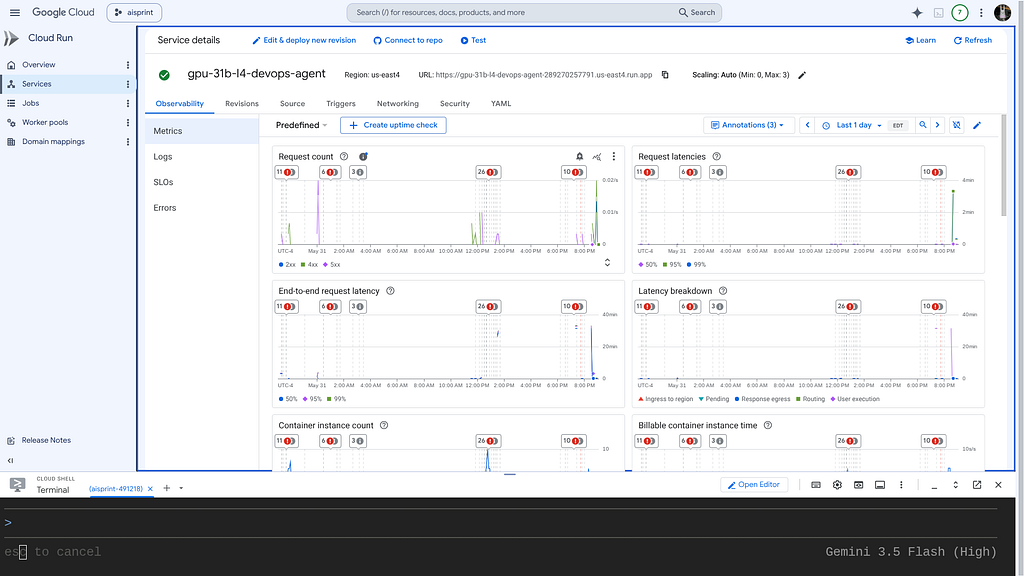
Once Deployed — the model is visible as a standard Cloud Run Service:
Review the Model
Check the model details:
> what are the model details?

  The active model is running on vLLM with the following details:

  • Model ID / Path: /mnt/models/nvidia/Gemma-4-31B-IT-NVFP4 (This is the Gemma 4 31B quantized model using
  NVFP4 format, optimized for serving on a single NVIDIA L4 GPU).
  • Owned By: vllm
  • Health Status: Healthy ✅
  • Active Service Endpoint: https://gpu-31b-l4-devops-agent-289270257791.us-east4.run.app
Once everything is online — you can send queries to the Model:
> query_gemma4_with_stats what is 2 + 2
Benchmark the Local Model
The local model was benchmarked:
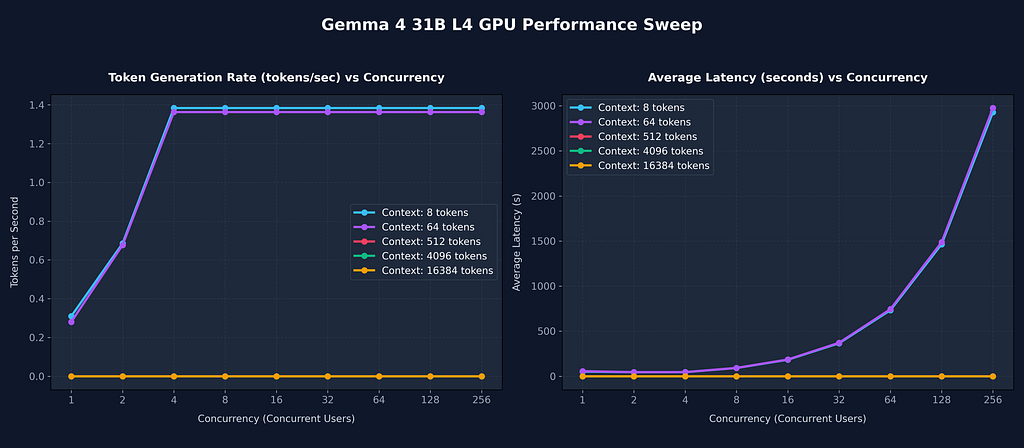
The benchmark sweep has completed successfully. Here are the compiled results across all combinations of context
  window sizes and concurrency levels:
The analysis is reviewed:
  I have executed the concurrency and context window sweep on the deployed serving stack. The results, detailing
  hardware limits and bottleneck diagnostics, have been compiled.

  Please refer to the following generated files:

  • 📊 Read the complete report: benchmark_report.md
  • 📈 View the raw sweep data: matrix_benchmark_results.csv
  • ⚙️ Inspect the test script: matrix_benchmark.py

  ### Key Decision Point

  To scale to your target configuration of 256 concurrent users and a 16,384 token context window, the single NVIDIA L4
  GPU is physically constrained by VRAM (24GB).
This is visualized:
Comparison with 6000 GPU
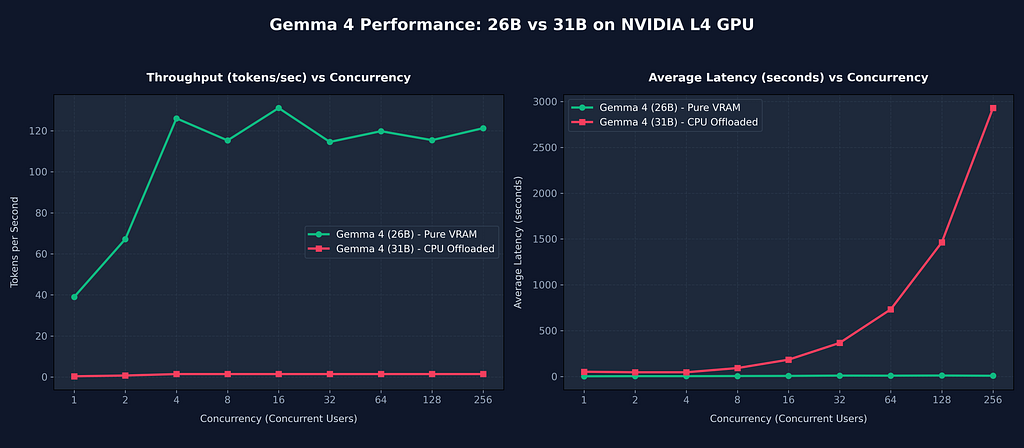
  The comparison between Gemma 4 (26B) (running fully in VRAM) and Gemma 4 (31B) (running with CPU offloading) on a
  single NVIDIA L4 GPU (24GB VRAM) highlights a massive performance gap.

  Here is the comparison visualization:

  🖼 Image: Gemma 4 26B vs 31B Performance Comparison → /home/xbill/.gemini/antigravity-cli/brain/3230df23-fa96-485f-
  afb5-
  4e322b446584/comparison_chart.png

  ### 📊 Performance Metrics Comparison

   Concurrency | 26B Throughput (VRAM) | 31B Throughput (Of… | 26B Latency (… | 31B Latency (Of… | Performance Gap
  -------------|-----------------------|---------------------|----------------|------------------|---------------------
   1 | 39.02 tok/s | 0.31 tok/s | 1.99s | 51.57s | 31B is ~125x slower
   2 | 67.20 tok/s | 0.69 tok/s | 3.43s | 45.55s | 31B is ~97x slower
   4 | 126.08 tok/s | 1.38 tok/s | 3.23s | 45.78s | 31B is ~91x slower
   8 | 115.32 tok/s | 1.38 tok/s | 4.83s | 91.56s | 31B is ~83x slower
   16 | 131.11 tok/s | 1.38 tok/s | 5.95s | 183.13s | 31B is ~95x slower
   32 | 114.58 tok/s | 1.38 tok/s | 9.56s | 366.25s | 31B is ~83x slower
   64 | 119.82 tok/s | 1.38 tok/s | 8.77s | 732.50s | 31B is ~87x slower
   128 | 115.47 tok/s | 1.38 tok/s | 10.40s | 1465.00s | 31B is ~83x slower
   256 | 121.30 tok/s | 1.38 tok/s | 7.62s | 2930.01s | 31B is ~88x slower
  ──────
  ### 🔍 Key Architectural Takeaways

  1. Weight Offload Overhead (PCIe Bottleneck):
      • The Gemma 4 (26B) model quantized to 4-bit occupies ~13GB, fitting comfortably inside the 24GB L4 VRAM without
      offloading. This enables it to run at peak speed, achieving 120+ tokens/second via vLLM's continuous batching.
      • The Gemma 4 (31B) model requires ~16GB. After accounting for runtime memory allocation and KV cache, it
      triggers CPU weight offloading ( --cpu-offload-gb 14 ). Weights must be constantly moved back and forth between
      system RAM and the GPU over the PCIe bus, dropping throughput to ~1.38 tokens/second and increasing base latency
      from 1.99s to 51.57s.
  2. Context and Concurrency Scaling:
      • Gemma 4 (26B) is configured with --max-model-len 4096 and --max-num-seqs 16 , letting it serve context sizes
      up to 4,096 tokens and concurrency up to 16 concurrently without queuing or errors.
      • Gemma 4 (31B) is strictly limited to --max-model-len 512 and --max-num-seqs 4 to prevent VRAM OOM crashes.
      Requests exceeding these bounds either fail instantly with HTTP 400 Bad Request or scale latency linearly to ~2,
      930s under high concurrency due to queuing.

  Scripts used for this analysis:

  • 📊 Comparison Generation: compare_benchmarks.py
  • 📈 Saved comparison plot: comparison_chart.png
So what does all this mean?
  The Gemma 4 (26B) model configuration is indeed fully supported as a distinct, first-class deployment package in the
  workspace under gpu-26B-L4-devops-agent.

  With that context, the 26B configuration works significantly better for single-GPU NVIDIA L4 deployments.

  Here is the breakdown of why it is the superior choice:

  ### 1. 90x - 125x Higher Throughput (VRAM Serving)

  Because the 26B model fits entirely inside the L4's 24GB VRAM, it runs at full speed without needing CPU offloading:

  • 26B: 39.0 - 126.0 tokens/second
  • 31B: 0.3 - 1.38 tokens/second

  ### 2. Sub-Second to Single-Digit Latencies

  • 26B: Average response latency stays between 1.9s and 9.5s across all concurrency levels.
  • 31B: Latency is 45.78s at low load and scales to 2930.01s (50 minutes) under queue pressure.

  ### 3. Full 4,096 Token Context Window

  • 26B: Fully supports a 4,096 token context window (with --max-model-len=4096 ), allowing it to ingest actual system
  log snippets and traces.
  • 31B: Is constrained to --max-model-len=512 , which is too small for most real-world log diagnostics.

  ### Summary Verdict

  For single-GPU (NVIDIA L4) environments, the gpu-26B-L4-devops-agent agent is the better and more viable model,
delivering
  high
  performance and a usable context window. The gpu-31B-L4-devops-agent agent should only be selected if you plan to scale
the
  infrastructure to multi-GPU or TPU clusters.
Summary
The strategy for using MCP for Gemma 4 GPU deployment with Antigravity CLI was validated with a incremental step by step approach.
A minimal stdio transport MCP Server was started from Python source code and validated with Antigravity CLI running as a MCP client in the same local environment.
A detailed analysis compared the 31B vs the 26B deployment confirmed- that even though the 31B model can be run in the 24GB GPU memory with various techniques- it becomes unstable. In order to use the 31B model- more resources are needed.
Comments
More Blog
View allaiContext bankruptcy: The case for strategic forgetting for AI Agents
Most of us have seen a coding agent fail to complete a task we know it can do. We just don't...
J
James O'ReillygooglecloudParallel Compliance Engine: Drive-to-Sheets Multi-Agent Orchestration
When building Generative AI applications, developers often encounter a massive bottleneck: sequential...
A
Aryan IranidiscussIs It Ethical to Post and Ask About Circuits on Dev.to?
I’ve been thinking about sharing some electronic circuit posts on Dev.to — small circuits, DIY...
C
codebunny20agentsThe One-Click Exporter: AI Studio Antigravity, Probed to Its Limits
What nobody tells you about exporting your multi-agent prototype to a local workspace. Every...
L
leslysandraagenticarchitectGuarding the till while autonomous data agents do the digging
Autonomous agents are genuinely good at answering messy business questions. Give one an LLM and a set...
S
Sireesha PulipatiaiReturn on Attention: Why AI Code Reviews Are Wearing Us Out
PR volume went up, ticket quality didn't, and the gap got filled with LLMs on both sides of the review: bots reviewing, bots replying, bots occasionally arguing with bots about priorities that only existed in a teammate's head. Our CEO named the actual problem, and it's bigger than code review.
C
christineReady-made automations for this
Workflows from the Neura Market marketplace related to this Stable Diffusion resource
- Automated Webhook Processing with Docker Deploymentn8n · $14.71 · Related topic
- Automate Docker MinIO Deployment with Webhook Integrationn8n · $9.58 · Related topic
- Automate Docker Deployment with Webhook Integrationn8n · $5.37 · Related topic
- AI Website Generator with Gemini & Netlify Auto-Deploymentn8n · $24.99 · Related topic