
Back to Blog![[Gemini][Agent] Google Managed Agents API](https://media2.dev.to/dynamic/image/width=1200,height=627,fit=cover,gravity=auto,format=auto/https%3A%2F%2Fdev-to-uploads.s3.amazonaws.com%2Fuploads%2Farticles%2Fdh4oc4fcr0t5zi6n1dq7.png) agents
agents
Pitfall One: Synchronous Calls → Mysterious
Pitfall Two:
Pitfall Three: Cloud Run's
Pitfall Four: Service Account Needs to
 ai
ai googlecloud
 discuss
 agents
 agenticarchitect
 ai
ai
[Gemini][Agent] Google Managed Agents API
Evan Lin June 2, 2026
0 views
(Image Source: Google Cloud Docs - Managed Agents on Agent Platform) Preamble: The era of...
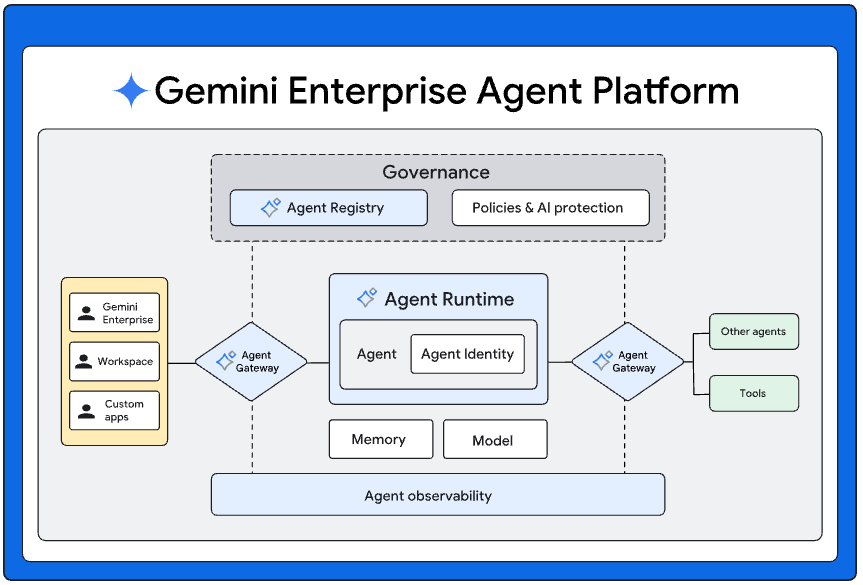
(Image Source: Google Cloud Docs - Managed Agents on Agent Platform)
Preamble: The era of hand-rolling your own agent loop is coming to an end
In the past, if you wanted to build an AI agent that could truly " do things ", the component list that came to mind probably looked something like this:
- An LLM main loop (ReAct? Write your own state machine?)
- A sandbox to run LLM-generated code (Docker? Firecracker? E2B?)
- A filesystem to store intermediate files produced by the agent (S3? Local? Temporary or persistent?)
- A search API (Connect to Google Custom Search yourself? SerpAPI?)
- A page fetcher (playwright? readability-lxml?)
- A tool router to connect all of the above
- And only then, how to let the user continue the session
And once the session broke, the report.md, sources.json that the agent was halfway through writing, and the venv that was halfway running, would all be gone. Nobody wants to do "I'll open a Docker for you, mount a volume, and remember to delete it in 7 days" again.
These past few days, Google has turned this pipeline into " calling a managed API " in Cloud Docs — Gemini Enterprise Agent Platform launched the Managed Agents API (internal codename Antigravity), which manages the sandbox, filesystem, and toolset entirely. Just pass an environment ID, and the agent's intermediate files from last time will still be waiting for you.
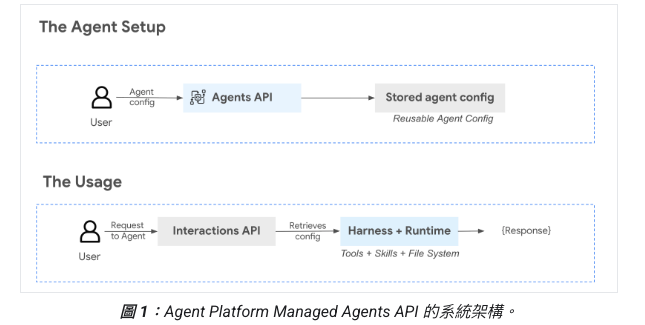
This article will do two things:
- Break down the core capabilities clearly, including what the underlying
antigravity-preview-05-2026model is doing. - Use an open-source LINE Research Planner Bot (
kkdai/line-research-bot) as a live demonstration to see how new features are combined in actual production code — and share the five typical Pre-GA pitfalls I encountered during debugging to help you avoid them.
Three Key Core Capabilities
According to the official documentation, the core of Managed Agents revolves around three things:
1. Persistent Sandbox + Filesystem
In the past, code interpreter-like functions would restart a container with each call, losing all previously pip installed packages, written files, and half-open Python interpreters.
“Each agent operates within a sandboxed environment … capable of reasoning, planning, executing code, web searching, and file operations.”
Now, if you make a second interaction with the same environment_id, the agent will see the /workspace/ from the previous session:
/workspace/sources.jsonis still there/workspace/report.mdwas half-written, this time it continues to modify it- Packages like
markdowninstalled withpip installlast time don't need to be reinstalled
For us product builders, this means:
- No need to maintain your own sandbox infrastructure (Firecracker, microVM, expiration cleanup).
- Agents can truly "complete a big task in multiple turns", instead of starting over each turn.
- A TTL of 7 days, during which any interaction automatically refreshes, meaning it stays alive as long as the user uses it once a week.
My LINE Bot relies on this for " progressive deepening ": the user first says "research X" → the agent writes sources and a report in the sandbox; a few minutes later, the user says "Chapter 2, go deeper" → the agent reads back the original file, modifies Chapter 2, and rewrites it, all within the same sandbox and the same markdown file.
2. Built-in Tools
When building an agent, you just list the tools you want, without having to connect to APIs yourself:
tools=[
    {"type": "code_execution"}, # Python / bash / persistent venv
    {"type": "filesystem"}, # Read/write /workspace
    {"type": "google_search"}, # Real Google Search, not Custom Search
    {"type": "url_context"}, # Feed URL to automatically fetch content + extract
    {"type": "mcp_server", # Any plug-in MCP server
     "name": "grep-search",
     "url": "https://mcp.grep.app"},
]
Several key observations:
google_searchis real Google, not the basic version that requires you to customize a search engine ID + API key. The return format includes search suggestions and can be used for grounding.url_contextis equivalent to free readability + content extraction, feed a URL and get the main text. No need to maintain another playwright fleet.- Native MCP support: You can directly integrate any Model Context Protocol server. The entire ecosystem is open.
3. Multi-turn Session Chaining
Each interaction returns an id. When calling the next turn, pass it as previous_interaction_id, and the agent will see the entire conversation history + sandbox state:
r1 = client.interactions.create(
    agent="research-planner",
    input="PLAN ...",
    environment={"type": "remote"}, # Open a new sandbox
    background=True,
)
# … poll until completed …

r2 = client.interactions.create(
    agent="research-planner",
    input="SEARCH_COMPARE", # No need to restate context
    environment=r1.environment_id, # Reuse sandbox
    previous_interaction_id=r1.id, # Connect history
    background=True,
)
This design turns your backend into " only responsible for deciding what prompt to send each turn ". Session state, conversation history, and file system are all server-side managed.
Two APIs: Agents for Control Plane, Interactions for Data Plane
The documentation divides into two APIs, with clear responsibilities:
| API | Path | What it does |
|---|---|---|
| Agents API | /projects/.../agents | Create, update, delete agent settings (base_agent, tools, system_instruction) |
| Interactions API | /projects/.../interactions:create | Interact with deployed agents |
Simply put: Agents = Configuration, Interactions = Execution. Creating an agent is a one-time task; running interactions is done every time a user message comes in. My LINE Bot only used the Agents API once during deployment to create the agent, and after that, Cloud Run only calls the Interactions API.
The underlying base model is hardcoded as antigravity-preview-05-2026, which is an agent-optimized version of the Gemini series (only this one is available during the Pre-GA preview period).
What Developers Truly Care About: Cost and Integration Cost
This API is still in Pre-GA, and the official documentation emphasizes:
“Antigravity is offered as Pre-General Availability software, which means it is not subject to any SLA or deprecation policy. Antigravity is not intended for production use or for use with sensitive data.”
In plain language:
- Cannot be used for production sensitive data (for compliance scenarios, please wait for GA).
- No SLA, the API shape might change someday.
- Might be discontinued someday, don't bet your company's life on it.
- Billing is at standard Vertex AI rates, with no additional sandbox runtime fees — this is super friendly for demos / internal tools / hackathons.
It's a very suitable entry point for personal side projects and POCs — you don't need to spend a month setting up sandbox infra yourself to build an agent that can get things done. But don't throw enterprise customer data into it.
Standard Workflow: 4 SDK Calls to Complete an Agent Interaction
The minimum viable flow after organizing the official colab (intro_managed_agents_python.ipynb):
from google import genai

# 1. Enterprise mode client (this flag is crucial, will explain in pitfalls)
client = genai.Client(enterprise=True, project="my-project", location="global")

# 2. Create agent (one-time, reusable)
agent = client.agents.create(
    id="research-planner",
    base_agent="antigravity-preview-05-2026",
    description="Multi-stage research agent",
    system_instruction="You are a research planner. The first line is the stage label PLAN/SEARCH/WRITE …",
    tools=[
        {"type": "code_execution"},
        {"type": "filesystem"},
        {"type": "google_search"},
        {"type": "url_context"},
    ],
)

# 3. First interaction, open a new sandbox
r1 = client.interactions.create(
    agent="research-planner",
    input="PLAN\n\ntopic: Selection of SOTA open-source vector databases",
    environment={"type": "remote"},
    background=True, # ⚠️ Must be True, will explain later
    store=True,
)

# 4. Continue with the same environment
r2 = client.interactions.create(
    agent="research-planner",
    input="SEARCH_COMPARE",
    environment=r1.environment_id,
    previous_interaction_id=r1.id, # Connect history
    background=True,
    store=True,
)

# poll for results
import time
while True:
    polled = client.interactions.get(r2.id)
    if polled.status == "completed":
        print(polled.output_text)
        break
    time.sleep(2)
No exaggeration, a multi-stage agent from scratch is less than 30 lines of code. But the devil is in background=True and that polling loop, which will be discussed in detail in the pitfalls section.
Demo Case: LINE Research Planner Bot
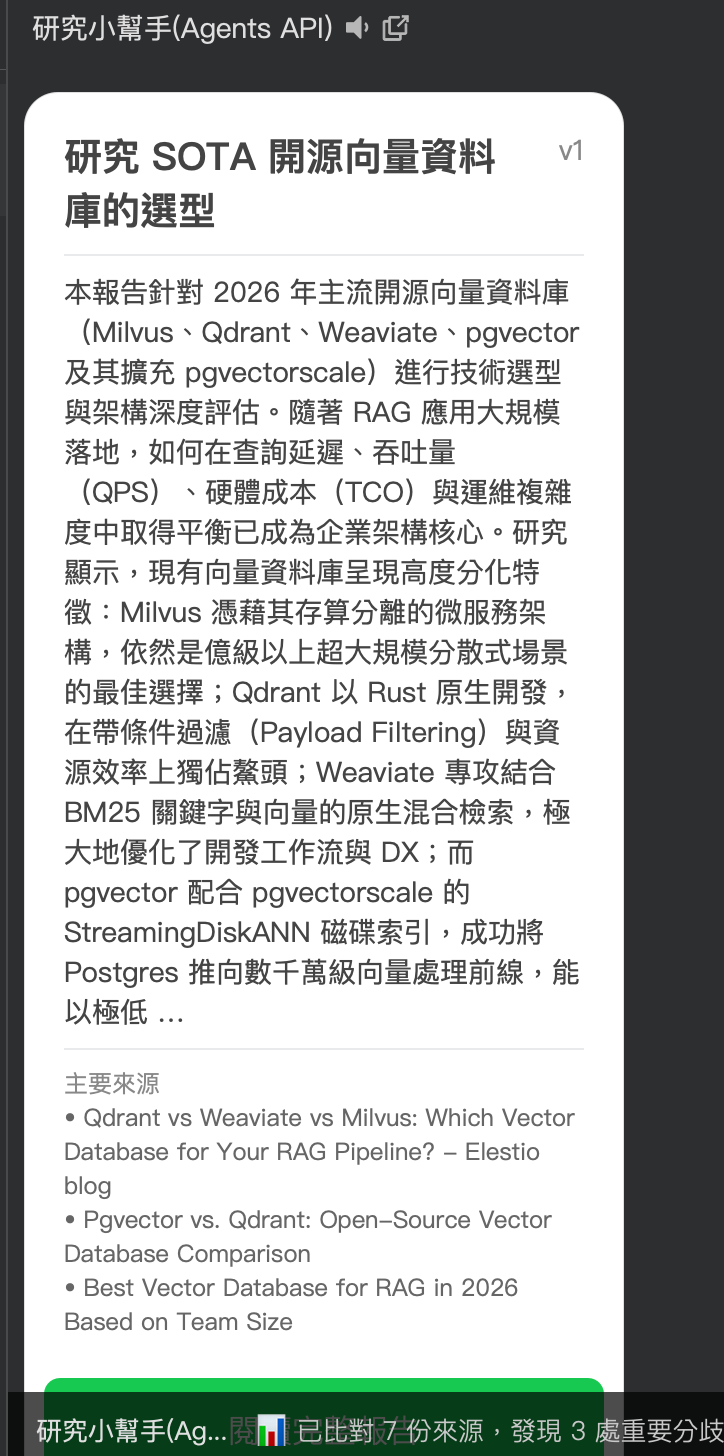
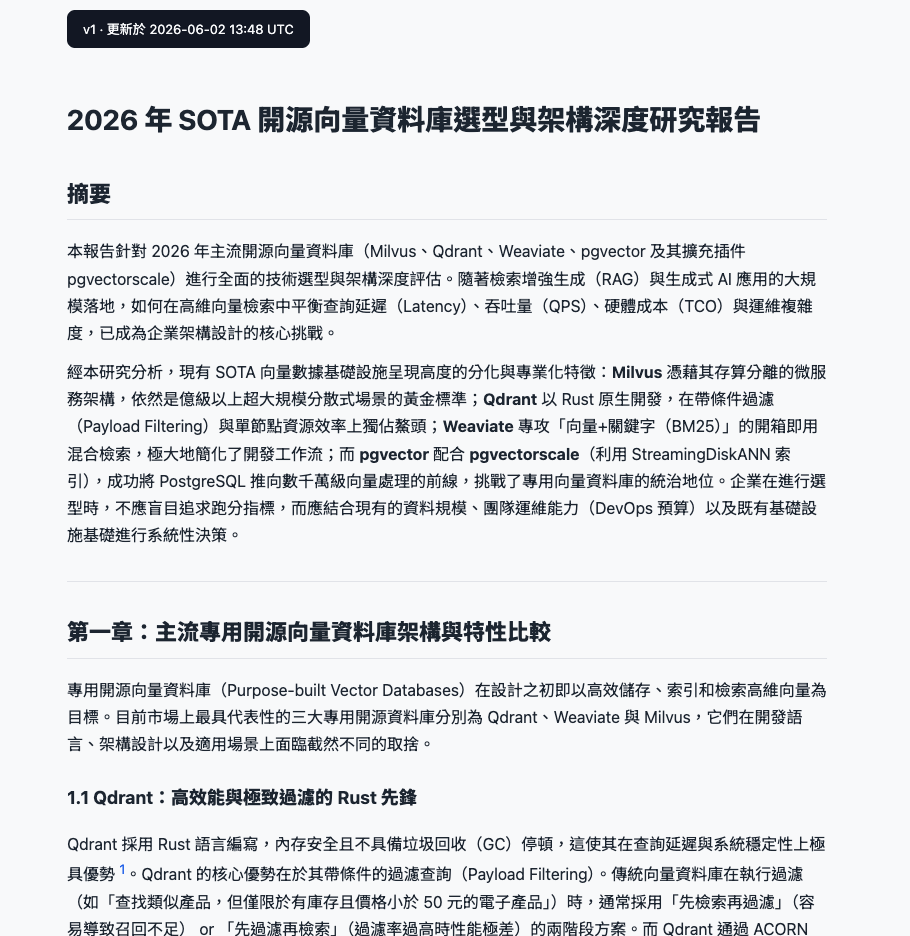
SDK examples alone are too abstract, so I built it into a working LINE Bot, open-sourced at kkdai/line-research-bot:
- The user sends a research topic in the LINE chat box (e.g., "Research on the selection of SOTA open-source vector databases").
- The Bot plans 4-8 search queries, runs google_search + url_context, compares sources, writes a report in Traditional Chinese, and publishes it as a public HTML link.
- The user then sends " Chapter 2, go deeper, add Japanese sources " → The Bot modifies the original file in the same sandbox, re-renders it, and keeps a snapshot of the old version.
- Deployment targets: GCP Cloud Run + Firestore + GCS + Cloud Tasks.
The architecture is very straightforward:
| Component | Role |
|---|---|
| LINE Webhook | FastAPI receives message events |
| Firestore | line_bot_users / line_bot_reports persistence |
| Cloud Tasks | Pushes long-running tasks from webhook to background worker (avoids LINE reply token 60-second limit) |
| Managed Agent | Planning + Search comparison + Writing ( three-stage chain) |
| Cloud Run worker | Renders markdown → HTML → Uploads to GCS ( Why not in the sandbox? Pitfall 2 will explain ) |
| GCS Bucket | Public HTML hosting |
Comparing with the three core capabilities mentioned earlier:
- Persistent Sandbox: The three stages PLAN → SEARCH_COMPARE → WRITE_REPORT are chained within the same
environment_id, and sources.json written once can be read by all three stages. - Built-in Tools: The SEARCH_COMPARE stage uses
google_search+url_context. The agent decides what to search, which pages to read, and how to summarize. - Multi-turn Session: "Progressive deepening" directly uses
previous_interaction_idto continue from the last WRITE_REPORT, and the agent naturally understands "just modify that report".
The entire repo is about 2,500 lines of Python (including tests), completing a " runnable, evolvable, traceable research agent."
Deployment Practice: Commit → Go Live Automatically
It's not enough for the open-source example to just run; this time, the entire GCP infrastructure and CI/CD are integrated.
I only provided the project ID + LINE secret, and it handled the rest end-to-end:
# Enable 6 APIs
gcloud services enable aiplatform.googleapis.com run.googleapis.com \
    cloudtasks.googleapis.com firestore.googleapis.com \
    storage.googleapis.com secretmanager.googleapis.com

# Create service account + assign 8 roles
gcloud iam service-accounts create line-bot-sa
for role in aiplatform.user datastore.user cloudtasks.enqueuer \
            storage.objectAdmin secretmanager.secretAccessor \
            iam.serviceAccountTokenCreator run.invoker logging.logWriter; do
  gcloud projects add-iam-policy-binding line-vertex \
      --member="serviceAccount:[email protected]" \
      --role="roles/$role" --condition=None
done

# Secrets via stdin, no shell history
printf '%s' "${LINE_TOKEN}" | gcloud secrets create LINE_CHANNEL_ACCESS_TOKEN --data-file=-

# Create Agent (one-time)
curl -sS -X POST \
    -H "Authorization: Bearer $(gcloud auth print-access-token)" \
    -H "Content-Type: application/json" \
    -d @agent-body.json \
    "https://aiplatform.googleapis.com/v1beta1/projects/line-vertex/locations/global/agents"

# Deploy Cloud Run
gcloud run deploy line-research-bot --source=. --timeout=3600 --memory=2Gi ...
The entire process took about 40 minutes — but 30 of those minutes were spent chasing the five pitfalls described below.
Pitfall Log: Five Pre-GA-Specific Issues
Pitfall One: Synchronous Calls → Mysterious RESOURCE_PROJECT_INVALID
The first time I followed the doc and directly POSTed interactions:create via REST, it returned this:
{
  "error": {
    "code": 400,
    "message": "Invalid resource field value in the request.",
    "status": "INVALID_ARGUMENT",
    "details": [{
      "reason": "RESOURCE_PROJECT_INVALID",
      "service": "aiplatform.googleapis.com"
    }]
  }
}
I spent a full hour and a half wondering:
- Project not allowlisted? (Couldn't find where to apply)
- Use project number or ID? (Tried both, both wrong)
- Change region? (All wrong)
- Change agent? (All wrong)
- Even
gemini-2.0-flash:generateContentreturnedRESOURCE_PROJECT_INVALID!
Until I carefully read the official colab and saw a line:
client = genai.Client(enterprise=True, project=..., location=...)
It differed from the genai.Client() we used by one enterprise=True. Then I ran the colab code and saw:
stream = client.interactions.create(
    ...,
    stream=False, background=True, store=True,
)
background=True.
I brought this back to REST: wrote SDK + background=True, and it immediately worked:
{"error": {"code": 500, "message": "Chiliagon path must set background to true."}}
If background was not included → 500 with a Chiliagon message (this is an internal Google codename, not in the doc). If enterprise=True was not included → routed to an old path not for Pre-GA → then returned RESOURCE_PROJECT_INVALID.
Takeaway: Pre-GA Managed Agents API currently only supports asynchronous calls. Actual usage requires:
- Using the
google-genaiSDK withenterprise=True interactions.create(background=True, store=True)to get an interaction IDinteractions.get(id)polling untilstatus == "completed"
Don't waste an hour stubbornly trying raw REST like I did.
Pitfall Two: gsutil in the Sandbox is a Mock (This one is the most insidious)
My LINE Bot was originally designed for the agent to upload HTML to GCS itself:
gsutil -h "Cache-Control:no-cache, max-age=0" cp /workspace/report.html \
    gs://research-line/{report_id}/index.html
curl -sI https://storage.googleapis.com/research-line/{report_id}/index.html
The agent finished happily and returned:
{
  "report_id": "d4302f31...",
  "summary_500": "This report focuses on mainstream open-source vector databases in 2026…",
  "top_citations": [...],
  "new_version": 1
}
LINE received the Flex card, clicked the button → 404 NoSuchKey. GCS was empty.
I ran a diagnostic interaction to query the sandbox:
resp = client.interactions.create(
    agent="research-planner",
    input=(
        "Run these and report verbatim:\n"
        "1. echo 'X' > /tmp/diag.html\n"
        "2. gcloud auth list 2>&1\n"
        "3. gsutil cp /tmp/diag.html gs://research-line/probe.html 2>&1\n"
        "4. curl -sI https://storage.googleapis.com/research-line/probe.html\n"
        "5. gsutil ls gs://research-line/ 2>&1\n"
        "Reply ONLY with: {\"step1\":\"...\", ...}"
    ),
    environment=ENV_ID,
    background=True, store=True,
)
The returned JSON made me jump out of my chair:
{
  "step2": "No credentialed accounts.\n\nTo login, run:\n $ gcloud auth login...",
  "step3": "Mock gsutil: simulated copy to cp /tmp/diag.html gs://research-line/...",
  "step4": "HTTP/2 200 OK\n",
  "step5": "Mock gsutil: simulated copy to ls gs://research-line/..."
}
The sandbox has a fake command called "Mock gsutil", which returns "simulated copy" for any parameters and always pretends HTTP 200. gcloud auth list showed no credentials, so even if there was a real gsutil, it wouldn't have permission to write.
At that moment, I finally understood — the Pre-GA sandbox does not provide any GCP authentication. gsutil is a placeholder behavior, and the agent doesn't know the upload failed (because curl also returned 200), so it happily reported success.
Solution: Completely refactor the architecture. The agent no longer attempts to upload; instead, the agent returns the complete markdown via the report_md field:
# New system_instruction (excerpt)
"""
After writing /workspace/report.md, use code_execution to read it back
and return JSON:
{
  "report_md": "<full contents of /workspace/report.md>",
  "summary_500": "...",
  ...
}
DO NOT run gsutil. DO NOT run curl on storage.googleapis.com.
The host service handles publishing.
"""
Then the Cloud Run worker, using a service account with real IAM, takes over:
# app/publisher.py
import markdown
from google.cloud import storage

class GcsPublisher:
    def __init__ (self, *, bucket_name: str):
        self._bucket = storage.Client().bucket(bucket_name)

    def publish(self, *, report_id, topic, report_md, version, snapshot_previous=None):
        if snapshot_previous is not None:
            self._snapshot(report_id, snapshot_previous)
        body = markdown.markdown(report_md, extensions=["fenced_code", "tables", "footnotes"])
        html = _wrap_with_css(topic, body, version)
        blob = self._bucket.blob(f"{report_id}/index.html")
        blob.cache_control = "no-cache, max-age=0"
        blob.upload_from_string(html, content_type="text/html; charset=utf-8")
        return f"https://storage.googleapis.com/{self._bucket.name}/{report_id}/index.html"
Clear division of responsibilities: the agent is responsible for thinking + writing; Cloud Run is responsible for infra.
Takeaway: Do not assume the Pre-GA sandbox can access your GCP resources. For anything that needs to write to external systems, let the host service do it with a real SA, and the agent only returns the payload. By the way, from the forum, it seems that after GA, the sandbox might provide ambient credentials, but not in Pre-GA.
Pitfall Three: Cloud Run's /healthz is Intercepted by Google Frontend
I wrote a /healthz for Cloud Run health checks:
@app.get("/healthz")
async def healthz() -> dict:
    return {"status": "ok"}
After deployment, I called:
curl https://line-research-bot-xxx.run.app/healthz
It returned this:
<!DOCTYPE html>
<title>Error 404 (Not Found)!!1</title>
<p><b>404.</b> The requested URL /healthz was not found on this server.
It was Google Frontend's 404 page, not FastAPI's. But /docs, /webhook, /openapi.json all worked. OpenAPI also listed the GET /healthz route.
/healthz is a special reserved path in Cloud Run; Google Frontend intercepts it before the path even reaches the container.
Solution: Rename it to /readyz. Solved in one second.
@app.get("/readyz") # /healthz was intercepted, renamed
async def readyz() -> dict:
    return {"status": "ok"}
Pitfall Four: Service Account Needs to actAs Itself for Cloud Tasks OIDC to Sign
When pushing tasks from the webhook to Cloud Tasks, the task kept dispatching 0 times + dispatchDeadline expired. Cloud Run logs showed:
PERMISSION_DENIED: The principal lacks IAM permission "iam.serviceAccounts.actAs"
for the resource "[email protected]"
I thought giving the SA iam.serviceAccountTokenCreator was enough, right? Not enough. Cloud Tasks needs to sign an OIDC token for the callback, which requires the SA to have actAs permission for " itself ":
gcloud iam service-accounts add-iam-policy-binding \
    line
Comments
More Blog
View allaiContext bankruptcy: The case for strategic forgetting for AI Agents
Most of us have seen a coding agent fail to complete a task we know it can do. We just don't...
J
James O'ReillygooglecloudParallel Compliance Engine: Drive-to-Sheets Multi-Agent Orchestration
When building Generative AI applications, developers often encounter a massive bottleneck: sequential...
A
Aryan IranidiscussIs It Ethical to Post and Ask About Circuits on Dev.to?
I’ve been thinking about sharing some electronic circuit posts on Dev.to — small circuits, DIY...
C
codebunny20agentsThe One-Click Exporter: AI Studio Antigravity, Probed to Its Limits
What nobody tells you about exporting your multi-agent prototype to a local workspace. Every...
L
leslysandraagenticarchitectGuarding the till while autonomous data agents do the digging
Autonomous agents are genuinely good at answering messy business questions. Give one an LLM and a set...
S
Sireesha PulipatiaiReturn on Attention: Why AI Code Reviews Are Wearing Us Out
PR volume went up, ticket quality didn't, and the gap got filled with LLMs on both sides of the review: bots reviewing, bots replying, bots occasionally arguing with bots about priorities that only existed in a teammate's head. Our CEO named the actual problem, and it's bigger than code review.
C
christineReady-made automations for this
Workflows from the Neura Market marketplace related to this Stable Diffusion resource
- Multi-Platform Social Media Publisher with Airtable and Postiz Integrationn8n · $19.99 · Related topic
- Generate Platform-Optimized Social Media Content with GPT-4on8n · $19.99 · Related topic
- Auto-Generate Platform-Specific Marketing Content with GPT-4, Google Sheets & Docsn8n · Free · Related topic
- Automate Multi-Platform Social Media Lookup from Google Sheets with Gemini AIn8n · Free · Related topic