
Back to Blog devchallenge
 ai
ai googlecloud
 discuss
 agents
 agenticarchitect
 ai
ai
I Finished What I Started: Adding AI to Every Layer of a Form Builder (With GitHub Copilot)
Natheesh Kumar June 4, 2026
0 views
This is a submission for the GitHub Finish-Up-A-Thon Challenge What I Built Dculus...
title: I Finished What I Started: Adding AI to Every Layer of a Form Builder (With GitHub Copilot) published: true tags: devchallenge, githubchallenge, githubcopilot, webdev
This is a submission for the GitHub Finish-Up-A-Thon Challenge
What I Built
Dculus Forms is a full-stack, multi-tenant SaaS form builder — think Typeform, but with real-time collaborative editing (Y.js), a plugin system, analytics, and multi-cloud deployment.
I started this project with the core builder working: drag-and-drop fields, a public form viewer, GraphQL API, Prisma + PostgreSQL. But several important layers were stubbed out or incomplete:
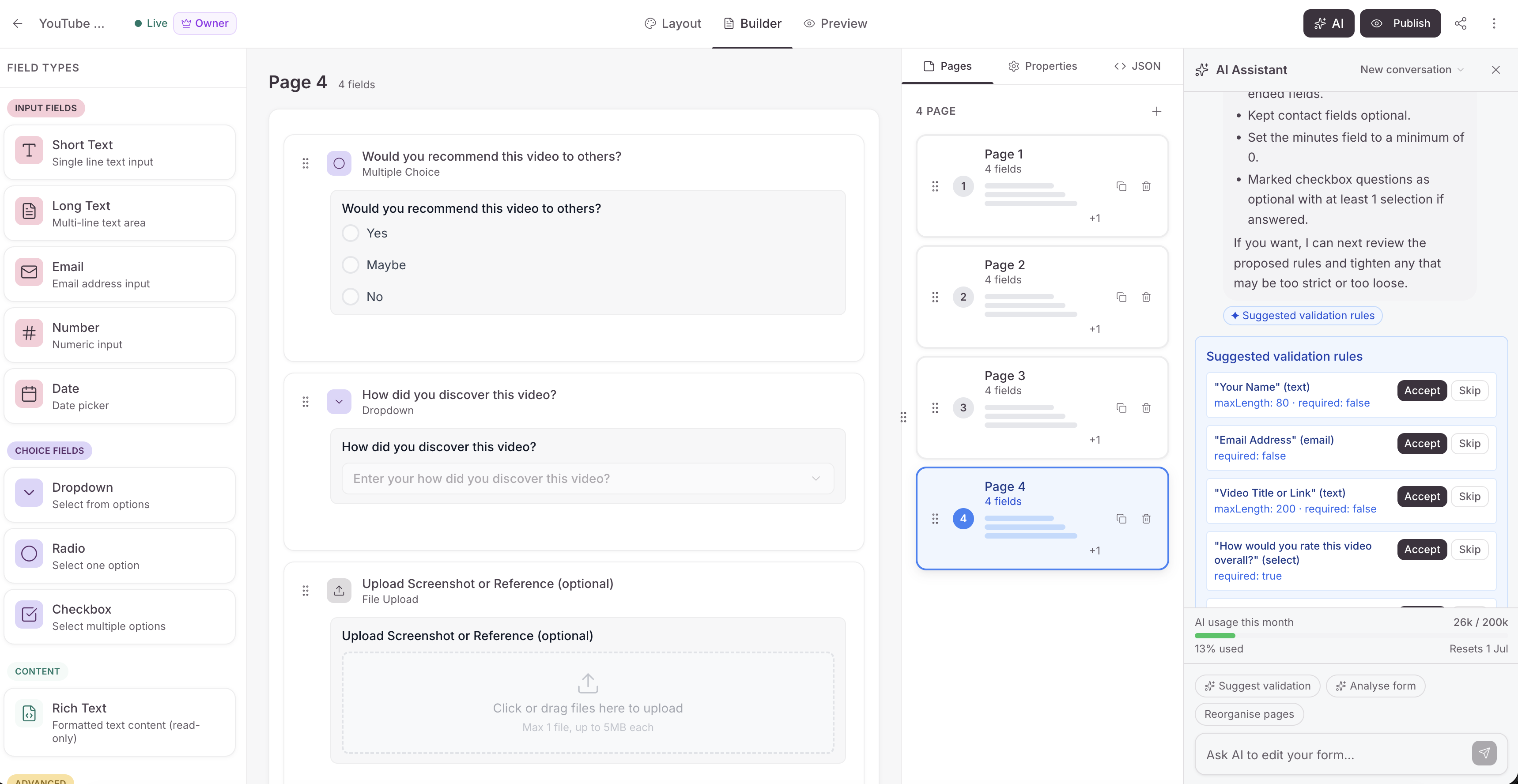
- The AI form builder chat existed but had stability problems: schema fetched fresh on every message, unbounded history, no user feedback while the AI was thinking, and no way to undo a bad AI edit.
- The analytics dashboard showed numbers but gave users no guidance on what to do about them.
- Dashboard stats had three hardcoded trend badges (
+12%,+8%,+15%) that were never connected to real data. - The settings page was a double-nested tab maze.
The GitHub Finish-Up-A-Thon gave me the forcing function to finally ship these. Here's exactly what the before/after looks like — and how GitHub Copilot helped me get there faster than I thought possible.
The "Before" State
AI Chat: Working but Fragile
The form builder had an AIEditDrawer — a chat panel where users could type "add a required email field after Full Name" and the AI would apply it. Under the hood: a Vercel AI SDK ToolLoopAgent with 11 tools streaming over HTTP to a useChat hook.
Problems I'd deferred:
- Schema re-fetched from Y.js on every single message — every turn read the full collaborative document regardless of whether anything had changed.
- Conversation history grew unbounded — a long session could eat thousands of tokens just in history replay.
- Users saw generic bouncing dots — no indication of what tool the AI was calling, what it changed, or how many steps it had taken.
- No undo for AI turns — if the AI made a bad batch edit, users had no targeted recovery path.
- Destructive actions applied immediately —
removeFieldswent straight to the Y.js store with no warning, no "this affects 47 existing responses" heads-up. - Token quota was invisible — users on the free plan (200k tokens/month) had no idea how close to the limit they were.
Analytics: Data Without Direction
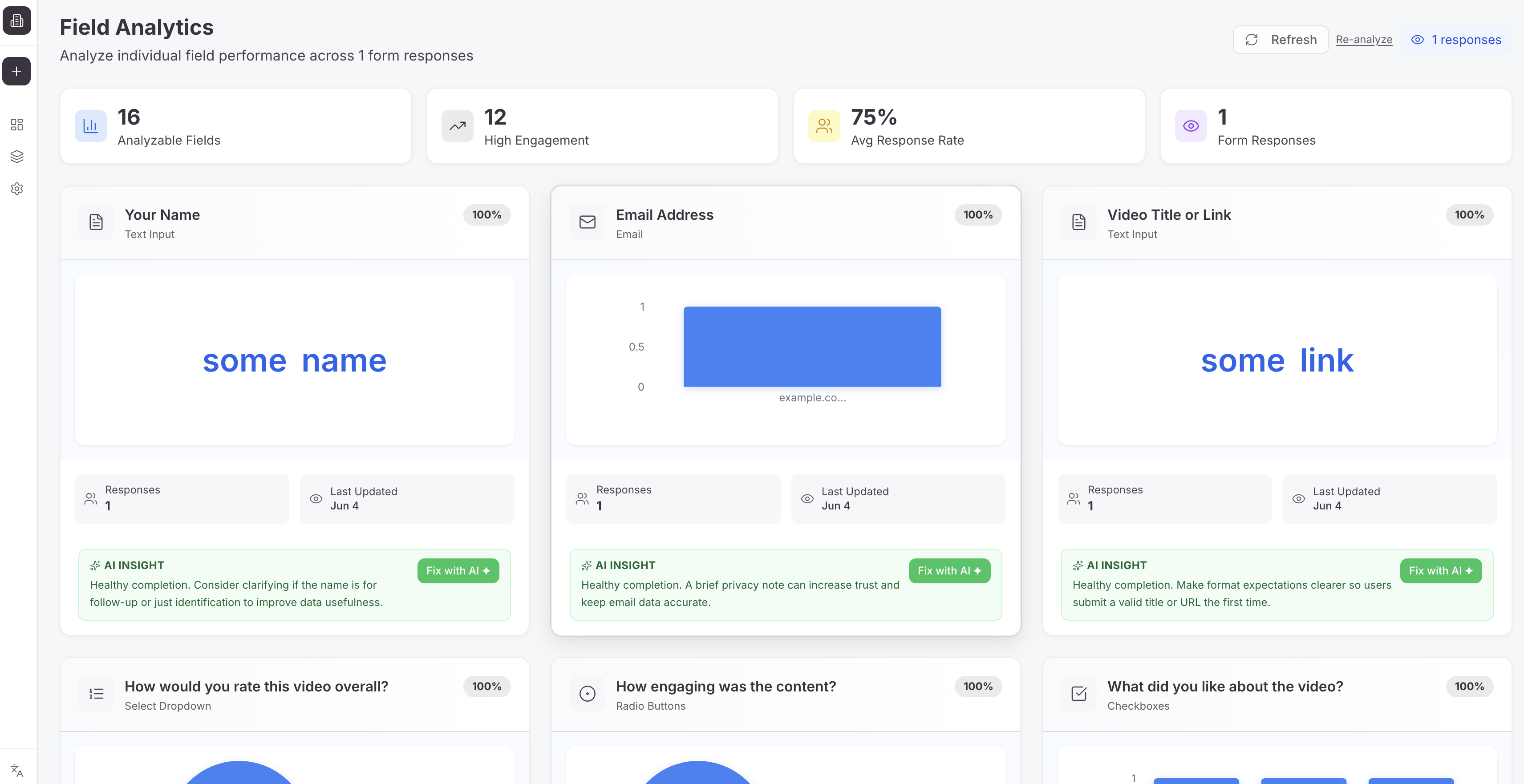
The field analytics tab showed per-field fill rates, option frequency charts, average response lengths, and completion time percentiles. Rich data — but purely descriptive. A user seeing "your Country dropdown has a 31% fill rate" had to mentally translate that into action themselves.
Dashboard Stats: Hardcoded Lies
// Before — StatsGrid.tsx
<TrendBadge value={positiveTrend(12)} />  // always +12%
<TrendBadge value={positiveTrend(8)} />   // always +8%
<TrendBadge value={positiveTrend(15)} />  // always +15%
These weren't placeholders with a TODO comment. They had shipped and sat there for months.
Settings: Double-Nested Tab Maze
The Settings page used tabs within tabs — you'd click Account, then click a sub-tab for Profile, then another for Organization. Three levels of navigation for simple tasks.
How GitHub Copilot Helped Me Get There
Before writing any feature code, I set up GitHub Copilot with domain-specific instruction files. This turned out to be the highest-leverage thing I did in the entire sprint.
The Instruction Files
I created 8 instruction files in .github/instructions/, each scoped to a part of the codebase:
.github/instructions/
├── authentication.instructions.md   # better-auth patterns
├── backend.instructions.md          # resolver → service → repository layering
├── database.instructions.md         # Prisma conventions, serialization rules
├── frontend.instructions.md         # import rules, component organization
├── graphql.instructions.md          # schema-first conventions, error codes
├── i18n.instructions.md             # translation requirements (en + ta)
├── shared-packages.instructions.md  # @dculus/ui, @dculus/types, @dculus/utils
└── testing.instructions.md          # Vitest, Cucumber BDD patterns
Each file has an applyTo frontmatter that scopes it automatically. For example:
---
applyTo: "apps/form-app/**,apps/form-viewer/**,apps/admin-app/**"
---
What this meant in practice: When I asked Copilot to "add a GraphQL query for field insights," it automatically:
- Used
createGraphQLErrorwith typedGRAPHQL_ERROR_CODES(notthrow new Error()) - Called
requireAuth+requireOrganizationMembershipin the resolver - Used
@dculus/typesfor type imports, not local relative paths - Added Tamil translations alongside English ones
Without the instruction files, I'd have been correcting import paths and missing auth guards on every single file. With them, the first draft was almost always structurally correct.
Custom Agents for Complex Work
For multi-file features, I used Copilot's custom agent mode with specialized agents I'd defined:
feature-developer— full-stack features across GraphQL schema, resolver, service, and frontendfield-type-developer— covers all 10 layers a new field type touches (types, validation, renderer, builder UI, analytics, filters, export, collaboration, i18n)
When I was building AI Field Insights (a feature that spans Prisma schema, a new backend service, 2 GraphQL resolver additions, 5 frontend components, and translations), I used the feature-developer agent with a detailed spec. Copilot produced a complete plan with a file map and step-by-step tasks, each with failing tests first. I reviewed, accepted the plan, and executed it task by task.
The back-and-forth that would have taken me a day of context-switching took a focused afternoon.
What I Finished
1. AI Chat — Stability + Full Feature Overhaul
Schema cache with 10-second TTL:
Instead of reading the Y.js document on every message, the route now caches the serialized form schema per formId. A /api/ai/invalidate-schema endpoint is called by applyAIOp whenever a mutation is applied — so the cache is always fresh when the next message arrives.
// After — aiChat.ts (simplified)
const schemaCache = new Map<string, { schema: FormSchema; cachedAt: number }>();
const SCHEMA_CACHE_TTL_MS = 10_000;

export function getFormSchema(formId: string): FormSchema | null {
  const entry = schemaCache.get(formId);
  if (!entry) return null;
  if (Date.now() - entry.cachedAt > SCHEMA_CACHE_TTL_MS) {
    schemaCache.delete(formId);
    return null;
  }
  return entry.schema;
}
20-message history cap:
// After — aiChatService.ts
const MAX_HISTORY_MESSAGES = 20;
const rows = await prisma.aIChatMessage.findMany({
  where: { conversationId },
  orderBy: { createdAt: 'desc' },
  take: MAX_HISTORY_MESSAGES,
});
return rows.reverse();
Token meter — users can now see their quota:
// AITokenMeter.tsx — rendered at the bottom of every AIEditDrawer
<AITokenMeter organizationId={organizationId} />
// Shows: [████████░░] 1.4M / 2M tokens used (Starter plan)
ChangeSummaryCard — what actually changed this turn:
Every AI response now includes a structured diff card showing added/modified/removed fields, so users don't have to visually scan the entire form to see what the AI did.
Propose-then-confirm for destructive operations:
removeFields, removePage, and proposeFieldTypeChange no longer apply immediately. They return a proposal card showing exactly how many existing responses would be affected:
⚠️  Remove "Country" (select)?
    This field has 312 existing responses.
    [Cancel]  [Confirm Delete]
Field type conversion done right:
Converting a text field to a select isn't a mutation — it's delete-old + create-new with a new ID. This preserves response history integrity (old responses keep their text values; the new field starts clean). Copilot caught this edge case when I described the feature: it flagged that mutating type in place would corrupt the data: { [fieldId]: value } structure that analytics and exports rely on.
Context-aware suggestion chips (useAIChips):
The chat drawer now shows smart chips based on the current state — "Add validation", "Reorder fields", "Add a page" — derived from the form's actual content, not hardcoded strings.
Net result: 14 tools total (up from 11), all with TypeScript Zod schemas validated at runtime, streamed via DefaultChatTransport.
2. AI Field Insights — Analytics That Explains Itself
This is the feature I'm most proud of, because it closes the loop between seeing a problem and fixing it without leaving the page.
How it works:
- User opens Form Analytics → Field Analytics.
- No tips yet — a "✨ Analyze all fields" button appears.
- One click triggers a single batch AI call (1–3k tokens). The AI receives all field analytics data and returns a structured insight per field.
- Tips are persisted in a new
AIFieldInsightPrisma model, keyed by(formId, fieldId)with aschemaHashfor staleness detection. - Future visits read from the database — zero token cost until the form schema changes.
model AIFieldInsight {
  id           String   @id @default(cuid())
  formId       String
  fieldId      String
  tip          String   @db.Text      // "67% of users skip this field. Consider making it optional."
  fixPrompt    String   @db.Text      // exact message to pre-fill in AIEditDrawer
  severity     String                 // "warning" | "error" | "success" | "info"
  schemaHash   String                 // 16-char SHA-256 prefix — staleness detection
  generatedAt  DateTime @default(now())

  form Form @relation(fields: [formId], references: [id], onDelete: Cascade)

  @@unique([formId, fieldId])
  @@index([formId])
}
The "Fix with AI ✦" button:
Each insight card has a button that opens the AIEditDrawer with the fixPrompt pre-loaded as the initial message. The user clicks confirm, and the AI applies the suggested fix immediately. The gap between insight and action is one click.
Stale detection:
If the form schema changes after analysis, a yellow banner appears: "Form changed since last analysis — Re-analyze?" This is powered by comparing a 16-char SHA-256 prefix of the field structure against the stored schemaHash.
3. Real Trend Percentages — Goodbye Hardcoded Lies
Before:
<TrendBadge value={positiveTrend(12)} />  // +12% — fiction
<TrendBadge value={positiveTrend(8)} />   // +8%  — fiction
<TrendBadge value={positiveTrend(15)} />  // +15% — fiction
After — GraphQL schema:
type FormDashboardStats {
  responsesToday: Int!
  responsesThisWeek: Int!
  responsesThisMonth: Int!
  trendResponsesToday: Float   # % change today vs yesterday; null = no data
  trendThisWeek: Float         # % change this week vs last week; null = no data
  trendResponseRate: Float     # percentage-point delta; null = <10 views
}
The resolver runs 4 parallel Prisma queries and computes real period-over-period deltas. null means insufficient data — the badge simply hides instead of showing a misleading number. A form with 3 total responses doesn't pretend it grew by 12%.
4. Settings Redesign — Typeform-Style Sidebar
Replaced double-nested tabs with a clean left sidebar following a pattern users already know from tools like Typeform and Linear:
Settings
├── Account
│   └── Profile          ← name, email, avatar upload
└── Organization
    ├── Members           ← invite, role management
    └── Billing & Plans   ← Chargebee subscription dashboard
Old URLs (/settings/account, /settings/team) redirect to new equivalents — no broken links for existing users.
The Copilot Moment That Surprised Me Most
When building the field type conversion feature, I described the problem to Copilot: "convert a text field to a select field." Its first response wasn't code — it was a question about data integrity:
"If you mutate the
typein place and keep the same field ID, responses stored asdata: { [fieldId]: "some text" }will be read by the select renderer expecting an option value. Do you want conversion to create a new field ID so old responses are preserved as immutable history?"
That's the kind of thing I would have caught in a code review — after a bug report from a user. Copilot caught it during design.
The instruction files were doing their job: Copilot knew that response.data is JSONB keyed by fieldId, that analytics and exports all read from that structure, and that changing a field's type mid-life would silently corrupt historical data. It had the full mental model of the system because I'd written it down.
Tech Stack
| Layer | Technology |
|---|---|
| Frontend | React 18, Vite, TypeScript, Tailwind CSS, shadcn/ui |
| AI | Vercel AI SDK v5, Azure OpenAI |
| State | Apollo Client (server), Zustand slices (local) |
| Realtime | Y.js + Hocuspocus WebSocket |
| Backend | Express.js, Apollo Server (GraphQL SDL) |
| Database | PostgreSQL + Prisma ORM |
| Auth | better-auth (cookie + bearer, org plugin) |
| Billing | Chargebee |
| Testing | Vitest (unit), Playwright + Cucumber (E2E) |
| Deployment | Azure Container Apps (backend) + Cloudflare Pages (frontend) |
GitHub Repository
github.com/dculussoftwares/dculus-forms
The .github/instructions/ folder, custom agents, and skills are all in the repo — feel free to use the pattern for your own project.
Demo URL:
{% embed https://form-app-dev.dculus.com/ %}
What I Learned
Write the context down first, then write the code. The 8 instruction files took about 2 hours to write and saved me 10x that in correction loops. Every time Copilot produced something architecturally wrong without them, it was because I hadn't told it how this specific codebase works.
Specs as prompts. I wrote design specs in docs/superpowers/specs/ before writing a line of code. These double as context for Copilot — feeding it a spec file produces dramatically better first drafts than "hey, build me a thing."
The schema cache story is a Copilot story. I described the performance problem (schema read on every message). Copilot suggested the TTL cache + invalidation endpoint pattern, explained why a push invalidation is better than a TTL-only approach for a real-time collaborative document, and wrote the first draft. I reviewed it, tweaked the TTL, and shipped it.
Built with GitHub Copilot. Finished for the GitHub Finish-Up-A-Thon Challenge.
Comments
More Blog
View allaiContext bankruptcy: The case for strategic forgetting for AI Agents
Most of us have seen a coding agent fail to complete a task we know it can do. We just don't...
J
James O'ReillygooglecloudParallel Compliance Engine: Drive-to-Sheets Multi-Agent Orchestration
When building Generative AI applications, developers often encounter a massive bottleneck: sequential...
A
Aryan IranidiscussIs It Ethical to Post and Ask About Circuits on Dev.to?
I’ve been thinking about sharing some electronic circuit posts on Dev.to — small circuits, DIY...
C
codebunny20agentsThe One-Click Exporter: AI Studio Antigravity, Probed to Its Limits
What nobody tells you about exporting your multi-agent prototype to a local workspace. Every...
L
leslysandraagenticarchitectGuarding the till while autonomous data agents do the digging
Autonomous agents are genuinely good at answering messy business questions. Give one an LLM and a set...
S
Sireesha PulipatiaiReturn on Attention: Why AI Code Reviews Are Wearing Us Out
PR volume went up, ticket quality didn't, and the gap got filled with LLMs on both sides of the review: bots reviewing, bots replying, bots occasionally arguing with bots about priorities that only existed in a teammate's head. Our CEO named the actual problem, and it's bigger than code review.
C
christineReady-made automations for this
Workflows from the Neura Market marketplace related to this Stable Diffusion resource
- Process Contact Form Submissions with Validation and MongoDB Storagen8n · Free · Related topic
- Automate Outbound Voice Calls with Vapi from n8n Form Submissionsn8n · Free · Related topic
- Automate LinkedIn Profile Discovery and Outreach via Form Submissionn8n · Free · Related topic
- Create a New User in Notion Based on the Signup Form Submissionn8n · Free · Related topic