
Back to Blog ai
ai
 ai
ai googlecloud
 discuss
 agents
 agenticarchitect
 ai
ai
✨Cool Effects, TTS, and Fun Animations (AI Avatar v15: VS Code and Chrome Extension)
Web Developer Hyper June 6, 2026
0 views
Intro AI Avatar is a completely free app that lets your VRoid (VRM) 3D avatar animate in...
Intro
AI Avatar is a completely free app that lets your VRoid (VRM) 3D avatar animate in response to AI chat and the Enter key in VS Code and Chrome (Edge). AI Avatar's mission is to cheer developers and everyone and make them happy. There are 4 big updates to AI Avatar since the last version.
- Super cool effects by my friend RutenVeil
- TTS (Text-to-Speech)
- Fun 3D animations
- Other updates
What I want to emphasize most is the collaboration with my friend RutenVeil. RutenVeil created super cool background effects and a loading effect for AI Avatar. They made AI Avatar even more attractive than before. Also, last time, I finally added API-based AI and local LLMs. So this time, I added another AI superpower, TTS (Text-to-Speech). Now AI Avatar can speak, and this feature will make AI Avatar even closer to you. Moreover, I added fun 3D animations, Golden Fountain and Roller Coaster that will entertain you. In addition, I added contextual messages. So messages will be different depending on the day, time, and situation. Let's take a look at the new features!
1. Cool Effects by RutenVail
{% youtube oe025rprCqM %} Hi, I’m @rutenveil. I contributed to the visual effects section of the v15 update of the AI Avatar app. This is part of a collaborative article, and I am not the main author of the app. For this update, I created a set of CSS animation-based visual effects to make the app feel more dynamic and expressive.
Effect Themes
The v15 update includes six different visual themes:
- Idol Stage
- Sci-Fi
- Magic
- Cyber
- Galaxy
- American Comic Style
Each theme explores a different visual world. In this article, I’ll focus on the “Idol Stage” effect, which is built around a highly precise timeline design (down to 0.1s units). I’ll also share some of the implementation details and the challenges I faced during development.
1-1. Spatial Design: Creating Depth with a Photoshop-like Layer Structure
In this implementation, the screen is structured using multiple layered divs, separated into layers such as top, middle, avatar, and bottom. This creates a structure similar to Photoshop layers. By stacking layers in depth, we can achieve strong visual perspective and depth, even though all assets are simple flat illustrations or vector shapes. The result is a sense of 3D space that holds up against a 3D avatar. Another benefit of this structure is maintainability. Because each layer is separated, it becomes easier to control and adjust later.
1-2. Control: Resolving Animation Conflicts and Priority Issues
During development, I ran into issues where animations did not behave as expected due to CSS conflicts caused by declaration order and style overriding. After investigation, I found that CSS follows strict rules where transform inside @keyframes takes priority over static class-based transform. To solve this, I completely separated:
- static styles (initial positioning)
- dynamic styles (animations)
Each responsibility was moved into independent classes. This design removed conflicts in animation priority and made all effects run in perfect sync, resulting in a more stable and predictable system.
1-3. Timeline-Based Multi-Animation System (Idol Stage Example)
In the “Idol Stage” effect, each light or glow element is controlled using multiple animations on a single line. Each element follows a three-stage timeline:
- Appearance (FadeIn)
- Loop motion (Waving / Swing)
- Disappearance (FadeOut)
These are combined using comma-separated animations in CSS. Example:
.psy-purple {
   transform: translateX(0%) rotate(8deg) translateY(33%);
   animation:
       psyFadeIn 0.4s ease-out forwards 1s,
       psyWavingPurple 0.13s ease-in-out infinite alternate 1.4s,
       fadeOutLight 0.2s ease forwards 11.4s;
}
This approach allows precise control over multiple visual states within a single element, enabling complex choreography-like motion in pure CSS.
2. Text-to-Speech
{% youtube vQ9sC10_HNc %}
I added several TTS (Text-to-Speech) options, Gemini TTS, Web Speech API, Kokoro, and VOICEVOX. Gemini TTS is high quality and fast, but with the free plan, I could use it only 10 times a day. That is too little for the daily use of AI Avatar because it speaks a lot. The Web Speech API is free, fast, and unlimited, but it sounds like a robot with no emotions. So I also added local TTS models, Kokoro for English and VOICEVOX for Japanese. They are reasonably natural. However, Kokoro is a little heavy to run locally. As for VOICEVOX, users have to install it themselves beforehand, which takes a little extra effort. So, if you're rich (unlike me), pay for Gemini TTS and enjoy its fast, high-quality speech.
| TTS (Text-to-Speech) | Advantages | Disadvantages |
|---|---|---|
| Gemini TTS | High quality and fast | Free for 10/day, pay to use |
| Web Speech API | Fast and free | Robotic-voice |
| Local TTS models | Reasonably natural | Heavier than others, need setup |
3. Fun 3D Animations
3.1 Millionaire Mode
{% youtube ACcrC_mWx_U %}
As AI Avatar uses VRM 3D avatars, I also didn't forget to add fun Three.js 3D animation updates. I added Millionaire Mode. This mode bursts gold coins like a fountain. It is a remake of one of my previous projects, which was one of my biggest hits. I am glad I had a chance to reuse my old project and save development time. You can choose between a gold coin fountain and a pink diamond fountain. If you want to feel even richer or just like the color pink, choose the pink diamond fountain. Of course, everybody likes money, right? This mode is recommended for developers who love money but don't have enough of it, like me. The key to making this feature performant is that it doesn't calculate collisions for every coin, making the animation much lighter.
3.2 Rollercoaster Mode
{% youtube iyecc2jEQcY %}
I also added Rollercoaster Mode. It is also a remake of one of my previous biggest-hit projects. Roller coasters are fun, but we can enjoy them only for a short time. With this mode, you can enjoy a roller coaster as much as you like. I added three versions, Default, Rainbow, and Water. The avatar slides along the track on a board like a skateboard with excellent balance and never falls off the small board. This mode is made with RollerCoaster.js from Three.js.
4. Other Updates
4.1 Contextual Messages
AI Avatar has fixed cheering messages. Although you can add and edit them, fixed messages make the avatar feel robotic. So I added a contextual message feature. Now AI Avatar checks the day, hour, and time, and changes its messages accordingly. Here are the contexts I set. AI Avatar responds with the highest-priority message.
| Priority | Condition | Example Messages |
|---|---|---|
| 1 | Special day (holiday) | "Happy Halloween! 🎃" |
| 2 | Session count milestone | "10th reaction today! 🎉" |
| 3 | Long time since last reaction | "Welcome back! Missed you 💕" |
| 4 | Long session | "You've been at it for an hour! 🔥" |
| 5 | Day of week | "Happy Monday! Let's go! ⚡" |
| 6 | Time of day | "Good morning! ☀️" |
| 7 | AI / fixed pool | Normal reaction message |
4.2 Idle Animations
I added more default animations. It only had blinking before, so I added random small tilts to the head, chest, and body. Tilting the head and chest was easy because I just needed to add a tilt. However, when tilting the whole body, the opposite leg floated and looked weird, so I needed to adjust the leg to keep it on the ground.
4.3 Change AI Character
Even though users can change the avatar's character through prompts, I added several default characters for easier use, Cute, Energetic, and Cool. Now users can quickly change the character to match their mood.
How to Use the AI Avatar VS Code Extension Version (Thank you 200+ installs!)
You can download the AI Avatar VS Code extension in two ways.
-
Option 1: Install from VS Code:
Extensionsbutton in the left sidebar > Search AI Avatar >Install↓↓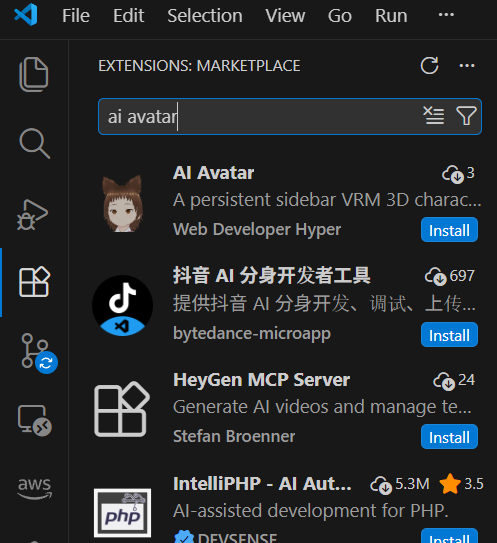
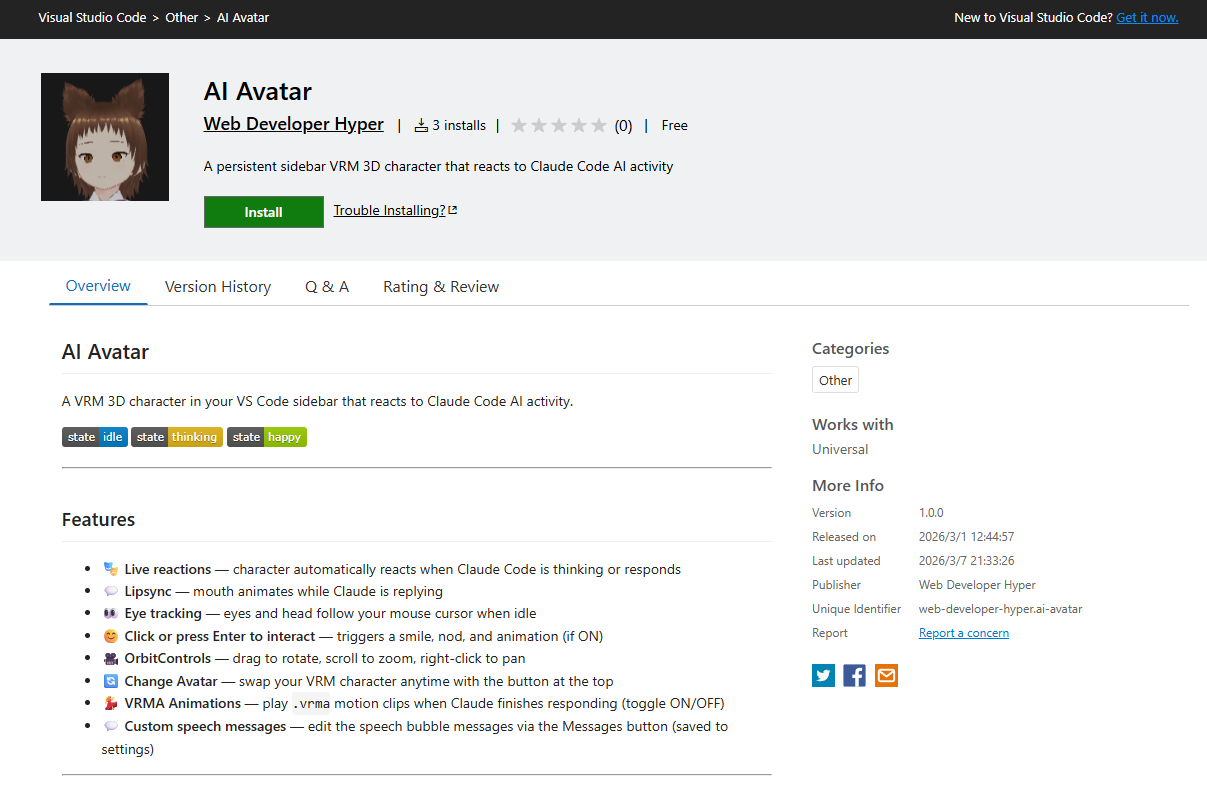
-
Option 2: Install from the VS Code Marketplace: https://marketplace.visualstudio.com/items?itemName=web-developer-hyper.ai-avatar ↓↓
How to Use the AI Avatar Chrome Version
Install from Chrome Web Store: ↓↓ https://chromewebstore.google.com/detail/ai-avatar/afmcfaeaaojalninahhhjnonhmlmiidi
Special Thanks
My friend and CDO (Chief Design Officer)🤣, @rutenveil helped create the cool effects. Thank you very much! My DEV Community friend and CTO (Chief Technology Officer)🤣, @gramli helped update AI Avatar in version 2, and keeps supporting me. Thank you very much! My DEV Community friend and CMO (Chief Marketing Officer)🤣, @itsugo. Our avatar collaboration project was the beginning of AI Avatar, and keeps supporting me. Thank you very much! My colleague Maximum Blue helped make unique avatars in version, 6 and keeps supporting me. Thank you very much!
Version 16 Update
I'm already working on the version 16 update. More fun updates, so please stay tuned!
Outro
Ah! It's time to take a ride on the roller coaster, so I have to go now. I would love to add more fun features and also use latest AI in my next updates. I hope you enjoy recharging your batteries for tomorrow with AI Avatar. Thank you for reading, and have a great AI Avatar life!
Comments Welcome!
- Do you have any ideas for new effects?
- Do you have any ideas to make AI Avatar even more fun?
- Do you have any ideas to add more AI features?
- Do you have any ideas for making cool avatars and animations?
- Do you have any ideas to improve the user experience?
- Do you have any ideas for increasing the number of users of AI Avatar?
Any other comments are also welcome!
Comments
More Blog
View allaiContext bankruptcy: The case for strategic forgetting for AI Agents
Most of us have seen a coding agent fail to complete a task we know it can do. We just don't...
J
James O'ReillygooglecloudParallel Compliance Engine: Drive-to-Sheets Multi-Agent Orchestration
When building Generative AI applications, developers often encounter a massive bottleneck: sequential...
A
Aryan IranidiscussIs It Ethical to Post and Ask About Circuits on Dev.to?
I’ve been thinking about sharing some electronic circuit posts on Dev.to — small circuits, DIY...
C
codebunny20agentsThe One-Click Exporter: AI Studio Antigravity, Probed to Its Limits
What nobody tells you about exporting your multi-agent prototype to a local workspace. Every...
L
leslysandraagenticarchitectGuarding the till while autonomous data agents do the digging
Autonomous agents are genuinely good at answering messy business questions. Give one an LLM and a set...
S
Sireesha PulipatiaiReturn on Attention: Why AI Code Reviews Are Wearing Us Out
PR volume went up, ticket quality didn't, and the gap got filled with LLMs on both sides of the review: bots reviewing, bots replying, bots occasionally arguing with bots about priorities that only existed in a teammate's head. Our CEO named the actual problem, and it's bigger than code review.
C
christineReady-made automations for this
Workflows from the Neura Market marketplace related to this Stable Diffusion resource
- LinkedIn Chrome Extensions Limit Code Automationn8n · $15.99 · Related topic
- AI Chart Analysis for TradingView via Chrome Extension & n8nn8n · $12.99 · Related topic
- Discover Chrome Extensions Tracked by LinkedInn8n · $14.99 · Related topic
- Automate Chart Analysis with TradingView, Chrome Extension, and OpenAI in n8nn8n · Free · Related topic