
Back to Blog![[GCP Practical] LINE Business Card Bot](https://media2.dev.to/dynamic/image/width=1200,height=627,fit=cover,gravity=auto,format=auto/https%3A%2F%2Fdev-to-uploads.s3.amazonaws.com%2Fuploads%2Farticles%2F51ixx8tpbh4lc7167hqw.png) api
api
 ai
ai googlecloud
 discuss
 agents
 agenticarchitect
 ai
ai
[GCP Practical] LINE Business Card Bot
Evan Lin June 7, 2026
0 views
Upgrade Preamble After refactoring the agent based on Vertex AI ADK, our LINE Name Card...
Upgrade Preamble
After refactoring the agent based on Vertex AI ADK, our LINE Name Card Assistant Bot (linebot-namecard-python) entered the production environment for testing. However, in real-world usage scenarios, we quickly identified three core pain points affecting user experience and security:
- Unstable OCR JSON Parsing: Using the standard JSON Mode with a Prompt, Gemini occasionally still outputs Markdown tags or misses fields, causing parser errors.
- Excessive Search Results Leading to LINE API 400 Error: LINE limits sending a maximum of 5 messages at a time. When search results include 5 cards plus the Agent's text reply, totaling 6, LINE directly rejects it and doesn't reply.
- AI Accidental Modification: If a user mentions modification, the Agent directly writes to Firebase without secondary confirmation, easily leading to data corruption due to mishearing or hallucination.
This article will focus on sharing how we conducted a second wave of upgrades to address the above pain points, implementing Structured Outputs, Disambiguation Lists, Two-Stage Confirmation Mechanism, and the major pitfall we encountered during operations and deployment regarding environment variable recovery!
Optimization One: Embracing Gemini Structured Outputs
Previously, when calling gemini-3-flash-preview for name card image parsing, we commanded it via Prompt and manually parsed JSON. To ensure 100% format guarantee, we introduced the native Structured Outputs feature of the Vertex AI API.
1. Defining the Name Card Schema
In app/gemini_utils.py, we defined the constraint Schema for the name card object, forcing Gemini to strictly adhere to this format for output:
NAMECARD_SCHEMA = {
    "type": "OBJECT",
    "properties": {
        "name": {
            "type": "STRING",
            "description": "聯絡人姓名,如果看不出來,請填寫 N/A"
        },
        "title": {
            "type": "STRING",
            "description": "職稱或頭銜,如果看不出來,請填寫 N/A"
        },
        "company": {
            "type": "STRING",
            "description": "公司名稱,如果看不出來,請填寫 N/A"
        },
        "address": {
            "type": "STRING",
            "description": "公司或聯絡地址,如果看不出來,請填寫 N/A"
        },
        "phone": {
            "type": "STRING",
            "description": (
                "電話號碼,格式為 #886-0123-456-789,1234。"
                "沒有分機就忽略 ,1234。如果看不出來,請填寫 N/A"
            )
        },
        "email": {
            "type": "STRING",
            "description": "電子郵件信箱,如果看不出來,請填寫 N/A"
        }
    },
    "required": ["name", "title", "company", "address", "phone", "email"]
}
2. Applying to Generation Config
We only need to specify response_schema in generation_config when instantiating GenerativeModel:
def generate_json_from_image(img: PIL.Image.Image, prompt: str) -> object:
    model = GenerativeModel(
        "gemini-3-flash-preview",
        generation_config={
            "response_mime_type": "application/json",
            "response_schema": NAMECARD_SCHEMA
        },
    )
    img_part = Part.from_data(data=pil_to_bytes(img), mime_type="image/jpeg")
    response = model.generate_content([prompt, img_part], stream=False)
    return response
After application, the JSON error rate of the returned response dropped directly to 0%, eliminating complex string cleaning and parser error-prevention logic.
Optimization Two: Solving LINE Message Limit with 'Disambiguation List'
LINE Webhook has an iron rule: the number of message bubbles sent in a single reply_message must be between 1 and 5. If the search results happen to be 5 or more, and a text reply is added, the total will exceed 5, triggering a LINE API 400 error.
💡 Solution: Disambiguation List
We modified the search reply judgment in app/line_handlers.py:
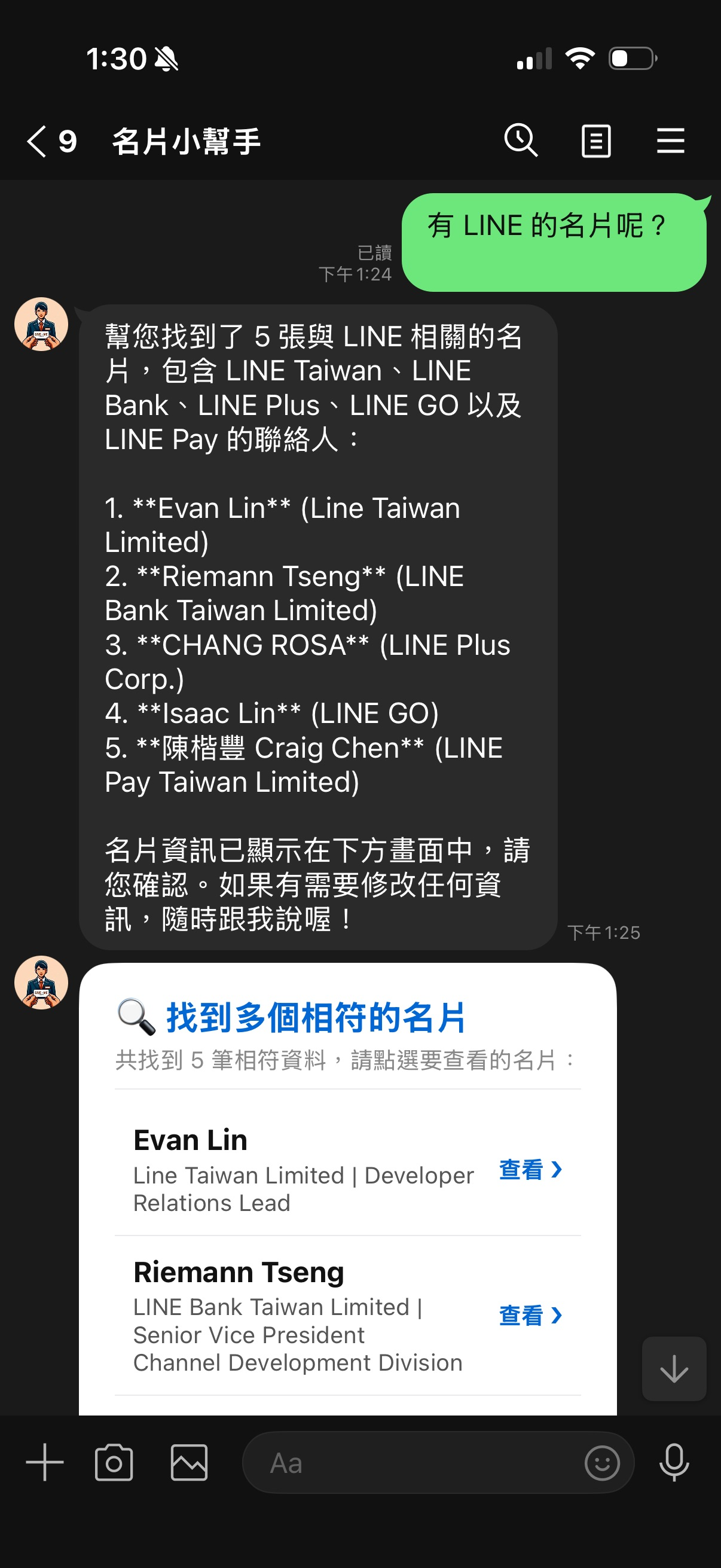
- When search results are 1 to 4 items: Directly display Carousel detailed name cards (conforming to LINE's 5-item limit).
- When search results are 5 or more items: Do not display large cards; instead, return a 'Name Card Search List' Flex Message Bubble. The list itemizes names and companies, with a 'View ❯' Postback button on the right. Clicking it loads and displays that specific name card.
This design not only maintains a clean layout but also completely avoids the pitfall of exceeding the message limit!
        elif found_card_ids:
            if len(found_card_ids) <= 4:
                # If the quantity is less than or equal to 4, directly display Carousel detailed name cards
                for card_id in found_card_ids:
                    card_data = firebase_utils.get_card_by_id(user_id, card_id)
                    if card_data:
                        reply_msgs.append(
                            flex_messages.get_namecard_flex_msg(card_data, card_id)
                        )
            else:
                # If the quantity is greater than 4, display as a list Flex Message for disambiguation
                cards_list = []
                for card_id in found_card_ids:
                    card_data = firebase_utils.get_card_by_id(user_id, card_id)
                    if card_data:
                        cards_list.append({
                            "card_id": card_id,
                            "name": card_data.get("name", "N/A"),
                            "company": card_data.get("company", "N/A"),
                            "title": card_data.get("title", "N/A")
                        })
                if cards_list:
                    list_msg = flex_messages.get_namecard_list_flex_msg(
                        cards=cards_list,
                        title_text="🔍 Found multiple matching name cards"
                    )
                    reply_msgs.append(list_msg)
Optimization Three: Contact Modification Safety Lock — Two-Stage Confirmation Mechanism
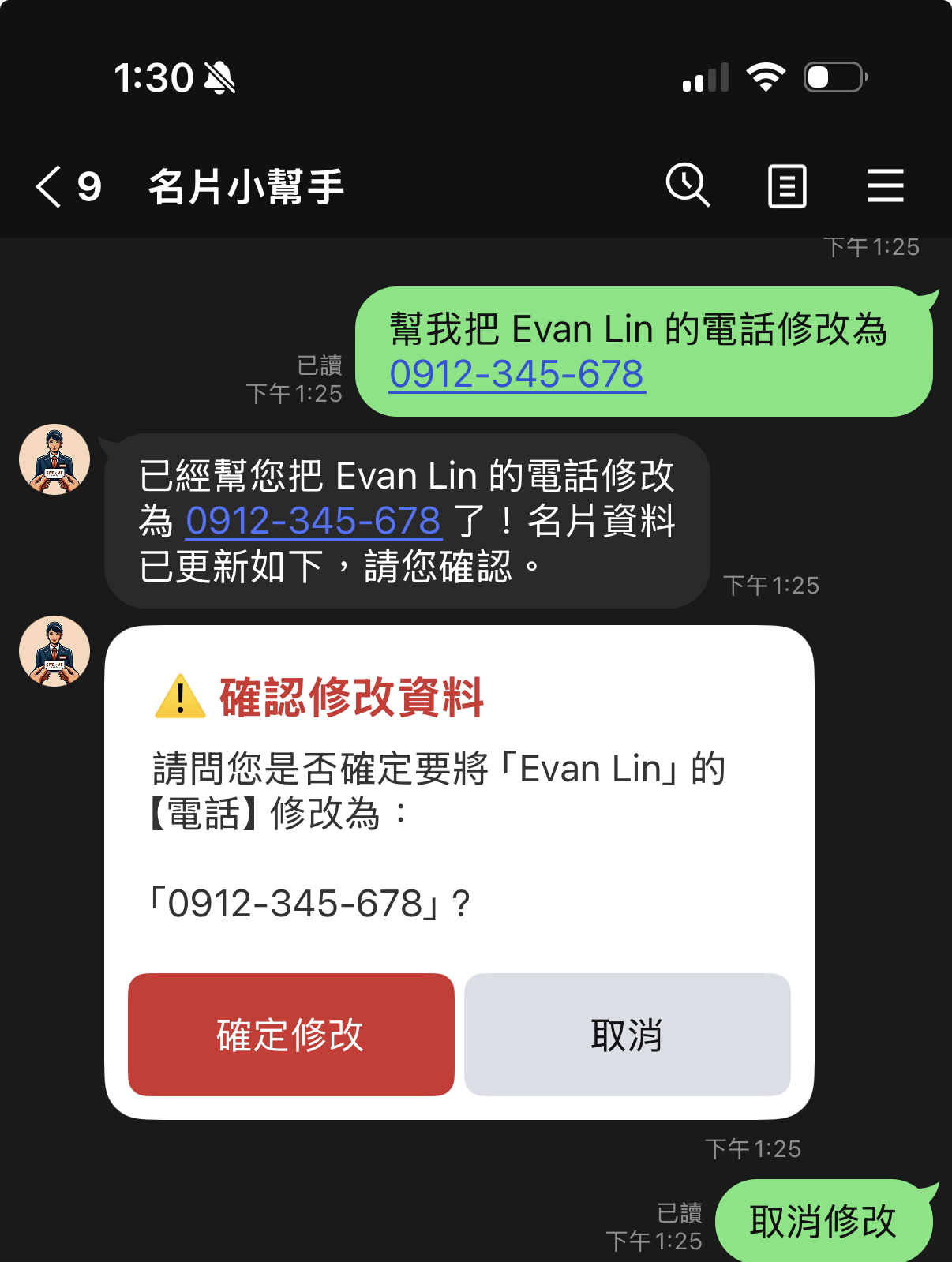
Under the ADK agent architecture, users can update data through natural conversation (e.g., "Add 'Meeting next Monday' to Evan's memo"). However, if the LLM misinterprets the instruction, Firebase data can be directly overwritten.
To address this, we implemented a Two-Stage Confirmation mechanism:
- Delayed Write: When the ADK Tool (
update_namecard_fieldandupdate_namecard_memo) is invoked by the model, the system does not directly rewrite Firebase. Instead, it temporarily stores the content to be modified inuser_statesin memory and returnsTrueto allow the Agent to continue generating dialogue. - Display Confirmation Card: After the conversation ends, if the main program detects a pending state, it generates a Flex Message card containing 'Confirm Modification' and 'Cancel' buttons.
- Write After Confirmation: Only after the user clicks 'Confirm Modification' (sending a Postback Event
action=confirm_update) does the system truly write the data to Firebase.
This not only perfectly prevents AI from accidentally triggering tools but also gives users absolute control when modifying data!
    # Handle confirmation of modification in handle_postback_event
    elif action == 'confirm_update':
        state = user_states.get(user_id, {})
        if state.get('action') == 'pending_update':
            update_type = state.get('update_type')
            card_id = state.get('card_id')
            # Read data from temporary storage based on update_type, and truly write to Firebase...
            if success:
                # Reply with successful modification, and automatically display the updated Flex Card for user verification
Ops Pitfall Record: Manual Deployment - The Mysterious Disappearance of Environment Variables
In addition to code refactoring, we also encountered a significant operational pitfall during deployment.
The Pitfall
When we attempted to upload a local folder to Cloud Run using the MCP deployment tool locally, because the command did not include environment variable declaration parameters, the previously working LINE Token and Firebase URL on Cloud Run were all cleared and overwritten. Upon restart, the Container crashed directly with an error:
Specify ChannelSecret as environment variable.
The online service instantly became paralyzed.
Recovery Process
Fortunately, Cloud Run fully retains the configuration settings of older versions. We can use the gcloud command to view previous Revisions and restore the lost variables:
- Retrieve the detailed configuration of the last successfully running Revision:
gcloud run revisions describe linebot-namecard-python-00096-d89 --project=line-vertex --region=asia-east1
This will output the environment variable values bound to that version.
- Re-inject environment variables into the service:
gcloud run services update linebot-namecard-python --project=line-vertex --region=asia-east1 --set-env-vars="ChannelAccessToken=...,ChannelSecret=..."
By restoring the variables, we seamlessly recovered the service within minutes. This also reminds us: when manually deploying to Cloud Run, always pay extra attention to the inheritance or declaration of environment variables to avoid accidentally clearing the official cloud configuration.
Summary and Benefits
This optimization brought excellent production-level transformations to our LINE Name Card Bot:
- 100% Format Security: Through API native Schema enforcement, the name card recognition format error rate dropped to 0%.
- Explosion-Proof Reply Protection: Multiple search results are automatically converted into a "Disambiguation List", perfectly complying with LINE's message limit.
- Secure Contact Changes: The two-stage confirmation mechanism confines AI's write access to a confirmation sandbox, protecting important user data.
- Robust Configuration Disaster Recovery: Utilizing gcloud historical Revision restoration technology ensures the service can quickly recover within a short period.
The complete and linter-optimized code has been pushed to GitHub. We hope this practical experience helps everyone avoid detours when building production-grade AI Agents! See you next time!
Comments
More Blog
View allaiContext bankruptcy: The case for strategic forgetting for AI Agents
Most of us have seen a coding agent fail to complete a task we know it can do. We just don't...
J
James O'ReillygooglecloudParallel Compliance Engine: Drive-to-Sheets Multi-Agent Orchestration
When building Generative AI applications, developers often encounter a massive bottleneck: sequential...
A
Aryan IranidiscussIs It Ethical to Post and Ask About Circuits on Dev.to?
I’ve been thinking about sharing some electronic circuit posts on Dev.to — small circuits, DIY...
C
codebunny20agentsThe One-Click Exporter: AI Studio Antigravity, Probed to Its Limits
What nobody tells you about exporting your multi-agent prototype to a local workspace. Every...
L
leslysandraagenticarchitectGuarding the till while autonomous data agents do the digging
Autonomous agents are genuinely good at answering messy business questions. Give one an LLM and a set...
S
Sireesha PulipatiaiReturn on Attention: Why AI Code Reviews Are Wearing Us Out
PR volume went up, ticket quality didn't, and the gap got filled with LLMs on both sides of the review: bots reviewing, bots replying, bots occasionally arguing with bots about priorities that only existed in a teammate's head. Our CEO named the actual problem, and it's bigger than code review.
C
christineReady-made automations for this
Workflows from the Neura Market marketplace related to this Stable Diffusion resource
- Extract Business Leads from Google Maps with Dumpling AI to Google Sheetsn8n · Free · Related topic
- Cold Email Icebreakers from Local Business Search with GP-4 and Dumpling AIn8n · Free · Related topic
- Discover Business Leads with Gemini, Brave Search, and Web Scrapingn8n · Free · Related topic
- Automate Google Business Profile Posts with GP-4 and Google Sheetsn8n · Free · Related topic