
Back to Blog devchallenge
 ai
ai googlecloud
 discuss
 agents
 agenticarchitect
 ai
ai
Reviving an Abandoned Side Project with Spec-Driven Development (SDD)
Karly Hoffman June 7, 2026
0 views
This is a submission for the GitHub Finish-Up-A-Thon Challenge I had two goals when I decided to...
This is a submission for the GitHub Finish-Up-A-Thon Challenge
I had two goals when I decided to enter the Finish-Up-A-Thon: revive an abandoned side project I still care about, and use it as an opportunity to learn Spec-Driven Development (SDD).
This post is both a project retrospective and a practical guide to SDD, in which I'll share how I rebuilt the application with a modernized stack and implemented years of unfinished ideas.
What I Built
<!-- Provide an overview of your project, where it started, and what it means to you. -->Old Project Link: https://recipe-library-prismic.vercel.app
The project was a personal recipe website I built in 2020. It was a simple Next.js app backed by a Prismic headless CMS for storing and displaying recipe content. Over the years it served as a recipe library with curated lists (cook next, favorites, recently added, random suggestions), recipe search, and tag filtering. It then gradually became the tool I relied on to decide what to cook each week, plan grocery trips, and keep track of favorite recipes. Personally, my favorite feature is the grocery shopping list, which organizes the ingredients by aisle—it makes life so much easier at the grocery store.
Despite the continued use of the app, I stopped maintaining the codebase and CMS years ago. Every new recipe required manually copying ingredients, instructions, and metadata into the CMS. Eventually, maintaining the library became more work than the value I got from adding new recipes.
The "Before" Stack
- Next.js 13 (Pages Router)
- Prismic API
The Lost Roadmap
I kept a mental list throughout the years of improvements that would address the biggest frustrations I had maintaining the app:
- Migrate the backend from Prismic (a hosted headless CMS) to Supabase (a PostgreSQL platform) for more control and flexibility.
- Automate database entry by importing recipes and parsing text directly from PDFs.
- Integrate grocery price APIs to compare ingredient costs across local stores. (Yes, this was more of a "nice-to-have" idea rather than a maintenance feature… but one can dream.)
These were all enhancements I never thought I'd have the time or energy to implement. Until now!
Demo
<!-- Share a link to your project and include a video walkthrough or screenshots showing your application in action. -->Below you'll find a link to the project, along with the GitHub repository. Later in the post, I'll provide pull requests and video demos relating to each implementation.
New Project Link: https://recipe-library-nextjs-supabase.vercel.app
Repository: https://github.com/karlyhoffman/recipe-website
The "After" Stack
- Next.js 16 (App Router)
- Supabase (PostgreSQL)
- JSON Web Tokens (JWT)
- PDF Parser
- Anthropic AI SDK
- Kroger Pricing API
The Comeback Story
<!-- Tell us where the project was before and what you changed, fixed, or added to finish it up. -->Spec-Driven Development (SDD) to the Rescue
I recently learned about Spec-Driven Development, and I've been hooked ever since. I knew as soon as I heard about the Finish-Up-A-Thon that I would use the SDD methodology to complete the challenge. It's an AI-assisted development approach in which detailed, structured specifications serve as the primary artifacts and absolute sources of truth. From those specs, documentation is derived, and code samples or instructions are generated.
With SDD tools like GitHub's SpecKit combined with Copilot, the workload becomes less daunting, and reviving a years-old project suddenly felt completely manageable.
Getting Started (again)
Before I could implement the SpecKit toolkit, the Next.js application was in major need of an upgrade to the latest version. However, this was not the first time I made upgrades to this application. In fact, I created a folder directory of all the instances of the redesigns:
/
├── 2020-recipe-website/
├── 2021-recipe-website/
├── 2023-recipe-website/
So I continued this pattern with a new 2026-recipe-website/ directory and a fresh Next.js app (this time using the App Router instead of the Pages Router), and transferred over the global styles from the 2023 instance.
Once the structure and styles were in place, it was time to use Copilot and add SpecKit to the project.
Initializing SpecKit with Copilot
To add the toolkit to a project, I ran the following command at the root:
specify init --here --integration copilot
With this initialization, the SpecKit commands /speckit.* will now be recognized when working in VS Code's Copilot chat window.
Generating a Constitution
Before writing any specs, SpecKit requires a constitution.md, a document that establishes project-wide principles, requirements, and technical standards. It's intentionally high‑level, focusing on the project's goals and purpose, meant to determine the "why and how we work," not the "what we're building" or any technical specifics.
To create a constitution.md for the project, I ran the command:
/speckit.constitution
If you don't pass an argument providing extra context, SpecKit generates a starter constitution template based on the codebase and your input.
After running the command, I needed to review and edit the file, which became my standard process going forward: [SpecKit Command] → Review → Edit → Next Step.
My SpecKit Workflow
Below is a SpecKit command workflow I created as a reference guide when implementing the new features. I found myself referring to them often, and hope it helps you as much as it helped me:
/speckit.specify→ Creates a new specification. If you provide a description, you need to describe what you want to build; just the what and why. Do not include any tech stack details. If no description is provided, the agents will analyze the codebase files to get context.- [OPTIONAL]
/speckit.clarify→ An optional command to reveal ambiguities and uncover blind spots in the new spec doc. This command can take two types of arguments: a path argument (e.g., using the@prefix to point directly to a file or folder), which narrows the scope of what the agent scans, and a scope argument (e.g., "performance", "data model", and "security"), which clarifies a specific area. If both arguments are omitted, the agent will scan the entire spec for ambiguity and ask up to 5 clarification questions. - [OPTIONAL]
/speckit.checklist→ Creates custom quality checklists to validate requirements are complete, clear, and consistent. (This command does not take arguments.) /speckit.plan→ Creates a concrete technical implementation plan from the fully clarified spec. Essentially, this is the "design phase" of Spec‑Driven Development, when the what becomes the detailed how. This phase determines the architecture, stack choices, component boundaries, data flow, and integrations. If you pass arguments (e.g., "Use Next.js and Supabase", "Must comply with HIPAA", "Optimize for low latency (<50ms)"), they become constraints that the planner must consider before proceeding./speckit.tasks→ Creates lists of tasks that are broken down into actionable items. Oncetasks.mdis added, the spec is ready to move on to the implementation phase.- [OPTIONAL]
/speckit.analyze→ Audits every spec document to provide a deep technical analysis report that identifies inconsistencies and ambiguities. /speckit.implement→ Executes the implementation plan and generates starter code, file structures, and precise instructions for completing the feature.
My Experience with GitHub Copilot
<!-- Explain how GitHub Copilot supported your process. -->One of the biggest surprises during this challenge was how much SpecKit changed the way I approached development.
Rather than jumping directly into code, I spent most of my time reviewing specifications and plans, and generating tasks before implementation ever began. That shift forced me to think more deliberately about requirements and design decisions. It felt like my role changed from builder to supervisor.
Ironically, with all the planning and reviewing, I hit Copilot's free-tier usage limit mid-project and had to switch to a different AI agent. Fortunately, this turned out to be a non-issue, as SpecKit made switching AI agents seamless. As long as the plugin was installed, all the /speckit.* commands worked the same. The workflow stayed the same, and I could keep moving forward without interruption. The transition was minimal.
To keep things transparent, I included the exact SpecKit commands used in each commit description, which you can find in each pull request.
New Spec: Migrate the Backend from Prismic to Supabase
Pull Request: https://github.com/karlyhoffman/recipe-website/pull/8
Migrating to Supabase was the first major item on my wishlist. It ultimately gives me granular control over my data structure, and since my recipe archive doesn't require daily content management, a hosted headless CMS felt like overkill. I also always wanted to try Supabase, so I figured there was no better time than now. (Plus, if it turns out I truly do need a CMS, I can always connect the Supabase database to Directus or PayloadCMS later.)
To start the migration process, I ran the /speckit.specify command with the following details:
/speckit.specify --text "Migrate the Prismic backend of @2023-recipe-website/ to Supabase in @2026-recipe-website/"
I used the optional --text flag to add more context for this spec (in the specs below, you'll see different ways the command can be called).
After running that command, the following files were generated:
specs/001-prismic-to-supabase/spec.mdspecs/001-prismic-to-supabase/checklists/requirements.md
The spec.md contains user stories, functional requirements (what the system must do), non‑functional requirements (i.e., performance, UX, constraints), success criteria, and edge cases. The requirements.md contains actionable product and technical requirements that will later be turned into formal specifications.
This is also the phase where the deep review begins. Every time a new specification document is created, it's crucial to understand its contents in their entirety and how they affect the application. I make sure to read each new file carefully so I know what the agent is about to implement, and I question anything unclear, inconsistent, or incorrect (it happens regularly).
For example, while reviewing the specs and requirements, I decided not to migrate the hero_image_url field to reduce storage costs. Interestingly, the agent removed it from the codebase and documentation completely without noting the change anywhere. Especially since documentation plays a central role in the methodology, I found that inconsistency surprising.
After refining the spec, it was time to move on and create the planning documents:
/speckit.plan
This command reads your feature specification and constitution, then generates a technical implementation plan covering architecture, project structure, design decisions, risks, and supporting design docs, which is saved as a plan.md inside your feature directory.
*Tip: Because I knew Supabase was going to be a part of the tech stack from the very start of this spec, I made sure the supabase-best-practice plugin was installed before this phase so that the code that was being implemented was following best practices. Generally, if you know your tech stack up front, make sure you've installed any related MCPs and plugins before this planning phase. These will ensure the agent-generated snippets and instructions are accurate and follow best practices.
Once I was done reviewing all the new planning documents, I ran the /speckit.analyze and /speckit.tasks to audit the plan and generate actionable items.
Then came the implementation phase. While I still needed to review outputs, validate migrations, and test the generated code, the heavy lifting had already been mapped out through the specification and planning process. The migration scripts ran smoothly, unit tests passed, and the data was successfully migrated to Supabase PostgreSQL. What would likely have taken me a week+ of manual schema mapping was wrapped up in less than 48 hours.
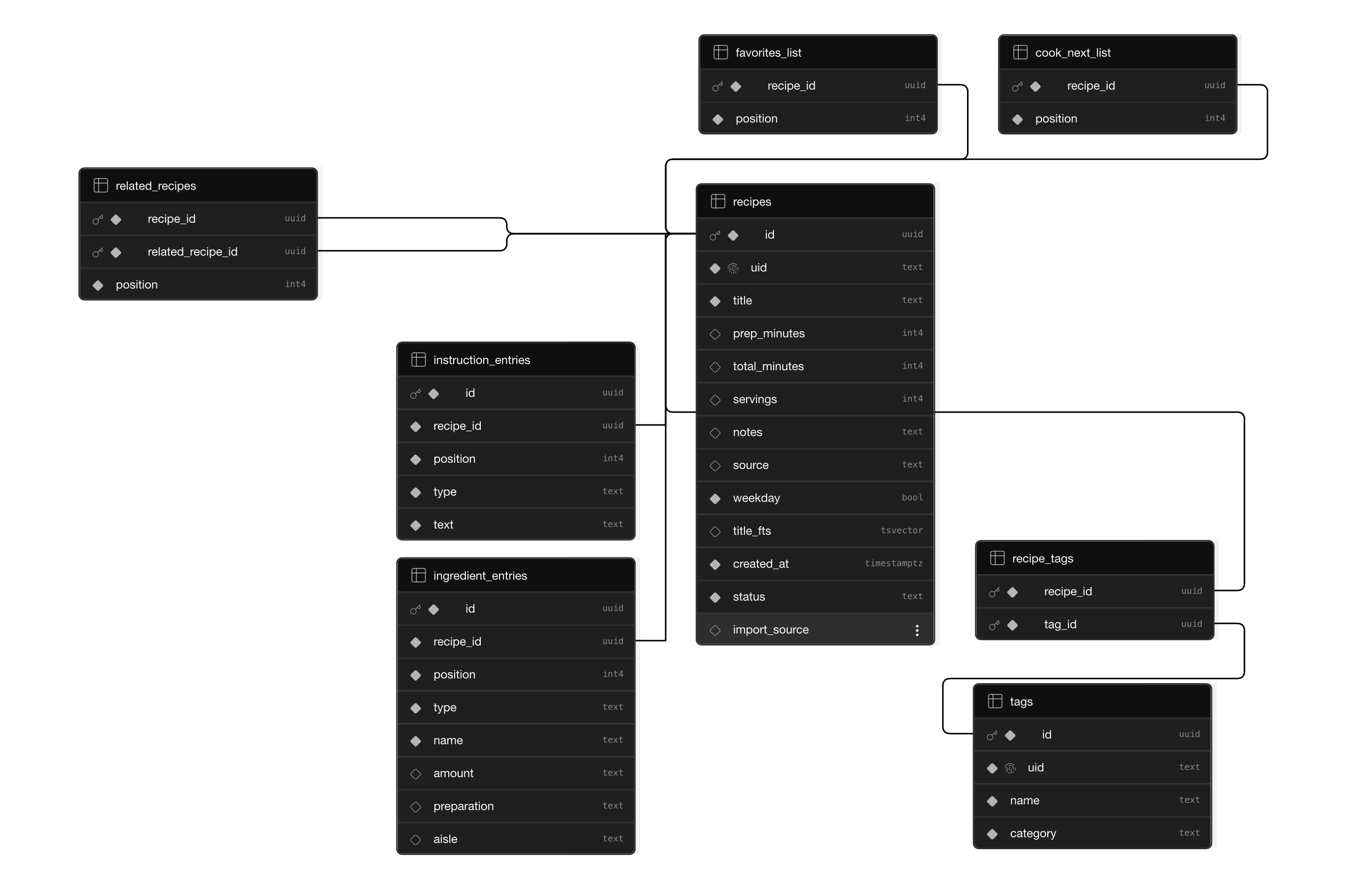

As you'll see in the commits, at this point I decided to clean up and remove a lot of unused code. I no longer needed to reference the old Next.js v9 2020-recipe-website/ codebase, so I updated the folder structure as follows.
(I wanted to call that out in case you notice the change in the codebase or PRs.)
/
├── prismic/
├── supabase/
├── ...
New Spec: Add a PDF Scanner that Converts Text into Database Entries
Pull Request: https://github.com/karlyhoffman/recipe-website/pull/10
This was the feature that inspired the entire comeback. It's what I've always wanted to build, but assumed it would take weeks of effort and testing. However, SpecKit and Copilot changed that. It broke the feature into clear steps so that I could implement it in a matter of days.
Under the hood, I used a PDF parser to extract the raw text and Anthropic's AI SDK to convert it into structured recipe fields (ingredients, instructions, and metadata) before writing them to the database.
To get started, I ran:
/speckit.specify add functionality to upload PDF files (recipes), scan text contents (ingredients and instructions), and create new recipe entries in the database with the content from the PDF
*Note: From here on, the spec workflow was largely the same as the migration above, so I'll only call out the moments worth mentioning. The exact commands for each step are in the PR commit descriptions. Onwards!
Since this spec was more complex, I followed the spec initialization with /speckit.clarify, which prompted the agent to ask a series of questions to gather more context. I found them to be extremely helpful when thinking about features like this in the future:
- After text extraction completes, what happens to the uploaded PDF file itself? (I decided to have it be deleted immediately after extraction, which minimizes storage footprint and avoids retaining user files beyond their purpose for privacy.)
- What status should a recipe have immediately after a successful PDF import? (I answered with "draft". The content imported via the PDF extract is unverified. Defaulting to a draft prevents unpublished or incomplete recipes from being publicly visible before there's a chance to review them.)
- The spec permits unauthenticated imports when the project is "running locally." What determines whether the environment is local? (I chose to use Next.js' standard flag to check which environment the application is running in—later I noticed the AI implemented the wrong syntax for this check. Remember to review everything!)
- What should happen if a user uploads the same PDF (or a PDF with an identical extracted title) more than once? (I clarified that a new recipe will always be created. Deduplication logic based on extracted text is unreliable and adds scope; admins can manage duplicates manually after import instead.)
- When PDF text extraction takes time, should the user wait on the page or be able to leave and return? (I went with synchronous with a loading indicator, since it's simpler to implement and appropriate for the expected file sizes (≤10 MB). Async notifications add significant scope (email/push infrastructure, background jobs) that isn't needed for this application.)
Afterward, I was cleared to proceed by the agent:
No outstanding high-impact ambiguities remain. Safe to proceed to /speckit.plan.
Once the technical plan was established and reviewed (several times with /speckit.checklist and /speckit.analyze), I ran the implementation scripts, and the initial prototype was built.
That first prototype successfully extracted ingredients and instructions, but I encountered a few errors regarding fetch requests and malformed parsing results. After fixing those errors, the remaining work was only manual cleanup of the review form's styling and layout (problems that were far easier to solve than building the entire PDF importer pipeline from scratch).
{% embed https://www.youtube.com/watch?v=4A1CDw7JiiU %}
New Spec: Add Authentication Route (Supabase Token → JWT‑Based Admin Login)
Pull Request: https://github.com/karlyhoffman/recipe-website/pull/11
This feature wasn't on my original roadmap, but it quickly became necessary. As the project grew, I wanted a more secure and scalable way to manage admin access, especially before implementing the next feature, which relies heavily on authenticated API calls.
Before generating the spec, however, I noticed while implementing the previous builds that the implementation agents sometimes deviated from established project patterns, such as applying inline styles when they're not used elsewhere in the application. To fix this, I updated the constitution to ensure it follows best practices and existing codebase patterns.
Once the constitution was updated, the authentication update was straightforward: SpecKit generated the spec, the agent produced the plan, and the implementation was followed cleanly. The result was a proper admin login flow backed by JWT authentication, replacing the direct use of the Supabase token system.
{% embed https://www.youtube.com/watch?v=caBVdJx00-Y %}
New Spec: Add a Grocery Store Price Comparison Section
Pull Request: https://github.com/karlyhoffman/recipe-website/pull/13
This was the final feature of the lost roadmap, and the one I'm the most excited about. Adding real-time grocery price data felt like the most natural way to make this side project even more useful.
To kick off this spec, I ran /speckit.specify with the following context:
/speckit.specify Add a "Cheapest Grocery Store" section to the grocery page. This section will only appear for authenticated users and should display a list of stores sorted by total price for the given ingredients list. This feature should integrate with one or more (cost-effective) grocery pricing data sources (e.g., a third-party grocery API, scraped price data, or a manually maintained price database) to fetch current prices per store. The goal is to help users save money on their weekly grocery shop by making intelligent, data-driven store recommendations directly from the recipes they already use.
The process that followed was very similar to the previous builds: generate the spec, clarify ambiguities, create the plan, review the documents, and implement.
From there, the only two experiences that stood out were:
- Because I wrote "cost-effective" in the specify prompt, the agent defaulted to manual database entry (the last example I listed). Instead, I had to clarify and update the planning documentation to say the data must be retrieved from an API. (Luckily, the Kroger API was available through a free developer tier and fit the needs of this project.) The experience was a great reminder that small wording choices can significantly shape the outcome.
- During the planning phase, the agent suggested scheduling API price updates via cron jobs (daily, weekly, or a hidden server endpoint). Instead, I came up with the idea of triggering calls via a button on the frontend—grocery shopping isn't on a fixed schedule. Sometimes we go to the store twice a week, sometimes we don't. It turned out to be a useful example of where AI-generated plans benefit from real-world context.
Once the implementation was complete, this feature transformed the application from a recipe organizer into a meal-planning tool that can help make shopping decisions based on real prices.
{% embed https://www.youtube.com/watch?v=b0i1d_aYWlE %}
The Results
By the end of the challenge, I had:
- Upgraded the application to Next.js 16
- Migrated from Prismic to Supabase
- Added AI-powered PDF recipe imports
- Implemented JWT-based admin authentication
- Built real-time grocery price comparison functionality
What began as a largely unmaintained recipe archive is now a tool that helps me discover recipes, import new content, and make grocery shopping decisions based on real pricing data. I couldn't be happier.
Top Resources
I highly recommend exploring SpecKit's source code and Microsoft's Spec-Driven Development learning resources if you'd like to learn more about SDD. They are the resources I frequently referenced throughout this challenge.
Final Thoughts
I lost motivation years ago to maintain my simple recipe application, largely because of the manual effort required to keep the database up to date. The Finish-Up-A-Thon gave me a reason to return to that long-abandoned backlog, all while gaining more experience in AI-assisted development.
Copilot and SpecKit gave me the process to make those features feel so much more achievable. Together, we broke down each feature into more manageable tasks while ensuring I understood what was being implemented at every step.
All I can say is, I can't recommend Spec-Driven Development and the SpecKit toolkit highly enough.
Thank you for reading, and I hope you found this guide helpful!
<!-- Don't forget to add a cover image (if you want). --> <!-- Team Submissions: Please pick one member to publish the submission and credit teammates by listing their DEV usernames directly in the body of the post. --> <!-- Thanks for participating! -->Comments
More Blog
View allaiContext bankruptcy: The case for strategic forgetting for AI Agents
Most of us have seen a coding agent fail to complete a task we know it can do. We just don't...
J
James O'ReillygooglecloudParallel Compliance Engine: Drive-to-Sheets Multi-Agent Orchestration
When building Generative AI applications, developers often encounter a massive bottleneck: sequential...
A
Aryan IranidiscussIs It Ethical to Post and Ask About Circuits on Dev.to?
I’ve been thinking about sharing some electronic circuit posts on Dev.to — small circuits, DIY...
C
codebunny20agentsThe One-Click Exporter: AI Studio Antigravity, Probed to Its Limits
What nobody tells you about exporting your multi-agent prototype to a local workspace. Every...
L
leslysandraagenticarchitectGuarding the till while autonomous data agents do the digging
Autonomous agents are genuinely good at answering messy business questions. Give one an LLM and a set...
S
Sireesha PulipatiaiReturn on Attention: Why AI Code Reviews Are Wearing Us Out
PR volume went up, ticket quality didn't, and the gap got filled with LLMs on both sides of the review: bots reviewing, bots replying, bots occasionally arguing with bots about priorities that only existed in a teammate's head. Our CEO named the actual problem, and it's bigger than code review.
C
christineReady-made automations for this
Workflows from the Neura Market marketplace related to this Stable Diffusion resource
- Automate Product Development with AI-Driven CPO and Specialized Agentsn8n · Free · Related topic
- Automate Shopify Abandoned Cart Recovery with Gmail and Google Sheetsn8n · Free · Related topic
- Automate Abandoned Cart Recovery with Gmail and Google Sheetsn8n · Free · Related topic
- Automate Slack Approvals and Data Submission with n8n Webhooksn8n · Free · Related topic