
Back to Blog mcpserver
 ai
ai googlecloud
 discuss
 agents
 agenticarchitect
 ai
ai
Dialling Our Agents to 11: My Favourite MCP Servers
Darren "Dazbo" Lester June 8, 2026
0 views
What This Article Is About I’d like to tell you about a few of the MCP servers and agent...
title: "Dialling Our Agents to 11: My Favourite MCP Servers" series: "Dialling Our Agents to 11" published: true date: "2026-06-08 02:27:01 UTC" tags: "mcpserver, agenticai, googleantigravity, agentharness" canonical_url: "https://medium.com/google-cloud/dialling-our-agents-to-11-my-favourite-mcp-servers-9549c1442a5e" cover_image: https://cdn-images-1.medium.com/max/1024/1*iSthtg9iS5ziUr36QtHHBw.png
What This Article Is About
I’d like to tell you about a few of the MCP servers and agent skills that I use most often. I’ll tell you what they do, how I use them, and how to install them.
These make up much of my agentic environment — or agent harness — that ensures that my agentic tools do what I need them to do, in a reliable and repeatable way. Since I mostly work within the Google ecosystem, it will be no surprise to the majority of my readers that most of these (but not all) are Google-centric.
This first part will cover the MCP servers, and I’ll share my favourite agent skills in the second part.
Not Sure What MCP Servers and Skills Are?
Check out this video, where I explain MCP and skills, how they work, and how they differ.
{% youtube tFUjc1Jx5_0 %}
I talk about the use cases where skills are better than MCP servers and vice versa, and I talk about the scenarios where you might want to use them together. (This is the talk I did for the Google Build with AI roadshow.)
MCP servers and skills are crucial for grounding our agents and ensuring they do what we want them to do, in a repeatable way. They make up two core components of the agent harness. If you’re new to this term, then here’s the thing to know: “If you’re not the model, you’re the harness.”
When you’re using an agent to achieve a goal, that agent calls at least one model. But every agent also needs at least some of the following: prompts, context management, state management, tools, data for grounding, orchestration and an execution environment. These are the things that make up the harness.
So, where exactly do MCP and skills fit into this scaffolding?
- MCP servers let you have natural language conversations with tools, services and data. They provide a standardised open interface that gives the agent its hands and eyes — letting it safely interact with local files, run database queries, fetch documentation, execute code, browse the web, and so on.
- Skills configure the on-demand knowledge for our agents. I.e. the reusable prompts, patterns, workflows, checklists, principles and rules.
Assembling a tailored set of skills and MCP servers dials your agentic development environment straight up to 11. Suddenly, your agentic editor isn’t just suggesting code; it’s actively provisioning cloud services, auditing your SEO, checking your security protocols, and maintaining your documentation.
Environment
These days I’m doing all my development work in either Google Antigravity CLI or Antigravity IDE. (By the way, Google Antigravity is also known as Agy. So I’ll be using this nickname frequently in this article.) If you want a general overview of how to set up skills and MCP servers in Agy, check out my article:
Configuring MCP Servers and Skills for Antigravity CLI and IDE
Okay, that’s it for the preamble. Let’s get into the list!
#1 — GitHub
What It Does
This MCP server acts as the bridge between your agent and your GitHub repositories. It exposes a full set of tools for managing pull requests, creating issues, committing changes, and pushing them.
It’s also particularly useful if you manage to get yourself in a git pickle! I have a bit of imposter syndrome when it comes to remembering certain git commands. Is it just me?
For example, you might say to Antigravity: “Commit all the changes in my workspace in a new branch, and push.”
In response, Agy is going to pick an appropriate name for your branch, create it, stage and commit your changes with an appropriate commit message, and push to your remote repo.
Here’s a really simple demo, where I’ve asked Agy:
“Look up all my public github repos. Return them to me directly in this chat as a markdown table, including one line description, primary technologies used, and number of stars. List them in descending stars order.”
{% youtube yIrgfGh-hTo %}
Installation
To install it, just add this block to your MCP configuration. (In Antigravity, it will be ~/.gemini/config/mcp_config.json.) The MCP server is remote, so you don’t need to install anything locally. You will need a GitHub access token, to allow your agent to authenticate to GitHub.
"mcpServers": {
  // other MCP servers
  "remote-github": {
    "serverUrl": "https://api.githubcopilot.com/mcp/",
    "headers": {
      "Authorization": "Bearer YOUR_GITHUB_PERSONAL_ACCESS_TOKEN",
      "Content-Type": "application/json"
    }
  }
}
#2 — Google Developer Knowledge
What It Does
This is a remote server that gives your agent the power to perform semantic search of the official Google developer documentation corpus. It covers everything from Android, Go, Flutter, Firebase, ADK, and Gemini APIs, to Google Cloud and TensorFlow.
With this MCP server, your agent knows:
- The latest Google services and APIs
- What’s deprecated and should be avoided
- Best practices for architecture, coding standards, and implementation
- How to troubleshoot common issues related to Google services
In short… If you do any work with Google services, you want this MCP to be running!
Without this MCP, you’ll often get outdated information about Google services and APIs, or code generated with hallucinations that don’t actually work.
Let’s give it a try…
“Using Google Developer Knowledge MCP, tell me about GKE in-place pod resize”
Our agent quickly comes back with an accurate and up-to-date response:
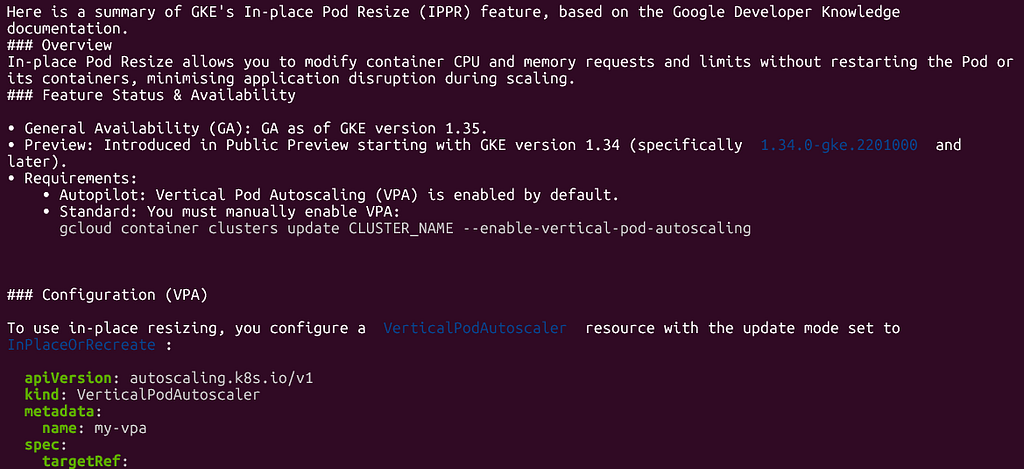
Note: it’s not really necessary to tell Agy which MCP server to use to do a task. But sometimes, if you have many servers with complementary capabilities, it can save your agent a bit of confusion if you tell it how you want it to fetch your information.
Installation
To configure this, you’ll need to authenticate (which can be with ADC or an API key), and then add an entry like this to your MCP config:
"mcpServers": {
  // other MCP servers
  "google-developer-knowledge": {
    "command": "npx",
    "args": [
      "-y",
      "mcp-remote",
      "https://developerknowledge.googleapis.com/mcp",
      "--header",
      "X-Goog-Api-Key: YOUR_API_KEY"
    ]
  }
}
#3 — AVTool
What It Does
I love this one! It’s basically a wrapper around the free command line tool, ffmpeg. With it you can manipulate video, images and audio with natural language commands. With prompts like…
- “Extract the audio from the video file video123.mp4 as mp3”
- “Trim the first 5 seconds off the video”
- “Convert all the gif files >5MB in this folder to jpg”
- “Double the playback speed of this video”
- “Optimise this video so it’s less than 10MB”
Let’s do a quick demo… I’ve put an episode of an old 1980s Dungeons and Dragons cartoon into the workspace directory. My goal is to extract just the first 10 seconds of the episode and save it as a separate video file. The original video has quite a long title, but I don’t have to be specific with Agy:
“Take the first 10 seconds of the dungeons and dragons video, and save it as a new video.”
{% youtube mh_XKxrJleg %}
The clip generation was super fast. Agy, via the MCP server, ran this command, but we don’t need to know or care!
ffmpeg -y -i "dungeons & dragons -01- the night of no tomorrow (mummra1983).avi" \
  -ss 00:00:00 -t 10 -c:v libx264 \
  -c:a aac media-output/dungeons_and_dragons_10s.mp4
Insanely cool, right?
Installation
Unlike the previous MCP servers I’ve described, this one requires that we set up some prerequisites...
- Of course, we need to have
ffmpeginstalled locally. - The tool can optionally write to a GCS bucket. For this, make sure you’ve specified a Google Cloud project and bucket you have write access to. (Authentication is done using ADC.)
- Install the local AVTool MCP server. See the instructions here.
Finally, add your MCP configuration as usual:
"mcpServers": {
  // other MCP servers
  "avtool": {
    "command": "mcp-avtool-go",
    "env": {
      "MCP_SERVER_REQUEST_TIMEOUT": "55000",
      "PROJECT_ID": "your-google-project",
      "GENMEDIA_BUCKET": "your-gcs-bucket",
      "LOCATION": "europe-west1"
    }
  }
}
#4 — NotebookLM
What It Does
Everyone knows I love NotebookLM! A quick recap, if you don’t know what it is…
NotebookLM is a personalised AI research assistant built on top of Google’s multimodal Gemini models. It’s designed to help you understand, synthesise, and present complex information that’s scattered across all sorts of different formats. Some key tenets:
- The information it synthesises is grounded strictly on only the sources you provide.
- It supports various formats of data, including videos, audio, Google Docs and Sheets, PDFs, images, web pages, and more.
- It can generate various types of output for you, including detailed reports, mind maps, audio podcasts, presentations, and even videos!
I’ve written a dedicated blog about using MCP to integrate with NotebookLM previously:
Integrate NotebookLM with Gemini CLI, Google Antigravity or Other Agents with MCP
That blog has a number of use cases demonstrated, so I won’t repeat them here.
Installation
This is another MCP server that runs locally, so there’s a few things you need to setup:
- Have
uvinstalled. (Like many locally running MCP servers require.) - Install the local
notebooklm-mcp-cli:uv tool install notebook-mcp-cli
Now you can go ahead and add your MCP server entry:
"mcpServers": {
  // other MCP servers
  "notebooklm-mcp": {
    "command": "uvx",
    "args": [
      "--from",
      "notebooklm-mcp-cli",
      "--with",
      "fakeredis<2.20.0",
      "notebooklm-mcp"
    ]
  }
}
#5 — ADK-Docs
What It Does
This is very useful when developing using Google Agent Development Kit (ADK). This particular MCP Server provides your agent with specific grounding documentation about ADK itself. These days, this one might be a little redundant, given that the Google Developer Knowledge MCP includes ADK documentation in its corpus. But I still find that having this MCP installed provides very targeted information when I’m building agents with ADK.
It works by running a local mcpdoc MCP server on your machine and pointing that server to the official ADK documentation. If you want to know a bit more about how this works, you might find this interesting:
Give Your AI Agents Deep Understanding With LLMS.txt
Installation
You do need to have uv pre-installed, but otherwise, the only configuration you need is this:
"mcpServers": {
  // other MCP servers
  "adk-docs-mcp": {
    "command": "uvx",
    "args": [
      "--from",
      "mcpdoc",
      "mcpdoc",
      "--urls",
      "AgentDevelopmentKit:https://adk.dev/llms.txt",
      "--transport",
      "stdio"
    ]
  }
}
#6 — Stitch
What It Does
Google Stitch is very cool! It’s all about designing the UI.
This is its tagline:
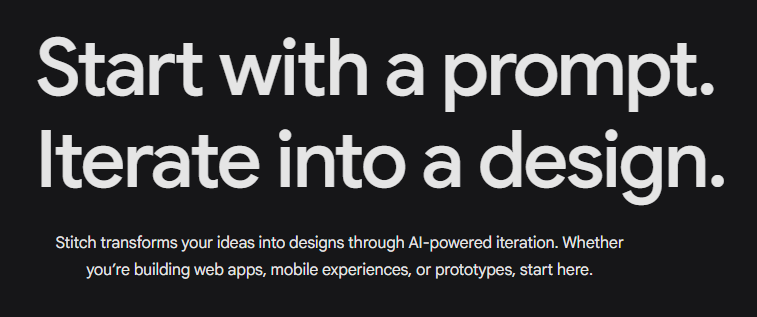
You describe an idea in natural language, and Stitch creates the wireframe and the interactive mockups of what your application will look like. You might give Stitch a prompt like:
“A landing page for a movie club application. Minimalist dark-mode aesthetic with neon purple and green accents. Top bar navigation, with main window widgets for calendar and movie management.”
Let’s give that prompt a go!
Initially, as Stitch is building the design, we see this:
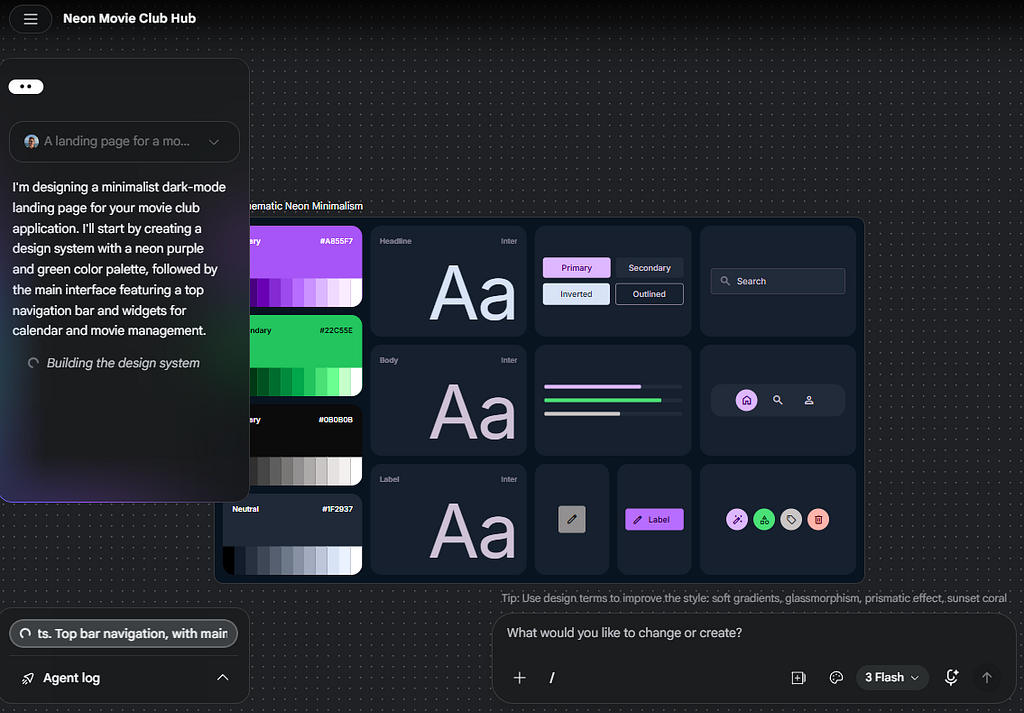
And a minute later, we have this:
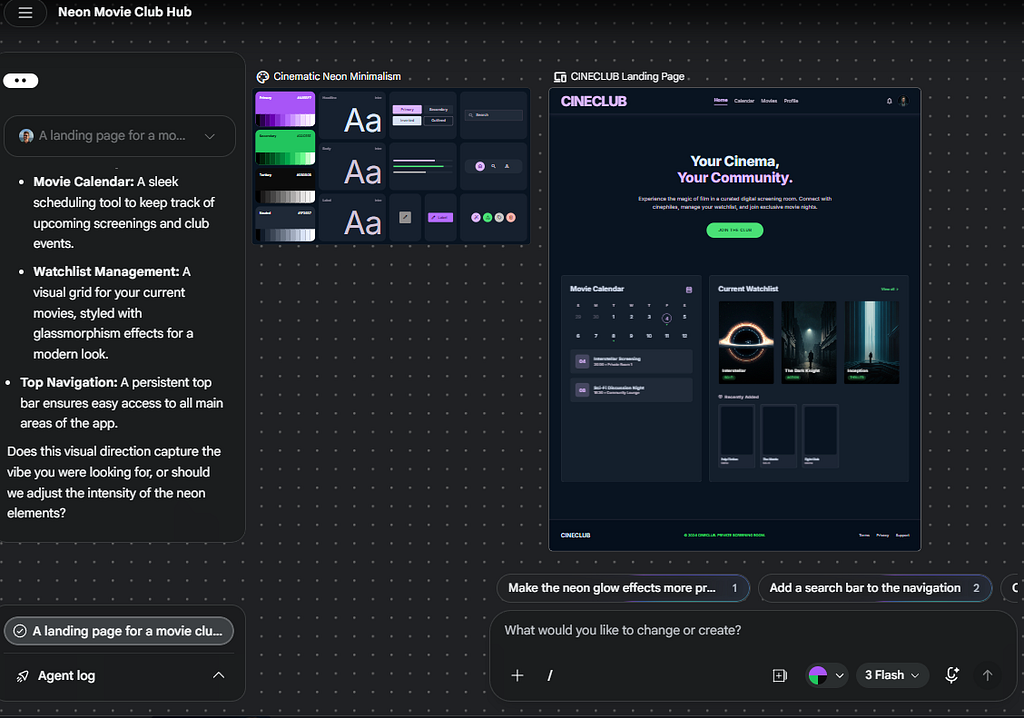
How cool is that?
From here, you can annotate, modify and iterate.
As you go, Stitch maintains your UI design in a standardised DESIGN.md document that is both human and agent-readable. And you can export everything created by Stitch — the DESIGN.md, the HTML, and the images — in various formats, including Figma, as a zip file, or directly into AI Studio.
If I download the zip, it looks like this:
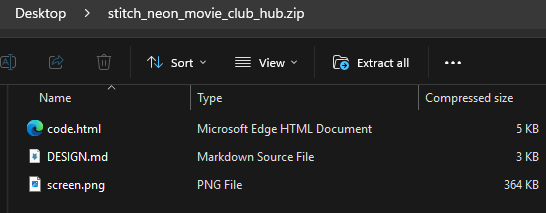
Now I can add these files to my development project. If I’m vibing the frontend, I could drop in these files and then ask Agy to (say) create a React web application that matches these files.
But with the Stitch MCP server, it’s even easier! It essentially opens a two-way conversation about your agentic development environment (like the Agy IDE) and Stitch. So now you could say, from Agy:
“Using Stitch MCP, create a landing page for a movie club application. Minimalist dark-mode aesthetic with neon purple and green accents. Top bar navigation, with main window widgets for calendar and movie management. Let me give it the once over before we build the actual web UI application.”
This is what we then see in Agy:
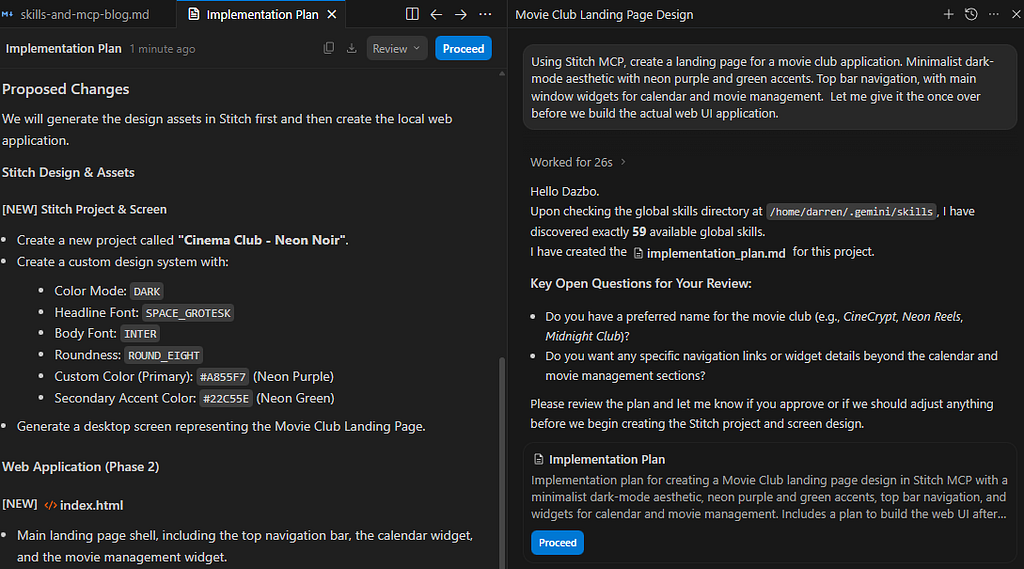
Then, as with any MCP server, Agy asks if it has permission to execute the required tool:
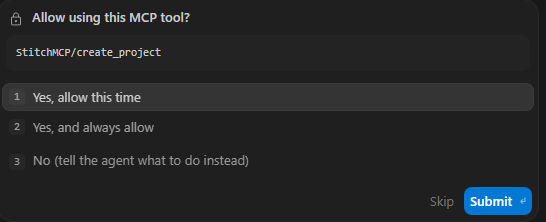
Once Agy is finished, we see this:
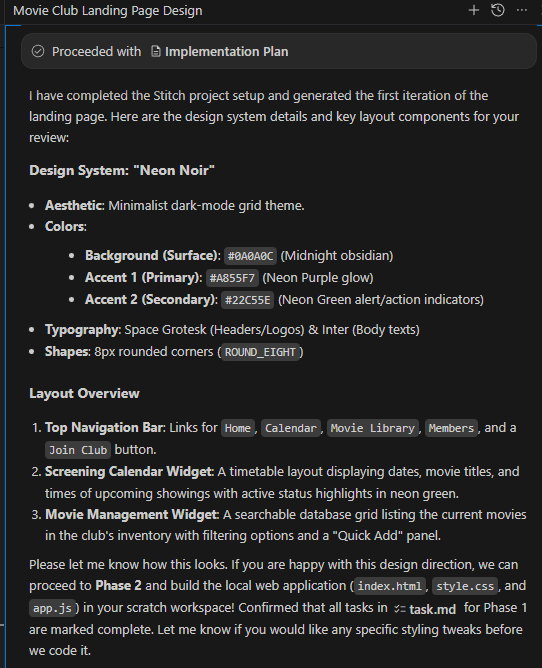
Of course, we can always go into the Stitch UI and take a look at what was created.
To conclude, with the Stitch MCP server we can:
- Create the design using a natural language prompt
- Iterate on the design
- Then proceed directly to implementation
And all without ever leaving our IDE’s chat interface. Also, we never have to export any files from Stitch and dump them into our workspace. We have true two-way conversation between our Agy agent and Stitch.
Installation
Stitch uses a remote MCP server, so we just need to download an API key from Stitch, and then add this to our MCP config:
"mcpServers": {
  // other MCP servers
  "StitchMCP": {
    "command": "npx",
    "args": [
      "-y",
      "mcp-remote",
      "https://stitch.googleapis.com/mcp",
      "--header",
      "X-Goog-Api-Key: YOUR_API_KEY"
    ]
  }
}
#7 — Google Cloud Remote MCP Servers, e.g. Firestore, BigQuery, etc
What It Does
These have been around for a little while now, but Google made them generally available (GA) in April 2026.
Basically, they are a set of remote MCP servers, hosted and fully-managed by Google. They align to many of Google’s services and products, like BigQuery, Firestore, Cloud SQL, Cloud Storage, Cloud Run, GKE, Maps, Cloud Monitoring, Cloud Logging, and so on. They allow us to have natural language conversations with these Google services.
And because they are fully-managed, we don’t have to install anything and we never have to maintain them.
Typically, I don’t have these enabled all the time. But if I’m working with a particular Google Cloud service for a given project, I’ll typically configure the required MCP server for as long as I need it.
Installation
We do need to do a couple of things in Google Cloud first. This includes:
- Ensuring we have a Google project
- Enabling the API for the service we want to talk to, e.g.
bigquery.googleapis.com - Enabling the required MCP server
- Granting your identity the
roles/mcp.toolUserrole - Granting your identity the correct IAM role to use the underlying service that is provided via MCP
Then we can add our MCP configuration:
"mcpServers": {
  // other MCP servers
  "FirestoreMCP": {
    "serverUrl": "https://firestore.googleapis.com/mcp",
    "authProviderType": "google_credentials",
    "oauth": {
      "scopes": [
        "https://www.googleapis.com/auth/cloud-platform"
      ]
    },
    "headers": {
      "X-Goog-User-Project": "YOUR_PROJECT_ID"
    }
  }
}
If you want to know more about these Google MCP servers, check out Romin Irani’s Google MCP Server Tutorial Series. He goes into a lot of depth, and provides a bunch of use cases.
#8 — gcloud
What It Does
This empowers our agent to know how to use the Google gcloud CLI. So we can issue natural language prompts like:
- “Find all log entries with severity ERROR in the last 15 minutes”
- “Deploy my local container to Cloud Run and split the traffic 50/50”
This saves a lot of time in trying to determine the exact gcloud syntax to do a specific thing.
Installation
This is a remote MCP server, and setting it up is as simple as adding this config:
"mcpServers": {
  // other MCP servers
  "gcloud": {
    "command": "npx",
    "args": [
      "-y",
      "@google-cloud/gcloud-mcp"
    ]
  },
}
It operates with the authority of your ADC credentials.
Wrap-Up
Having a robust agent harness transforms the effectiveness of your agent. Having a good set of MCP servers is part of this harness. Give these a try in your own development environment, whether it’s Antigravity or other. And let me know: which are your favourites? What other MCP servers would you recommend?
Stay tuned. The Agent Skills rundown will arrive soon.
Before You Go
- Please share this with anyone that you think will be interested. It might help them, and it really helps me!
- Please give me 50 claps! (Just hold down the clap button.)
- Feel free to leave a comment 💬.
- Follow and subscribe, so you don’t miss my content.
Useful Links and References
-
Skills and MCP Servers Explained (Build with AI, Prishtina)
{% youtube tFUjc1Jx5_0 %}
-
Configuring MCP Servers and Skills for Antigravity CLI and IDE
-
Integrate NotebookLM with Gemini CLI, Google Antigravity or Other Agents with MCP
Comments
More Blog
View allaiContext bankruptcy: The case for strategic forgetting for AI Agents
Most of us have seen a coding agent fail to complete a task we know it can do. We just don't...
J
James O'ReillygooglecloudParallel Compliance Engine: Drive-to-Sheets Multi-Agent Orchestration
When building Generative AI applications, developers often encounter a massive bottleneck: sequential...
A
Aryan IranidiscussIs It Ethical to Post and Ask About Circuits on Dev.to?
I’ve been thinking about sharing some electronic circuit posts on Dev.to — small circuits, DIY...
C
codebunny20agentsThe One-Click Exporter: AI Studio Antigravity, Probed to Its Limits
What nobody tells you about exporting your multi-agent prototype to a local workspace. Every...
L
leslysandraagenticarchitectGuarding the till while autonomous data agents do the digging
Autonomous agents are genuinely good at answering messy business questions. Give one an LLM and a set...
S
Sireesha PulipatiaiReturn on Attention: Why AI Code Reviews Are Wearing Us Out
PR volume went up, ticket quality didn't, and the gap got filled with LLMs on both sides of the review: bots reviewing, bots replying, bots occasionally arguing with bots about priorities that only existed in a teammate's head. Our CEO named the actual problem, and it's bigger than code review.
C
christineReady-made automations for this
Workflows from the Neura Market marketplace related to this Stable Diffusion resource
- AI Agent for Q&A with RAG & Search Engine MCP Serversn8n · $22.99 · Related topic
- Automate PostgreSQL & MySQL DB Management on Linux Serversn8n · $24.99 · Related topic
- Create a WHOIS API Interface for AI Agents with 8 Domain Management Operationsn8n · Free · Related topic
- Build AI Agents with Think-Plan-Act Architecture Using Llama-4 Reasoningn8n · Free · Related topic