
Back to Blog runcloud
 ai
ai googlecloud
 discuss
 agents
 agenticarchitect
 ai
ai
12B Gemma 4 QAT Deployment with NVIDIA L4, Cloud Run, MCP, and Antigravity CLI
xbill June 10, 2026
0 views
This article provides a step by step deployment guide for Gemma 4 to a Google Cloud Run hosted GPU...
title: 12B Gemma 4 QAT Deployment with NVIDIA L4, Cloud Run, MCP, and Antigravity CLI published: true series: Gemma4 date: 2026-06-09 17:22:57 UTC tags: runcloud,googleantigravity,mcps,gemma4 canonical_url: https://xbill999.medium.com/12b-gemma-4-qat-deployment-with-nvidia-l4-cloud-run-mcp-and-antigravity-cli-944d603b4ab5
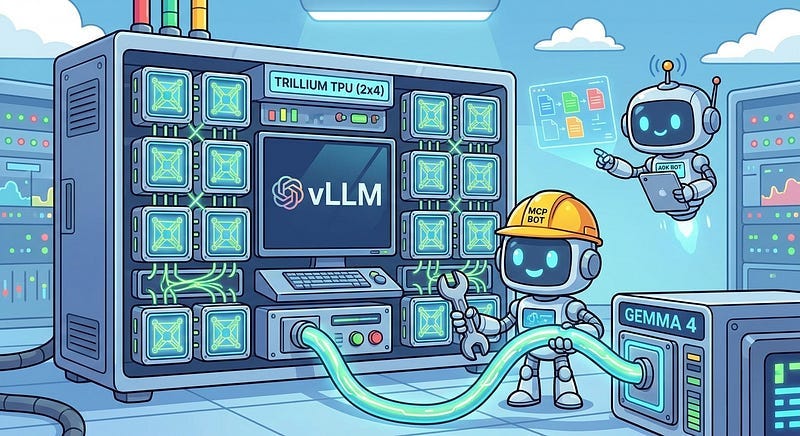
This article provides a step by step deployment guide for Gemma 4 to a Google Cloud Run hosted GPU enabled system. A suite of Python MCP tools is built to simplify management of the vLLM hosted Gemma 4 deployment with Antigravity CLI.
What is this project trying to Do?
This project is a DevOps/SRE assistant that uses a Gemma 4 model hosted on Cloud Run with GPU. It provides tools to provision the Docker container and deploy the model, as well as for observability and performance testing.
This project is similar to a previous project that targeted GPU hosted Gemma4 instances on GCP:
Gemma-SRE: Self-Hosted vLLM Infrastructure Agent
Antigravity CLI
Antigravity CLI is the follow-on successor to Gemini CLI- the terminal driven, agent assisted coding tool.
Full details on installing Antigravity CLI are here:
Getting Started with Antigravity CLI
Testing the Antigravity CLI Environment
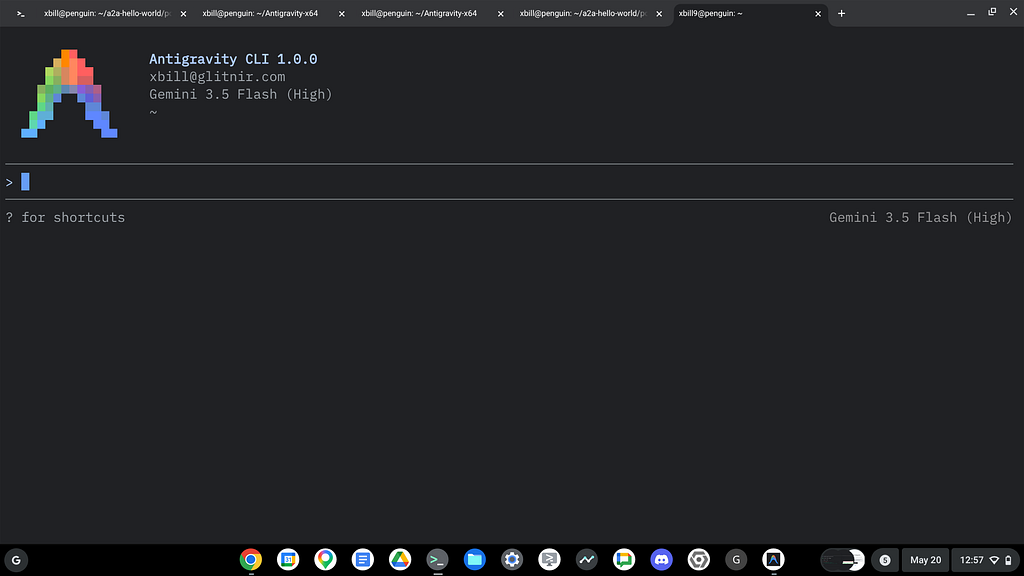
Once you have all the tools in place- you can test the startup of Antigravity CLI.
You will need to authenticate with a Google Cloud Project or your Google Account:
agy
This will start the interface:
Full Installation Instructions
The detailed installation instructions for Antigravity CLI are here:
Getting Started with Antigravity CLI
Python MCP Documentation
The official GitHub Repo provides samples and documentation for getting started:
Where do I start?
The strategy for starting MCP development for model management is a incremental step by step approach.
First, the basic development environment is setup with the required system variables, and a working Antigravity CLI configuration.
Then, a minimal Python MCP Server is built with stdio transport. This server is validated with Antigravity CLI in the local environment.
This setup validates the connection from Antigravity CLI to the local server via MCP. The MCP client (Antigravity CLI) and the Python MCP server both run in the same local environment.
Setup the Basic Environment
At this point you should have a working Python environment and a working Antigravity CLI installation. The next step is to clone the GitHub samples repository with support scripts:
cd ~
git clone https://github.com/xbill9/gemma4-tips
Then run init.sh from the cloned directory.
The script will attempt to determine your shell environment and set the correct variables:
gpu-12B-qat-L4-devops-agent
source init.sh
If your session times out or you need to re-authenticate- you can run the set_env.sh script to reset your environment variables:
gpu-12B-qat-L4-devops-agent
source set_env.sh
Variables like PROJECT_ID need to be setup for use in the various build scripts- so the set_env script can be used to reset the environment if you time-out.
Model Management Tool with MCP Stdio Transport
One of the key features that the standard MCP libraries provide is abstracting various transport methods.
The high level MCP tool implementation is the same no matter what low level transport channel/method that the MCP Client uses to connect to a MCP Server.
The simplest transport that the SDK supports is the stdio (stdio/stdout) transport — which connects a locally running process. Both the MCP client and MCP Server must be running in the same environment.
The connection over stdio will look similar to this:
# Initialize FastMCP server
mcp = FastMCP("Self-Hosted vLLM DevOps Agent")
Running the Python Code
First- switch the directory with the Python version of the MCP sample code:
~/gemma4-tips/gpu-12B-qat-L4-devops-agent
Run the release version on the local system:
make install
Processing ./.
The project can also be linted:
xbill@penguin:~/gemma4-tips/gpu-12B-qat-L4-devops-agent$ make lint
ruff check .
All checks passed!
ruff format --check .
6 files already formatted
mypy .
Success: no issues found in 6 source files
And a test run:
xbill@penguin:~/gemma4-tips/gpu-12B-qat-L4-devops-agent$ make test
python test_agent.py
2026-05-29 19:07:48,275 - vllm-devops-agent - INFO - Initializing DevOps Agent MCP Server...
.........2026-05-29 19:07:48,318 - vllm-devops-agent - INFO - Querying Cloud Run model with prompt: 'Hello...'
2026-05-29 19:07:48,318 - vllm-devops-agent - INFO - Model response: 'Response from Gemma...'
.2026-05-29 19:07:48,319 - vllm-devops-agent - INFO - Querying model with stats with prompt: 'Hello...'
2026-05-29 19:07:48,320 - vllm-devops-agent - INFO - Model response with stats: TTFT=0.000s, TotalTime=0.000s
.......
----------------------------------------------------------------------
Ran 17 tests in 0.024s

OK
Getting Started with Gemma 4 on GPU
The Official vLLM repo also has Gemma4 specific information:
Gemma 12B
Gemma 12B is the latest model in the Gemma4 series. More details are available here:
Introducing Gemma 4 12B: a unified, encoder-free multimodal model
and here:
Gemma 4 12B: The Developer Guide
NVIDIA L4 on Cloud Run
The L4 on Google Cloud Run provides a cost-effective “scale to zero” option for providing inference:
Quantization-Aware Training (QAT)
One of the key issues with deploying models is available GPU memory based in the hardware footprint. Along with the new 12B model release- new versions of the model that use QAT to reduce the memory requirements have been released:
Gemma 4 QAT models: Optimizing model compression for mobile and laptop efficiency
QAT Model Versions
What are the differences between the versions on Hugging Face?
> what is the difference between google/gemma-4-12B-it-qat-q4_0-unquantized and https://huggingface.co/google/gemma-
  4-12B-it-qat-q4_0-gguf and google/gemma-4-12B-it-qat-w4a16-ct

▸ Thought for 1s, 602 tokens
  Analyzing Gemma QAT Variations

● Read(/home/xbill/gemma4-tips/gpu-12B-qat-L4-devops-agent/GEMINI.md) (ctrl+o to expand)

  Here is a comparison of the three Gemma 4 QAT (Quantization-Aware Training) model configurations:

  ### 1. google/gemma-4-12B-it-qat-q4_0-unquantized

  • Format: Unquantized, high-precision weights (usually float16 or bfloat16) extracted directly from the QAT
  training pipeline.
  • Target Engine: Standard deep learning/fine-tuning framework runtimes (e.g., PyTorch, Transformers, Jax).
  • Primary Use Case:
      • Serving as a high-precision reference baseline.
      • Custom downstream quantization, compilation, or MLX conversion.
      • Research, fine-tuning, or running Speculative Decoding (where this serves as the primary model alongside
      its matching MTP assistant/draft model).

  ### 2. google/gemma-4-12B-it-qat-q4_0-gguf

  • Format: GGUF (specifically quantized using the standard q4_0 4-bit method).
  • Target Engine: Local CPU, Apple Silicon, or consumer GPU engines (e.g., llama.cpp , Ollama, LM Studio).
  • Primary Use Case:
      • Zero-setup local execution with minimal memory requirements.
      • Running LLMs efficiently on consumer-grade hardware.

  ### 3. google/gemma-4-12B-it-qat-w4a16-ct

  • Format: Compressed Tensors format ( -w4a16-ct ), which stores 4-bit weights while performing computation using
  16-bit activations.
  • Target Engine: High-performance, high-throughput cloud inference engines (specifically vLLM or SGLang ).
  • Primary Use Case:
      • High-concurrency cloud deployments utilizing GPU accelerators (e.g., NVIDIA L4).
      • Optimizing GPU memory usage and improving inference speed while maintaining near-lossless model accuracy
      via QAT.

  ──────
  ### 📊 Summary Reference Table

   Checkpoint Configuration | Serialization Format | Target Platform | Primary Engine
  ---------------------------|---------------------------|----------------------------|----------------------------
    ...-qat-q4_0-unquantized | Unquantized ( BF16 / FP16 | Custom compilation / | Transformers / Speculative
                             | ) | research | Drafts
    ...-qat-q4_0-gguf | GGUF (4-bit weight) | Local Desktop/Server | llama.cpp / LM Studio /
                             | | (CPU/GPU) | Ollama
    ...-qat-w4a16-ct | compressed-tensors (4- | Cloud GPU Deployments | vLLM / SGLang
                             | bit/16-bit) | |

  For more details on QAT architecture and configuration, see GEMINI.md.
  ──────
  ### Summary of Work

  • Reviewed Context: Analyzed the workspace documentation GEMINI.md to compare the unquantized, GGUF, and
  compressed-tensors configurations.
More documentation is available here:
Gemma 4 model overview | Google AI for Developers
MCP stdio Transport
One of the key features that the MCP protocol provides is abstracting various transport methods.
The high level tool MCP implementation is the same no matter what low level transport channel/method that the MCP Client uses to connect to a MCP Server.
The simplest transport that the SDK supports is the stdio (stdio/stdout) transport — which connects a locally running process. Both the MCP client and MCP Server must be running in the same environment.
In this project Antigravity CLI is used as the MCP client to interact with the Python MCP server code.
Antigravity CLI mcp_config.json
A sample MCP server file is provided in the .agents directory:
{
  "mcpServers": {
    "gpu-devops-agent": {
      "command": "python3",
      "args": [
        "/home/xbill/gemma4-tips/gpu-12B-qat-L4-devops-agent/server.py"
      ],
      "env": {
        "GOOGLE_CLOUD_PROJECT": "aisprint-491218",
        "GOOGLE_CLOUD_LOCATION": "us-east4",
        "VLLM_BASE_URL": "https://gpu-12b-qat-l4-devops-agent-289270257791.us-east4.run.app",
        "MODEL_NAME": "/mnt/models/gemma-4-12B-it-qat-w4a16-ct"
      }
    }
  }
}
Validation with Antigravity CLI
The final connection test uses Antigravity CLI as a MCP client with the Python code providing the MCP server:
MCP Servers

Plugins (~/.gemini/antigravity-cli/plugins)
> ✓ google-dev-knowledge Tools: search_documents, answer_query, get_documents
   ✓ gpu-devops-agent Tools: save_hf_token, get_vllm_endpoint, list_vertex_models, list_bucket_models,
                       analyze_cloud_logging, +21 more
Model Lifecycle Management via MCP
The MCP tools provide a complete suite of agent-oriented operations for managing vLLM deployment on Cloud Run or a TPU.
Overview of MCP tools :
> get_help

▸ Thought for 1s, 640 tokens
  Exploring Available Tools

● ListDir(/home/xbill/gemma4-tips/gpu-12B-qat-L4-devops-agent)
● Read(/home/xbill/.gemini/antigravity-cli/mcp/gpu-devops-agent/get_help.json)
● gpu-devops-agent/get_help(Running MCP tool) (ctrl+o to expand)
  Here is the SRE and configuration help dashboard for the Gemma 4 DevOps Agent running on Cloud Run GPU:

  ### ⚙️ Active Environment Configuration

  • GCP Project ID: aisprint-491218
  • GCP Region: us-east4
  • GCS Bucket: aisprint-491218-bucket
  • Default Model: /mnt/models/gemma-4-12B-it-qat-w4a16-ct
  • VLLM Base URL: https://gpu-12b-qat-l4-devops-agent-289270257791.us-east4.run.app
  • GPU Accelerator: NVIDIA L4 GPU (1 unit) on Cloud Run Gen2
  ──────
  ### 🧰 Available SRE & DevOps Tools

  #### 🐳 Infrastructure & Deployment

  • deploy_vllm : Deploys vLLM to Cloud Run GPU (NVIDIA L4 in us-east4 ).
  • destroy_vllm : Deletes the Cloud Run vLLM service.
  • status_vllm : Checks the status of the Cloud Run vLLM service.
  • update_vllm_scaling : Updates min/max instances for scaling.
  • get_vllm_deployment_config : Generates the gcloud deployment command.
  • get_vllm_gpu_deployment_config : Generates a GKE manifest for GPU (NVIDIA L4).
  • check_gpu_quotas : Checks L4 and other GPU quotas for a region.

  #### 📦 Model Management

  • list_vertex_models : Lists models in the Vertex AI Registry.
  • list_bucket_models : Lists model weights in GCS bucket.
  • save_hf_token : Securely saves a Hugging Face API token to Secret Manager.
  • get_vertex_ai_model_copy_instructions : Instructions to copy model from Vertex AI Model Garden to GCS.
  • get_huggingface_model_copy_instructions : Instructions to download model from Hugging Face and upload to GCS.
  • get_huggingfacehub_download_path : Resolves local cache path using huggingface_hub .

  #### 📊 Monitoring & Status

  • get_system_status : Provides a high-level status dashboard of the Cloud Run service and health.
  • get_endpoint : Verifies connectivity and returns the active service URL.
  • get_model_details : Retrieves detailed model metadata and engine state from /v1/models .
  • verify_model_health : Deep health check by querying the model with a simple prompt and measuring latency.

  #### 📈 Performance & Benchmarking

  • run_benchmark : Runs performance/concurrency benchmark sweeps against the Cloud Run vLLM GPU endpoint.

  #### 💬 Diagnostics & Remediation

  • query_gemma4 : Primary tool to query the self-hosted model with standard chat message format.
  • query_gemma4_with_stats : Queries the model and returns streaming performance statistics (TTFT, throughput).
  • query_vllm : Direct text completions querying tool.
  • analyze_cloud_logging : Fetches logs from GCP Logging and analyzes them using the model.
  • analyze_gpu_logs : Fetches Cloud Run logs and uses Gemma 4 to analyze them for SRE/DevOps errors.
  • suggest_sre_remediation : Suggests remediation plans for SRE errors using the model.

  All capabilities are implemented in the main server entrypoint: server.py.
  ──────
  ### Summary of Work

  1. Analyzed Directory: Explored the workspace files in /home/xbill/gemma4-tips/gpu-12B-qat-L4-devops-agent .
  2. Inspected Schema: Read the configuration for the get_help tool in the MCP folder.
  3. Executed Help Command: Called the lazy-loaded get_help tool to retrieve active SRE/DevOps capabilities and
  configuration options.
Deploy The Model
The MCP server tools are used to deploy the model to Cloud Run with TPU:
deploy the model
Checking System status
The status can be checked with an MCP tool:
> get_system_status

● gpu-devops-agent/get_system_status(Running MCP tool) (ctrl+o to expand)

  The system is now fully deployed and operational:

  ### 🌀 GPU Cloud Run System Status

  • vLLM Health: 🟢 Online ( https://gpu-12b-qat-l4-devops-agent-289270257791.us-east4.run.app )
  • Cloud Run Service Status: 🟢 Ready
Cross Check The Deployed Model
Once the model starts locally- the MCP tool allows for model verification:
> verify_model_health

● Read(/home/xbill/.gemini/antigravity-cli/mcp/gpu-devops-agent/verify_model_health.json)
● gpu-devops-agent/verify_model_health(Running MCP tool) (ctrl+o to expand)

  The deep model health check has passed successfully:

  ### 🏥 Model Health Check Results

  • Status: ✅ PASSED
  • Active Model: /mnt/models/gemma-4-12B-it-qat-w4a16-ct
  • Test Response: "Yes, I am working! How can I help you today?..."
  • Round-trip Latency: 6.69 seconds

  The endpoint is fully operational and responsive. For implementation details on the health check endpoint, refer
  to server.py.
  ──────
  ### Summary of Work

  1. Executed Deep Health Check: Called the verify_model_health tool to run an end-to-end inference verification
  check, confirming normal latency and response generation.
and model details:
> get_active_models

● Read(/home/xbill/.gemini/antigravity-cli/mcp/gpu-devops-agent/get_model_details.json)
● gpu-devops-agent/get_model_details(Running MCP tool) (ctrl+o to expand)

  The details of the active model served by the vLLM instance are:

  ### 🧩 Active Model Details

  • Service URL: https://gpu-12b-qat-l4-devops-agent-289270257791.us-east4.run.app
  • Health Status ( /health ): Healthy ✅
  • Available Models ( /v1/models ):
    [
      {
        "id": "/mnt/models/gemma-4-12B-it-qat-w4a16-ct",
        "object": "model",
        "owned_by": "vllm"
      }
    ]

  • Health Status: Healthy (🟢 /health check passed)
and the endpoint:
> get_endpoint

● Read(/home/xbill/.gemini/antigravity-cli/mcp/gpu-devops-agent/get_endpoint.json)
● gpu-devops-agent/get_endpoint(Running MCP tool) (ctrl+o to expand)

  The active Cloud Run vLLM endpoint is:

  🟢 https://gpu-12b-qat-l4-devops-agent-289270257791.us-east4.run.app

  For deployment configurations and endpoint resolution, you can refer to server.py.
and status:
  Here is the current system status:

  ### 🌀 GPU Cloud Run System Status ( get_system_status )

  • vLLM Health: 🟢 Online ( https://gpu-12b-qat-l4-devops-agent-289270257791.us-east4.run.app )
  • Cloud Run Service Status: 🟢 Ready
  ──────
  ### 🧩 Active Model Details ( get_model_details )

  • Active Model: /mnt/models/gemma-4-12B-it-qat-w4a16-ct
  • Health Endpoint: Healthy ✅
  ──────
Check the Cloud Run Service
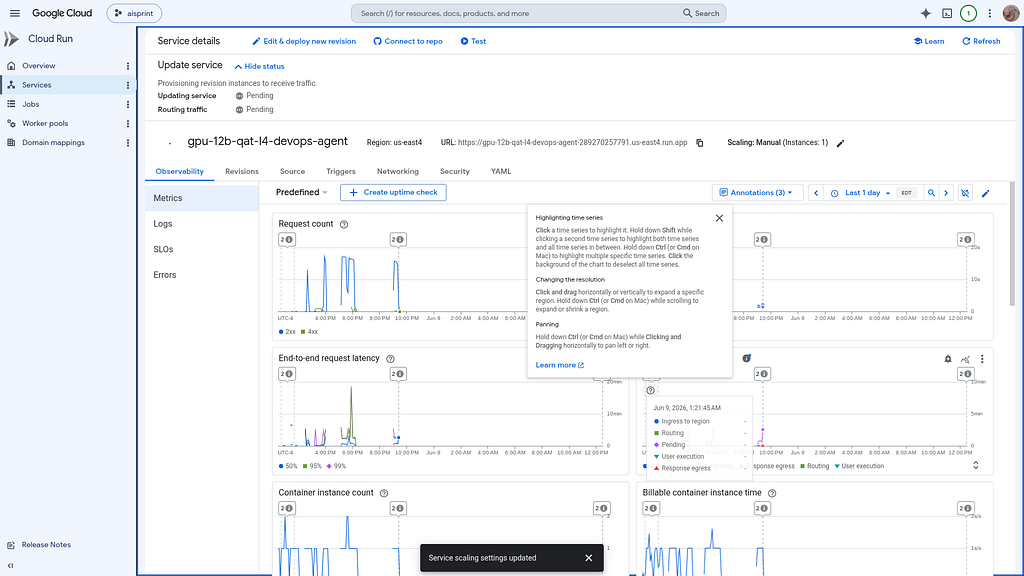
Once Deployed — the model is visible as a standard Cloud Run Service:
Review the Model
Check the model details:
> what are the model details?

▸ Thought for 2s, 461 tokens
  Recalling Model Details
  The details of the active model currently served on the GPU Cloud Run instance are as follows:

  ### 🧩 Active Model: /mnt/models/gemma-4-12B-it-qat-w4a16-ct

  • Base Model: Google Gemma 4 (12B Parameters) Instruction-tuned ( -it ) checkpoint.
  • Quantization Method: Quantization-Aware Training (QAT). Unlike Post-Training Quantization (PTQ), QAT simulates
  precision loss during the training process itself, allowing the model to learn to compensate and maintain near-
  lossless baseline performance.
  • Precision / Format: w4a16 (4-bit weights with 16-bit activations).
  • Serialization format: compressed-tensors ( -ct ), which is natively parsed and optimized by vLLM.
  • Engine / Serving Backend: vLLM (configured with --quantization compressed_tensors , --max-model-len 256000 ,
  and nvfp4 4-bit KV Cache).
  • Hardware Requirement: Fits onto a single NVIDIA L4 GPU, reserving approximately 7 GB VRAM for weights.
Once everything is online — you can send queries to the Model:
> query_gemma4_with_stats what is gemma?

● gpu-devops-agent/query_gemma4_with_stats(Running MCP tool) (ctrl+o to expand)

  Here is the response from the self-hosted Gemma 4 model along with the generation performance statistics:

  ### 📊 Performance Statistics

  • Active Model: /mnt/models/gemma-4-12B-it-qat-w4a16-ct
  • Time to First Token (TTFT): 0.222 seconds
  • Total Generation Time: 42.744 seconds
  • Inference Throughput: 15.03 tokens/second
  • Total Generated Tokens: ~639 tokens
  ──────
  ### 💬 Model Response: What is Gemma?

  Gemma is a family of lightweight, state-of-the-art open models developed by Google DeepMind.

  To understand what Gemma is, it helps to look at it in three contexts: its relationship to Gemini, its technical
  nature, and its purpose.

  #### 1. The Relationship to Gemini

  Gemma is built using the same research, technology, and infrastructure used to create Google’s highly capable
  Gemini models. Think of Gemini as the "flagship" model (large, massive, and hosted by Google) and Gemma as the
  "distilled" version designed to be smaller and more accessible to the public.

  #### 2. Key Characteristics

  • Open Weights: Unlike "closed" models (where you can only access them via an API, like GPT-4), Gemma is an open
  weights model. This means developers can download the model, run it on their own hardware, and customize it for
  specific tasks.
  • Size Variations: Gemma comes in different sizes (e.g., 2B, 7B, 9B, 27B). The smaller sizes (like the 2B model)
  are designed to run on local devices like laptops, mobile phones, or standard desktop GPUs.
  • Performance: Despite being smaller than Gemini, Gemma is designed to punch above its weight class. It is
  optimized for high performance in reasoning, coding, and mathematics relative to its size.

  #### 3. Why is it important?

  Gemma is part of a movement toward democratizing AI. Because the models are smaller and open:

  • Privacy: Developers can run the model locally, meaning data doesn't have to be sent to a cloud server.
  • Customization: Researchers can "fine-tune" Gemma on specific data (like medical records or legal documents) to
  make it an expert in a specific field.
  • Cost: It is significantly cheaper to run a small Gemma model than it is to call a massive proprietary API every
  time you need a simple task done.

  #### 4. What can Gemma do?

  Gemma is a Large Language Model (LLM), meaning it can perform a wide variety of text-based tasks, including:

  • Text Generation: Writing stories, emails, or summaries.
  • Coding: Writing and debugging code in various programming languages.
  • Reasoning: Solving logic puzzles or math problems.
  • Instruction Following: Carrying out specific multi-step commands.

  #### Summary Comparison

   Feature | Gemini | Gemma
  ----------------------------|-----------------------------------------------|------------------------------------
   Access | Proprietary (API/Google Products) | Open Weights (Downloadable)
   Size | Massive (Thousands of billions of parameters) | Compact (Billions of parameters)
   Use Case | Enterprise, high-scale complex tasks | Research, local apps, edge devices
   Developer | Google DeepMind | Google DeepMind
  ──────
  For the underlying benchmarking and query statistics implementation, see server.py.
Benchmark the Local Model
The local model was benchmarked:
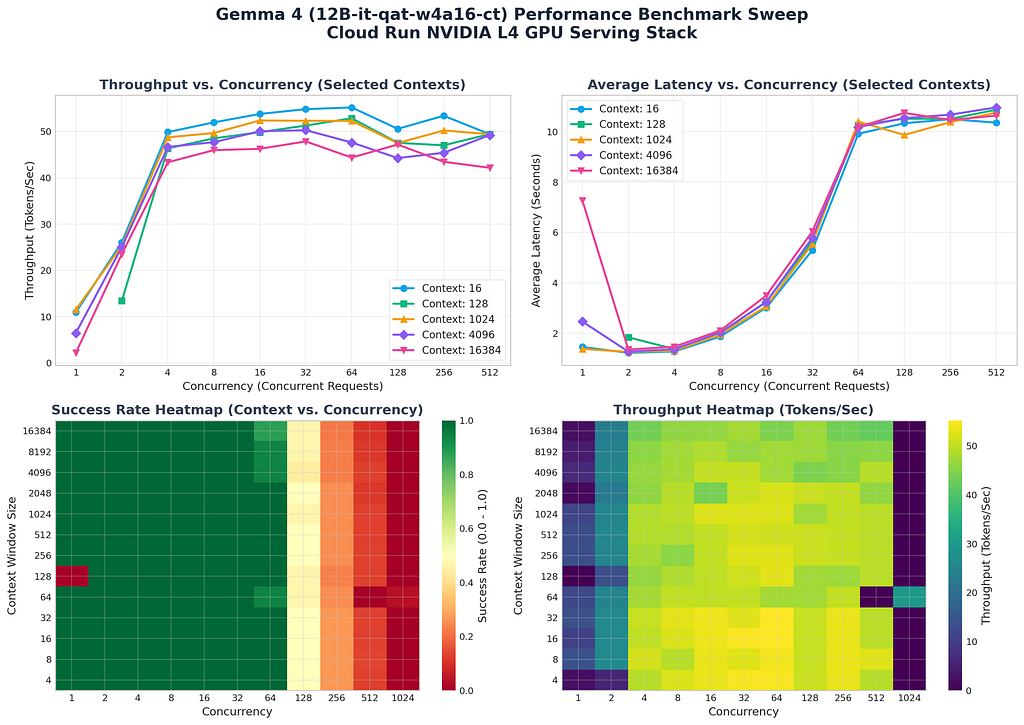
The benchmark sweep has completed successfully. Here are the compiled results across all combinations of context
  window sizes and concurrency levels:
The analysis is reviewed:
> summarize benchmark results
● Read(/home/xbill/gemma4-tips/gpu-12B-qat-L4-devops-agent/benchmark_report.md) (ctrl+o to expand)

  Here is a summary of the performance benchmark results for serving Gemma 4 (12B-it-qat-w4a16-ct) via vLLM on a
  single
  NVIDIA L4 GPU (24GB VRAM) on Cloud Run:

  ### 🔍 Key Metrics Summary

  • Peak Throughput: 55.21 tokens/second (at Concurrency = 64, Context Window = 16 tokens)
  • Lowest Latency: 1.142 seconds (at Concurrency = 1, Context Window = 8 tokens)
  • Optimal Concurrency Boundary: ≤ 32 concurrent requests. Under this boundary, a 100.0% request success rate is
  maintained across all context windows.
  ──────
  ### 📈 Concurrency & Context Performance Matrix

  • Small Contexts (4 to 256 tokens): Under concurrency of 8 to 32, throughput scales to ~45–54 tokens/sec with
  average latency ranging between 1.8s and 5.5s.
  • Large Contexts (16,384 tokens): Remains highly stable, achieving ~47.9 tokens/sec at concurrency 32 with a
  latency of 6.04s. This demonstrates the efficiency of vLLM's page attention and continuous batching scheduler.
  ──────
  ### ⚠️ SRE Diagnostic Saturation Points

  • Concurrency ≤ 32: Perfect stability (100% success rate).
  • Concurrency = 64: Dip in success rate to 97.6% as queueing delay starts to exceed client timeouts.
  • Concurrency ≥ 128: System collapse (success rate drops to ~48% at 128, and <25% at 256). Requests build up in
  vLLM's internal scheduling queue and time out before they can be processed on the GPU.
  ──────
  ### 🛠 SRE Serving Recommendations

  1. Cloud Run Max Concurrency: Cap the max concurrency per Cloud Run instance to 32 (or at most 48). This forces
  Cloud Run to scale out horizontally to new GPU nodes rather than overloading a single instance's serving queue.
  2. vLLM Parameters: Maintain --kv-cache-dtype nvfp4 and --gpu-memory-utilization 0.97 to maximize available
  VRAM on the NVIDIA L4. Consider tuning --max-num-seqs to match the target concurrency.
  3. Client Timeout: Configure client timeout limits to at least 15–20 seconds to tolerate transient traffic spikes.
  ──────
  ### 📚 Benchmark Artifacts

  • Full Benchmark Report: benchmark_report.md
  • Performance Plot: benchmark_chart.png
  • Raw CSV Sweep Data: benchmark_sweep_results.csv
This is visualized:
Cost Analysis
The current Google Cloud pricing is used to evaluate the cost per token:
> summarize cost_analysis.md

  Here is a summary of the cost analysis compiled in cost_analysis.md:

  ### 💵 Base Infrastructure Costs

  Serving the model on Cloud Run requires a minimum allocation of 4 vCPUs, 16 GiB Memory, and 1 NVIDIA L4 GPU.

  • Per Second Rate: $0.00032270
  • Per Hour Rate: $1.1617
  • Per Day Rate (Continuous): $27.88
  ──────
  ### 📊 Cost Per Token by Concurrency (256-Token Context)

  Due to vLLM's continuous batching, increasing concurrent request volume heavily optimizes the cost efficiency:

  • Concurrency = 1 (Single User):
      • Throughput: 13.3 tokens/sec
      • Cost: $24.26 per million tokens
  • Concurrency = 8:
      • Throughput: 45.7 tokens/sec
      • Cost: $7.06 per million tokens
  • Concurrency = 32 (Optimal Load):
      • Throughput: 52.5 tokens/sec
      • Cost: $6.15 per million tokens
  • Concurrency = 64 (Peak Saturation):
      • Throughput: 52.8 tokens/sec
      • Cost: $6.11 per million tokens (with a 97.6% success rate)

  ──────
  ### 💡 SRE Cost-Efficiency Recommendations

  1. Concurrency Cap: Set Cloud Run's max concurrency limit per container to 32. This maximizes performance-per-
  dollar ($6.15 per million tokens) while maintaining a 100% request success rate.
  2. Serverless Scale-to-Zero: Keep scale-to-zero active if traffic is sporadic. For example, if active queries
  only span 4 hours a day, the daily cost is just $4.65 (compared to $27.88/day for dedicated always-on VM hosting).
  ──────
  ### Summary of Work

  • Summarized Cost Analysis: Provided a detailed breakdown of base resource costs, per-token pricing dynamics at
  varying concurrency levels, and key SRE operational recommendations.
Summary
The strategy for using MCP for Gemma 4 GPU deployment with Antigravity CLI was validated with a incremental step by step approach.
A minimal stdio transport MCP Server was started from Python source code and validated with Antigravity CLI running as a MCP client in the same local environment. This Python server provided all of the management tools to deploy and troubleshoot Cloud Run Model deployments.
Comments
More Blog
View allaiContext bankruptcy: The case for strategic forgetting for AI Agents
Most of us have seen a coding agent fail to complete a task we know it can do. We just don't...
J
James O'ReillygooglecloudParallel Compliance Engine: Drive-to-Sheets Multi-Agent Orchestration
When building Generative AI applications, developers often encounter a massive bottleneck: sequential...
A
Aryan IranidiscussIs It Ethical to Post and Ask About Circuits on Dev.to?
I’ve been thinking about sharing some electronic circuit posts on Dev.to — small circuits, DIY...
C
codebunny20agentsThe One-Click Exporter: AI Studio Antigravity, Probed to Its Limits
What nobody tells you about exporting your multi-agent prototype to a local workspace. Every...
L
leslysandraagenticarchitectGuarding the till while autonomous data agents do the digging
Autonomous agents are genuinely good at answering messy business questions. Give one an LLM and a set...
S
Sireesha PulipatiaiReturn on Attention: Why AI Code Reviews Are Wearing Us Out
PR volume went up, ticket quality didn't, and the gap got filled with LLMs on both sides of the review: bots reviewing, bots replying, bots occasionally arguing with bots about priorities that only existed in a teammate's head. Our CEO named the actual problem, and it's bigger than code review.
C
christineReady-made automations for this
Workflows from the Neura Market marketplace related to this Stable Diffusion resource
- Automated Webhook Processing with Docker Deploymentn8n · $14.71 · Related topic
- Automate Docker MinIO Deployment with Webhook Integrationn8n · $9.58 · Related topic
- Automate Docker Deployment with Webhook Integrationn8n · $5.37 · Related topic
- AI Website Generator with Gemini & Netlify Auto-Deploymentn8n · $24.99 · Related topic