
Back to Blog mcpserver
 ai
ai googlecloud
 discuss
 agents
 agenticarchitect
 ai
ai
Google Antigravity SDK: The developer guide
Karl Weinmeister June 10, 2026
0 views
The Google Antigravity SDK is a Python framework for building and running autonomous agents. It...
title: Google Antigravity SDK: The developer guide published: true date: 2026-06-09 15:01:34 UTC tags: mcpserver,googlegemini,python,aiagent canonical_url: https://www.linkedin.com/pulse/google-antigravity-sdk-developer-guide-karl-weinmeister-nymsc cover_image: https://cdn-images-1.medium.com/max/1024/1*ew_HgMaHiNf6tcYBBnH-jQ.png
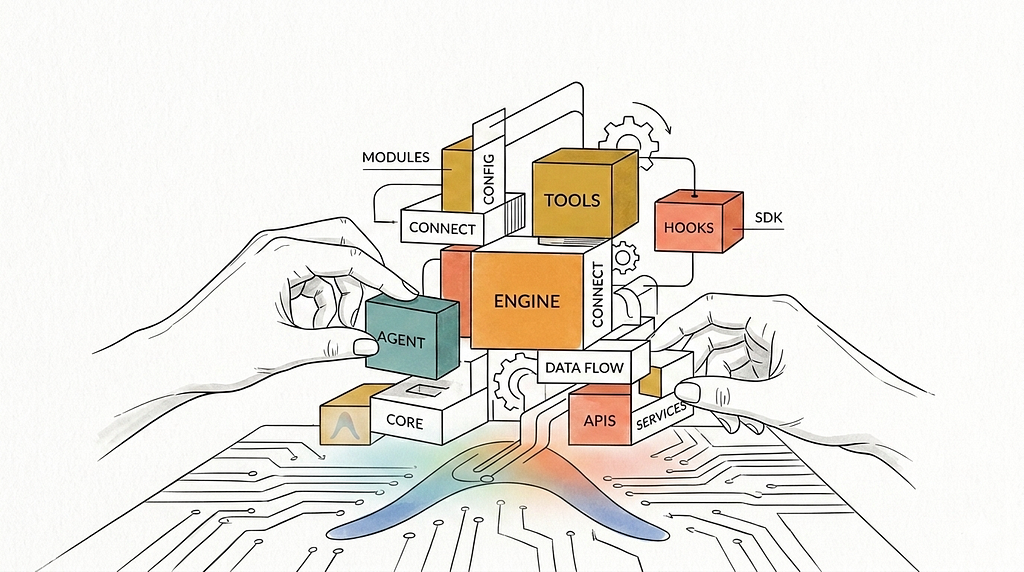
The Google Antigravity SDK is a Python framework for building and running autonomous agents. It decouples your agent’s logic from where it runs, letting you focus on what the agent does while the SDK manages execution and state.
The Python SDK interfaces with a bundled Go harness over WebSockets. The local Go harness runs the core agentic loop and manages sandboxed tool execution. Python acts as the control plane where you configure tools, safety policies, and lifecycle hooks.
This guide outlines the SDK’s architecture one layer at a time, referencing the official source repository. Note that the SDK is currently pre-v1.0 and subject to change.
Where Antigravity fits in Google’s AI stack
Google’s AI stack offers multiple levels of abstraction for building with Gemini. Choosing the right one depends on how much control you need over the execution loop.
- The Gemini API is stateless. You make an API call and get a response. You manage the entire loop.
- The Agent Development Kit sits one level up. With the ADK, you design the event loops, pick the foundation models, and control how agents route messages to each other.
- The Antigravity SDK is a pre-packaged runtime tightly integrated with Gemini. You don’t build the agentic loop; you’re given one. Your role is to govern it.
Getting started
Install the package with pip install google-antigravity, ensuring that GEMINI_API_KEY is set in your environment. Then you’re ready to build your first agent!
import asyncio
from google.antigravity import Agent, LocalAgentConfig

# 1. Define a tool function with a descriptive docstring
async def get_weather(location: str) -> str:
    """Gets the current weather for a location."""
    return f"The weather in {location} is sunny, 72°F."

async def main():
    # 2. Register the tool in the agent configuration
    config = LocalAgentConfig(
        system_instructions="You are a helpful weather assistant.",
        tools=[get_weather]
    )

    # 3. Initialize the agent and query it
    async with Agent(config) as agent:
        response = await agent.chat("How's the weather in San Diego?")
        async for token in response:
            print(token, end="", flush=True)

asyncio.run(main())
What’s happening here? The Agent context manager starts the Go harness, establishes a WebSocket connection, and registers the get_weather function as an available tool. The model automatically decides when to invoke it based on the user’s prompt. When the async with block exits, the harness shuts down and all connections are closed.
The three-layer architecture
The SDK separates concerns into three layers, each with a distinct responsibility.
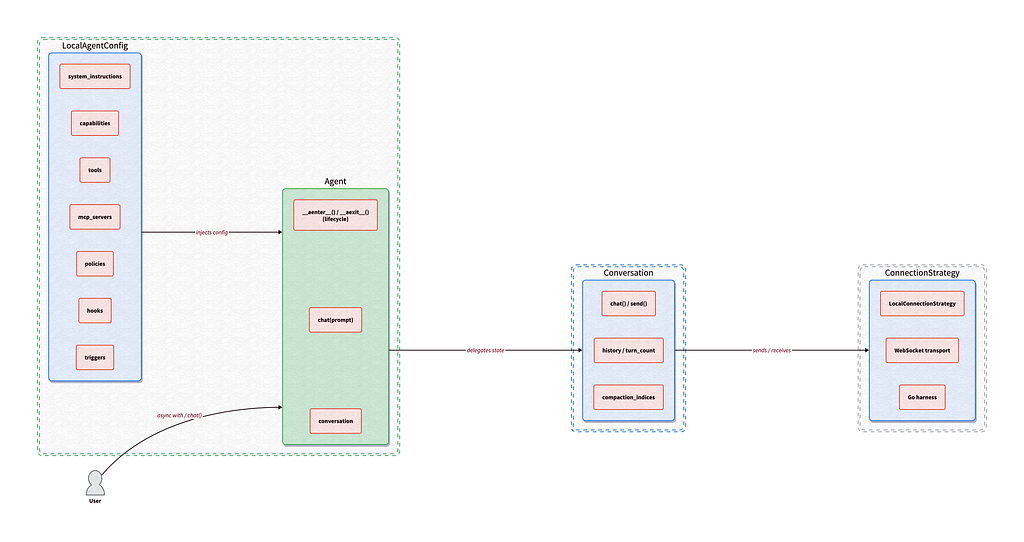
Layer 1: Agent and LocalAgentConfig. The high-level entry point. Manages configuration, session lifecycle, tool wiring, hooks, and triggers. This is where you spend most of your time.
Layer 2: Conversation. The stateful session manager. Wraps the connection and handles message history accumulation, context window compaction, and token usage tracking (including Gemini’s “thinking tokens”).
Layer 3: Connection and ConnectionStrategy. The transport abstraction. For local development, LocalConnection communicates via WebSockets with the Go harness. This layer is what makes it possible to eventually swap in remote backends without changing your application code.
Now let’s look at what you can build on top of those three layers.
Tools and MCP
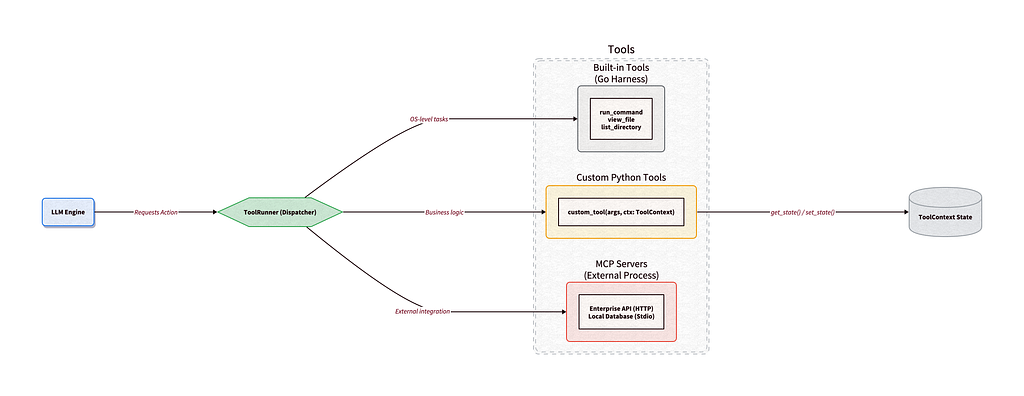
Built-in tools
The Go harness ships with optimized native tools for standard OS interactions: view_file, edit_file, create_file, list_directory, search_directory, run_command, and generate_image. These run inside the harness process, not in Python, so they’re fast and sandboxed.
Custom Python tools
If you need the agent to call your business logic, you write a standard Python function. The SDK’s ToolRunner uses reflection to inspect type hints and parse docstrings, generating the Gemini FunctionDeclaration automatically.
async def lookup_customer_tier(email: str) -> str:
    """Looks up a customer's subscription tier.

    Args:
        email: The customer's registered email address.
    """
    tier = await db.query(email)
    return f"The customer is on the {tier} plan."

config = LocalAgentConfig(tools=[lookup_customer_tier])
ToolContext for stateful tools
Sometimes a tool needs to remember things across invocations in the same conversation, like a pagination cursor or a running counter. Passing that state through the LLM wastes tokens and bloats the context window.
The SDK provides ToolContext, a conversation-scoped key-value store. Add ctx: ToolContext to your function signature and the SDK injects it automatically. The model never sees the parameter.
from google.antigravity.tools.tool_context import ToolContext

def process_logs(batch_size: int, ctx: ToolContext) -> str:
    """Processes the next batch of server logs."""
    cursor = ctx.get_state("log_cursor", 0)
    logs = fetch_logs(offset=cursor, limit=batch_size)
    ctx.set_state("log_cursor", cursor + batch_size)
    return logs
MCP integration
The SDK has native support for the Model Context Protocol using both Stdio transport and Streamable HTTP. Point your agent at an MCP server and it for access to its exposed tools.
Because MCP tools are integrated at the ToolRunner level, they’re governed by the exact same safety policies as built-in and custom tools.
Lifecycle hooks
The SDK treats agent lifecycles through composable middleware using hooks.
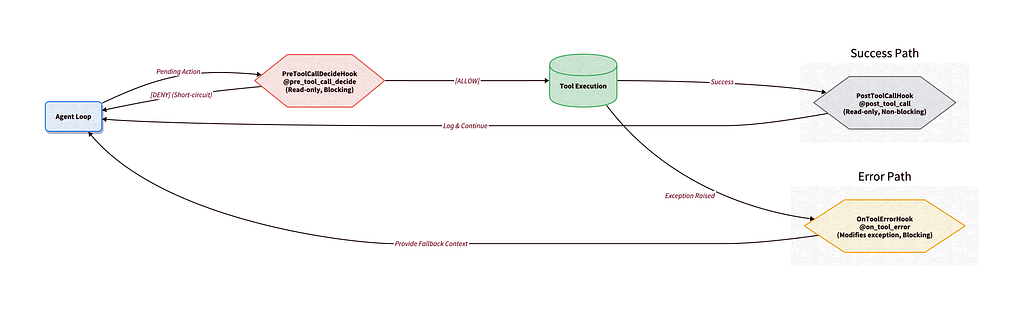
A common security flaw in custom agent frameworks is the Time-Of-Check to Time-Of-Use, or TOCTOU, vulnerability. A security hook approves a tool call’s arguments, then a subsequent middleware mutates those arguments before execution. Antigravity prevents this by categorizing hooks into three archetypes, enforced by the type system.
Decide hooks are read-only and blocking. They inspect incoming data (like a pending tool call) and return HookResult(allow=True/False). They can’t modify the payload. If any Decide hook denies, execution short-circuits. Example: PreToolCallDecideHook.
Inspect hooks are read-only and non-blocking. They receive data after an event and run concurrently. They can’t block the main flow. Example: PostToolCallHook (writing tool outputs to external systems).
Transform hooks are modifying and blocking. They receive data, mutate it, and pass the transformed payload back. Example: OnToolErrorHook.
The OnToolErrorHook is particularly useful. When a tool throws an exception, instead of crashing the entire loop or dumping a raw Python traceback into the model’s context, you intercept the error and feed strategic recovery guidance:
from typing import Optional
from google.antigravity.hooks import hooks

class FallbackHook(hooks.OnToolErrorHook):
    """Intercepts tool errors and returns recovery guidance."""

    async def run(self, context: hooks.HookContext, data: Exception) -> Optional[str]:
        if isinstance(data, ValueError):
            return (
                "[System: Invalid parameters. "
                "Try 'search_directory' to find the correct ID.]"
            )
        return None

config = LocalAgentConfig(hooks=[FallbackHook()])
You can stack these hook types together to build a middleware pipeline. For example, you could include rate-limiting via Decide hooks, audit logging via Inspect hooks, and crash recovery via Transform hooks.
Safety policies
Giving an autonomous agent access to your system requires guardrails. The SDK employs a declarative, priority-based policy engine that evaluates every single action at the runtime hook level.
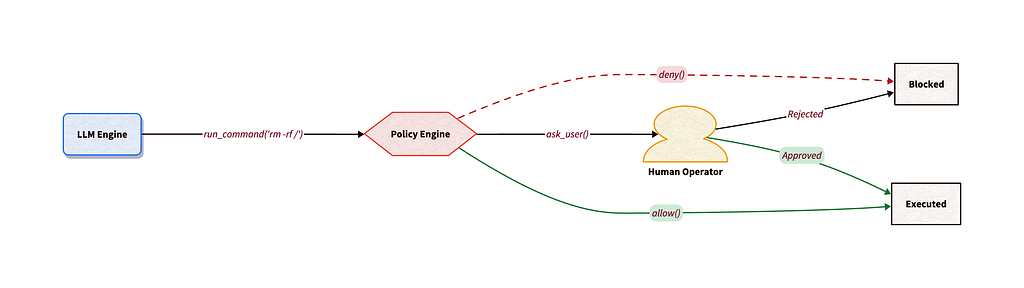
Out of the box, the SDK takes a strict security stance. If you spin up an agent with zero configuration, it defaults to confirm_run_command(): the agent can read and write files, but shell execution requires explicit approval.
Policies evaluate top-down using a priority model. You configure rules with policy.allow(), policy.deny(), and policy.ask_user().
from google.antigravity import Agent, LocalAgentConfig
from google.antigravity.hooks import policy

policies = [
    # Block dangerous arguments instantly
    policy.deny(
        "run_command",
        when=lambda args: "rm " in args.get("CommandLine", "")
    ),
    # Ask the human for any other shell command
    policy.ask_user("run_command", handler=my_cli_prompt_function),
    # Allow safe tools silently
    policy.allow("view_file"),
    # Deny everything else
    policy.deny("*")
]

config = LocalAgentConfig(policies=policies)
Human-in-the-loop
The policy.ask_user() builder pauses the execution loop, invokes your custom handler, and waits for approval before continuing.
Disabling vs. denying
There’s an important distinction between disabling vs denying tools. CapabilitiesConfig.disabled_tools physically removes a tool’s JSON Schema from the context window before sending the prompt to Gemini. The model doesn’t know the tool exists, and you save input tokens. policy.deny() keeps the tool visible but blocks it at runtime. The model attempts to use it, gets an error message, and learns why it was blocked. It costs tokens for the failed attempt, but enables dynamic, argument-based restrictions and lets the model adapt.
Background triggers
True autonomous systems monitor their environment and alert you proactively. The SDK’s triggers are long-lived async tasks that run alongside the agent session, reacting to external events.
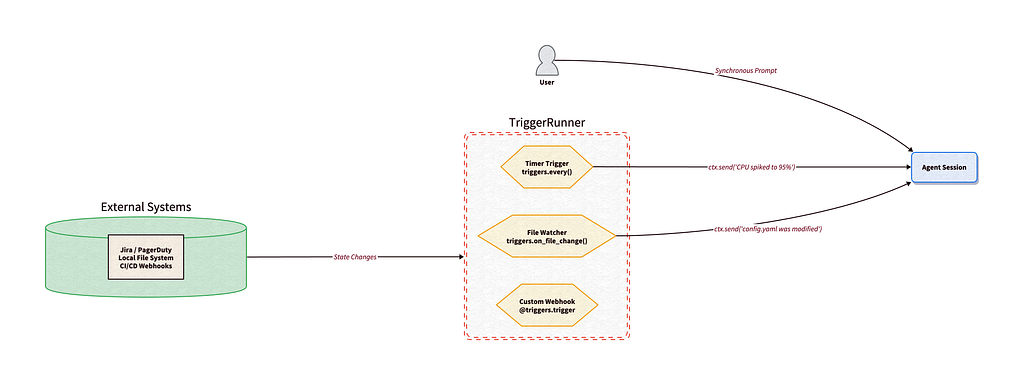
When you start an Agent context, the TriggerRunner spawns a separate asyncio task for each registered trigger. A crashing trigger won’t take down the agent. A busy agent won’t block the triggers.
Each trigger receives a TriggerContext. When it notices something in the outside world, it calls ctx.send(“Message”) to inject a notification into the agent’s conversation history. The agent reacts as if the user had typed it.
from google.antigravity import Agent, LocalAgentConfig
from google.antigravity.triggers import every, TriggerContext

async def monitor_queue(ctx: TriggerContext):
    tickets = await fetch_pagerduty_alerts()
    if tickets:
        await ctx.send(f"[System Alert]: {len(tickets)} new P0 alerts detected.")

config = LocalAgentConfig(triggers=[every(60, monitor_queue)])
The SDK also ships triggers.on_file_change() for OS-level file watching (great for local coding assistants) and @triggers.trigger for custom async listeners like GitHub webhook receivers.
Streaming and thoughts
When an agent is executing a multi-step task, waiting for a final output can make the application feel frozen.
The SDK addresses this by streaming execution events in real time. Instead of blocking, await agent.chat() immediately returns a ChatResponse object. This object acts as a shared, memory-cached buffer.
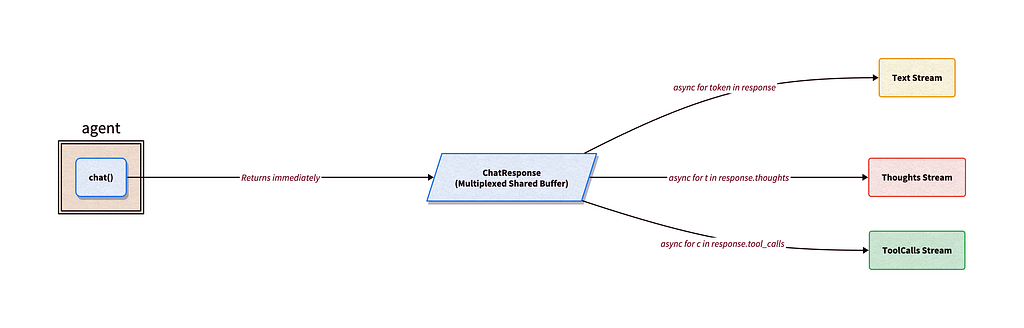
Unlike standard Python generators, which are exhausted once read, ChatResponse lets you attach multiple independent cursors to the same stream. This allows you to route different aspects of the same agent turn concurrently:
- Main text stream (e.g., rendering markdown chunks to your frontend UI)
- Chain-of-thought stream (e.g., logging the agent’s internal reasoning to a developer console)
- Tool-call stream (e.g., displaying a live status widget as the agent invokes tools)
response = await agent.chat("Write a short story.")

# Stream raw text tokens
async for token in response:
    print(token, end="", flush=True)
The response.thoughts stream exposes the model’s Chain-of-Thought reasoning in real-time. Token costs are tracked with response.usage_metadata.thoughts_token_count.
The response.tool_calls stream yields strongly-typed ToolCall objects as soon as the agent dispatches them, so your UI can render updates instantly.
Subagents
One of the most common pitfalls in autonomous agents is context window bloat. The SDK solves this through hierarchical delegation.

Instead of doing all the work in a single thread, the main agent invokes the built-in start_subagent tool. This prompts the harness to spin up a fresh agent session with a clean context window to handle the subtask in isolation. The subagent works through the problem using its own tools and MCP servers, then shuts down. It returns only a synthesized summary of its findings, keeping the main agent’s context window clean and focused on high-level orchestration.
from google.antigravity import Agent, LocalAgentConfig

config = LocalAgentConfig(
    system_instructions="You are a lead developer. Delegate heavy research to subagents."
)

async with Agent(config) as agent:
    prompt = (
        "Use a subagent to research the /docs directory and "
        "write a synthesized lesson plan based on what it finds."
    )
    response = await agent.chat(prompt)
    print(await response.text())
To prevent privilege escalation, safety policies and hooks cascade hierarchically. If the main agent is restricted from running terminal commands, those same restrictions automatically apply to any subagents it spawns. You can also intercept and inspect subagent lifecycles using the same hook middleware (PreToolCallDecideHook and PostToolCallHook) that governs regular tool calls.
What will you build?
Building an agent loop is relatively straightforward, but securing and monitoring it in production is where challenges typically begin. The Antigravity SDK bridges this gap by decoupling your agent’s logic from its execution environment.
To get started, review the SDK overview docs and clone the source repository. Then try out one of the examples.
Stay tuned for the next agent I’ll build with the Antigravity SDK! Share with me what you’re building on X, LinkedIn, or Bluesky.
Comments
More Blog
View allaiContext bankruptcy: The case for strategic forgetting for AI Agents
Most of us have seen a coding agent fail to complete a task we know it can do. We just don't...
J
James O'ReillygooglecloudParallel Compliance Engine: Drive-to-Sheets Multi-Agent Orchestration
When building Generative AI applications, developers often encounter a massive bottleneck: sequential...
A
Aryan IranidiscussIs It Ethical to Post and Ask About Circuits on Dev.to?
I’ve been thinking about sharing some electronic circuit posts on Dev.to — small circuits, DIY...
C
codebunny20agentsThe One-Click Exporter: AI Studio Antigravity, Probed to Its Limits
What nobody tells you about exporting your multi-agent prototype to a local workspace. Every...
L
leslysandraagenticarchitectGuarding the till while autonomous data agents do the digging
Autonomous agents are genuinely good at answering messy business questions. Give one an LLM and a set...
S
Sireesha PulipatiaiReturn on Attention: Why AI Code Reviews Are Wearing Us Out
PR volume went up, ticket quality didn't, and the gap got filled with LLMs on both sides of the review: bots reviewing, bots replying, bots occasionally arguing with bots about priorities that only existed in a teammate's head. Our CEO named the actual problem, and it's bigger than code review.
C
christineReady-made automations for this
Workflows from the Neura Market marketplace related to this Stable Diffusion resource
- Streamline PDF Processing with Adobe Developer API Workflown8n · $16.81 · Related topic
- PDF Manipulation Workflow with Adobe Developer APIn8n · $4.99 · Related topic
- Autonomous Vehicle Log Summarizer: Streamlining Vehicle Data Managementn8n · $4.91 · Related topic
- Autonomous AI Crawler for Financial Insightsn8n · $4.76 · Related topic