
Back to Blog gpu
gpu ai
ai googlecloud
 discuss
 agents
 agenticarchitect
 ai
ai
Heterogeneous Pythonic language in your pocket
Amr Hesham June 11, 2026
0 views
Hello everyone 👋, I am Amr Hesham, and I am very passionate about Compilers, Languages, and building...
Hello everyone 👋, I am Amr Hesham, and I am very passionate about Compilers, Languages, and building cool projects.
Four years ago, when I was working as a full-time junior Android Developer, I used to spend my time after work reading Compiler books 🐉 and contributing to open source projects.
When I was playing with the Python Turtle graphics library, I found it very interesting, and I started to think, why not mix Android and Compilers 🤔, what if I can build a small language and re-implement the turtle library in this language and deploy it in an Android App? The result of that was Turtle 🐢.
The project was very interesting to implement, and 4 years later, I was surprised that the app had 35K downloads with good ratings and reviews on Google Play.
By the end of 2025 and the start of 2026, I started to read Programming Massively Parallel Processors, CPython Internals, and other books to learn more about GPU architecture and programming, compilers, and runtime systems.
Then I started to think 🤔, Mmmmm, a modern smartphone has a GPU already, can’t we create a language that allows users to perform computation on that GPU 🤯, can’t we create a system that, at runtime, can compile a function node in this language into GPU code and launch it, then read the result back to the interpreter or VM 🤔, so think of it as a JIT for GPU.
At that time (Around March of 2026), I created an expermintal toy project that compiles a simple function into a WebGPU shader and launches it on Android Device, and guess what, it works 🥳, then I decided, okay, let's first create a language that gives the current users the same features that were in the previous version, Then we can support GPU, but what will be the syntax of this language 🤔? should i extend the current language that i built in 2022 or should i rebuild a new language (Which is something i love to do so much 😉)?.
The Lilo Programming Language
I started to think, okay, first, who are the target users? They want to practice or play with features and turtle graphics drawing on a mobile phone, and they want a language that they already know or is easy to use. Mmmmm, which language do we know that it’s easy to use and most people love it 🤔, yes, Python 🐍, also I was already reading the CPython Internal book and reading Mojo 🔥 stdlib source code, which is so interesting to read.
I spent some time reading more about Python, CPython internals from the maintainer's talks, and also from Chris Lattner's talks, to understand how Python has only one data type, which is PyObject. I started an empty project to implement a subset of Python from the official standard, with the same dynamic features and API’s, for example, magic methods, stdlib modules such as List, Dict, Map, Reflections, other commons libraries, and of course Turtle 🐢, and here is the result.
{% embed https://youtube.com/shorts/CD80a774R9Y?feature=share %}
The journey was very interesting for me. I implemented most of the features in Python, learned a lot about the language and VM implementation of CPython, and then I started to think it’s time to switch from continuing to implement Python features to working on the GPU programming part 🫣.
Add support for GPU programming
At this point, we have a nice Pythonic language with Turtle module that can run python samples and draw the same shapes 🥳, but now it’s time to support compiling and launching kernals on the GPU, and to update the value back then continue the interpreter execution, which allow for example to perform Vector or Matrix multiplications on the GPU and use the result with the Turtle API to draw nice graphics.
Note 🪧: At that point, Lilo has the same syntax and semantics implemented from the Python grammar reference, but I added one extra keyword out To make it easy to know which argument we should copy the value from the Device to the Host after finishing executing the kernel, we can remove it and sync all arguments back, or perform a simple analysis and mark the output parameter in the AST, and it’s possible, but I just added it for now in the beta version, and maybe removed soon.
Before showing the syntax in Lilo and how I implemented that, let me show you a quick example in CUDA-C (If you know Mojo or Trition, Lilo is also inspired by them :D) to make it easy to map the concepts from CUDA-C to what I implemented.
__global__
void vector_add(float *A, float *B, float *C, int N) {
    int i = blockIdx.x * blockDim.x + threadIdx.x;
    C[i] = A[i] + B[i];
}

int threadsPerBlock = Dim3(...);
int blocksPerGrid   = Dim3(...);
vector_add<<<blocksPerGrid, threadsPerBlock>>>(a, b, c, N);
For this article, I will not explain everything from scratch. I can’t recommend more to read the Programming massively parallel processors if you are interested in the topic
So i is the index of the current thread that is executing this kernel (vector_add), we calculate it depending on the size of the block (group of threads), the index of the group, and the local thread index in the current group, so if we have 3 blocks and each block has 3 threads, then in the last thread, the index will be 2 (blockIdx) * 3 (blockDim) + 2 (local thread index) , so the index will be 8, which is correct.
blocks = {
   0: [0, 1, 2],
   1: [0, 1, 2],
   2: [0, 1, 2]
             ^------- 2 (block index) * 3 (block size) + 2 (thread local index in block)
}
To launch the kernel on the GPU, you need to specify/config the number of threads per block and the number of blocks, too. So here is the CUDA-C syntax to do that
vector_add                                        <----- the kernal
<<<blocksPerGrid, threadsPerBlock>>>              <----- the configuration
(a, b, c, N);                                     <----- arguments
So to implement that, I need to represent them in a language (Kernel, Kernel with Config, and the configured Kernel call with arguments), so what I did is I created a decorator function (A function in Python that takes a function as a parameter), so it takes a function and returns Kernel
def gpu(func):
   return LiloKernal(func)

@gpu
def vector_add():
   pass
And instead of creating an extension similar to CUDA-C, I implemented it with Python language features, so in the LiloKernel object, I overrode the magic method __getitem__ So you can pass the config to the kernel and get ConfiguredKernel
blocksPerGrid = Dim(...)
threadsPerBlock = Dim(...)
vector_add[blocksPerGrid, threadsPerBlock]

# Which is equals to
vector_add.__getitem__(tuple(blocksPerGrid, threadsPerBlock))
That means, we now have a kernel with a configuration that we can call using the Magic method __call__ , so we will end up with
@gpu
def vector_add(a, b, out c):
  i = gpu.block_dim.x * gpu.block_idx.x + gpu.thread_idx.x
  c[i] = a[i] + b[i]

blocksPerGrid = Dim(...)
threadsPerBlock = Dim(...)
vector_add[blocksPerGrid, threadsPerBlock](a, b, c)

# which is equals to :D
vector_add.__getitem__(tuple(blocksPerGrid, threadsPerBlock)).__call__(a, b, c)
Looks similar to CUDA, right 😉? I also implemented another way to do that using functions, for example, launch and config similar to other languages (This is useful when implementing GPU puzzles in the app)
Compiling Lilo Function to WebGPU Shader code
So now we are in the LiloInterpreter, which traverses the tree and executes code, but when we hit a Kernel, we take this FunctionAST Node and send it to a component called LiloGPUCompiler, which takes this Function and returns a string containing this function as WebGPU Code, and when we hit the Call of the kernel, we pass the parameters and the WebGPU to the WebGPU API so we can run them on GPU and when we get the result, we write it back to the argument with out keyword :D
Note: I named it Dim, not Dim3, inspired by Mojo stdlib :D.
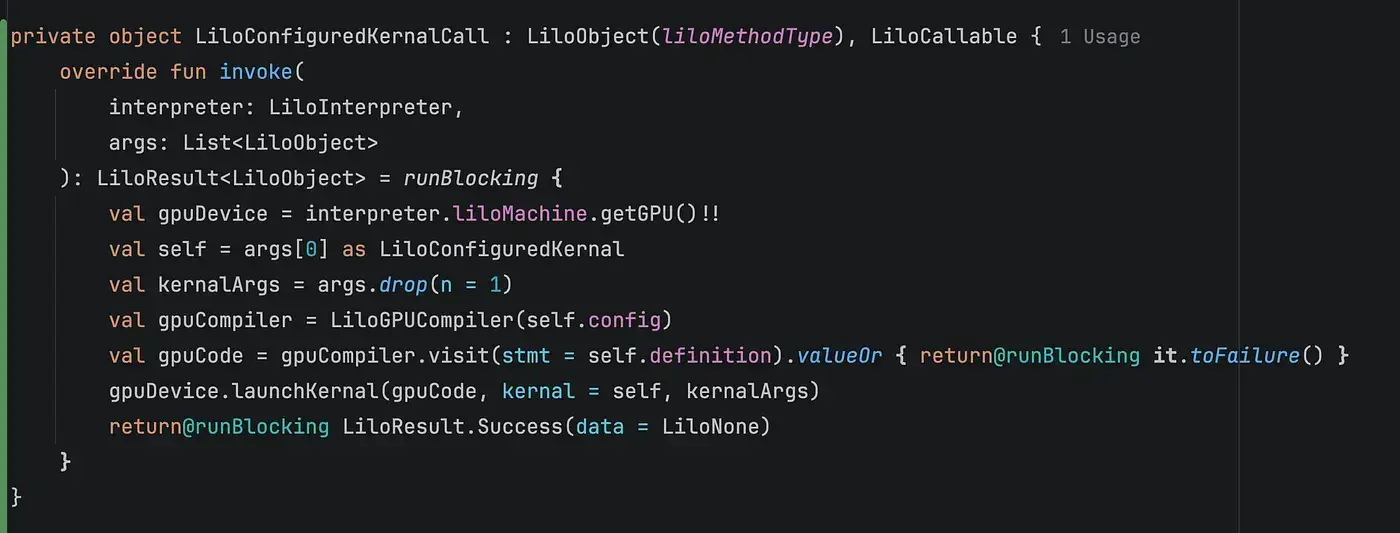
And here is the actual result
{% embed https://youtube.com/shorts/c7SENf6Zxp0?feature=share %}
Benchmark
The project goal was not to implement the fastest language but to build a platform and tools to learn more about GPUs, and also to write scripts and programs on your mobile device that use a GPU, but let's see if we have the same logic, how fast it will be on a GPU without any optimizations 🤔
It’s almost 11x faster, part of it is because the Lilo Interpreter is not optimized at all now, but also the GPU shader code is not optimized either, and the compilation time is included (Because we don’t have a cache for that yet 🤭). We can, for example, do constant folding before emitting the code, but this is on the TODO list for the future.
The next step
Currently, Lilo has a good subset of Python features implemented, but there is a lot to implement, for example, the generators, OOP, async, and also to complete the stdlib modules implementations.
In the GPU part, currently, you can use the global memory, but we can allow more and more features like shared memory, constant memory, tiling, and other features.
Step by step, this project will be turned into a platform that not only allows you to execute Python syntax with GPU programming but also to add a linter for the GPU part.
In Turtle app, we already know the GPU information of the current device, data size, and your kernel configuration, so we can, for example, show pop-ups explaining why a specific configuration can be better than another config, or how to use the device info to optimize your kernel, how to create tiling ….etc so it can be turned into an educational project not only for me and the contributors to re-implement python and support GPU but also for the users to learn with fun how to write GPU Code in their mobile phone.
Before finishing this article, I want to share a demo of a nice example of Turtle graphics code I used to make sure my current implementation is drawing the same shapes as the official Python.
{% embed https://youtube.com/shorts/2honnZjGvT8?feature=share %}
The project is far from complete, but I decided to continue building it in public, and also contributors can join and enjoy this experience with me :D
I hope you all enjoyed reading this article. The project is open source from day one and available on Google Play, too
Github: https://github.com/AmrDeveloper/Turtle
Google Play: https://play.google.com/store/apps/details?id=com.amrdeveloper.turtle
Feel free to contribute, submit an issue, or suggest ideas 😄
You can find me on GitHub, LinkedIn, and Twitter.
And you can sponsor my work on GitHub Sponsor 😇.
Enjoy Programming 😋.
Comments
More Blog
View allaiContext bankruptcy: The case for strategic forgetting for AI Agents
Most of us have seen a coding agent fail to complete a task we know it can do. We just don't...
J
James O'ReillygooglecloudParallel Compliance Engine: Drive-to-Sheets Multi-Agent Orchestration
When building Generative AI applications, developers often encounter a massive bottleneck: sequential...
A
Aryan IranidiscussIs It Ethical to Post and Ask About Circuits on Dev.to?
I’ve been thinking about sharing some electronic circuit posts on Dev.to — small circuits, DIY...
C
codebunny20agentsThe One-Click Exporter: AI Studio Antigravity, Probed to Its Limits
What nobody tells you about exporting your multi-agent prototype to a local workspace. Every...
L
leslysandraagenticarchitectGuarding the till while autonomous data agents do the digging
Autonomous agents are genuinely good at answering messy business questions. Give one an LLM and a set...
S
Sireesha PulipatiaiReturn on Attention: Why AI Code Reviews Are Wearing Us Out
PR volume went up, ticket quality didn't, and the gap got filled with LLMs on both sides of the review: bots reviewing, bots replying, bots occasionally arguing with bots about priorities that only existed in a teammate's head. Our CEO named the actual problem, and it's bigger than code review.
C
christineReady-made automations for this
Workflows from the Neura Market marketplace related to this Stable Diffusion resource
- Auto-Translate Blog Content to Multiple Languages with GPT-4o & Markdownn8n · $14.99 · Related topic
- Translate & Repost Twitter Threads in Multiple Languages with OpenAIn8n · $24.99 · Related topic
- Transcribe & Translate Audio Between Languages with OpenAI & S3 Storagen8n · $22.99 · Related topic
- Translate Telegram Audio Messages with AI (55 Languages)n8n · $17.99 · Related topic