
Back to Blog![[Gemini API] Gemini Batch API and Webhook API practical usage on restaurant survey](https://media2.dev.to/dynamic/image/width=1200,height=627,fit=cover,gravity=auto,format=auto/https%3A%2F%2Fdev-to-uploads.s3.amazonaws.com%2Fuploads%2Farticles%2Fzyfgncl2qh3n7f3xpmjo.png) api
api
 ai
ai googlecloud
 discuss
 agents
 agenticarchitect
 ai
ai
[Gemini API] Gemini Batch API and Webhook API practical usage on restaurant survey
Evan Lin June 14, 2026
0 views
A Powerful Tool for Asynchronous Processing: Gemini Batch API & Webhooks When...
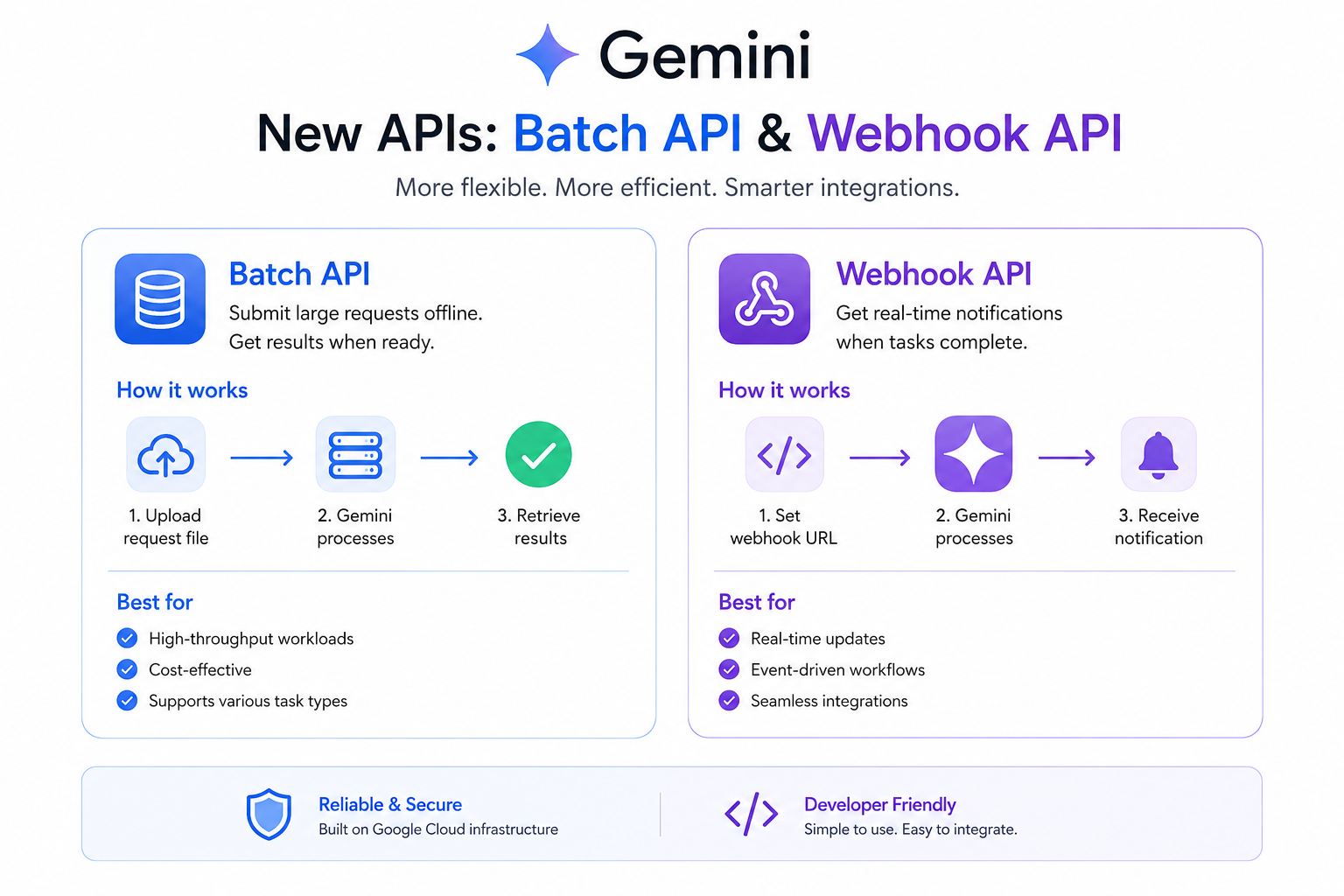
A Powerful Tool for Asynchronous Processing: Gemini Batch API & Webhooks
When developing LLM-based applications, we often need to handle a large number of data analysis tasks—for example, analyzing reviews from dozens of restaurants at once, classifying a large volume of articles, or batch generating translations. If we use traditional synchronous APIs (real-time calls), we would not only face severe Rate Limit blockages but also fail due to network connection timeouts and extremely high computing costs.
To overcome this limitation, Google has launched the Gemini Batch API and Webhook API:
- Gemini Batch API: Allows developers to package a large number of requests into a JSONL file and upload them all at once. Gemini performs asynchronous scheduled computations in the background, without consuming your daily real-time API quotas (Rate Limits), and its computing cost is usually half that of real-time APIs, making it a perfect choice for non-urgent big data processing.
- Webhook API: Traditional Batch tasks require us to constantly write polling logic locally to check the status. With Webhooks, when Gemini completes a Batch computation, it actively sends an HTTP POST callback to your specified URL, instantly notifying you that the task is complete, making the system architecture more elegant and energy-efficient.
This article will document how we integrated these two powerful APIs into our LINE Bot Restaurant Analysis Assistant to achieve one-click deep review and signature dish big data analysis for specific restaurants on mobile devices.
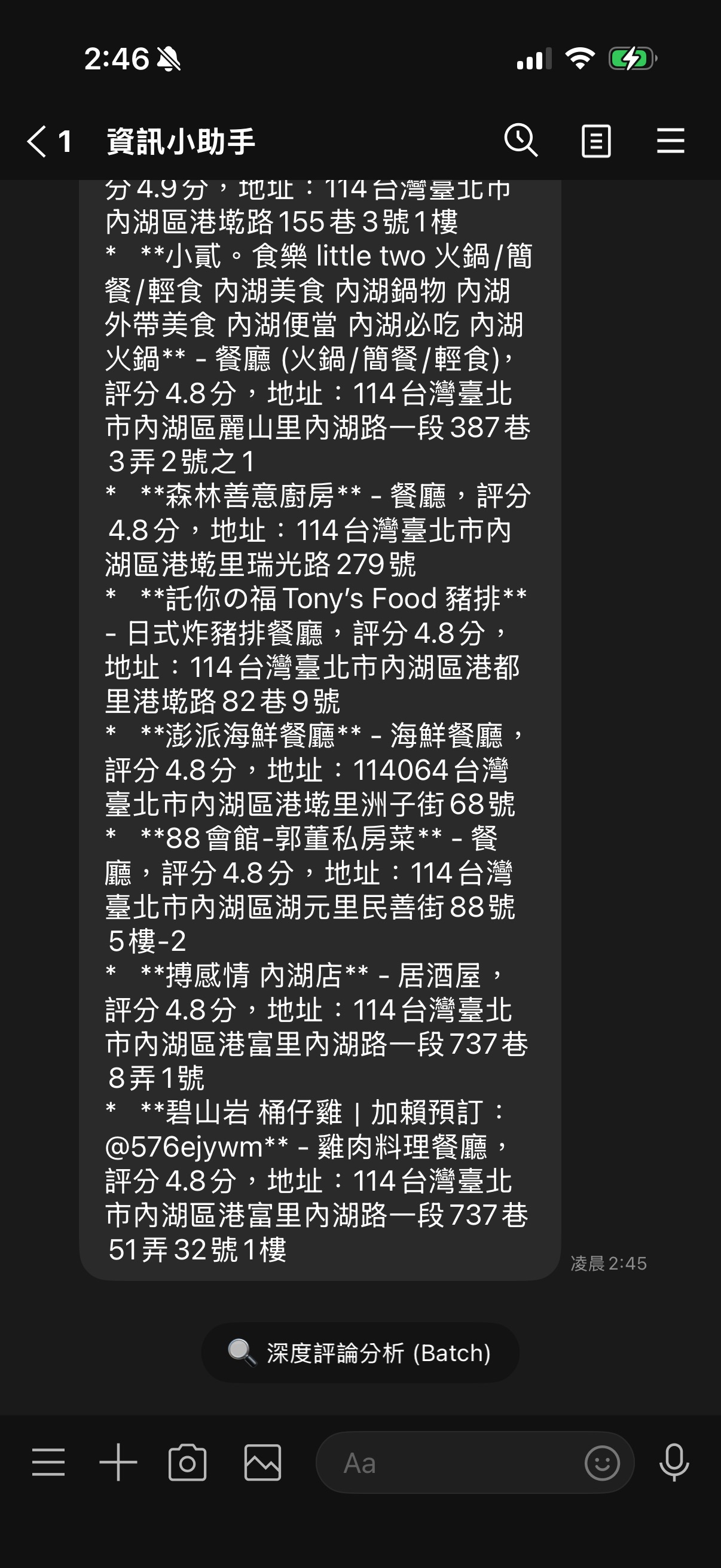
System Design and Optimized Architecture
Originally, the restaurant analysis function worked by having the Bot list nearby restaurants when a user sent their location, and then providing a generic "Deep Review Analysis (Batch)" button. Clicking it would send all nearby restaurants for analysis at once. However, this led to a poor UX: analyzing all restaurants took too long, and users often only wanted to delve into one specific restaurant they were interested in.
Therefore, we optimized the function into dynamic Quick Reply buttons:
- The user sends their location, and the Bot searches for nearby restaurants via Google Maps Grounding.
- After the client receives a plain text list of restaurants, the Bot automatically uses Gemini to extract the top 3 highest-rated restaurant names.
- Three customized Quick Reply buttons are generated (e.g.,
🍴 Analyze Din Tai Fung). - After the user clicks a specific restaurant button, the Bot immediately replies "Processing" to avoid LINE timeouts, and submits the Batch task for that single restaurant in the background. Once Gemini completes the computation, it proactively pushes a dedicated big data report.
System Architecture Flow
graph TD
    A[User Sends Location] -->|Location Message| B[Google Maps Grounding Search]
    B -->|Plain Text Restaurant List| C[Gemini-2.5-flash Extracts Top 3 Restaurants]
    C -->|Dynamically Generates Quick Reply| D[LINE Bot Replies with 3 Customized Analysis Buttons]
    D -->|User Clicks Specific Analysis| E[FastAPI Background Task]
    E -->|Immediate Reply ACK| F[LINE Chat Message]
    E -->|Package JSONL and Upload| G[Gemini Batch API Submission]
    G -->|Computation Complete Webhook/Polling Callback| H[Proactively Pushes Deep Report to User]
Core Implementation
1. Precisely Extracting Restaurant Names from Grounding Text using Gemini
In tools/maps_tool.py, the map search returns a plain text string rich in formatting and descriptions. We use Gemini-2.5-flash's structured output concept to precisely extract restaurant names in JSON format:
        # Extract top three restaurant names for Quick Reply
        names = []
        if place_type == "restaurant":
            try:
                extract_prompt = f"Please extract all restaurant names from the following text and return them in a JSON array format (e.g., [\"Restaurant A\", \"Restaurant B\"]). Please output the JSON array directly, without any markdown tags (like ```json) or explanatory text.\n\n{result}"
                extract_res = client.models.generate_content(
                    model="gemini-2.5-flash",
                    contents=extract_prompt
                )
                extract_text = extract_res.text.strip() if extract_res.text else ""

                try:
                    names = json.loads(extract_text)
                except Exception:
                    import re
                    array_match = re.search(r"\[(.*?)\]", extract_text, re.DOTALL)
                    if array_match:
                        import ast
                        names = ast.literal_eval(f"[{array_match.group(1)}]")

                names = [str(n).strip() for n in names if n]
                logger.info(f"Extracted restaurant names for Quick Reply: {names}")
            except Exception as e_extract:
                logger.error(f"Failed to extract restaurant names: {e_extract}")
2. Dynamically Generating LINE Quick Reply Buttons
In main.py, after obtaining the restaurant list, we dynamically generate QuickReplyButton. We need to pay special attention to LINE API's length limit for button label:
        quick_reply = None
        if place_type == "restaurant" and result.get("status") == "success":
            restaurant_names = result.get("restaurant_names", [])
            if restaurant_names:
                buttons = []
                for name in restaurant_names[:3]:
                    clean_label = name
                    # LINE label limit is 20 characters
                    if len(clean_label) > 10:
                        clean_label = clean_label[:9] + "…"
                    buttons.append(
                        QuickReplyButton(
                            action=PostbackAction(
                                label=f"🍴 分析 {clean_label}",
                                data=json.dumps({
                                    "action": "specific_foodie_deep_analysis",
                                    "restaurant_name": name
                                }),
                                display_text=f"🔍 進行「{name}」深度評論與招牌菜色分析"
                            )
                        )
                    )
                quick_reply = QuickReply(items=buttons)
Major Pitfalls and Solutions
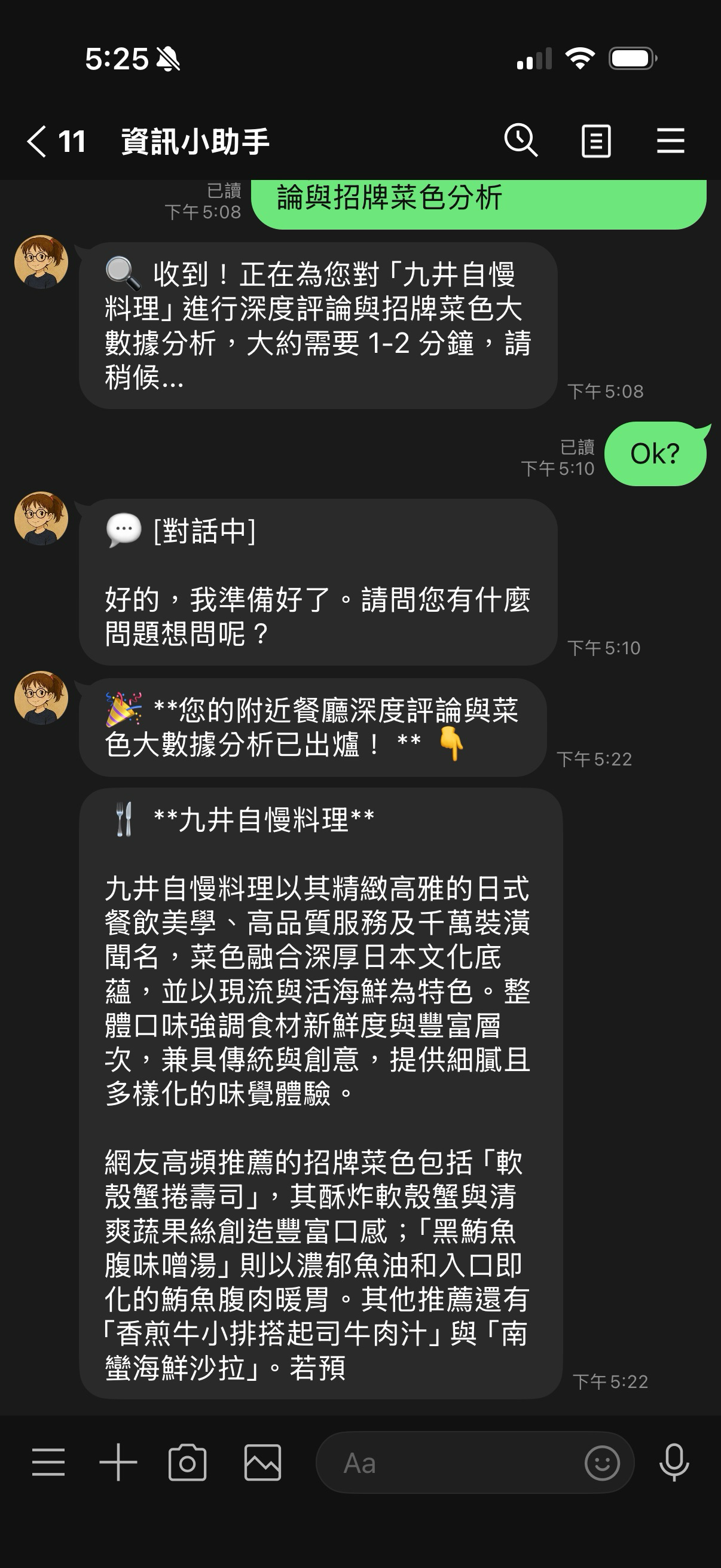
During the process of connecting this dynamic Quick Reply to the Batch API, we encountered several critical UX and API limitation issues:
Pitfall One: LINE 20-character Limit Causing API Sending Errors
Initially, when implementing, we directly used the full restaurant name in the button's Label, for example: 🍴 Analyze Love Hot Pot Ultimate Hot Pot. As a result, the LINE API immediately returned a 400 error, and the message could not be sent at all:
LineBotApiError: status_code=400, error_message=The property 'label' must be less than 20 characters.
[Cause Analysis and Solution] LINE's official label limit for Quick Reply is extremely strict; including emojis and spaces, it can have a maximum of 20 characters. To address this, we added a character count check and dynamic truncation mechanism in our code:
- First, the original restaurant name (
clean_label) is truncated: if its length exceeds 10 characters, it is forcibly cut to the first 9 characters and appended with "…" (occupying 10 characters). - Adding the prefix
🍴 Analyze(a total of 5 characters), the maximum total length becomes 15 characters, safely staying within the 20-character limit, thus eliminating the error!
Pitfall Two: Batch API Asynchronous Delay and LINE Webhook's "Three-Second Timeout Survival Battle"
When a user clicks the "Analyze Restaurant" button, the Bot must first call Google Search Grounding to collect online reviews for that restaurant, then package the JSONL file and upload it to Gemini to submit the Batch task. This entire sequence usually takes 3 to 8 seconds. However, the LINE Webhook server requires the Bot to return an HTTP 200 OK response within 3 seconds, otherwise it will be deemed a connection failure and re-send the request, leading to severe server congestion.
[Cause Analysis and Solution] We completely asynchronous the processing architecture:
- Fast Response: When the Bot intercepts a
specific_foodie_deep_analysisPostback action, it does not execute the analysis directly within the Request flow. Instead, it immediately calls LINE'sreply_messageto respond to the user:🔍 Received! Performing deep analysis for you... This will take about 1-2 minutes..., and then instantly returns HTTP 200 to end that Webhook request. - Background Task Dispatch: Use Python
asyncio.create_taskto dispatch heavy network search, upload, and submission tasks to FastAPI's background Worker for execution. - Big Data Push: When the background Polling listener or Gemini Webhook receives a task completion notification, it then uses LINE's
push_messageto proactively send the analysis report to the specific user.
Pitfall Three: Gemini Batch API's Queuing and Pending Status
During testing, users sometimes got confused, "Why hasn't there been a reply after three minutes? Is the Bot down?". After checking the system logs, we found that our JSONL file had been successfully uploaded, but the task status on the Gemini server side was stuck at JobState.JOB_STATE_PENDING.
[Solution] This is a characteristic of the Batch API; tasks need to be queued, waiting for Google's server resources. We adopted two major optimizations:
- Minimize Workload: Reduce the number of restaurants for batch analysis to 1, shrinking the number of request lines in the JSONL to the extreme, to speed up Gemini's scheduling and processing.
- UX Optimization and Deduplication Mechanism: When a user clicks to analyze, we first check if that user already has a Batch Job running. If so, we reply:
⏳ Your deep analysis task is currently running, please wait patiently, preventing users from submitting multiple duplicate Batch Jobs due to anxious repeated clicks, which would consume unnecessary resources.
Results and Benefits
This optimization of Quick Reply and Gemini Batch API for the LINE Bot Restaurant Assistant has achieved excellent practical value:
- Highly Customized Mobile Experience: After locating, users don't need to type; they can directly click on a restaurant of interest with one tap to precisely get a summary of its signature dishes and review pain points.
- Robust Backend Architecture: By leveraging asynchronous background tasks and LINE's character limit safety valve, the risks of Webhook timeouts and LINE API errors have been completely resolved.
- Cost Advantage for Big Data Processing: Through the Batch API's half-price advantage and Webhook's proactive callback, while ensuring user experience, it also saves significant computing resources and API costs for the server.
Through this architecture, the LINE Bot truly achieves a low-latency, highly stable big data deep analysis experience on mobile!
All development code for this project has been open-sourced on GitHub: kkdai/linebot-helper-python. Everyone is welcome to deploy and personally test this one-click analysis function, which we believe can bring a higher level of intelligent experience to your LINE Bot projects!
Comments
More Blog
View allaiContext bankruptcy: The case for strategic forgetting for AI Agents
Most of us have seen a coding agent fail to complete a task we know it can do. We just don't...
J
James O'ReillygooglecloudParallel Compliance Engine: Drive-to-Sheets Multi-Agent Orchestration
When building Generative AI applications, developers often encounter a massive bottleneck: sequential...
A
Aryan IranidiscussIs It Ethical to Post and Ask About Circuits on Dev.to?
I’ve been thinking about sharing some electronic circuit posts on Dev.to — small circuits, DIY...
C
codebunny20agentsThe One-Click Exporter: AI Studio Antigravity, Probed to Its Limits
What nobody tells you about exporting your multi-agent prototype to a local workspace. Every...
L
leslysandraagenticarchitectGuarding the till while autonomous data agents do the digging
Autonomous agents are genuinely good at answering messy business questions. Give one an LLM and a set...
S
Sireesha PulipatiaiReturn on Attention: Why AI Code Reviews Are Wearing Us Out
PR volume went up, ticket quality didn't, and the gap got filled with LLMs on both sides of the review: bots reviewing, bots replying, bots occasionally arguing with bots about priorities that only existed in a teammate's head. Our CEO named the actual problem, and it's bigger than code review.
C
christineReady-made automations for this
Workflows from the Neura Market marketplace related to this Stable Diffusion resource
- Asynchronous Bulk Web Scraping with Bright Data & Webhook Notificationsn8n · Free · Related topic
- Mitigate Google Sheets API Quota Errors with Batch Processingn8n · Free · Related topic
- Automate Weekly Restaurant Forecasting with Google Sheets and Gemini AIn8n · Free · Related topic
- Learn JavaScript Data Processing with CodeNode: Filtering, Analysis, & Export Examplesn8n · Free · Related topic