
Back to Blog![Migrate to Firebase Server Prompt Template in Angular using Dependency Injection [GDE]](https://media2.dev.to/dynamic/image/width=1000,height=420,fit=cover,gravity=auto,format=auto/https%3A%2F%2Fdev-to-uploads.s3.amazonaws.com%2Fuploads%2Farticles%2Fodtswm0h0q0k2wyrvfsm.jpg) angular
angular
 ai
ai googlecloud
 discuss
 agents
 agenticarchitect
 ai
ai
Migrate to Firebase Server Prompt Template in Angular using Dependency Injection [GDE]
Connie Leung June 15, 2026
0 views
Migrate to Firebase Server Prompt Template in Angular using Dependency Injection Firebase...
Migrate to Firebase Server Prompt Template in Angular using Dependency Injection
Firebase released Server Prompt Templates to host prompt templates in its infrastructure. The template follows the DotPrompt format and syntax, so the content can have one or more of the following:
- Model name
- Model configuration
- Input validation and schema
- Output schema
- Tool user
- System instruction
- User prompt
Moreover, the team offers the TemplateGenerativeModel class, which allows engineers to call either the generateContent or generateContentStream method with a template ID and optional template variables to generate responses. This simplifies the process of constructing text and inline data parts programmatically, passing the parts array and the generation configuration to GenerativeModel to obtain the same results.
Server Prompt Templates resolve several key enterprise AI pain points.
| Pain Point | Description |
|---|---|
| Better Security | The prompt text is stored in the server side, so it cannot be exposed in the network call. Users cannot open the Network tab of the Chrome browser and inspect the prompt text in the payload. |
| Better Guardrail | Prompt texts are not revealed, so malicious users cannot modify the prompt easily to trigger prompt injection and other attacks to Gemini models |
| No Prompt Drift | Engineer A edits a prompt locally, forgets to commit, and deploys the code changes. Engineer B uses the old prompt for development, and there are two versions scattered around. Server prompt templates ensure engineers use the same version for development. When the prompt is updated on the server, it is propagated to all instances of the client application. |
| Testing in Console | Engineers can verify the prompts are working in the Firebase Console before writing a line of code. |
| Less Deployments | When prompts are updated in the server side, client applications receive the prompt updates without redeployment. |
I have listed the benefits of Firebase AI Logic Server Prompt Templates. Next, I will demonstrate how to migrate an existing prompt to use Server Prompt Templates in Angular using Dependency Injection.
Note: Currently, Firebase AI Logic Server Prompt Template is in Preview, please do not use it in production until it reaches General Availability (GA) status. However, it is an interesting technology to explore.
1. Prerequisites
- Angular 19
- TailwindCSS
- Node 22
- gemini-3.1-flash-image (also known as Nano Banana 2)
- Firebase AI Logic
- Firebase Cloud Functions
- Firebase Remote Config
- Firebase Local Emulator Suite
npm i -g firebase-tools
Install firebase-tools globally using npm.
firebase logout
firebase login
Log out of Firebase and re-login to perform proper Firebase authentication.
firebase init
Execute firebase init and follow the screens to set up Firebase Cloud Function, Firebase Local Emulator Suite and Firebase Remote Config.
If you have an existing project or multiple projects, you can specify the project ID on the command line.
firebase init --project <PROJECT_ID>
After completing the step-by-step, the Firebase tools will generate function and remote config templates, and configuration files such as .firebaserc and firebase.json.
The next section has the details of the implementation repository.
2. Source Code
The full source code for this project is available in the NG Firebase AI Nano Banana, however, the following sections describe the code changes made to migrate to Firebase Server Prompt Templates.
3. Architecture
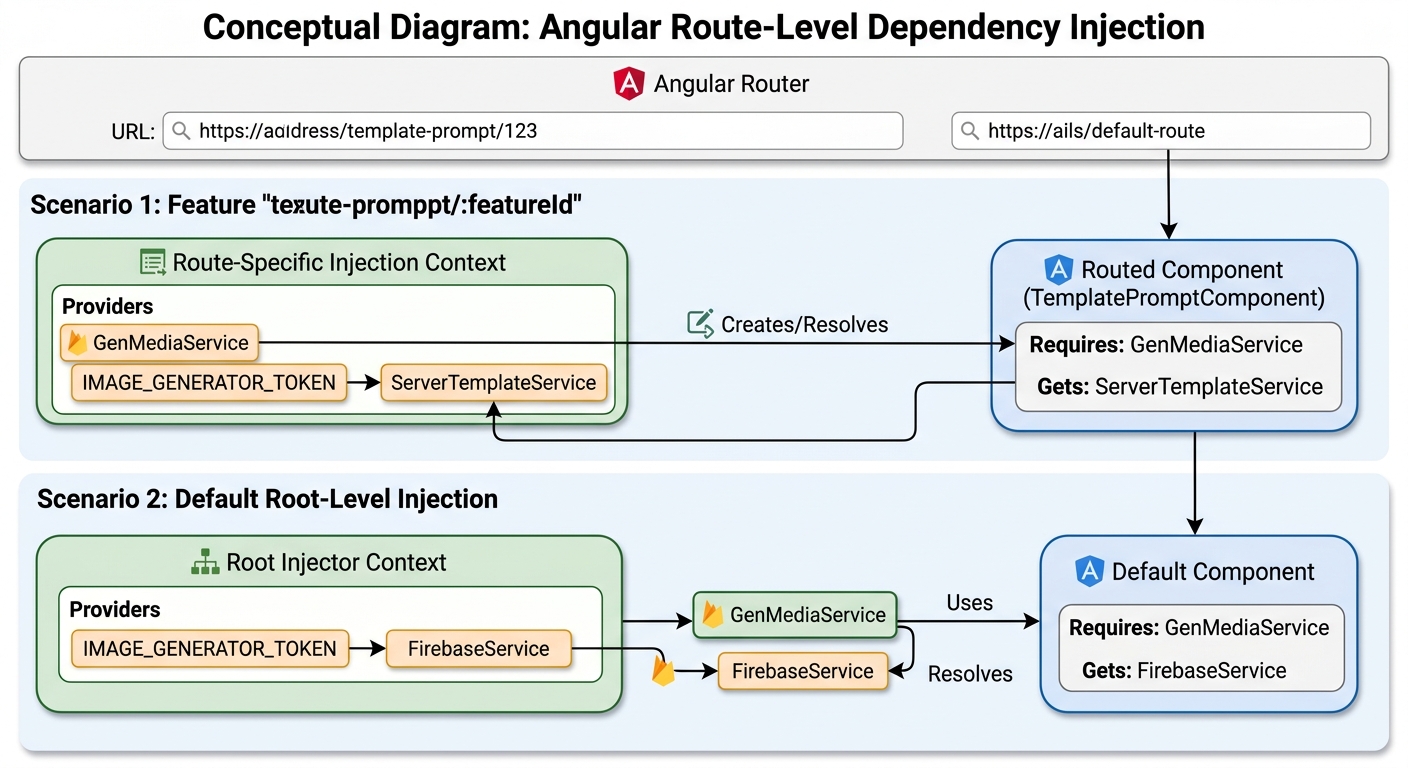
The application matches the URL paths and routes to different components. When the URL path matches template-prompt/:featureId, the route creates GenMediaService at the route level and injects IMAGE_GENERATOR_TOKEN using the route's injection context. The token is mapped to ServerTemplateService. On the other hand, other routes use the GenMediaService in the root injector and inject a global IMAGE_GENERATOR_TOKEN that maps to FirebaseService. The implementation will be shown later in the blog.
4. Server Prompt Template Creation
You can create a server prompt template in the Firebase Console. This guide assumes an existing Firebase project named vertexai-firebase. Click "AI Logic" from the left sidebar, and click the "Prompt templates (PREVIEW)" tab.
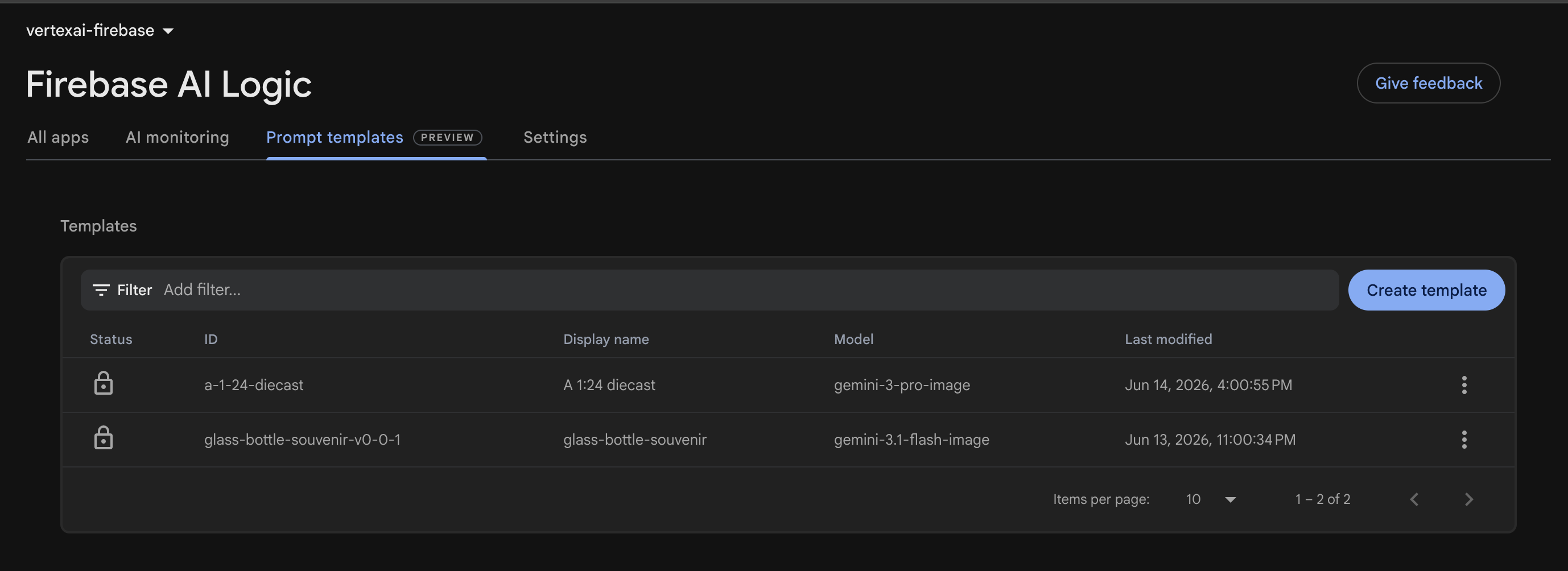
Users can click the Create Template button to create a new prompt on the server side.
A template is configured to generate a glass bottle image from inline image data. The unique template ID is glass-bottle-souvenir-v0-0-1, and the template name is glass-bottle-souvenir.
4.1. Model Configuration
---
model: "gemini-3.1-flash-image"
config:
  candidateCount: 1
  safetySettings:
    - category: HARM_CATEGORY_HARASSMENT
      threshold: BLOCK_ONLY_HIGH
    - category: HARM_CATEGORY_HATE_SPEECH
      threshold: BLOCK_ONLY_HIGH
    - category: HARM_CATEGORY_SEXUALLY_EXPLICIT
      threshold: BLOCK_ONLY_HIGH
    - category: HARM_CATEGORY_DANGEROUS_CONTENT
      threshold: BLOCK_ONLY_HIGH
input:
  schema:
    inlineImages?(array, inline image data):
      type: object
      properties:
        mimeType: string
        data: string  # inline data must be base64-encoded
    aspectRatio?: string, the aspect ratio of the image
    resolution?: string, the resolution of the image
---
The configuration specifies the model name, model configuration, and input schema and validations.
| Section | Configuration | Description |
|---|---|---|
| model | gemini-3.1-flash-image | The Gemini model name of Nano Banana 2. |
| config | candidateCount: 1 | The model returns at most 1 image |
| safetySettings | BLOCK_ONLY_HIGH | Safety category of harassment, hate speech, sexually explicit content, and dangerous content |
| input | schema | Input schema and validation |
This prompt expects an array of inlineImages of type object. Each inline image contains a MIME type and inline data. Moreover, the prompt accepts an optional aspect ratio and resolution.
4.2. System Instructions
The prompt parts has {{role "system"}} syntax to specify the system instructions, and {{role "user"}} to specify the user prompt.
{{role "user"}}
A 1/7 scale commercialized collectible ... with realistic lighting and shadows.
{{#if aspectRatio}}
Apply this aspect ratio to the image: {{aspectRatio}}.
{{/if}}
{{#if resolution}}
Apply this resolution to the image: {{resolution}}.
{{/if}}

{{#each inlineImages}}
  {{media type="mimeType" data="data"}}
{{/each}}
The user prompt generates a souvenir glass bottle image from the uploaded inline image.
When the aspect ratio is provided, "Apply this aspect ratio to the image: {{aspectRatio}}." is appended to the prompt.
When the resolution is provided, "Apply this resolution to the image: {{resolution}}." is appended to the prompt.
The loop iterates the inlineImages list to specify the mime type and the inline data.
4.3. Testing the Prompt in Firebase Console
// Prompt Input
{
   "inline_images": [{
    "mime_type": "image/png",
    "contents": "iVBORw0KGgoAAAANSUhEUgAAARAAAABcCAYAAACm+q2AAAXGElEQVR4Ae1dC5QcVZm..."
  }],
   "aspectRatio": "4:1",
   "resolution": "512"
}
The prompt input includes an image, aspect ratio, and resolution for testing before writing a line of code.
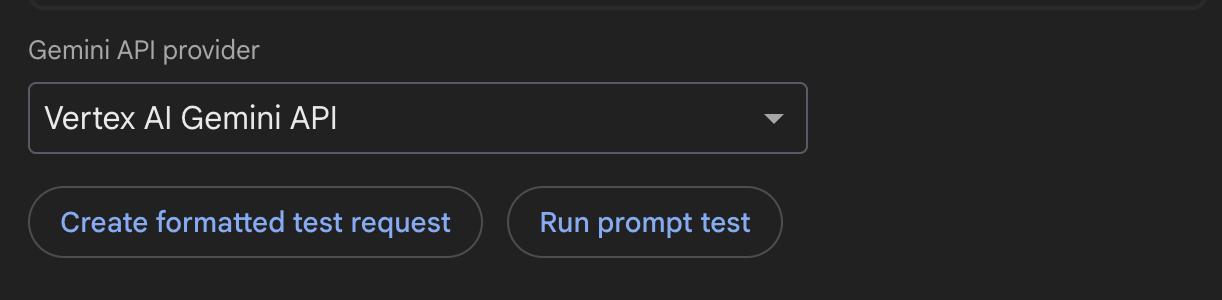
In the Firebase UI Console, choose the Gemini API provider from the dropdown list. The Create formatted test request button allows users to verify the request is correct before the actual execution. The Run prompt text button executes the request to generate a 512px and 4:1 image.
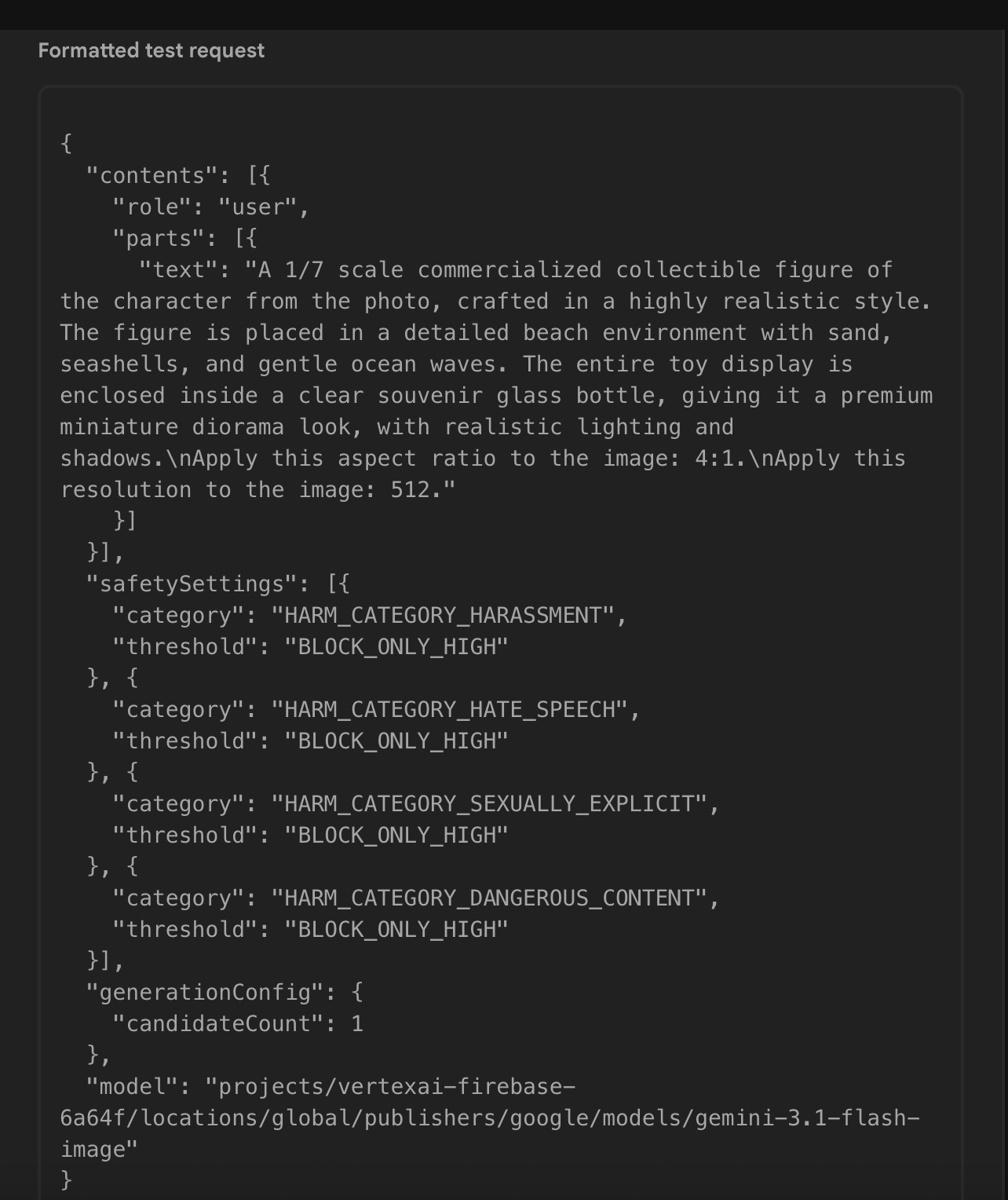
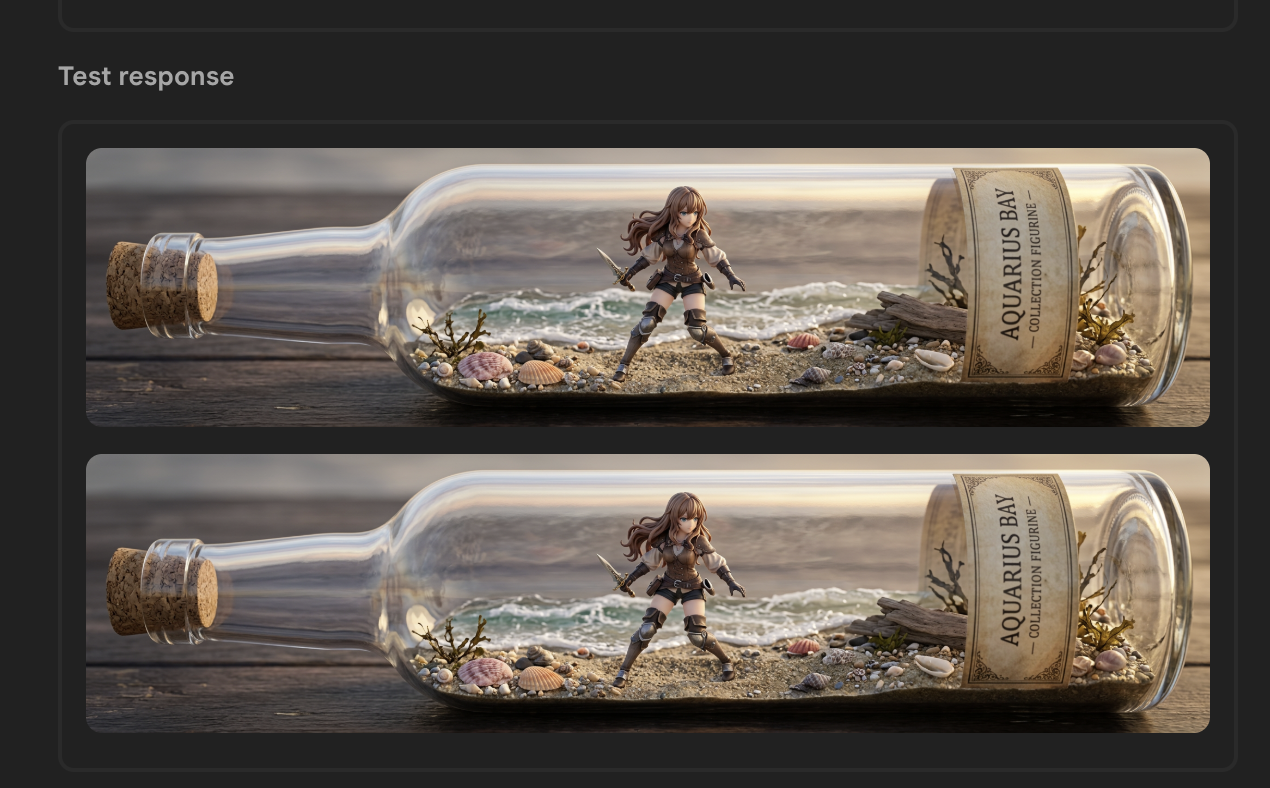
The test request generates a souvenir glass bottle with the expected aspect ratio.
Next, I will define two new injection tokens: the first one injects an image generator and the second one injects a TemplateGenerativeModel. I also create a new Server Prompt Template service to generate an image based on the template ID and template variables.
5. Server Prompt Template Service Implementation
5.1. Image Generator Interface
export type BaseGenerateParam = {
  aspectRatio?: string;
  resolution?: string;
  imageFiles: File[];
}

export type GenerateImageParam = BaseGenerateParam &  {
  prompt?: string;
  templateId?: string;
}
The GenerateImageParam type provides aspect ratio, resolution, uploaded images, and template ID to the Gemini model to generate an image.
export type ImageResponseWithoutId = {
  data: string;
  mimeType: string;
  inlineData: string;
}

export type ImageResponse = ImageResponseWithoutId & {
  id: number;
}

export type ImageTokenUsage = {
  image: ImageResponse,
}
The ImageTokenUsage type stores inline image data, mime type, and a dummy image ID.
import { GenerateImageParam } from '@/features/ai/types/generate-image-param.type';
import { ImageTokenUsage } from '@/features/ai/types/image-response.type';

export interface ImageGenerator {
  generateImage(param: GenerateImageParam): Promise<ImageTokenUsage | undefined>;
}
ImageGenerator interface is a contract that must implement a generateImage method to accept a GenerateImageParam parameter and output a promise of ImageTokenUsage or undefined.
5.2. Injection Token for Image Generator
import { FirebaseService } from '@/features/ai/services/firebase.service';
import { ImageGenerator } from '@/shared/ui/gen-media/interfaces/image-generator.interface';
import { InjectionToken, inject } from '@angular/core';

export const IMAGE_GENERATOR_TOKEN = new InjectionToken<ImageGenerator>('IMAGE_GENERATOR_TOKEN', {
  providedIn: 'root',
  factory: () => inject(FirebaseService)
});
The IMAGE_GENERATOR_TOKEN injection token uses the factory function to inject FirebaseService by default. It can be overridden to use the ServerTemplateService when the URL path is template-prompt/:featureId.
5.3. Injection Token for Server Template Model
import { InjectionToken } from '@angular/core';
import { AI, TemplateGenerativeModel } from 'firebase/ai';

export const SERVER_TEMPLATE_MODEL = new InjectionToken<TemplateGenerativeModel>('SERVER_TEMPLATE_MODEL');
The SERVER_TEMPLATE_MODEL injection token injects an instance of TemplateGenerativeModel
Then, the provideFirebase function is updated to instantiate a TemplateGenerativeModel and provide it.
export function provideFirebase() {
    return makeEnvironmentProviders([
        {
          provide: VERTEX_AI_BACKEND,
          useFactory: () => {
            const configService = inject(ConfigService);
            const vertexAILocation = getValue(configService.remoteConfig, 'vertexAILocation').asString();
            const ai = getAI(configService.app, {
              backend: new VertexAIBackend(vertexAILocation)
            });

            return ai;
          }
        },
        {
          provide: SERVER_TEMPLATE_MODEL,
          useFactory: () => {
            const ai = inject(VERTEX_AI_BACKEND);
            return getTemplateGenerativeModel(ai);
          }
        }
    ]);
}
5.4. Server Prompt Template Service
export async function makeTemplateVariables({ imageFiles, aspectRatio, resolution }: GenerateImageParam) {
  const imageParts = await resolveImageParts(imageFiles);
  const inlineImages = imageParts.map(part => part.inlineData);
  return {
    inlineImages,
    aspectRatio,
    resolution
  }
}
The makeTemplateVariables function converts Files[] to an array of inline image data before returning an object of inline images, aspect ratio, and resolution.
function processImageGeneratedContent(result: GenerateContentResult): ImageTokenUsage {
  const response = result.response;
  const inlineDataParts = response.inlineDataParts();

  if (inlineDataParts?.length) {
    const images = inlineDataParts.map(({inlineData}, index) => {
      const { data, mimeType } = inlineData;
      return {
        id: index,
        mimeType,
        data,
        inlineData: `data:${mimeType};base64,${data}`
      };
    });

    if (images.length <= 0) {
      throw new Error('Error in generating the image.');
    }

    return {
      image: images[0],
    };
  }

  throw new Error('Error in generating the image.');
}

export async function getTemplateBase64Images({ model, templateId, templateVariables }: TemplateImageOptions): Promise<ImageTokenUsage> {
  const result = await model.generateContent(templateId, templateVariables);
  return processImageGeneratedContent(result);
}
The getTemplateBase64Images function uses the model to generate an image, calls processImageGeneratedContent to post-process the result, and returns the ID, MIME type, inline data, and Base64-encoded string.
import { SERVER_TEMPLATE_MODEL } from '@/features/ai/constants/firebase.constant';
import { GenerateImageParam } from '@/features/ai/types/generate-image-param.type';
import { ImageTokenUsage } from '@/features/ai/types/image-response.type';
import { getTemplateBase64Images } from '@/features/ai/utils/generate-image.util';
import { makeTemplateVariables } from '@/features/ai/utils/inline-image-data.util';
import { inject, Injectable } from '@angular/core';

@Injectable({
  providedIn: 'root'
})
export class ServerTemplateService  {
    private readonly serverTemplateModel = inject(SERVER_TEMPLATE_MODEL);

    async generateImage(genImageParameter: GenerateImageParam): Promise<ImageTokenUsage | undefined> {
        const { templateId } = genImageParameter;
        if (!templateId) {
          return undefined;
        }

        const templateVariables = await makeTemplateVariables(genImageParameter);
        return getTemplateBase64Images({
          model: this.serverTemplateModel,
          templateId,
          templateVariables,
        });
    }
}
The ServerTemplateService fulfills the contract of ImageGenerator and implements generateImage to call serverTemplateModel.
6. Angular Route Definition
import { ServerTemplateService } from '@/features/ai/services/server-template.service';
import { IMAGE_GENERATOR_TOKEN } from '@/shared/ui/gen-media/constants/image-generator.token';
import { GenMediaService } from '@/shared/ui/gen-media/services/gen-media.service';
import { Routes } from '@angular/router';

export const routes: Routes = [
  {
    path: 'predefined-prompt/:featureId',
    loadComponent: () => import('./features/predefined-prompt-editor/predefined-prompt-editor.component'),
  },
  {
    path: 'template-prompt/:featureId',
    loadComponent: () => import('./features/predefined-prompt-editor/predefined-prompt-editor.component'),
    providers: [
      GenMediaService,
      { provide: IMAGE_GENERATOR_TOKEN, useExisting: ServerTemplateService }
    ],
  },
  ... other routes ...
];
The routes array specifies a list of paths to route to different components to demonstrate use cases of image generation. The PredefinedPromptEditorComponent consists of an uploader that allows users to upload at least one image to prompt gemini-3.1-flash-image to generate a new image.
Use this component in two scenarios: programmatically passing the prompt text, or using Firebase Server Prompt Templates.
When the path is predefined-prompt/:featureId, the prompt text is submitted to gemini-3.1-flash-image directly. When the path is template-prompt/:featureId, the server prompt template is used.
In the former case, the component uses the FirebaseService that IMAGE_GENERATOR_TOKEN provides in its factory function. In the latter case, the route creates an instance of GenMediaService and does not use the global one. It also provides ServerTemplateService to IMAGE_GENERATOR_TOKEN.
@Injectable({
  providedIn: 'root'
})
export class GenMediaService {
  private readonly imageGenerator = inject(IMAGE_GENERATOR_TOKEN);

  ... the rest of the service ...
}
When GenMediaService injects IMAGE_GENERATOR_TOKEN, imageGenerator is mapped to the ServerTemplateService instead of FirebaseService.
Next, update the navigation menu to use /template-prompt/bottle to call the new template.
7. Update the Navigation Menu
"modeling": {
    "figurine": {
      "path": "/predefined-prompt/figurine",
      "customPrompt": "... custom prompt ..."
    },
    "bottle": {
      "path": "/template-prompt/bottle",
      "templateConfigName": "glassBottleSouvenirTemplateId"
    },
  }
In the features JSON file, the path of bottle is updated to /template-prompt/bottle. Delete customPrompt and add templateConfigName to store the Firebase Remote Config name.

glassBottleSouvenirTemplateId references the template Id, glass-bottle-souvenir-v0-0-1, to load the template to generate the image.
When the Angular application makes the request to Firebase AI Logic, the network payload does not reveal the prompt text.
8. Verify the Network Request
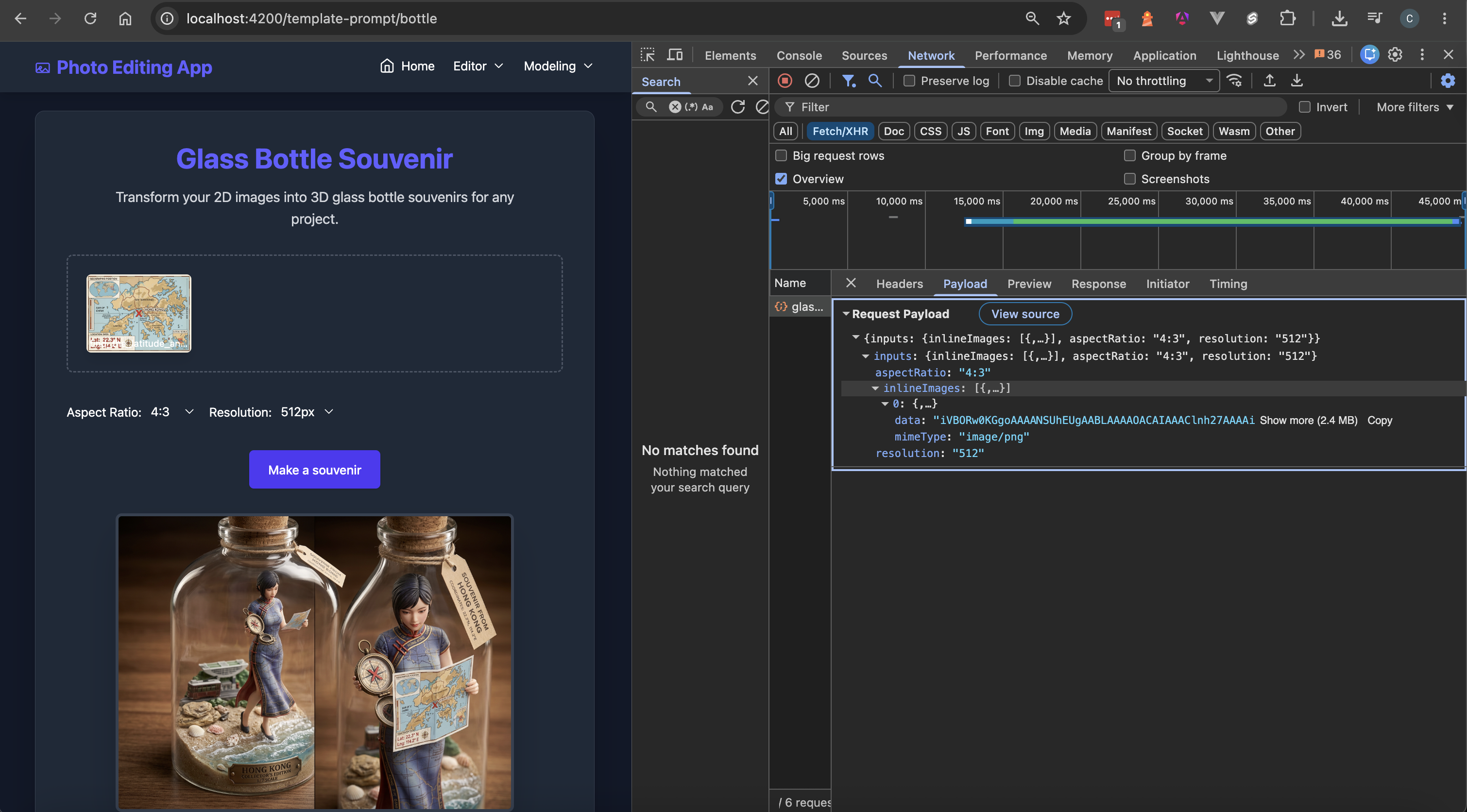
The network payload includes the aspect ratio, resolution, and inline image data. Firebase hides the prompt text, preventing it from being stored as a static value in the JSON file. If prompt text is sensitive data of an application, it is secured in the Firebase's infrastructure.
9. Conclusion
This concludes the journey of migrating the static prompt text to Firebase AI Logic Server Prompt Template.
After the migration, the Angular application does not require redeployment when the server prompt is modified. Users reload the page and they can use the latest prompt to generate images.
Engineers can build AI applications with Firebase AI Logic Server Prompt Templates to perform tasks beyond image generation, such as summarization, text generation, and tool use via Google Search and Google Maps.
Resources
Comments
More Blog
View allaiContext bankruptcy: The case for strategic forgetting for AI Agents
Most of us have seen a coding agent fail to complete a task we know it can do. We just don't...
J
James O'ReillygooglecloudParallel Compliance Engine: Drive-to-Sheets Multi-Agent Orchestration
When building Generative AI applications, developers often encounter a massive bottleneck: sequential...
A
Aryan IranidiscussIs It Ethical to Post and Ask About Circuits on Dev.to?
I’ve been thinking about sharing some electronic circuit posts on Dev.to — small circuits, DIY...
C
codebunny20agentsThe One-Click Exporter: AI Studio Antigravity, Probed to Its Limits
What nobody tells you about exporting your multi-agent prototype to a local workspace. Every...
L
leslysandraagenticarchitectGuarding the till while autonomous data agents do the digging
Autonomous agents are genuinely good at answering messy business questions. Give one an LLM and a set...
S
Sireesha PulipatiaiReturn on Attention: Why AI Code Reviews Are Wearing Us Out
PR volume went up, ticket quality didn't, and the gap got filled with LLMs on both sides of the review: bots reviewing, bots replying, bots occasionally arguing with bots about priorities that only existed in a teammate's head. Our CEO named the actual problem, and it's bigger than code review.
C
christineReady-made automations for this
Workflows from the Neura Market marketplace related to this Stable Diffusion resource
- Receive ISS Position Updates and Push to Firebasen8n · $9.99 · Related topic
- Real-Time ISS Position Updates via Google Firebase Webhookn8n · $8.33 · Related topic
- GPT-4O Security Defense Against Prompt Injection Attacksn8n · $24.99 · Related topic
- Awork Task Dependency Checker (Workaround for Completion)n8n · $12.99 · Related topic