
Back to Blog security
 ai
ai googlecloud
 discuss
 agents
 agenticarchitect
 ai
ai
Securely Exposing Internal GCP VMs using Cloudflare Tunnels
Alexander Tyutin June 16, 2026
0 views
Exposing a web service to the public internet typically involves assigning a public IP address to the...
Exposing a web service to the public internet typically involves assigning a public IP address to the Virtual Machine, opening firewall ports (e.g., 80/443), and configuring TLS certificates. However, this traditional approach leaves the infrastructure vulnerable to port scanning, DDoS attacks, and zero-day exploits.
A more modern, secure, and elegant approach is to use a Cloudflare Tunnel (cloudflared) combined with a GCP VM that has no external IP address.
This article explains the architecture, security benefits, step-by-step implementation, and troubleshooting for this approach.
1. The Architecture
Instead of accepting incoming connections (Ingress), the cloudflared daemon runs on the VM and establishes an outbound-only, encrypted, long-lived QUIC connection to the Cloudflare Edge network.
When a client visits the configured domain, Cloudflare proxies the request through this established tunnel directly to the internal service.
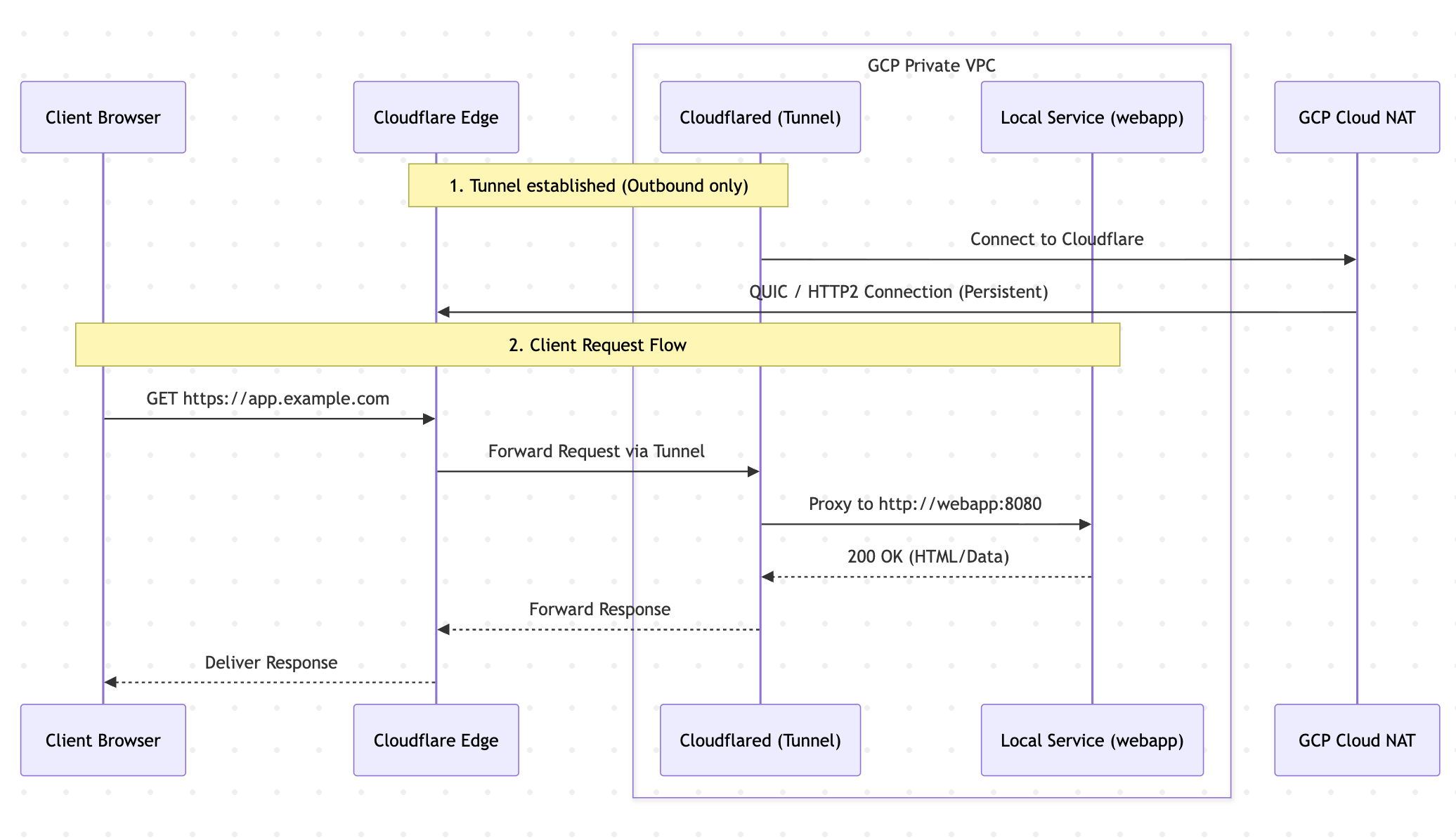
Benefits of this architecture
- No Ingress Firewall Rules: There is no need to open port 80 or 443 in the GCP VPC firewall.
- No Public IP: The VM is invisible to the public internet. It cannot be pinged or port-scanned.
- Automatic SSL/TLS at the Edge: While end-to-end encryption (HTTPS everywhere) is advocated as a best practice, this guide configures the internal traffic between
cloudflaredand the target service as plain HTTP for simplicity. Cloudflare handles the public-facing HTTPS certificates automatically, simplifying the initial setup. - Out-of-the-box DDoS Protection: Cloudflare absorbs volumetric attacks before they ever reach the GCP infrastructure.
2. GCP VM Security Measures
When designing a secure VM without an external IP, the following GCP-specific security measures should be implemented:
A. Networking (Cloud NAT)
Since the VM has no public IP, it cannot access the internet directly. However, cloudflared needs internet access to connect to Cloudflare, and the VM needs internet to pull updates or Docker images.
- Solution: Set up a Cloud Router and Cloud NAT in the VPC. This allows outbound internet access for internal VMs while blocking all inbound internet connections.
B. Shielded VM Features
Enable Shielded VM options to protect the boot process and kernel integrity:
- Secure Boot: Ensures the system only boots authentic, digitally signed software.
- vTPM (Virtual Trusted Platform Module): Validates the VM's identity and provides secure key generation.
- Integrity Monitoring: Generates alerts if the boot sequence is tampered with.
C. Identity and API Access
- Dedicated Service Account: Avoid using the default Compute Engine service account. Create a custom service account with the absolute minimum permissions required.
- Metadata Security: Ensure
disable-legacy-endpoints = truein the instance metadata to prevent Server-Side Request Forgery (SSRF) attacks from extracting GCP credentials from the metadata server.
D. Secure SSH Access (IAP)
Since there is no public IP, standard SSH over the internet is impossible.
- Solution: Use Identity-Aware Proxy (IAP) TCP Forwarding. IAP validates Google Identity and IAM permissions before tunneling the SSH connection through GCP's internal backbone to the VM.
3. Step-by-Step Implementation
Step 1: Provisioning the Cloudflare Tunnel
- Navigate to the Cloudflare Zero Trust Dashboard -> Networks -> Tunnels.
- Create a new tunnel and select Cloudflared.
- Add a Public Hostname (e.g.,
app.example.com) and point it to the internal service (http://webapp:8080). - Copy the generated Tunnel Token.
Step 2: Infrastructure Configuration (Docker Compose)
Docker Compose can be used to run both the service and the cloudflared daemon in the same isolated bridge network.
version: '3.8'

services:
  webapp:
    image: your-company/webapp:latest
    restart: always
    environment:
      - APP_ENV=production
      # Listen on all interfaces inside the container, but expose NO ports to the host
      - LISTEN_ADDRESS=0.0.0.0

  cloudflared:
    image: cloudflare/cloudflared:latest
    restart: always
    # CRITICAL: Prevent zombie processes by running tini as PID 1
    init: true
    command: tunnel --no-autoupdate run
    environment:
      - TUNNEL_TOKEN=your_secret_token_here
    depends_on:
      - webapp
Note: Notice there is no ports: ["8080:8080"] mapped to the host. The cloudflared container reaches the web app entirely within the internal Docker network via http://webapp:8080.
Step 3: Run the stack
docker-compose up -d
Within seconds, cloudflared will connect to the Cloudflare Edge, and the site will be securely accessible.
4. Diagnostics & Troubleshooting
When diagnosing connectivity issues, the non-standard traffic flow requires a systematic approach.
A. Diagnosing the Edge (Cloudflare)
A 502 Bad Gateway error indicates that Cloudflare Edge cannot reach the cloudflared tunnel, OR cloudflared cannot reach the target container.
# Check the HTTP response from the outside
curl -I https://app.example.com
B. Diagnosing the Host & Services
Before diving into logs, verify the overall health and resource consumption of the host and Docker containers.
# Check container uptime, status, and IDs
sudo docker ps -a

# Check memory and CPU usage (crucial for diagnosing OOM freezes)
sudo docker stats --no-stream

# Look for stray processes outside of Docker
sudo ps aux | grep cloudflared
sudo systemctl status webapp.service
C. Diagnosing the Tunnel (Cloudflared)
Verify that cloudflared is running and successfully connected to the Edge:
sudo docker logs --tail 50 <cloudflared_container_id>
Look for: INF Registered tunnel connection or ERR Unable to reach the origin service.
D. Verifying Internal Docker Connectivity
Verify that the service is actually alive and responding to the tunnel's requests. Simulate the tunnel's behavior by running a temporary curl container inside the same Docker network:
# Replace 'app_default' with the actual docker network name
sudo docker run --rm --network app_default curlimages/curl -s -I -m 5 http://webapp:8080
If this returns 200 OK, the service is healthy, and the issue lies in the Tunnel or Cloudflare configuration.
5. Common Failures & Edge Cases
[!WARNING] The Zombie Process (Duplicate Connectors) When updating or restarting containers (
docker-compose down && docker-compose up), Docker sends aSIGTERMtocloudflared. Occasionally, the process ignores the signal, and Docker forcefully orphans it. The process remains alive in the host OS's memory, continuing to send keep-alives to Cloudflare.Symptom: Cloudflare load-balances traffic between the new healthy container and the old "zombie" process. 50% of incoming requests will randomly return a 502 Bad Gateway. Fix:
- Find the zombie:
sudo ps aux | grep cloudflared- Kill the duplicate PIDs:
sudo kill -9 <PID>- Prevention: Always add
init: trueto thecloudflaredservice indocker-compose.yml. This forces Docker to use a proper init system (Tini) as PID 1, which reliably reaps and kills child processes.
[!CAUTION] OOM (Out of Memory) Hangs If the VM lacks sufficient memory (e.g., using an
e2-microwith 1GB RAM for a heavy Node.js app), the application may freeze without the container crashing. The status will showUp X minutes, but the application's event loop is blocked.Symptom:
cloudflaredcannot proxy requests, Cloudflare times out after 15 seconds, and returns a 502. Running the diagnostic internalcurlcommand will hang indefinitely. Fix: Increase the VM machine type (e.g., toe2-medium4GB) or configure swap space.
[!NOTE] Protocol Mismatch (HTTP vs HTTPS) While end-to-end HTTPS is the recommended best practice, this guide uses plain HTTP internally for simplicity. If a protocol mismatch occurs, connectivity will fail.
- If the internal service expects HTTPS, but
cloudflaredsends HTTP, the connection will be dropped immediately.- If
cloudflaredis configured to send HTTPS, it will fail if the internal service presents an untrusted/self-signed certificate (unless configured to skip TLS verification).Ensure the protocol configured in the Cloudflare Zero Trust Dashboard perfectly matches what the internal container expects.
Comments
More Blog
View allaiContext bankruptcy: The case for strategic forgetting for AI Agents
Most of us have seen a coding agent fail to complete a task we know it can do. We just don't...
J
James O'ReillygooglecloudParallel Compliance Engine: Drive-to-Sheets Multi-Agent Orchestration
When building Generative AI applications, developers often encounter a massive bottleneck: sequential...
A
Aryan IranidiscussIs It Ethical to Post and Ask About Circuits on Dev.to?
I’ve been thinking about sharing some electronic circuit posts on Dev.to — small circuits, DIY...
C
codebunny20agentsThe One-Click Exporter: AI Studio Antigravity, Probed to Its Limits
What nobody tells you about exporting your multi-agent prototype to a local workspace. Every...
L
leslysandraagenticarchitectGuarding the till while autonomous data agents do the digging
Autonomous agents are genuinely good at answering messy business questions. Give one an LLM and a set...
S
Sireesha PulipatiaiReturn on Attention: Why AI Code Reviews Are Wearing Us Out
PR volume went up, ticket quality didn't, and the gap got filled with LLMs on both sides of the review: bots reviewing, bots replying, bots occasionally arguing with bots about priorities that only existed in a teammate's head. Our CEO named the actual problem, and it's bigger than code review.
C
christineReady-made automations for this
Workflows from the Neura Market marketplace related to this Stable Diffusion resource
- Cloudflare Key-Value Database Full API Integration Workflown8n · $14.99 · Related topic
- Automate Cloudflare Webhook Creation and Management with Easen8n · $14.84 · Related topic
- Cloudflare KV Full API Integration Workflown8n · $24.99 · Related topic
- AI-Powered Cloudflare DNS Records Management Assistantn8n · $19.99 · Related topic