
Back to Blog antigravitycli
 ai
ai googlecloud
 discuss
 agents
 agenticarchitect
 ai
ai
Serverless Gemma 12B on Azure Container Apps
xbill June 19, 2026
0 views
This article provides a step by step debugging guide for deploying Gemma 4 to Azure Container Apps. A...
title: Serverless Gemma 12B on Azure Container Apps published: true series: Azure date: 2026-06-19 02:00:12 UTC tags: antigravitycli,aca,mcps,azure canonical_url: https://xbill999.medium.com/serverless-gemma-12b-on-azure-container-apps-e63a9e28e617
This article provides a step by step debugging guide for deploying Gemma 4 to Azure Container Apps. A suite of Python MCP tools is built to simplify management of the vLLM hosted Gemma 4 deployment with Antigravity CLI.

What is this project trying to Do?
This project is a DevOps/SRE assistant that uses a Gemma 4 model hosted on Azure Container APps. It provides tools to provision the Docker container and deploy the model, as well as for observability and performance testing.
This project is similar to a previous project that targeted GPU hosted Gemma4 instances on GCP:
Gemma-SRE: Self-Hosted vLLM Infrastructure Agent
Antigravity CLI
Antigravity CLI is the follow-on successor to Gemini CLI- the terminal driven, agent assisted coding tool.
Full details on installing Antigravity CLI are here:
Getting Started with Antigravity CLI
Testing the Antigravity CLI Environment
Once you have all the tools in place- you can test the startup of Antigravity CLI.
You will need to authenticate with a Google Cloud Project or your Google Account:
agy
This will start the interface:
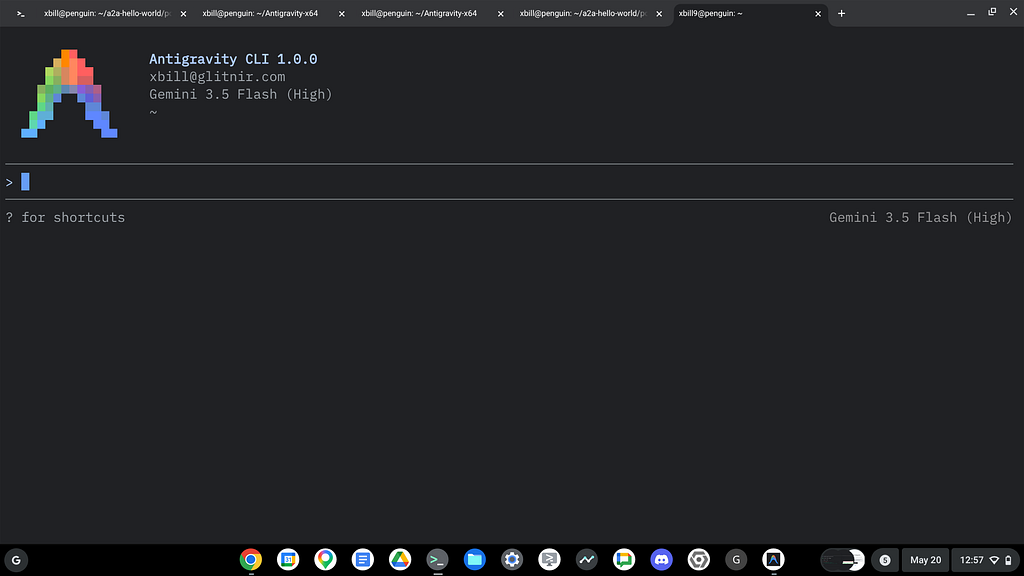
Full Installation Instructions
The detailed installation instructions for Antigravity CLI are here:
Getting Started with Antigravity CLI
Azure CLI
The Azure Command-Line Interface (CLI) is a cross-platform tool used to connect to Azure and execute administrative commands on Azure resources. It allows you to manage services like virtual machines, databases, and networking through a terminal using interactive prompts or scripts. [1, 2, 3]
More details are available here:
What is the Azure Developer CLI?
Azure Container Apps
Azure Container Apps is a fully managed, serverless Kubernetes-based application platform designed for building and deploying modern, containerized apps without managing complex infrastructure. It enables scaling from zero to high demand, supports microservices, and handles event-driven processing with built-in HTTPS and observability.
Full details are available here:
https://azure.microsoft.com/en-us/products/container-apps
Where do I start?
The strategy for starting MCP development for model management is a incremental step by step approach.
First, the basic development environment is setup with the required system variables, and a working Antigravity CLI configuration.
Then, a minimal Python MCP Server is built with stdio transport. This server is validated with Antigravity CLI in the local environment.
This setup validates the connection from Antigravity CLI to the local server via MCP. The MCP client (Antigravity CLI) and the Python MCP server both run in the same local environment.
Setup the Basic Environment
At this point you should have a working Python environment and a working Antigravity CLI installation. The next step is to clone the GitHub samples repository with support scripts:
cd ~
git clone https://github.com/xbill9/gemma4-tips-azure
Then run init.sh from the cloned directory.
The script will attempt to determine your shell environment and set the correct variables:
cd gpu-12B-qat-aca-devops-agent
source init.sh
If your session times out or you need to re-authenticate- you can run the set_env.sh script to reset your environment variables:
cd gpu-12B-qat-aca-devops-agent
source set_env.sh
Variables like PROJECT_ID need to be setup for use in the various build scripts- so the set_env script can be used to reset the environment if you time-out.
Model Management Tool with MCP Stdio Transport
One of the key features that the standard MCP libraries provide is abstracting various transport methods.
The high level MCP tool implementation is the same no matter what low level transport channel/method that the MCP Client uses to connect to a MCP Server.
The simplest transport that the SDK supports is the stdio (stdio/stdout) transport — which connects a locally running process. Both the MCP client and MCP Server must be running in the same environment.
The connection over stdio will look similar to this:
# Initialize FastMCP server
mcp = FastMCP("Self-Hosted vLLM DevOps Agent")
Running the Python Code
First- switch the directory with the Python version of the MCP sample code:
~/gemma4-tips-azure/cd gpu-12B-qat-aca-devops-agent
Run the release version on the local system:
xbill@penguin:~/gemma4-tips-azure/gpu-12B-qat-aca-devops-agent$ make install
pip install -r requirements.txt
Requirement already satisfied: mcp in /home/xbill/.pyenv/versions/3.13.13/lib/python3.13/site-packages (from -r requirements.txt (line 1)) (1.27.2)
Requirement already satisfied: fastmcp in /home/xbill/.pyenv/versions/3.13.13/lib/python3.13/site-packages (from -r requirements.txt (line 2)) (2.11.3)
The project can also be linted:
mxbill@penguin:~/gemma4-tips-azure/gpu-12B-qat-aca-devops-agent$ make lint
ruff check .
All checks passed!
ruff format --check .
7 files already formatted
mypy .
Success: no issues found in 7 source files
xbill@penguin:~/gemma4-tips-azure/gpu-12B-qat-aca-devops-agent$
MCP stdio Transport
One of the key features that the MCP protocol provides is abstracting various transport methods.
The high level tool MCP implementation is the same no matter what low level transport channel/method that the MCP Client uses to connect to a MCP Server.
The simplest transport that the SDK supports is the stdio (stdio/stdout) transport — which connects a locally running process. Both the MCP client and MCP Server must be running in the same environment.
In this project Antigravity CLI is used as the MCP client to interact with the Python MCP server code.
Antigravity CLI mcp_config.json
A sample MCP server file is provided in the .agents directory:
{
  "mcpServers": {
    "gpu-devops-agent": {
      "command": "python3",
      "args": [
        "/home/xbill/gemma4-tips-azure/gpu-12B-qat-aca-devops-agent/server.py"
      ],
      "env": {
        "GOOGLE_CLOUD_PROJECT": "aisprint-491218",
        "MODEL_NAME": "/mnt/models/gemma-4-12B-it-qat-w4a16-ct"
      }
    }
  }
}
Validation with Antigravity CLI
The final connection test uses Antigravity CLI as a MCP client with the Python code providing the MCP server:
MCP Servers

Plugins (~/.gemini/antigravity-cli/plugins)
> ✓ google-dev-knowledge Tools: search_documents, answer_query, get_documents
   ✓ gpu-devops-agent Tools: save_hf_token, get_vllm_endpoint, list_vertex_models, list_bucket_models,
                       analyze_cloud_logging, +25 more
Getting Started with Gemma 4 on GPU
The Official vLLM repo also has Gemma4 specific information:
The Gemma 12B model was just released:
Introducing Gemma 4 12B: a unified, encoder-free multimodal model
What about the QAT Models?
A deep dive into deploying the 12B QAT model is here:
12B Gemma 4 QAT Deployment with NVIDIA L4, Cloud Run, MCP, and Antigravity CLI
Lets Deploy this!
The model was deployed to Standard_NV36ads_A10_v5 backed with a NVIDIA GPU:
> status_azure_vm

● ListDir(/home/xbill/.gemini/antigravity-cli/mcp/gpu-devops-agent)
● Read(/home/xbill/.gemini/antigravity-cli/mcp/gpu-devops-agent/status_azure_vm.json)
● gpu-devops-agent/status_azure_vm(Call MCP Tool) (ctrl+o to expand)

  I have retrieved the status of the Azure Container App service:

  ### Azure Container App Status for service gpu-12b-qat-l4-devops-agent :

  • Container App Name: gpu-12b-qat-l4-devops-agent-app
  • Provisioning State: Succeeded
  • Running Status: Running
  • FQDN: https://gpu-12b-qat-l4-devops-agent-app.purplesmoke-a1c60b91.eastus.azurecontainerapps.io
Now check the Docker Container:
> check_vllm

  Here is the verified status output of the check_vllm diagnostic check for the active Azure Container App:

  ### 🖥️ Azure Container App: gemma4-vllm-gpu

  • Provisioning State: Succeeded
  • Running Status: Running
  • FQDN: https://gemma4-vllm-gpu.gentlefield-612b24aa.westus2.azurecontainerapps.io
  • vLLM API Endpoint ( https://gemma4-vllm-gpu.gentlefield-612b24aa.westus2.azurecontainerapps.io/health ): Healthy ✅

  All deployment verification logs have been archived in aca_deployment_status.md.
Cross Check The Deployed Model
Once the model starts locally- the MCP tool allows for model verification:
> verify_model_health

  Here are the details from the deep model health check diagnostics:

  • Health Status: PASSED ✅
  • Target Model: google/gemma-4-12B-it-qat-w4a16-ct
  • Response: 'Yes, I am working! I am Gemma 4, a large language ...'
  • Latency: 2.23 seconds

  Full details have been logged in aca_deployment_status.md.
and model details:
> > check model details

  I will call the get_model_details tool on the MCP server to retrieve the active vLLM serving parameters and
  configurations.

● gpu-devops-agent/get_model_details(Call get_model_details tool) (ctrl+o to expand)

  Here are the serving model details retrieved from the active vLLM instance:

  ### 🧩 Model Details

  • Public Endpoint: https://gemma4-vllm-gpu.gentlefield-612b24aa.westus2.azurecontainerapps.io
  • Model ID: google/gemma-4-12B-it-qat-w4a16-ct
  • Object Type: model
  • Owned By: vllm
  • API Health Endpoint Status: Healthy ✅
and the endpoint:
> get_endpoint

  Here is the active vLLM service URL:

  🟢 vLLM Endpoint: https://gemma4-vllm-gpu.gentlefield-612b24aa.westus2.azurecontainerapps.io
and status:
> get_status

  Here is the verified GPU vLLM System Status:

  ### 🌀 GPU vLLM System Status

  • vLLM Health: 🟢 Online (https://gemma4-vllm-gpu.gentlefield-612b24aa.westus2.azurecontainerapps.io)
  • Hosting Status: 🟢 ACA Succeeded ( gemma4-vllm-gpu )
and metrics:
> get_metrics

  ### 📈 Request & Concurrency Metrics

  • Successfully Processed Requests: 2 (both completed via natural stop token)
  • Currently Active Running Requests: 0
  • Currently Waiting Requests (Queued): 0
  • KV-Cache Memory Usage: 0.0%

  ### 🚀 Throughput & Token Stats

  • Total Prefill (Prompt) Tokens Processed: 36 tokens
  • Total Generated (Completion) Tokens Processed: 63 tokens

  ### ⏱️ Latency Metrics

  • Average Time to First Token (TTFT): 1.81 seconds (sum: 3.62s over 2 requests)
  • Average End-to-End Latency: 2.96 seconds (sum: 5.92s over 2 requests)
Check the Azure Instance
Once Deployed — the model is visible on the Azure Console:
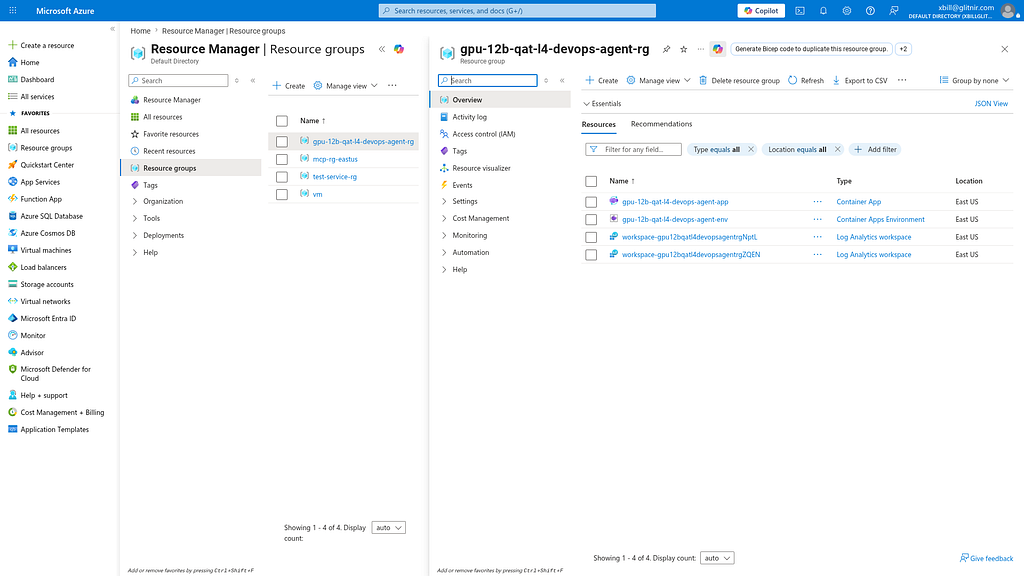
Review the Model
Check the model details:
> what are the model details?

  Here are the active model deployment details:

  • Serving Endpoint: https://gemma4-vllm-gpu.gentlefield-612b24aa.westus2.azurecontainerapps.io
  • Model ID: google/gemma-4-12B-it-qat-w4a16-ct
  • Quantization Format: compressed-tensors (4-bit weights, 16-bit activations)
  • API Engine / Server: vLLM
  • VRAM Allocation (Tesla T4): 95% GPU memory utilization, 18,187 KV cache tokens
  • API Health status: Healthy (Online) ✅


> query_gemma4_with_stats what is Gemma?

  I will call the query_gemma4_with_stats tool on the MCP server to query the model and retrieve both the generated
  response and model performance statistics (like TTFT and total generation time).

● gpu-devops-agent/query_gemma4_with_stats(Call query_gemma4_with_stats tool) (ctrl+o to expand)

  Here is the response from the serving Gemma 4 model along with the query performance statistics:

  ### 💬 Model Response

  │ Depending on the context, Gemma usually refers to one of two very popular things: a Google AI model or a gemstone.
  │
  │ Here is a breakdown of both:
  │
  │ ### 1. In Technology: Google’s AI Model
  │
  │ Gemma is a family of open-model Large Language Models (LLMs) developed by Google DeepMind.
  │
  │ • Relationship to Gemini: It is built from the same research, technology, and infrastructure used to create Google's
  │ most capable AI model, Gemini.
  │ • "Open" Nature: Unlike the "closed" Gemini models (which are accessed primarily via API or Google products), Gemma
  is
  │ released as "open weights." This means developers and researchers can download, customize, and run the model on their
  │ own hardware (like a personal laptop or a private cloud).
  │ • Size Varieties: Gemma is designed to be lightweight. It comes in different sizes (such as 2B, 7B, 9B, and 27B
  │ parameters), making it easy for people who don't have massive supercomputers to run high-quality AI locally.
  │ • Capabilities: It can understand and generate text, reason, and even process images or audio (depending on the
  │ version). It is commonly used by developers to build chatbots, summarize documents, or power coding assistants.
  │ ──────
  │ ### 2. In Gemology: The Gemstone
  │
  │ Gemma is the Latin word for "gem" or "precious stone." In the world of jewelry and geology:
  │
  │ • Gemma is often used as a prefix or root for various precious stones (e.g., Gemmae refers to jewels).
  │ • However, if you are looking for a specific stone, you might be thinking of Garnet, Garner, or a specific variety of
  │ Jade.
  │ ──────
  │ ### 3. In Other Contexts
  │
  │ • Name: Gemma is a popular female given name of Italian origin, meaning "gem" or "precious stone."
  │ • Software/Coding: There are various smaller libraries or internal projects in coding communities named "Gemma," but
  │ they are less common than the Google AI model.
  │
  │ Summary: If you are asking about AI, Gemma is Google's "mini" version of Gemini that anyone can download and use for
  │ free.

  ### 📊 Performance Stats

  • Serving Model: google/gemma-4-12B-it-qat-w4a16-ct
  • Time to First Token (TTFT): 0.26 seconds
  • Total Generation Time: 19.68 seconds
  • Generation Throughput: 25.74 tokens/s (~500 tokens total)
Benchmark the Local Model
The local model was benchmarked. Summarize the results:
> summarize benchmark_report.md

  Here is a summary of the performance results from benchmark_report.md:

  ### 🕒 Average Latency Highlights

  • Low Concurrency (1–4 users): Extremely fast response times ( 0.33s – 1.5s ) for all valid context windows (up to
  2048 tokens).
  • High Concurrency (1024–2048 users): Latency scales up to 23s – 32s due to queuing under heavy load.
  • Tipping Point: Latency remains under 3s up to 128 concurrent users for short prompts (<= 64 tokens) and under 8s
  for large prompts (512 tokens).

  ### 🚀 Throughput Highlights

  • Max Throughput: Tops out at 47.7 requests/sec (4 tokens context window at 1024 users).
  • Prefabricated Prefill Impact: Throughput drops linearly as context window size increases, reaching a maximum
  throughput of 5.2 requests/sec at 2048 tokens.
  • Concurrency Saturation: Throughput plateaus once concurrency reaches 128–256 users; additional users increase latency
  rather than total request throughput.

  ### 🚫 Limit Violations

  • 4096 tokens and above: Reports 0.0% success rate and 0.0 throughput across all concurrencies because the prompt
  length exceeds the serving engine's maximum limit ( max-model-len = 4096 ).
This is visualized:
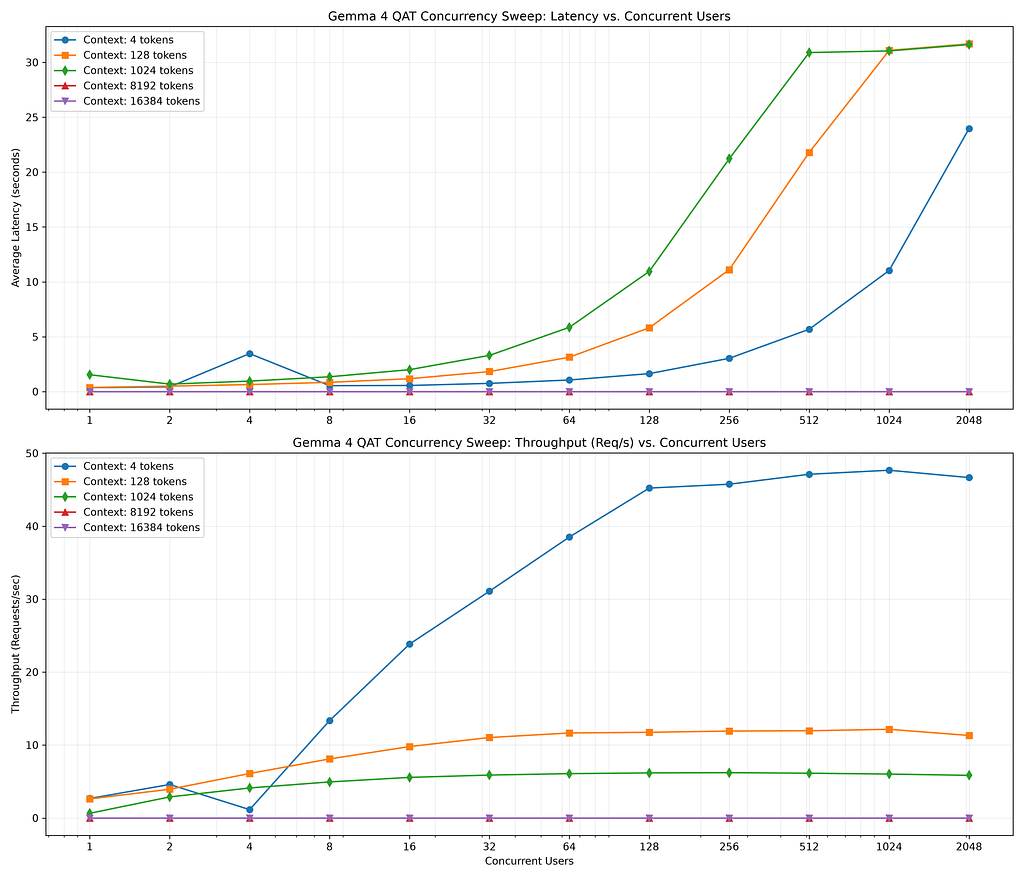
GPU Memory Allocation of QAT 12B Models
The GPU provides 28 GB of GPU Memory:
> > what is the memory breakdown on the GPU?
  Here is the approximate memory breakdown on the NVIDIA Tesla T4 GPU (16 GB VRAM) running the google/gemma-4-12B-it-qat-
  w4a16-ct model via vLLM:

  ### 📟 VRAM Allocation Overview (16 GB Total)

   VRAM Category | Size (GiB) | % of total GPU | Purpose
  ---------------------------|--------------|----------------|-----------------------------------------------------------
   Model Weights | ~ 6.50 GiB | ~ 40.6% | Gemma-4 12B QAT 4-bit weights
   KV Cache | 5.85 GiB | 36.6% | Reserved space for context tokens ( 18,187 FP8 tokens)
   CUDA / Workspace Overhead | ~ 2.85 GiB | ~ 17.8% | Run-time activations, CUDA context, graph capture
   Free / System Reserve | 0.80 GiB | 5.0% | Unallocated (enforced by --gpu-memory-utilization 0.95 )
  ──────
  ### 🔍 Key Metrics Details

  1. Model Compression Advantage:
      • An unquantized 12B parameter model in bfloat16 requires at least 24 GB of VRAM just for the weights (which
      exceeds the Tesla T4's 16 GB limit).
      • Thanks to QAT (4-bit quantization), weights occupy only ~6.5 GB, leaving ample space (5.85 GB) for the KV cache
      on a single cost-effective T4 GPU.
  2. KV Cache Efficiency:
      • Quantized to FP8 (via --kv-cache-dtype fp8 ), cutting the token memory footprint in half.
      • This provides a total capacity of 18,187 tokens (5,990 blocks of size 16), which translates to a maximum
      concurrency of 4.44x concurrent users at a full 4,096 context length.

────────────────────────────────────────────────────────────────────────────────────────────────────────────────────────────
>
What are the performance characteristics of the Model?
> what are the performance characteristics of the deployment

Here are the core performance characteristics of the vLLM deployment running the Gemma-4 12B QAT model on an NVIDIA
  Tesla T4 GPU (Azure Container Apps):

### 1. Latency Profile (TTFT & E2E)

• Time to First Token (TTFT): 0.26 seconds under low concurrency, indicating highly optimized prefill compilation.
  • Average E2E Latency: 2.96 seconds for a standard completion task.
  • Queuing Scaling: Latency scales linearly with user concurrency once the queue saturates (reaching ~21s at 256 users
  and ~31s at 1024+ users).

### 2. Throughput & Scaling

• Prefill Throughput Peak: Achieves 47.7 requests per second for very small context queries (4 tokens) at concurrency
  1024.
  • Payload Throughput Bounds: Peak throughput drops to 5.2 requests per second at the model's active 2048-token context
  window boundary.
  • Saturation Plateau: The deployment saturates around 128–256 concurrent users. Adding users beyond this point
  increases queuing latency without improving aggregate throughput.

### 3. Context & Limits

• Maximum Context Size: Strictly capped at 4096 tokens (as configured by --max-model-len ). Queries equal to or larger
  than 4096 tokens are rejected instantaneously (0% success rate).
  • KV-Cache Pool Size: Accommodates 18,187 concurrent tokens using FP8 KV cache quantization.

### 4. Hardware Efficiency (The QAT Advantage)

• Datacenter Accessibility: Quantization-Aware Training (QAT) fits the 12B parameter model into a cost-efficient 16 GB
  Tesla T4 GPU while reserving 5.85 GB for the active cache.
  • Without QAT, this model would require an A10 or L4 GPU (24 GB VRAM) to start up successfully.

────────────────────────────────────────────────────────────────────────────────────────────────────────────────────────────
>
One last cross check — what are the trade-offs of the deployment?
> what are the trade-offs on the deployment?

Here are the primary technical and financial trade-offs in this deployment architecture:

### 1. Model Quantization: QAT 4-bit (INT4) vs. Full Precision (BF16)

• The Trade-off: VRAM Savings vs. Mathematical Precision
  • Pros: Quantization-Aware Training (QAT) reduces model size to ~6.5 GB, allowing a 12B model to be served on a cheap
  16 GB GPU while leaving room for the KV cache.
  • Cons: There is a minor quality degradation in reasoning and function-calling precision compared to the native BF16
  checkpoint (though QAT retains ~99% of baseline performance, far outperforming standard Post-Training Quantization).

### 2. GPU Hardware: Tesla T4 vs. NVIDIA L4

• The Trade-off: Infrastructure Cost vs. Generation Speed
  • Pros: The Tesla T4 (NC8as-T4 workload profile on Azure) is significantly cheaper and more widely available in cloud
  regions than modern NVIDIA L4 GPUs.
  • Cons: The T4 runs on the older Turing architecture and lacks native hardware Tensor Core support for bfloat16
  execution. This results in slower token generation speeds (~25 tokens/s) than an L4 GPU.

### 3. KV Cache Format: FP8 vs. FP16 Cache

• The Trade-off: Concurrency Capacity vs. Long-Context Recall
  • Pros: Compressing the KV cache to 8-bit ( --kv-cache-dtype fp8 ) cuts memory requirements in half, increasing token
  capacity to 18,187 tokens.
  • Cons: Quantizing attention keys and values can introduce small rounding errors in attention calculations, slightly
  degrading retrieval accuracy in long-context prompts (approaching the 4K boundary).

### 4. Active Context Cap: 4,096 tokens vs. 32,768 tokens (Model Native)

• The Trade-off: Server Stability vs. Maximum Document Size
  • Pros: Capping the context at 4096 tokens ( --max-model-len 4096 ) guarantees the system will not exhaust VRAM or
  crash under massive concurrent requests.
  • Cons: The model cannot process long documents, large codebases, or extended chat histories that exceed 4K tokens,
  rejecting them immediately.
So where is the best place to run Gemma? AWS or GCP? Azure?
Survey says…
> compare aws vs gcp vs azure performance

> summarize cloud_comparison_report.md

  Here is a quick summary of cloud_comparison_report.md:

  ### 📋 Key Metrics Comparison

   Metric | AWS EC2 (VM + L4) | GCP Cloud Run (Serverless + L4) | Azure ACA (Serverless + T4)
  ---------------------------|---------------------------|---------------------------------|-----------------------------
   Max Context Size | 16,384 tokens | 16,384 tokens | 4,096 tokens
   Peak Throughput | 93.3 req/s | 40.3 req/s | 47.7 req/s
   First Token Latency | 0.09s | 0.14s | 0.26s
   Max Stable Users | 1024 | 512 | 256

  ### 💡 Core Takeaways

  1. AWS EC2 (L4 GPU VM): Best raw performance and highest stability under extreme concurrency (1024+ users) since
  dedicated hardware avoids serverless hypervisor overhead.
  2. GCP Cloud Run (L4 GPU Serverless): Best cost-performance balance. Supports large context lengths (16K) and scales to
  zero when idle, but throughput is lower than dedicated VMs due to proxy networking.
  3. Azure Container Apps (T4 GPU Serverless): Good for serverless workloads but constrained by older GPU hardware (Tesla
  T4), restricting context length to 4K to prevent Out-of-Memory crashes.
What about costs?!?
The serving costs were summarized:
> summarize azure_cost_comparison.md

  Here is a summary of azure_cost_comparison.md:

  ### 📋 Cost Model Summary

  • Azure Container Apps (ACA - Serverless): Billed per second of active execution. Replicas scale down to zero when idle,
  incurring no compute charges.
      • Tesla T4 Profile: ~$2.20/hr. Cheapest option for intermittent use (costs ~$316/month at 20% active utilization).
      • A10G Profile: ~$3.90/hr. Best for serverless workloads that require a larger 24 GB VRAM GPU.
  • Dedicated GPU VM (Standard_NV36ads_A10_v5): Billed hourly at ~$3.20/hr regardless of utilization (costs ~$2,
  304/month). Offers the cheapest cost-per-hour for 24/7 continuous operations but cannot scale to zero.

  ### 💡 Decision Matrix

  • Choose ACA (T4 or A10G) if your SRE diagnostic workloads are trigger-based, intermittent, or idle for a majority of
  the day.
  • Choose Dedicated VM (A10G) if you are running continuous, high-concurrency production inference pipelines 24/7.
What about other cloud costs?
> summarize multi_cloud_cost_comparison.md

  Here is a quick summary of multi_cloud_cost_comparison.md:

  ### 📋 Cost and VM Performance Characteristics

  • GCP Compute Engine ( g2-std-8 ): Cheapest VM option at ~$0.85/hr (~$612/month) for a dedicated NVIDIA L4 GPU.
  • AWS EC2 ( g6.2xlarge ): Highly competitive dedicated VM rate at ~$0.98/hr (~$705/month) with unmatched stability
  under high concurrency.
  • GCP Cloud Run (Serverless L4): Best serverless choice. Costs ~$1.48/hr (only ~$213/month at 20% active runtime) and
  hosts a modern 24 GB VRAM L4 GPU.
  • Azure Container Apps (Serverless T4): More expensive (~$2.20/hr) for an older 16 GB VRAM Tesla T4 GPU, restricting
  active context length to 4K.
  • Azure VM ( NV36ads_A10_v5 ): Most expensive VM option (~$3.20/hr) due to larger bundled CPU/RAM profiles.

  ### 💡 Recommendation

  • If migrating to save cost on scale-to-zero (intermittent load): Choose GCP Cloud Run.
  • If migrating for continuous, high-concurrency 24/7 runtimes: Choose a dedicated GCP Compute Engine VM or AWS EC2 VM.
Summary
The strategy for using MCP for Gemma 4 GPU deployment with Antigravity CLI and Azure was validated with an incremental step by step approach.
A minimal stdio transport MCP Server was started from Python source code and validated with Antigravity CLI running as a MCP client in the same local environment. This Python server provided all of the management tools to deploy and troubleshoot Azure Model deployments.
Comments
More Blog
View allaiContext bankruptcy: The case for strategic forgetting for AI Agents
Most of us have seen a coding agent fail to complete a task we know it can do. We just don't...
J
James O'ReillygooglecloudParallel Compliance Engine: Drive-to-Sheets Multi-Agent Orchestration
When building Generative AI applications, developers often encounter a massive bottleneck: sequential...
A
Aryan IranidiscussIs It Ethical to Post and Ask About Circuits on Dev.to?
I’ve been thinking about sharing some electronic circuit posts on Dev.to — small circuits, DIY...
C
codebunny20agentsThe One-Click Exporter: AI Studio Antigravity, Probed to Its Limits
What nobody tells you about exporting your multi-agent prototype to a local workspace. Every...
L
leslysandraagenticarchitectGuarding the till while autonomous data agents do the digging
Autonomous agents are genuinely good at answering messy business questions. Give one an LLM and a set...
S
Sireesha PulipatiaiReturn on Attention: Why AI Code Reviews Are Wearing Us Out
PR volume went up, ticket quality didn't, and the gap got filled with LLMs on both sides of the review: bots reviewing, bots replying, bots occasionally arguing with bots about priorities that only existed in a teammate's head. Our CEO named the actual problem, and it's bigger than code review.
C
christineReady-made automations for this
Workflows from the Neura Market marketplace related to this Stable Diffusion resource
- Interactive n8n Lesson 1: Data Flow, Execution & Debuggingn8n · $12.99 · Related topic
- Debug: Lightweight Node.js & Browser Debugging Utilityn8n · $6.99 · Related topic
- Telegram Echo Bot for Debugging Messagesn8n · $4.99 · Related topic
- Automate Multi-Step Onboarding with Google Sheets, Forms, and Gmail Notificationsn8n · Free · Related topic