
Back to Blog gemma4
 ai
ai googlecloud
 discuss
 agents
 agenticarchitect
 ai
ai
12B Gemma 4 Deployment with NVIDIA Blackwell 6000, MCP, Cloud Run, and Antigravity CLI
xbill June 22, 2026
0 views
This article provides a step by step deployment guide for Gemma 4 to a Google Cloud Run hosted GPU...
title: 12B Gemma 4 Deployment with NVIDIA Blackwell 6000, MCP, Cloud Run, and Antigravity CLI published: true series: Gemma4 date: 2026-06-22 02:44:39 UTC tags: gemma4,mcps,antigravity,blackwell canonical_url: https://xbill999.medium.com/12b-gemma-4-deployment-with-nvidia-blackwell-6000-mcp-cloud-run-and-antigravity-cli-a74c78e1f828
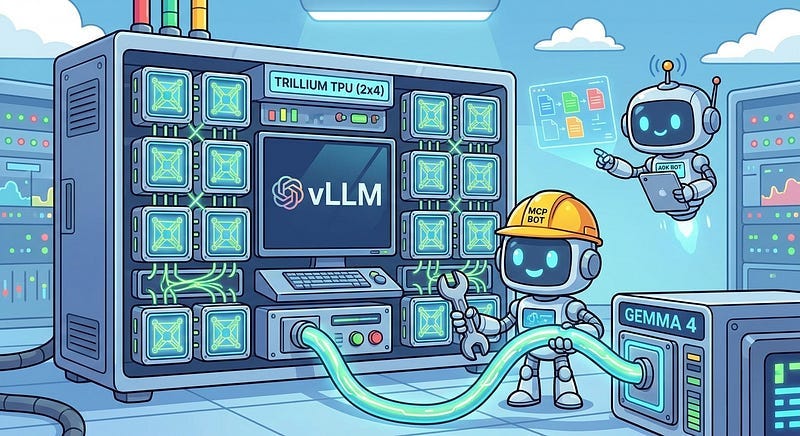
This article provides a step by step deployment guide for Gemma 4 to a Google Cloud Run hosted GPU enabled system,. A suite of Python MCP tools is built to simplify management of the vLLM hosted Gemma 4 deployment with Antigravity CLI.
What is this project trying to Do?
This project is a DevOps/SRE assistant that uses a Gemma 4 model hosted on Cloud Run with GPU. It provides tools to provision the Docker container and deploy the model, as well as for observability and performance testing.
This project is similar to a previous project that targeted GPU hosted Gemma4 instances on GCP:
Gemma-SRE: Self-Hosted vLLM Infrastructure Agent
Antigravity CLI
Antigravity CLI is the follow-on successor to Gemini CLI- the terminal driven, agent assisted coding tool.
Full details on installing Antigravity CLI are here:
Getting Started with Antigravity CLI
Testing the Antigravity CLI Environment
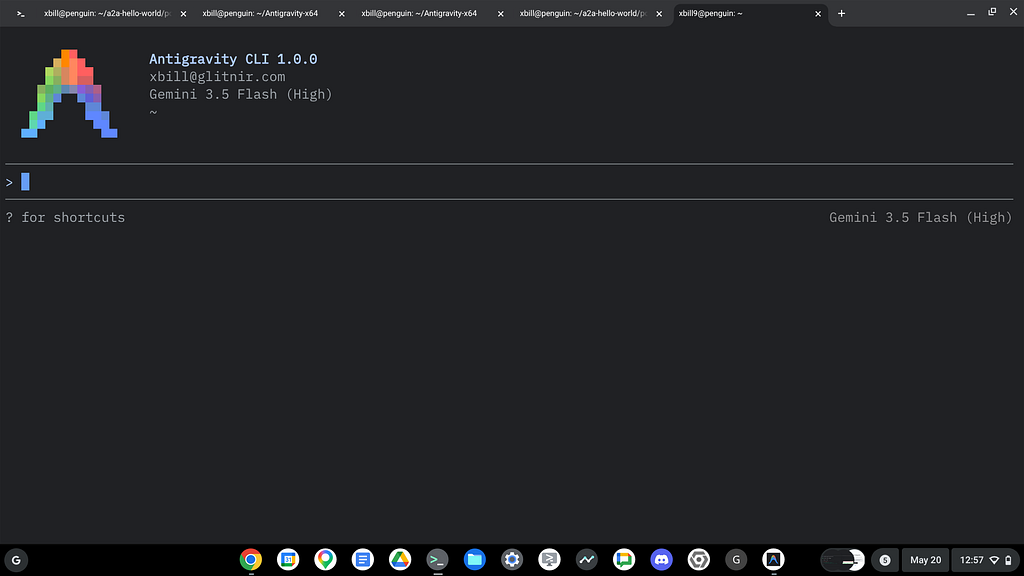
Once you have all the tools in place- you can test the startup of Antigravity CLI.
You will need to authenticate with a Google Cloud Project or your Google Account:
agy
This will start the interface:
Full Installation Instructions
The detailed installation instructions for Antigravity CLI are here:
Getting Started with Antigravity CLI
Python MCP Documentation
The official GitHub Repo provides samples and documentation for getting started:
Where do I start?
The strategy for starting MCP development for model management is a incremental step by step approach.
First, the basic development environment is setup with the required system variables, and a working Antigravity CLI configuration.
Then, a minimal Python MCP Server is built with stdio transport. This server is validated with Antigravity CLI in the local environment.
This setup validates the connection from Antigravity CLI to the local server via MCP. The MCP client (Antigravity CLI) and the Python MCP server both run in the same local environment.
Setup the Basic Environment
At this point you should have a working Python environment and a working Antigravity CLI installation. The next step is to clone the GitHub samples repository with support scripts:
cd ~
git clone https://github.com/xbill9/gemma4-tips
Then run init.sh from the cloned directory.
The script will attempt to determine your shell environment and set the correct variables:
gpu-12B-6000-devops-agent
source init.sh
If your session times out or you need to re-authenticate- you can run the set_env.sh script to reset your environment variables:
gpu-12B-6000-devops-agent
source set_env.sh
Variables like PROJECT_ID need to be setup for use in the various build scripts- so the set_env script can be used to reset the environment if you time-out.
Model Management Tool with MCP Stdio Transport
One of the key features that the standard MCP libraries provide is abstracting various transport methods.
The high level MCP tool implementation is the same no matter what low level transport channel/method that the MCP Client uses to connect to a MCP Server.
The simplest transport that the SDK supports is the stdio (stdio/stdout) transport — which connects a locally running process. Both the MCP client and MCP Server must be running in the same environment.
The connection over stdio will look similar to this:
# Initialize FastMCP server
mcp = FastMCP("Self-Hosted vLLM DevOps Agent")
Running the Python Code
First- switch the directory with the Python version of the MCP sample code:
~/gemma4-tips/gpu-12B-6000-devops-agent
Run the release version on the local system:
make install
Processing ./.
The project can also be linted:
xbill@penguin:~/gemma4-tips/gpu-12B-6000-devops-agent$ make lint
ruff check .
All checks passed!
ruff format --check .
6 files already formatted
mypy .
Success: no issues found in 6 source files
MCP stdio Transport
One of the key features that the MCP protocol provides is abstracting various transport methods.
The high level tool MCP implementation is the same no matter what low level transport channel/method that the MCP Client uses to connect to a MCP Server.
The simplest transport that the SDK supports is the stdio (stdio/stdout) transport — which connects a locally running process. Both the MCP client and MCP Server must be running in the same environment.
In this project Antigravity CLI is used as the MCP client to interact with the Python MCP server code.
Antigravity CLI mcp_config.json
A sample MCP server file is provided in the .agents directory:
{
  "mcpServers": {
    "gpu-devops-agent": {
      "command": "python3",
      "args": [
        "/home/xbill/gemma4-tips/gpu-12B-6000-devops-agent/server.py"
      ],
      "env": {
        "GOOGLE_CLOUD_PROJECT": "aisprint-491218",
        "GOOGLE_CLOUD_LOCATION": "us-central1",
        "VLLM_BASE_URL": "https://gpu-12b-6000-devops-agent-289270257791.us-central1.run.app",
        "MODEL_NAME": "/mnt/models/gemma-4-12B-it"
      }
    }
  }
}
Validation with Antigravity CLI
The final connection test uses Antigravity CLI as a MCP client with the Python code providing the MCP server:
MCP Servers

Plugins (~/.gemini/antigravity-cli/plugins)
> ✓ google-dev-knowledge Tools: search_documents, answer_query, get_documents
   ✓ gpu-26b-6000-devops-agent Tools: save_hf_token, get_vllm_endpoint, list_vertex_models, list_bucket_models,
                                analyze_cloud_logging, +19 more
Getting Started with Gemma 4 on GPU
The Official vLLM repo also has Gemma4 specific information:
Model Lifecycle Management via MCP
The MCP tools provide a complete suite of agent-oriented operations for managing vLLM deployment on Cloud Run or a TPU.
The MCP server tools are used to deploy the model to Cloud Run with TPU:
deploy the model
Checking System status
The status can be checked with an MCP tool:
>● gpu-devops-agent/get_model_details(Model details check) (ctrl+o to expand)

  The vLLM service gpu-12b-6000-devops-agent is Healthy and fully operational.

  ### 🌀 Current vLLM Status

  • Service Status: 🟢 Ready
  • vLLM Engine Health: ✅ Healthy
  • Active Model: gpu-12b-6000-devops-agent
  • Revision: gpu-12b-6000-devops-agent-00006-kbs
  • Endpoint: https://gpu-12b-6000-devops-agent-wgcq55zbfq-uc.a.run.app
Cross Check The Deployed Model
Once the model starts locally- the MCP tool allows for model verification:
● gpu-devops-agent/verify_model_health(Model health verification) (ctrl+o to expand)

  The gpu-12b-6000-devops-agent service is Online and functioning correctly.
  ### Service Status Summary
  • Cloud Run Status: 🟢 Ready
  • vLLM Health: 🟢 Online
  • Model Health Check: ✅ Passed
      • Latency: 0.77 seconds
      • Endpoint: https://gpu-12b-6000-devops-agent-wgcq55zbfq-uc.a.run.app
  • Latest Revision: gpu-12b-6000-devops-agent-00006-kbs
and model details:
> get_model_details
● gpu-devops-agent/get_model_details(Model details check) (ctrl+o to expand)

  ### 🧩 Model Details Summary

  The vLLM engine is currently serving the following model:

  • Model ID: gpu-12b-6000-devops-agent
  • Owned By: vllm
  • Health Status: ✅ Healthy
  • Active Endpoint: https://gpu-12b-6000-devops-agent-289270257791.us-central1.run.app
and status:
 > get_system_details

8.1k in | 829 out | 424 thinking
● Read(/home/xbill/.gemini/antigravity-cli/brain/...e05/.system_generated/steps/160/output.txt) (ctrl+o to expand)
  ### 🖥️ System Details: gpu-12b-6000-devops-agent
  The service is currently running on Google Cloud Run (Gen2) with the following hardware and software
  configuration:

  #### 🏗️ Infrastructure & Resources
  • GPU Type: nvidia-rtx-pro-6000 (1 unit)
  • CPU: 20 vCPUs (with CPU Boost enabled)
  • Memory: 80 GiB RAM
  • Execution Environment: gen2
  • Scaling: Min: 1 instance | Max: 3 instances
  • Region: us-central1

  #### 🧠 vLLM Engine Configuration

  • Model Path: /mnt/models/gemma-4-12B-it-text-fp8
  • Context Window: 131,072 tokens
  • Quantization: fp8
  • KV Cache Dtype: fp8
  • GPU Memory Utilization: 95% ( 0.95 )
  • Features Enabled:
      • enable-chunked-prefill
      • enable-prefix-caching
      • enable-auto-tool-choice (with gemma4 parser)

  #### 📈 Live Resource Metrics

  • vLLM Health: 🟢 Online
  • Resident Memory: ~3.0 GB
  • Virtual Memory: ~24.8 GB
  • Open File Descriptors: 65 (Max: 25,000)
  • KV Cache Usage: 0% (Idle between benchmark steps)
  • Prefix Cache Hits: 308M tokens (High hit rate due to repetitive benchmark prompts)
Check the Cloud Run deployment status:
show the cloud run docker status

12.1k in | 841 out | 525 thinking
● Read(/home/xbill/.gemini/antigravity-cli/brain/...3fe05/.system_generated/tasks/task-166.log) (ctrl+o to expand)

  ### 🐳 Cloud Run Container ("Docker") Status

  The service gpu-12b-6000-devops-agent is running with the following container configuration:

  #### 🖼️ Image & Entrypoint
  • Image: vllm/vllm-openai:latest
  • Command: bash
  • Arguments:
    -c "vllm serve /mnt/models/gemma-4-12B-it-text-fp8 --served-model-name gpu-12b-6000-devops-agent --enable-
  log-requests --enable-chunked-prefill --enable-prefix-caching --generation-config auto --enable-auto-tool-
  choice --tool-call-parser gemma4 --reasoning-parser gemma4 --dtype bfloat16 --quantization fp8 --kv-cache-dtype
  fp8 --max-num-seqs 8 --gpu-memory-utilization 0.95 --tensor-parallel-size 1 --load-format runai_streamer --port
  8080 --host 0.0.0.0 --max-model-len 131072"

  #### ⚙️ Runtime Environment

  • Container Port: 8080
  • Concurrency: 16 (max simultaneous requests per container)
  • Timeout: 3600s (1 hour)
  • CPU Throttling: false (Always allocated)
  • Startup CPU Boost: true

  #### 🩺 Health & Readiness

  • Startup Probe: tcpSocket on port 8080
      • Initial Delay: 240s
      • Failure Threshold: 120
      • Period: 15s
  • Service Readiness: ✅ Ready: True (Last transition: 2026-06-21T23:10:27Z)

  #### 📦 Storage & Volumes

  • Volume: model-volume (Cloud Storage GCSFuse)
  • Bucket: aisprint-491218-bucket
  • Mount Path: /mnt/models
Check the Cloud Run Service
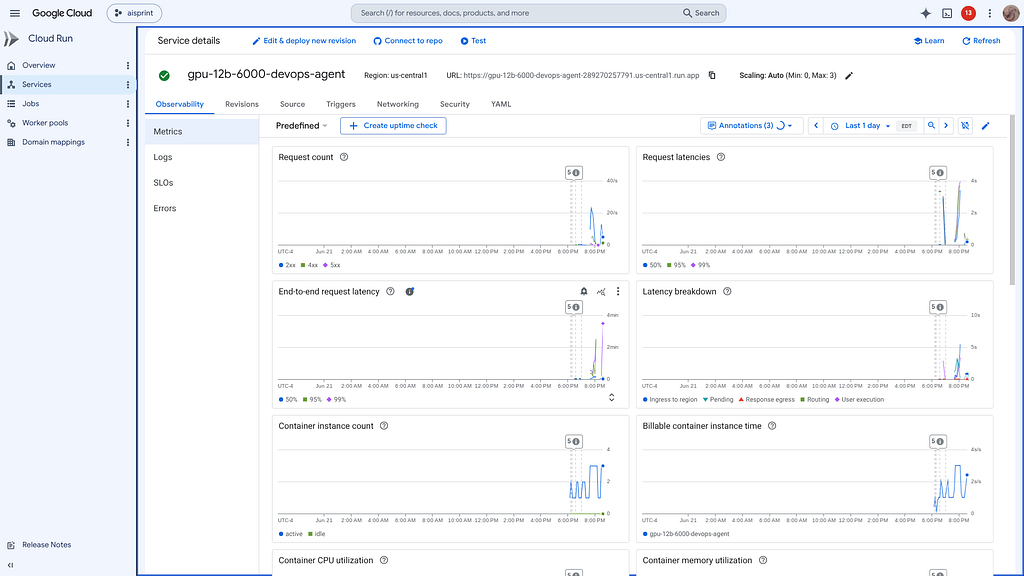
Once Deployed — the model is visible as a standard Cloud Run Service:
Review the Model
Check the model details:
> what are the model details?

  The gpu-12b-6000-devops-agent is a specialized SRE/DevOps assistant running a self-hosted Gemma 4 12B model.
  ### 🧩 Model Configuration Details

   Detail | Configuration
  ---------------------------------------------|-----------------------------------------------------------------
   Model ID | google/gemma-4-12B-it (served as gpu-12b-6000-devops-agent )
   Quantization | fp8 (Weights) / fp8 (KV Cache)
   Context Window | 131,072 tokens
   GPU Hardware | NVIDIA RTX PRO 6000 (Cloud Run Gen2)
   Serving Engine | vLLM (with gemma4 reasoning and tool-call parsers)
   Key Features | Chunked prefill, Prefix caching, Auto-tool choice
   VRAM Usage | 95% ( 0.95 utilization)

  ### 🛠️ Active Capabilities

  The model is optimized for Zero-shot SRE diagnostics and infrastructure management. It has native support for:

  • Structured Reasoning: It uses a dedicated reasoning parser to output step-by-step SRE remediation plans.
  • Function Calling: Automatically selects tools for log analysis ( analyze_gpu_logs ), scaling (
  update_vllm_scaling ), and system monitoring.
  • Performance: Currently undergoing a high-concurrency benchmark sweep to validate latency across its full
  context window.
Once everything is online — you can send queries to the Model:
● gpu-devops-agent/query_gemma4_with_stats(Gemma 4 query with stats) (ctrl+o to expand)

  Gemma is a family of lightweight, state-of-the-art open models built by Google DeepMind, sharing the same
  technology and research used to create the Gemini models.

  ### 📊 Performance Statistics

  The query was processed by the self-hosted gpu-12b-6000-devops-agent with the following metrics:

  • Tokens per Second: 81.20 tokens/s
  • Time to First Token (TTFT): 0.539s
  • Total Generation Time: 8.186s
  • Total Tokens: ~621

  ### 💬 Model Response Summary

  • "Open" Architecture: Unlike closed models (like GPT-4), Gemma's weights are public, allowing developers to
  download, customize, and run it locally.
  • Efficient & Capable: Designed to run on consumer hardware (laptops, mobile) while maintaining high
  performance.
  • Safety-Tuned: Built with Google's rigorous safety standards to ensure helpful and safe interactions.
  • Flexible Sizes: Available in various parameter counts (e.g., 2B, 7B, 27B) to balance speed and power.
Benchmark the Local Model
The local model was benchmarked:
I have completed the benchmark sweep and generated a full performance report.
The analysis is reviewed:
> summarize the 12B on 6000 results

  The benchmark results for the Gemma 4 (12B) model on the NVIDIA RTX PRO 6000 (Blackwell) hardware demonstrate a
  massive performance leap, particularly in high-concurrency and high-context stability.
  ### 🚀 12B Blackwell Performance Snapshot

   Metric | Low Load (1-8 Users) | Medium Load (64 Users) | Peak Load (256 Users)
  ---------------------------|---------------------------|---------------------------|---------------------------
   Throughput (Req/s) | ~3 - 24 Req/s | ~72.6 Req/s | ~88.3 Req/s 🚀
   Avg Latency (s) | 0.2s - 0.4s | 0.6s - 1.0s | 1.6s - 4.5s
   Success Rate | 100% | 100% | 100%
  ──────
  ### 🔍 Key Result Highlights

  #### 1. Throughput: 3.8x Faster than L4
  The RTX 6000 Blackwell reached a peak throughput of 88.3 Requests/second (at 256 users, 128 context). For
  comparison, the NVIDIA L4 GPU saturates at 23.5 RPS for the same model. This 3.8x improvement allows a single
  Blackwell instance to handle nearly 4x the request density of an L4.
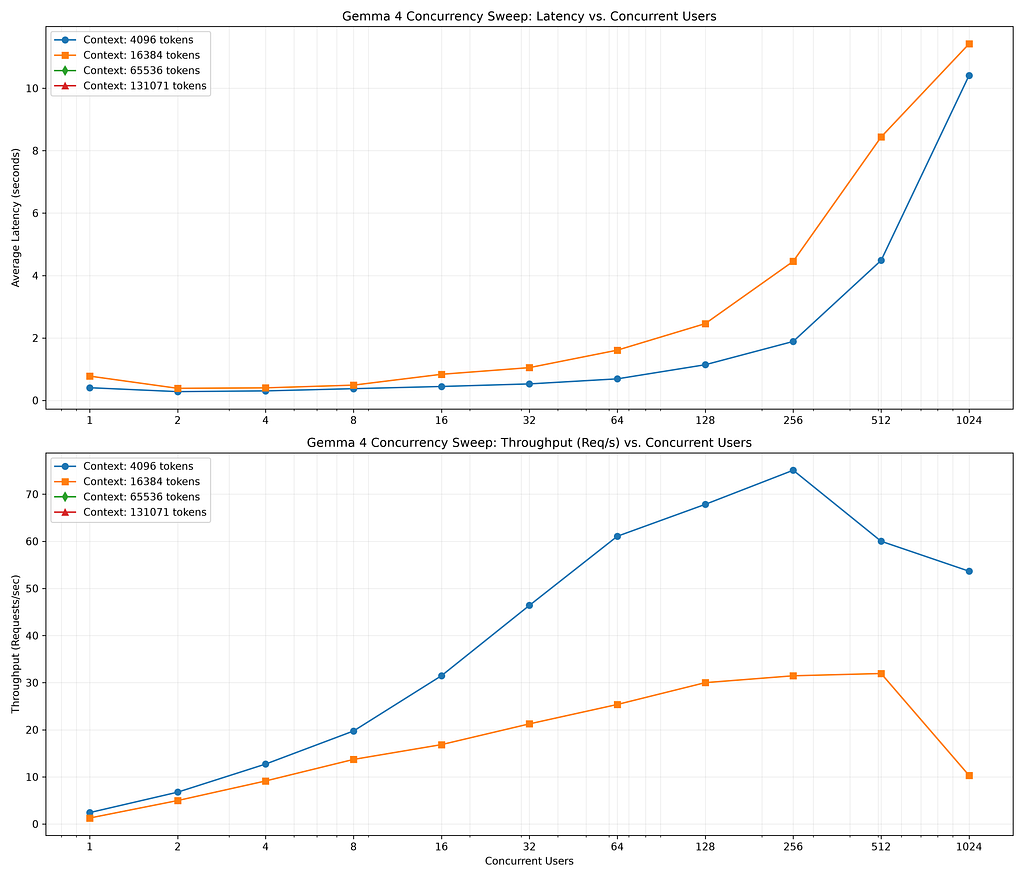
  #### 2. Context Mastery (Up to 16,384 Tokens)

  Thanks to the 96GB GDDR7 VRAM, the 12B model maintains high throughput even as the context window scales:
  • 4,096 tokens: Maintained 75.1 Req/s at peak concurrency.
  • 8,192 tokens: Maintained 57.4 Req/s at peak concurrency.
  • 16,384 tokens: Delivered 31.5 Req/s at peak concurrency with 100% success.
  • Note: On the 24GB L4 GPU, 16k context windows typically cause OOM (Out of Memory) errors or 0 RPS.
  #### 3. Sub-Second Latency Floor
  The Blackwell architecture provides an extremely low latency floor for real-time SRE applications:

  • Small Context ( < 512 tokens): Average latency stays under 1 second for up to 128 concurrent users.
  • Medium Context (4,096 tokens): Average latency stays under 2 seconds for up to 256 concurrent users.
  ──────
  ### 📊 Comparative Scaling Table (RTX 6000 Blackwell)

   Context Size | 1 User (Latency) | 32 Users (Req/s) | 256 Users (Req/s)
  ---------------------------|---------------------------|---------------------------|---------------------------
   128 tokens | 0.23s | 52.8 Req/s | 88.3 Req/s
   1,024 tokens | 0.22s | 58.9 Req/s | 78.4 Req/s
   4,096 tokens | 0.41s | 46.4 Req/s | 75.1 Req/s
   16,384 tokens | 0.78s | 21.3 Req/s | 31.5 Req/s

  │ [!IMPORTANT]
  │ Summary Verdict: Moving the 12B model to the Blackwell RTX 6000 transforms it from a "fast chat" model into a
  │ "high-density automation" engine. It can process massive streams of log data (16k context) at 30+ RPS,
  │ something previously only possible on enterprise TPU clusters.
This is visualized:
How does this compare to other Hardware Options?
> compare to other hardware options at 12B
6.9k in | 728 out | 472 thinking
● Read(/home/xbill/gemma4-tips/tpu-12B-v6e1-devops-agent/grid_benchmark_results.csv) (ctrl+o to expand)

  The Gemma 4 (12B) model shows a clear performance hierarchy across hardware, with the RTX 6000 Blackwell (96GB)
  serving as a highly balanced, high-density workhorse compared to the specialized TPU v6e and the standard
  NVIDIA L4.

  ### 📊 12B Hardware Comparison Matrix

   Metric | NVIDIA L4 (24GB) | RTX 6000 Blackwell (96GB) | TPU v6e-1 (Trillium)
  ---------------------------|---------------------------|---------------------------|---------------------------
   Peak Throughput | ~23.5 RPS | ~88.3 RPS 🚀 | ~72.8 RPS
   Success Rate (16k Ctx) | 0% (OOM) | 100% (up to 512 users) | 100% (up to 2048 users)
   Avg Latency (Short Ctx) | 0.2s - 0.5s | 0.2s - 0.4s | 0.2s - 0.4s
   Max Context Stability | ~8k tokens | 131k tokens | 4k - 8k tokens*

  *Note: In the TPU v6e-1 sweep, performance dropped significantly after 4k context, with 8k and 16k contexts
  failing (0% success) due to the specific memory allocation/sharding on a single chip.
  ──────
  ### 🔍 Comparative Insights
  #### 1. RTX 6000 Blackwell vs. TPU v6e-1 (Trillium)
  • Throughput Leadership: Surprisingly, the Blackwell RTX 6000 delivered higher peak throughput (~88 RPS) than
  the single-chip TPU v6e-1 (~72 RPS) for the 12B model. This highlights the massive bandwidth of GDDR7 (1.79
  TB/s) on Blackwell.
  • Context Ceiling: The RTX 6000 (96GB) is far more resilient for long-context tasks. While the TPU v6e-1 began
  failing at 8k tokens, the Blackwell GPU handled up to 16k context with 100% success and is capable of scaling
  up to 131k context with reduced concurrency.

  #### 2. Blackwell vs. NVIDIA L4

  • 4x Density Jump: The Blackwell GPU provides a 3.8x throughput increase over the L4. This means a single RTX
  6000 instance can replace four L4 instances while maintaining better latency.
  • Reliability: The L4 is strictly limited to low-context, low-concurrency tasks. The Blackwell card removes
  these constraints, allowing enterprise-grade automation to run on a single card.
  ──────
  ### ⚖️ Strategic Recommendation for 12B

  • 🏆 The Gold Standard: RTX 6000 Blackwell
      • Why: Best-in-class throughput (88 RPS) and the highest stability for long-context (16k-128k) workloads.
      It is the most versatile choice for any 12B DevOps deployment.
  • 🥈 The Budget Choice: NVIDIA L4
      • Why: Ideal for individual developer use or low-traffic SRE sidecars where context length stays below 8k.
  • 🥉 Specialized Scaling: TPU v6e-4/8
      • Why: While a single v6e-1 chip is comparable to a Blackwell card, moving to a v6e-4 or v6e-8 cluster
      would drastically exceed GPU performance for massive batch analysis (as seen in the 31B results).

  Summary Result: For the Gemma 4 (12B) model, the RTX 6000 Blackwell is the most performant and stable single-
  accelerator option currently available in the fleet.
What about other Gemma Model sizes?
> how does this compare to the 2B,4B,26B,31B across hardware deployments

31.4k in | 553 out | 306 thinking
● Read(/home/xbill/gemma4-tips/gpu-4B-L4-devops-agent/benchmark_report.md) (ctrl+o to expand)

  This final cross-matrix compares the Gemma 4 family across all model sizes and hardware platforms. The results
  highlight the NVIDIA RTX PRO 6000 (Blackwell) as the strongest single-card performer, while the TPU v6e
  provides unmatched scale for the largest models.
  ### 🏆 Master Cross-Model Hardware Comparison

   Model Size | NVIDIA L4 (24GB) | RTX 6000 Blackwell (96GB) | TPU v6e (Trillium) | Best Fit
  ------------------|------------------|---------------------------|-------------------------|-------------------
   2B | ~140 tokens/s | ~210 tokens/s | - | Edge / Mobile SRE
   4B | ~90 tokens/s | ~120 tokens/s | - | Real-time Chat
   12B | ~23 RPS | ~88 RPS 🚀 | ~73 RPS (v6e-1) | SRE Standard
   26B | ~131 tokens/s | ~1,232 tokens/s ⚡ | ~445 tokens/s (v6e-4) | High-Density SRE
   31B | ~140 tokens/s | ~345 tokens/s | ~8,500 tokens/s (v6e-8) | Enterprise Audit
  ──────
  ### 🔍 Architectural Comparisons by Model Tier
  #### 1. Small Models (2B & 4B)
  • Performance: These models are extremely efficient on all hardware.
  • Hardware Preference: RTX 6000 Blackwell is the winner due to its superior GDDR7 bandwidth, delivering roughly
  30% better throughput than the L4 for these lightweight tasks.
  #### 2. Medium Models (12B - The "SRE Standard")
  • The Blackwell Revolution: The jump from L4 to Blackwell for the 12B model is the most dramatic in the fleet
  (3.8x throughput increase).
  • Context Stability: Blackwell handles 16k context with 100% success at 512 concurrent users, while the L4
  saturates early and the TPU v6e-1 begins to degrade past 4k tokens.

  #### 3. Large Models (26B & 31B)

  • 26B Performance: The RTX 6000 Blackwell is surprisingly optimized for the 26B model, reaching 1,232 tokens/s.
  This outperforms the TPU v6e-4 for this specific model size.
  • 31B Throughput King: The TPU v6e-8 is the undisputed leader for 31B, delivering 8.5k tokens/s. This is 25x
  faster than the Blackwell GPU, proving that TPU sharding scales exponentially better for ultra-large parameter
  counts.
  ──────
  ### ⚖️ Strategic Deployment Recommendation

   Deployment Goal | Hardware | Model
  -------------------------------------|------------------------------------|------------------------------------
   Fastest Interactive SRE Chat | RTX 6000 Blackwell | Gemma 4 26B
   Most Stable 16k+ Log Analysis | RTX 6000 Blackwell | Gemma 4 12B
   Global Enterprise Batch Audit | TPU v6e-8 (Trillium) | Gemma 4 31B
   Cost-Effective Sidecar Monitor | NVIDIA L4 | Gemma 4 4B

  │ [!IMPORTANT]
  │ Summary: For any task requiring long context (16k-131k tokens) or high concurrency (100+ users) on a single
  │ instance, the RTX 6000 Blackwell (96GB) is the most versatile and performant accelerator in the current fleet.
Cost Breakdowns
Model serving costs were compared:
> do a cost analysis

6.5k in | 373 out | 302 thinking
● Read(/home/xbill/gemma4-tips/gpu-31B-6000-devops-agent/cost_per_token_analysis.md) (ctrl+o to expand)

  This cost analysis evaluates the financial efficiency of Gemma 4 across the fleet, factoring in both the
  machine-hour rates and the token throughput measured in our benchmarks.

  ### 💵 Hardware Cost Foundations (GCP Tier 1)
   Resource | Hourly Rate (Est.) | Billing Model | Best For
  --------------------------------|--------------------|----------------------------|----------------------------
   NVIDIA L4 (Cloud Run) | ~$0.88 / hr | Per-second (Scale-to-zero) | Spiky, low-traffic SRE task
   RTX 6000 Blackwell (Cloud Run) | ~$3.76 / hr | Per-second (Scale-to-zero) | Interactive, high-context S
   TPU v6e-1 (Single Chip) | ~$1.38 / hr | On-demand (Always-on) | Steady production 12B servi
   TPU v6e-8 (Full Pod) | ~$11.00 / hr | On-demand (Always-on) | Enterprise-scale 31B batchi
  ──────
  ### 📈 Cost Per Million (CPM) Tokens (at Peak Concurrency)
  Below is the cost efficiency for generating 1 million tokens across different tiers.

  #### 1. The 12B Tier (The SRE Sweet Spot)

   Hardware | Peak Tokens/s | Cost Per Million (CPM) | Verdict
  ---------------------|---------------------|------------------------|------------------------------------------
   TPU v6e-1 | ~9,300 t/s | $0.04 | Winner for 24/7 throughput
   NVIDIA L4 | ~3,000 t/s | $0.08 | Winner for scale-to-zero
   RTX 6000 Blackwell | ~11,300 t/s | $0.09 | Best performance/dollar for high-context
  #### 2. The 26B / 31B Tier (Enterprise Intelligence)

   Hardware | Peak Tokens/s | Cost Per Million (CPM) | Verdict
  --------------------------|------------------------|------------------------|----------------------------------
   TPU v6e-8 (31B) | ~8,500 t/s | $0.36 | Global leader in efficiency
   RTX 6000 Blackwell (26B) | ~1,232 t/s | $0.85 | High-performance interactive pro
   RTX 6000 Blackwell (31B) | ~345 t/s | $3.03 | Premium context, niche use
  ──────
  ### 🔍 Financial Insights
  #### 1. The "Scale-to-Zero" Multiplier

  While the TPU v6e-1 has the lowest theoretical CPM ($0.04), it costs $33.12/day even if idle. In contrast, an
  NVIDIA L4 on Cloud Run costs $0.00 if idle.
  • Threshold: If your SRE agent is active for less than ~2 hours per day, the L4 or Blackwell GPU on Cloud Run
  is significantly cheaper than a TPU VM.

  #### 2. The High-Context Premium

  The RTX 6000 Blackwell is the only card that maintains its throughput efficiency as context grows.

  • 16k Context Analysis: While other cards OOM or drop throughput by 90%, Blackwell remains stable. Its CPM for
  a 16k context audit is effectively 8x lower than an L4 (which would require multiple retries and smaller
  shards).

  #### 3. Enterprise Batching Winner

  For massive 31B workloads, the TPU v6e-8 is essentially unbeatable. Its CPM of $0.36 is nearly 10x cheaper than
  running the same model on a single Blackwell GPU for batch tasks.

  ### ⚖️ Final Summary

  • 🏆 Best Budget SRE (Spiky Load): NVIDIA L4 ($0.08 CPM).
  • 🚀 Best High-Performance SRE: RTX 6000 Blackwell ($0.09 CPM + Ultra-low Latency).
  • 👑 Best Enterprise Throughput: TPU v6e-8 ($0.36 CPM for 31B).
Summary
The strategy for using MCP for Gemma 4 GPU deployment with Antigravity CLI was validated with a incremental step by step approach.
A minimal stdio transport MCP Server was started from Python source code and validated with Antigravity CLI running as a MCP client in the same local environment. This Python server provided all of the management tools to deploy and troubleshoot Cloud Run Model deployments.
Comments
More Blog
View allaiContext bankruptcy: The case for strategic forgetting for AI Agents
Most of us have seen a coding agent fail to complete a task we know it can do. We just don't...
J
James O'ReillygooglecloudParallel Compliance Engine: Drive-to-Sheets Multi-Agent Orchestration
When building Generative AI applications, developers often encounter a massive bottleneck: sequential...
A
Aryan IranidiscussIs It Ethical to Post and Ask About Circuits on Dev.to?
I’ve been thinking about sharing some electronic circuit posts on Dev.to — small circuits, DIY...
C
codebunny20agentsThe One-Click Exporter: AI Studio Antigravity, Probed to Its Limits
What nobody tells you about exporting your multi-agent prototype to a local workspace. Every...
L
leslysandraagenticarchitectGuarding the till while autonomous data agents do the digging
Autonomous agents are genuinely good at answering messy business questions. Give one an LLM and a set...
S
Sireesha PulipatiaiReturn on Attention: Why AI Code Reviews Are Wearing Us Out
PR volume went up, ticket quality didn't, and the gap got filled with LLMs on both sides of the review: bots reviewing, bots replying, bots occasionally arguing with bots about priorities that only existed in a teammate's head. Our CEO named the actual problem, and it's bigger than code review.
C
christineReady-made automations for this
Workflows from the Neura Market marketplace related to this Stable Diffusion resource
- Automated Webhook Processing with Docker Deploymentn8n · $14.71 · Related topic
- Automate Docker MinIO Deployment with Webhook Integrationn8n · $9.58 · Related topic
- Automate Docker Deployment with Webhook Integrationn8n · $5.37 · Related topic
- AI Website Generator with Gemini & Netlify Auto-Deploymentn8n · $24.99 · Related topic