
Back to Blog githubactions
 ai
ai googlecloud
 discuss
 agents
 agenticarchitect
 ai
ai
Still Storing AWS Access Keys in CI/CD? There’s a safer way.
Keme Kenneth June 23, 2026
0 views
Does your GitHub Actions or GitLab CI pipeline contains these secrets: AWS_ACCESS_KEY_ID or...
Does your GitHub Actions or GitLab CI pipeline contains these secrets: AWS_ACCESS_KEY_ID or AWS_SECRET_ACCESS_KEY? That's considered a vulnerable bad practice.
It means if someone gains access to your repository secrets or CI environment, they potentially have AWS credentials that remain valid until you manually rotate them.
A much better approach is OIDC (OpenID Connect).
Instead of storing credentials, your pipeline proves its identity to AWS and AWS issues temporary credentials that expire automatically.
Think of it like this:
❌ Traditional approach = Permanent office key ✅ OIDC = Visitor pass that's valid for only a short time
So what is OIDC?
OIDC is an identity protocol.
GitHub Actions and GitLab CI can generate a signed identity token that says who they are and AWS verifies that identity and, if it matches your configured rules, allows the workflow to assume an IAM Role using temporary credentials.
No access keys or secrets stored in your repository.
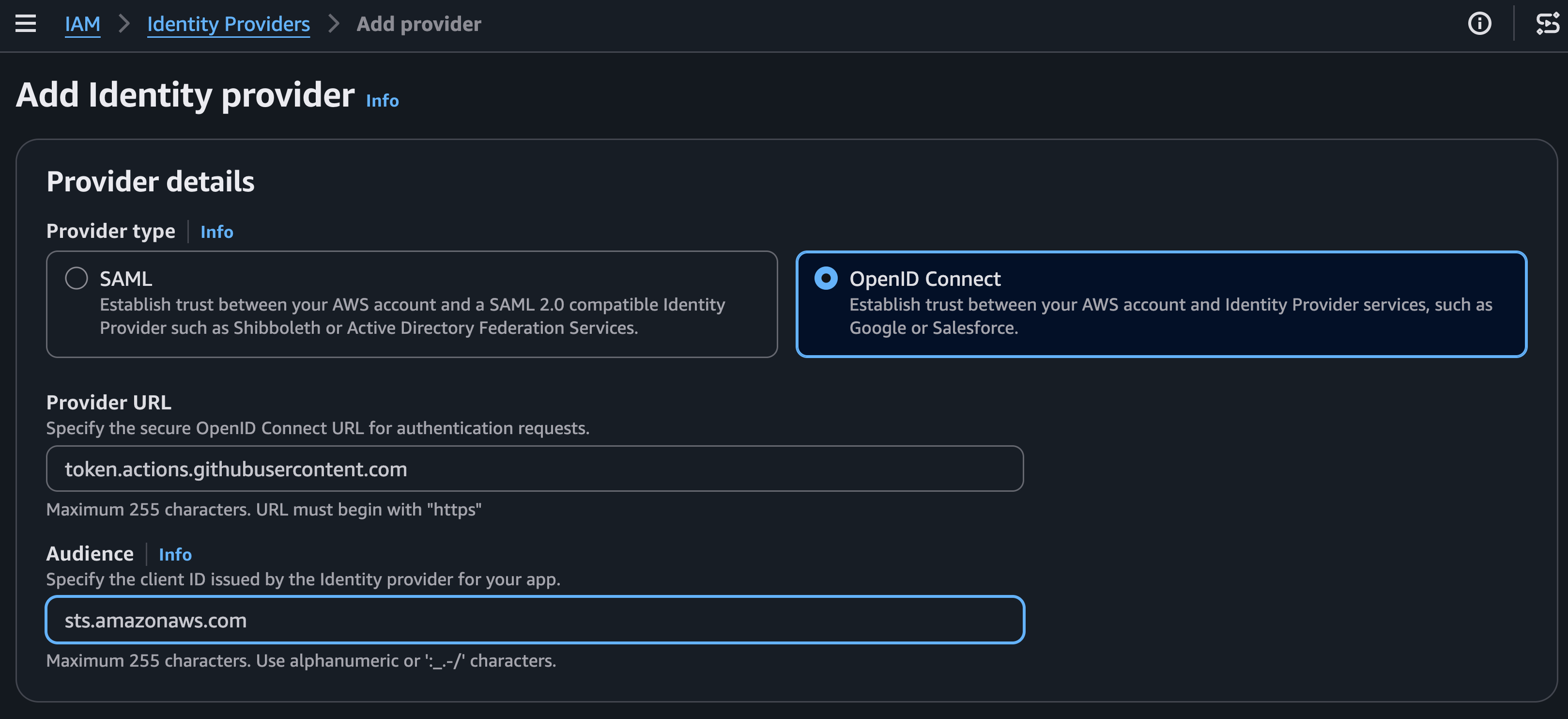
Register GitHub (token.actions.githubusercontent.com) or GitLab (gitlab.com or your self-managed instance) as a trusted OIDC Identity Provider.
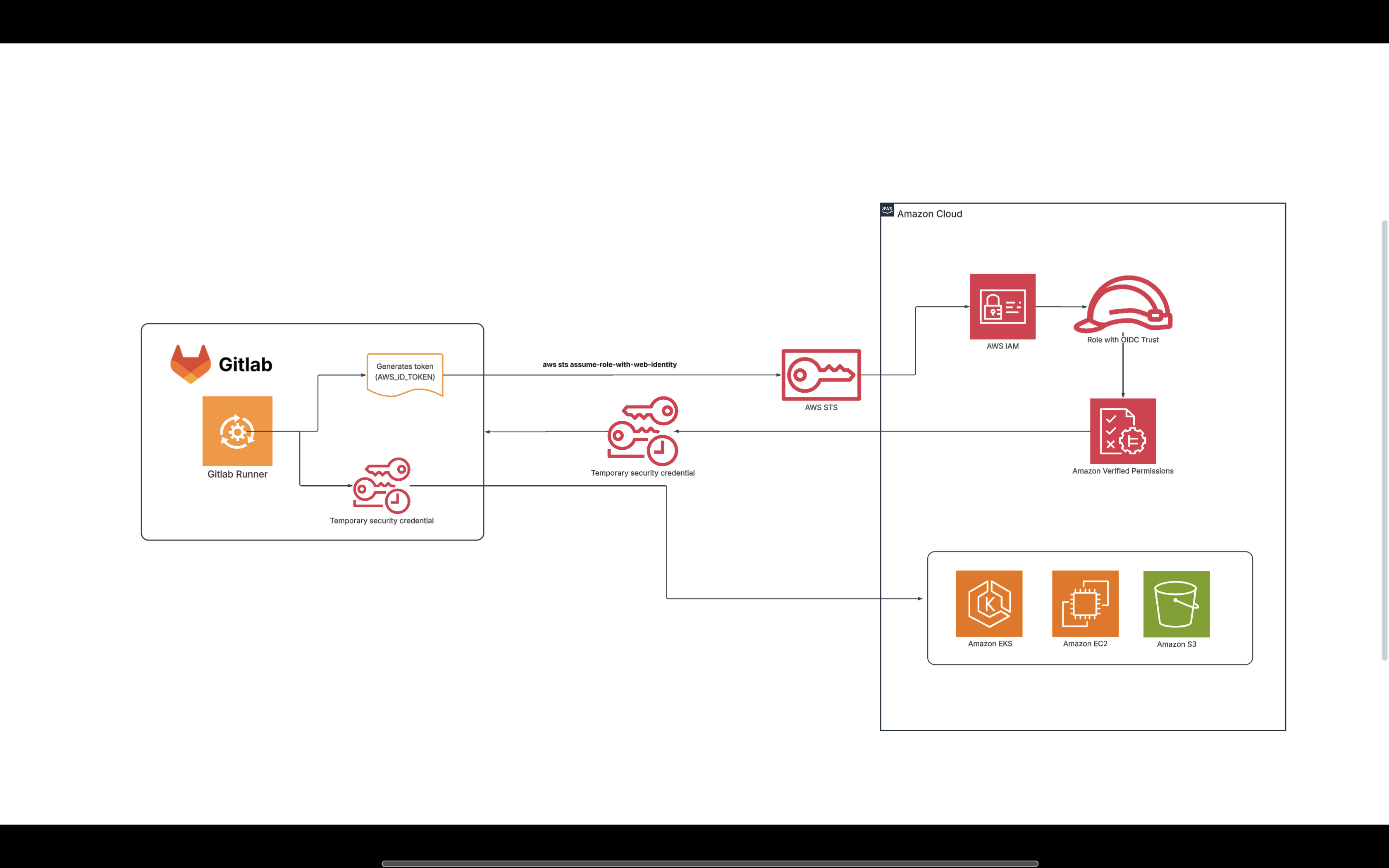
How does the authentication actually work?
When the pipeline is triggered the runner generates JWT token with issuer, audience, etc, and make validation request to AWS. AWS validates token against role and returns temporary credentials Runner can now access AWS resources per what the role allows.
The pipeline exchanges its identity for temporary AWS credentials.
Step 1: Configure AWS First, create an OIDC Identity Provider in AWS IAM.
For GitHub:
https://token.actions.githubusercontent.com
For GitLab:
https://gitlab.com
(or your self-managed GitLab URL)
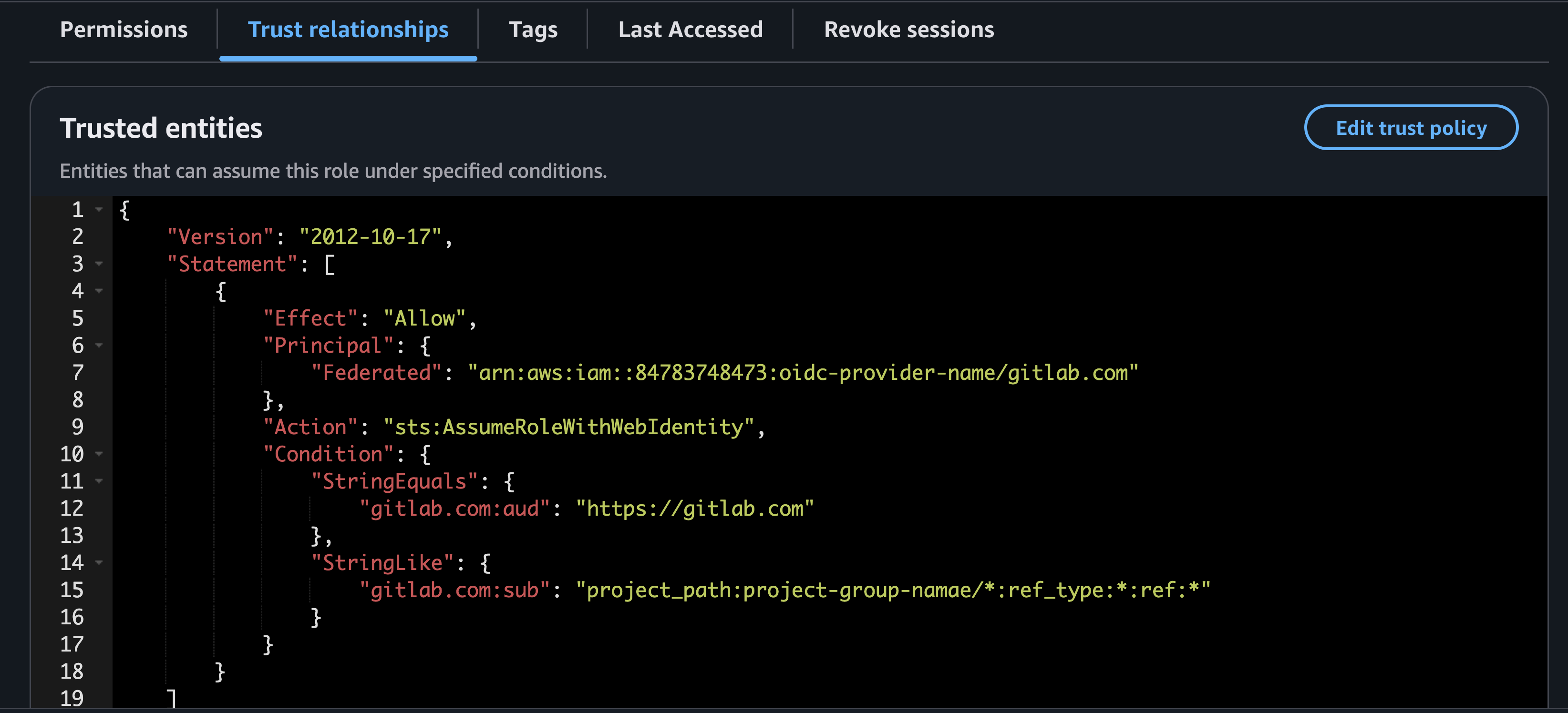
Next, create an IAM Role that trusts this provider.
The trust policy can also restrict access so that only a specific group, project, repository or branch can assume the role.
Restricting any other repository from accessing AWS using that IAM role.
Restrict role assumption to specific repositories, branches, or environments for least-privilege access.
GitHub Actions example
name: Deploy

on:
  push:
    branches:
      - main

permissions:
  id-token: write
  contents: read

jobs:
  deploy:
    runs-on: ubuntu-latest

    steps:
      - uses: actions/checkout@v4

      - name: Configure AWS Credentials
        uses: aws-actions/configure-aws-credentials@v4
        with:
          role-to-assume: arn:aws:iam::123456789012:role/github-deploy-role
          aws-region: eu-west-1

      - name: Verify identity
        run: aws sts get-caller-identity

      - name: Deploy
        run: aws s3 ls
GitHub exchanges its OIDC identity for temporary AWS credentials.
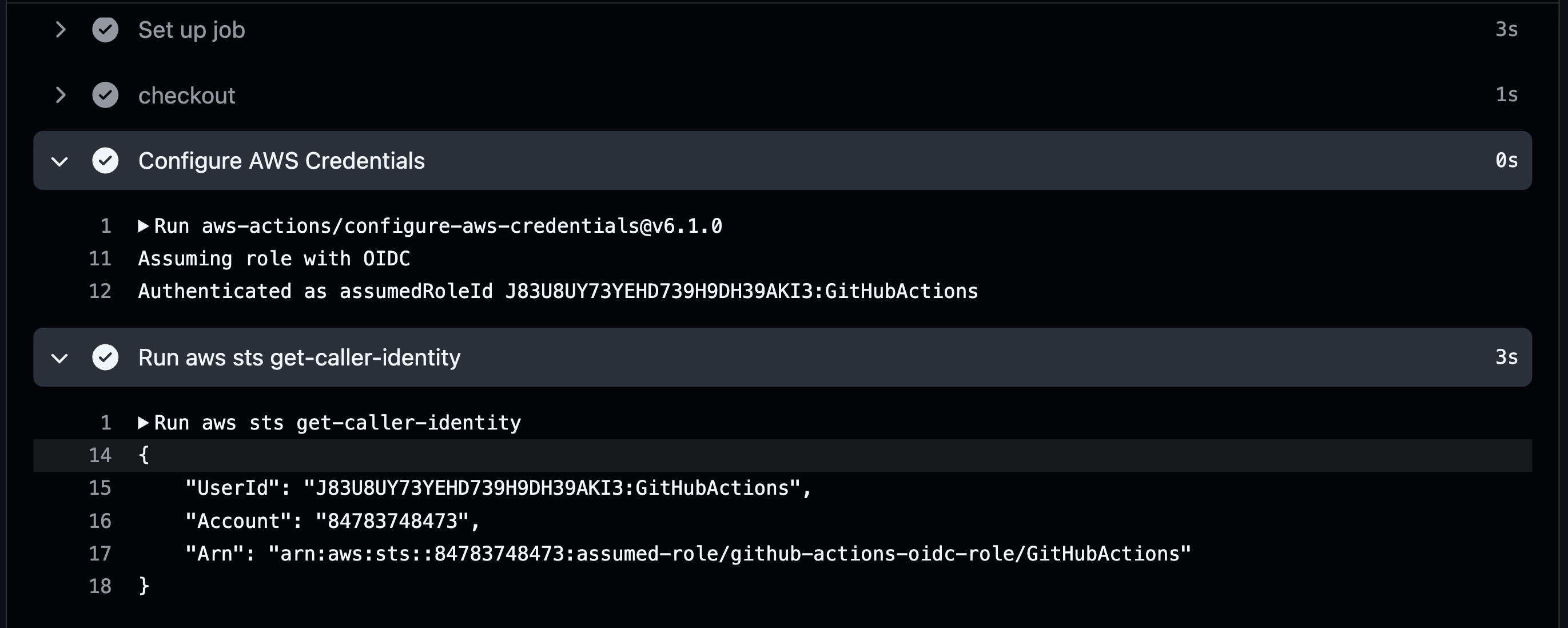
One important requirement is enabling OIDC permissions:
permissions:
  id-token: write
  contents: read
Then simply configure AWS credentials:
GitLab CI example
GitLab also supports OIDC by issuing an identity token to the job.
stages:
  - aws-configure

aws-configure:
  stage: aws-configure
  image:
    name: amazon/aws-cli:latest
    entrypoint: [""]

  id_tokens:
    AWS_OIDC_TOKEN:
      aud: https://gitlab.com

  script:
    - >
      STS_ASSUME_ROLE_OUTPUT=$(aws sts assume-role-with-web-identity
      --role-arn "${OIDC_ROLE_ARN}"
      --role-session-name "gitlab-ci-${CI_PIPELINE_ID}"
      --web-identity-token "${AWS_OIDC_TOKEN}"
      --duration-seconds 3600
      --query "Credentials.[AccessKeyId,SecretAccessKey,SessionToken]"
      --output text
      )

    - export AWS_ACCESS_KEY_ID=$(echo "$STS_ASSUME_ROLE_OUTPUT" | awk '{print $1}')
    - export AWS_SECRET_ACCESS_KEY=$(echo "$STS_ASSUME_ROLE_OUTPUT" | awk '{print $2}')
    - export AWS_SESSION_TOKEN=$(echo "$STS_ASSUME_ROLE_OUTPUT" | awk '{print $3}')

    - aws sts get-caller-identity
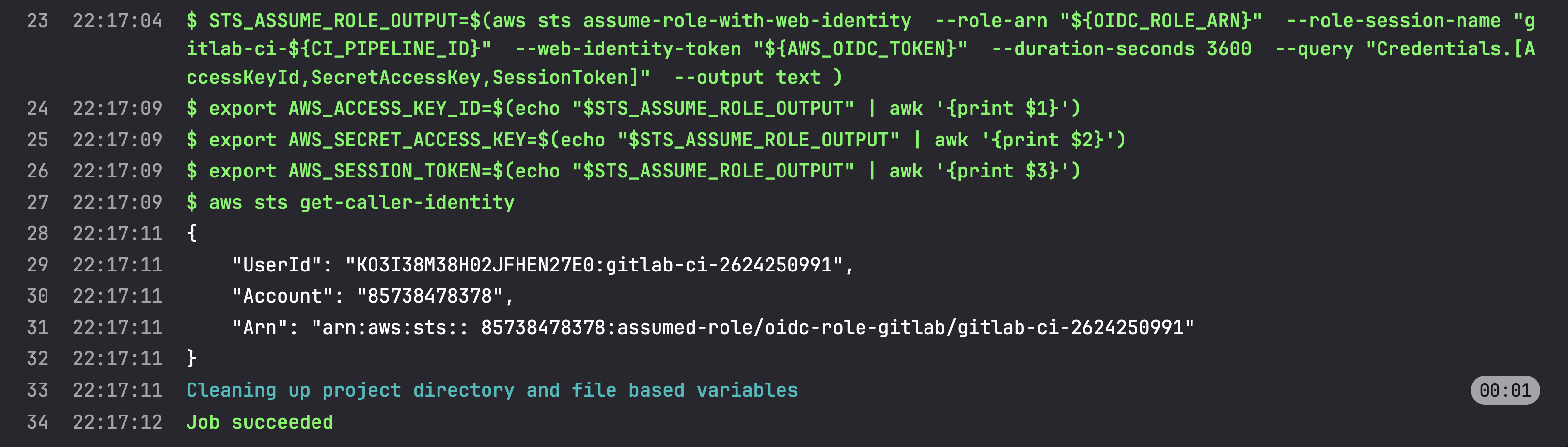
Here, AWS STS returns temporary credentials that expire automatically after the configured duration.
GitLab authenticates using OIDC and receives short-lived credentials from AWS STS.
Why is this considered a best practice?
- No long-lived AWS secrets stored in CI/CD
- Credentials expire automatically
- Easy to restrict access by repository, branch, or environment
- Follows the principle of least privilege
- Eliminates the operational burden of rotating access keys
Modern cloud authentication is moving away from "Who knows the secret?" toward "Can you prove who you are?"
OIDC is one of the simplest ways to adopt that model for your CI/CD pipelines.
#AWS #DevOps #DevSecOps #CloudSecurity #GitHubActions #GitLabCI #OIDC #IAM #STS #CICD
Comments
More Blog
View allaiContext bankruptcy: The case for strategic forgetting for AI Agents
Most of us have seen a coding agent fail to complete a task we know it can do. We just don't...
J
James O'ReillygooglecloudParallel Compliance Engine: Drive-to-Sheets Multi-Agent Orchestration
When building Generative AI applications, developers often encounter a massive bottleneck: sequential...
A
Aryan IranidiscussIs It Ethical to Post and Ask About Circuits on Dev.to?
I’ve been thinking about sharing some electronic circuit posts on Dev.to — small circuits, DIY...
C
codebunny20agentsThe One-Click Exporter: AI Studio Antigravity, Probed to Its Limits
What nobody tells you about exporting your multi-agent prototype to a local workspace. Every...
L
leslysandraagenticarchitectGuarding the till while autonomous data agents do the digging
Autonomous agents are genuinely good at answering messy business questions. Give one an LLM and a set...
S
Sireesha PulipatiaiReturn on Attention: Why AI Code Reviews Are Wearing Us Out
PR volume went up, ticket quality didn't, and the gap got filled with LLMs on both sides of the review: bots reviewing, bots replying, bots occasionally arguing with bots about priorities that only existed in a teammate's head. Our CEO named the actual problem, and it's bigger than code review.
C
christineReady-made automations for this
Workflows from the Neura Market marketplace related to this Stable Diffusion resource
- Automate Your LinkedIn Content Creation with RAG Pipeline & Chatbotn8n · $24.99 · Related topic
- Automated TikTok Video Creation Pipeline with AI Integrationn8n · $19.99 · Related topic
- Automate CircleCI Pipeline Execution with Manual Triggern8n · $17.07 · Related topic
- Automated CircleCI Pipeline Trigger for Prescription Managementn8n · $14.99 · Related topic