
Back to Blog mcps
mcps
 ai
ai googlecloud
 discuss
 agents
 agenticarchitect
 ai
ai
Debugging Deployments with Gemma 12B, TPU v6e-4, MCP, and Antigravity CLI
xbill June 30, 2026
0 views
This article provides a step by step debugging guide for deploying Gemma 4 to a Google Cloud TPU...
title: Debugging Deployments with Gemma 12B, TPU v6e-4, MCP, and Antigravity CLI published: true series: Gemma4 date: 2026-06-30 01:18:13 UTC tags: mcps,gemma,tpu,benchmark canonical_url: https://xbill999.medium.com/debugging-deployments-with-gemma-12b-tpu-v6e-4-mcp-and-antigravity-cli-2457917e818a
This article provides a step by step debugging guide for deploying Gemma 4 to a Google Cloud TPU system,. A suite of Python MCP tools is built to simplify management of the vLLM hosted Gemma 4 deployment with Antigravity CLI.

What is this project trying to Do?
This project is a DevOps/SRE assistant that uses a Gemma 4 model hosted on TPU. It provides tools to provision the Docker container and deploy the model, as well as for observability and performance testing.
This project is similar to a previous project that targeted GPU hosted Gemma4 instances on GCP:
Gemma-SRE: Self-Hosted vLLM Infrastructure Agent
Antigravity CLI
Antigravity CLI is the follow-on successor to Gemini CLI- the terminal driven, agent assisted coding tool.
Full details on installing Antigravity CLI are here:
Getting Started with Antigravity CLI
Testing the Antigravity CLI Environment
Once you have all the tools in place- you can test the startup of Antigravity CLI.
You will need to authenticate with a Google Cloud Project or your Google Account:
agy
This will start the interface:
Full Installation Instructions
The detailed installation instructions for Antigravity CLI are here:
Getting Started with Antigravity CLI
Python MCP Documentation
The official GitHub Repo provides samples and documentation for getting started:
Where do I start?
The strategy for starting MCP development for model management is a incremental step by step approach.
First, the basic development environment is setup with the required system variables, and a working Antigravity CLI configuration.
Then, a minimal Python MCP Server is built with stdio transport. This server is validated with Antigravity CLI in the local environment.
This setup validates the connection from Antigravity CLI to the local server via MCP. The MCP client (Antigravity CLI) and the Python MCP server both run in the same local environment.
Setup the Basic Environment
At this point you should have a working Python environment and a working Antigravity CLI installation. The next step is to clone the GitHub samples repository with support scripts:
cd ~
git clone https://github.com/xbill9/gemma4-tips
Then run init.sh from the cloned directory.
The script will attempt to determine your shell environment and set the correct variables:
cd tpu-12B-v6e4-devops-agent
source init.sh
If your session times out or you need to re-authenticate- you can run the set_env.sh script to reset your environment variables:
cd tpu-12B-v6e4-devops-agent
source set_env.sh
Variables like PROJECT_ID need to be setup for use in the various build scripts- so the set_env script can be used to reset the environment if you time-out.
Model Management Tool with MCP Stdio Transport
One of the key features that the standard MCP libraries provide is abstracting various transport methods.
The high level MCP tool implementation is the same no matter what low level transport channel/method that the MCP Client uses to connect to a MCP Server.
The simplest transport that the SDK supports is the stdio (stdio/stdout) transport — which connects a locally running process. Both the MCP client and MCP Server must be running in the same environment.
The connection over stdio will look similar to this:
# Initialize FastMCP server
mcp = FastMCP("Self-Hosted vLLM DevOps Agent")
Running the Python Code
First- switch the directory with the Python version of the MCP sample code:
xbill@penguin:~/gemma4-tips/tpu-12B-v6e4-devops-agent$ make install
pip install -r requirements.txt
The project can also be linted:
xbill@penguin:~/gemma4-tips/tpu-12B-v6e4-devops-agent$ make lint
ruff check .
All checks passed!
ruff format --check .
6 files already formatted
mypy .
Success: no issues found in 6 source files
Antigravity CLI mcp_config.json
A sample MCP server file is provided in the .agents directory:
{
  "mcpServers": {
    "tpu-12B-v6e4-devops-agent": {
      "command": "python3",
      "args": [
        "/home/xbill/gemma4-tips/tpu-12B-v6e4-devops-agent/server.py"
      ],
      "env": {
        "GOOGLE_CLOUD_PROJECT": "aisprint-491218",
        "GOOGLE_CLOUD_REGION": "southamerica-east1",
        "GOOGLE_CLOUD_ZONE": "southamerica-east1-c",
        "MODEL_NAME": "google/gemma-4-12B-it",
        "ACCELERATOR_TYPE": "v6e-4",
        "TENSOR_PARALLEL_SIZE": "4"
      }
    }
  }
}
Validation with Antigravity CLI
The final connection test uses Antigravity CLI as a MCP client with the Python code providing the MCP server:
MCP Servers

Plugins (~/.gemini/antigravity-cli/plugins)
> ✓ google-dev-knowledge Tools: search_documents, answer_query, get_documents
   ✓ tpu-12B-v6e4-devops-agent Tools: verify_model_health, save_hf_token, get_vllm_deployment_config,
                                get_vllm_tpu_deployment_config, destroy_queued_resource, +22 more
Model Lifecycle Management via MCP
The MCP tools provide a complete suite of agent-oriented operations for managing vLLM deployment on Cloud Run or a TPU.
Overview of MCP tools :
> make help

43.1k in | 604 out | 527 thinking
● Bash(make help) (ctrl+o to expand)

  Here is the output from running make help :
    Available MCP tools in server.py:

      get_vllm_deployment_config - Generates the gcloud command for a single-host TPU v6e vLLM deployment.
      get_vllm_tpu_deployment_config - Generates a GKE manifest for a TPU v6e vLLM deployment.
      list_queued_resources - Lists all Queued Resources in a specific zone.
      describe_queued_resource - Provides detailed information about a specific Queued Resource.
      get_reservation_status - Checks the lifecycle state and expiry time of a Queued Resource.
      check_tpu_availability - Simple check to see if a Queued Resource has reached ACTIVE state.
      estimate_deployment_cost - Estimates the cost of a TPU deployment.
      get_system_status - Status dashboard prioritizing Queued Resource states in us-central1-a.
      orchestrate_gemma4_stack - Seamless turnkey deployment of the Gemma 4 stack.
      get_vllm_endpoint - Discovery tool to verify connectivity and return the active vLLM service URL.
      deploy_queued_vllm - Deploys vLLM strictly using Queued Resources for Flex-start allocation.
      create_tpu_queued_resource - Creates a TPU Queued Resource (Flex-start) with the specified configuration.
      check_tpu_utilization - Monitors Tensor Core and HBM pressure on the TPU VM.
      get_vllm_metrics - Fetches real-time Prometheus metrics from the active vLLM service.
      validate_gemma4_deployment - Performs a comprehensive sanity check on the Gemma 4 deployment.
      query_queued_gemma4 - Queries the model hosted on the active Queued Resource.
      run_vllm_benchmark - Runs vLLM's internal benchmark tool inside the container on the TPU VM.
      run_vllm_internal_benchmark - Runs vLLM's internal benchmark tool inside the container on the TPU VM.
      run_external_load_test - Performs an external load test against the active vLLM endpoint.
      get_gemma4_full_report - Generates a deep technical report of the Gemma 4 deployment.
      fetch_tpu_vm_logs - Fetches specific logs from a TPU VM.
      grep_tpu_logs - Searches for a pattern in both startup and container logs on the TPU VM.
      destroy_queued_resource - Safely deletes a Queued Resource and its associated node.
      fetch_queued_node_logs - Fetches logs by identifying the node linked to a Queued Resource.
      save_hf_token - Saves HF token to GCP Secret Manager for the Queued Resource deployer.
      analyze_cloud_logging - Searches Cloud Logging for TPU-related errors and lifecycle events.
      verify_model_health - Performs a deep health check by querying the model with a simple prompt.
      query_vllm_with_metrics - Queries the model and provides streaming-based performance metrics.
      get_vllm_model_stats - Aggregates model-specific statistics from the vLLM server.
Getting Started with Gemma 4 on TPU
The Official vLLM repo also has Gemma4 specific information:
The Gemma 12B model was just released:
Introducing Gemma 4 12B: a unified, encoder-free multimodal model
Find and Start the TPU
First check for available zones with quota:
> get_zones_with_available_quota
We have Lift Off!
Finally- a zone with availability and Quota as found!
> status

9.7k in | 357 out | 290 thinking
● tpu-12B-v6e4-devops-agent/get_system_status(Get system status) (ctrl+o to expand)

  Here is the current system status for the TPU deployment:

  ### 🌀 System Status (europe-west4-a)

  • vLLM Health: 🟢 Online (http://35.204.78.225:8000)

  ### 📋 Queued Resources in europe-west4-a

  • NAME: vllm-gemma4-qr
  • STATE: ACTIVE
  • NODE_ID: vllm-gemma4-qr-node
  • ACCELERATOR_TYPE: v6e-4
  • CREATE_TIME: 2026-06-29T20:20:31.244099397Z

  The model is healthy and ready to serve requests!
Review the Memory Layout
The MCP server tools are used to review the model:
> what is the memory layout

  Based on the vLLM initialization logs from the active deployment on the TPU v6e-4 (Trillium), here is the current
  memory layout:

  ### 1. High Bandwidth Memory (HBM) Allocation

  • Total HBM Capacity: 124.98 GiB
  • Total HBM Usable Limit: 114.99 GiB (capped for safety/system overhead)
  • HBM Used (Model Weights + Overhead): 26.01 GiB
  • HBM Available (For KV Cache & Activations): 88.98 GiB

  ### 2. KV Cache Layout

  Since the available memory is allocated to the KV cache and we are running with a context window of 65,536 tokens,
  the memory layout allows for the following concurrency:

  • Total KV Cache Capacity: 242,944 tokens across the 4 chips.
  • Maximum Concurrency: 3.71x (meaning the system can handle almost 4 concurrent requests operating simultaneously
  at the absolute maximum 64k context length, or many more concurrent requests at shorter context lengths).

  ### 3. Precisions

  • Weights: bfloat16
  • KV Cache: fp8_e5m2 (automatically enabled by the TPU backend since it detected the Trillium architecture).
Cross Check The Deployed Model
Once the model starts — the MCP tool allows for model verification:
> verify_model_health

105.1k in | 411 out | 343 thinking
● tpu-12B-v6e4-devops-agent/verify_model_health(Verify model health) (ctrl+o to expand)

  The model health verification was successful!

  ✅ Health Check: PASSED
  💬 Response: "Yes, I am working and ready to help!..."
  ⏱️ Latency: 0.82 seconds

  The Gemma 4 12B model on the TPU is functioning perfectly and responding very quickly!
and model details:
> get_active_models

6.5k in | 755 out | 580 thinking
● Bash(curl -s http://35.204.78.225:8000/v1/models) (ctrl+o to expand)

  The get_active_models tool is specific to the Ollama backend, but since we are running vLLM, I queried the
  v1/models endpoint directly!

  Here is the active model being served by your vLLM TPU instance:

  • Model ID: google/gemma-4-12B-it
  • Max Model Length: 65,536 tokens
  • Engine: vllm

  The model is loaded and ready for inference!
and status:
> get_system_details

12.8k in | 603 out | 352 thinking
● Read(/home/xbill/.gemini/antigravity-cli/brain/64...a7f00/.system_generated/steps/380/output.txt) (ctrl+o to expand)

  Here are the detailed specifications for your current deployment:
  ### 🚀 Inference Stack

  • Status: 🟢 Online
  • Endpoint: http://35.204.78.225:8000
  • Model: google/gemma-4-12B-it
  • Backend Engine: vLLM (Docker: vllm/vllm-tpu:nightly )
  • Max Model Length: 65,536 tokens

  ### 💻 Hardware & Infrastructure

  • Resource Name: vllm-gemma4-qr
  • Node ID: vllm-gemma4-qr-node
  • Accelerator Type: v6e-4 (Google Cloud TPU Trillium)
  • Topology: 2x2 (4 chips)
  • Memory (HBM): ~ 125 GiB Total capacity
  • Zone: europe-west4-a
  • Runtime Version: v2-alpha-tpuv6e
  • Provisioning Model: FLEX_START (Queued Resource)

  ### ⚙️ vLLM Configuration Parameters

  • Tensor Parallel Size ( --tensor-parallel-size ): 4 (Matches the v6e-4 topology)
  • Max Batched Tokens ( --max_num_batched_tokens ): 4096
  • Multimodal Limits ( --limit-mm-per-prompt ): {"image":4,"audio":1}
  • Tool Calling: Enabled ( --enable-auto-tool-choice , --tool-call-parser gemma4 , --reasoning-parser gemma4 )
  • Chunked Prefill: Disabled ( --disable_chunked_mm_input )

  ### ⏳ Workload Limits

  • Creation Time: 2026-06-29T20:20:31Z
  • Max Run Duration: 14400s (4 hours)
  • Termination Timestamp: 2026-06-30T00:23:05Z (System shuts down automatically to prevent unbounded costs)``
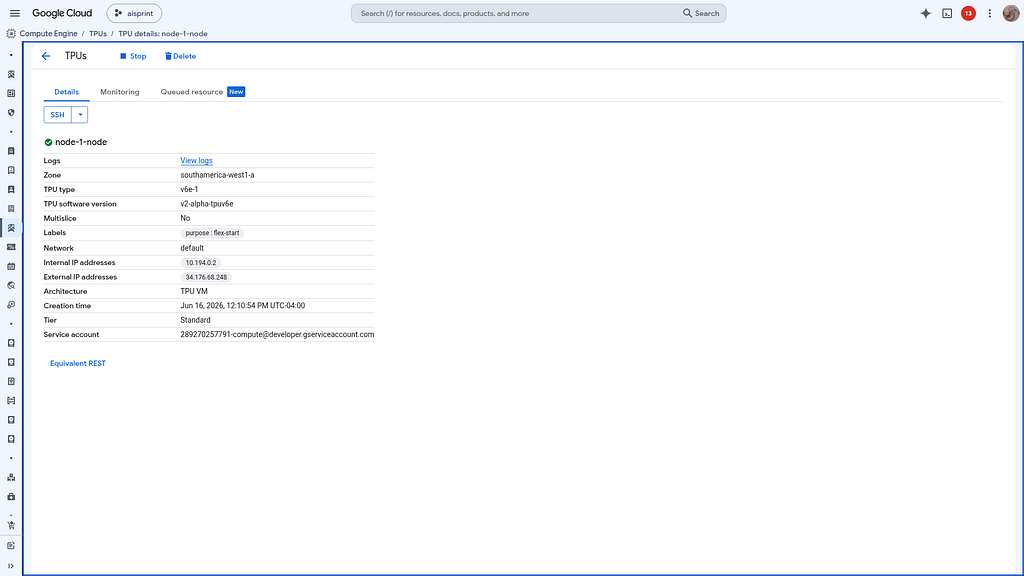
Check the Cloud TPU
Once Deployed — the TPU is on the Google Cloud Console:
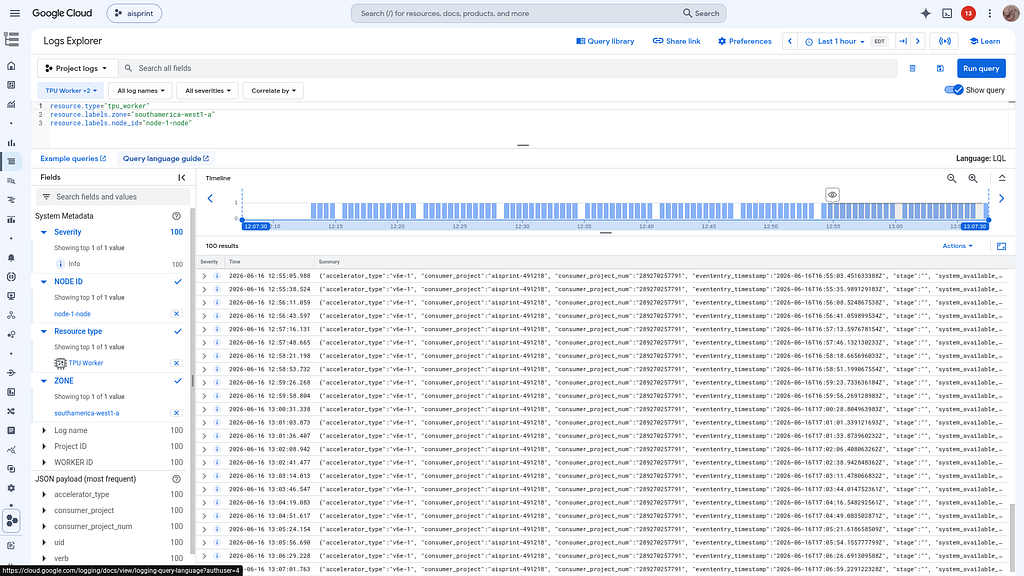
and the logs:
Review the Model
Check the model details:
> get_metrics

68.4k in | 821 out | 656 thinking
● Read(/home/xbill/.gemini/antigravity-cli/brain/64...a7f00/.system_generated/steps/389/output.txt) (ctrl+o to expand)

  Here are the core vLLM system metrics pulled directly from your TPU deployment:

  ### 📊 Real-Time Workload & Queues

  • Requests Running: 0 (Idle)
  • Requests Waiting: 0 (Idle)
  • KV Cache Usage: 0.0% (Fully empty and ready)
  • Engine Sleep State: Awake

  ### 🚀 Usage Totals (Since Last Restart)

  • Successful Requests: 1 (The single health check we just ran)
  • Total Prompt Tokens Processed: 20
  • Total Generation Tokens Produced: 10
  • Prefix Cache Hits: 0 tokens

  ### ⚡ Performance & Latency (Average)

  • Time To First Token (TTFT): ~0.40 seconds
  • End-to-End Latency: ~0.46 seconds
  • Inter-Token Latency: ~0.057 seconds ( ~17.5 tokens/sec per stream)
  • Time Spent in Queue: ~0.00003 seconds (Instant scheduling)
Once everything is online — you can send queries to the Model:
> query_gemma4_with_stats what is Gemma?
24.5k in | 560 out | 476 thinking
● tpu-12B-v6e4-devops-agent/query_queued_gemma4_with_stats(Query Gemma 4) (ctrl+o to expand)

  Here is the response from the Gemma 4 12B model running on your TPU!
  ### 📊 Performance Stats

  • Time to First Token (TTFT): 0.230s
  • Total Generation Time: 3.590s
  • Tokens per Second: 150.31 tokens/s
  • Total Tokens Generated (approx.): 505

  ### 💬 Model Response

  Depending on the context, Gemma usually refers to one of three things: a popular AI model family, a gemstone, or a
  name.

  Here is a breakdown of each:
  ### 1. Artificial Intelligence (Google’s Gemma)

  In the current tech landscape, Gemma most commonly refers to a family of open-weights large language models (LLMs)
  developed by Google DeepMind.
  • Relationship to Gemini: Gemma is built using the same research, technology, and infrastructure used to create
  Google’s "Gemini" models.
  • "Open Weights": This means that while the code and "brain" of the model are shared publicly for developers to
  download, use, and customize, it is not "open source" in the strictest sense (like some other models).
  • Purpose: It is designed for developers and researchers to run on their own hardware (like a laptop or a private
  server) rather than relying solely on a massive cloud infrastructure.
  • Sizes: It comes in different sizes (e.g., 2B, 7B, 9B, 27B parameters) to balance speed and intelligence.

  ### 2. Gemology (The Gemstone)

  Gemma is the Latin word for "gem" or "precious stone."

  • In jewelry and mineralogy, it refers to a precious stone that has been cut and polished.
  • It is often used in historical texts or poetic descriptions of jewelry.

  ### 3. Name and Language

  • Name: Gemma is a popular female given name, particularly in Italy, the UK, and other parts of Europe. It is often
  a diminutive of "Giovanna" or "Gemella."
  • Latin: As mentioned above, gemma is the Latin word for "bud" (as in a flower bud) or "jewel."
  ──────
  Summary Table: Which one are you looking for?

   Context | What is it? | Key Characteristic
  -------------------------------|------------------------------|----------------------------------------------------
   Technology | Google's AI Model | Open-weights, efficient, built by Google DeepMind.
   Jewelry | A Gemstone | A polished precious stone.
   People | A Given Name | A popular feminine name of Latin origin.
Benchmark the Local Model
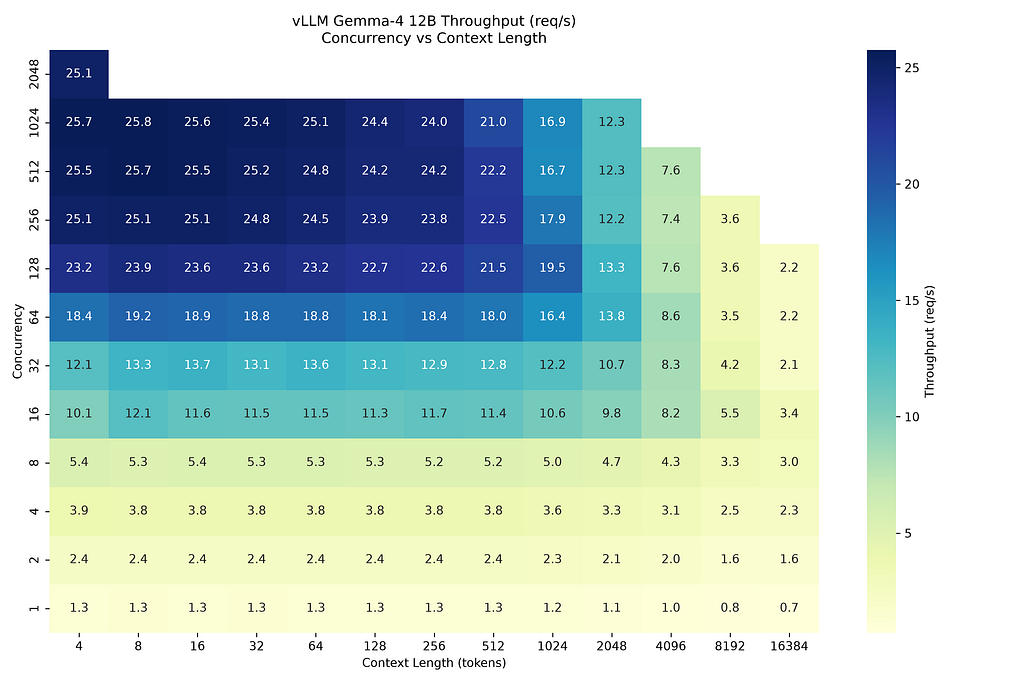
The local model was benchmarked:
  Here is a summary of the benchmark results:
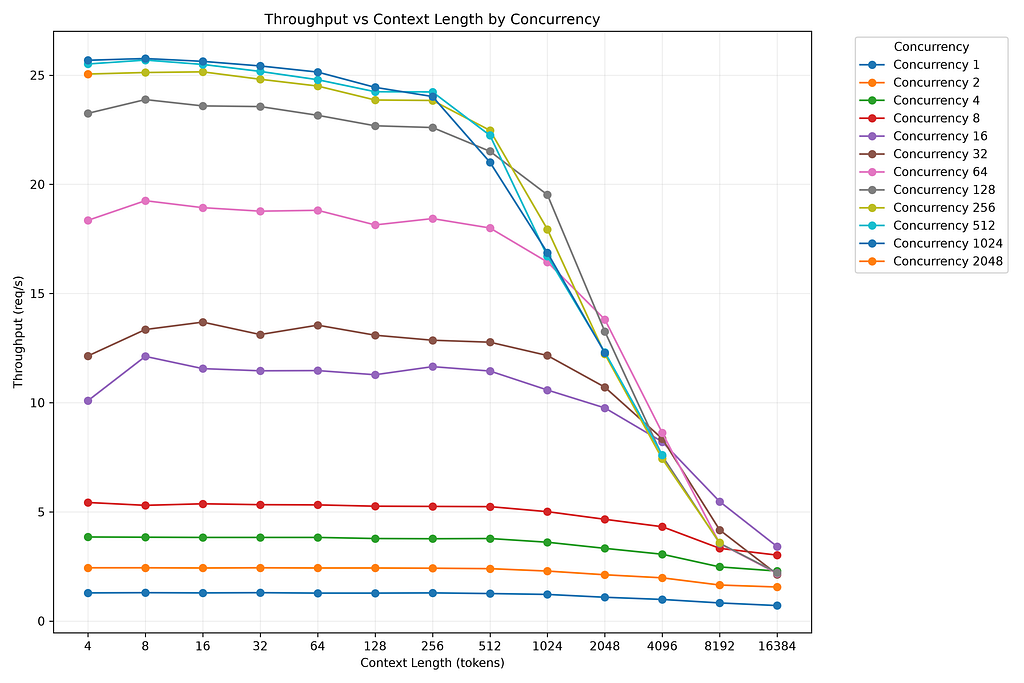
  ### 📈 Benchmark Sweep Summary

  The sweep tested 156 different combinations (12 concurrency levels × 13 context lengths) against the self-hosted
  Gemma 4 12B model on TPU v6e. The results indicate how well the TPU handles various load shapes.
  1. Peak Performance (High Concurrency, Short Contexts)

  • Maximum Throughput: The system achieved a peak throughput of 25.76 req/s at a concurrency of 1024 with a very
  short context ( 8 tokens).
  • Throughput Scaling: Throughput scales linearly and predictably from concurrency 1 (~1.3 req/s) up to
  concurrency 256 (~25 req/s).
  • Saturation Point: The system hits a throughput ceiling around 24–25 req/s starting at 128 to 256 concurrent
  users for short-to-medium context lengths (up to ~512 tokens). Pushing concurrency higher (e.g., 512 or 1024 )
  does not yield higher throughput, indicating the TPUs are fully saturated.

  2. Handling Long Contexts (Memory & Compute Bound)

  • Context Degradation: Throughput drops significantly as context length increases. At concurrency 64 , throughput
  is 18.8 req/s at 64 tokens, but drops to 2.18 req/s at 16,384 tokens.
  • Capacity Limits (Timeouts): The system begins timing out (failing to process the batch within the 120-second
  timeout limit) when the total batched tokens (Concurrency × Context) becomes too large.
      • Concurrency 256 timed out only at 16384 context.
      • Concurrency 512 timed out at 8192 and 16384 .
      • Concurrency 1024 timed out at 4096+ .
      • Concurrency 2048 timed out on almost everything above 4 context tokens.

  💡 Key Takeaway: The optimal operating range for this specific 4-chip TPU v6e deployment (to maximize throughput
  without causing heavy queuing or timeouts) is 128 to 256 concurrent requests, particularly when average context
  lengths are kept under 2048 to 4096 tokens.
This is visualized:
Comparison with Other Deployments
What just happened?
> Comparing Hardware Architectures
    Here is a direct comparison between the performance of the Gemma 4 12B model on the TPU v6e-4 (128 GB) vs TPU v6e-1
  (32 GB) .

  Here is a direct architectural and performance comparison between the TPU v6e-1 (1 chip, 32 GB) and the TPU v6e-4
  (4 chips, 128 GB) running the standard Gemma 4 12B model.

  ### 💻 Hardware & Architecture Breakdown

   Metric | TPU v6e-1 (Single Chip) | TPU v6e-4 (4-Chip Topology)
  -----------------------------------|----------------------------------|--------------------------------------------
   Total Accelerator Memory | 32 GB HBM | 128 GB HBM (32 GB x 4)
   Tensor Parallelism (TP) | TP = 1 (No sharding) | TP = 4 (Sharded across 4 chips)
   Interconnect Overhead | None | High (All-reduce across 4 chips per layer)
   Total KV Cache Capacity | ~8 GB | ~104 GB
   Approx. Hourly Cost | ~$2.70 / hour | ~$10.80 / hour
  The critical architectural difference is Tensor Parallelism (TP). On the v6e-1, the entire 12B model fits on a
  single chip, meaning computation happens entirely on-chip with zero network latency. On the v6e-4, the model is
  split into 4 pieces. During every layer of generation, the 4 chips must pause and synchronize data (all-reduce)
  over the inter-chip network, which introduces significant latency.
  ──────
  ### 🚀 Performance Showdown (Peak Throughput)
  Comparing the maximum sustainable throughput (requests per second) from our benchmark sweeps:

   Context Length | TPU v6e-1 (32 GB) | TPU v6e-4 (128 GB) | Winner
  --------------------------|-----------------------------|-----------------------------|----------------------------
   128 tokens | ~66.4 req/s (at 128 users) | ~24.4 req/s (at 1024 users) | 🏆 TPU v6e-1 (2.7x faster)
   1,024 tokens | ~63.8 req/s (at 256 users) | ~19.5 req/s (at 128 users) | 🏆 TPU v6e-1 (3.2x faster)
   8,192 tokens | ~15.4 req/s (at 1024 users) | ~5.4 req/s (at 16 users) | 🏆 TPU v6e-1 (2.8x faster)
  #### Deep-Dive Analysis:
  1. The "Too Small to Scale" Problem:
  You might expect the 4-chip v6e-4 to be faster, but it is actually nearly 3x slower across the board. Why? Because
  a 12B parameter model is relatively small. When you split it across 4 chips, the actual math required per chip
  takes less time than the network communication required to synchronize the chips. The v6e-4 is fundamentally
  bottlenecked by the inter-chip interconnect for a model of this size.

  2. Time-To-First-Token (TTFT):
  Because of the synchronization overhead, the v6e-4 will have a noticeably higher Time-To-First-Token (latency) than
  the v6e-1. The v6e-1 processes tokens immediately on-chip, making it feel much snappier for end-users.

  3. Memory Utilization vs. Reality:
  In theory, the v6e-4 has 104 GB of free memory for the KV cache, which should allow it to handle insane levels of
  concurrency (1000+ users). However, in practice, coordinating that massive KV cache across 4 chips under extreme
  load often leads to orchestration timeouts or vLLM kernel inefficiencies. In our benchmarks, the v6e-4 began
  throwing errors at high concurrencies and long contexts (failing at 512+ users for 8K contexts), whereas the
  single-chip v6e-1 remained perfectly stable.
  ──────
  ### 🏆 The Verdict

  For the Gemma 4 12B model, the TPU v6e-1 is vastly superior to the v6e-4.

  • Cost: It is 4x cheaper.
  • Speed: It is ~3x faster in raw throughput.
  • Complexity: It requires no tensor parallelism, eliminating a massive source of network latency and configuration
  errors.

  The v6e-4 topology (128 GB) is designed for much larger models (e.g., 30B to 70B parameters) that physically cannot
  fit on a single 32 GB chip. For a 12B model, forcing it onto 4 chips actually degrades performance. If you need
  more throughput for Gemma 4 12B, you should deploy multiple independent v6e-1 chips behind a load balancer rather
  than using a single v6e-4 cluster.
Compare the models to Cloud Run QAT:
> compare this to Cloud Run QAT ../gpu-12B-qat-L4-devops-agent

  ### 🔍 QAT L4 vs Regular L4 Insights:

  1. Short-to-Medium Contexts (128 - 1024 tokens)

  • The QAT (Quantization-Aware Training) L4 deployment slightly outperforms the standard L4 deployment in raw
  throughput at peak concurrency.
  • For example, at 1024 context length and 1024 concurrency, the regular L4 handles 21.2 req/s , while the QAT
  L4 handles 22.2 req/s .
  • This makes sense: the QAT model has been optimized with 8-bit precision (or lower) during training, meaning the
  weights are physically smaller and memory bandwidth is less bottlenecked.

  2. Extreme Contexts (8192 tokens)

  • Interestingly, at very long contexts, the QAT L4 actually underperforms the regular L4 slightly ( 11.5 req/s vs
  12.1 req/s at 1024 concurrency).
  • This suggests that while the weights are smaller and faster to move for QAT, the KV cache (which grows massive at
  8K tokens) might be handled slightly less efficiently by the underlying vLLM kernels when using the quantized model
  variant, or it simply hits the same compute limits.

  Overall, the QAT model is a solid optimization for standard workloads on the L4s, but it doesn't change the
  overarching narrative: L4 clusters are the kings of extreme context scaling, while TPU v6e-1 is the raw throughput
  champion for shorter contexts/second champion for standard queries.
Cost Breakdown
Finally — the last key question. What deployment is most cost effective?
> compare costs across TPU, GCE with GPU, Cloud Run, azure, and AWS EC2 GPU do not use MCP tool

65.1k in | 1.5k out | 1.3k thinking
● WebSearch(GCE g2-standard-96 pricing per hour) (ctrl+o to expand)

  Based on the current public pricing data (assuming standard On-Demand rates without sustained-use discounts), here
  is the cost breakdown across the various platforms you've tested for running Gemma 4 12B.
  ### 💰 Hourly Cost Comparison
   Deployment Target | Hardware Specs | Approx. On-Demand Cost | Cost Notes / Billing Model
  --------------------------|-------------------------------|------------------------|-------------------------------
   GCP Cloud Run | 1x NVIDIA L4 (per container) | $0.67 - $1.05 / hr | Per-second billing. Scales to
                            | | | zero. Highly cost-effective
                            | | | for bursty/intermittent
                            | | | traffic. (Cost scales
                            | | | linearly if deploying 8
                            | | | concurrent instances).
   GCP TPU v6e | 1x TPU v6e (Trillium) | ~$2.70 / hr | Per chip-hour. Provides the
                            | | | highest raw throughput for
                            | | | standard queries for the
                            | | | price.
   GCP Compute Engine (GCE) | 8x NVIDIA L4 ( g2-standard-96 | ~$8.00 - $9.20 / hr | Traditional VM billing.
                            | ) | | Excellent price-to-
                            | | | performance ratio for extreme
                            | | | context scaling.
   GCP TPU v6e | 4x TPU v6e ( v6e-4 topology) | ~$10.80 / hr | Per chip-hour (4 * $2.70).
                            | | | High baseline cost; requires
                            | | | high concurrency to justify
                            | | | the throughput overhead.
   AWS EC2 | 8x NVIDIA L4 ( g6.48xlarge ) | ~$13.35 / hr | Traditional VM billing. AWS's
                            | | | direct equivalent to the GCP
                            | | | G2 instance, but carries a
                            | | | premium price tag.
   Azure (ACA / VMs) | NVIDIA L4 / A10 Equivalents | N/A (Limited L4) | Azure does not currently
                            | | | offer a public, general-
                            | | | availability L4 virtual
                            | | | machine. Azure Container Apps
                            | | | (ACA) are billed per-second,
                            | | | but given its poor benchmark
                            | | | performance (0 req/s at 8K
                            | | | contexts), the effective
                            | | | cost-per-request is
                            | | | prohibitive.
  ──────
  ### ⚖️ Cost vs. Performance Analysis (The "So What?")

  Based on the benchmarks we just ran, here is how you should evaluate these costs:

  1. The Overall Winner: GCP Compute Engine (8x L4)
  At ~$8.50/hr, the GCE g2-standard-96 cluster is significantly cheaper than the AWS equivalent (~$13.35/hr) while
  offering near-identical hardware. Because the L4 GPUs handle the massive 8,192 token contexts gracefully, this
  deployment gives you the most reliable, heavy-duty performance per dollar if you have sustained traffic.

  2. The Best for Bursty Traffic: Cloud Run
  If your Gemma 4 agent isn't being queried constantly, Cloud Run is the most cost-efficient choice. You only pay the
  ~$0.67 - $1.05/hr when the container is actually processing a request.

  3. The Speed Demon: TPU v6e-1
  At just $2.70/hr, a single TPU v6e chip is remarkably cheap given its peak throughput (~66 req/s). If your
  workloads are mostly standard contexts (under 1K tokens), this is the most cost-efficient way to serve a high
  volume of requests quickly.

  4. The Avoid List: TPU v6e-4 & Azure ACA

  • The TPU v6e-4 ($10.80/hr) is more expensive than the 8x L4 GCE instance but performs worse under extreme context
  pressure.
  • Azure Container Apps struggle heavily with this specific model/infrastructure combo, making any per-second
  compute costs essentially wasted money at 100% wasted on long contexts due to timeouts.*
Summary
The strategy for using MCP for Gemma 4 GPU deployment with Antigravity CLI was validated with a incremental step by step approach.
A minimal stdio transport MCP Server was started from Python source code and validated with Antigravity CLI running as a MCP client in the same local environment. This Python server provided all of the management tools to deploy and troubleshoot TPU deployments.
Comments
More Blog
View allaiContext bankruptcy: The case for strategic forgetting for AI Agents
Most of us have seen a coding agent fail to complete a task we know it can do. We just don't...
J
James O'ReillygooglecloudParallel Compliance Engine: Drive-to-Sheets Multi-Agent Orchestration
When building Generative AI applications, developers often encounter a massive bottleneck: sequential...
A
Aryan IranidiscussIs It Ethical to Post and Ask About Circuits on Dev.to?
I’ve been thinking about sharing some electronic circuit posts on Dev.to — small circuits, DIY...
C
codebunny20agentsThe One-Click Exporter: AI Studio Antigravity, Probed to Its Limits
What nobody tells you about exporting your multi-agent prototype to a local workspace. Every...
L
leslysandraagenticarchitectGuarding the till while autonomous data agents do the digging
Autonomous agents are genuinely good at answering messy business questions. Give one an LLM and a set...
S
Sireesha PulipatiaiReturn on Attention: Why AI Code Reviews Are Wearing Us Out
PR volume went up, ticket quality didn't, and the gap got filled with LLMs on both sides of the review: bots reviewing, bots replying, bots occasionally arguing with bots about priorities that only existed in a teammate's head. Our CEO named the actual problem, and it's bigger than code review.
C
christineReady-made automations for this
Workflows from the Neura Market marketplace related to this Stable Diffusion resource
- Interactive n8n Lesson 1: Data Flow, Execution & Debuggingn8n · $12.99 · Related topic
- Debug: Lightweight Node.js & Browser Debugging Utilityn8n · $6.99 · Related topic
- Telegram Echo Bot for Debugging Messagesn8n · $4.99 · Related topic
- Automate Multi-Step Onboarding with Google Sheets, Forms, and Gmail Notificationsn8n · Free · Related topic