
Back to Blog![[AI in Action] Refining a macOS Meeting Translation App with Claude Code: Auto-reconnect, Floating Captions, and Meeting Minutes Export Evolution](https://media2.dev.to/dynamic/image/width=1200,height=627,fit=cover,gravity=auto,format=auto/https%3A%2F%2Fdev-to-uploads.s3.us-east-2.amazonaws.com%2Fuploads%2Farticles%2F5w2lr0jyuw7me0350aov.png) ai
ai
 ai
ai googlecloud
 discuss
 agents
 agenticarchitect
 ai
ai
[AI in Action] Refining a macOS Meeting Translation App with Claude Code: Auto-reconnect, Floating Captions, and Meeting Minutes Export Evolution
Evan Lin July 2, 2026
0 views
Foreword: Round Two, Switching to a Sharper Tool In the previous article, we used AGY...
Foreword: Round Two, Switching to a Sharper Tool
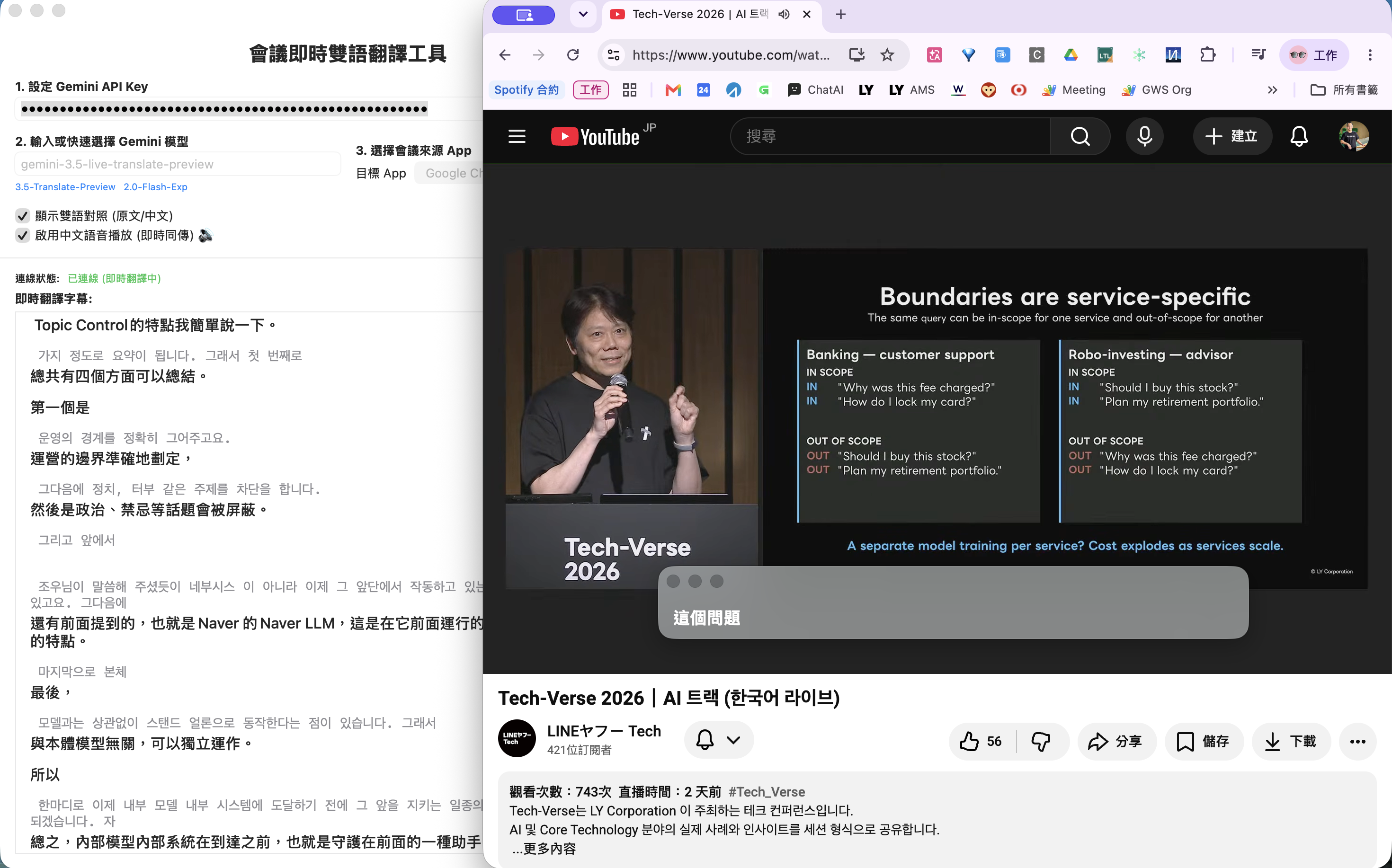
In the previous article, we used AGY CLI (Antigravity) to build a macOS real-time meeting translation App from scratch: capturing audio from Zoom / Google Meet via ScreenCaptureKit, sending it to the Gemini Live API for real-time translation, and displaying Traditional Chinese bilingual subtitles in the App window.
After the App went live, the developer discovered several issues during actual meetings that raised eyebrows, while also coming up with more functional ideas. This time, we switched to Anthropic's Claude Code to start the second round of deep polishing in the terminal.
The following records the complete dialogue flow of this collaboration, restoring every key decision point.
Phase 1: Uncovering Hidden Dangers — The Mystery of the WebSocket Stopping After 10 Minutes
The App seemed to work perfectly, but the developer returned with a question after a real, long meeting:
User: Check this code. Why does the real-time translation stop after about ten minutes? Help me look into possible reasons.
Claude Code read all five Swift source files and, combined with the built-in Gemini Live API documentation, precisely pointed out the root of the problem:
The Gemini Live API's WebSocket connection has a Session limit of about 10 minutes. Once the time is up, the server actively closes the connection and sends a GoAway signal. However, the original code was completely unprepared for this scenario, causing a three-layer failure:
- No reconnection after disconnection: The
didCloseWithcallback only updated the status text on the UI without any reconnection logic. - Silent audio discarding: After
isConnected = false, every audio chunk from the microphone was silently consumed byguard isConnected else { return }, without the user noticing. - Incorrect
isRunningstate: The "Translating" icon in the main window was still flashing, but in reality, nothing was happening.
Claude Code immediately refactored GeminiLiveConnection.swift, introducing three lines of defense without changing any external interfaces:
- Proactive GoAway Signal Detection: Parse the
goAwayJSON message sent by the server inparseServerResponse(), and actively reconnect before the connection actually drops to achieve seamless translation continuity. - Exponential Backoff Auto-Reconnection: After disconnection, retry at increasing intervals of 2s → 4s → 6s, up to 10 times; the count resets after a successful reconnection, ensuring the next disconnection also has a full set of retry opportunities. The entire process is silent and transparent to the user.
- 30-second Ping Keep-Alive: Start a
Timerafter a successful connection to send asendPingto the server every 30 seconds, preventing intermediate network equipment from cutting the connection due to inactivity.
After the modifications were completed, the developer executed bash build_app.sh and pushed to GitHub:
Claude Code: Build successful, commit completed, pushed. Real-time translation should now be able to operate continuously for a long time, silently reconnecting automatically when the Session expires without the user noticing an interruption.
Phase 2: Feature Interview — Five Questions to Lock Down Two Priority Development Directions
With stability resolved, the developer began thinking about how the App could go further:
User: Help me research carefully and give me three new feature recommendations.
After carefully reading the code, Claude Code first proposed a directional question instead of directly giving a list:
Which category of these three new feature directions do you prefer?
- A. Utility / UX — Making daily use more convenient (transcript export, hotkeys, meeting notes)
- B. Translation Quality — More accurate and natural (multi-language detection, speaker identification)
- C. System Integration — Connecting with other tools (Notion, Zoom overlay)
User: A
Three UX features were immediately produced: Floating Subtitle Window, Automatic Meeting Transcript Export, and Global Hotkeys. The developer's response was direct:
User: I want both 1 and 2.
Next was a brief requirement interview, where Claude Code asked only one most critical question at a time:
- How many lines should the floating window display? → Double lines (small text for original + large text for translation)
- Background style? → Vibrancy effect (frosted glass)
- Export method? → Automatically save to the desktop, no dialog box
After five questions, the design direction was completely clear. Claude Code proposed a complete design plan and wrote the specification document. After the developer confirmed "no problem," it entered the implementation phase.
Phase 3: Plan-Driven Development — Subagent Closed-Loop Delivery, Review Catches Critical Bugs
With clear specifications, Claude Code entered its most proficient work mode: Write a plan first, then use multiple independent Subagents to execute tasks, with each Task immediately reviewed by a Reviewer Subagent upon completion.
The entire process was divided into three Tasks; the two most critical ones are recorded below:
Task 1: Automatic Meeting Transcript Export
The Implementer Subagent quickly completed three things: removed the original 25-line history limit, added the exportTranscript() method, and automatically saved the complete bilingual comparison record in Markdown format to the Desktop when translation stopped.
However, the Reviewer Subagent immediately raised a flag:
Critical Issue found:
status = "Stopped"instop()is executed immediately afterexportTranscript(), instantly overwriting the save path message. The user will only ever see "Stopped" and will never know where the file was saved.
This was a logic bug just one line away, which would have been very easy to overlook without a Reviewer. The Fix Subagent then intervened, changing exportTranscript() to return a Bool: when export is successful, stop() no longer overwrites the status; "Stopped" is only displayed when there are no records to export. After the modification, the Reviewer confirmed again, and all passed.
Task 2: Floating Subtitle Window
Added FloatingSubtitleWindow.swift, with a core structure of three layers:
NSPanel(level = .floating): Always on top, does not steal focus (.nonactivatingPanel), and can be displayed across full-screen Apps.NSVisualEffectView(material = .hudWindow): Native macOS vibrancy effect.NSHostingViewembedding SwiftUI'sFloatingSubtitleView: Directly bound toTranslatorViewModel.currentLine, updating in real-time.
At the same time, ownership of TranslatorViewModel was moved up from ContentView to TranslatorApp, allowing the main window and the floating window to share the same data source, avoiding data duplication or synchronization issues. The window position is saved to UserDefaults after dragging and automatically restored after a restart.
The Task Reviewer checked all 11 specifications one by one; all passed without any need for correction.
The entire "Implementation → Review → Correction → Re-review" closed loop was completed automatically by subagents. The developer only needed to confirm that the final bash build_app.sh passed cleanly:
Claude Code: Build successful, commit completed, pushed.
Phase 4: App Brand Upgrade — Real-time Generation of Professional Icons with Python
With features complete, the developer turned their attention to the appearance:
User: The app icon doesn't look good, help me generate a professional one.
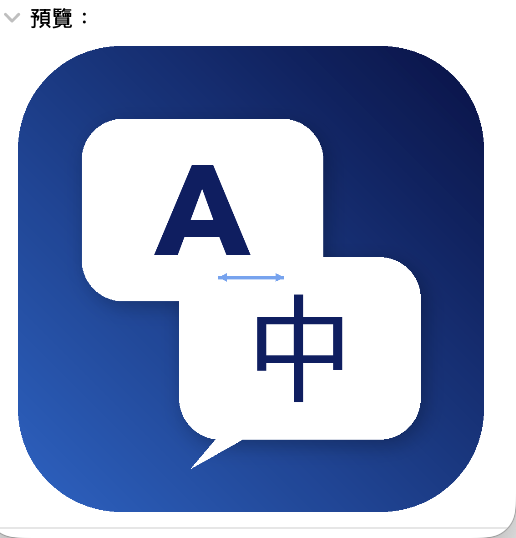
Claude Code first confirmed that Pillow (Python image library) was in the environment, then directly wrote a complete Icon generation script with the following design description:
- Background: Deep sea blue gradient (
#0D1B4E→#1565C0), standard macOS 22% rounded corners, echoing the macOS Design Language. - Core Pattern: Two overlapping speech bubbles. The upper bubble (semi-transparent white) contains "A" representing the original English audio, and the lower bubble (pure white) contains "中" representing the translated output. They are connected by a bidirectional arrow in the center, making the "real-time translation" product positioning clear at a glance.
- Fonts: Avenir Next for English and Apple SD Gothic Neo for Chinese, both of which are built-in macOS fonts, requiring no external resources.
The script output 10 sizes at once (16px → 1024px), converted them into an .icns file using the system's iconutil command, and automatically updated build_app.sh to copy the icon into the App Bundle, adding the CFBundleIconFile declaration to Info.plist. The entire process did not require opening Xcode or using any image design tools.
Phase 5: Code Quality Refinement — Clearing All Compilation Warnings
When the developer executed bash build_app.sh for acceptance, they noticed a few lines of yellow warnings in the output:
User: There are some warnings when running build_app.sh, help me check them.
Claude Code carefully executed the Build and categorized three types of warnings, treating them accordingly:
| Warning Type | Root Cause | Fix |
|---|---|---|
onChange(of:perform:) deprecated × 2 | swiftc did not specify a deployment target, defaulting to the latest SDK rules | Added -target arm64-apple-macos13.0 to build_app.sh to let the compiler know we are targeting macOS 13, where the old API is the correct choice |
SCRunningApplication non-Sendable × 2 | Types in the ScreenCaptureKit framework are not marked Sendable | Changed import ScreenCaptureKit to @preconcurrency import ScreenCaptureKit |
TranslatorViewModel non-Sendable captured | ViewModel was captured in a @Sendable closure | Added @MainActor to TranslatorViewModel (modern standard practice for SwiftUI ViewModels) and added @preconcurrency to delegate conformance to suppress derived warnings |
The final Build output was as clean as new, without any Warnings:
🛠 Starting compilation of Swift files (target: arm64-apple-macos13.0)...
🎨 Copying App Icon...
📝 Generating Info.plist...
✅ Packaging complete!
All modifications were committed and pushed to GitHub together.
Phase 6: Real-World Pitfalls — The ScreenCaptureKit Permission Labyrinth
The App's functionality seemed complete until the developer actually turned it on to start using it:
User: Is it a permission issue? I open the app and it keeps failing to scan the "Target App" list. Help me check the relevant code.
The App list was always empty. "Screen Recording" in System Settings was indeed checked. This is a typical "permissions are granted, but it just doesn't work" dead-end problem.
First Cut: Handling Silent Failures
After reading AudioCaptureManager.swift, Claude Code immediately spotted the problem: when the fetchShareableApps() call to SCShareableContent.current failed, it only printed to the console. The UI showed an empty list without any prompt. The developer had no idea what was happening.
The first wave of modifications did three things:
- Added
NSScreenCaptureUsageDescriptiontoInfo.plist: Without this key, the macOS authorization dialog will never pop up. - Added an ad-hoc signing step:
codesign --sign - --force --deep— ScreenCaptureKit requires the App to have a code identity to appear in the "System Settings > Screen Recording" list. - Surfaced errors to the UI: Changed
fetchShareableApps()to return(apps, errorMessage?). Any failure would be displayed in the App's status bar, allowing the developer to see immediately what happened.
Build completed, tested again—still the same error message.
Second Cut: Overly Aggressive Error Classification Logic
Looking closely at the error judgment code:
let isPermissionDenied = nsError.domain == "..." && nsError.code == 1
    || error.localizedDescription.lowercased().contains("permission")
    || error.localizedDescription.lowercased().contains("denied")
The contains("permission") line was too aggressive. As long as any word containing "permission" appeared in the error description, it would be incorrectly judged as "Permission Denied," displaying "Please go to System Settings to enable authorization." In reality, it could be a completely different error.
Claude Code corrected the judgment logic—only the exact ScreenCaptureKit userDeclined error code (-3801) is treated as a permission issue. All other errors display the actual domain, code, and description for easier diagnosis:
let isPermissionDenied = nsError.code == -3801
let message = isPermissionDenied
    ? "Screen recording permission required: Please go to System Settings to enable authorization"
    : "Unable to get App list (code \(nsError.code)): \(error.localizedDescription)"
Third Cut: Finding the Root Cause — TCC Identity Mismatch
After correcting the error classification, Claude Code ran the App and captured the logs, finding that the status bar displayed a new message with a code number, not -3801. This confirmed: The problem wasn't that the user hadn't given permission, but that macOS didn't recognize the App at all.
The root cause:
Every time
build_app.shis executed and re-signed ad-hoc, the hash of the binary changes, and the macOS TCC database treats it as a completely new App. The old screen recording authorization was given to the previous binary; the new binary did not inherit it. System Settings shows it as checked, but that's authorization for the old identity, which is invalid for the new binary.
The solution is to reset TCC to let macOS re-trigger the authorization dialog:
tccutil reset ScreenCapture com.poc.MeetingTranslator
After execution, reopening the App and clicking "↻" caused macOS to immediately pop up the "MeetingTranslator wants to record the contents of this screen" dialog. Clicking "Allow" instantly listed all running applications in the App list.
Permanent Countermeasure: Writing the Reset into the Build Process
The ad-hoc signing issue persists during development—every rebuild requires re-authorization. Claude Code added tccutil reset directly as the last step of build_app.sh:
tccutil reset ScreenCapture com.poc.MeetingTranslator 2>/dev/null && \
  echo "✅ Reset complete. The system will ask for authorization again after opening the App" || true
From then on, after every bash build_app.sh, simply open MeetingTranslator.app, and the system will ask for authorization again. The entire development cycle will never again get stuck in the "permissions are granted but it doesn't work" loop.
Conclusion: The True Value of the "Plan → Subagent Implementation → AI Review" Closed Loop
This collaboration with Claude Code made me feel a completely different way of working compared to the first AGY CLI development:
-
Proactively asking questions instead of just starting: Faced with "give me three new feature recommendations," Claude Code's first step was to ask for a direction; faced with the "floating window," it confirmed style and details one by one. This rhythm of "align first, then implement" is much more reliable than directly guessing requirements.
-
The plan is a moat for quality: Writing specification documents and implementation plans before implementation gives each Subagent clear boundaries and acceptance criteria. This seemingly "redundant" step directly discovered a state-overwriting bug in the Task 1 review that human developers could easily overlook.
-
AI Reviewing AI is a different layer of protection: The Reviewer Subagent and Implementer Subagent are started completely independently; they share no context. Because of this, the Reviewer can discover the Implementer's blind spots from a fresh perspective—this is the extra protection brought by "AI double-checking," not a replacement for human Code Review, but a completely new level of quality.
-
Tool boundaries are functional boundaries: App Icon generation, Warning fixes, Git commit/push—Claude Code moves freely throughout the development environment. The developer doesn't need to switch tools; all actions are completed within the dialogue.
-
Real-world use is the best test: The ScreenCaptureKit issue in Phase 6 never appeared in any build tests until the developer actually turned it on to use it. This kind of "silent failure + system-level identity mismatch" problem only surfaces in real-world scenarios. Claude Code's diagnostic method—from correcting error classification to letting the UI display real error codes, to finding the TCC root cause—is a typical "narrowing the hypothesis range and letting the problem speak" debugging approach.
If the first article was about "from zero to one," this record is about "from usable to good, and then to standing firm in real-world scenarios." Two types of AI Agents, two collaboration styles, together completed a full Native macOS App covering low-level audio, WebSocket connections, SwiftUI UI, Python image generation, and system permission diagnosis. See you next time!
Comments
More Blog
View allaiContext bankruptcy: The case for strategic forgetting for AI Agents
Most of us have seen a coding agent fail to complete a task we know it can do. We just don't...
J
James O'ReillygooglecloudParallel Compliance Engine: Drive-to-Sheets Multi-Agent Orchestration
When building Generative AI applications, developers often encounter a massive bottleneck: sequential...
A
Aryan IranidiscussIs It Ethical to Post and Ask About Circuits on Dev.to?
I’ve been thinking about sharing some electronic circuit posts on Dev.to — small circuits, DIY...
C
codebunny20agentsThe One-Click Exporter: AI Studio Antigravity, Probed to Its Limits
What nobody tells you about exporting your multi-agent prototype to a local workspace. Every...
L
leslysandraagenticarchitectGuarding the till while autonomous data agents do the digging
Autonomous agents are genuinely good at answering messy business questions. Give one an LLM and a set...
S
Sireesha PulipatiaiReturn on Attention: Why AI Code Reviews Are Wearing Us Out
PR volume went up, ticket quality didn't, and the gap got filled with LLMs on both sides of the review: bots reviewing, bots replying, bots occasionally arguing with bots about priorities that only existed in a teammate's head. Our CEO named the actual problem, and it's bigger than code review.
C
christineReady-made automations for this
Workflows from the Neura Market marketplace related to this Stable Diffusion resource
- Automate Language Translation with Webhook Integrationn8n · $19.99 · Related topic
- Automate English to German Translation with Google Translate in n8nn8n · $17.66 · Related topic
- Automate Voice Creation and Translation with ElevenLabs APIn8n · $16.43 · Related topic
- Advanced Slackbot Integration with n8n for Language Translationn8n · $12.99 · Related topic