
Back to Blog gemini
 ai
ai googlecloud
 discuss
 agents
 agenticarchitect
 ai
ai
Omni Flash Preview with Kiro
xbill July 2, 2026
0 views
This article covers the MCP setup and configuration for using Google Omni Preview and underlying...
This article covers the MCP setup and configuration for using Google Omni Preview and underlying Gemini LLM with Kiro CLI to enhance and extend Omni operations over MCP.

What is Google Omni?
Google Gemini Omni (often referred to simply as Google Omni) is a powerful, multimodal AI video model developed by Google. It allows users to generate, edit, and iterate on video content using any combination of text, images, video, and audio inputs through simple, conversational prompts. [1, 2, 3]
More details are here:
https://blog.google/innovation-and-ai/models-and-research/gemini-models/gemini-omni
and here:
Start building with Nano Banana 2 Lite and Gemini Omni Flash
But wait- there is more!
Gemini Omni Flash Preview | Gemini Enterprise Agent Platform | Google Cloud Documentation
Haven’t You Done this One Before?
What is old is new.
This article extends a previous article covering using Antigravity CLI with MCP servers. The original article is here:
Google Omni Flash Preview with MCP and Antigravity CLI
The same structured approach is used to enable Python MCP servers on Kiro CLI.
This seems Pretty Basic- why even Bother?!
When configuring a new environment and new tools — the key to a successful deployment is to validate the basic building blocks for the approach. Python MCP servers allow CLI tools like Kiro to be dynamically extended with a clear approach to enable minimal MCP tools. Before attempting more complicated MCP tools — a set of basic MCP commands with the simplest MCP protocol (stdio) is used to verify the functionality.
AWS Setup
The AWS CLI provides the basic tools for working with the AWS services:
Check the AWS installation:
xbill9@cloudshell:~ (aisprint-491218)$ /usr/local/bin/aws --version
aws-cli/2.34.57 Python/3.14.5 Linux/6.6.137+ exe/x86_64.ubuntu.24
xbill9@cloudshell:~ (aisprint-491218)$
Once the tools are installed — login to the AWS console:
aws login --remote
What is Kiro
Kiro is an agentic, AI-powered Integrated Development Environment (IDE) built by Amazon Web Services (AWS) designed to help developers move from initial concepts to production-ready software. Based on a fork of VS Code (Code OSS), Kiro feels familiar while acting like an autonomous co-developer. [1, 2, 3]
Installing Kiro
The main download site for Kiro is:
https://kiro.dev/
Kiro: Bring engineering rigor to agentic development
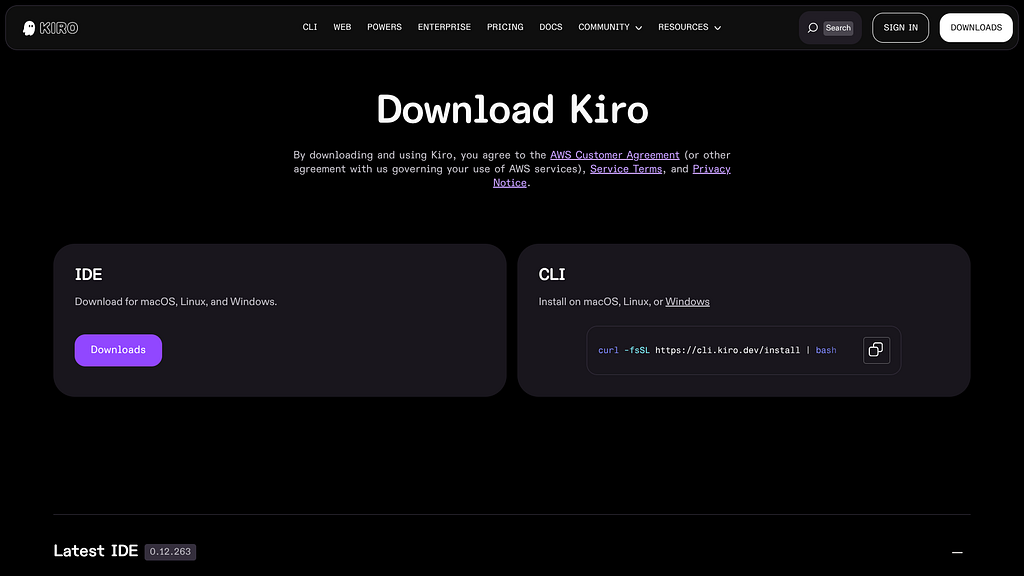
for the CLI download — click CLI:
curl -fsSL https://cli.kiro.dev/install | bash
once the stars align — you will see the CLI:
⢀⣴⣶⣶⣦⡀⠀⠀⠀⠀⢀⣴⣶⣦⣄⡀ ⢀⣴⣶⣶⣦⡀ ⢀⣴⣶⣶⣶⣶⣶⣶⣶⣶⣶⣦⣄⡀ ⢀⣠⣴⣶⣶⣶⣶⣶⣦⣄⡀
                            ⢰⣿⠋⠁⠈⠙⣿⡆⠀⢀⣾⡿⠁ ⠈⢻⡆ ⢰⣿⠋⠁⠈⠙⣿⡆ ⢰⣿⠋⠁ ⠈⠙⠻⣦ ⣴⡿⠟⠋⠁ ⠈⠙⠻⢿⣦
                            ⢸⣿⠀⠀⠀⠀⣿⣇⣴⡿⠋⠀⠀ ⢀⣼⠇ ⢸⣿⠀⠀⠀⠀⣿⡇ ⢸⣿⠀⠀⠀⢠⣤⣤⣤⣤⣄ ⣿⡆ ⣼⡟⠀⠀⠀ ⣀⣀⣀ ⢻⣧
                            ⢸⣿⠀⠀⠀⠀⣿⡿⠋⠀⠀ ⢀⣾⡿⠁ ⢸⣿⠀⠀⠀⠀⣿⡇ ⢸⣿⠀⠀⠀⢸⣿⠉⠉⠉⣿⡇ ⣿⡇ ⣼⡟⠀⠀ ⣰⡿⠟⠛⠻⢿⣆⠀⠀ ⢻⣧
                            ⢸⣿⠀⠀⠀⠀⠙⠁⠀⠀ ⢀⣼⡟⠁ ⢸⣿⠀⠀⠀⠀⣿⡇ ⢸⣿⠀⠀⠀⢸⣿⣶⣶⡶⠋⠀ ⣿⠇ ⢰⣿⠀⠀⠀⢰⣿⠀⠀⠀ ⣿⡆⠀⠀ ⣿⡆
                            ⢸⣿⠀⠀⠀⠀⠀⠀⠀⠀ ⠹⣷⡀ ⢸⣿⠀⠀⠀⠀⣿⡇⠀⢸⣿⠀⠀⠀⠀⠀⠀⠀⠀ ⣠⣼⠟ ⢸⣿⠀⠀ ⢸⣿⠀⠀⠀⠀ ⣿⡇⠀⠀ ⣿⡇
                            ⢸⣿⠀⠀⠀⠀⠀⣠⡀⠀⠀ ⠹⣷⡄ ⢸⣿⠀⠀⠀⠀⣿⡇⠀⢸⣿⠀⠀⠀⠀⣤⣄ ⠀⠀⠹⣿⡅ ⠸⣿⠀⠀ ⠸⣿⠀⠀⠀⠀ ⣿⠇⠀ ⣿⠇
                            ⢸⣿⠀⠀⠀⠀⣾⡟⣷⡀⠀⠀ ⠘⣿⣆ ⢸⣿⠀⠀⠀⠀⣿⡇ ⢸⣿⠀⠀⠀⠀⣿⡟⣷⡀⠀⠀ ⠘⣿⣆ ⢻⣧⠀⠀ ⠹⣷⣦⣤⣤⣾⠏⠀⠀⠀⣼⡟
                            ⢸⣿⠀⠀⠀⠀⣿⡇⠹⣷⡀ ⠀⠈⢻⡇ ⢸⣿⠀⠀⠀⠀⣿⡇ ⢸⣿⠀⠀⠀⠀⣿⡇⠹⣷⡀ ⠀⠈⢻⡇ ⢻⣧⠀⠀⠀ ⠉⠉⠉ ⣼⡟
                            ⠸⣿⣄⡀⢀⣠⣿⠇⠀⠙⣷⡀ ⢀⣼⠇ ⠸⣿⣄⡀⢀⣠⣿⠇ ⠸⣿⣄⡀⢀⣠⣿⠇⠀⠙⣷⡀ ⢀⣼⠇ ⠻⣷⣦⣄⡀ ⢀⣠⣴⣾⠟
                             ⠈⠻⠿⠿⠟⠁⠀⠀⠀⠈⠻⠿⠿⠟⠁ ⠈⠻⠿⠿⠟⠁ ⠈⠻⠿⠿⠟⠁⠀⠀⠀⠈⠻⠿⠿⠟⠁ ⠀⠀⠈⠙⠻⠿⠿⠿⠿⠟⠋⠁

                                                 Welcome to Kiro CLI V3!

                             What's new: Specs, expanded hooks, and an improved trust model.
                         Migration tooling to bring your V2 configurations to V3 is coming soon.
                                              [https://kiro.dev/docs/cli/v3/](https://kiro.dev/docs/cli/v3/)

                                         Share feedback anytime with /feedback.
What is MCP?
Unless you have been living off grid without Internet- MCP is the new universal connector and next “Big Thing”.
More information is here:
What is Model Context Protocol (MCP)? A guide
Python MCP Documentation
The official GitHub Repo provides samples and documentation for getting started:
Isn’t MCP overkill?
There are many ways to call the Omni models. Native MCP support in Kiro opens up a new pathway to call the underlying Omni model.
So what is the Secret Sauce?
The Interactions API allows for a clean consistent call to the model.
The Interactions API is Google’s unified interface for building with Gemini AI models and autonomous agents. Rather than using multiple separate endpoints for text chat, tool use, image generation, or background agents, it provides a single, streamlined API to handle complex, stateful workflows. [1, 2, 3]
More information is here:
Interactions API | Gemini API | Google AI for Developers
and here:
Gemini Interactions API | Gemini API | Google AI for Developers
There is A Skill for That!
You can make the magic happen!
Interactions API: our primary interface for Gemini models and agents
npx skills add google-gemini/gemini-skills --skill gemini-interactions-api
Setup the Basic Environment
At this point you should have a working Python environment and a working Kiro CLI installation. The next step is to clone the GitHub samples repository with support scripts:
cd ~
git clone https://github.com/xbill9/omni-flash-video-agent-kiro
Then run init.sh from the cloned directory.
The script will attempt to determine your shell environment and set the correct variables:
cd omni-flash-video-agent-kiro
source init.sh
If your session times out or you need to re-authenticate- you can run the set_env.sh script to reset your environment variables:
cd omni-flash-video-agent-kiro
source set_env.sh
Variables like PROJECT_ID need to be setup for use in the various build scripts- so the set_env script can be used to reset the environment if you time-out.
Running the Python Code
First- switch the directory with the Python version of the MCP sample code:
xbill@penguin:~/omni-flash-video-agent-kiro$ make install
pip install -r requirements.txt
The project can also be linted:
xbill@penguin:~/omni-flash-video-agent-kiro$ make lint
ruff check .
All checks passed!
ruff format --check .
4 files already formatted
mypy .
Success: no issues found in 4 source files
Kiro CLI MCP Config
A sample MCP server file is provided in the .kiro directory:
{
  "mcpServers": {
    "omni-agent": {
      "command": "python3",
      "args": [
        "/home/xbill/omni-flash-video-agent-kiro/server.py"
      ],
      "disabled": false,
      "env": {
      }
    },
    "aws-mcp": {
      "command": "uvx",
      "args": [
        "mcp-proxy-for-aws==1.6.0",
        "https://aws-mcp.us-east-1.api.aws/mcp",
        "--metadata",
        "AWS_REGION=us-east-1"
      ],
      "disabled": false
    }
  }
}
Validation with Kiro CLI
The final connection test uses Kiro CLI as a MCP client with the Python code providing the MCP server:
 /mcp list · 2 configured
────────────────────────────────────────────────────────────────────────────────────────────────────────────────────────
 search: type to filter

 Configured Servers
 Name Status Details
 aws-mcp ● running 9 tools
 omni-agent ● running 8 tools
Omni Video Management via MCP
The MCP tools provide a complete suite of agent-oriented operations for managing the Omni Video calls.
Overview of MCP tools :
  Here's a summary of the available tools in this Gemini Omni Flash Video Agent:

  ──────────────────────────────────────────────────────────────────────────────────────────────────────────────────────

  Video Generation

  - generate_video — Create a video from a text prompt. Supports 16:9 or 9:16 aspect ratio.
  - generate_with_subjects — Generate a video using reference images as subjects.

  Video Editing

  - edit_video — Edit a previously generated video by passing its interaction ID and an edit prompt.
  - edit_user_video — Upload a local video file and edit it with a prompt.

  Image-Based

  - animate_image — Animate a static local image with a motion description.
  - interpolate_images — Create a transition video between two keyframe images.

  Publishing

  - upload_to_youtube — Upload a local video file to YouTube (requires client_secrets.json).

  Utility

  - get_help — Returns this guide (what you just called).

  ──────────────────────────────────────────────────────────────────────────────────────────────────────────────────────

  Delivery modes:

  - inline (default) — base64-encoded, best for clips under ~4MB
  - uri — recommended for larger videos, uses Google File API

  Workflow tip: Generate → Edit → Upload. Use the interaction_id returned from generate_video as input to edit_video for
  stateful multi-turn editing.
We have Lift Off!
Finally- the MCP tools are now available for working with the Omni models:
  use the mcp tool generate_video to create a video of the kiro ghost in a futuristic data center
● generate_video
    ╰ prompt=A glowing ghost mascot floating through a futuristic data center with neon blue server racks, cyberpunk
    atmosphere, cinematic shot, delivery=inline
    {
      "content": [
        {
    ...+5 lines (ctrl+o to toggle)

  The video was generated successfully! Here are the details:

  - File: /home/xbill/omni-flash-video-agent-kiro/gen_1782940602.mp4
  - Interaction ID: v1_Chd1WU5GYXVPQkJyZnFqTWNQaWJfWW1RTRIXdVlORmF1T0JCcmZxak1jUGliX1ltUU0

[https://www.youtube.com/watch?v=w5mgqeJZsgk](https://www.youtube.com/watch?v=w5mgqeJZsgk)
● edit_video ╰ previous_interaction_id=v1_Chd1WU5GYXVPQkJyZnFqTWNQaWJfWW1RTRIXdVlORmF1T0JCcmZxak1jUGliX1ltUU0, edit_prompt=Add a tiny nano banana companion floating alongside the ghost. The banana is miniature and cute, glowing with a warm yellow light, bouncing and hovering next to the ghost as they drift together through the futuristic data center., delivery=inline
Done! Here are the details:
- File: /home/xbill/omni-flash-video-agent-kiro/edit_1782940987.mp4
- Interaction ID: v1_Chd1WU5GYXVPQkJyZnFqTWNQaWJfWW1RTRIXT29WRmF2cXdFdWUwMU1rUDdfS2ItUWM
The nano banana companion is now glowing yellow and bouncing alongside the Kiro ghost through the data center. Want to keep editing, or upload this version to YouTube?
https://www.youtube.com/watch?v=JsCJhcfjnRY
<iframe src="https://cdn.embedly.com/widgets/media.html?src=https%3A%2F%2Fwww.youtube.com%2Fembed%2FJsCJhcfjnRY%3Ffeature%3Doembed&display_name=YouTube&url=https%3A%2F%2Fwww.youtube.com%2Fwatch%3Fv%3DJsCJhcfjnRY&image=https%3A%2F%2Fi.ytimg.com%2Fvi%2FJsCJhcfjnRY%2Fhqdefault.jpg&type=text%2Fhtml&schema=youtube" width="854" height="480" frameborder="0" scrolling="no"><a href="https://medium.com/media/92e8b79911a2d507f3dc3734c8e29dcf/href">https://medium.com/media/92e8b79911a2d507f3dc3734c8e29dcf/href</a></iframe>
```plaintext
> use the mcp tool animate_image with Kiro.web
use the mcp tool animate_image with image kiro.webp
● Glob "kiro.webp"
1 file
kiro.webp
● animate_image
╰ image_path=/home/xbill/omni-flash-video-agent-kiro/kiro.webp, motion_prompt=The Kiro ghost gently floats and bobs
up and down with a subtle ghostly hovering motion. A soft glowing aura pulses around it. The ghost's expression
remains friendly as it drifts slowly, with a slight swaying side to side motion, leaving a faint trail of shimmering
light particles., delivery=inline
{
"content": [
{
...+5 lines (ctrl+o to toggle)
Animated! Here are the details:
- File: /home/xbill/omni-flash-video-agent-kiro/animated_1782941216.mp4
- Interaction ID: v1_ChZINFpGYXZtaURlS2lqckVQNE5teENBEhZINFpGYXZtaURlS2lqckVQNE5teENB
The Kiro ghost is now animated with a gentle floating bob, pulsing glow, and shimmering light trail. Want to edit it
further or upload it to YouTube?
[https://www.youtube.com/watch?v=dxOyZG4OCzg](https://www.youtube.com/watch?v=dxOyZG4OCzg)
● Glob "ghost_banana.webp" 1 file ghost_banana.webp ● interpolate_images ╰ start_image_path=/home/xbill/omni-flash-video-agent-kiro/kiro.webp, end_image_path=/home/xbill/omni-flash-video-agent-kiro/ghost_banana.webp, prompt=A smooth cinematic transition from the Kiro ghost to the ghost banana companion. The Kiro ghost gently morphs and transforms into the ghost banana with a magical glowing effect, light particles swirling around as the shape shifts. Soft volumetric lighting, dreamy and fluid motion., delivery=inline { "content": [ { ...+5 lines (ctrl+o to toggle)
Done! Here are the details:
- File: /home/xbill/omni-flash-video-agent-kiro/interpolation_1782941999.mp4
- Interaction ID: v1_ChdMWWxGYW83a09xRDJqckVQbjYyanNRWRIXTFlsRmFvN2tPcUQyanJFUG42MmpzUVk
The video smoothly transitions from the Kiro ghost to the ghost banana companion with a magical glowing morph effect. Want to edit it further or upload it to YouTube?
<iframe src="https://cdn.embedly.com/widgets/media.html?src=https%3A%2F%2Fwww.youtube.com%2Fembed%2F90rRuCzqM4g%3Ffeature%3Doembed&display_name=YouTube&url=https%3A%2F%2Fwww.youtube.com%2Fwatch%3Fv%3D90rRuCzqM4g&image=https%3A%2F%2Fi.ytimg.com%2Fvi%2F90rRuCzqM4g%2Fhqdefault.jpg&type=text%2Fhtml&schema=youtube" width="854" height="480" frameborder="0" scrolling="no"><a href="https://medium.com/media/e0dba7b51720aa3693a80841c225ced9/href">https://medium.com/media/e0dba7b51720aa3693a80841c225ced9/href</a></iframe>
```plaintext
> generate_with_subjects v1_ChdMVk5FYXZDLUY5ejBqckVQLXFDRWlBURIXTFZORWF2Qy1GOXowanJFUC1xQ0VpQVE
v1_ChdrVkJFYXJ5SE8tYXUxTWtQMmM3aDBRNBIXcUZGRWFxLTdJYy1NMzlJUDhKbXl3UUU
● generate_with_subjects
╰ subject_image_paths=/home/xbill/omni-flash-video-agent-kiro/kiro.webp,
/home/xbill/omni-flash-video-agent-kiro/ghost_banana.webp, prompt=The Kiro ghost and the ghost banana companion
explore a futuristic data center together. They float side by side between towering server racks covered in blinking
neon blue and cyan LED lights. Holographic data streams flow around them as they drift curiously through the
corridors. The ghost emits a soft white and purple glow while the banana glows warm yellow. Reflective floors,
volumetric lighting, cinematic tracking shot, cyberpunk atmosphere, photorealistic 3D render., delivery=inline
Done! Here are the details:
- File: /home/xbill/omni-flash-video-agent-kiro/subject_1782942220.mp4
- Interaction ID: v1_ChdDb3BGYW9pTk5jbVVfdU1QaUwyeWtBcxIXQ29wRmFvaU5OY21VX3VNUGlMMnlrQXM
The Kiro ghost and ghost banana are now exploring the futuristic data center together, floating side by side through
neon-lit server corridors. Want to edit it or upload it to YouTube?
[https://www.youtube.com/watch?v=7NlLxIG3iaQ](https://www.youtube.com/watch?v=7NlLxIG3iaQ)
Done! Here are the details:
- File: /home/xbill/omni-flash-video-agent-kiro/user_edit_1782942468.mp4
- Interaction ID: v1_ChdBNHRGYXZQeExZdXVqckVQdGRPQy1BaxIXQTR0RmF2UHhMWXV1anJFUHRkT0MtQWs
https://www.youtube.com/watch?v=sUivQ8o342s
<iframe src="https://cdn.embedly.com/widgets/media.html?src=https%3A%2F%2Fwww.youtube.com%2Fembed%2FsUivQ8o342s%3Ffeature%3Doembed&display_name=YouTube&url=https%3A%2F%2Fwww.youtube.com%2Fwatch%3Fv%3DsUivQ8o342s&image=https%3A%2F%2Fi.ytimg.com%2Fvi%2FsUivQ8o342s%2Fhqdefault.jpg&type=text%2Fhtml&schema=youtube" width="854" height="480" frameborder="0" scrolling="no"><a href="https://medium.com/media/5227a04e06ccd69eb609126ce0f1e003/href">https://medium.com/media/5227a04e06ccd69eb609126ce0f1e003/href</a></iframe>
#### One last thought- Where are Agents?
Where are the Agents?
The Kiro CLI harness itself uses agents to manage the workflow.
The additional touch point for leveraging the MCP interface is that they all are exposed as MCP tools. The MCP tools can be called directly from Agent code or used as a template for Interactions API calls embedded in an Agent.
#### Summary
The strategy for using MCP with Omni and Kiro CLI was validated with a incremental step by step approach.
A minimal stdio transport MCP Server was started from Python source code and validated with Kiro CLI running as a MCP client in the same local environment. This Python server provided all of the management tools to interact with the Omni models.
* * *
Comments
More Blog
View allaiContext bankruptcy: The case for strategic forgetting for AI Agents
Most of us have seen a coding agent fail to complete a task we know it can do. We just don't...
J
James O'ReillygooglecloudParallel Compliance Engine: Drive-to-Sheets Multi-Agent Orchestration
When building Generative AI applications, developers often encounter a massive bottleneck: sequential...
A
Aryan IranidiscussIs It Ethical to Post and Ask About Circuits on Dev.to?
I’ve been thinking about sharing some electronic circuit posts on Dev.to — small circuits, DIY...
C
codebunny20agentsThe One-Click Exporter: AI Studio Antigravity, Probed to Its Limits
What nobody tells you about exporting your multi-agent prototype to a local workspace. Every...
L
leslysandraagenticarchitectGuarding the till while autonomous data agents do the digging
Autonomous agents are genuinely good at answering messy business questions. Give one an LLM and a set...
S
Sireesha PulipatiaiReturn on Attention: Why AI Code Reviews Are Wearing Us Out
PR volume went up, ticket quality didn't, and the gap got filled with LLMs on both sides of the review: bots reviewing, bots replying, bots occasionally arguing with bots about priorities that only existed in a teammate's head. Our CEO named the actual problem, and it's bigger than code review.
C
christineReady-made automations for this
Workflows from the Neura Market marketplace related to this Stable Diffusion resource
- Automate Standup Bot Configuration with Write Binary Filen8n · $9.93 · Related topic
- Effortless Telegram Bot Webhook Configuration Tooln8n · $15.99 · Related topic
- Standup Bot Configuration Readern8n · $9.99 · Related topic
- AI Hairstyle Preview Generator with OpenAI & LINE Sharingn8n · $17.99 · Related topic