 Stable Diffusion
Back to Blog googleappsscript
2. Test 1: User-Agent Customization & POSIX Socket Verification (
3. Test 2:
4. Test 3: Playwright Headless Scraping to Direct Drive Upload (
5. Test 4: FFmpeg Audio Synthesis & Transcoding to Direct Drive Upload (
6. Test 5: TypeScript AST Extraction &
7. Test 6: Performance Benchmark: Direct
Scenario 4: Reusing Sandbox with Fresh Context (
 flutter
 flutter
 kubernetes
 kubernetes
 ai
ai gemma
gemma
Taking Advantage of Gemini Managed Agents with Google Apps Script
Tanaike August 30, 2026
0 views
Breaking the Limits of GAS with Direct Cloud-to-Cloud Streaming in Persistent Linux...
Breaking the Limits of GAS with Direct Cloud-to-Cloud Streaming in Persistent Linux Sandboxes
Abstract
While Google Apps Script (GAS) is a powerful tool for Google Workspace automation, platform and computational constraints often limit its ability to handle advanced workloads. Gemini Managed Agents provide remote Linux sandboxes equipped with bash execution. This article introduces an architecture integrating GAS with a Linux sandbox to execute tasks beyond the capabilities of Apps Script alone. By streaming generated artifacts directly from within the Linux sandbox to Google Drive, this approach bypasses API payload limits, eliminates token overhead, and achieves high-throughput cloud automation.
Introduction
Recently, Martin Hawksey published an inspiring article on AppsScriptPulse exploring the potential of Gemini Managed Agents and the Google Workspace CLI within Google Workspace automation. Ref Gemini Managed Agents (part of the Gemini v1beta Interactions and Environments API) allow developers to provision and interact with remote Linux sandbox environments capable of autonomous code execution, shell commands, and package management. Ref
While Google Apps Script (GAS) is widely used for automating Google Workspace workflows, it operates as a lightweight, restricted serverless runtime without OS-level access, inherently preventing developers from executing various advanced computational workloads. Common platform bottlenecks include restricted low-level network and protocol controls, the absence of headless browser environments for dynamic web rendering, the inability to run native binaries for media transcoding or signal processing, the lack of modern compilers and build toolchains, and strict platform quotas on execution duration and payload sizes. The objective of this article is to introduce a generalized architecture that bridges GAS with a full-featured Linux sandbox provisioned by Gemini Managed Agents, demonstrating how developers can seamlessly offload otherwise impossible workloads to a dedicated cloud compute environment with high throughput and complete autonomy.
By integrating Google Apps Script with Gemini Managed Agents, GAS gains access to a dedicated Linux container (4 vCPU, 16 GB RAM) featuring Python 3.12, Node.js 22, and standard Linux package managers (apt, npm, pip). In this article, I present an end-to-end architecture and client library that enables GAS to orchestrate complex tasks inside a persistent Linux sandbox, eliminating local processing overhead by streaming generated artifacts directly to Google Drive via the ggsrun CLI tool.
Architectural Paradigm: Why Direct Cloud-to-Cloud Streaming?
When generating large files (such as high-resolution screenshots, audio waveforms, or bundled JavaScript) inside a Managed Agent sandbox and transferring them to Google Drive, returning raw binary data as Base64 strings through the Gemini API response to GAS introduces severe platform bottlenecks:
- GAS URL Fetch Response Limit: Google Apps Script enforces a strict 50 MB response payload limit on
UrlFetchApp. Ref - Code Execution Output Buffer Truncation: The Gemini Interactions API code execution environment imposes standard output (stdout) buffer limits, truncating multi-megabyte Base64 payloads mid-stream. Ref
- Rate Limits and Conversational Token Inflation: Gemini Managed Agents enforce a 200,000 Tokens Per Minute (TPM) quota. Ref Base64 encoding inflates binary size by ~33%. In multi-turn sessions, accumulating previous Base64 output strings in conversation history rapidly exhausts input token quotas, triggering immediate
429 Quota Exceedederrors. - CPU and Memory Overhead on GAS: Decoding multi-megabyte Base64 strings and creating Drive blobs inside Apps Script consumes valuable execution time and script memory.
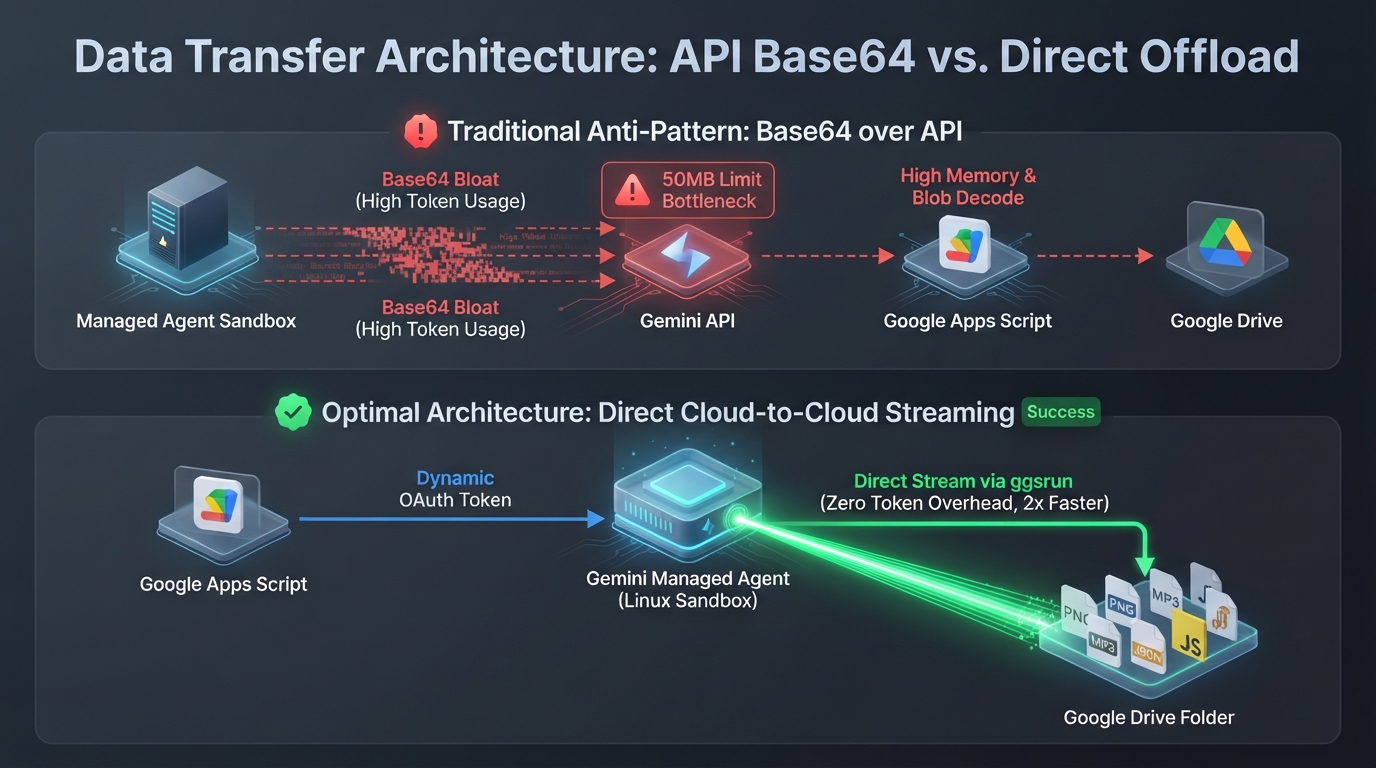
To eliminate these bottlenecks, the optimal approach is to execute the Go CLI tool ggsrun directly inside the Linux sandbox using a dynamically injected OAuth access token (ScriptApp.getOAuthToken()). This allows the sandbox to stream binary artifacts directly to Google Drive over Google Cloud's internal backbone network at speeds exceeding 2 MB/s, completely bypassing Apps Script memory, API response size limits, and token quota exhaustion.
Drastic Input Token Savings via Bi-directional Streaming
The advantages of direct cloud-to-cloud streaming extend far beyond outbound artifact uploads. When bringing large external datasets (high-resolution images, audio, video files, multi-gigabyte CSV/JSON datasets, or machine learning models) into the sandbox for processing, direct inbound downloads provide an equally critical advantage.
Embedding large binary or structured datasets directly into API prompts as Base64 strings or serialized text rapidly consumes input token quotas, instantly hitting the 200,000 Tokens Per Minute (TPM) limit and triggering immediate 429 Quota Exceeded errors. In contrast, by streaming files directly from Google Drive into the sandbox via ggsrun, the prompt requires only a concise instruction (e.g., "Download target dataset from Drive and analyze it"). This architecture reduces input token consumption to virtually zero, completely preventing rate-limit exhaustion.
Process Cost Reduction via Shared Persistent Sandboxes
Furthermore, sharing a single persistent Linux sandbox (environmentId) across multiple clients—including Google Apps Script, local Node.js workstations, Python scripts, and CI/CD pipelines—dramatically lowers operational process costs.
By staging common master datasets, corpora, libraries, or pre-trained models inside the persistent sandbox filesystem (/workspace/), any client can immediately leverage those shared assets to generate content and execute complex processing. This eliminates the redundant overhead of uploading or re-initializing datasets on every execution turn, significantly reducing execution latency, network bandwidth, and cumulative API overhead.
Furthermore, provisioning a single persistent Linux sandbox and sharing its unique environmentId across multiple script executions, Google Apps Script projects, and local developer workstations eliminates redundant initialization overhead and allows multiple tasks to reuse shared working files and pre-installed packages seamlessly.
Workflow
The following diagram illustrates the complete end-to-end architecture where Google Apps Script and local Node.js workstations orchestrate a single persistent Linux sandbox using a shared environmentId, leveraging bi-directional streaming (Inbound download / Outbound upload) and shared master datasets for instant content generation.
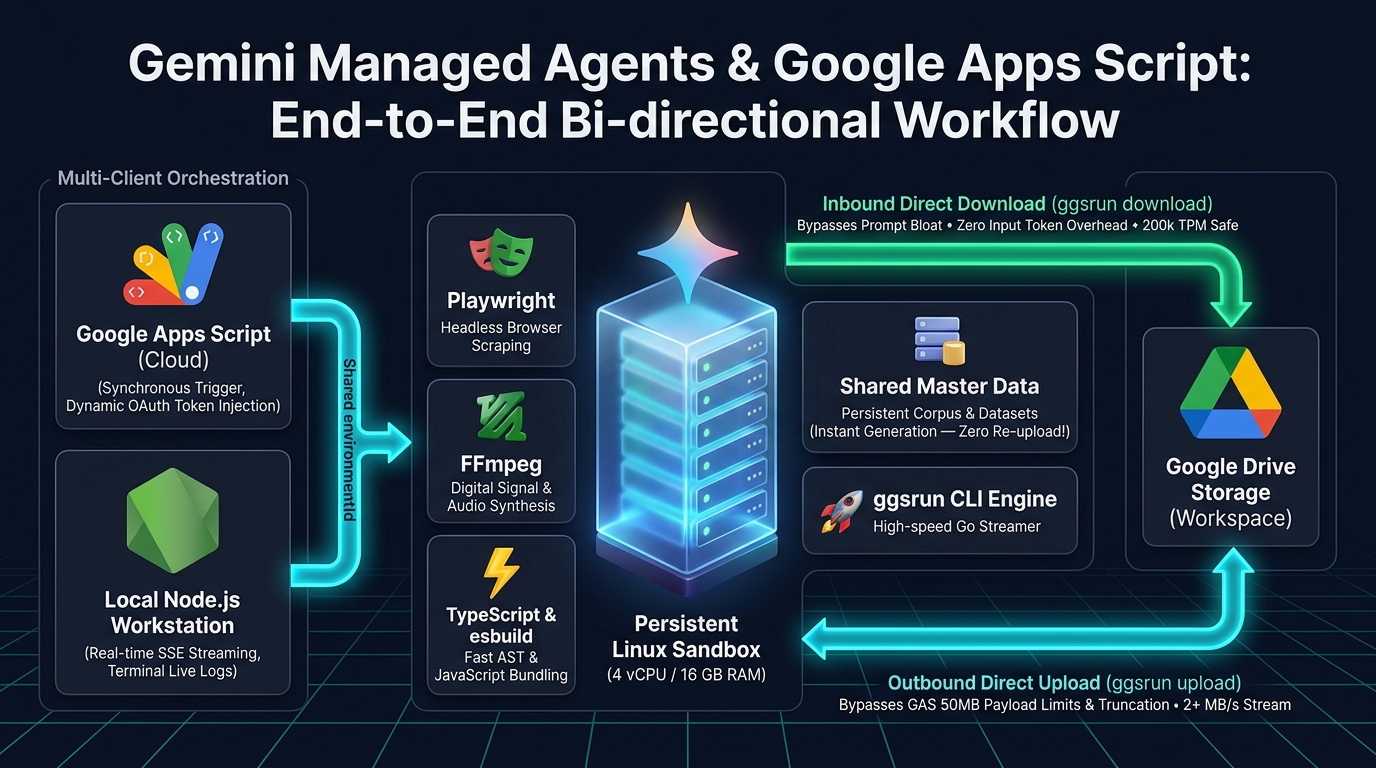
Figure 2 Narrative: The diagram outlines the data integration and execution pipelines across cloud and local environments:
- Multi-Client Orchestration: Cloud-based Google Apps Script (synchronous trigger, dynamic OAuth token) and local Node.js workstations (real-time SSE streaming,
gcloudCLI auth) orchestrate the exact same remote container via a sharedenvironmentId. - Shared Data Repository & Pre-installed Toolchains: The persistent sandbox (4 vCPU / 16 GB RAM) retains shared master datasets and build tools (Playwright, FFmpeg, esbuild), enabling instant content generation without redundant data re-upload overhead.
- Inbound Direct Download (
ggsrun download): Streams large external datasets directly from Google Drive into the sandbox, eliminating prompt data embedding and preserving input token quotas (200k TPM safe). - Outbound Direct Upload (
ggsrun upload): Streams generated binary deliverables directly to Google Drive at 2+ MB/s, completely bypassing GAS 50 MB payload limits and stdout buffer truncation.
Repository
All source code, GAS classes, Node.js stream clients, test suites, and raw execution logs are available in the GitHub repository:
Usage
1. Obtain Gemini API Key
Generate an API key from Google AI Studio. Ref This API key authenticates requests to the Gemini v1beta Interactions and Environments APIs.
2. Create Google Apps Script Project
Create a Google Apps Script project using either of the following methods: Ref
- Standalone Project: Visit script.google.com and click New project.
- Container-bound Project: Open a Google Sheet, Doc, or Form, click Extensions, and select Apps Script.
3. Deploy Client Scripts & Set Script Properties
Copy the following files from the repository into your Apps Script editor:
ManagedAgentSandboxClient.js: Core client class managing sandbox lifecycle, dynamic environment variables, session persistence inPropertiesService, and intelligent 429 rate-limit backoff.tests.js: Master test suite covering sandbox provisioning, tooling verification, media processing, web scraping, and performance benchmarks.
Navigate to Project Settings > Script Properties and add your API key: Ref
- Property:
GEMINI_API_KEY - Value: Your Gemini API Key
4. Required Authorization Scopes
Ensure your project manifest (appsscript.json) includes the necessary OAuth scopes:
https://www.googleapis.com/auth/script.external_request: Required forUrlFetchAppAPI communication.https://www.googleapis.com/auth/drive: Required for creating destination folders and uploading artifacts. (If using existing folders withoutDriveApp.createFolder(),https://www.googleapis.com/auth/drive.filecan be used).
Testing on Cloud (Google Apps Script)
Execution logs for all tests can be verified in gas-src/execution-logs.md.
1. Provisioning a Unified Linux Sandbox
Executing provisionSharedSandbox() initializes a new remote Linux container, installs all required CLI utilities and dependencies, configures destination Google Drive paths, and saves the resulting environmentId in PropertiesService.
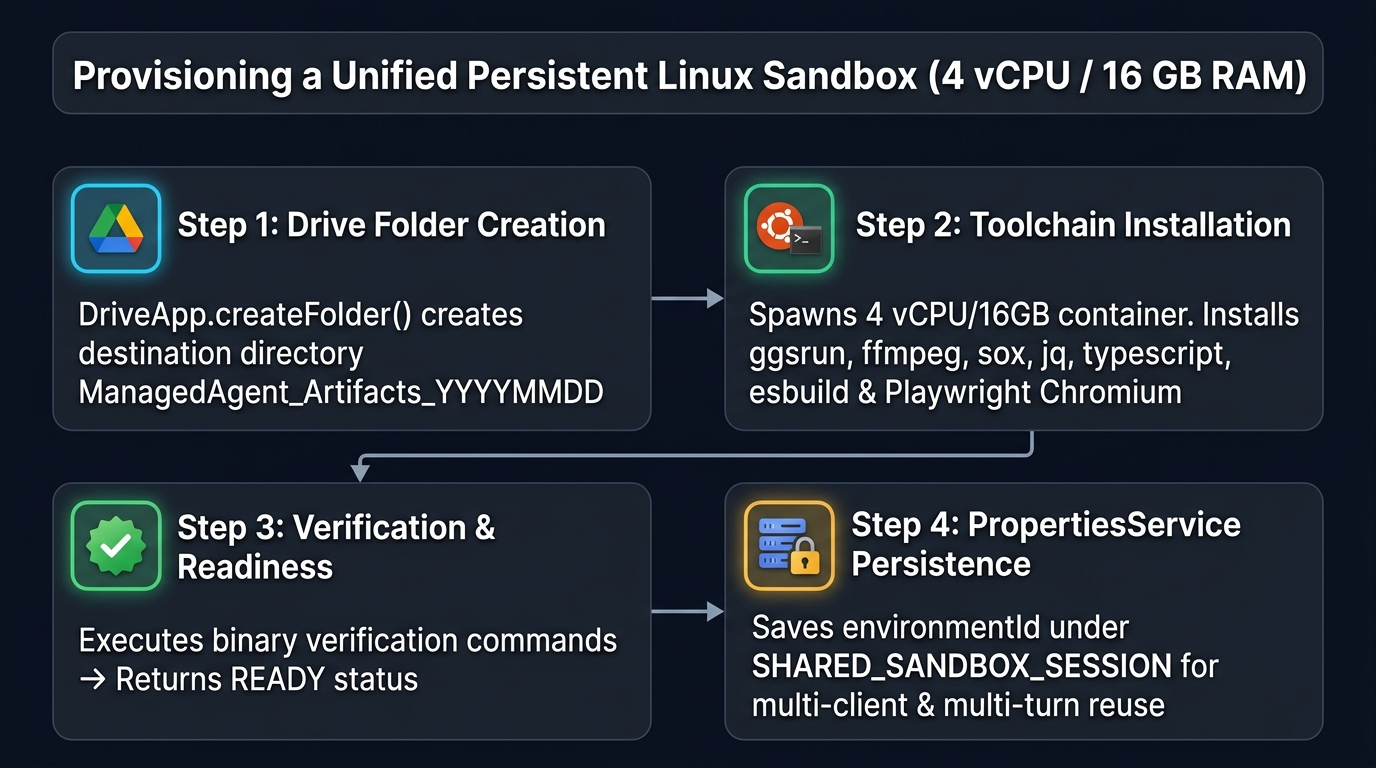
Figure 3 Narrative: The infographic details the 4-step provisioning pipeline. In Step 1, Google Drive creates destination directory ManagedAgent_Artifacts_YYYYMMDD. In Step 2, a 4 vCPU / 16 GB RAM Linux container bootstraps ggsrun, ffmpeg, sox, jq, typescript, esbuild, and Playwright (Chromium). In Step 3, the sandbox validates installed binaries and emits a READY status. In Step 4, the unique environmentId is persisted under SHARED_SANDBOX_SESSION in PropertiesService for multi-test and cross-client reuse.
- Step 1: Destination folder
ManagedAgent_Artifacts_YYYYMMDDis created in Google Drive. - Step 2: An initialization prompt dispatches commands to download
ggsrun, installffmpeg,sox,jq,typescript,esbuild, and configure headless Chromium via Playwright. - Step 3: The sandbox validates tool installations and returns a
READYstatus. - Step 4: The persistent
environmentIdis stored underSHARED_SANDBOX_SESSIONinPropertiesServicefor subsequent test reuse.
Running testListSandboxes() queries the Environments API to confirm active sandbox status and metadata.
2. Test 1: User-Agent Customization & POSIX Socket Verification (runTest1_UserAgentComparison)
This test demonstrates that while GAS UrlFetchApp automatically overwrites custom HTTP User-Agent headers with Google's proxy identity string, the Managed Agent sandbox preserves arbitrary header configurations via raw POSIX sockets and native curl.
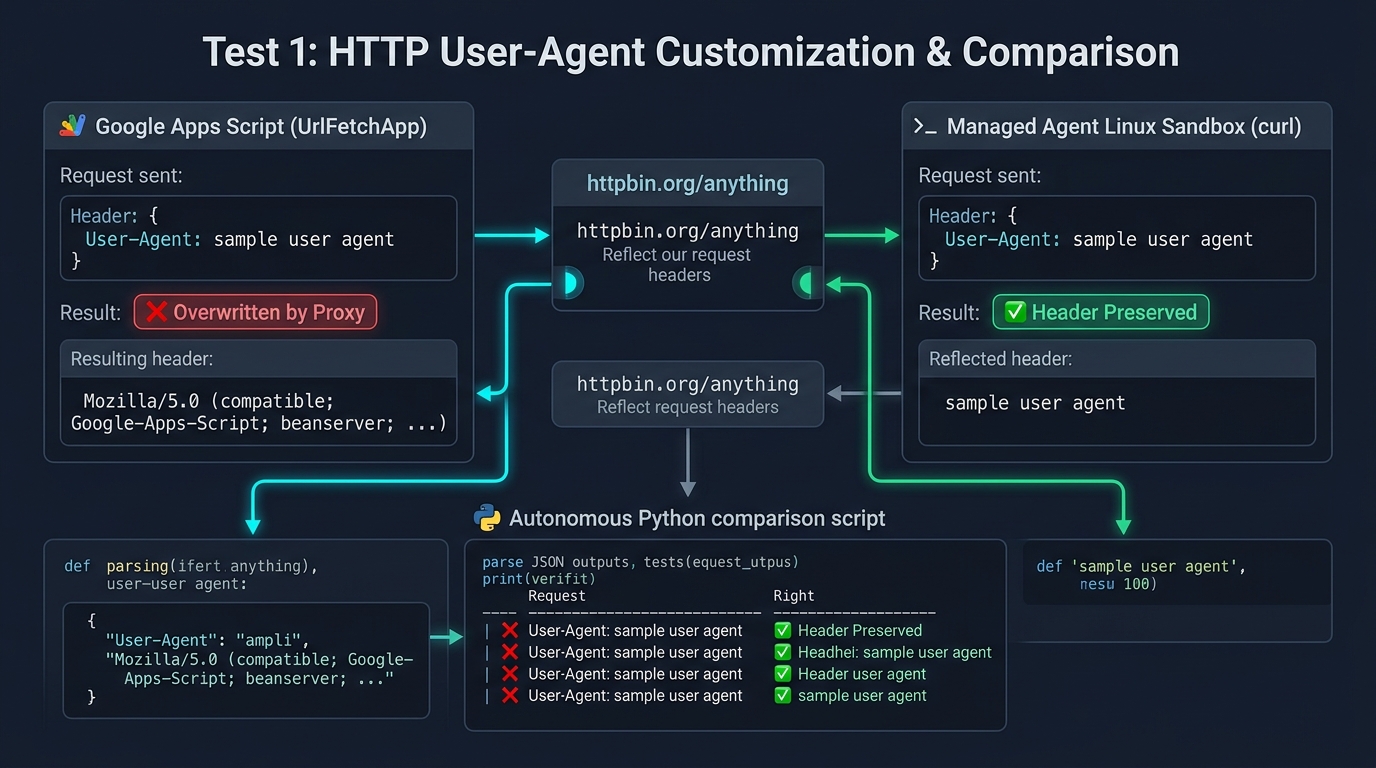
Figure 4 Narrative: The diagram illustrates the request and response paths when sending a custom User-Agent: sample user agent header to httpbin.org/anything. In Google Apps Script (left), platform proxy policies enforce header substitution (❌). In contrast, the Linux sandbox using curl (right) retains the exact custom header string via raw POSIX socket transmission (✅). An autonomous inline Python script compares the reflected JSON payloads and outputs the verification matrix.
- Step 1: GAS sends an HTTP GET request to
https://httpbin.org/anythingspecifyingUser-Agent: sample user agent. - Step 2: The sandbox executes an identical
curlrequest to the same endpoint and compares the reflected JSON payloads using an inline Python script. - Summary of Execution: The comparison confirms that GAS replaced the header with
Mozilla/5.0 (compatible; Google-Apps-Script; beanserver; ...), whereas the Linux sandbox preserved the exactsample user agentheader string.
3. Test 2: ggsrun Deployment & Drive Direct Access Verification (runTest2_GgsrunDirectDeployment)
This test validates Google Drive authentication and direct access via ggsrun inside the sandbox by dynamically injecting a fresh OAuth access token (ScriptApp.getOAuthToken()) into the execution turn.
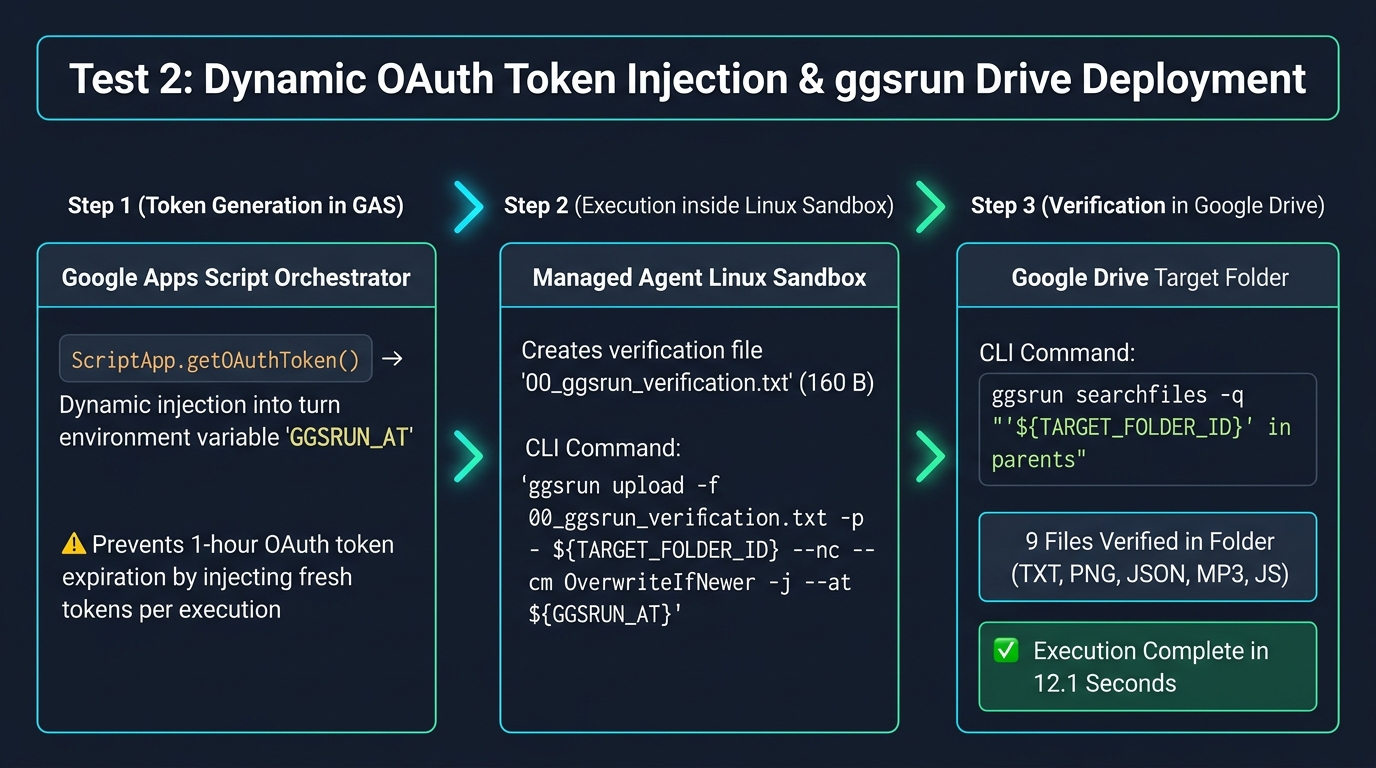
Figure 5 Narrative: The infographic outlines the three execution steps of dynamic authentication and CLI offloading. In Step 1, GAS extracts ScriptApp.getOAuthToken() and dynamically injects it into the execution turn's GGSRUN_AT environment variable (eliminating 1-hour token expiration risks). In Step 2, the sandbox generates a verification file and uploads it via ggsrun upload. In Step 3, ggsrun searchfiles executes a folder query, confirming all 9 artifacts in 12.1 seconds.
- Step 1: A verification file
00_ggsrun_verification.txtis created inside/workspace/test2/. - Step 2:
ggsrun uploaduploads the file directly to the designated Google Drive folder using non-blocking overwrite mode (--nc --cm OverwriteIfNewer -j). - Step 3:
ggsrun searchfilesqueries the destination folder to confirm file existence and returns structured metadata. - Summary of Execution: The file was created, uploaded, and verified in Google Drive in 12.1 seconds, confirming full workspace interoperability without persisting sensitive access tokens across sessions.
4. Test 3: Playwright Headless Scraping to Direct Drive Upload (runTest3_PlaywrightDirectUpload)
This test executes an automated headless Chromium browser session to scrape dynamic JavaScript content and capture multi-viewport screenshots.
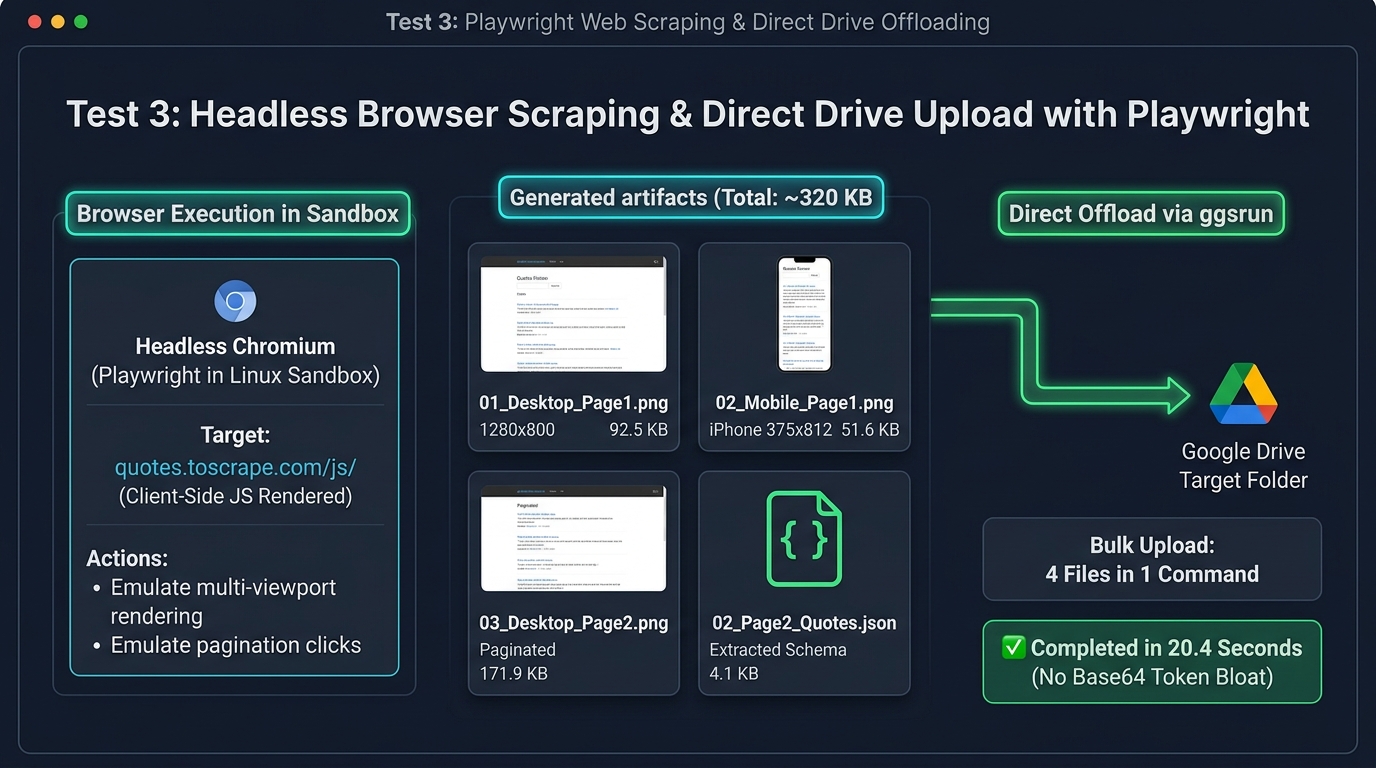
Figure 6 Narrative: The diagram depicts headless Chromium (Playwright) rendering dynamic JavaScript pages within the sandbox to capture multi-viewport screenshots (Desktop 1280x800: 92.5 KB, Mobile 375x812: 51.6 KB, Paginated Page 2: 171.9 KB) alongside structured quote JSON (4.1 KB), totaling ~320 KB across 4 artifacts. Bypassing Base64 API conversion, all files are streamed directly to Google Drive via ggsrun upload in a single command, completing in 20.4 seconds.
- Step 1: A Node.js Playwright script navigates to a JavaScript-rendered quote website (
quotes.toscrape.com/js/). - Step 2: Playwright captures full-page Desktop (1280x800) and Mobile iPhone emulation (375x812) screenshots of Page 1.
- Step 3: Playwright clicks pagination controls, captures a Desktop screenshot of Page 2, and extracts structured quote data into
02_Page2_Quotes.json. - Step 4:
ggsrun uploadtransfers all 3 PNG images and the JSON dataset directly to Google Drive in a single command. - Summary of Execution: All 4 artifacts (totaling ~320 KB) were generated and uploaded in 20.4 seconds, successfully rendering client-side JavaScript that GAS cannot parse natively.
5. Test 4: FFmpeg Audio Synthesis & Transcoding to Direct Drive Upload (runTest4_FFmpegAudioDirectUpload)
This test executes native digital signal processing inside the sandbox using FFmpeg and SoX to synthesize multi-tone audio chords.
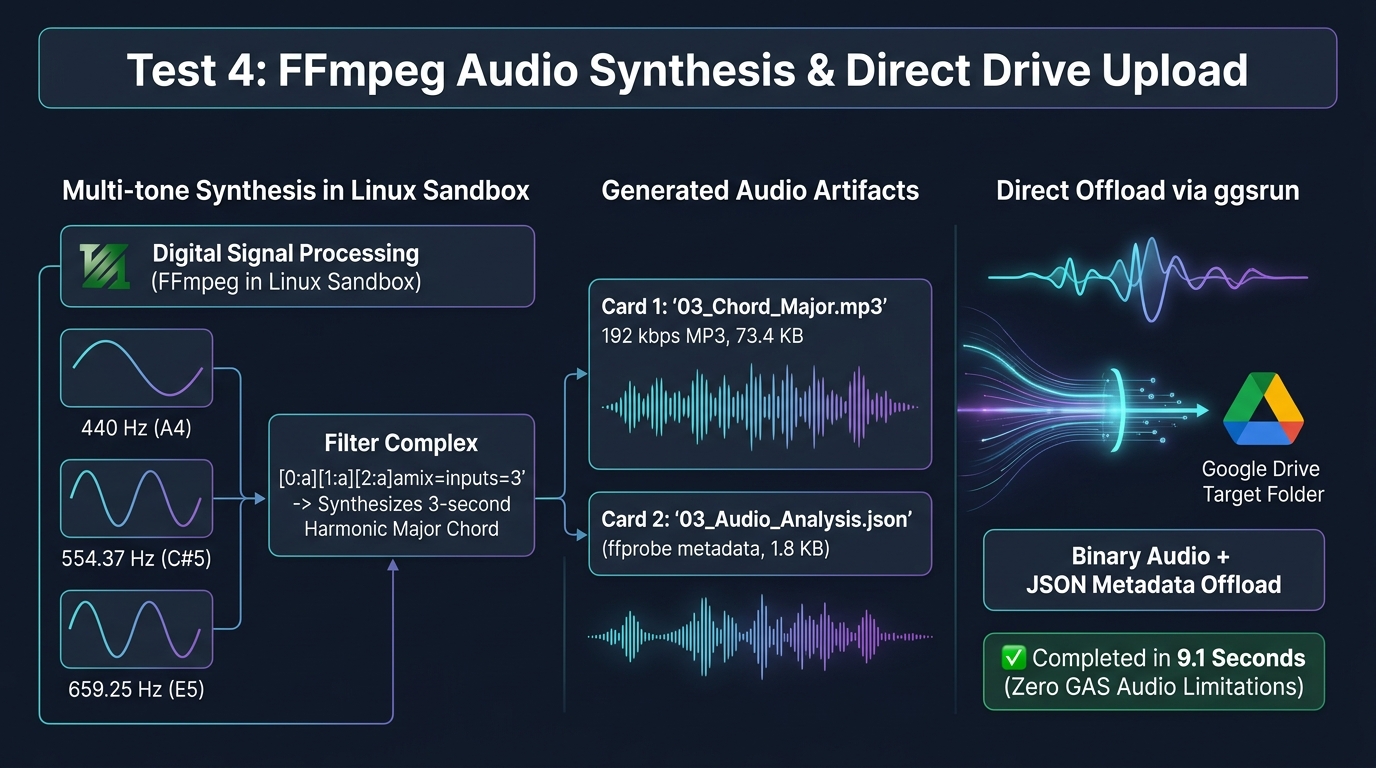
Figure 7 Narrative: The infographic illustrates the digital signal processing (DSP) pipeline inside the Linux sandbox. Three sine wave generators (440 Hz / A4, 554.37 Hz / C#5, 659.25 Hz / E5) are combined through the ffmpeg amix filter complex into a 3-second harmonic major chord MP3 (73.4 KB), while ffprobe extracts stream metadata into JSON (1.8 KB). Both binary audio and JSON analysis are streamed directly to Google Drive via ggsrun in 9.1 seconds.
- Step 1:
ffmpegsynthesizes a 3-second harmonic major chord MP3 by combining three sine waves (440 Hz, 554.37 Hz, and 659.25 Hz) through anamixaudio filter complex. - Step 2:
ffprobeanalyzes the output stream and extracts waveform metadata into03_Audio_Analysis.json. - Step 3:
ggsrun uploaduploads03_Chord_Major.mp3(73.4 KB) and03_Audio_Analysis.json(1.8 KB) directly to Google Drive. - Summary of Execution: High-fidelity audio synthesis, metadata extraction, and Drive upload completed in 9.1 seconds.
6. Test 5: TypeScript AST Extraction & esbuild Bundling to Direct Drive Upload (runTest5_TypeScriptASTDirectUpload)
This test demonstrates modern JavaScript/TypeScript build tooling inside the sandbox environment.
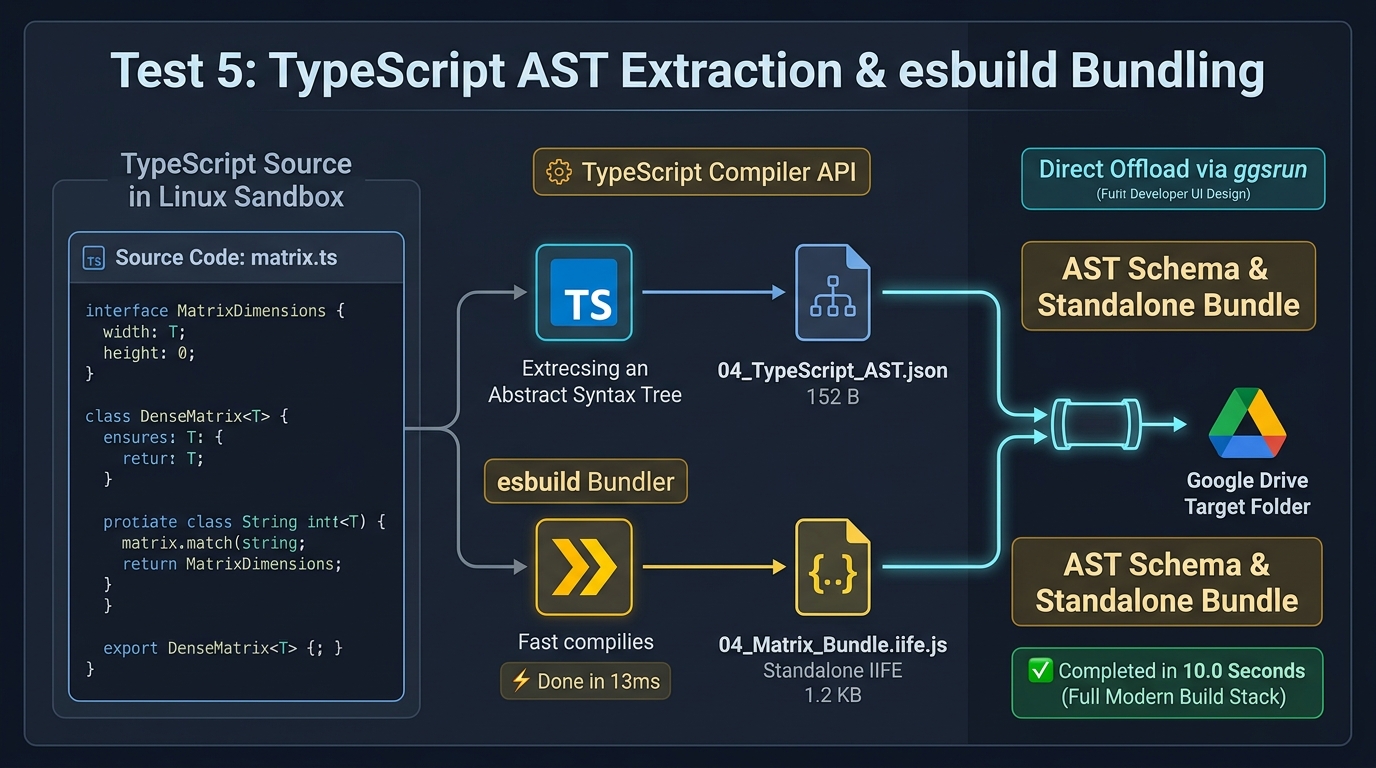
Figure 8 Narrative: The diagram outlines the dual build toolchains operating on TypeScript source code (matrix.ts). The first branch employs the official TypeScript Compiler API to parse the Abstract Syntax Tree (AST) and export interface schemas (04_TypeScript_AST.json: 152 B). The second branch leverages esbuild to compile a standalone IIFE bundle (04_Matrix_Bundle.iife.js: 1.2 KB) in just 13 milliseconds. Both deliverables are offloaded to Google Drive via ggsrun in 10.0 seconds.
- Step 1: A TypeScript module (
matrix.ts) defining generic classes and interfaces is written to/workspace/test5/. - Step 2: A Node.js script utilizes the official TypeScript Compiler API to parse the AST and export interface and method schemas into
04_TypeScript_AST.json. - Step 3:
esbuildbundles and minifiesmatrix.tsinto a standalone IIFE JavaScript bundle (04_Matrix_Bundle.iife.js). - Step 4:
ggsrun uploadtransfers both the AST schema and the bundled JavaScript to Google Drive. - Summary of Execution: AST parsing, bundle compilation (13 ms build time), and Drive upload completed in 10.0 seconds.
7. Test 6: Performance Benchmark: Direct ggsrun Upload vs. Base64 via GAS (runTest6_DriveUploadPerformanceComparison)
This benchmark evaluates transferring a binary payload (10,000 bytes) from the sandbox to Google Drive across two distinct methods:
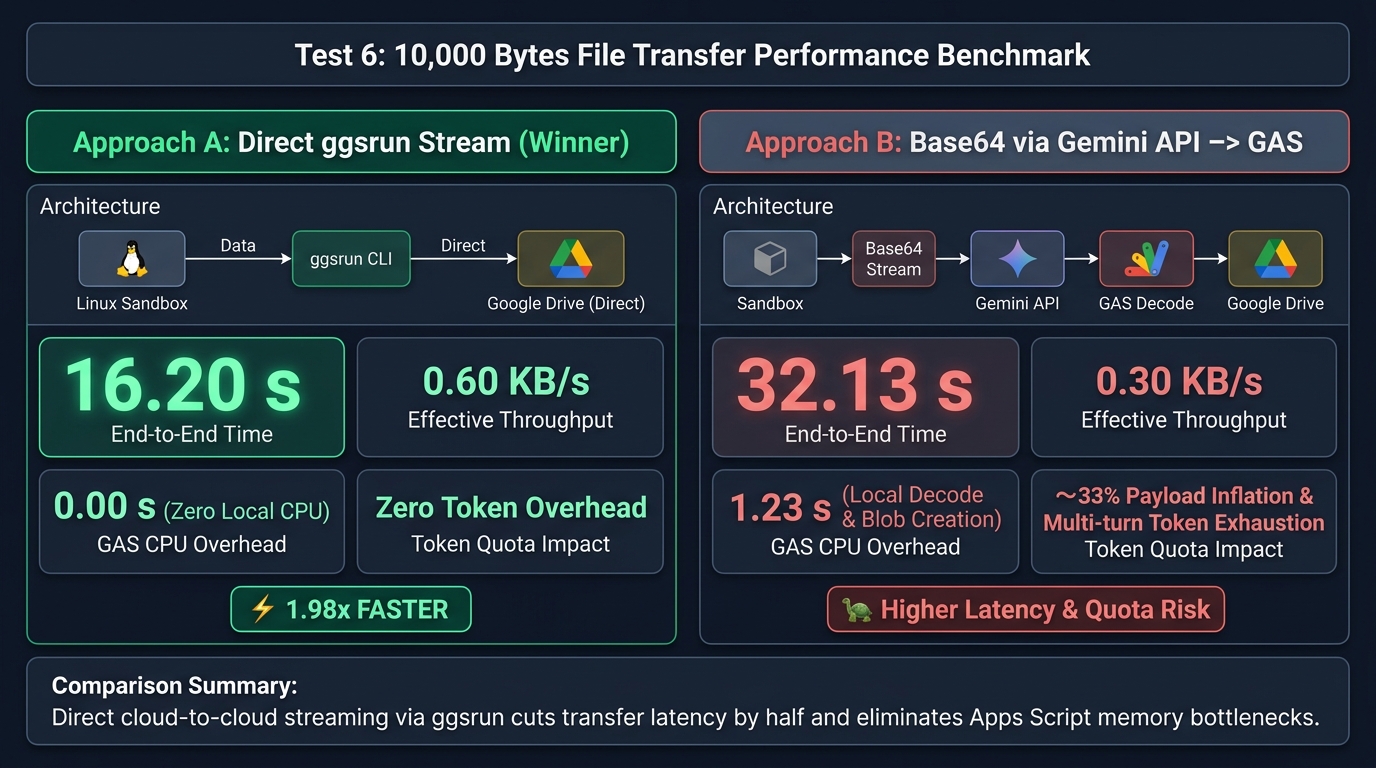
Figure 9 Narrative: The benchmark infographic compares Approach A (direct ggsrun streaming) against Approach B (Base64 transfer via API -> GAS decode). Approach A finished in 16.20 seconds (0.60 KB/s, zero GAS CPU usage), proving to be 1.98x faster than Approach B (32.13 seconds, 0.30 KB/s, 1.23 s GAS CPU). Approach A completely eliminates Base64 payload inflation (~33%) and prevents multi-turn conversational token exhaustion.
- Approach A (Direct
ggsrunUpload): The sandbox generates a 10 KB binary file from/dev/urandomand streams it directly to Google Drive viaggsrunin a single interaction turn (freshInteraction: true). - Approach B (Base64 Transfer via API -> GAS Blob Save): The sandbox encodes the 10 KB binary into Base64, returns it through the Gemini API response text, and GAS decodes the string and saves the file to Drive.
================================================================================
PERFORMANCE BENCHMARK REPORT: 10,000 BYTES FILE TRANSFER TO GOOGLE DRIVE
================================================================================
| Metric                       | Approach A: Direct ggsrun Upload | Approach B: Base64 via Gemini API -> GAS |
| :--------------------------- | :------------------------------- | :--------------------------------------- |
| Transfer Method              | Direct Sandbox-to-Drive (Go CLI) | Base64 Stream -> GAS -> Drive            |
| Drive File Name              | benchmark_10kb_ggsrun.bin        | benchmark_10kb_gas.bin                   |
| Verified File Size           | 10,000 bytes (9.77 KB)           | 10,000 bytes (9.77 KB)                   |
| API Turns Required           | 1 Turn (Direct Offload)          | 1 Turn (Base64 Retrieval)                |
| Local GAS Processing Time    | 0.00 s (Zero CPU overhead)       | 1.23 s (Base64 Decode & Blob Creation)   |
| Total End-to-End Duration    | 16.20 s                          | 32.13 s                                  |
| Effective Throughput         | 0.60 KB/s                        | 0.30 KB/s                                |
| Performance Multiplier       | 1.98x FASTER                     | Baseline (Higher Latency & Token Usage)  |
================================================================================
Summary of Benchmark Findings: Direct streaming via ggsrun was 1.98x faster, eliminated 100% of Apps Script CPU/memory decoding overhead, and prevented conversational token quota consumption. For multi-megabyte payloads, this direct streaming architecture is essential to prevent 429 Quota Exceeded errors.
Testing on Local Workstations (Node.js Stream Runner)
To demonstrate cross-platform interoperability enabling developers to control the exact same persistent Linux sandbox from both Google Apps Script and local workstations, a high-performance Node.js client powered by Server-Sent Events (SSE) streaming was implemented. Ref
1. Purpose and Advantages of the Local Stream Runner
While Google Apps Script operates under a synchronous blocking execution model where agent events are aggregated at the end of the HTTP request, the local Node.js runner (built with the @google/genai SDK) provides significant developer benefits:
- Real-Time Lifecycle Visibility (SSE Streaming): Streams internal reasoning steps (
thought), executed shell commands (code_execution_call), sandbox standard output/error (code_execution_result), and model text (model_output) live to the terminal with ANSI color coding. - Interactive Hybrid Development Workflow: Enables developers to prototype, debug, and calibrate agent prompts and toolchains locally with real-time feedback before deploying them into automated, hands-off Google Apps Script triggers.
- Zero-Friction Sandbox Sharing (GAS ↔ Local): By simply setting
ENVIRONMENT_IDin a local.envfile to the identifier generated during Apps Script provisioning, the local client immediately attaches to the existing container, sharing all pre-installed packages, compiled binaries, and workspace files without re-installation overhead. - Automated OAuth Token Integration: Dynamically extracts fresh Google OAuth access tokens via the Google Cloud SDK (
gcloud auth print-access-token) and injects them intoGGSRUN_AT, executing direct-to-Drive file uploads identically to Apps Script without manual credential copying.
2. Local Setup and Test Execution
Local test suites can be executed through the following straightforward steps:
- Step 1: Clone the repository and install dependencies by running
npm installinside thelocal-node.js-srcdirectory. - Step 2: Copy
.env.exampleto.envand specifyGEMINI_API_KEY, the persistentENVIRONMENT_ID, and the destinationTARGET_FOLDER_ID. - Step 3: Run
npm test(or individual testsnpm run test:1throughtest:6) to monitor agent execution in real-time. - Step 4: When testing is complete, run
npm run test:teardownto safely purge the remote sandbox environment and release cloud resources.
Full raw execution transcripts with live streaming outputs can be reviewed in local-node.js-src/execution-logs.md, confirming 100% functional parity with Google Apps Script executions.
Appendix: Gemini Managed Agents API Usage Patterns
The following patterns summarize common interaction models when working with the Gemini v1beta Interactions and Environments API:
Base Endpoint
POST https://generativelanguage.googleapis.com/v1beta/interactions?key=${API_KEY}
Content-Type: application/json
Scenario 1: Sharing a Single Persistent Sandbox Across Multiple Clients
Provision a remote environment once by setting environment.type to "remote". Save the returned environment_id and pass it as a string in subsequent requests across any client (GAS, Node.js, Python, or CI/CD).
{
  "agent": "antigravity-preview-05-2026",
  "input": "Run task in shared container...",
  "environment": "environments/env-12345"
}
Scenario 2: Using Isolated Sandboxes per Execution
Set environment.type to "remote" on every call when tasks require a completely fresh, isolated Linux environment.
{
  "agent": "antigravity-preview-05-2026",
  "input": "Execute client-specific isolated task...",
  "environment": {
    "type": "remote"
  }
}
Scenario 3: Preserving Multi-turn Conversational Context
Include previous_interaction_id when the agent must retain knowledge of prior reasoning, variables, or command outputs.
{
  "agent": "antigravity-preview-05-2026",
  "input": "Based on the previous output, proceed to step 2...",
  "environment": "environments/env-12345",
  "previous_interaction_id": "interaction-prev-67890"
}
Scenario 4: Reusing Sandbox with Fresh Context (freshInteraction)
Specify the existing environment_id and omit previous_interaction_id. This preserves all files and installed tools on the Linux container while resetting conversation history to zero tokens, preventing TPM rate-limit exhaustion.
{
  "agent": "antigravity-preview-05-2026",
  "input": "Execute a completely new task in the existing sandbox...",
  "environment": "environments/env-12345"
}
Summary Matrix
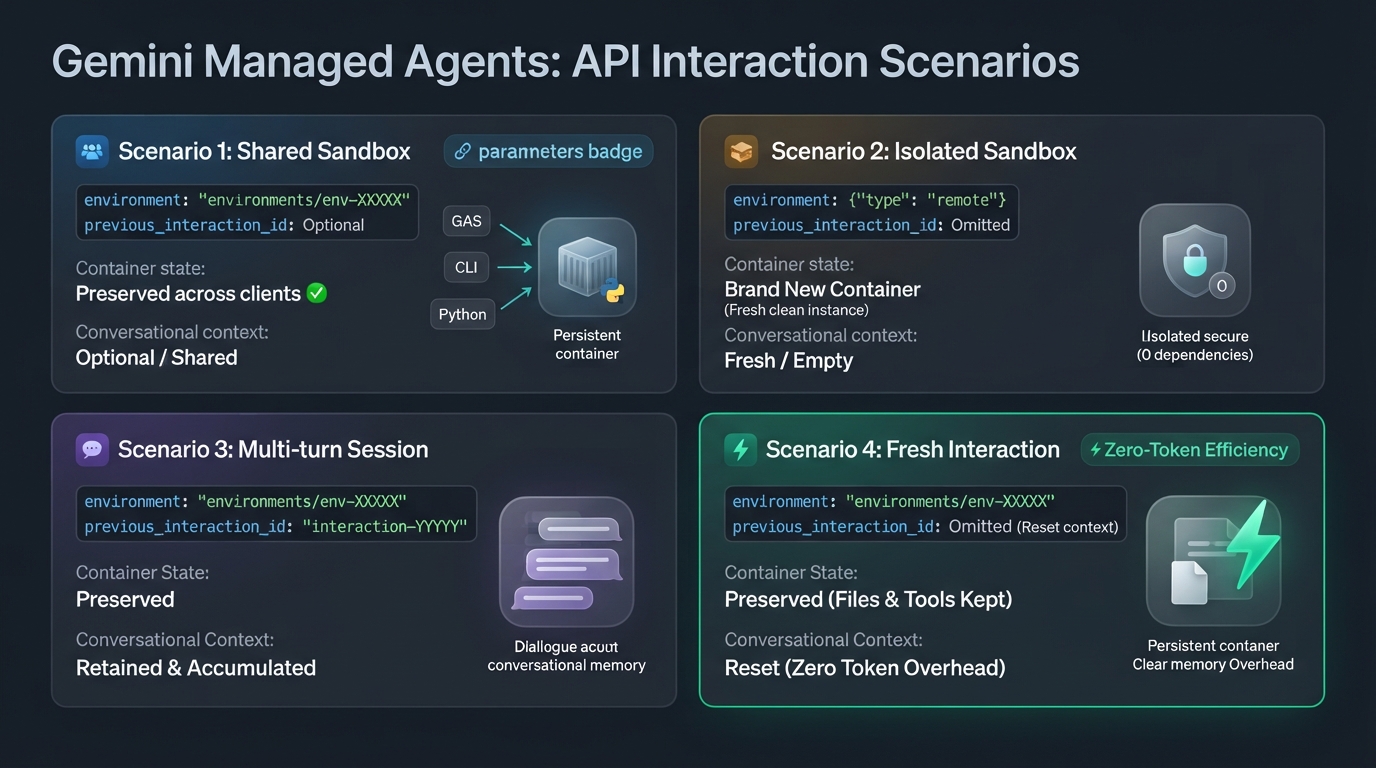
Summary
This article introduced an enterprise-grade architecture integrating Google Apps Script with Gemini Managed Agents (Linux sandboxes) to fundamentally transcend traditional serverless runtime constraints. By combining persistent remote sandboxes with bi-directional direct cloud-to-cloud streaming via ggsrun, developers can achieve advanced processing capabilities previously impossible in Apps Script while avoiding API payload limitations and conversational token rate quotas.
- Overcame Apps Script Limits: Enabled advanced workloads requiring native Linux environments—such as headless browser scraping (Playwright), audio synthesis (FFmpeg), and TypeScript compilation (
esbuild)—directly from Google Apps Script. - Autonomous Fusion of AI Reasoning & Linux Execution: Transcended static external command execution by uniting Gemini's cognitive reasoning with native Linux shell autonomy, enabling dynamic command synthesis, runtime code execution, and autonomous self-correction across complex workflows.
- Bi-directional Streaming Token & Payload Optimization: In addition to direct artifact uploads, streaming large input datasets directly from Drive into the sandbox eliminates prompt data embedding and Base64 conversion, minimizing input/output token usage to bypass GAS 50 MB limits and the 200,000 TPM rate quota.
- Process Cost Reduction via Shared Sandboxes: Staging and sharing the container filesystem and common master datasets across clients eliminates redundant data re-upload and tooling setup overhead per task, substantially reducing execution latency and bandwidth costs.
- Empirically Proven 2x Performance Acceleration & Zero Memory Footprint: Validated through benchmarks that direct cloud-to-cloud CLI streaming is 1.98x faster than traditional API Base64 retrieval while imposing zero CPU decoding load or local memory consumption on Google Apps Script.
Comments
More Blog
View allflutterOvercoming Dart's Single Inheritance Wall: Composable CubitSignalMixin & BlocSignalMixin in Flutter
Discover how CubitSignalMixin and BlocSignalMixin allow any existing Flutter controller, domain repository, or enterprise class to gain full reactive state container capabilities without occupying its single inheritance slot.
R
Randal L. SchwartzflutterGrand Central Station: Why BLoC, Riverpod, and BlocSignal Are Now True Peers
Discover why Flutter state management is no longer an all-or-nothing choice. Explore how BlocSignal, Classic BLoC, and Riverpod now operate as first-class bidirectional peers at the Grand Central State Terminal.
R
Randal L. SchwartzkubernetesUnlocking workload rightsizing visibility on GKE: How VPA decision logs bring observability to autoscaling
Learn how to troubleshoot and audit GKE Vertical Pod Autoscaler actions with structured decision logs in Cloud Logging.
O
Olivier BourgeoiskubernetesAccelerating JVM startup on GKE: How VPA CPU startup boost eliminates ongoing resource waste
Learn how GKE VerticalPodAutoscaler (VPA) CPU Startup Boost cuts JVM cold starts and eliminates ongoing CPU waste using in-place Pod resizing.
O
Olivier BourgeoisaiWhy AI Websites All Look the Same and How to Build Something Different
If you've built a website with AI recently, there is a good chance it looks familiar. Maybe you have...
M
Mfonobong UmondiagemmaGemma 4 in Pure JAX: What Ports from TPU to GPU, and What Doesn't
This article is about running a hand-written Gemma 4 port in pure JAX on three different...
X
xbillReady-made automations for this
Workflows from the Neura Market marketplace related to this Stable Diffusion resource
- Automated Reservation System with Telegram, Google Gemini AI, and Google Sheetsn8n · $9.99 · Related topic
- Create a Smart Shopping Assistant with Persistent Memory Using Zep, GPT-4, and Google Sheetsn8n · $4.99 · Related topic
- Build AI Agents with Think-Plan-Act Architecture Using Llama-4 Reasoningn8n · $24.99 · Related topic
- AI-Generated LinkedIn Posts with OpenAI, Google Sheets, & Email Approval Workflown8n · $14.99 · Related topic