DeepSeek Automation Workflows
45 ready-made DeepSeek workflows for n8n, Make, Zapier, Activepieces, and Pipedream. DeepSeek-powered analysis, generation, and cost-efficient LLM steps in your automations.
Compare Multi-Period Financial Data from Google Sheets with DeepSeek AI Analysis
Overview This workflow generates automated revenue and expense comparison reports from a structured Google Sheet. It enables users to compare financial data across the current period, last month, and last year, then uses an AI agent to analyze and summarize the results for business reporting. 1. Prerequisites - A connected Google Sheets OAuth2 credential. - A valid DeepSeek AI API (or replaceable with another Chat Model). - A sub-workflow (child workflow) that handles processing logic. - Properly structured Google Sheets data (see below). 2. Required Google Sheet Structure - Column headers must include at least: Date, Amount, Type. - Data format for Date must be in dd/MM/yyyy or dd-MM-yyyy. - Entries should span over multiple time periods (e.g., current month, last month, last year). 3. Setup Steps - Import the workflow into your n8n instance. - Connect your Google Sheets and DeepSeek API credentials. - Update: - Sheet ID and Tab Name (already embedded in node: Get revenue from Google Sheet). - Custom sub-workflow ID (in the Call n8n Workflow Tool node). - Optionally configure chatbot webhook in the When chat message received node. 4. What the Workflow Does - Accepts date inputs via AI chat interface (Chattrigger + AI Agent). - Fetches raw transaction data from Google Sheets. - Segments and pivots revenue by classification for: - Current period - Last month - Last year - Aggregates totals and applies custom titles for comparison. - Merges all summaries into a final unified JSON report. 5. Customization Options - Replace DeepSeek with OpenAI or other LLMs. - Change the date fields or cycle comparisons (e.g., quarterly, weekly). - Add more AI analysis steps such as sentiment scoring or forecasting. - Modify the pivot logic to suit specific KPI tags or labels. 6. Troubleshooting Tips - If Google Sheets fetch fails: ensure the document is shared with your n8n Google credential. - If parsing errors: verify that all dates follow the expected format. - Sub-workflow must be active and configured to accept the correct inputs (6 dates). 7. SEO Keywords: - google sheets report, AI financial report, compare revenue by month, expense analysis automation, chatbot n8n report generator, n8n Google Sheet integration
n8n$14.99Deploy a Customizable AI Chatbot with DeepSeek Integration on Your Website
Implement a branded AI chatbot on your website using DeepSeek for intelligent conversation management. This workflow provides a fully customizable chat widget that integrates seamlessly with your brand, enhancing user interaction and support.
n8n$4.99Integrate DeepSeek AI Models with n8n for Advanced Chat and Reasoning
Leverage DeepSeek's AI models within n8n to create sophisticated chatbots and reasoning systems. This workflow supports local deployment with Ollama and direct API integration for seamless automation.
n8n$9.99Automate Blog Content Creation with Notion MCP, DeepSeek AI, and WordPress
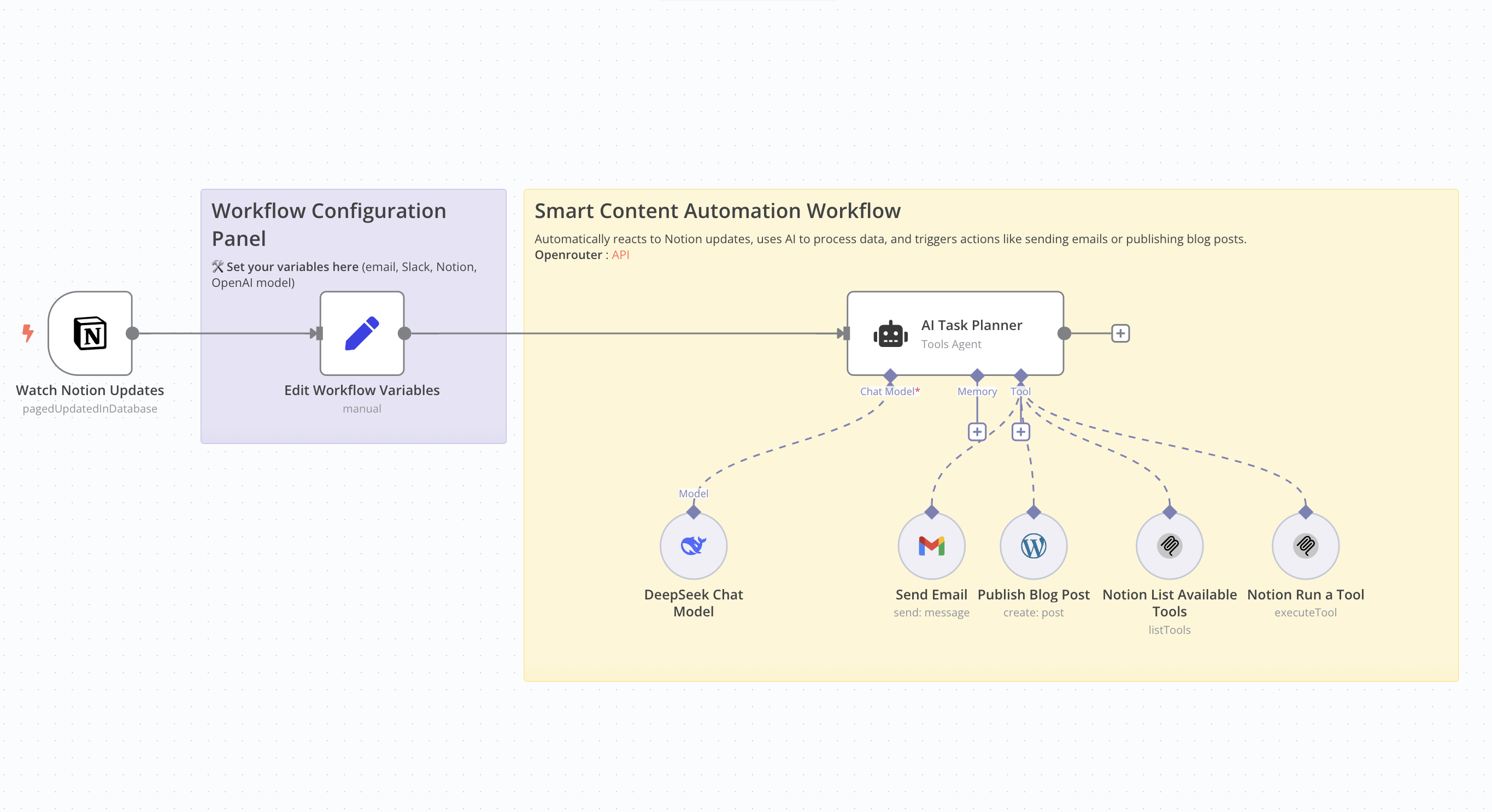 # Who Is This For This workflow is ideal for content creators, bloggers, marketers, and professionals seeking to automate the creation and publication of SEO-optimized articles. It's particularly beneficial for those utilizing Notion for content management and WordPress for publishing. # What Problem Does This Workflow Solve Manually creating SEO-friendly articles is time-consuming and requires consistent effort. This workflow streamlines the entire process—from detecting updates in Notion to publishing on WordPress—by leveraging AI for content generation, thereby reducing the time and effort involved. # What This Workflow Does - Monitor Notion Updates: Detects changes in a specified Notion database. - AI Content Generation: Utilizes an AI model to produce an SEO-optimized article based on Notion data. - Publish to WordPress: Automatically posts the generated article to a WordPress site. - Email Notification: Sends an email containing the article's title and URL. Update Notion Database: Updates the corresponding entry in the Notion database with the article details. # Setup Guide ## Prerequisites - WordPress account with API access. - API key for the AI model used. - Notion integration with the relevant database ID. - Credentials for the email service used (e.g., Gmail). Community Node Requirement: This workflow utilizes the n8n-nodes-mcp community node, which is only compatible with self-hosted instances of n8n. For more information on installing and managing community nodes, refer to the n8n documentation. n8n Docs ## Steps 1. Import the workflow into your self-hosted n8n instance. 2. Install the required community node (n8n-nodes-mcp). 3. Configure API credentials for WordPress, the AI service, Notion, and the email service. 4. Define necessary variables, such as the notification email address and Notion database IDs. 5. Activate the workflow to automate the process. # How to Customize This Workflow - AI Prompt: Adjust the prompt used for content generation to align with your preferred tone and style. - Article Structure: Modify the structure of the generated article by tweaking settings in the content generation node. - Notifications: Customize the content and recipients of the emails sent post-publication. - Notion Updates: Tailor the fields updated in Notion to suit your specific requirements.
n8n$9.99Integrate DeepSeek AI with Telegram for Contextual Conversations
This n8n workflow connects a DeepSeek AI agent with Telegram to deliver personalized, context-aware responses using long-term memory capabilities.
n8n$14.99Automate Flight Searches and Recommendations with DeepSeek AI and Google Flights
This workflow automates the process of searching and comparing flights using DeepSeek AI and Google Flights API. It provides users with real-time flight options, flexible travel date suggestions, and AI-powered travel recommendations.
n8n$4.99Automate CRM Data Analysis with Dual-AI Verification Using DeepSeek Models
This workflow automates CRM data analysis using DeepSeek models for robust quality control. It integrates dual-AI architecture to ensure reliable results and supports both manual testing and real-time data processing via webhook.
n8n$9.99Generate AI Videos from Scripts with DeepSeek, Synthesia, and Together.ai
# Automated Video Generator (n8n Workflow) ## Features - End-to-End Video Creation from user idea or transcript - AI-Powered Scriptwriting using LLMs (e.g., DeepSeek via OpenRouter) - Voiceover Generation with customizable voices - Image Scene Generation using generative models like together.ai - Clip Creation & Concatenation into a full video - Dynamic Caption Generation with styling options - Google Drive & Sheets Integration for asset storage and progress tracking ## How It Works User Submits Form with: - Main topic or transcript - Desired duration - Voice - Visual style (e.g., Pixar, Lego, Cyberpunk) - Image generation provider AI generates a script: A catchy title, description, hook, full script, and call to action using a language model. Text-to-Speech (TTS): The script is turned into audio using the selected voice, with timestamped captions generated. Scene Segmentation: The script is split into 5-6 second segments for visual storyboarding. Image Prompt Creation: Each scene is converted into an image prompt in the selected style (e.g., anime close-up of a racing car). Image Generation: Prompts are sent to together.ai or fal.ai to generate scenes. Clip Creation: Each image is turned into a short video clip (Ken Burns-style zoom) based on script timing. Video Assembly: - All clips are concatenated into a single video. - Captions are overlaid using the earlier timestamps. - Final Output is uploaded to Google Drive, Telegram, and links are saved in Google Sheets. ## Initial Setup ### 1. Set Up TTS Voice (Text-to-Speech) Run your TTS server locally using Docker. ### 2. Set Up NCA-Toolkit The nca-toolkit appears to be a custom video/image processing backend used via HTTP APIs: - http://host.docker.internal:9090/v1/image/transform/video - http://host.docker.internal:9090/v1/video/concatenate - http://host.docker.internal:9090/v1/ffmpeg/compose #### Steps: - Clone or build the nca-toolkit container (if it's a private tool): - Ensure it exposes port 9090. - It should support endpoints for: - Image to video (zoom effect) - Video concatenation - Audio + video merging - Caption overlay via FFmpeg - Run it locally with Docker: - `docker run -d -p 9090:80 your-nca-toolkit-image` ### 3. Set Up together.ai (Image Generation) (Optional. You can use ChatGPT API Instead) This handles image generation using models like FLUX.1-schnell. #### Steps: - Create an account at: https://www.together.ai - Generate your API key
n8n$24.99Automate YouTube Video Optimization with Google Sheets and DeepSeek AI
Enhance your YouTube channel's visibility by automating video title and description optimization using Google Sheets and DeepSeek AI. This workflow streamlines the process of managing video data and generating SEO-friendly content.
n8n$9.99Automate Trustpilot Review Scraping and Sentiment Analysis with DeepSeek and OpenAI
This workflow automates the extraction of Trustpilot reviews, performs sentiment analysis using OpenAI, and saves the results to Google Sheets. It leverages DeepSeek for detailed review data extraction.
n8n$14.99Auto-Generate FAQ Answers in Vtiger CRM with DeepSeek LLM and LangChain
This workflow contains community nodes that are only compatible with the self-hosted version of n8n. ## Vtiger CRM - Auto-Answer FAQs with DeepSeek AI **Description:** This workflow automates the process of answering FAQ drafts in Vtiger CRM using DeepSeek LLM via LangChain. It's perfect for teams who want to accelerate knowledge base creation, improve support response consistency, or reduce the manual effort of writing FAQ content. Every **1 minute**, this workflow: - Retrieves the most recent FAQ record marked as `Draft` in Vtiger CRM - Sends the question to a **LangChain agent** powered by **DeepSeek AI** - Receives a plain-text answer - Updates the original FAQ with the generated answer and changes its status to `Published` --- ## How It Works - **Trigger:** Scheduled to run every 1 minute - **Query:** Pulls the latest FAQ from Vtiger where `faqstatus = Draft` - **AI Agent:** Uses LangChain + DeepSeek to generate a natural-language answer - **Memory Buffer:** Keeps context using LangChain memory - **Update:** Pushes the answer back to Vtiger and marks it as `Published` --- ## Setup Instructions 1. **Connect Credentials** for: - Vtiger CRM API - DeepSeek API 2. Ensure your Vtiger CRM has a `Faq` module with fields: - `question` - `faq_answer` - `faqstatus` 3. **Install the required Community Node**: - Go to `Settings` > `Community Nodes` - Click **Install Node** and enter: ```bash n8n-nodes-vtiger-crm ``` - Restart your instance when prompted. 4. Optionally customize the schedule or field names as needed. --- ## Who Is This For? - Customer support teams building a knowledge base - Businesses using Vtiger as a CRM or internal helpdesk - Teams looking to automate repetitive content creation using LLMs --- ## Credentials Required - Vtiger CRM API credentials - DeepSeek AI API key --- ## Highlights - Fully automated LLM-powered FAQ generation - Uses custom community node for Vtiger support - Lightweight and runs on a short interval (1 min) - Includes sticky note for clarity and onboarding - Clean conditional logic and memory context built-in --- ## Tags ``` vtiger, crm, faq automation, ai automation, deepseek, langchain, llm, open source crm, faq generation, customer support, n8n, n8n community nodes, workflow automation, ai generated answers, vtiger integration, deepseek ai, langchain integration ```
n8n$4.99Tesla News and Sentiment Analysis Tool (Powered by DeepSeek Chat)
**This AI-powered agent performs real-time sentiment analysis on Tesla (TSLA) news to support trading decisions**. It aggregates headlines from 5 trusted sources and uses **DeepSeek Chat** to classify sentiment and generate structured summaries. This tool is a critical sub-agent in the broader **Tesla Quant Trading AI Agent** system. **Not standalone** - this agent is designed to be executed by the [Tesla Quant Trading AI Agent](https://n8n.io/workflows/4092-tesla-quant-trading-ai-agent-using-telegram-gpt-41-main-interface/). Requires: **DeepSeek Chat API Key** --- ## Workflow Role This tool processes Tesla-related news and produces output like: ```json { "sentiment": "bullish", "summary": "Tesla stock rallied today after strong delivery numbers and Cybertruck updates. Analysts remain optimistic.", "topHeadlines": [ "Tesla beats Q2 delivery forecast - Yahoo Finance", "Cybertruck ramps up in Texas - Electrek", "Berlin Gigafactory expands battery production - CleanTechnica" ] } ``` Its output feeds directly into the master trading agent's final trade report. --- ## News Sources Used This agent collects real-time headlines from: * Google News (filtered by "Tesla" or "TSLA") * Yahoo Finance (TSLA-specific feed) * Electrek (Tesla archive) * CleanTechnica (Tesla sustainability news) * TeslaNorth (app/product release updates) These five tools are always queried together to ensure market-wide signal coverage. --- ## What the Agent Does 1. Pulls headlines from all 5 Tesla-specific RSS feeds 2. Uses **DeepSeek Chat** to: * Analyze narrative tone (bullish / bearish / neutral) * Identify macro/financial drivers * Generate a 2-3 sentence summary * Return top 3-5 headlines 3. Outputs structured JSON for downstream use --- ## Setup Instructions ### 1. Install & Name * Import this file and name it: `Tesla_News_and_Sentiment_Analyst_Tool` ### 2. Add DeepSeek API Credentials * Go to: **Credentials → Add New → DeepSeek API** * Save as: `DeepSeek account` ### 3. Internet Access Required * Ensure RSS feeds can fetch live headlines * Works best with a cloud-hosted n8n instance or tunnel-enabled local install ### 4. Must Be Triggered by Parent * Triggered via `Execute Workflow` by the Tesla Quant Trading AI Agent * Requires these inputs: * `message`: optional query context * `sessionId`: passed to maintain short-term memory across executions --- ## Agent Architecture | Node Name | Function | | ----------------------------- | ------------------------------------------------- | | `DeepSeek Chat Model` | Performs AI-based sentiment analysis | | `Tesla News and Sentiment Analyst` | Combines results, formats output in strict JSON | | `Simple Memory` | Stores session-level context (short-term memory) | | 5x `RSS` nodes | Aggregate Tesla news from trusted media outlets | --- ## Sticky Notes Included **Trigger from Parent Workflow** - Executed only by main TSLA agent **News Feeds Overview** - Lists and explains each of the 5 feeds **DeepSeek Chat Notes** - Describes LLM behavior and parsing role **Short-term Memory** - Buffers sentiment context during user session **Sentiment Analyst Agent** - Summarizes key responsibilities --- ## Licensing & Attribution © 2025 **Treasurium Capital Limited Company** This architecture, workflow structure, and prompt design are licensed for educational and operational use only. Commercial resale or rebranding prohibited without authorization. **Creator:** [Don Jayamaha](https://linkedin.com/in/donjayamahajr) **Templates:** [https://n8n.io/creators/don-the-gem-dealer/](https://n8n.io/creators/don-the-gem-dealer/) --- **Power your TSLA trading with AI-driven sentiment-built with DeepSeek Chat and 5 trusted news sources.** **This tool is required by the Tesla Quant Trading AI Agent.**
n8n$9.99PostgreSQL Conversational Agent with Claude & DeepSeek (Multi-KPI, Secure)
# Conversational PostgreSQL Agent Enable AI-driven conversations with your PostgreSQL database using a secure and visual-free agent powered by n8n's Model Context Protocol (MCP). This template allows users to ask multiple KPIs in a single message, returning consolidated insights - more efficient than the original Conversing with Data template. --- ## Why This Template Unlike the Conversing with Data workflow, which handles one KPI per message, this version: - Supports multi-KPI questions - Returns structured, human-readable reports - Uses fewer AI calls, making it faster and cheaper - Avoids raw SQL execution for enhanced security **Estimated cost per full multi-request run: ~$0.01** This template is optimized for efficiency. Each message can return 2-4 KPIs (You can change the MaxIteration of the Agent to make it more, it is currently set up at 30 iterations) using a single Claude 3.5 Haiku session and DeepSeek-based SQL generation - balancing speed, reasoning, and affordability. --- ## Sample Use Case **User:** "Can you show product performance, revenue trends, and top 5 customers?" **Agent:** - Uses `Listables` and `GetableSchema` - Generates three SQL queries using `get_query_and_data` - Returns: **Product Performance** 1. High-Waist Jeans - 10 units, $1,027 revenue 2. Denim Jacket - 10 units, $783 revenue **Sales Trends** - Peak Month: January 2024 - 32 units, $2,378 - Average Monthly Units: 10-16 **Customer Insights** 1. Bob Brown - $1,520 spent 2. Diana Wilson - $925 spent All from one natural prompt. --- ## Real-World Interaction Screenshot  --- ## What's Inside | Node | Purpose | |----------------------------|-----------------------------------------------------------| | MCP Server Trigger | Receives user queries via `/mcp/...` | | AI Agent + Memory | Understands and plans multi-step queries | | Think Tool | Breaks down the user's question into structured goals | | get_query_and_data | Generates SQL securely from natural language | | Listables, GetSchema | AI tools to explore DB safely | | Read/Insert/Update Tools | Execute structured operations (never raw SQL) | | checkdatabase Subflow | Validates SQL, formats response as clean text | --- ## Model Selection Recommendations This template uses two types of models, selected for cost-performance balance and role alignment: **1. Claude 3.5 Haiku (Anthropic) - for the MCP Agent** The main conversational agent uses Claude 3.5 Haiku, ideal for MCP because it was built by Anthropic - the creators of the MCP standard. It's fast, affordable, and performs excellently in tool-calling and reasoning tasks. **2. DeepSeek - for the SQL subworkflow** The subworkflow that turns natural language into SQL uses DeepSeek. It's one of the most affordable and performant models available today for structured outputs like SQL, making it a perfect fit for utility logic. This setup provides top-tier reasoning + low-cost execution. --- ## Security Benefits - No raw SQL accepted from the user or LLM - All queries are parameterized - Schema is dynamically retrieved - Final output is clean, safe, and human-readable --- ## Try a Prompt > "Show me the top 5 products by units sold and revenue, total monthly sales trend, and top 5 customers by spending." In one message, the agent will: - Generate and run multiple queries - Use the schema to validate logic - Return a single, comprehensive answer --- ## How to Use 1. Upload both workflow files into your n8n instance: - `Build_your_own_PostgreSQL_MCP_server_No_visuals_.json` - `checkdatabase.json` 2. Set up PostgreSQL credentials (e.g., "Postgres account 3") 3. Confirm model setup: - Claude 3.5 Haiku for the main agent - DeepSeek for the subflow 4. Use the `/mcp/...` URL from the MCP Server Trigger to connect your frontend or chatbot 5. Ask questions naturally - the agent takes care of planning, querying, and formatting --- ## Customization Ideas - Swap Claude or DeepSeek for OpenAI, Mistral, Gemini, etc. - Export insights to Slack, Notion, or Google Sheets - Add Switch nodes to control access to specific tables - Integrate with any front-end app, internal dashboard, or bot --- ## What's Included - `Build_your_own_PostgreSQL_MCP_server_No_visuals_.json` - MCP agent logic - `checkdatabase.json` - SQL generation and formatting utility workflow These must be uploaded into your n8n workspace for the template to function. --- ## Comparison: Conversing with Data vs This Workflow | Feature | Conversing with Data | This Workflow |
n8n$14.99Personalized Language Learning News Digests with LLaMA-3.1 & DeepSeek AI
Automatically generates level-appropriate language learning news digests from trending topics, formats them with grammar and vocab highlights using AI, and emails them daily to learners from Google Sheets.
n8n$22.99Automate Sleep Meditation Content with ElevenLabs & DeepSeek AI
Automates ad-friendly meditation content creation: trends from Brave Search, AI scripts/titles via DeepSeek, lifelike audio with ElevenLabs, stored in Google Drive.
n8n$24.99AI-Powered WordPress Content Generator with DeepSeek R1 & Images
Automates SEO-optimized article generation using DeepSeek AI, publishes to WordPress with featured images from OpenAI, and updates Google Sheets. Ideal for content marketers saving hours on blogging.
n8n$24.99DeepSeek AI Telegram Bot with Long-Term Memory
Integrates DeepSeek AI agent with Telegram for personalized, context-aware chat responses using long-term memory. Supports text, audio, image messages with user validation and error handling.
n8n$22.99Reddit Sentiment Analysis with Deepseek AI
Automates fetching Reddit posts and comments for AI-powered sentiment analysis, detecting emotions, toxicity, and trends using Deepseek AI.
n8n$24.99Altcoin News to LinkedIn Posts with DeepSeek AI & Google Sheets
Automates fetching altcoin news from RSS, rewriting into LinkedIn posts via DeepSeek AI, storing in Google Sheets, and optional publishing. Hands-free daily crypto content creation for social media.
n8n$16.99Automate Altcoin News to LinkedIn Posts with DeepSeek AI and Google Sheets
Streamline your crypto content creation by automating the transformation of altcoin news into LinkedIn posts using DeepSeek AI and Google Sheets. This workflow fetches news from an RSS feed, converts it into LinkedIn-style posts, stores the content in Google Sheets, and optionally schedules it for LinkedIn publishing.
n8n$14.99DeepSeek AI Agent + Telegram Bot with Long-Term Memory
n8n workflow integrating DeepSeek AI with Telegram for personalized, context-aware chatbots using long-term memory and multi-message support.
n8n$24.99Automate SEO Blog Posts: Notion → DeepSeek AI → WordPress
Monitors Notion database updates, generates SEO-optimized articles with DeepSeek AI, publishes to WordPress, sends email notifications, and updates Notion.
n8n$24.99DeepSeek V3 Chat & R1 Reasoning Quick Start Workflow
The 'DeepSeek V3 Chat & R1 Reasoning Quick Start' workflow is an advanced automation solution aimed at facilitating seamless interactions between users and AI agents. This workflow utilizes the capabilities of OpenAI's advanced language models to ...
n8n$8.33Transcribe Telegram Voice Notes to Google Docs with OpenAI & DeepSeek
Automates transcribing Telegram voice messages with OpenAI, generating DeepSeek summaries, and saving both to separate Google Docs in Drive.
n8n$14.99
More integrations
Custom AI Systems & Services
Our team of experienced AI builders will help build custom AI systems, workflows, and solutions.
Request Custom Work