Google Sheets Automation Workflows
3,636 ready-made Google Sheets workflows for n8n, Make, Zapier, Activepieces, and Pipedream. Spreadsheet-driven automations: logging, reporting, syncing rows to and from every tool in your stack.
Automate Expense Tracking with Telegram and Google Sheets
Streamline your expense tracking by sending messages to a Telegram bot, which uses AI to parse and log expenses into Google Sheets. Perfect for freelancers and small business owners.
n8n$9.99Automate Birthday Discount Emails with Google Sheets and Gmail
This workflow automatically sends personalized birthday discount emails to customers by integrating Google Sheets and Gmail, enhancing customer loyalty and driving sales.
n8n$4.99Automate Marketing Campaign ROI Reporting with Google Sheets and OpenAI
This n8n workflow automates the process of generating ROI reports for marketing campaigns by extracting data from Google Sheets, summarizing it with OpenAI, and emailing the results via Outlook.
n8n$14.99AI Powered Language Teacher with Telegram, Google Sheets, and GPT-4
Tags: Productivity, Education, Learning, Language ### Context I'm a **Supply Chain Data Scientist from Paris** who lived six years in China - and yes, **learning Mandarin while working full-time was tough**.  Learning Mandarin as an adult can be very difficult, especially if you have a full-time job. With AI, you can now have a **Chinese tutor available 24/7** on your phone - no excuses left! It is with this spirit that I designed this workflow to support fellow Mandarin learners with a **Chinese teacher powered by GPT-4**. Boost your **language skills** with AI using N8N! For business inquiries, you can add me on [LinkedIn](https://www.linkedin.com/in/samir-saci) ### Who is this template for? This workflow template is designed for **language learners** and **educators** who need support to learn a vocabulary list in Mandarin (or any other language) using **Open AI GPT-4**, an **AI agent** and a **Telegram Bot** to interact with users.  For the vocabulary list, you can use another template shared in my profile [Generate Anki Flash Cards for Language Learning with Google Translate and GPT-4](https://n8n.io/workflows/3195-generate-anki-flash-cards-for-language-learning-with-google-translate-and-gpt-4/) to generate the Google Sheet needed in this workflow. ### How does it work? The workflow loads a **vocabulary list** stored in your **Google Sheet**. 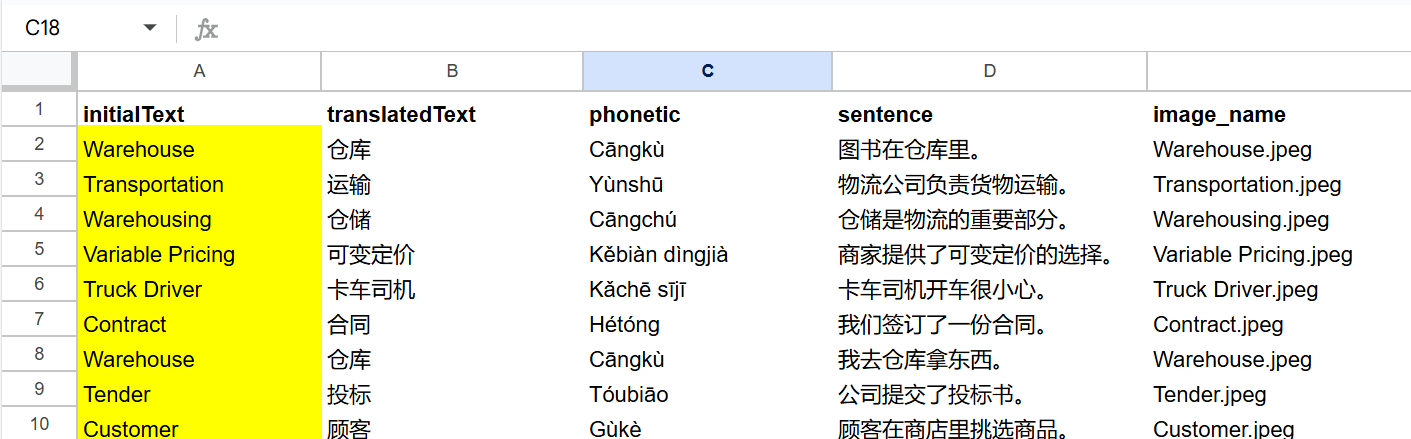 The bot will: 1. Load your vocabulary list from Google Sheets 2. Generate multiple-choice questions with GPT-4 3. Evaluate your answer and give instant feedback 4. Loop to the next word until you're fluent 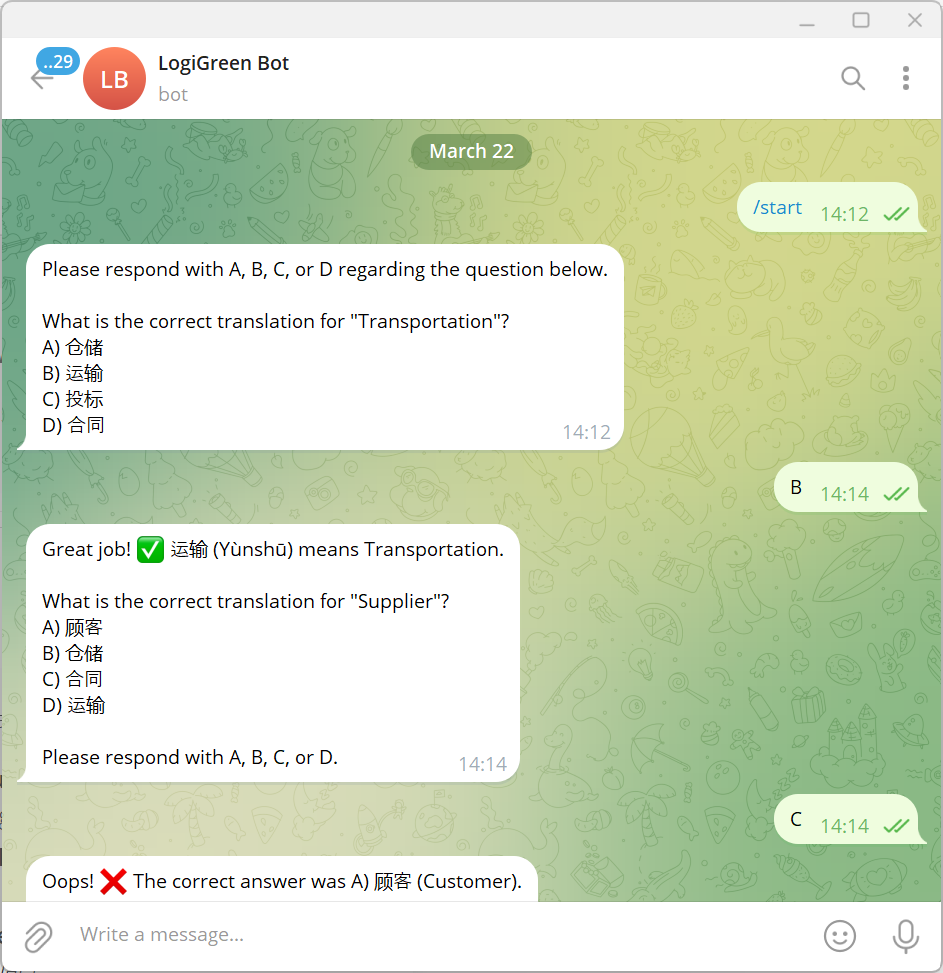 These fields will be automatically added to a Google Sheet, ready to be loaded in Anki to create flash cards. ### What do I need to start? This workflow does not require any advanced programming skills. #### Prerequisite - A **Google Drive Account** with a folder including a Google Sheet filled with the vocabulary list you want to learn. - API Credentials: **Open AI API** for the chat model, **Google Drive API** and **Google Sheets API** activated with OAuth2 credentials - A **Telegram Bot** with its token recorded in the Telegram Node Credentials - **A Google Sheet** with two columns (initialText: words in your own language, translatedText: words in the target language) ### Next Steps Follow the sticky notes to set up the parameters inside each node and get ready to pump your learning skills.  [Watch My Tutorial](https://youtu.be/MQV8wDSug7M) Curious how N8N can supercharge learning or supply chain? Let's connect on [LinkedIn](https://www.linkedin.com/in/samir-saci) --- ### Notes - This workflow can be used **for any language**. In the AI Agent prompt, you just need to replace Chinese with your language. This workflow has been created with N8N 1.82.1 Submitted: March 23, 2025
n8n$9.99Automate Social Media Posting from Google Sheets to Twitter and Instagram
This workflow automates the process of posting content from Google Sheets to Twitter and Instagram. It fetches pending rows, generates captions, converts them into images, and posts them on social media platforms.
n8n$14.99Automate Lead Engagement with AI-Driven WhatsApp Messages and Google Sheets
This workflow captures leads from an inquiry form, crafts personalized WhatsApp messages using AI, and logs interactions in Google Sheets. It enhances lead engagement by automating initial outreach and tracking message success or failure.
n8n$9.99Track CVE Vulnerability Details & History with NVD API and Google Sheets
## Who is this for? NVD (National Vulnerability Database) data is essential for security analysts, vulnerability managers, and DevSecOps professionals who need to perform both CVE lookups and monitor historical change logs. This workflow helps streamline those efforts by providing structured outputs for audit, triage, or compliance tracking purposes. **Note:** While this example uses Google Sheets as the destination, you can easily modify the final destination node (e.g., send to Slack, email, database, etc.) based on your specific automation needs. ## What problem is this solving? Security teams often manually look up CVE data and track changes across multiple tools. This process is inefficient and error-prone. This workflow automates the CVE lookup and historical change tracking by logging enriched vulnerability data into Google Sheets in real-time. ## What this workflow does This workflow is designed for CVE API lookup and change history tracking. In many vulnerability automation pipelines, it is essential to determine not only the metadata of a CVE but also how it has evolved over time. Based on the operational need—whether it's enrichment, risk scoring, or remediation validation—this workflow becomes particularly handy in surfacing both current and historical CVE data. This template performs the following actions: - Accepts incoming webhook requests containing a CVE ID - Queries the NVD CVE Lookup API to fetch vulnerability metadata - Queries the NVD CVE History API to retrieve all historical changes - Flattens both datasets into a sheet-compatible structure - Appends vulnerability metadata to one sheet and change history to another within the same Google Spreadsheet ## Setup **Request an NVD API Key** To request an NVD API Key, please provide your organization name, a valid email address, and indicate your organization type at [NVD API Key Request](https://nvd.nist.gov/developers/request-an-api-key). You must scroll to the end of the Terms of Use Agreement and check "I agree to the Terms of Use" to obtain an API Key. After submission, you will receive a single-use hyperlink via email to activate and view your API Key. If not activated within seven days, a new request must be submitted. **API Rate Limits** Without an API key, you're limited to 5 requests per 30-second window. With an API key, you're allowed up to 50 requests in the same period. To prevent request throttling, it's recommended to introduce slight delays between consecutive API calls in production setups. 1. Clone or import this workflow into your n8n instance. 2. Set up the following credentials: - Google Sheets OAuth2 - NVD API Key (via HTTP Header Auth) 3. The workflow logs data to a Google Sheet titled **NVD Database**, with Sheet 1 named **CVE Lookup** and Sheet 2 named **CVE History**. 4. Trigger each workflow using the respective webhook URL, appending `?cveId=CVE-XXXX-XXXX` as a query parameter. ### **Example Webhook Request (CVE Change History)** You can test this workflow with the following example: ``` GET https://your-domain.com/webhook/cve-history?cveId=CVE-2023-34362 ``` ## How to customize this workflow - Use the `Edit Fields` node (optional) to centralize configuration like sheet name or query input - Extend the CVE flattening logic to include more nested metadata if needed - Integrate notification systems (e.g., Slack or email) by branching from the processing nodes - Modify webhook paths for better endpoint organization ## **Production Security Tips** - Use **HTTP Header Auth** on the webhook for secure access > **This template uses webhooks and NVD API access with authentication headers.** --- This template uses two flows: - **Webhook 1:** `NVD CVE Lookup` - Lookup CVE vulnerability metadata from NVD and sync to Google Sheet - **Webhook 2:** `NVD CVE Change History` - Track change history for CVEs via NVD and log each update Each flow: - Hits NVD's respective endpoint - Uses custom JS Code node to flatten the nested JSON - Syncs data to dedicated Google Sheet tabs - Consists of 4 nodes: Webhook → API Call → Parse → Sheet Sync Make sure both flows are activated and webhooks exposed for external access. Based on your needs, ensure you have a secure setup—whether hosted internally or in a cloud environment—when running n8n in production.
n8n$9.99Extract Invoice Data from PDFs with AI - Google Sheets Email Alerts
Built by Setidure Technologies This smart n8n automation extracts invoice details from PDF files uploaded to Google Drive using AI, logs them to a Google Sheet, and notifies the billing team via email - all without manual intervention. Note: This workflow requires a self-hosted n8n instance with LangChain, LLM, and Google integrations configured. **What This Workflow Does** - Monitors a Google Drive folder for new invoice uploads - Extracts text and parses key invoice details using LLM via LangChain - Logs extracted data into a Google Sheet (Invoice Database) - Generates a summary email using GPT-4O-MINI (Greenie) - Sends the email to the billing team via Gmail **Prerequisites** - A Google Drive folder to monitor for PDF uploads - A Google Sheet named Invoice Database with the following columns: - Invoice Number, Client Name, Client Email, Client Address, Client Phone, Invoice Date, Due Date, Total Amount - Service account or OAuth credentials for: - Google Drive - Google Sheets - Gmail - LangChain + Ollama integration for LLM responses **Step-by-Step Setup Instructions** 1. Clone this workflow into your self-hosted n8n instance 2. Set up credentials: - Google Drive (for folder trigger) - Google Sheets (for data logging) - Gmail (for sending email) - Ollama (local LLM) or any connected LangChain provider 3. Configure the trigger node to watch your specific Invoice Uploads folder 4. Update the Google Sheet node with your Invoice Database sheet URL and column mapping 5. Test with a sample invoice to validate the AI extraction and email generation **Workflow Steps** ## Step 1: Trigger on New File in Google Drive Node Name: Watch for New Invoices Type: Google Drive Trigger Event: fileCreated Triggers when a new PDF file is uploaded to a designated folder ## Step 2: Download the Uploaded File Node Name: Download Invoice PDF Type: Download Binary Downloads the invoice file from Google Drive ## Step 3: Extract Raw Text from PDF Node Name: Extract PDF Text Type: Extract from File Extracts unstructured text content from the downloaded PDF ## Step 4: Parse Invoice Fields Using AI Node Name: Parse Invoice Data with LLM Type: LangChain Agent LLM is prompted to extract: - Invoice Number - Client Name, Email, Address, Phone - Invoice Date, Due Date, Total Amount Fields not found are skipped ## Step 5: Log Extracted Data to Google Sheet Node Name: Log to Invoice Database Type: Google Sheets Appends a new row with the extracted fields to the Invoice Database spreadsheet ## Step 6: Create Email Notification via LLM Node Name: Generate Billing Email Summary Type: LangChain Agent (GPT-4O-MINI) Prompt instructs AI to: - Act as "Greenie" from Green Grass Corp - Inform billing that a new invoice was processed - Confirm logging into the Invoice Database ## Step 7: Send the Email to Billing Team Node Name: Email Billing Team Type: Gmail Send To: billing@example.com Subject and body injected from LLM output ## Step 8: End Workflow Gracefully Node Name: End Type: No Operation Used to cleanly terminate the flow ## Example Output (Email) Subject: New Invoice Logged - Client: ABC Corp Hi Billing Team, A new invoice has been received and processed automatically. The following details have been extracted and logged into the Invoice Database: - Invoice Number: INV-1024 - Client: ABC Corp - Amount: $1,450 - Due Date: July 15, 2025 Please review the [Invoice Database](https://docs.google.com/spreadsheets/d/14FtgVUjy0tw4EQOB28wuCYOe6CELtt3Ujn-GsuDWY/edit?gid=0#gid=0) for full details. Regards, Greenie Green Grass Corp
n8n$9.99Automate Weekly Real Estate Listings to Google Sheets
Automatically scrape and store real estate listings from LoopNet into Google Sheets on a weekly schedule using Scrapeless and n8n.
n8n$4.99Automate Invoice and Receipt Data Extraction to Google Sheets
Streamline your bookkeeping by automatically extracting invoice and receipt data using Gemini OCR and saving it to Google Sheets from sources like Google Drive, Gmail, and Telegram.
n8n$14.99Automate Product Data Extraction from Google Sheets URLs with Dumpling AI
This workflow automates the extraction of product information from URLs listed in a Google Sheet, using Dumpling AI to gather details like product name, price, and description, and stores the data in another sheet.
n8n$4.99Automate Customer Interactions with WhatsApp Business and Google Sheets
This n8n workflow automates customer interactions and appointment management using WhatsApp Business and Google Sheets. It sends notifications, stores user messages, and manages replies efficiently.
n8n$9.99Automated Reservation System with Telegram, Google Gemini AI, and Google Sheets
**What It Is** SmartReserve is a flexible, automated Telegram chatbot built in n8n that allows users to request and confirm reservations for any kind of resource—training sessions, equipment, appointments, event slots, or more. It connects with Google Sheets for live availability tracking and automatically sends confirmation emails to your users. **How It Works** **Telegram Chatbot Interface** Users interact with a friendly bot to submit their reservation request. The bot collects: - Date - Name - Email - Resource / Service - Start Time & End Time - Final confirmation All in one seamless message. **Conflict-Free Booking System** The bot checks your existing reservation sheet to avoid time overlaps before confirming. **Google Sheets Integration** Two spreadsheets are used: - Resource Info: Define available services, resources, or assets. - Reservation Log: Store confirmed reservations in structured rows. **Confirmation via Email** Once a reservation is accepted, the bot sends a detailed confirmation email to the user. **Setup Steps** 1. Import the n8n Workflow - Use the provided .json template inside your n8n workspace. 2. Create Your Google Sheets - Sheet 1: Resource Info (e.g., rooms, courts, sessions, etc.) - Sheet 2: Reservation Log with these headers: - Date | Name | Email | Resource | Start Time | End Time | Status 3. Set Telegram Bot Token - Create a Telegram bot and paste the token into n8n credentials. 4. Connect Google Sheets - Add your Google account to n8n and allow spreadsheet access. 5. Customize for Your Use Case - Rename “Resource” to anything (e.g., Room, Coach, Equipment). - Edit confirmation text and branding inside the “Set” and “Email” nodes. 6. Go Live! - Enable the workflow, and you're ready to accept real-time reservations. **What You Get** - One-click Telegram reservation system - Conflict checker with Google Sheets - Auto email confirmation - User-friendly one-shot data collection - Fully editable & extendable workflow - Future updates and support options **Need Help Setting It Up?** If you'd like help customizing or deploying this workflow, I offer quick setup assistance and extended support. Contact: tharwat.elsayed.hamad@gmail.com WhatsApp: +201061803236 Whether you're setting it up for your team, your club, or your business—I'm here to help!
n8n$9.99Automate Travel Agent Outreach with Web Scraping, OpenAI, and Google Sheets
**Automated Workflow: Scrape Travel Agent Contacts and Send Personalized Survey Emails** This workflow is designed to automate the process of scraping travel agent contact data, standardizing the information, storing it, and then sending out personalized survey emails using AI. It's especially useful for outreach campaigns, research, or lead generation. **Workflow Breakdown** **Part 1: Scraping and Storing Travel Agent Data** 1. **HTTP Scrape Website** - Type: HTTP Request (POST) - Function: Calls a third-party scraping API (https://api.firecrawl.dev...) to scrape data from a travel agent listing site. - Purpose: Extract raw HTML or structured data from a website containing contact info. 2. **OpenAI Standardize Data** - Type: OpenAI Message Model - Function: Uses AI to clean and standardize the raw scraped data into structured JSON (e.g., name, email, agency, location). - Purpose: Ensures uniformity in formatting, making data easier to process downstream. 3. **Split Out** - Type: Item Splitter - Function: Splits the standardized array of agent records into individual items. - Purpose: Allows appending each agent as a separate row in Google Sheets. 4. **Google Sheet - Data Store** - Type: Google Sheets (Append) - Function: Stores each individual record in a spreadsheet. - Purpose: Maintains a centralized and accessible log of scraped and processed contacts. **Part 2: Read Records and Send Personalized Survey Emails** Triggered Manually - when “Test Workflow” button is clicked. 1. **Trigger - When clicking Test Workflow** - Type: Manual Trigger - Function: Starts the second part of the workflow manually. - Use Case: Testing or running the outreach email process on demand. 2. **Google Sheet Data Store (Read)** - Type: Google Sheets (Read) - Function: Reads the stored travel agent records from the spreadsheet. - Purpose: Retrieves contact details and context for personalized messaging. 3. **OpenAI Mail Composer** - Type: OpenAI Message Model - Function: Generates a custom email for each agent using their details. - Purpose: Creates human-like, engaging emails that include a survey link (optional input). 4. **Google Sheet Update Records** - Type: Google Sheets (Update) - Function: Optionally marks the record as emailed or logs the date of outreach. - Purpose: Prevents duplicate outreach and helps track campaign status. 5. **Send Email** - Type: Email Node (SMTP or integrated service) - Function: Sends the personalized email generated by OpenAI. - Purpose: Delivers the survey to each travel agent with contextually relevant messaging. - Use Case: Targeted email outreach to travel agents. Collect insights or feedback via survey links. Use personalized messaging to improve response rates. **Benefits:** - Fully automated scraping and processing. - Personalized at scale using OpenAI. - Easily repeatable for different domains or campaigns. - Centralized recordkeeping in Google Sheets. **Tech Stack:** - n8n: Automation and workflow management - OpenAI: AI-based text standardization and email generation - Firecrawl (or similar): Web scraping API - Google Sheets: Data storage and tracking - Email Node: Survey email delivery
n8n$9.99Automated Vulnerability Scanning and Reporting with Nessus, AI, and Google Sheets
This workflow automates vulnerability scanning using Nessus, applies AI-based risk triage, and generates comprehensive reports in Google Sheets. It is designed for security teams to streamline compliance with NIST CSF and CISA KEV guidelines.
n8n$24.99Track Student Attendance with Mobile App, Google Sheets, and Email Alerts
A lightweight no-code workflow that captures student check-in data via a mobile app or webhook, stores it in a Google Sheet, and instantly notifies the class teacher via email. ## What This Does - Students **check in using a mobile app or QR code** - Their data is **formatted and saved** to a Google Sheet - A **notification email** is sent to the class teacher in real time ## Workflow Steps | Step | Description | | ---------------------------- | ------------------------------------------------------------ | | **Student Check-in (Webhook)** | Triggered via POST request from mobile app or QR scanner | | **Format Data** | Cleans and prepares incoming JSON into structured format | | **Append or Update Row** | Saves student check-in data into Google Sheets | | **Email Teacher** | Sends formatted check-in email to the class teacher | | **Success Response** | Returns a confirmation response to the mobile app or system | ## Example Check-in Input (Webhook Body) ```json { "student_name": "Aarav Mehta", "student_id": "SU025", "class_name": "Grade 6B" } ``` ## Google Sheets Format | Student Name | Student ID | Class | Date | Time | | ------------ | ---------- | ------- | ---------- | ----- | | Aarav Mehta | SU025 | Grade 6B | 2025-08-06 | 08:35 | *Date and time are added dynamically in the workflow.* ## Setup Requirements - **n8n Instance** - Deployed with public webhook support - **Google Sheets** - Sheet with columns as shown above - **Email SMTP Settings** - For sending teacher notification ## Quick Setup Instructions 1. Import the workflow into your n8n instance 2. Replace the webhook URL in your mobile app 3. Set your Google Sheet ID and range 4. Enter the teacher's email in the **Email Teacher** node 5. Test with mock data 6. Deploy and use live!
n8n$9.99Automate Google Maps Business Phone Scraping to Google Sheets
This n8n workflow automates the extraction of business phone numbers and other details from Google Maps using the Bright Data API, and stores the information in Google Sheets for easy access and management.
n8n$14.99Automate Lead Generation & Email Outreach with Apify, Apollo.io, GPT-4 & Google Sheets
## Disclaimer: Community nodes are used, and the template can only be used on self-hosted n8n instances.  ## This n8n template from [Intuz](https://www.intuz.com/) provides a complete solution to automate your entire B2B lead generation pipeline, from discovering recently funded companies to drafting hyper-personalized outreach emails with AI. ## Who's this workflow for? - Sales Development Representatives (SDRs) - Business Development Teams - Growth Hackers - Startup Founders - Marketing Agencies ## How it works **1. Scrape Funded Companies:** The workflow begins by using Apify to scrape a target list of recently funded companies directly from a Crunchbase search. **2. Enrich with Apollo.io:** It takes each company and uses the Apollo.io API to find key decision-makers (like VPs, Directors) and enrich their contact information, including finding their email addresses. **3. Populate Google Sheets:** All the gathered lead data—company name, contact name, title, email, LinkedIn URL, etc.—is neatly organized and added to a Google Sheet. **4. AI-Personalized Email Crafting:** The workflow sends the leads' information to OpenAI (GPT-4) with a highly specialized prompt, instructing it to write a concise, impactful, and hyper-personalized first touch cold email. **5. Update Lead List with Email Content:** Finally, the unique, AI-generated email is saved back into the Google Sheet alongside the corresponding lead's information, making it ready for you to send. ## Pre-conditions and Requirements Before you can successfully execute this workflow, you must have the following accounts, credentials, and assets in place. **1. n8n Instance:** You need an active n8n instance (self-hosted). **2. Apify Account & Crunchbase Access:** - Apify Account: A registered account on Apify. - Crunchbase Account: An active, logged-in Crunchbase account (a paid subscription is recommended for accessing detailed search filters). **3. Apollo.io API:** You need an Apollo.io plan that includes API access. You can generate the API from settings. **4. Google Sheet:** Create a new Google Sheet to store your leads. The workflow is configured for two tabs: one for raw data (HealthCare in the template) and one for email generation (Company sheet). **5. OpenAI Account:** An account with OpenAI with API access and billing set up. ## Setup Instructions **1. Apify Connection:** - Connect your Apify account in the Run an Actor node. - You'll need an Apify scraper, [here's the link](https://console.apify.com/actors/BBfgvSNWcySEk1jQO/input) - In the Custom Body field, update the search.url with your target Crunchbase discovery URL and provide a valid cookie for authentication. **2. Apollo.io Connection:** - Connect your Apollo.io account using HTTP Header Authentication in the three Apollo nodes. - You will need to provide your API key. **3. Google Sheets Connection:** - Connect your Google Sheets account. - Create a spreadsheet and update the Document ID and Sheet Name in the three Google Sheets nodes to match yours. Ensure your sheet columns are set up to receive the data. **4. OpenAI Connection:** - Connect your OpenAI account in the Message a model node. The prompt is pre-engineered for high-quality output, but you can tailor it to better fit your specific value proposition. **5. Activate Workflow:** - Click Execute workflow to run the automation manually and watch your AI-powered lead list build itself. ## Customization Guide This workflow is a powerful template. To adapt it to your specific business needs, you should review and modify the following nodes. **1. Changing Your Target Companies (The Source)** - Node: Run an Actor - What to change: The search.url parameter inside the customBody. - How to do it: 1. Go to Crunchbase and perform a search for your ideal companies (e.g., filter by different funding rounds, industry, location, keywords, etc.). 2. Copy the URL from your browser's address bar after the search results have loaded. 3. Paste this new URL as the value for search.url in the node. 4. You can also adjust count: 10 to pull more or fewer companies per run. Be mindful of Apify and Apollo credit usage. **2. Defining Your Ideal Contact Persona** - Node: Apollo - Get User - What to change: The person_seniorities and person_titles arrays in the jsonBody. - How to do it: **1. Seniority:** Modify the person_seniorities list to match who you sell to. Examples: [c_level, founder] or [manager, contributor]. **2. Job Titles:** This is crucial. Replace the existing list of titles (engineering, technology, etc.) with keywords relevant to your target buyer. For example, if you sell to marketing teams, you might use: [marketing, demand generation, growth, content, brand]. **3. Configuring Your Google Sheet Destination** - Nodes: Append or update row in sheet and Update row in sheet - What to change: The documentId and sheetName.
n8n$24.99Automate AI-Driven Outreach with Google Sheets, Gmail, and Gemini
Streamline your lead generation and outreach by integrating AI-generated messaging with Google Sheets and Gmail using n8n. This workflow automates personalized email campaigns, leveraging Google Gemini for AI-optimized content.
n8n$9.99Automate Website Traffic Analysis with Semrush and Google Sheets
This workflow automates the process of analyzing website traffic using the Semrush API and logs the results into Google Sheets for easy access and reporting. Ideal for SEO professionals seeking efficient data tracking and analysis.
n8n$9.99Automate Personalized Cold Emails for Dental Clinics Using Google Sheets and OpenAI
This n8n workflow automates the creation of personalized cold emails for dental clinics, leveraging Google Sheets and OpenAI's GPT-4o-mini model to enhance outreach efficiency and engagement.
n8n$9.99Reddit Sentiment Analysis for Apple WWDC25 with GeminAI and Google Sheets
This workflow automates sentiment analysis of Reddit posts related to Apple's WWDC25 event. It extracts data, categorizes posts, analyzes the sentiment of comments, and updates a Google Sheet with the results. ### Prerequisites 1. **Bright Data Account:** You need a Bright Data account to scrape Reddit data. Ensure you have the correct permissions to use their API. [https://brightdata.com/](https://brightdata.com/) 2. **Google Sheets API Credentials:** Enable the Google Sheets API in your Google Cloud project and create credentials (OAuth 2.0 Client IDs). 3. **Google Gemini API Credentials:** You need a Gemini API key to run the sentiment analysis. Ensure you have the correct permissions to use their API. [https://ai.google.dev/](https://ai.google.dev/). You can use any other models of choice. ### Setup 1. **Import the Workflow:** Import the provided JSON workflow into your n8n instance. 2. **Configure Bright Data Credentials:** In the scrape Reddit and the get status nodes, in Header Parameters find the Authorization field, replace `Bearer 1234` with your Bright Data API key. Apply this to every node that utilizes your Bright Data API Key. 3. **Set up the Google Sheets API credentials** - In the Append Sentiments node, set up the Google Sheets API by connecting your Google Sheets account through OAuth 2 credentials. 4. **Configure the Google Gemini Credential ID** - In the Sentiment Analysis per comment node, set up the Google Gemini API by connecting your Google AI account through the API credentials. 5. **Configure Additional Parameters:** - In the scrape Reddit node, modify the JSON body to adjust the search term, date, or sort method. - In the Wait node, alter the Amount to adjust the polling interval for scraping status, it is set to 15 seconds by default. - In the ext Classifier node, customize the categories and descriptions to suit the sentiment analysis needs. Review categories such as WWDC events to ensure relevancy. - In the Sentiment Analysis per comment node, modify the system prompt template to improve context. ### Customization Options 1. Bright Data API parameters to adjust scraping behavior. 2. Wait node duration to optimize polling. 3. ext Classifier categories and descriptions. 4. Sentiment Analysis system prompt. ### Use Case Examples - **Brand Monitoring:** Track public sentiment towards Apple during and after the WWDC25 event. - **Product Feedback Analysis:** Gather insights into user reactions to new product announcements. - **Competitive Analysis:** Compare sentiment towards Apple's announcements versus competitors. - **Event Impact Assessment:** Measure the overall impact of the WWDC25 event on various aspects of Apple's business. ### Target Audiences - Marketing professionals in the tech industry, - Brand managers, - Product managers, - Market research analysts, - Social media managers ### Troubleshooting 1. Workflow fails to start. Check that all necessary credentials (Bright Data and Google Sheets API) are correctly configured and that the Bright Data API key is valid. 2. Data scraping fails. Verify the Bright Data API key, ensure the dataset ID is correct, and inspect the Bright Data dashboard for any issues with the scraping job. 3. Sentiment analysis is inaccurate. Refine the categories and descriptions in the ext Classifier node. Check that you have the correct Google Gemini API key, as the original is a placeholder. 4. Google Sheets are not updating. Ensure the Google Sheets API credentials have the necessary permissions to write to the specified spreadsheet and sheet. Check API usage limits. 5. Workflow does not produce the correct output. Check the data connections, by clicking the connections, and looking at which data is being produced. Check all formulas for errors. Happy productivity!
n8n$14.99Automatically Track New YouTube Videos and Save to Google Sheets
Efficiently monitor new YouTube videos based on custom search criteria and automatically log the details into Google Sheets. This workflow ensures you stay updated with the latest content relevant to your interests.
Make$2.99Scrape Google Maps Leads to Google Sheets via Apify
This workflow contains community nodes that are only compatible with the self-hosted version of n8n. ## Scrape Google Maps leads to Google Sheets via Apify ## Who's it for This workflow is ideal for marketers, sales professionals, and solo entrepreneurs who want to collect local leads based on Google Maps search terms. For example, restaurants in North Holland. ## What it does This workflow uses an Apify actor to scrape business details from Google Maps and automatically appends them to a Google Sheet with the following fields: - Business name - Street - Postal code - City - Website - Phone number ## How it works 1. The workflow starts with a manual trigger (you can replace it with any other trigger). 2. The Google Maps Scraper Apify actor is launched. 3. A short wait ensures the actor completes the task (you can increase the wait time for more extensive outputs). 4. The resulting dataset is retrieved from Apify. 5. Data is mapped and added into a connected Google Sheet. ## How to set up Step 1: Configure the “Run Apify scraper” node - Go to the Google Maps Scraper actor on Apify. - Create a new task with your search term. - Find your actor from the list. Step 2: Edit the “Find your last run” node - Select the correct actor (Google Maps Scraper) from the dropdown in this node. Step 3: Fetch the dataset - In the “Get the data from Apify” node, use {{$json.defaultDatasetId}} to dynamically pull the correct dataset. Step 4: Connect your Google Sheet - Link your Google account and select the desired spreadsheet and tab (for example, Leads). - Make sure the column headers match the data fields. Current column headers: - Title - Street - Postcode - City - Website - Phone If you have any questions, feel free to reach out to info@ai-amigos.com
n8n$4.99
More integrations
Custom AI Systems & Services
Our team of experienced AI builders will help build custom AI systems, workflows, and solutions.
Request Custom Work