AI Powered Language Teacher with Telegram, Google Sheets, and GPT-4
Tags: Productivity, Education, Learning, Language ### Context I'm a **Supply Chain Data Scientist from Paris** who lived six years in China - and yes, **learning Mandarin while working full-time was tough**.  Learning Mandarin as an adult can be very difficult, especially if you have a full-time job. With AI, you can now have a **Chinese tutor available 24/7** on your phone - no excuses left! It is with this spirit that I designed this workflow to support fellow Mandarin learners with a **Chinese teacher powered by GPT-4**. Boost your **language skills** with AI using N8N! For business inquiries, you can add me on [LinkedIn](https://www.linkedin.com/in/samir-saci) ### Who is this template for? This workflow template is designed for **language learners** and **educators** who need support to learn a vocabulary list in Mandarin (or any other language) using **Open AI GPT-4**, an **AI agent** and a **Telegram Bot** to interact with users.  For the vocabulary list, you can use another template shared in my profile [Generate Anki Flash Cards for Language Learning with Google Translate and GPT-4](https://n8n.io/workflows/3195-generate-anki-flash-cards-for-language-learning-with-google-translate-and-gpt-4/) to generate the Google Sheet needed in this workflow. ### How does it work? The workflow loads a **vocabulary list** stored in your **Google Sheet**. 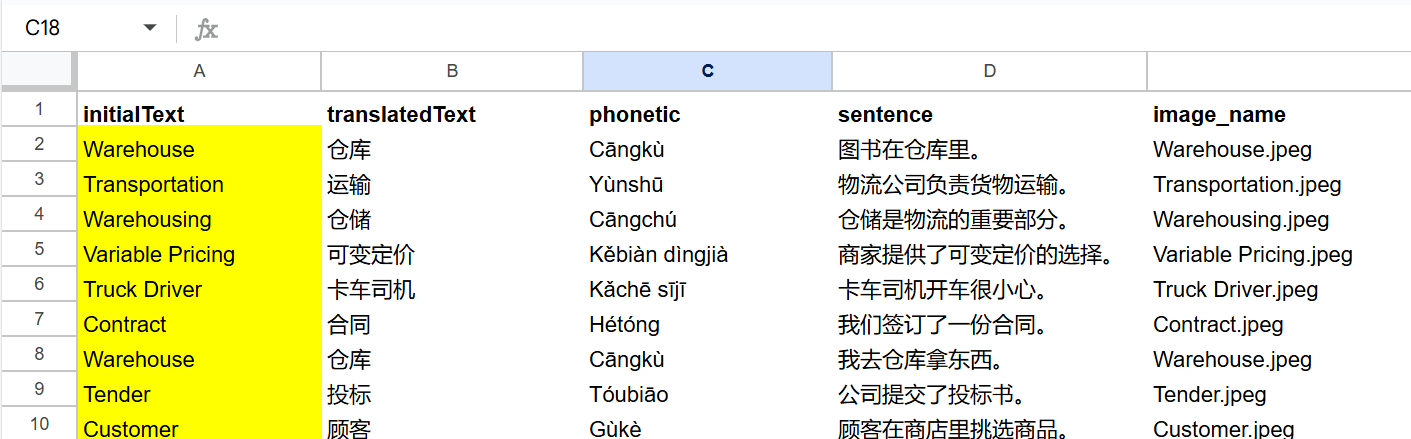 The bot will: 1. Load your vocabulary list from Google Sheets 2. Generate multiple-choice questions with GPT-4 3. Evaluate your answer and give instant feedback 4. Loop to the next word until you're fluent 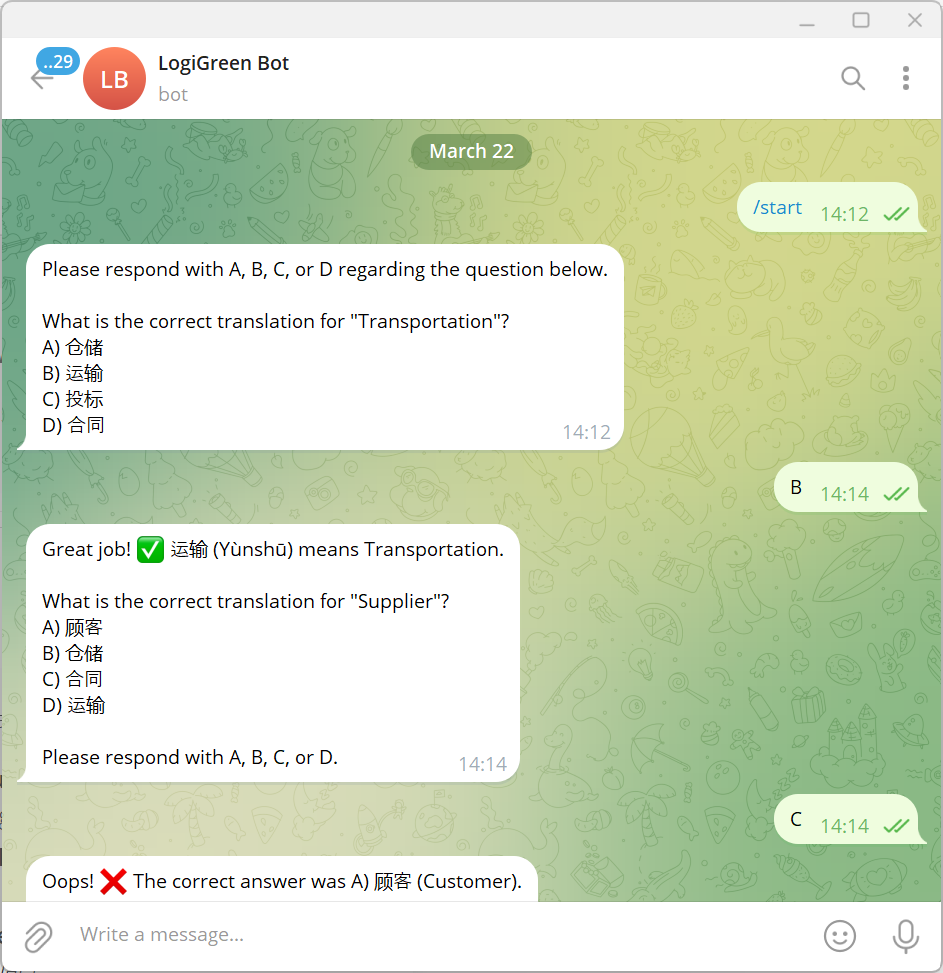 These fields will be automatically added to a Google Sheet, ready to be loaded in Anki to create flash cards. ### What do I need to start? This workflow does not require any advanced programming skills. #### Prerequisite - A **Google Drive Account** with a folder including a Google Sheet filled with the vocabulary list you want to learn. - API Credentials: **Open AI API** for the chat model, **Google Drive API** and **Google Sheets API** activated with OAuth2 credentials - A **Telegram Bot** with its token recorded in the Telegram Node Credentials - **A Google Sheet** with two columns (initialText: words in your own language, translatedText: words in the target language) ### Next Steps Follow the sticky notes to set up the parameters inside each node and get ready to pump your learning skills.  [Watch My Tutorial](https://youtu.be/MQV8wDSug7M) Curious how N8N can supercharge learning or supply chain? Let's connect on [LinkedIn](https://www.linkedin.com/in/samir-saci) --- ### Notes - This workflow can be used **for any language**. In the AI Agent prompt, you just need to replace Chinese with your language. This workflow has been created with N8N 1.82.1 Submitted: March 23, 2025
Tags: Productivity, Education, Learning, Language
Context
I'm a Supply Chain Data Scientist from Paris who lived six years in China - and yes, learning Mandarin while working full-time was tough.

Learning Mandarin as an adult can be very difficult, especially if you have a full-time job. With AI, you can now have a Chinese tutor available 24/7 on your phone - no excuses left!
It is with this spirit that I designed this workflow to support fellow Mandarin learners with a Chinese teacher powered by GPT-4. Boost your language skills with AI using N8N!
For business inquiries, you can add me on LinkedIn
Who is this template for?
This workflow template is designed for language learners and educators who need support to learn a vocabulary list in Mandarin (or any other language) using Open AI GPT-4, an AI agent and a Telegram Bot to interact with users.
 For the vocabulary list, you can use another template shared in my profile Generate Anki Flash Cards for Language Learning with Google Translate and GPT-4 to generate the Google Sheet needed in this workflow.
How does it work?
The workflow loads a vocabulary list stored in your Google Sheet.
 The bot will:
- Load your vocabulary list from Google Sheets
- Generate multiple-choice questions with GPT-4
- Evaluate your answer and give instant feedback
- Loop to the next word until you're fluent

These fields will be automatically added to a Google Sheet, ready to be loaded in Anki to create flash cards.
What do I need to start?
This workflow does not require any advanced programming skills.
Prerequisite
- A Google Drive Account with a folder including a Google Sheet filled with the vocabulary list you want to learn.
- API Credentials: Open AI API for the chat model, Google Drive API and Google Sheets API activated with OAuth2 credentials
- A Telegram Bot with its token recorded in the Telegram Node Credentials
- A Google Sheet with two columns (initialText: words in your own language, translatedText: words in the target language)
Next Steps
Follow the sticky notes to set up the parameters inside each node and get ready to pump your learning skills.

Curious how N8N can supercharge learning or supply chain? Let's connect on LinkedIn
Notes
- This workflow can be used for any language. In the AI Agent prompt, you just need to replace Chinese with your language.
This workflow has been created with N8N 1.82.1 Submitted: March 23, 2025
New buyers can create an account from the cart to unlock a controlled $10 first-purchase credit on eligible orders of $25+.
Related bundle
E-commerce Store Automation Suite
8 hand-picked workflows for $39.00.
That is $4.88 each, vs $9.99 for this one alone.
View bundleSecure checkout powered by Stripe
Support
How to import this workflow into n8n
- 1Purchase or download the workflow to get the n8n workflow JSON file.
- 2In your n8n instance, open Workflows and choose "Import from File" (or paste the JSON with Ctrl+V on the canvas).
- 3Open each node marked with a credential warning and connect your own accounts and API keys.
- 4Run the workflow once manually to verify the data flow, then toggle it to Active.
Related Education workflows
- Learn JSON Basics with an Interactive Step-by-Step Tutorial for Beginners$14.99
- Learn n8n Expressions with an Interactive Step-by-Step Tutorial for Beginners$14.99
- Automated AI Degree Audit Using Google Sheets and OpenAI$9.99
- Learn API Fundamentals with an Interactive Hands-On Tutorial Workflow$24.99
- Master Webhook Integration and Security with Supabase in n8n$14.99
- Master JavaScript Code Node with Interactive n8n Tutorial$9.99
More from Samir Saci
Need this deployed? We'll set it up for you.
Our automation experts deploy this workflow in your stack, connect your accounts, and verify it works — or build a custom solution from scratch.