Education Workflows
Learning and educational tools
Learn JSON Basics with an Interactive Step-by-Step Tutorial for Beginners
## How it works This workflow is an interactive, hands-on tutorial designed to teach you the absolute basics of JSON (JavaScript Object Notation) and, more importantly, how to use it within n8n. It's perfect for beginners who are new to automation and data structures. The tutorial is structured as a series of simple steps. Each node introduces a new, fundamental concept of JSON: 1. **Key/Value Pairs:** The basic building block of all JSON. 2. **Data Types:** It then walks you through the most common data types one by one: - **String** (text) - **Number** (integers and decimals) - **Boolean** (`true` or `false`) - **Null** (representing nothing) - **Array** (an ordered list of items) - **Object** (a collection of key/value pairs) 3. **Using JSON with Expressions:** The most important step! It shows you how to dynamically pull data from a previous node into a new one using n8n's expressions (`{{ }}`). 4. **Final Exam:** A final node puts everything together, building a complete JSON object by referencing data from all the previous steps. Each node has a detailed sticky note explaining the concept in simple terms. ## Set up steps **Setup time: 0 minutes!** This is a tutorial workflow, so there is no setup required. 1. Simply click the **Execute Workflow** button to run it. 2. Follow the instructions in the main sticky note: click on each node in order, from top to bottom. 3. For each node, observe the output in the right-hand panel and read the sticky note next to it to understand what you're seeing. By the end, you'll have a solid understanding of what JSON is and how to work with it in your own n8n workflows.
n8n$14.99Learn n8n Expressions with an Interactive Step-by-Step Tutorial for Beginners
## How it works This template is an interactive, step-by-step tutorial designed to teach you the most important skill in n8n: **using expressions to access and manipulate data**. If you know what JSON is but aren't sure how to pull a specific piece of information from one node and use it in another, this workflow is for you. It starts with a single Source Data node that acts as our filing cabinet, and then walks you through a series of lessons, each demonstrating a new technique for retrieving and transforming that data. You will learn how to: 1. **Access a simple value** from a previous node. 2. Use n8n's built-in selectors like **`.last()`** and **`.first()`**. 3. Get a specific item from a list (**Array**). 4. Drill down into nested data (**Objects**). 5. Combine these techniques to access data in an **array of objects**. 6. Go beyond simple retrieval by using **JavaScript functions** to do math or change text. 7. Inspect data with utility functions like **`Object.keys()`** and **`JSON.stringify()`**. 8. Summarize data from **multiple items** using `.all()` and arrow functions. ## Set up steps **Setup time: 0 minutes!** This workflow is a self-contained tutorial and requires no setup or external credentials. 1. Click **Execute Workflow** to run the entire tutorial. 2. Follow the flow from the Source Data node to the Final Exam node. 3. For each lesson, click on the node to see how its expressions are configured in the parameters panel. 4. Read the detailed sticky note next to each lesson—it breaks down exactly how the expression works and why. By the end, you'll have the foundational knowledge to connect data and build powerful, dynamic workflows in n8n.
n8n$14.99Automated AI Degree Audit Using Google Sheets and OpenAI
This workflow automates the degree audit process for senior students by leveraging AI to evaluate completed courses against program requirements, providing a comprehensive summary of remaining credits and courses directly in Google Sheets.
n8n$9.99Learn API Fundamentals with an Interactive Hands-On Tutorial Workflow
### How it works This template is an interactive, hands-on tutorial designed to demystify what an API is and how it works, right inside your n8n canvas. It uses a simple restaurant analogy to explain the core concepts: - **You** are the Client (an **HTTP Request** node). - The **Kitchen** is the Server (a **Webhook** node). - The **API** is the **Menu and the Waiter**—the set of rules for how you can ask for things and get a response. The workflow is a series of self-contained lessons. Each lesson pairs an HTTP Request node (the customer placing an order) with a Webhook node (the kitchen receiving and responding to the order) to demonstrate a key concept: 1. **The Basics:** Making a simple `GET` request to a `URL`. 2. **Customizing:** Using `Query Parameters` to filter or modify your request. 3. **Sending Data:** Using the `POST` method and a `Body` to send information to the server. 4. **Identification:** Using `Headers` and simple `Authentication` to prove who you are. 5. **Handling Delays:** Understanding how `Timeouts` prevent your workflow from getting stuck. ### Set up steps **Setup time: < 1 minute** This workflow is a self-contained tutorial and requires no external services or credentials. You may want to check the Base URL. 1. Click **Execute Workflow** to run the entire tutorial. 2. Follow the flow from top to bottom, exploring each Lesson. 3. For each lesson, click on the **HTTP Request** node and its corresponding **Webhook** node to see how they are configured and what they do. 4. Read the sticky notes next to each lesson—they contain the core explanations! That's it! Explore and have fun learning the fundamentals of APIs in an interactive way.
n8n$24.99Master Webhook Integration and Security with Supabase in n8n
This workflow serves as a comprehensive guide to using webhooks in n8n, demonstrating HTTP methods, authentication strategies, and Supabase integration for data management.
n8n$14.99Master JavaScript Code Node with Interactive n8n Tutorial
This workflow serves as an interactive tutorial for mastering the Code node in n8n, demonstrating both basic and advanced JavaScript concepts through data processing tasks.
n8n$9.99Automate Student Course Scheduling with Google Sheets and OpenAI
Efficiently generate personalized Fall 2025 course schedules for students by leveraging Google Sheets and OpenAI. This workflow selects courses based on completed prerequisites and term availability, ensuring a balanced schedule.
n8n$9.99Automate YouTube Video Curation with Quality and Relevance Filtering to Google Sheets
This workflow automates the process of finding high-quality YouTube videos on specific topics, filters them based on quality and relevance, and exports the top results to Google Sheets. Ideal for content creators, educators, and marketers looking to build curated lists or gain content insights.
n8n$14.99Learn n8n Keyboard Shortcuts with an Interactive Hands-On Tutorial Workflow
## How it works This template is an interactive playground designed to help you master the most useful keyboard shortcuts in n8n and supercharge your building speed. Forget boring lists—this workflow gives you hands-on tasks to complete, turning learning into a practical exercise. The workflow is structured into four chapters, each focusing on a different aspect of workflow development: 1. **Node Basics:** Learn the fundamentals of interacting with a single node, such as renaming, editing, duplicating, and deactivating. 2. **Canvas Navigation & Selection:** Master the art of moving around the canvas and selecting multiple nodes efficiently. 3. **Advanced Actions:** Discover powerful moves like tidying up messy connections and creating sub-workflows. 4. **Execution & Debugging:** Uncover essential shortcuts for testing your workflows, like pinning data and navigating the executions panel. Each step provides a clear task in a sticky note, guiding you to perform the action yourself. ## Set up steps **Setup time: 0 minutes!** This workflow is a self-contained tutorial and requires no setup, credentials, or configuration. 1. Open the workflow. 2. Follow the instructions in the sticky notes, starting from the top. 3. Perform the actions as described to build muscle memory for each shortcut. That's it! Get ready to become an n8n power user.
n8n$24.99Test Your JSON Skills with Interactive Challenges and Instant Feedback
## How it works This template is a hands-on, practical exam designed to test your understanding of the fundamental JSON data types. It's the perfect way to solidify your knowledge after learning the basics. Think of it as the **driver's test** that comes after the theory lesson. You'll be given a series of tasks, and the workflow will automatically check your answers, providing instant feedback. The test is broken down into six sequential challenges, each focusing on a core data type: 1. **String:** Writing text values correctly. 2. **Number:** Using integers and decimals. 3. **Boolean:** Working with `true` and `false`. 4. **Null:** Representing a non-existent value. 5. **Array:** Creating ordered lists of data. 6. **Object:** Building nested key-value structures. For each challenge, you'll modify a `Set` node with the correct JSON syntax. When you execute the workflow, a corresponding `IF` node will validate your input. A green path means you passed and can move to the next challenge. A red path means you need to try again! ## Set up steps **Setup time: < 1 minute** This workflow is a self-contained test and requires no setup or credentials. 1. Read the instructions on the main sticky note to understand the goal. 2. Start with the first challenge, **Test - String**. Activate and modify the node according to the instructions on the purple sticky note next to it. 3. Click **Execute Workflow**. 4. If the execution path is green, you've passed! You can move on to the next test node in the sequence to continue. If the path is red, read the hint in the error message and try again. 5. Repeat the process until you reach the final success message. **Good luck!**
n8n$24.99Learn Workflow Logic with Merge, IF & Switch Operations
## How it works Ever wonder how to make your workflows smarter? How to handle different types of data in different ways? This template is a hands-on tutorial that teaches you the three most fundamental nodes for controlling the flow of your automations: **Merge**, **IF**, and **Switch**. To make it easy to understand, we use a simple **package sorting center** analogy: * **Data Items** are packages on a conveyor belt. * The **Merge Node** is where multiple conveyor belts combine into one. * The **IF Node** is a simple sorting gate with two paths (e.g., Fragile or Not Fragile). * The **Switch Node** is an advanced sorting machine that routes packages to many different destinations. This workflow takes you on a step-by-step journey through the sorting center: 1. **Creating Packages:** Three different packages (two letters and one parcel) are created using Set nodes. 2. **Merging:** The first **Merge** node combines all three packages onto a single conveyor belt so they can be processed together. 3. **Simple Sorting:** An **IF** node checks if a package is fragile. If `true`, it's sent down one path; if `false`, it's sent down another. 4. **Re-Grouping:** After being processed separately, another **Merge** node brings the packages back together. This **Split > Process > Merge** pattern is a critical concept in n8n! 5. **Advanced Sorting:** A **Switch** node inspects each package's `destination` and routes it to the correct output (London, New York, Tokyo, or a Default bin). By the end, you'll see how all packages have been correctly sorted, and you'll have a solid understanding of how to build intelligent, branching logic in your own workflows. ## Set up steps **Setup time: 0 minutes!** This template is a self-contained tutorial and requires **zero setup**. 1. There are no credentials or external services to configure. 2. Simply click the **Execute Workflow** button. 3. Follow the flow from left to right, clicking on each node to see its output and reading the detailed sticky notes to understand what's happening at each stage.
n8n$14.99Automate School Fee Reminders with Email and WhatsApp Notifications
Efficiently manage school fee reminders by automatically sending emails and WhatsApp messages with secure payment links to parents, three days before the due date.
n8n$9.99Test Your Data Access Techniques with Progressive Expression Challenges
## How it works This template is a hands-on, practical exam designed to help you master **n8n Expressions**—the key to accessing and manipulating data in your workflows. If the `Expressions Tutorial Template` was the theory lesson, this is the **practical driving test**. You'll learn how to navigate through complex data structures to get the exact piece of information you need. All challenges will reference a single **Source Data** node, which acts as our data map. The test is a series of six sequential challenges that build in complexity: 1. **Basic Access:** Getting a simple value from an object. 2. **Array Access:** Targeting a specific item in a list. 3. **Nested Object Access:** Reaching data inside another object. 4. **Array of Objects:** Combining array and object skills to get a specific value from a list of objects. 5. **Using JavaScript:** Applying simple JavaScript functions (like `.toUpperCase()`) to your data. 6. **Combining Text & Expressions:** Creating dynamic strings that mix static text with data from previous nodes. For each challenge, you'll write an expression in a Test node. When you execute the workflow, an `IF` node will instantly validate your answer, giving you a green path for success or a red path with a hint if you need to try again. ## Set up steps **Setup time: < 1 minute** This workflow is a self-contained test and requires no setup or credentials. 1. Read the instructions on the main sticky note to understand the goal. 2. Start with the first challenge, **Test - Basic Access**. Modify the node by writing the correct expression in the value field, according to the instructions on the purple sticky note. 3. Click **Execute Workflow**. 4. If the execution path is green, you've passed! The next Test node in the sequence will automatically be enabled for you to continue. If the path is red, read the hint in the error message and try again. 5. Repeat the process until you reach the final success message and become an expressions pro. **Good Luck!**
n8n$24.99Process Multiple Files with Forms: A Tutorial on Binary Data and Loops
Let a user load multiple files with a Form node, and process the binary data. A very important workflow for many tools. This is a learning example of several core concepts that are hard to grasp in n8n: - Binary data - Loop and $runIndex - Split Out The Save File demonstrates how to access the binary data correctly, but could be swapped to POST the files to an AI, for example.
n8n$9.99Streamline Academic Research with Automated Multi-Database Search and Export
Efficiently search and compile academic literature from multiple databases, deduplicate results, and export citations in various formats using n8n.
n8n$9.99Transform YouTube Videos into Interactive MCQ Quizzes with Google Forms and Gemini AI
Automatically convert YouTube videos into interactive multiple-choice quizzes using Google Forms and Gemini AI. Ideal for educators, trainers, and content creators, this workflow streamlines quiz creation with AI-driven question generation and automatic grading.
n8n$14.99Automated Student Absence Notifications via Email and WhatsApp
This workflow automatically notifies parents about student absences through email and WhatsApp, while tracking attendance patterns over 30 days to identify potential risks.
n8n$9.99Automate Comprehensive Literature Reviews with Multi-Database Search and GPT-4
Streamline your literature review process by searching multiple academic databases, parsing papers, and synthesizing findings into a structured document using GPT-4.
n8n$4.99AI Powered Language Teacher with Telegram, Google Sheets, and GPT-4
Tags: Productivity, Education, Learning, Language ### Context I'm a **Supply Chain Data Scientist from Paris** who lived six years in China - and yes, **learning Mandarin while working full-time was tough**.  Learning Mandarin as an adult can be very difficult, especially if you have a full-time job. With AI, you can now have a **Chinese tutor available 24/7** on your phone - no excuses left! It is with this spirit that I designed this workflow to support fellow Mandarin learners with a **Chinese teacher powered by GPT-4**. Boost your **language skills** with AI using N8N! For business inquiries, you can add me on [LinkedIn](https://www.linkedin.com/in/samir-saci) ### Who is this template for? This workflow template is designed for **language learners** and **educators** who need support to learn a vocabulary list in Mandarin (or any other language) using **Open AI GPT-4**, an **AI agent** and a **Telegram Bot** to interact with users.  For the vocabulary list, you can use another template shared in my profile [Generate Anki Flash Cards for Language Learning with Google Translate and GPT-4](https://n8n.io/workflows/3195-generate-anki-flash-cards-for-language-learning-with-google-translate-and-gpt-4/) to generate the Google Sheet needed in this workflow. ### How does it work? The workflow loads a **vocabulary list** stored in your **Google Sheet**. 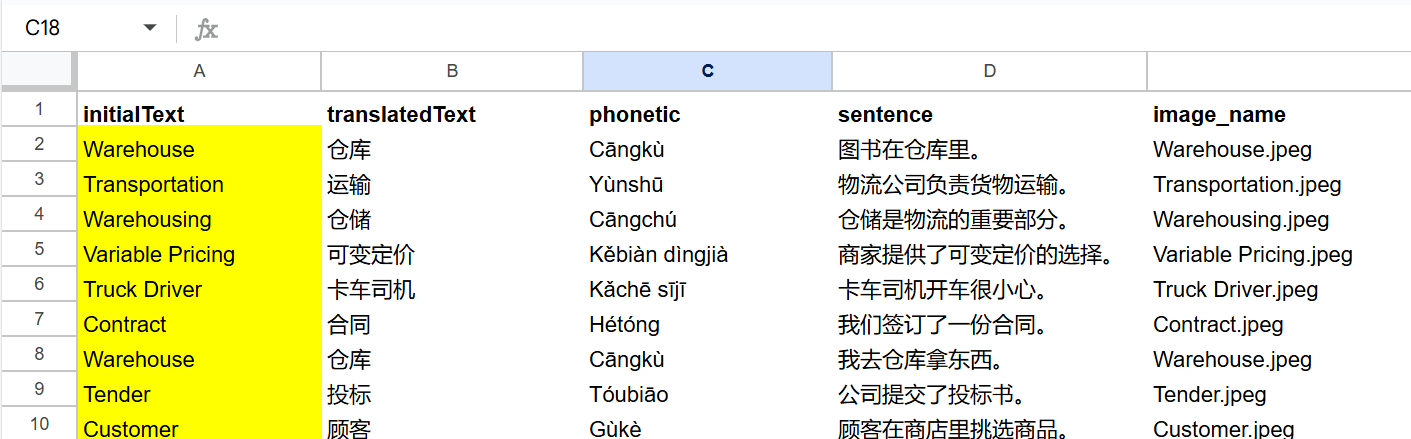 The bot will: 1. Load your vocabulary list from Google Sheets 2. Generate multiple-choice questions with GPT-4 3. Evaluate your answer and give instant feedback 4. Loop to the next word until you're fluent 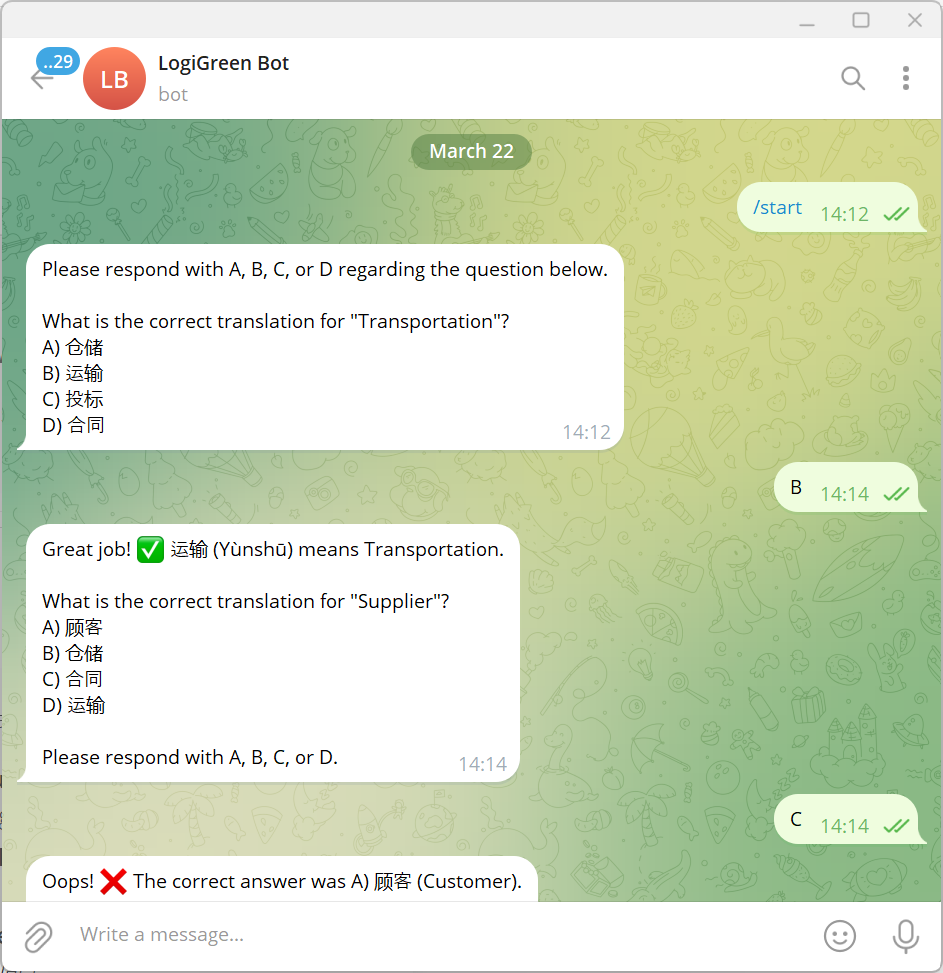 These fields will be automatically added to a Google Sheet, ready to be loaded in Anki to create flash cards. ### What do I need to start? This workflow does not require any advanced programming skills. #### Prerequisite - A **Google Drive Account** with a folder including a Google Sheet filled with the vocabulary list you want to learn. - API Credentials: **Open AI API** for the chat model, **Google Drive API** and **Google Sheets API** activated with OAuth2 credentials - A **Telegram Bot** with its token recorded in the Telegram Node Credentials - **A Google Sheet** with two columns (initialText: words in your own language, translatedText: words in the target language) ### Next Steps Follow the sticky notes to set up the parameters inside each node and get ready to pump your learning skills.  [Watch My Tutorial](https://youtu.be/MQV8wDSug7M) Curious how N8N can supercharge learning or supply chain? Let's connect on [LinkedIn](https://www.linkedin.com/in/samir-saci) --- ### Notes - This workflow can be used **for any language**. In the AI Agent prompt, you just need to replace Chinese with your language. This workflow has been created with N8N 1.82.1 Submitted: March 23, 2025
n8n$9.99Automate Student Admission Process with Excel, Validation, & Email Notifications
This automated n8n workflow processes student applications on a scheduled basis, validates data, updates databases, and sends welcome communications to students and guardians. **Main Components** * **Trigger at Every Day 7 am** - Scheduled trigger that runs the workflow daily * **Read Student Data** - Reads pending applications from Excel/database * **Validate Application Data** - Checks data completeness and format * **Process Application Data** - Processes validated applications * **Update Student Database** - Updates records in the student database * **Prepare Welcome Email** - Creates personalized welcome messages * **Send Email** - Sends welcome emails to students/guardians * **Success Response** - Confirms successful processing * **Error Response** - Handles any processing errors **Essential Prerequisites** * Excel file with student applications (student_applications.xlsx) * Database access for student records * SMTP server credentials for sending emails * File storage access for reading application data **Required Excel File Structure (student_applications.xlsx):** * Application ID | First Name | Last Name | Email | Phone * Program Interest | Grade Level | School | Guardian Name | Guardian Phone * Application Date | Status | Notes **Expected Input Data Format:** ```json { "firstName": "John", "lastName": "Doe", "email": "john.doe@example.com", "phone": "+1234567890", "program": "Computer Science", "gradeLevel": "10th Grade", "school": "City High School", "guardianName": "Jane Doe", "guardianPhone": "+1234567891" } ``` **Key Features** * **Scheduled Processing:** Runs daily at 7 AM automatically * **Data Validation:** Ensures application completeness * **Database Updates:** Maintains student records * **Auto Emails:** Sends welcome messages * **Error Handling:** Manages processing failures **Quick Setup** 1. Import workflow JSON into n8n 2. Configure schedule trigger (default: 7 AM daily) 3. Set Excel file path in Read Student Data node 4. Configure database connection in Update Student Database node 5. Add SMTP settings in Send Email node 6. Test with sample data 7. Activate workflow **Parameters to Configure** * `excel_file_path`: Path to student applications file * `database_connection`: Student database credentials * `smtp_host`: Email server address * `smtp_user`: Email username * `smtp_password`: Email password * `admin_email`: Administrator notification email
n8n$9.99Automate Quiz Delivery from Google Sheets to Telegram with Status Tracking
Streamline the process of delivering quizzes from Google Sheets to a Telegram group by automating poll creation and status updates. This workflow ensures quizzes are sent sequentially and notifies admins when the sheet needs refilling.
n8n$9.99Automate Lesson Planning and Resource Creation for UK Teachers
Streamline lesson preparation with AI-generated lesson packages, assessments, and integration tools, saving valuable time for UK teachers.
n8n$14.99Track Student Attendance with Mobile App, Google Sheets, and Email Alerts
A lightweight no-code workflow that captures student check-in data via a mobile app or webhook, stores it in a Google Sheet, and instantly notifies the class teacher via email. ## What This Does - Students **check in using a mobile app or QR code** - Their data is **formatted and saved** to a Google Sheet - A **notification email** is sent to the class teacher in real time ## Workflow Steps | Step | Description | | ---------------------------- | ------------------------------------------------------------ | | **Student Check-in (Webhook)** | Triggered via POST request from mobile app or QR scanner | | **Format Data** | Cleans and prepares incoming JSON into structured format | | **Append or Update Row** | Saves student check-in data into Google Sheets | | **Email Teacher** | Sends formatted check-in email to the class teacher | | **Success Response** | Returns a confirmation response to the mobile app or system | ## Example Check-in Input (Webhook Body) ```json { "student_name": "Aarav Mehta", "student_id": "SU025", "class_name": "Grade 6B" } ``` ## Google Sheets Format | Student Name | Student ID | Class | Date | Time | | ------------ | ---------- | ------- | ---------- | ----- | | Aarav Mehta | SU025 | Grade 6B | 2025-08-06 | 08:35 | *Date and time are added dynamically in the workflow.* ## Setup Requirements - **n8n Instance** - Deployed with public webhook support - **Google Sheets** - Sheet with columns as shown above - **Email SMTP Settings** - For sending teacher notification ## Quick Setup Instructions 1. Import the workflow into your n8n instance 2. Replace the webhook URL in your mobile app 3. Set your Google Sheet ID and range 4. Enter the teacher's email in the **Email Teacher** node 5. Test with mock data 6. Deploy and use live!
n8n$9.99Track Student Arrival with iOS Automation, Google Sheets & Email Alerts
This workflow automates **real-time student tracking** using **iOS Shortcuts and geolocation data**, notifying both **teachers and parents** based on geofenced logic. ## What This Workflow Does - Receives student **location updates via webhook** (iOS Shortcuts) - Detects if the student has **arrived at school** - Logs arrival data to Google Sheets - **Sends email alerts** to teachers and/or parents based on location ## Workflow Steps | Step | Description | | --------------------------- | -------------------------------------------------------- | | **Location Update Webhook** | Triggered via iOS Shortcut when student location updates | | **Process Location Data** | Extracts coordinates and metadata | | **Student Arrived?** | Checks if student entered school zone | | **Log School Arrival** | Adds arrival data to Google Sheet | | **At School?** | Double-checks geofence condition before notifying | | **Notify Teacher** | Sends email if student is confirmed at school | | **Notify Parent** | Sends email to parent (can vary based on geofence logic) | | **Success Response** | Returns a 200 response to the triggering device | ## How the Logic Works 1. The student's phone runs a shortcut when near school. 2. Sends coordinates to webhook. 3. Workflow compares coordinates with predefined geofence (e.g., radius around school). 4. If inside school zone: * Log arrival * Notify teacher and/or parent 5. Else: * Optionally notify parent only ## iOS Shortcut Sample (Trigger Setup) - **Automation Trigger**: Arrive at Location (e.g., School) - **Action**: Run Shortcut → Make Web Request (POST) **POST URL:** ``` https://your-n8n-instance.com/webhook/location-update ``` **Body Example:** ```json { "student_id": "SU042", "student_name": "Anaya Joshi", "lat": 19.0760, "lng": 72.8777, "timestamp": "2025-08-06T08:05:00" } ``` ## Google Sheets Logging | Student ID | Name | Date | Time | Status | | ---------- | ----------- | ---------- | ----- | ------- | | SU042 | Anaya Joshi | 2025-08-06 | 08:05 | Arrived | ## Setup Requirements - **n8n Instance** with webhook support - **Google Sheet** with appropriate columns - **iOS Shortcut** setup on student device - **Teacher and Parent Email Addresses** configured in workflow
n8n$9.99
Related categories
Custom AI Systems & Services
Our team of experienced AI builders will help build custom AI systems, workflows, and solutions.
Request Custom Work