"Blog Image SEO & Size Auditor with Ghost and Google Sheets"
**Tags**: Ghost CMS, SEO Audit, Image Optimization, Alt Text, Google Sheets, Automation ### Context Hi! I'm Samir - a Supply Chain Engineer and Data Scientist based in Paris, and founder of [LogiGreen Consulting](https://logi-green.com). I help companies and content creators use automation and analytics to **improve visibility**, **enhance performance**, and **reduce manual work**. > Let's use n8n to automate SEO audits to increase your traffic! For business inquiries, feel free to connect on [LinkedIn](https://www.linkedin.com/in/samir-saci) ### Who is this template for? This workflow is perfect for **bloggers, marketers, or content teams** using **Ghost CMS** who want to: - Extract and review **all images** from articles - Detect missing or short **alt texts** - Check image **file size** and **filename SEO compliance** - Push the audit results into a **Google Sheet** 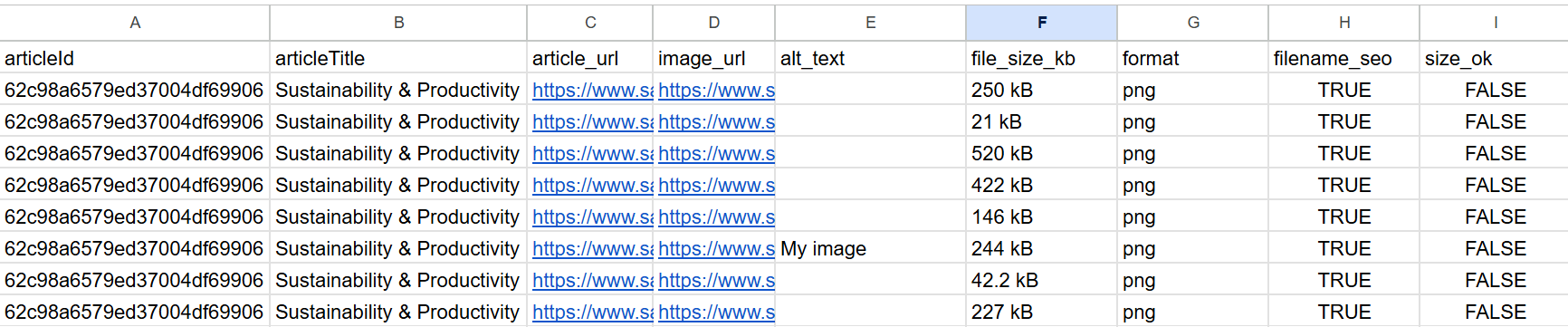 ### How does it work? This n8n workflow extracts all blog posts from Ghost CMS, scans the HTML to collect all embedded images, then evaluates each image for: - Presence and length of `alt text` - File size in kilobytes - Filename SEO quality (e.g., lowercase, hyphenated, no special chars) All findings are written to Google Sheets for **further analysis** or **manual cleanup**. ### Workflow Steps: 1. Trigger the workflow manually or on schedule 2. Extract blog post content from Ghost CMS 3. Parse all `<img>` tags with `src` and `alt` attributes 4. Store image metadata in a Google Sheet (step 1) 5. Download each image using HTTP request 6. Extract file size, extension, and filename SEO flag 7. Update the audit sheet with size and format insights 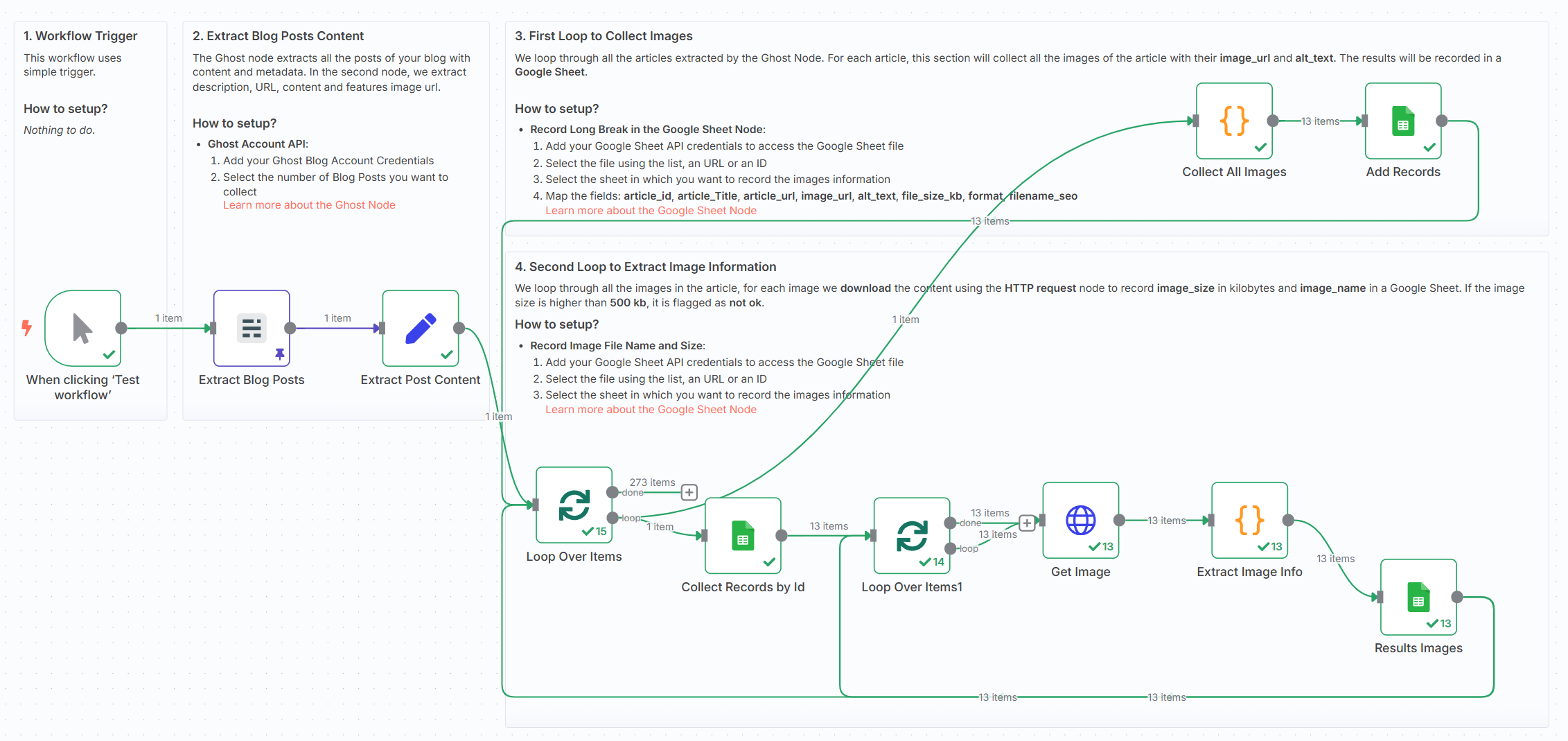 ### What do I need to get started? This workflow requires: - A **Ghost Content API key** - A **Google Sheet** (to log audit results) - No AI or external APIs required - works fully with built-in nodes ### Next Steps Follow the sticky notes inside the workflow to: - Plug in your Ghost blog credentials - Select or create a Google Sheet - Run the audit and start improving your SEO! This template was built using n8n v1.93.0 Submitted: June 8, 2025
Tags: Ghost CMS, SEO Audit, Image Optimization, Alt Text, Google Sheets, Automation
Context
Hi! I'm Samir - a Supply Chain Engineer and Data Scientist based in Paris, and founder of LogiGreen Consulting.
I help companies and content creators use automation and analytics to improve visibility, enhance performance, and reduce manual work.
Let's use n8n to automate SEO audits to increase your traffic!
For business inquiries, feel free to connect on LinkedIn
Who is this template for?
This workflow is perfect for bloggers, marketers, or content teams using Ghost CMS who want to:
- Extract and review all images from articles
- Detect missing or short alt texts
- Check image file size and filename SEO compliance
- Push the audit results into a Google Sheet

How does it work?
This n8n workflow extracts all blog posts from Ghost CMS, scans the HTML to collect all embedded images, then evaluates each image for:
- Presence and length of
alt text - File size in kilobytes
- Filename SEO quality (e.g., lowercase, hyphenated, no special chars)
All findings are written to Google Sheets for further analysis or manual cleanup.
Workflow Steps:
- Trigger the workflow manually or on schedule
- Extract blog post content from Ghost CMS
- Parse all
<img>tags withsrcandaltattributes - Store image metadata in a Google Sheet (step 1)
- Download each image using HTTP request
- Extract file size, extension, and filename SEO flag
- Update the audit sheet with size and format insights

What do I need to get started?
This workflow requires:
- A Ghost Content API key
- A Google Sheet (to log audit results)
- No AI or external APIs required - works fully with built-in nodes
Next Steps
Follow the sticky notes inside the workflow to:
- Plug in your Ghost blog credentials
- Select or create a Google Sheet
- Run the audit and start improving your SEO!
This template was built using n8n v1.93.0
Submitted: June 8, 2025
New buyers can create an account from the cart to unlock a controlled $10 first-purchase credit on eligible orders of $25+.
Related bundle
Lead Generation Machine
8 hand-picked workflows for $49.00.
That is $6.13 each, vs $9.99 for this one alone.
View bundleSecure checkout powered by Stripe
Support
How to import this workflow into n8n
- 1Purchase or download the workflow to get the n8n workflow JSON file.
- 2In your n8n instance, open Workflows and choose "Import from File" (or paste the JSON with Ctrl+V on the canvas).
- 3Open each node marked with a credential warning and connect your own accounts and API keys.
- 4Run the workflow once manually to verify the data flow, then toggle it to Active.
Related Marketing workflows
- Automate UGC Video Creation and Instagram Posting with Google Gemini and Veo 3$9.99
- Automate Lead Generation and Cold Email Outreach$14.99
- Automate Professional Video Ad Creation from Product Images$19.99
- Track SEO Keyword Rankings with Bright Data MCP and GPT-4o AI Analysis$14.99
- Automate Google Maps Data Scraping and Email Discovery for Local Business Outreach$14.99
- Automate AI-Driven Social Media Content for Auto Services$19.99
More from Samir Saci
Need this deployed? We'll set it up for you.
Our automation experts deploy this workflow in your stack, connect your accounts, and verify it works — or build a custom solution from scratch.