Custom Pomodoro Tracker using Telegram and Google Sheets
**Tags**: Productivity, Pomodoro, Organization ### Context Hey! I'm Samir, a Supply Chain Engineer and Data Scientist from Paris, founder of [LogiGreen Consulting](https://logi-green.com). A significant improvement in my productivity came from following the **Pomodoro Technique**. ### What is the Pomodoro Technique? The Pomodoro Technique is a time management method that breaks your workday into 25-minute focus intervals followed by short breaks. After 4 cycles, you take a longer break to recharge. It helps maintain concentration while preventing burnout. 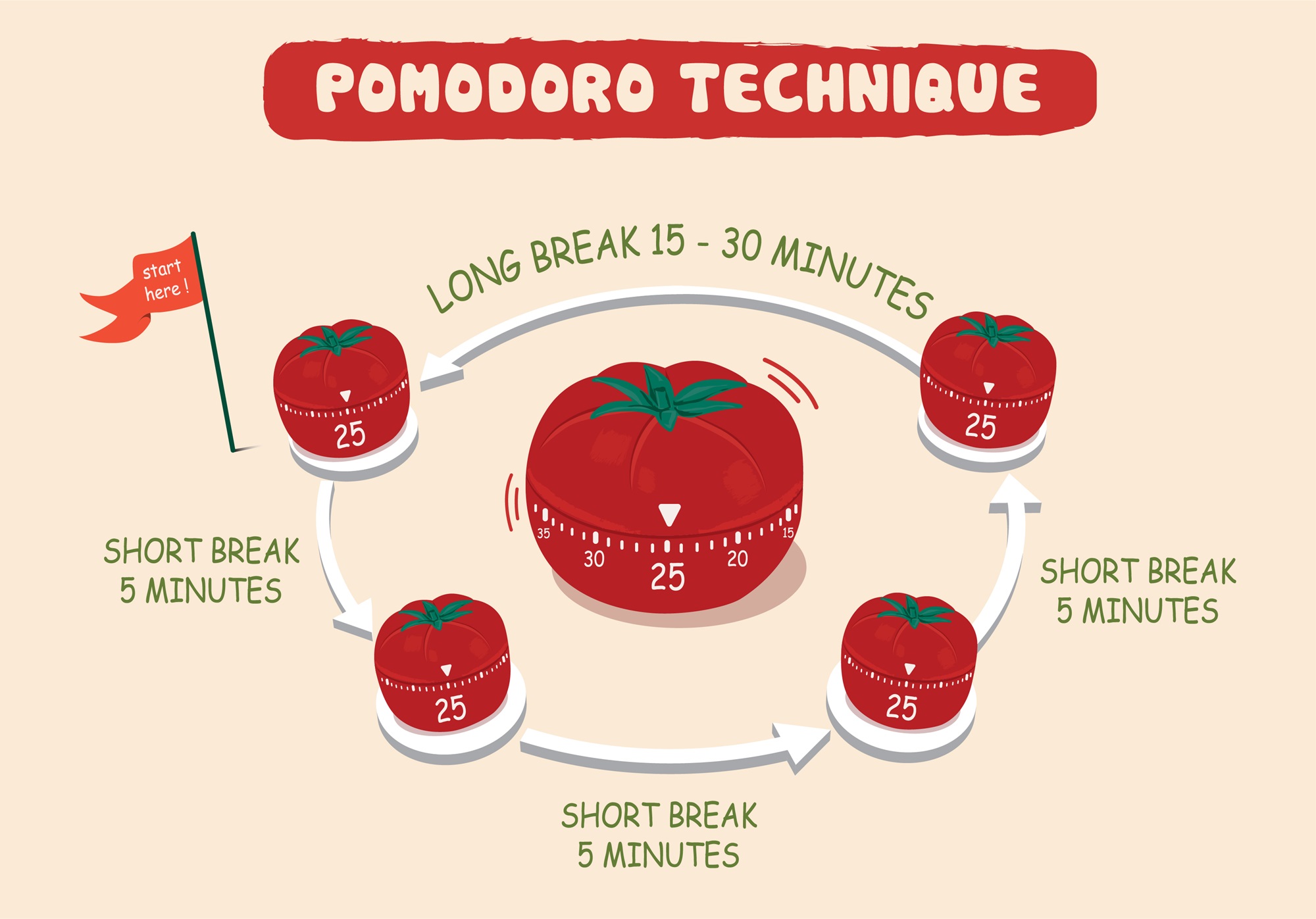 I've used this technique with web apps to receive break/work notifications. But I always wished I had a way to **track my sessions** for self-assessment. > Let's use **n8n** to boost our productivity and log our deep work sessions automatically! For business inquiries, you can add me on [Here](https://www.linkedin.com/in/samir-saci) ### Who Is This Template For? I built this workflow for creators, freelancers, students, and professionals who love the Pomodoro technique but want more than just timers - they want data. This template helps you: - Track every deep work session automatically - Store logs in Google Sheets for later analysis - Stay in control via Telegram commands - There is no need to pay for premium apps. It's all **free** and powered by **n8n**. ### How Does It Work? This Telegram bot tracks your Pomodoro sessions and sends you alerts during the process. **Here's what happens:** 1. A user sends `/start` to the bot. 2. It launches a 25-minute deep work timer. 3. After 25 minutes, the bot sends a break reminder. 4. **After four cycles**, a long break is triggered and the session is logged. 5. The session is **automatically recorded to Google Sheets** with (Date & Time, User ID, Pomodoro count, Session ID, Duration of focus and breaks) 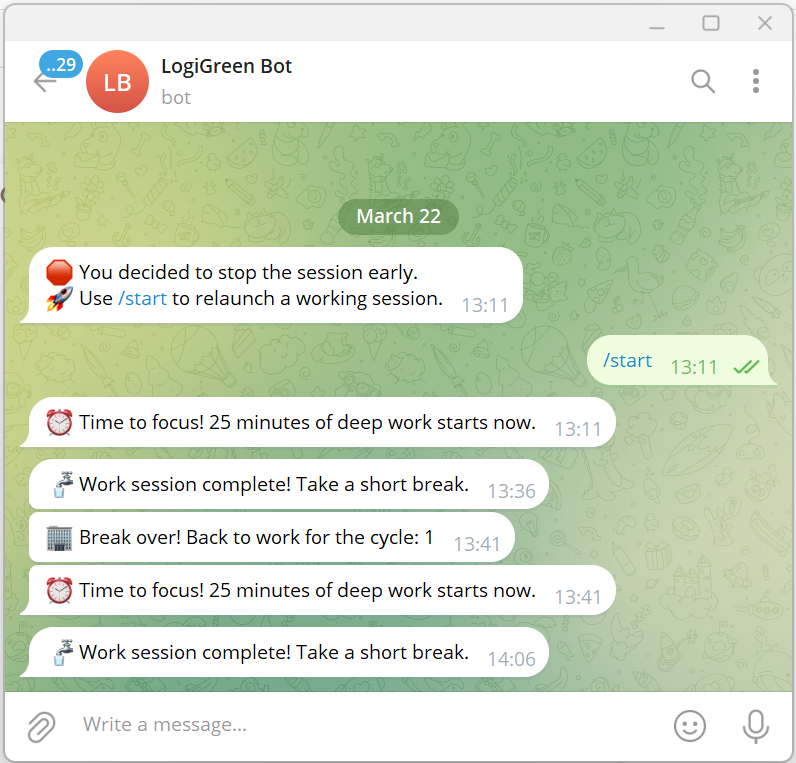 ### What Gets Tracked? | Field | Description | |-------------------|-----------------------------------| | Date & Time | When the session was logged | | User ID | Your Telegram ID | | Block Type | Deep Work or Short Break | | Pomodoro Count | Number of cycles completed | | Working Session ID| Unique ID for each session | | Focus Duration | Length of each deep work session | | Break Duration | Short or long break info | You can use this workflow as a base to bring additional features like: - Connecting with tasks from **Google Tasks** - Send automated productivity reports to monitor your activity - Link a Pomodoro with a task using **Google Calendar** ### What Do I Need to Start? This workflow is beginner-friendly - **no coding required**. - **Google Drive API** and **Google Sheets API** credentials - A Google Sheet set up to log sessions (with the columns of the table above) - API Credentials: - **Google Sheets API** (OAuth2) - **Telegram Bot Token** - Telegram app to chat with the bot > The template is plug-and-play. Just follow the sticky notes in the n8n editor to configure it. ### Next Steps Follow the sticky notes in the n8n workflow editor to: - Set your credentials - Connect your Google Sheet - Initialize the static data - Launch your first `/start` command on Telegram  [**Watch My Tutorial**](https://www.youtube.com/watch?v=ztMMrmbgGEo) Curious how n8n can supercharge **productivity and learning skills?** Let's connect on [**LinkedIn**](https://www.linkedin.com/in/samir-saci) This workflow has been created with N8N 1.82.1 Submitted: March 24th, 2025
Tags: Productivity, Pomodoro, Organization
Context
Hey! I'm Samir, a Supply Chain Engineer and Data Scientist from Paris, founder of LogiGreen Consulting.
A significant improvement in my productivity came from following the Pomodoro Technique.
What is the Pomodoro Technique?
The Pomodoro Technique is a time management method that breaks your workday into 25-minute focus intervals followed by short breaks. After 4 cycles, you take a longer break to recharge. It helps maintain concentration while preventing burnout.

I've used this technique with web apps to receive break/work notifications. But I always wished I had a way to track my sessions for self-assessment.
Let's use n8n to boost our productivity and log our deep work sessions automatically!
For business inquiries, you can add me on Here
Who Is This Template For?
I built this workflow for creators, freelancers, students, and professionals who love the Pomodoro technique but want more than just timers - they want data.
This template helps you:
- Track every deep work session automatically
- Store logs in Google Sheets for later analysis
- Stay in control via Telegram commands
- There is no need to pay for premium apps. It's all free and powered by n8n.
How Does It Work?
This Telegram bot tracks your Pomodoro sessions and sends you alerts during the process.
Here's what happens:
- A user sends
/startto the bot. - It launches a 25-minute deep work timer.
- After 25 minutes, the bot sends a break reminder.
- After four cycles, a long break is triggered and the session is logged.
- The session is automatically recorded to Google Sheets with (Date & Time, User ID, Pomodoro count, Session ID, Duration of focus and breaks)

What Gets Tracked?
| Field | Description |
|---|---|
| Date & Time | When the session was logged |
| User ID | Your Telegram ID |
| Block Type | Deep Work or Short Break |
| Pomodoro Count | Number of cycles completed |
| Working Session ID | Unique ID for each session |
| Focus Duration | Length of each deep work session |
| Break Duration | Short or long break info |
You can use this workflow as a base to bring additional features like:
- Connecting with tasks from Google Tasks
- Send automated productivity reports to monitor your activity
- Link a Pomodoro with a task using Google Calendar
What Do I Need to Start?
This workflow is beginner-friendly - no coding required.
- Google Drive API and Google Sheets API credentials
- A Google Sheet set up to log sessions (with the columns of the table above)
- API Credentials:
- Google Sheets API (OAuth2)
- Telegram Bot Token
- Telegram app to chat with the bot
The template is plug-and-play. Just follow the sticky notes in the n8n editor to configure it.
Next Steps
Follow the sticky notes in the n8n workflow editor to:
- Set your credentials
- Connect your Google Sheet
- Initialize the static data
- Launch your first
/startcommand on Telegram

Curious how n8n can supercharge productivity and learning skills? Let's connect on LinkedIn
This workflow has been created with N8N 1.82.1 Submitted: March 24th, 2025
New buyers can create an account from the cart to unlock a controlled $10 first-purchase credit on eligible orders of $25+.
Secure checkout powered by Stripe
Support
How to import this workflow into n8n
- 1Purchase or download the workflow to get the n8n workflow JSON file.
- 2In your n8n instance, open Workflows and choose "Import from File" (or paste the JSON with Ctrl+V on the canvas).
- 3Open each node marked with a credential warning and connect your own accounts and API keys.
- 4Run the workflow once manually to verify the data flow, then toggle it to Active.
Related Productivity workflows
- Automate Personal Life Management with Telegram and Google Services$14.99
- Automate Google Sheets Cleanup by Removing Duplicates via Profile URLs$4.99
- Automate Google Sheets with AI-Driven Text Generation in n8n$9.99
- Automated Daily Briefing for Executive Communication Management$14.99
- Automate Salon Bookings with AI, Google Calendar, and Email Confirmations$14.99
- Automate Meeting Scheduling with AI via Telegram$9.99
More from Samir Saci
Need this deployed? We'll set it up for you.
Our automation experts deploy this workflow in your stack, connect your accounts, and verify it works — or build a custom solution from scratch.