Telegram Automation Workflows
1,649 ready-made Telegram workflows for n8n, Make, Zapier, Activepieces, and Pipedream. Bots, alerts, and AI assistants delivered straight to Telegram chats and channels.
Transform Telegram Bot into a Multimodal AI Assistant with OpenAI and SERP
This workflow enhances your Telegram bot into a powerful AI assistant capable of processing text, voice, images, and documents. It leverages OpenAI, SERP, and vector store technologies to deliver comprehensive and context-aware responses.
n8n$24.99Transcribe Telegram Voice Messages Using OpenAI Whisper
This n8n workflow automatically transcribes voice messages received on Telegram using OpenAI's Whisper model, enhancing message accessibility and usability.
n8n$4.99Tesla Quant Trading AI Agent using Telegram + GPT-4.1 (Main Interface)
**Get daily and on-demand Tesla (SLA) trading signals via Telegram**—powered by GPT-4.1 and real-time market data. This is the central AI supervisor that orchestrates seven sub-agents for technical analysis, price pattern recognition, and news sentiment. Reports are delivered in structured Telegram-ready HTML, optimized for traders seeking fast, intelligent decision-making signals. This master agent **requires 7 connected sub-workflows** to function. One of them, the News & Sentiment Agent, also requires a **DeepSeek Chat API key** for language processing. --- ## Required Sub-Workflows You must download and publish the following workflows: 1. **[Tesla Financial Market Data Analyst Tool](https://n8n.io/workflows/4094-tesla-financial-market-data-analyst-tool-multi-timeframe-technical-ai-agent/)** 2. **[Tesla News and Sentiment Analyst Tool](https://n8n.io/workflows/4093-tesla-news-and-sentiment-analyst-tool-powered-by-deepseek-chat/)** *(Requires DeepSeek Chat API Key)* 3. **[Tesla 15min Indicators Tool](https://n8n.io/workflows/4096-tesla-15min-indicators-tool-short-term-ai-technical-analysis/)** 4. **[Tesla 1hour Indicators Tool](https://n8n.io/workflows/4097-tesla-1hour-indicators-tool-mid-term-technical-analysis-ai/)** 5. **[Tesla 1day Indicators Tool](https://n8n.io/workflows/4098-tesla-1day-indicators-tool-macro-level-technical-ai/)** 6. **[Tesla 1hour & 1day Klines Tool](https://n8n.io/workflows/4099-tesla-1hour-and-1day-klines-tool-candlestick-and-volume-ai-pattern-detector/)** 7. **[Tesla Quant Technical Indicators Webhooks Tool](https://n8n.io/workflows/4095-tesla-quant-technical-indicators-webhooks-tool/)** *(Requires Alpha Vantage Premium API Key)* See all tools at: **[https://n8n.io/creators/don-the-gem-dealer/](https://n8n.io/creators/don-the-gem-dealer/)** --- ## What This Agent Does 1. Listens to your trading query via Telegram 2. Calls the **Financial Analyst** and **News & Sentiment Analyst** 3. These agents aggregate: * RSI, MACD, BBANDS, SMA, EMA, ADX * Candlestick pattern + volume divergence analysis * News summaries and sentiment scoring via **DeepSeek Chat** 4. GPT-4.1 composes the final structured **SLA trade report** with: * Spot and leverage setups * Signal rationale * Confidence score * Sentiment tag * News summary --- ## Output Example **SLA Trading Report (Daily Summary)** **Spot Trade** Action: Buy Entry: 172.45 TP: 182.00 SL: 169.80 Signal: RSI bounce + Bullish Engulfing Sentiment: Neutral **Leveraged Position** Position: Long Leverage: 3x TP: 186 SL: 170 Confidence: High (83/100) **Top News** Tesla Model Y delivery surge - Electrek Options market pricing in upside - Bloomberg FSD delayed in Canada - TeslaNorth --- ## Setup Instructions ### 1. Import All 8 Workflows Ensure all sub-agents above are published in your n8n instance. ### 2. Create Your Telegram Bot Use [@BotFather](https://t.me/BotFather) to generate the token and connect to the trigger/send nodes. ### 3. Connect OpenAI GPT-4.1 Add your OpenAI credentials for GPT-4.1 in the designated node. ### 4. Add DeepSeek Chat API Key Sign up at [https://deepseek.com](https://deepseek.com) and insert your **DeepSeek Chat** credentials in the News Agent. ### 5. Add Alpha Vantage Premium API Key Sign up at [https://www.alphavantage.co/premium/](https://www.alphavantage.co/premium/) Use HTTP Header Auth for webhook-based indicator fetchers. ### 6. Replace Telegram ID Update the placeholder <<replace your ID here>> with your actual Telegram numeric ID in the auth node. --- ## Included Sticky Notes “Telegram Bot Setup “Agent Routing & Memory “Financial vs. Sentiment Trigger Flow “Report Formatting (HTML) “API Requirements (GPT-4.1, DeepSeek, Alpha Vantage) “Troubleshooting & Licensing --- ## Licensing & Attribution © 2025 Treasurium Capital Limited Company Architecture, prompts, and trade report structure are IP-protected. No unauthorized rebranding permitted. For support: [LinkedIn - Don Jayamaha](https://linkedin.com/in/donjayamahajr) --- **Deploy the Tesla Quant Trading AI system with GPT-4.1, DeepSeek Chat, and Alpha Vantage Premium**—right into Telegram. **All 8 workflows are required.** ## Tesla Quant AI Agent - Live Demo Experience the power of the Tesla Quant Trading AI Agent in action. [](https://youtu.be/4638p9XDnF4)
n8n$14.99Automate Wazuh Alert Triage and Reporting with GPT-4o-mini and Telegram
### Are alert storms overwhelming your Security Operations workflows? This n8n workflow supercharges your SOC by fully automating triage, analysis, and notification for Wazuh alerts—blending event-driven automation, OpenAI-powered contextual analysis, and real-time collaboration for incident response. ### Key Features: ### Automated Triage: Instantly filters Wazuh alerts by severity to focus analyst effort on the signals that matter. ### AI-Driven Investigation Reports: Uses OpenAI's **GPT-4-mini** to auto-generate **context-rich incident reports**, including: - MITRE tactic & technique mapping - Impacted scope (IP addresses, hostnames) - External artifact reputation checks - Actionable security recommendations - Fully customizable prompt format aligned with your SOC playbooks ### Multi-Channel Notification Delivers clean, actionable reports directly to your **SOC team via Telegram**. Easily extendable to Slack, Outlook, Gmail, Discord, or any other preferred channel. ### Noise Reduction Eliminates alert fatigue using **smart filters** and **custom AI prompts** that suppress false positives and highlight real threats. ### Fully Customizable Tweak severity thresholds, update prompt logic, or integrate additional data sources and channels—all with minimal effort. --- ## How It Works 1. **Webhook** Listens for incoming Wazuh alerts in real-time. 2. **If Condition** Filters based on severity (`1 low`, `2 medium`, etc.) or other logic you define. 3. **AI Investigation (LangChain + OpenAI)** Summarizes full alert logs and context using custom prompts to generate: - Incident Overview - Key Indicators - Log Analysis - Threat Classification - Risk Assessment - Security Recommendations 4. **Notification Delivery** The report is parsed, cleaned, and sent to your SOC team in real-time, enabling rapid response—even during high-alert volumes. 5. **No-Op Path** Efficiently discards irrelevant alerts without breaking the flow. --- ## Why n8n + AI? Traditional alert triage is **manual**, **slow**, and **error-prone**—leading to analyst burnout and missed critical threats. This workflow shows how combining **workflow automation** with a **tailored AI model** enables your SOC to shift from **reactive** to **proactive**. Analysts can now: - Focus on **critical investigations** - Respond to alerts **faster** - Eliminate **copy-paste fatigue** - Get instant **contextual summaries** > **Note:** We learned that generic AI isn't enough. Context-rich prompts and alignment with your actual SOC processes are key to meaningful, scalable automation. --- ## Ready to build a smarter, less stressful SOC? Clone this workflow, adapt it to your processes, and never miss a critical alert again. Contributions welcome! Feel free to raise PRs, suggest new enhancements, or fork for your own use cases. --- **Created by [Mariskarthick M](https://www.linkedin.com/in/mariskarthickm/)** Senior Security Analyst | Detection Engineer | Threat Hunter | Open-Source Enthusiast
n8n$4.99Create a Multi-Modal AI Assistant for Telegram with Voice and Image Generation
This workflow builds a versatile AI assistant named Simran that interacts with users on Telegram. It processes text and voice messages, understands user intent, and performs tasks like image generation, setting reminders, and storing information.
n8n$24.99Automate Reddit Image Archiving to Google Drive with Telegram Alerts
This workflow automatically downloads images from specified Reddit subreddits to Google Drive, preventing duplicates and sending Telegram alerts for new content.
n8n$14.99Automate Voice and Text AI Interactions via Telegram with Deepgram and OpenAI
Enable seamless voice and text interactions through Telegram using Deepgram for transcription and OpenAI for intelligent responses. Ideal for businesses seeking to enhance customer support with AI-driven voice and text capabilities.
n8n$14.99Automate Stock Market Analysis with AI and TradingView for Telegram
Leverage AI-driven technical analysis to receive real-time stock insights directly in your Telegram chat. This n8n workflow integrates with TradingView and OpenAI to provide professional-grade stock analysis.
n8n$14.99Automate SEO Blog Creation with GPT-4o, Perplexity, and Telegram
This workflow automates the generation of SEO-optimized blog posts using Perplexity.ai for topic research, OpenAI GPT-4o for content creation, and Telegram for optional interaction.
n8n$14.99Extract Text from Images & PDFs via Telegram with Mistral OCR to Markdown
This n8n template provides a complete solution for **Optical Character Recognition (OCR)** of image and PDF files directly within Telegram. --- Users can simply send **PNG, JPEG, or PDF** documents to your Telegram bot, and the workflow will process them, extract text using **Mistral OCR**, and return the content as a downloadable Markdown (`.md`) text file. ## Key Features & How it Works: - **Effortless OCR via Telegram**: Users send a file to the bot, and the system automatically detects the file type (PNG, JPEG, or PDF). - **File Size Validation**: The workflow enforces a **25 MB file size limit**, in line with Telegram Bot API restrictions, ensuring smooth operation. - **Mistral-Powered Recognition**: Leveraging **Mistral OCR**, the template accurately extracts text from various document types. - **Markdown Output**: Recognized text is automatically converted into a clean Markdown (`.md`) text file, ready for easy editing, storage, or further processing. - **Secure File Delivery**: The processed Markdown file is delivered back to the user via Telegram. For this, the workflow ingeniously uses a **GET request to itself** (acting as a file downloader proxy). This generated link allows Telegram to fetch the `.md` file directly. **Please note: This download functionality requires the workflow to be in an `Active` status.** - **Optional Whitelist Security**: Enhance your bot's security with an **optional whitelist feature**. You can configure specific Telegram User IDs to restrict access, ensuring only authorized users can interact with your bot. - **Simplified Webhook Management**: The template includes dedicated utility flows for convenient management of your Telegram bot's webhooks (for both development and production environments). This template is ideal for digitizing documents on the go, extracting text from scanned files, or converting image-based content into versatile, searchable text. ## Getting Started To get this powerful OCR bot up and running, follow these two main steps: 1. **Set Up Your Telegram Bot:** First, you'll need to configure your Telegram bot and its webhooks. Follow the instructions detailed in the **Telegram Bot Webhook Setup** section to create your bot, obtain its API token, and set up the necessary webhook URLs. 2. **Configure Bot Settings:** Next, you'll need to define key operational parameters for your bot. Proceed to the **Settings Configuration** section and populate the variables according to your preferences, including options for whitelist access.
n8n$24.99Automate Telegram Chat Responses Using Google Gemini
# Automate Telegram Chat Responses Using Google Gemini **By [WeblineIndia](https://n8n.io/creators/weblineindia/)** --- ## TL;DR (Quick Steps) 1. **Create a Telegram bot** using [@BotFather](https://t.me/BotFather) and copy the API token. 2. **Obtain Google Gemini API Key** via Google Cloud. 3. **Set up the n8n workflow**: - Trigger: Telegram message received. - AI Model: Google Gemini generates response. - Output: AI reply sent back to user via Telegram. 4. **Customize the system prompt**, model, or message handling to suit your use case. --- ## Description This n8n workflow enables seamless automation of real-time chat replies in **Telegram** by integrating with **Google Gemini's Chat Model**. Every time a user sends a message to your Telegram bot, the workflow routes it through the Gemini AI, which analyzes and crafts a professional response. This reply is then automatically delivered back to the user. The setup acts as a lightweight but powerful chatbot system - ideal for businesses, customer service, or even personal productivity bots. You can easily modify its tone, intelligence level, or logging mechanisms to cater to specific domains such as sales, tech support, or general Q&A. --- ## Purpose of the Workflow The primary goal of this workflow is to **automate intelligent, context-aware chat responses in Telegram** using a robust AI model. It eliminates manual reply handling, enhances user engagement, and ensures 24/7 interaction capabilities - all through a no-code or low-code setup using n8n. --- ## Steps to Configure and Use ### Pre-Conditions / Requirements - **Telegram Bot Token**: Get it from [@BotFather](https://t.me/BotFather). - **Google Gemini API Key**: Available via Google Cloud PaLM/Gemini API access. - **n8n Instance**: Hosted or local instance with required nodes installed (`Telegram`, `Basic LLM Chain`, and `Google Gemini` support). --- ### Setup Instructions #### Step 1: Telegram Trigger - Listen for Incoming Messages - Add **Telegram Trigger** node. - Select **Trigger On: Message**. - Authenticate using your **Telegram Bot Token**. - This will capture incoming messages from any user interacting with your bot. #### Step 2: Google Gemini AI - Generate a Smart Reply - Add the **Basic LLM Chain** node. - Connect the input message (`{{$json.message.text}}`) from the Telegram Trigger. - System Prompt: > You are an AI assistant. Reply to the following user message professionally: - Choose **Google Gemini Chat Model** (`models/gemini-1.5-pro`). - Connect this node to receive the text input and pass it to Gemini for processing. #### Step 3: Telegram Reply - Send the AI Response - Add a **Telegram** node (Operation: Send Message). - Set **Chat ID** dynamically from the Telegram Trigger node. - Input the generated message from the Gemini output. - Enable **Parse Mode** as `HTML` for rich formatting. #### Final Step: Link All Nodes - `Receive Telegram Message` → `Generate AI Response` → `Send Telegram Reply`. > Tip: Test the workflow by sending a message to your Telegram bot and ensure you receive an AI-generated reply. --- ## Customization Guidance - **Modify the AI tone** by updating the system prompt. - **Use other AI models** (e.g., OpenAI GPT-4). - **Add filters** to respond differently based on specific keywords. - **Extend the workflow** to store chats in Google Sheets, Airtable, or databases for audit or analytics. - **Multi-language support**: Add translation layers before and after AI processing. --- ## Troubleshooting Guide - **No message received?** Check if your Telegram bot is active and webhook is working. - **AI not responding?** Validate your Google Gemini API key and usage quota. - **Wrong replies?** Refine the system prompt or validate message routing. - **Formatting issues?** Ensure Parse Mode is correctly set to `HTML`. --- ## Use Case Examples - **Customer Service Chatbot** for product queries. - **Educational Bots** for answering user questions on a topic. - **Mental Health Companion** that gives supportive replies. - **Event-based Announcers** or automatic responders during off-hours. > And many more! This workflow can be easily extended to support advanced use cases with just a few additional nodes. --- ## About the Creator This workflow is developed by **WeblineIndia**, a trusted provider of AI development services and process automation solutions. If you're looking to build or customize intelligent workflows like this, we invite you to [get in touch with our team](https://www.weblineindia.com/contact-us.html). We also offer specialized [Python development](https://www.weblineindia.com/python-development.html) and [AI developer hiring services](https://www.weblineindia.com/hire-ai-developers.html) to supercharge your automation needs.
n8n$4.99Automate Quiz Delivery from Google Sheets to Telegram with Status Tracking
Streamline the process of delivering quizzes from Google Sheets to a Telegram group by automating poll creation and status updates. This workflow ensures quizzes are sent sequentially and notifies admins when the sheet needs refilling.
n8n$9.99Send a Voice Note on Telegram to Generate a Professional Email with ChatGPT
## Telegram Voice Message → Automatic Email  **Imagine:** What if you could turn a simple Telegram voice message into a professional email—without typing, copying, pasting, or even opening Gmail? This workflow does it all for you: just record a voice note, and it will transcribe, format, and write a clean HTML email, **then send it to the right person—all by itself.** ## Prerequisites - **Create a Telegram bot** (via [BotFather](https://t.me/botfather)) and get the token. - **Have an OpenAI account** (API key for Whisper and GPT-4). - **Set up a Gmail account with OAuth2.** - **Import the JSON template** into your automation platform. ## © Detailed Flow Architecture ### 1. Telegram Trigger  **Node:** Telegram Trigger. This node listens to all **Message** events received by the specified bot (e.g., “BO OFFICIEL BAPTISE”). Whenever a user sends a voice message, the trigger fires automatically. > Only one Telegram trigger per bot is possible (API limitation). **Key parameter:** - `Trigger On`: Message ### 2. Wait **Node:** Wait. Used to buffer or smooth out calls to avoid collisions if you receive several voice messages in a row. ### 3. Retrieve the Audio File  **Node:** Get a file - **Type:** Telegram (resource: `file`) - **Parameter:** - `fileId = {{$json[message][voice][file_id]}}` This node fetches the voice file from Telegram received in step 1. ### 4. Automatic Transcription (Whisper)  **Node:** Transcribe a recording - **Resource:** audio - **Operation:** transcribe - **API Key:** Your OpenAI account. The audio file is sent to OpenAI Whisper: the output is clean, accurate text ready to be processed. ### 5. Optional Wait (Wait1) **Node:** Wait1. Same purpose as step 2: useful if you want to buffer or add a delay to absorb processing time. ### 6. Structured Email Generation (GPT-4 + Output Parser) **Node:** AI Agent. This is the core of the flow: - The transcribed text is sent to GPT-4 (or GPT-4.1-mini here, via OpenAI Chat Model) - **Prompt used:** ```markdown You are an assistant specialized in writing professional emails. Based on the text below, you must: {{ $json.text }} 1. Detect if there is a recipient's email address in the text (or something similar like send to fort.baptiste.pro) - If it's not a complete address, complete it by assuming it ends with `@gmail.com`. 2. Understand the user's intent (resignation, refusal, application, excuse, request, etc.) 3. Generate a relevant and concise email subject, faithful to the content 4. Write a professional message, structured in HTML: - With a polite tone, adapted to the situation - Formatted with HTML tags (`<p>`, `<br>`, etc.) - No spelling mistakes in French - My first name is Jeremy and if the text says he is not happy, specify the wish to resign You must always return your answer in the following strict JSON format, with no extra text: ``` ```json { "email": "adresse@gmail.com", "subject": "Objet de l'email", "body": "<p>Contenu HTML de l'email</p>" } ``` Everything is strictly validated and formatted with the **Structured Output Parser** node. ### 7. Automatic Email Sending (Gmail) **Node:** Send a message - **To:** `{{$json.output.email}}` - **Subject:** `{{$json.output.subject}}` - **HTML Body:** `{{$json.output.body}}` This node takes the JSON structure returned by the AI and sends the email via Gmail, to the right recipient, with the correct subject and full HTML formatting.
n8n$9.99Automate Customer Support with AI Across Gmail and Telegram
Streamline your customer support by automating responses through Gmail and Telegram using AI, ensuring 24/7 availability and consistent communication.
n8n$14.99Automate AI Content Creation and Publishing with Google Sheets and Telegram
This n8n workflow automates the creation and publishing of AI-generated content. It crafts unique articles in Thai, generates AI images, and publishes them to your website, notifying you via Telegram.
n8n$14.99Automate Expense Tracking with Telegram and Google Sheets
Streamline your expense tracking by sending messages to a Telegram bot, which uses AI to parse and log expenses into Google Sheets. Perfect for freelancers and small business owners.
n8n$9.99Email to Notion Knowledge Base with IMAP, Postgres Dedup, and Telegram Alert
Please correct the following description: Filter incoming emails via IMAP, extract & clean the body into plain text, normalize (title/slug/snippet/date/from/url), check for duplicates in Postgres, store as a row in a Notion database, then send a Telegram notification. Perfect for building a knowledge base or inbox triage automation without duplicate noise. **Key Features** - IMAP polling (Only UNSEEN). - Extract & clean HTML to plain text. - Normalization: title, snippet, body text, slug, messageId, sentAt, fromAddress, sourceUrl. - Deduplication via Postgres (SELECT EXISTS). - Create page in Notion database (property mapping). - Telegram success notification. - Tags: email, imap, notion, postgres, deduplication, telegram, automation, knowledge-base **Prerequisites** - IMAP access (Gmail/Outlook/Custom). - Gmail: enable IMAP + App Password if using 2FA. - Notion Integration Token & Database ID (database must be shared with the integration). - PostgreSQL accessible from n8n. - (Optional) Telegram Bot Token & Chat ID.
n8n$14.99Automate Trello Task Creation from Telegram Audio Messages
This workflow automates the creation of Trello tasks from audio messages received in Telegram. It transcribes the audio, processes the text with AI, and updates Trello, streamlining task management.
n8n$9.99Automate Daily AI News Summaries with GPT-4 and Telegram
This workflow fetches the latest AI news articles every morning, summarizes them using GPT-4, translates them into Traditional Chinese, and delivers the digest to your Telegram account.
n8n$9.99Automate Telegram Chatbot Responses with OpenAI
This workflow automates responses to Telegram messages using OpenAI, generating text replies or images based on user commands.
n8n$14.99AI Powered Language Teacher with Telegram, Google Sheets, and GPT-4
Tags: Productivity, Education, Learning, Language ### Context I'm a **Supply Chain Data Scientist from Paris** who lived six years in China - and yes, **learning Mandarin while working full-time was tough**.  Learning Mandarin as an adult can be very difficult, especially if you have a full-time job. With AI, you can now have a **Chinese tutor available 24/7** on your phone - no excuses left! It is with this spirit that I designed this workflow to support fellow Mandarin learners with a **Chinese teacher powered by GPT-4**. Boost your **language skills** with AI using N8N! For business inquiries, you can add me on [LinkedIn](https://www.linkedin.com/in/samir-saci) ### Who is this template for? This workflow template is designed for **language learners** and **educators** who need support to learn a vocabulary list in Mandarin (or any other language) using **Open AI GPT-4**, an **AI agent** and a **Telegram Bot** to interact with users.  For the vocabulary list, you can use another template shared in my profile [Generate Anki Flash Cards for Language Learning with Google Translate and GPT-4](https://n8n.io/workflows/3195-generate-anki-flash-cards-for-language-learning-with-google-translate-and-gpt-4/) to generate the Google Sheet needed in this workflow. ### How does it work? The workflow loads a **vocabulary list** stored in your **Google Sheet**. 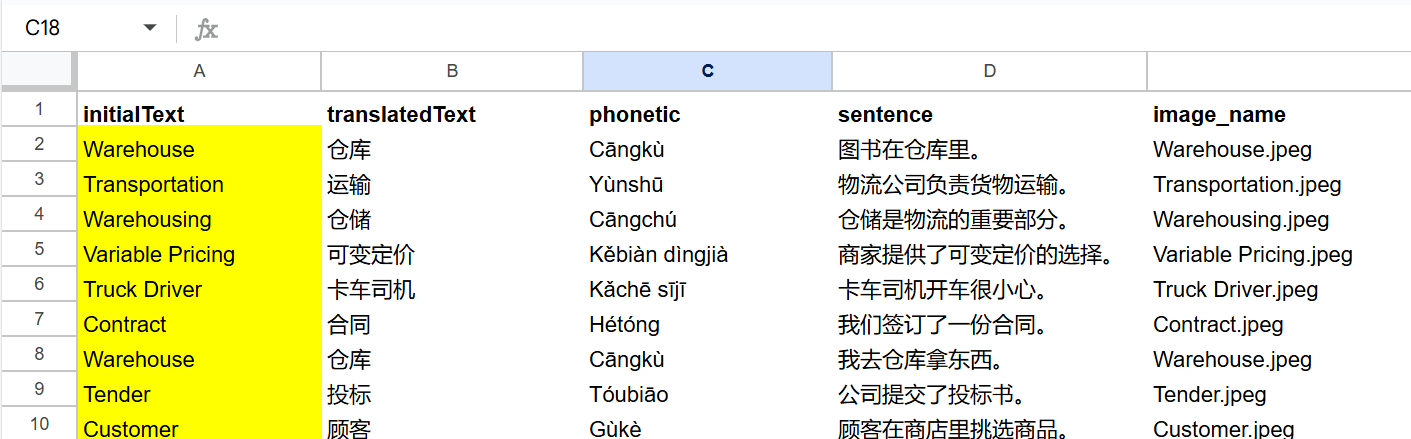 The bot will: 1. Load your vocabulary list from Google Sheets 2. Generate multiple-choice questions with GPT-4 3. Evaluate your answer and give instant feedback 4. Loop to the next word until you're fluent 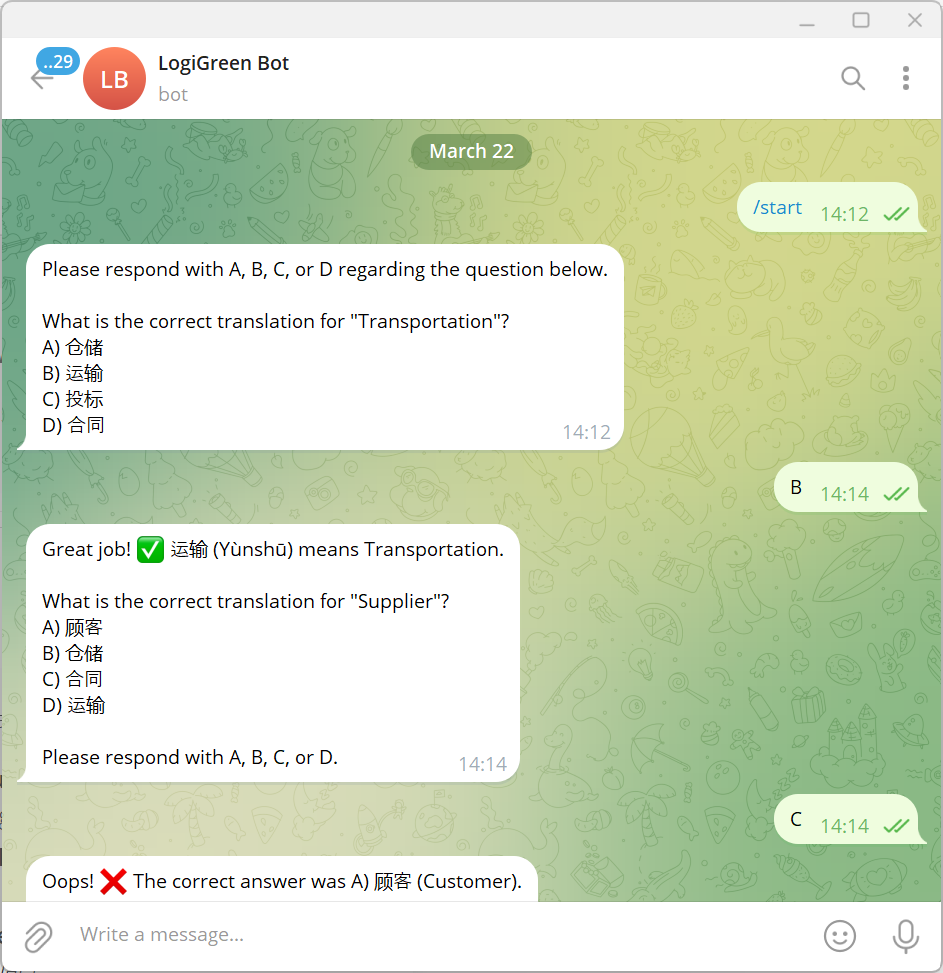 These fields will be automatically added to a Google Sheet, ready to be loaded in Anki to create flash cards. ### What do I need to start? This workflow does not require any advanced programming skills. #### Prerequisite - A **Google Drive Account** with a folder including a Google Sheet filled with the vocabulary list you want to learn. - API Credentials: **Open AI API** for the chat model, **Google Drive API** and **Google Sheets API** activated with OAuth2 credentials - A **Telegram Bot** with its token recorded in the Telegram Node Credentials - **A Google Sheet** with two columns (initialText: words in your own language, translatedText: words in the target language) ### Next Steps Follow the sticky notes to set up the parameters inside each node and get ready to pump your learning skills. 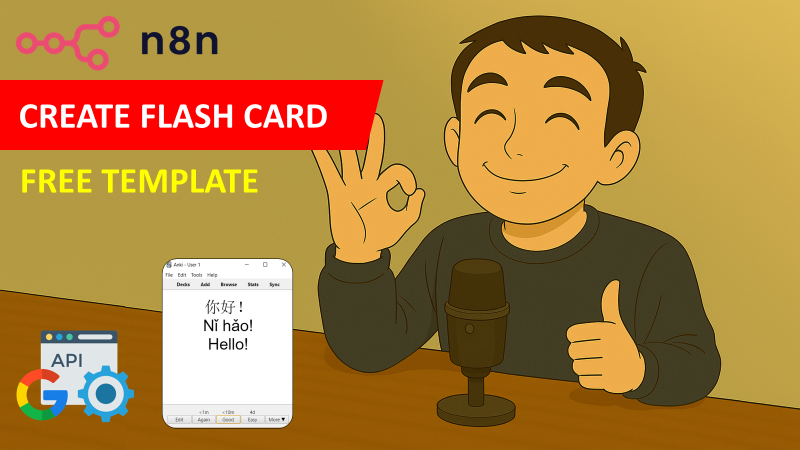 [Watch My Tutorial](https://youtu.be/MQV8wDSug7M) Curious how N8N can supercharge learning or supply chain? Let's connect on [LinkedIn](https://www.linkedin.com/in/samir-saci) --- ### Notes - This workflow can be used **for any language**. In the AI Agent prompt, you just need to replace Chinese with your language. This workflow has been created with N8N 1.82.1 Submitted: March 23, 2025
n8n$9.99Multilingual Voice & Text Telegram Bot with ElevenLabs API and LangChain Agents
This workflow contains community nodes that are only compatible with the self-hosted version of n8n. # Telegram Voice AI Assistant This n8n template creates a **multimodal Telegram bot** that dynamically responds to users: - **Replies with voice** when receiving voice messages (using ElevenLabs API) - **Replies with text** for text-based queries - Supports **custom AI tools** (e.g., crypto APIs, databases, or custom functions) Built with **LangChain Agents**, it can integrate any external API or data source into conversations. ## Key Features **Smart Response Logic** - **Voice Query? → Voice Reply** 1. Transcribes audio via ElevenLabs API 2. Processes with AI (Groq/Gemini) 3. Converts text response to natural speech (ElevenLabs API) - **Text Query? → Text Reply** Bypasses API/API for faster responses **Extensible AI Tools** Add your own tools: - Database lookups - Weather/stock APIs - Custom Python functions - RAG (document retrieval) Supports **multi-step tool chaining** (e.g., Get BTC price → analyze trends → summarize) **Language & Context** - Auto-detects user language (via Telegram's *language_code*) - Maintains **session memory** (remembers conversation history) ## Use Cases - **Voice-first customer support** - **Crypto/analytics assistants** (e.g., What's Ethereum's current gas fee?) - **Multilingual FAQ bots** - **Educational tutors** (voice-interactive learning) ## Requirements - **Telegram Bot Token** - **ElevenLabs API Key** (For S2S) - **Groq API Key** or **Google Gemini API Key** ## Customization Tips - **Change AI personality**: Modify the *systemMessage* in the Voice Assistant node - **Add more models**: Swap Groq/Gemini for OpenAI, Anthropic, etc. - **Extend functionality**: Add RAG (Retrieval-Augmented Generation) for document queries Take this template to create a **Siri-like AI assistant** for Telegram in minutes!
n8n$14.99Automate Web Searches via Telegram Using Brave Search
This workflow allows users to perform web searches directly from Telegram using the Brave search engine. By sending the command /brave followed by a query, users can receive search results as a Telegram message, streamlining the search process without leaving the chat.
n8n$9.99Automate Email Summaries from Gmail to Telegram Using OpenAI
Streamline your email management by automatically generating and sending AI-powered summaries of new Gmail messages directly to your Telegram chat.
n8n$4.99
More integrations
Custom AI Systems & Services
Our team of experienced AI builders will help build custom AI systems, workflows, and solutions.
Request Custom Work