Automate Lead Transfer from Facebook Lead Ads to Web Applications
Effortlessly manage your leads by automatically transferring data from Facebook Lead Ads to your web application. This workflow ensures timely engagement with potential customers by seamlessly transmitting lead information.
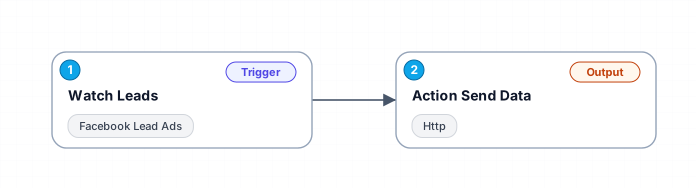
This workflow is designed to enhance your marketing efficiency by automating the process of sending new lead data from Facebook Lead Ads directly to your web application. It involves two main steps: monitoring Facebook Lead Ads for new leads and sending the captured data to a specified URL via an HTTP POST request. This automation helps maintain a robust follow-up strategy by ensuring no lead is missed.
New buyers can create an account from the cart to unlock a controlled $10 first-purchase credit on eligible orders of $25+.
Secure checkout powered by Stripe
Support
How to import this workflow into Make
- 1Purchase or download the workflow to get the Make blueprint JSON file.
- 2In Make, create a new scenario, click the three-dots menu, and choose "Import Blueprint".
- 3Reconnect each module to your own app connections when prompted.
- 4Run the scenario once to verify it, then set your schedule and turn it on.
Related Marketing workflows
- Automate UGC Video Creation and Instagram Posting with Google Gemini and Veo 3$9.99
- Automate Lead Generation and Cold Email Outreach$14.99
- Automate Professional Video Ad Creation from Product Images$19.99
- Track SEO Keyword Rankings with Bright Data MCP and GPT-4o AI Analysis$14.99
- Automate Google Maps Data Scraping and Email Discovery for Local Business Outreach$14.99
- Automate AI-Driven Social Media Content for Auto Services$19.99
More from Maxim Luong
Need this deployed? We'll set it up for you.
Our automation experts deploy this workflow in your stack, connect your accounts, and verify it works — or build a custom solution from scratch.