Automated Datetime Scheduler for Webhook Creation
This workflow automates the scheduling of webhook creation based on specific datetime intervals, enhancing efficiency in workflows.
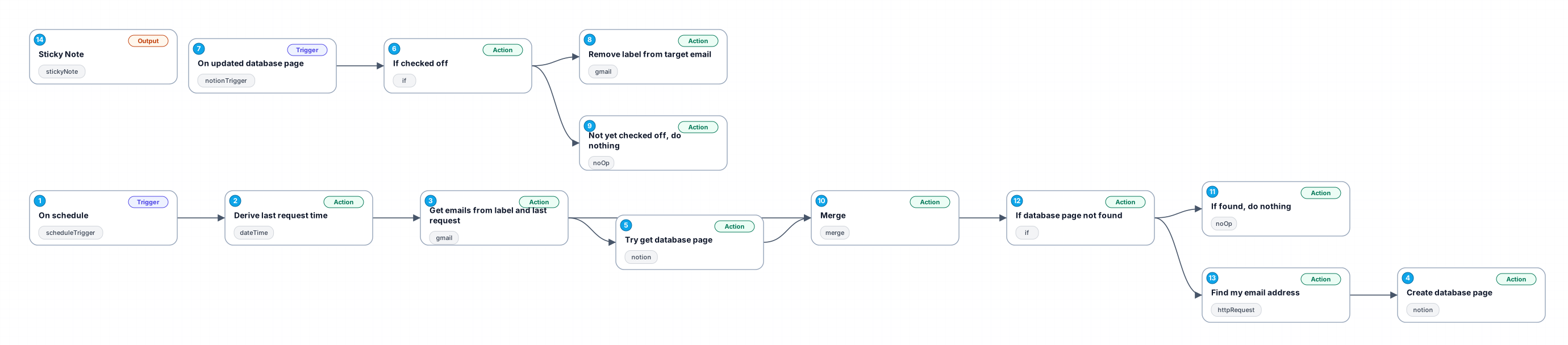
The '0311_Datetime_Schedule_Create_Webhook' workflow is designed to automate the process of creating webhooks triggered by scheduled datetime events. By integrating with various platforms such as Gmail and Notion, this workflow enables users to streamline their operations and manage data more effectively. It operates on a minute-by-minute schedule, ensuring that the necessary actions are taken promptly without manual intervention.
The workflow begins with a schedule trigger that initiates actions based on a defined interval, allowing for real-time responsiveness to events. This is particularly useful for teams needing to track and respond to time-sensitive communications, such as emails marked with specific labels. The process involves deriving the last request time to ensure that updates reflect the most recent interactions.
The integration with Gmail allows the workflow to fetch all emails associated with a particular label, ensuring that no important communication goes unnoticed. Following this, the workflow creates a corresponding page in Notion's database, effectively documenting the email details for easy access and tracking. This feature is particularly beneficial for teams that rely on organized documentation to manage projects and communications efficiently.
Overall, this automated workflow not only reduces manual workload but also enhances accuracy in data handling. Its versatility makes it suitable for various use cases, including project management, customer support, and data logging, thereby increasing productivity across different operational areas.
New buyers can create an account from the cart to unlock a controlled $10 first-purchase credit on eligible orders of $25+.
Related bundle
n8n Starter Kit
8 hand-picked workflows for $39.00.
That is $4.88 each, vs $11.94 for this one alone.
View bundleSecure checkout powered by Stripe
Support
How to import this workflow into n8n
- 1Purchase or download the workflow to get the n8n workflow JSON file.
- 2In your n8n instance, open Workflows and choose "Import from File" (or paste the JSON with Ctrl+V on the canvas).
- 3Open each node marked with a credential warning and connect your own accounts and API keys.
- 4Run the workflow once manually to verify the data flow, then toggle it to Active.
Related Development & IT workflows
- Create daily historical AI videos with Gemini, fal.ai, Telegram and YouTube$14.99
- Advanced multi-agent AI personal assistant with 250+ task capabilities (WhatsApp + GPT)$2.99
- Send Organized Security CVE Digests from NVD with AI-Polished Summaries to Gmail$4.99
- Learn n8n basics in 3 easy steps ✨$14.99
- Automated multi-platform sales agent with RAG, CRM & payment processing$2.99
- Version Control n8n Workflows in GitLab with Custom and Organization$14.99
More from Fred Garcia
Need this deployed? We'll set it up for you.
Our automation experts deploy this workflow in your stack, connect your accounts, and verify it works — or build a custom solution from scratch.